


 本文详细介绍了如何在FreeBSD 6.1系统中安装Webmin 1.441版本,包括下载、解压、配置等步骤,并提供了如何通过浏览器访问Webmin进行远程服务器管理的方法。
在自己的freebsd虚拟机上安装webmin来管理自己的freebsd。
OS:FreeBSD 6.1-RELEASE
soft:webmin1.44
1.使用root登陆系统
下载webmin-1.441.tar.gz
下载后解压
#tar zxfv webmin-1.441.tar.gz
#cd webmin-1.441
#./setup.sh /usr/local/webmin
#./setup.sh /usr/local/webmin
# ./setup.sh /usr/local/webmin
***********************************************************************
* Welcome to the Webmin setup script, version 1.441 *
***********************************************************************
Webmin is a web-based interface that allows Unix-like operating
systems and common Unix services to be easily administered.
***********************************************************************
* Welcome to the Webmin setup script, version 1.441 *
***********************************************************************
Webmin is a web-based interface that allows Unix-like operating
systems and common Unix services to be easily administered.
Installing Webmin from /usr/home/admin/webmin-1.441 to /usr/local/webmin ...
***********************************************************************
Webmin uses separate directories for configuration files and log files.
Unless you want to run multiple versions of Webmin at the same time
you can just accept the defaults.
Webmin uses separate directories for configuration files and log files.
Unless you want to run multiple versions of Webmin at the same time
you can just accept the defaults.
Config file directory [/etc/webmin]: webmin的配置文件目录,我的webmin安装目录/usr/local/webmin
Log file directory [/var/webmin]:webmin的日记文件目录
Log file directory [/var/webmin]:webmin的日记文件目录
***********************************************************************
Webmin is written entirely in Perl. Please enter the full path to the
Perl 5 interpreter on your system.
Webmin is written entirely in Perl. Please enter the full path to the
Perl 5 interpreter on your system.
Full path to perl (default /usr/bin/perl): perl的目录
Testing Perl ...
Perl seems to be installed ok
Perl seems to be installed ok
***********************************************************************
Operating system name: FreeBSD
Operating system version: 6.1
Operating system name: FreeBSD
Operating system version: 6.1
***********************************************************************
Webmin uses its own password protected web server to provide access
to the administration programs. The setup script needs to know :
- What port to run the web server on. There must not be another
web server already using this port.
- The login name required to access the web server.
- The password required to access the web server.
- If the webserver should use SSL (if your system supports it).
- Whether to start webmin at boot time.
Webmin uses its own password protected web server to provide access
to the administration programs. The setup script needs to know :
- What port to run the web server on. There must not be another
web server already using this port.
- The login name required to access the web server.
- The password required to access the web server.
- If the webserver should use SSL (if your system supports it).
- Whether to start webmin at boot time.
Web server port (default 10000): webmin的端口
Login name (default admin): fbh 登陆用户及密码
Login password:
Password again:
The Perl SSLeay library is not installed. SSL not available.
Start Webmin at boot time (y/n): y
***********************************************************************
Copying files to /usr/local/webmin ..
..done
Login name (default admin): fbh 登陆用户及密码
Login password:
Password again:
The Perl SSLeay library is not installed. SSL not available.
Start Webmin at boot time (y/n): y
***********************************************************************
Copying files to /usr/local/webmin ..
..done
Creating web server config files..
..done
..done
Creating access control file..
..done
..done
Inserting path to perl into scripts..
..done
..done
Creating start and stop scripts..
..done
..done
Copying config files..
..done
..done
Configuring Webmin to start at boot time..
..done
..done
Creating uninstall script /etc/webmin/uninstall.sh .. 删除webmin的脚本
..done
..done
Changing ownership and permissions ..
..done
..done
Running postinstall scripts ..
: Permission denied
syslog-ng: not found
: Permission denied
..done
: Permission denied
syslog-ng: not found
: Permission denied
..done
Attempting to start Webmin mini web server..
Starting Webmin server in /usr/local/webmin
..done
Starting Webmin server in /usr/local/webmin
..done
***********************************************************************
Webmin has been installed and started successfully. Use your web
browser to go to
Webmin has been installed and started successfully. Use your web
browser to go to
and login with the name and password you entered previously.
2.使用浏览器登陆
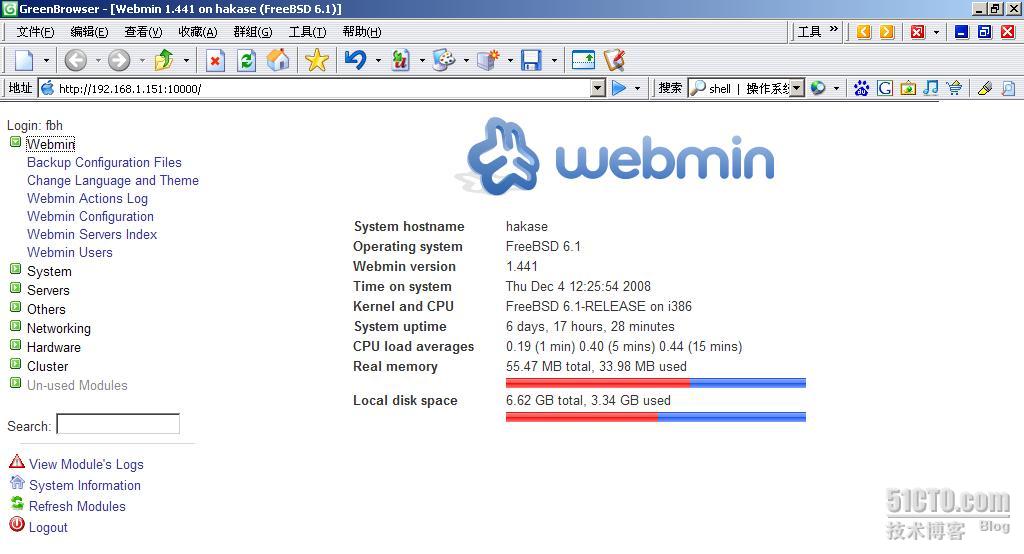
接下来就可以远程管理我们的服务器了。
如果你想删除webmin
#/etc/webmin
#./uninstall.sh
Are you sure you want to uninstall Webmin? (y/n) : y
Are you sure you want to uninstall Webmin? (y/n) : y
Stopping Webmin server in /usr/local/webmin
Running uninstall scripts ..
syslog-ng: not found
Deleting /usr/local/webmin ..
Deleting /etc/webmin ..
Done!
Running uninstall scripts ..
syslog-ng: not found
Deleting /usr/local/webmin ..
Deleting /etc/webmin ..
Done!





 扫一扫
扫一扫


 1448
1448

 被折叠的 条评论
为什么被折叠?
被折叠的 条评论
为什么被折叠?
 到【灌水乐园】发言





