



效果图如下
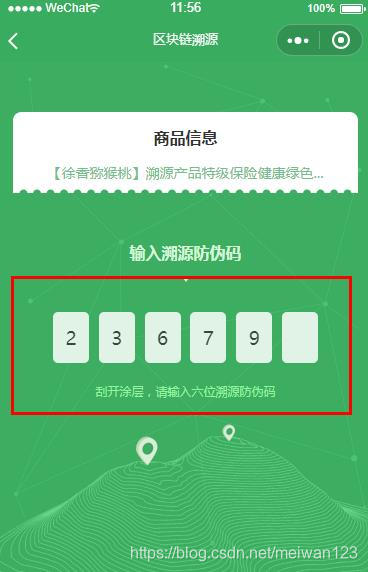
<template>
  <div class="securitycode">
    <div class="securitycodehome"
      style="background:url(http://m.qpic.cn/psb?/V14TeBIu0Cd0j7/55xIGvuSC4WpEJpytA97FVUu9G6Y8E8LJFzhrsRBhcs!/b/dLYAAAAAAAAA&bo=dwFbAgAAAAADBw0!&rf=viewer_4);">
      <div class="commoditinfoAll">

        <div class="commoditinfo"
          style="background:url(http://m.qpic.cn/psb?/V14TeBIu0Cd0j7/nN0WsOzPKaHAQ9.xTUoL3qtj4vSdK.Nf35uxIknlpkY!/b/dL8AAAAAAAAA&bo=WQFRAAAAAAADBys!&rf=viewer_4);background-repeat: no-repeat;background-position: center center;">
          <p class="spinfo">商品信息</p>
          <p class="spname">【徐香猕猴桃】溯源产品特级保险健康绿色...</p>
        </div>
        <p class="entercode">输入溯源防伪码</p>
        <img class="upimg" src="../../../static/images/up.png" alt="">
            <--输入框代码开始 -->
        <div class="code-input-main">
          <div class="code-input-main-item">{{code[0]}}</div>
          <div class="code-input-main-item">{{code[1]}}</div>
          <div class="code-input-main-item">{{code[2]}}</div>
          <div class="code-input-main-item">{{code[3]}}</div>
          <div class="code-input-main-item">{{code[4]}}</div>
          <div class="code-input-main-item">{{code[5]}}</div>
          <input class="code-input-input"  v-model="code" maxlength="6" :selection-start="-1" :selection-end="-1" type="number"  v-on:input="inputFunc" />
        </div>
        <--输入框代码开始end  -->
        <p class="codehint">刮开涂层,请输入六位溯源防伪码</p>
      </div>
    </div>
  </div>
</template>
css 就三个类
.code-input-main {
    display: flex;
    flex-direction: row;
    justify-content: space-around;
    margin-top: 60rpx;
    width: 550rpx;
  }

  .code-input-main-item {
    /* font-family: time-font-myself; */
    font-family:PingFang-SC-Medium;
    /* width: .34rem;
    height: .44rem; */
    opacity: 0.85;
    /* border-bottom: solid #ffffff 1rpx; */
    /* border: solid #ffffff 1rpx; */
    margin: 0 .05rem;
    text-align: center;
    padding-bottom: 0;
    color: #333333;
    line-height:102rpx;
    width:72rpx;
    height:102rpx;
    background:rgba(255,255,255,1);
    border-radius:10rpx;
  }
.code-input-input {
    height: .44rem;
    position: absolute;
    width: 100%;
    outline: none;
    color: transparent;
    text-shadow: 0 0 0 transparent;
    width: 300%;
    margin-left: -100%;
  }
获取 输入框的值 的事件方法 获取输入框的事件 标签上一定要这么写
v-on:input="inputFunc" v-on:input="xxxxx" 才有效果。用v-mode是不行的。
inputFunc() {
        if (this.code.length == 6) {
           //输入框的值
          console.log(this.code),
          // traceSourceCode: this.sourceCode
           //收起键盘
          wx.hideKeyboard()
          // wx.navigateTo({
          //   url: '/pages/webview/main?boxcode=' + this.sourceCode + "&code=" + this.code
          // });
          wx.redirectTo({
            url: '/pages/webview/main?boxcode=' + this.sourceCode + "&code=" + this.code
          });
        }

      }
这个是用mpvue写的哈 不是微信小程序的官方代码





 扫一扫
扫一扫


 814
814

 被折叠的 条评论
为什么被折叠?
被折叠的 条评论
为什么被折叠?
 到【灌水乐园】发言





