





-
环境:
Nagios Server Nagios 6.4
IP:192.168.0.58
Nagios Clint Nagios 6.4
IP:192.168.0.83
另注意:
Nagios需要PHP支持,安装Apache+PHP步骤略....
=========================================================================================
——安装Nagios
[root@Nagios ~]# cd /Linux
[root@Nagios Linux]# tar fzvx nagios-4.0.2.tar.gz
[root@Nagios Linux]# cd nagios-4.0.2
[root@Nagios nagios-4.0.2]# useradd -M -s /sbin/nologin nagios
[root@Nagios nagios-4.0.2]# mkdir /usr/local/nagios
[root@Nagios nagios-4.0.2]# chown -R nagios:nagios /usr/local/nagios/
[root@Nagios nagios-4.0.2]# ./configure --prefix=/usr/local/nagios/
[root@Nagios nagios-4.0.2]# make all
[root@Nagios nagios-4.0.2]# make install
[root@Nagios nagios-4.0.2]# make install-init
[root@Nagios nagios-4.0.2]# make install-commandmode
[root@Nagios nagios-4.0.2]# make install-config
[root@Nagios nagios-4.0.2]# chkconfig --add nagios
[root@Nagios nagios-4.0.2]# chkconfig --level 35 nagios on
[root@Nagios nagios-4.0.2]# chkconfig --list nagios
nagios 0:关闭 1:关闭 2:关闭 3:启用 4:关闭 5:启用 6:关闭
[root@Nagios nagios-4.0.2]# service nagios restart
=========================================================================================
——服务端安装Nagios插件plugins
[root@Nagios Linux]# tar zfvx nagios-plugins-1.5.tar.gz
[root@Nagios Linux]# cd nagios-plugins-1.5
[root@Nagios nagios-plugins-1.5]# ./configure --prefix=/usr/local/nagios/
[root@Nagios nagios-plugins-1.5]# make && make install
----------------------------------------------------------------------------
——服务端安装nrpe
[root@Nagios Linux]# tar zfvx nrpe-2.15.tar.gz
[root@Nagios Linux]# cd nrpe-2.15
[root@Nagios nrpe-2.15]# ./configure
[root@Nagios nrpe-2.15]# make all
[root@Nagios nrpe-2.15]# make install-plugin
=========================================================================================
——使apache支持nagios [这里安装apache的路径为/usr/local/apache-2.4]
[root@Nagios nagios-plugins-1.5]# vi /usr/local/apache-2.4/conf/httpd.conf
ScriptAlias /nagios/cgi-bin "/usr/local/nagios/sbin"
<Directory "/usr/local/nagios/sbin">
AuthType Basic
Options ExecCGI
AllowOverride None
Order allow,deny
Allow from all
AuthName "Nagios Access"
AuthUserFile /usr/local/nagios/etc/htpasswd
Require valid-user
</Directory>
Alias /nagios "/usr/local/nagios/share"
<Directory "/usr/local/nagios/share">
AuthType Basic
Options None
AllowOverride None
Order allow,deny
Allow from all
AuthName "nagios Access"
AuthUserFile /usr/local/nagios/etc/htpasswd
Require valid-user
</Directory>
=========================================================================================
——添加nagios登陆用户
[root@Nagios nagios-plugins-1.5]# /usr/local/apache-2.4/bin/htpasswd -c /usr/local/nagios/etc/htpasswd nagios
New password:
Re-type new password:
Adding password for user nagios
——修改apache的用户和用户组
[root@Nagios nagios-plugins-1.5]# vi /usr/local/apache-2.4/conf/httpd.conf
User nagios
Group nagios
--------------------------------------------------------------------------
——解决Nagios乱码问题
[root@Nagios nagios-plugins-1.5]# vi /usr/local/apache-2.4/conf/httpd.conf
LoadModule cgid_module modules/mod_cgid.so
LoadModule actions_module modules/mod_actions.so
[root@Nagios nagios-plugins-1.5]# service httpd restart
——测试访问
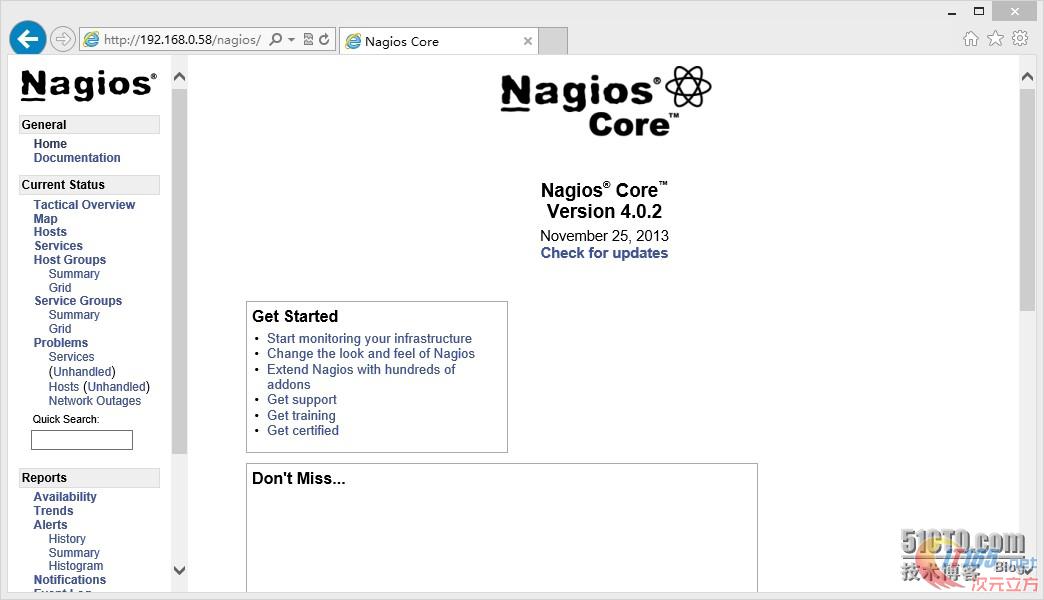
=========================================================================================
——客户端安装nagios-plugins
[root@CentOS ~]# cd /Linux
[root@CentOS Linux]# useradd -M -s /sbin/nologin nagios
[root@CentOS Linux]# tar zfvx nagios-plugins-1.5.tar.gz
[root@CentOS Linux]# cd nagios-plugins-1.5
[root@CentOS nagios-plugins-1.5]# ./configure --prefix=/usr/local/nagios/
[root@CentOS nagios-plugins-1.5]# make && make install
——客户端安装nrpe
[root@CentOS nagios-plugins-1.5]# cd ..
[root@CentOS Linux]# tar zfvx nrpe-2.15.tar.gz
[root@CentOS Linux]# cd nrpe-2.15
[root@CentOS nrpe-2.15]# ./configure
[root@CentOS nrpe-2.15]# make all
[root@CentOS nrpe-2.15]# make install-plugin
[root@CentOS nrpe-2.15]# make install-daemon
[root@CentOS nrpe-2.15]# make install-daemon-config
[root@CentOS nrpe-2.15]# vi /usr/local/nagios/etc/nrpe.cfg
allowed_hosts=127.0.0.1,192.168.0.58
-----------------------------------------------------------------------------------------
——启动nrpe
[root@CentOS nrpe-2.15]# /usr/local/nagios/bin/nrpe -c /usr/local/nagios/etc/nrpe.cfg -d
——检查是否启动
[root@CentOS nrpe-2.15]# netstat -antup |grep 5666
tcp 0 0 0.0.0.0:5666 0.0.0.0:* LISTEN 48456/nrpe
tcp 0 0 :::5666 :::* LISTEN 48456/nrpe
——开机启动
[root@CentOS nrpe-2.15]# vi /etc/rc.local
/usr/local/nagios/bin/nrpe -c /usr/local/nagios/etc/nrpe.cfg -d
——在服务端检查 [如果返回NRPE版本及成功,相反则检查配置]
[root@Nagios ~]# /usr/local/nagios/libexec/check_nrpe -H 192.168.0.83
NRPE v2.15
=========================================================================================
——配置nagios
[root@Nagios nrpe-2.15]# cd /usr/local/nagios/etc/
[root@Nagios etc]# vi nagios.cfg
注释下面的内容
#cfg_file=/usr/local/nagios/etc/objects/commands.cfg
#cfg_file=/usr/local/nagios/etc/objects/contacts.cfg
#cfg_file=/usr/local/nagios/etc/objects/timeperiods.cfg
#cfg_file=/usr/local/nagios/etc/objects/templates.cfg
#cfg_file=/usr/local/nagios/etc/objects/localhost.cfg
#cfg_file=/usr/local/nagios/etc/objects/windows.cfg
#cfg_file=/usr/local/nagios/etc/objects/switch.cfg
#添加监控主机目录
cfg_dir=/usr/local/nagios/etc/objects/hosts
#添加模板目录
cfg_dir=/usr/local/nagios/etc/objects/templates
[root@Nagios etc]# mdkir objects/templates
[root@Nagios etc]# mdkir objects/hosts
——复制所需文件
[root@Nagios etc]# cp objects/commands.cfg objects/templates/
[root@Nagios etc]# cp objects/timeperiods.cfg objects/templates/
——创建自定义模板
[root@Nagios etc]# vi objects/templates/templates.cfg
#联系人模板
define contact{
#联系人名称
name tao
#当服务出现异常时 发送通知的时间段
service_notification_period 24x7
#当主机出现异常时 发送通知的时间段
host_notification_period 24x7
#w 表示警告 u 表示不明 c 表示紧急 r 表示恢复
service_notification_options w,u,c,r
#d 表示宕机 u 表示不可达 r 表示重新恢复
host_notification_options d,u,r
#服务故障时 发送通知的方式[邮件]
service_notification_commands notify-service-by-email
#主机故障时 发送通知的方式[邮件]
host_notification_commands notify-host-by-email
register 0
}
#主机模板
define host{
#定义主机名
name linux-host
#其值为1 Nagios将收集的数据写入某个文件中 以备提取
process_perf_data 1
passive_checks_enabled 0
#主机与服务的刷新检测 0为关闭
check_freshness 0
#事件处理开启
event_handler_enabled 1
#打开抖动感知
flap_detection_enabled 1
active_checks_enabled 1
#发送通知的时间段
notification_period 24x7
#检查主机的时间段
check_period 24x7
#对主机的检查时间间隔/分钟
check_interval 5
#如果宕机重试检查时间/分钟
retry_interval 1
#宕机后对主机的最大检查次数
max_check_attempts 2
#检查主机状态指令[在commands.cfg中定义]
check_command check-host-alive
#在主机出现异常后 故障一直没有解决 再次发送通知的时间/分钟
notification_interval 5
#d 表示宕机 u 表示不可达 r 表示重新恢复
notification_options d,u,r
#1为开启报警信息
notifications_enabled 0
#指定联系人组[在contacts.cfg中定义]
contact_groups admins
#处理性能数据
#一天刷新检测一次,以防止检测结果不是实时的
freshness_threshold 86400
#0为不注册,意思是这个作为模板
register 0
}
#服务模板
define service{
#定义一个服务名称
name linux-service
#启用主动服务检查
active_checks_enabled 1
#启用被动服务检查
passive_checks_enabled 0
#主机与服务的刷新检测
check_freshness 0
#开启报警信息
notifications_enabled 1
#重新发送报警信息的间隔
notification_interval 5
#事件处理开启
event_handler_enabled 1
#启用抖动感知
flap_detection_enabled 1
#处理性能数据
process_perf_data 1
#发送通知的时间段
notification_period 24x7
#检查时间段
check_period 24x7
#如果宕机最大检查次数
max_check_attempts 5
#检查服务时间间隔/分钟
normal_check_interval 1
#如果宕机再次检查的间隔时间/分钟
retry_check_interval 1
#一天刷新检测一次,以防止检测结果不是实时的
freshness_threshold 86400
#0为不注册,意思是这个作为模板
register 0
}
define service {
name test
#1为开启报警信息
notifications_enabled 0
#重新发送报警信息的间隔
notification_interval 5
notification_options w,u,c,
#事件处理开启
event_handler_enabled 1
#打开抖动感知
flap_detection_enabled 1
#发送通知的时间段
notification_period 24x7
#检查时间段
check_period 24x7
#每一次检测的间隔时间
check_interval 1
#如果宕机再次检查的间隔时间
retry_interval 1
#检测次数,如果2次都是宕机的话 就报警
max_check_attempts 2
active_checks_enabled 1
passive_checks_enabled 0
#处理性能数据
process_perf_data 1
#主机与服务的刷新检测 0为关闭
check_freshness 0
#一天刷新检测一次,以防止检测结果不是实时的
freshness_threshold 86400
#0为不注册,意思是这个作为模板
register 0
}
[root@Nagios etc]# vi objects/templates/contacts.cfg
#联系人
define contact{
#用户名称
contact_name nagios
#引用模板
use tao
#别名
alias Nagios Admin
#发送邮箱
email xxxxxxxx@qq.com
}
#联系人组
define contactgroup{
#组名称
contactgroup_name admins
#组别名
alias Nagios Administrators
#组用户成员
members nagios
}
——添加监控主机
最好使用被监控机IP为名称、比如:被监控服务器为192.168.0.83 [后期服务器多的时候、容易维护]
这里为了省事、一台服务器监控多种服务。大家测试的时候、可以添加多个服务器监控不同服务。
[root@Nagios etc]# vi objects/hosts/192.168.0.83.cfg
#监控主机
define host {
host_name 192.168.0.83
address 192.168.0.83
use linux-host
}
#监控SSH
define service {
service_description check_ssh
check_command check_ssh!-p 22
host_name 192.168.0.83
use linux-service
register 1
}
#监控登陆用户
define service {
service_description check_users
check_command check_nrpe!check_users
host_name 192.168.0.83
use linux-service
register 1
}
#监控mysql [需要在被监控配置、下面有配置说明]
define service {
service_description check_mysql
check_command check_mysql
host_name 192.168.0.83
use linux-service
register 1
}
#监控交换空间
define service {
service_description check_swap
check_command check_nrpe!check_swap
host_name 192.168.0.83
use linux-service
register 1
}
#监控磁盘
define service {
service_description check_disk
check_command check_nrpe!check_disk
host_name 192.168.0.83
use linux-service
register 1
}
#监控HTTP
define service {
service_description check_http
check_command check_http!-p 80
host_name 192.168.0.83
use linux-service
register 1
}
#监控负载
define service {
service_description check_load
check_command check_nrpe!check_load
host_name 192.168.0.83
use linux-service
register
}
=========================================================================================
——重启启动nagios、登陆WEB查看
网上很多人说配置后,执行命令检查是否有错误。个人感觉完全没必要、因为启动的时候Nagios默认会自动检查配置、如果有错误Nagios会提示。
[root@Nagios etc]# service nagios restart
——在客户端 登陆nagios
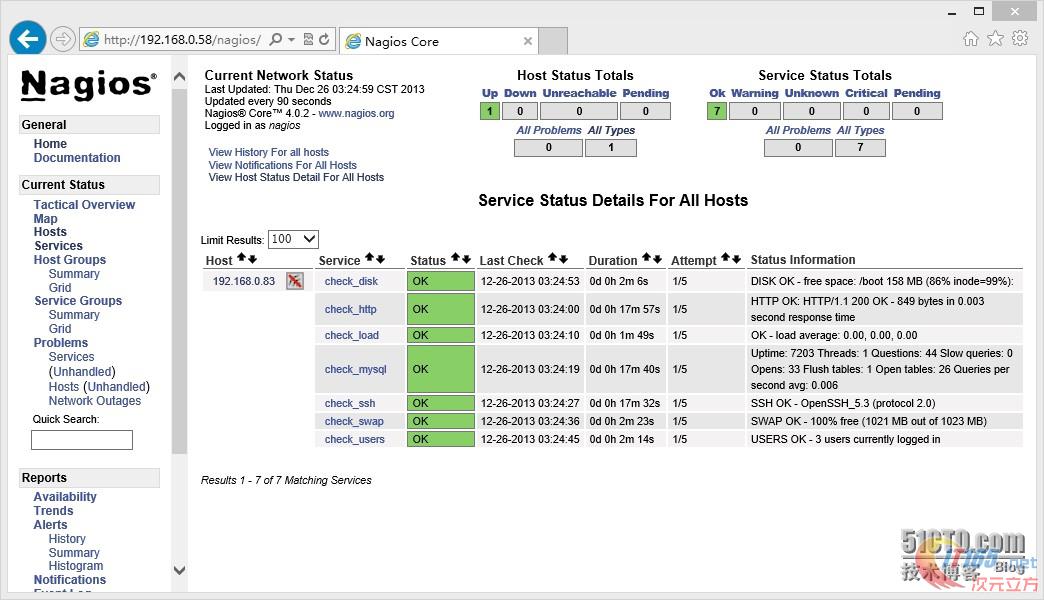
=========================================================================================
注意:监控MySQL需要在被监控端配置如下
——客户端连接mysql添加nagios用户
mysql> create database nagios;
Query OK, 1 row affected (0.00 sec)
mysql> grant select on nagios.* to nagios@'192.168.1.18' identified by 'nagios';
Query OK, 0 rows affected (0.11 sec)
mysql> flush privileges;
Query OK, 0 rows affected (0.00 sec)
mysql> quit
-----------------------------------------------------------------------------------------
——Nagios服务器端添加mysql监控
[root@Nagios nrpe-2.15]# vi /usr/local/nagios/etc/objects/templates/commands.cfg
# 'check_mysql' command definition
define command{
command_name check_mysql
command_line $USER1$/check_nrpe -H $HOSTADDRESS$ -u nagios -d nagios -p nagios
}
=========================================================================================
——安装msmtp
[root@Nagios Linux]# cd msmtp-1.4.31
[root@Nagios msmtp-1.4.31]# ./configure --prefix=/usr/local/msmtp
[root@Nagios msmtp-1.4.31]# make && make install
[root@Nagios msmtp-1.4.31]# cd /usr/local/msmtp/
[root@Nagios msmtp]# mkdir etc
[root@Nagios msmtp]# cd etc/
——配置msmtp
[root@Nagios etc]# vi msmtprc
account default
logfile /usr/local/msmtp/msmtp.log
host smtp.163.com #发件服务器
from xxxxxx@163.com #从那发邮件,和下面的邮箱是同一个
auth login
user xxxxxx@163.com #发件邮箱
password xxxxxx #邮箱密码
----------------------------------------------------------------------------
-
测试msmtp
/usr/local/msmtp/bin/msmtp sdata@foxmail.com
输入任意字符,然后按Ctrl+D退出,查看邮件是否收到。
可以到 /usr/local/msmtp/msmtp.log,查看日志,发信成功失败都会有记录。
——安装mutt
[root@Nagios etc]# yum install mutt -y
[root@Nagios etc]# vi /etc/Muttrc
set sendmail="/usr/local/msmtp/bin/msmtp"
set use_from=yes
set realname="YingTao" #真是姓名
set from=hypocriticals@163.com //发件邮箱
set envelope_from=yes
set editor="vim"
set record="/usr/local/msmtp/etc/sent" #邮件记录
=========================================================================================
- 测试一下mutt是否有效
echo “测试测试” | mutt -s “测试” 测试邮件地址
echo “test context” |mutt -s “test taile” sdata@foxmail.com
-
==========================================================================================
——Nagios默认使用sendmail发送邮件、只需要把 /bin/mail 改为 /usr/bin/mutt即可。
[root@Nagios etc]# vi objects/templates/commands.cfg
# 'notify-host-by-email' command definition
define command{
command_name notify-host-by-email
command_line /usr/bin/printf "%b" "***** Nagios *****\n\nNotification Type: $NOTIFICATIONTYPE$\nHost: $HOSTNAME$\nState: $HOSTSTATE$\nAddress: $HOSTADDRESS$\nInfo: $HOSTOUTPUT$\n\nDate/Time: $LONGDATETIME$\n" | /usr/bin/mutt -s "** $NOTIFICATIONTYPE$ Host Alert: $HOSTNAME$ is $HOSTSTATE$ **" $CONTACTEMAIL$
}
# 'notify-service-by-email' command definition
define command{
command_name notify-service-by-email
command_line /usr/bin/printf "%b" "***** Nagios *****\n\nNotification Type: $NOTIFICATIONTYPE$\n\nService: $SERVICEDESC$\nHost: $HOSTALIAS$\nAddress: $HOSTADDRESS$\nState: $SERVICESTATE$\n\nDate/Time: $LONGDATETIME$\n\nAdditional Info:\n\n$SERVICEOUTPUT$\n" | /usr/bin/mutt -s "** $NOTIFICATIONTYPE$ Service Alert: $HOSTALIAS$/$SERVICEDESC$ is $SERVICESTATE$ **" $CONTACTEMAIL$
}
=========================================================================================
——测试能否通过邮箱报警
1)在被监控端关闭mysql
[root@CentOS ~]# /etc/init.d/mysqld stop
Shutting down MySQL. SUCCESS!
[root@CentOS ~]# netstat -antup |grep 3306
2)登陆WEB Nagios查看MySQL状态
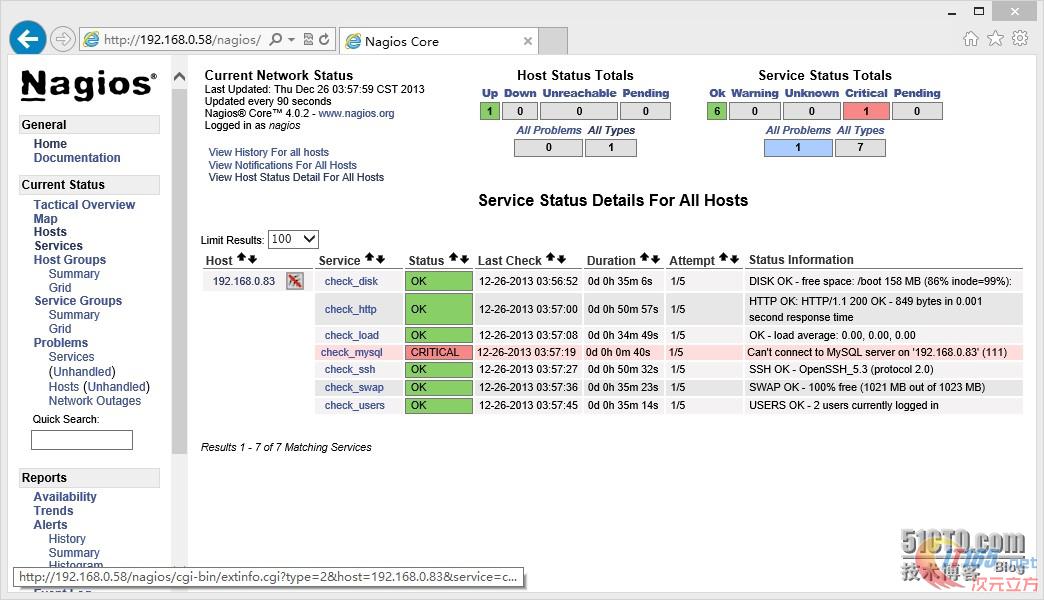
3)在服务端查看日志 [默认日志路径为/usr/local/nagios/var/]
[root@Nagios ~]# cd /usr/local/nagios/var/
[root@Nagios var]# tail -f nagios.log
检查五次、如果五次服务还是无法检测到服务是正常的,则发邮件通知。
[1388002399] SERVICE ALERT: 192.168.0.83;check_mysql;CRITICAL;SOFT;1;Can't connect to MySQL server on '192.168.0.83' (111)
[1388002459] SERVICE ALERT: 192.168.0.83;check_mysql;CRITICAL;SOFT;2;Can't connect to MySQL server on '192.168.0.83' (111)
[1388002519] SERVICE ALERT: 192.168.0.83;check_mysql;CRITICAL;SOFT;3;Can't connect to MySQL server on '192.168.0.83' (111)
[1388002579] SERVICE ALERT: 192.168.0.83;check_mysql;CRITICAL;SOFT;4;Can't connect to MySQL server on '192.168.0.83' (111)
[1388002639] SERVICE ALERT: 192.168.0.83;check_mysql;CRITICAL;HARD;5;Can't connect to MySQL server on '192.168.0.83' (111)
[1388002639] SERVICE NOTIFICATION: nagios;192.168.0.83;check_mysql;CRITICAL;notify-service-by-email;Can't connect to MySQL server on '192.168.0.83' (111)
4)登陆邮箱查看是否收到邮件 [由于是虚拟机时间没有调整、和现实时间有差别]
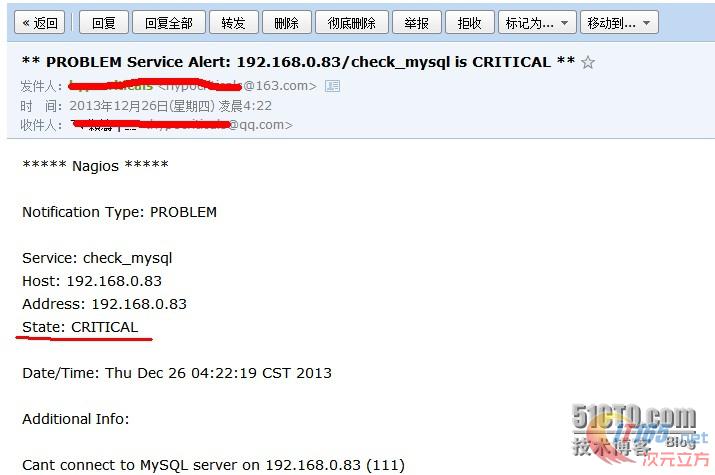
5)重新启动MySQL
[root@CentOS ~]# /etc/init.d/mysqld start
Starting MySQL.. SUCCESS!
[root@CentOS ~]# netstat -antup |grep 3306
tcp 0 0 0.0.0.0:3306 0.0.0.0:* LISTEN 51040/mysqld
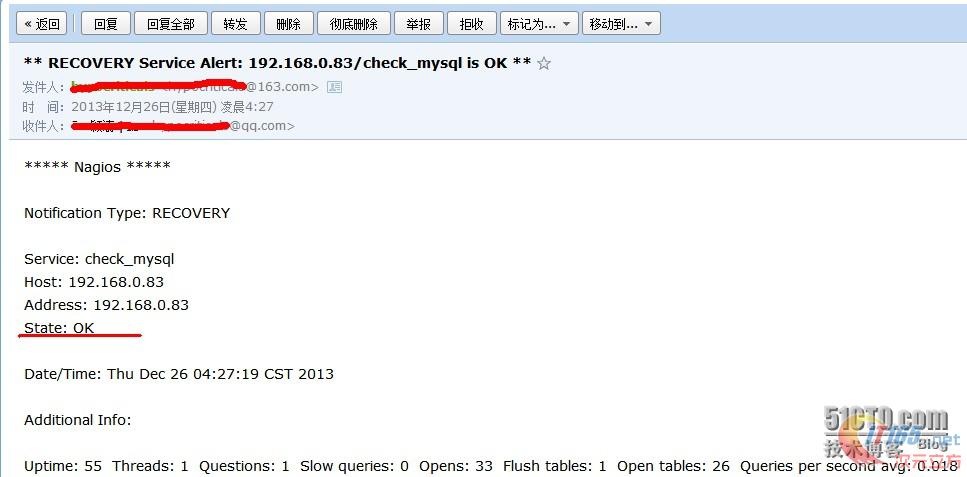
6)检测服务恢复正常后,是否收到邮件通知
CentOS 6.4+Nagios+Msmtp+Mutt邮箱报警
最新推荐文章于 2018-08-21 14:17:04 发布





 扫一扫
扫一扫


 352
352

 被折叠的 条评论
为什么被折叠?
被折叠的 条评论
为什么被折叠?
 到【灌水乐园】发言





