



 本文介绍了如何利用Element UI组件库在Vue.js应用中实现图片上传功能,并将上传的图片转换为Base64编码。通过在data中定义fileList数组来存储上传文件信息,结合JavaScript的FileReader API,可以读取并打印出图片的Base64结果。

<el-upload
  list-type="picture"
  action=''
  accept=".jpg, .png"
  :limit="1"
  :auto-upload="false"
  :file-list="fileList"
  :on-change="getFile"
  :on-preview="handlePictureCardPreview"
  :on-remove="handleUploadRemove"
>
  <el-button size="small" type="primary" @click="uploadimg">选择图片上传</el-button>
  <div slot="tip" class="el-upload__tip">只能上传一张jpg/png文件</div>
</el-upload>
<!--    list-type: 文件列表的类型-->
<!--    action: 必选参数,上传的地址-->
<!--    accept:接受上传的文件类型,这里是jpg和png-->
<!--    limit:最大允许上传的个数-->
<!--    auto-upload:是否在选取文件后立即进行上传,这里记得填 false-->
<!--    file-list:上传的文件列表-->
<!--    on-change:文件状态改变时的钩子,添加文件、上传成功和上传失败时都会被调用-->
<!--    on-preview:点击文件列表中已上传的文件时的钩子。-->
<!--    on-remove:文件列表移除文件时的钩子-->
data中定义:fileList:[],
//通过getFile方法获取文件信息
getFile(file, fileList) {
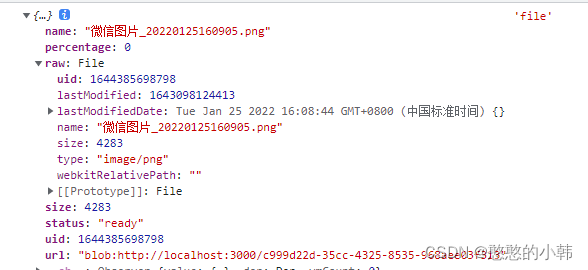
    console.log(file,'file')
    this.getBase64(file.raw).then(res => {
        const params = res
        this.proofImage = params
    })
},
// 图片转base64编码:

getBase64(file) {
        return new Promise(function (resolve, reject) {
            const reader = new FileReader()
            let imgResult = ''
            reader.readAsDataURL(file)
            reader.onload = function () {
                console.log(reader.result,'reader.result')
                imgResult = reader.result
            }
            reader.onerror = function (error) {
                reject(error)
            }
            reader.onloadend = function () {
                resolve(imgResult)
            }
        })
    },
console.log(reader.result,'reader.result') 下图是打印出来的结果

// 预览和删除
handleUploadRemove(file, fileList) {
console.log(this.proofImage,'这个是base64的编码值')
    this.proofImage = ''

},
handlePictureCardPreview(file) {
    console.log(this.proofImage)
},





 扫一扫
扫一扫


 3964
3964

 被折叠的 条评论
为什么被折叠?
被折叠的 条评论
为什么被折叠?
 到【灌水乐园】发言





