



 本文详细介绍使用PyEcharts库进行数据可视化的多种图表绘制方法,包括饼图、玫瑰图、折线图和柱状图的创建过程及展示效果。
所需包
pip install pyecharts
pip install echarts-countries-pypkg
pip install echarts-china-provinces-pypkg
pip install echarts-china-cities-pypkg
饼图
from pyecharts import options as opts
from pyecharts.charts import Pie

def pie_base():
    #火车的商品售卖比例
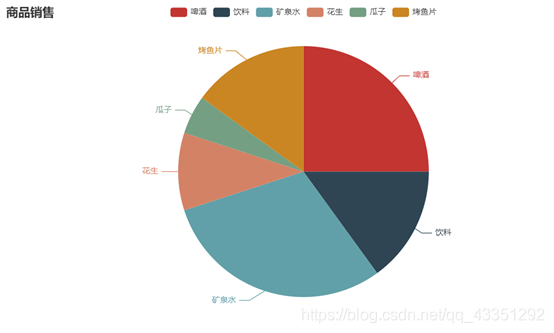
    v1 = ['啤酒','饮料','矿泉水','花生','瓜子','烤鱼片']
    v2 = [25,15,30,10,5,15]

    c = (
        Pie()
        .add('',[list(z) for z in zip(v1,v2)])
        .set_global_opts(title_opts=opts.TitleOpts(title='商品销售'))
        .set_series_opts(lable_opts=opts.LabelOpts(formatter='{b}:{c}%'))

    )
    return c

pie_base().render("饼图.html")
效果:
玫瑰图
import pyecharts.options as opts

from pyecharts.charts import Pie

#年度和季度数据对比

def pie_roseType():
    #链式写法
    c = (
        Pie()
        .add(
            '',
            #假数据 自定义数据
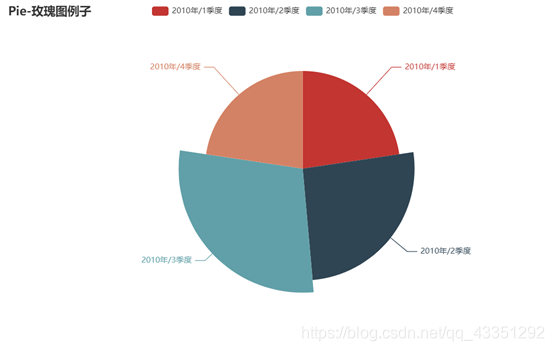
            [ list(z) for z in zip(['201{}年/{}季度'.format(y, z) for y in range(2)
                                for z in range(1,5)],[4.80,5.50,6.10,4.80])],
            radius = ['0%', '75%'],
            rosetype = 'radius',
            label_opts= opts.LabelOpts(is_show=True),
        )
        .set_global_opts(title_opts=opts.TitleOpts(title='Pie-玫瑰图例子'))

    )
    return c


pie_roseType().render('玫瑰图.html')
结果:
折线图
from pyecharts import options as opts
from pyecharts.charts import Line

line = Line()
#通过实列的line对象进行

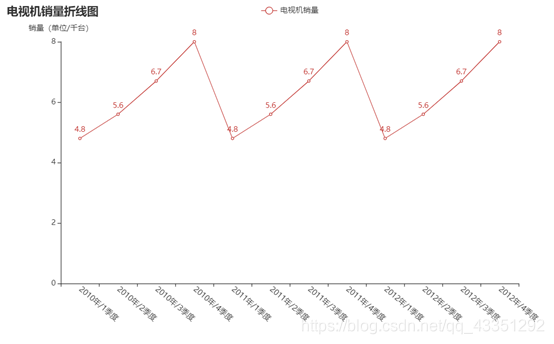
line.add_xaxis(['201{}年/{}季度'.format(y,z) for  y in range(3) for z in range(1,5)]),
line.add_yaxis('电视机销量',[4.8,5.6,6.7,8.0,4.8,5.6,6.7,8.0,4.8,5.6,6.7,8.0])

line.set_global_opts(
    #前端CSS属性
    xaxis_opts=opts.AxisOpts(axislabel_opts=opts.LabelOpts(rotate=-40)),
    yaxis_opts=opts.AxisOpts(name='销量(单位/千台)'),
    title_opts=opts.TitleOpts(title='电视机销量折线图')
)
line.render('折线图.html')
结果:
柱状图
下面展示一些 内联代码片。
'''
柱状图
'''

#1.0版本的引入写法
from pyecharts.charts import Bar

bar = Bar()
#设置图表的x轴的数据显示
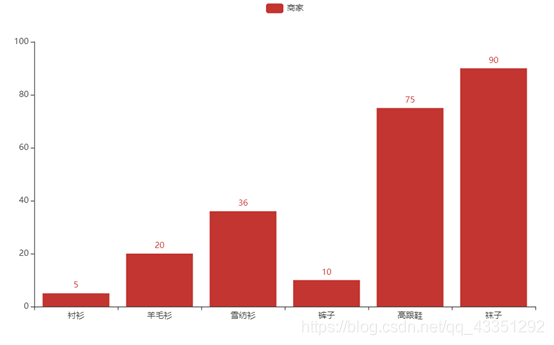
bar.add_xaxis(['衬衫','羊毛衫','雪纺衫','裤子','高跟鞋','袜子'])
#y轴的数据显示 数据名字
bar.add_yaxis("商家",[5,20,36,10,75,90])
bar.render('服装.html')
结果:





 扫一扫
扫一扫


 4697
4697

 被折叠的 条评论
为什么被折叠?
被折叠的 条评论
为什么被折叠?
 到【灌水乐园】发言





