






JDBC
将连接数据库,JDBC 整合成Bean,Spring底层统一使用SpringData
Data :https://springdoc.cn/spring-boot/data.html#data.sql
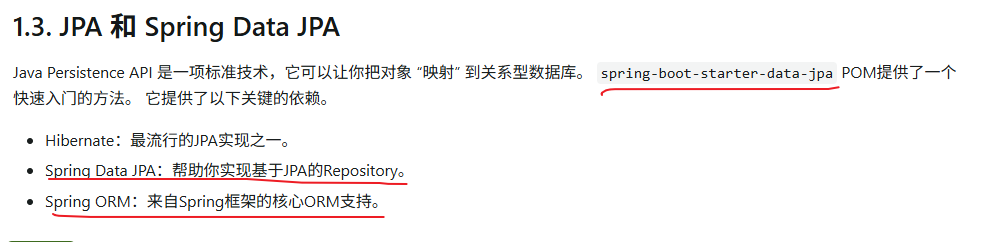
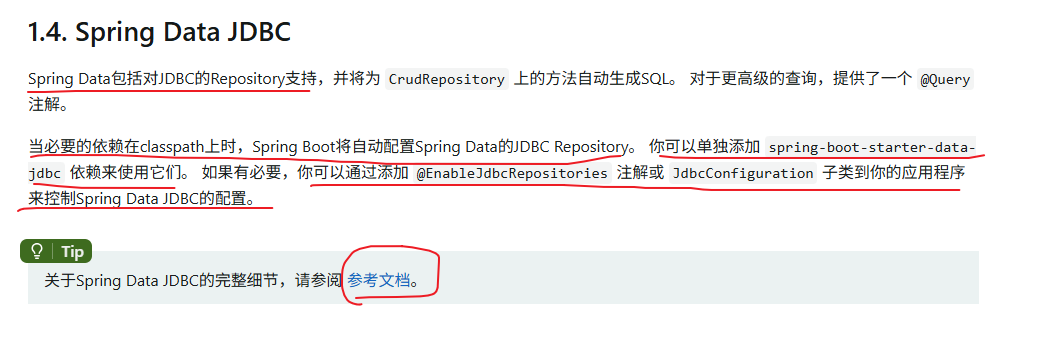
项目驱动学习
- 新建项目
- 选择需要的依赖组件
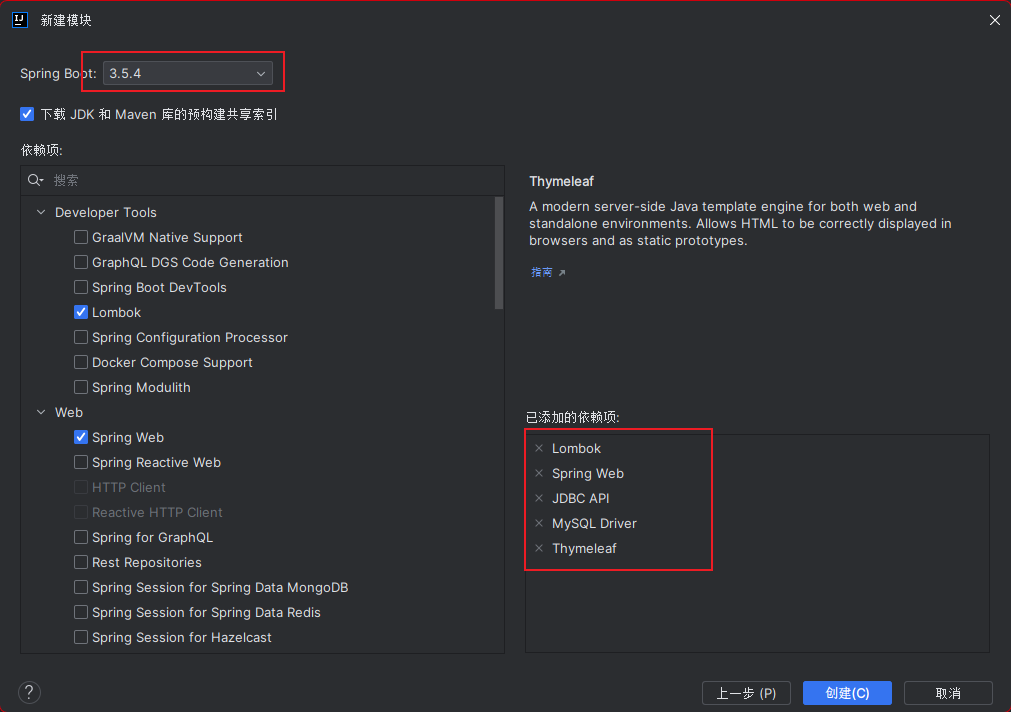
- web
- lombok
- thymeleaf
- SQLDriver
- 项目导入完成,依赖如下
<properties>
  <java.version>17</java.version>
</properties>
<dependencies>
  <dependency>
    <groupId>org.springframework.boot</groupId>
    <artifactId>spring-boot-starter-jdbc</artifactId>
  </dependency>
  <dependency>
    <groupId>org.springframework.boot</groupId>
    <artifactId>spring-boot-starter-thymeleaf</artifactId>
  </dependency>
  <dependency>
    <groupId>org.springframework.boot</groupId>
    <artifactId>spring-boot-starter-web</artifactId>
  </dependency>

  <dependency>
    <groupId>com.mysql</groupId>
    <artifactId>mysql-connector-j</artifactId>
    <scope>runtime</scope>
  </dependency>
  <dependency>
    <groupId>org.projectlombok</groupId>
    <artifactId>lombok</artifactId>
    <optional>true</optional>
  </dependency>
  <dependency>
    <groupId>org.springframework.boot</groupId>
    <artifactId>spring-boot-starter-test</artifactId>
    <scope>test</scope>
  </dependency>
</dependencies>
- 配置数据库连接文件
spring:
  datasource:
    username: root
    password: root
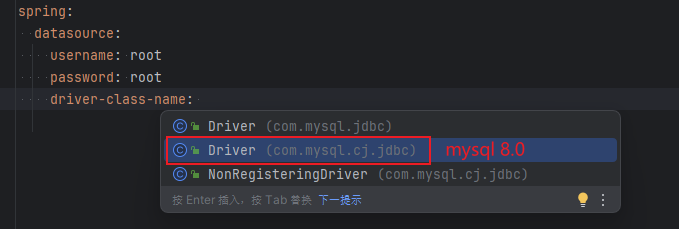
    driver-class-name: com.mysql.cj.jdbc.Driver
    url: jdbc:mysql://localhost:3306/training_mysql?useSSL=true&useUnicode=true&characterEncoding=utf8&serverTimezone=Asia/Shanghai
Driver 的驱动选自己的版本对应
测试配置是否通过
@SpringBootTest
class Springboot04DataApplicationTests {


    @Autowired
    DataSource dataSource;

    @Test
    void contextLoads() {
        System.out.println(dataSource.getClass());

    }

}

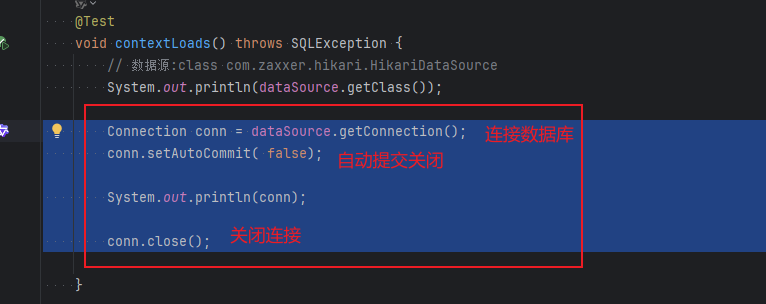

这样可以使用JDBC去进行连接,使用的数据源是HikariDataSource,可看做dbcp…

    @Test
    void contextLoads() throws SQLException {
        // 数据源:class com.zaxxer.hikari.HikariDataSource
        System.out.println(dataSource.getClass());

        Connection conn = dataSource.getConnection();
        conn.setAutoCommit( false);

        System.out.println(conn);

        conn.close();

    }

Springboot配置好的模版bean,如xxxx Template;拿来即用
例如 JDBCTemplate
使用JdbcTemplate进行CRUD
Spring 本身也对原生的JDBC 做了轻量级的封装JdbcTemplate
- 使用
HikariDataSource作为数据源,进行JDBC连接,使用原生的JDBC去操作数据库; - 没有第三方数据库操作框架,Spring对原生的JDBC也有轻量级的封装,也就是
JdbcTemplate; - 所有的操作放到都在
JdbcTemplate中,我们只需要注入这个bean就可以直接使用;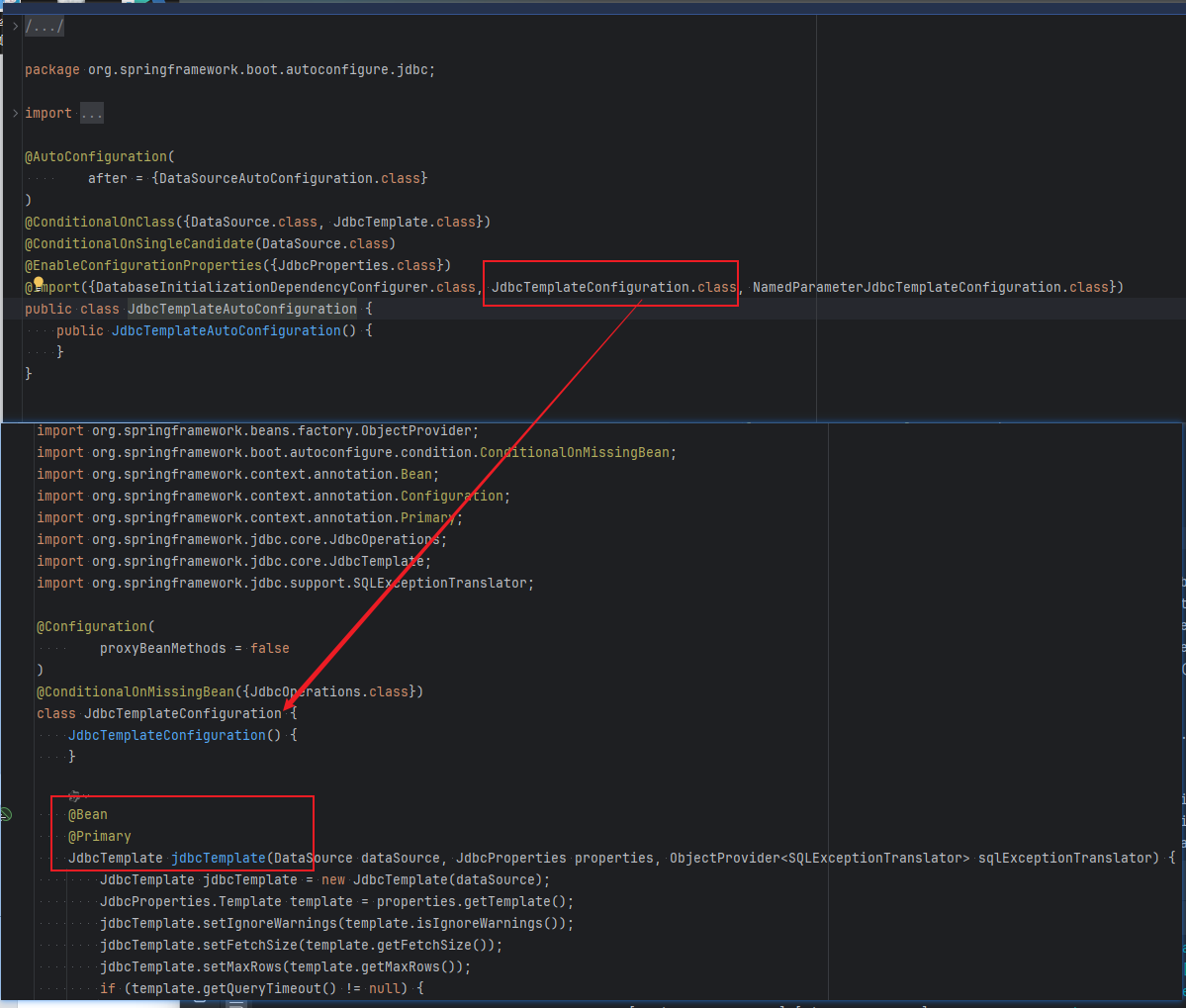
JdbcTemplate依赖的是org.springframework.boot.autoconfigure.jdbc下的JdbcTemplateConfiguration类
JdbcTemplate提供几种主要的方法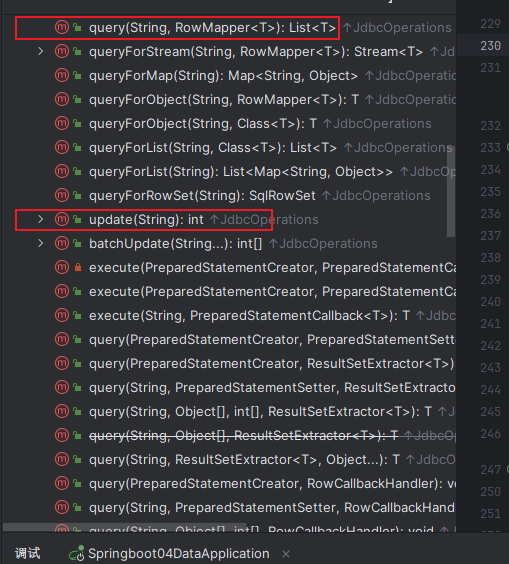
- execute:可以执行任何SQL语句;
- update:用于执行新增,修改,删除等操作;
- query:执行查询语句;
- batchUpdate:用于执行配处理的相关更新操作;
- call:执行存储过程,函数相关的语句;
编写Controller,返回数据没有对象,使用万能Map
@RestController
public class JDBCController {

    @Autowired
    JdbcTemplate  jdbcTemplate;

    // 查询数据库的所有信息并显示 使用Map
    @RequestMapping("/userList")
    public List<Map<String, Object>> index() {

        String sql = "select * from user";
        List<Map<String, Object>> mapList = jdbcTemplate.queryForList(sql);

        return mapList;
    }

    //插入数据
    @RequestMapping("/insert")
    public String insert() {
        String sql = "insert into user(id,name, pwd) values(?,?,?)";
        jdbcTemplate.update(sql, 4,"小王", 18);
        return "插入成功";
    }

    //更新数据
    @RequestMapping("/update")
    public String update() {
        String sql = "update user set name = ? where id = ?";
        jdbcTemplate.update(sql, "小王8", 4);
        return "更新成功";
    }

    //删除数据 Restful风格
    @RequestMapping("/delete/{id}")
    public String delete( @PathVariable int id) {
        String sql = "delete from user where id = ?";
        jdbcTemplate.update(sql, id);
        return "删除成功";
    }
}
Druid
Druid 是阿里巴巴开源平台上一个数据库连接池实现,结合了 C3P0、DBCP 等 DB 池的优点,同时加入了日志监控。
Druid使用详细说明教程 | 无疑 官方网站 | nacos、dubbo 、arthas报错处理 | 阿里开源 | 无疑
指定数据源内容spring.datasource.type
- 导入场景依赖启动器
<dependency>
    <groupId>com.alibaba</groupId>
    <artifactId>druid-spring-boot-starter</artifactId>
    <version>1.1.17</version> <!-- 请检查Maven仓库获取最新版本 -->
</dependency>
1. 从后面报错出现问题检查资料后返回回来,在这做了个笔记
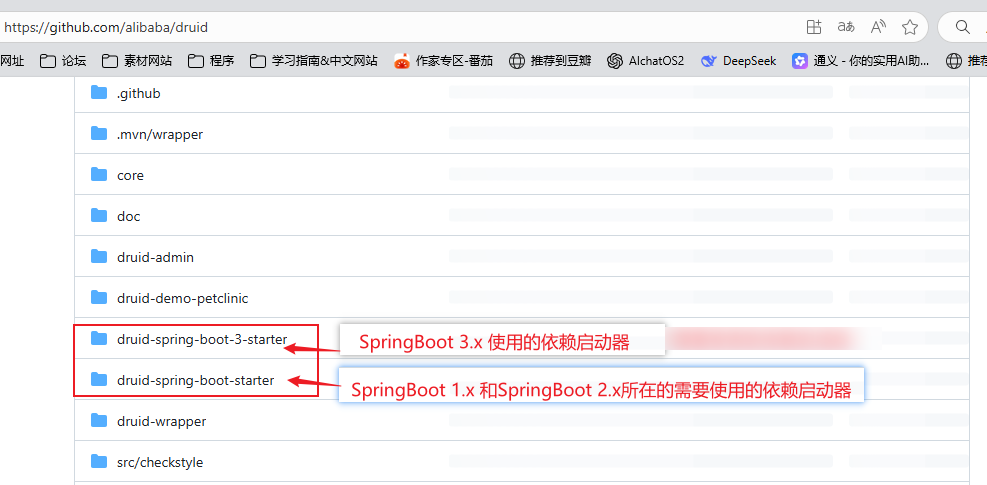
使用SpringBoot 3.5.4 的时候使用 带3的这个场景依赖启动器;
<dependency>
  <groupId>com.alibaba</groupId>
  <artifactId>druid-spring-boot-3-starter</artifactId>
  <version>1.2.20</version> <!-- 请检查Maven仓库获取最新版本 -->
</dependency>
- 配置application
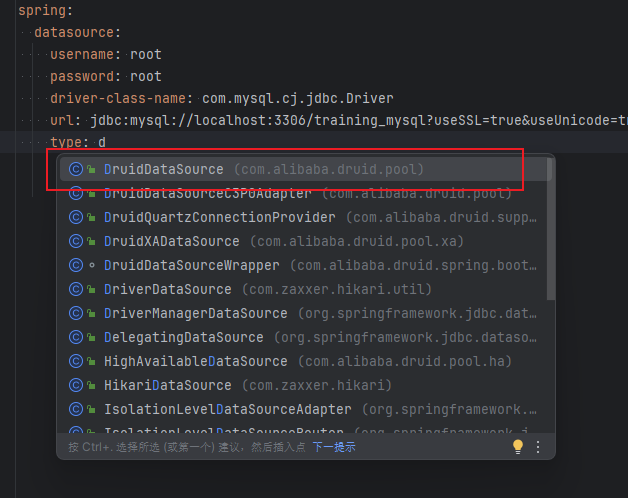
spring:
  datasource:
    username: root
    password: root
    driver-class-name: com.mysql.cj.jdbc.Driver
    url: jdbc:mysql://localhost:3306/training_mysql?useSSL=true&useUnicode=true&characterEncoding=utf8&serverTimezone=Asia/Shanghai
    type: com.alibaba.druid.pool.DruidDataSource
- 测试

- 德鲁伊的拦截器
    #Spring Boot 默认是不注入这些属性值的,需要自己绑定
    #druid 数据源专有配置
    druid:
      initialSize: 5
      minIdle: 5
      maxActive: 20
      maxWait: 60000
      timeBetweenEvictionRunsMillis: 60000
      minEvictableIdleTimeMillis: 300000
      validationQuery: SELECT 1 FROM DUAL
      testWhileIdle: true
      testOnBorrow: false
      testOnReturn: false
      poolPreparedStatements: true

    #配置监控统计拦截的filters,stat:监控统计、log4j:日志记录、wall:防御sql注入
    #如果允许时报错  java.lang.ClassNotFoundException: org.apache.log4j.Priority
    #则导入 log4j 依赖即可,Maven 地址:https://mvnrepository.com/artifact/log4j/log4j
      filters: stat,wall,log4j
      maxPoolPreparedStatementPerConnectionSize: 20
      useGlobalDataSourceStat: true
      connectionProperties: druid.stat.mergeSql=true;druid.stat.slowSqlMillis=500
- 使用log4j需要导入log4j的包
<!-- https://mvnrepository.com/artifact/log4j/log4j -->
<dependency>
  <groupId>log4j</groupId>
  <artifactId>log4j</artifactId>
  <version>1.2.17</version>
</dependency>
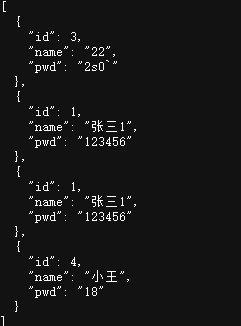
- 启动测试,数据正常抽出
- 写一个Druid配置类
    @ConfigurationProperties(prefix = "spring.datasource")
    @Bean
    public DataSource druidDataSource() {
        return new DruidDataSource();
    }
- 测试Druid是否能正常执行,发现失败
- 调整配置类
spring:
  datasource:
    driver-class-name: com.mysql.cj.jdbc.Driver
    url: jdbc:mysql://localhost:3306/training_mysql?useSSL=true&useUnicode=true&characterEncoding=utf8&serverTimezone=Asia/Shanghai
    username: root
    password: root
    type: com.alibaba.druid.pool.DruidDataSource

    #Spring Boot 默认是不注入这些属性值的,需要自己绑定
    #druid 数据源专有配置
    initialSize: 5
    minIdle: 5
    maxActive: 20
    maxWait: 60000
    timeBetweenEvictionRunsMillis: 60000
    minEvictableIdleTimeMillis: 300000
    validationQuery: SELECT 1 FROM DUAL
    testWhileIdle: true
    testOnBorrow: false
    testOnReturn: false
    poolPreparedStatements: true

    #配置监控统计拦截的filters,stat:监控统计、log4j:日志记录、wall:防御sql注入
    #如果允许时报错  java.lang.ClassNotFoundException: org.apache.log4j.Priority
    #则导入 log4j 依赖即可,Maven 地址:https://mvnrepository.com/artifact/log4j/log4j
    filters: stat,wall,log4j
    maxPoolPreparedStatementPerConnectionSize: 20
    useGlobalDataSourceStat: true
    connectionProperties: druid.stat.mergeSql=true;druid.stat.slowSqlMillis=500
- 测试,这样就能找到;
@SpringBootTest
class Springboot04DataApplicationTests {

    @Autowired
    DataSource dataSource;

    @Test
    void contextLoads() throws SQLException {
        // 数据源:class com.zaxxer.hikari.HikariDataSource
        System.out.println(dataSource.getClass());

        Connection conn = dataSource.getConnection();
        conn.setAutoCommit( false);

        System.out.println(conn);

        // 测试数据源
        DruidDataSource druidDataSource = (DruidDataSource) dataSource;

        System.out.println("druidDataSource 数据源最大连接数:" + druidDataSource.getMaxActive());
        System.out.println("druidDataSource 数据源初始化连接数:" + druidDataSource.getInitialSize());

        conn.close();
    }
}

- 通义,仅供参考。。。
- 配置结构变化
您将maxActive等Druid专有配置属性从druid: 节点下移出,直接放在了spring.datasource节点下,这样配置能够生效的原因如下: - Druid配置绑定机制
当您使用@ConfigurationProperties(prefix = "spring.datasource")绑定属性时,Spring会将所有以spring.datasource为前缀的属性都尝试绑定到DruidDataSource对象上。
- 配置结构变化
配置数据源监控
Druid 数据源具有监控的功能,并提供了一个 web 界面方便用户查看,类似安装 路由器 时,人家也提供了一个默认的 web 页面。
SpringBoot 2.x
参考:
- 设置 Druid 的后台管理页面
//配置 Druid 监控管理后台的Servlet;
//内置 Servlet 容器时没有web.xml文件,所以使用 Spring Boot 的注册 Servlet 方式
@Bean
public ServletRegistrationBean statViewServlet() {
    ServletRegistrationBean bean = new ServletRegistrationBean(new StatViewServlet(), "/druid/*");

    // 这些参数可以在 com.alibaba.druid.support.http.StatViewServlet
    // 的父类 com.alibaba.druid.support.http.ResourceServlet 中找到
    Map<String, String> initParams = new HashMap<>();
    initParams.put("loginUsername", "admin"); //后台管理界面的登录账号
    initParams.put("loginPassword", "123456"); //后台管理界面的登录密码

    //后台允许谁可以访问
    //initParams.put("allow", "localhost"):表示只有本机可以访问
    //initParams.put("allow", ""):为空或者为null时,表示允许所有访问
    initParams.put("allow", "");
    //deny:Druid 后台拒绝谁访问
    //initParams.put("kuangshen", "192.168.1.20");表示禁止此ip访问

    //设置初始化参数
    bean.setInitParameters(initParams);
    return bean;
}
- 配置yaml
spring:
  datasource:
    url: jdbc:mysql://localhost:3306/
    username: root
    password: root
    driver-class-name: com.mysql.cj.jdbc.Driver
    druid:
      aop-patterns: com.robin.boot # 监控SpringBean
      filters: stat,wall # 开启sql监控和防火墙功能

      stat-view-servlet: #配置监控页功能
        enabled: true
        login-username: admin
        login-password: robin
        reset-enable: false # 禁用刷新重置按钮

      web-stat-filter: # 监控web
        enabled: true
        url-pattern: /*
        exclusions: '*.js,*.gif,*.jpg,*.png,*.css,*.ico,/druid/*'
- 如果使用
SpringBoot 2.x的话上面这种写法是是没有问题的,但是我是使用的SpringBoot 3.5.4,因为Druid使用的是jaxax.servlet,Spring Boot 3.x使用了的最低兼容版本是JDK17将以前的javax.servlet迁移到jakarta.servlet。所以两者不能够兼容所导致的问题。
SpringBoot 3.x
- 多方查证后,使用yaml直接使用配置文件进行
    ### Druid监控配置
      stat-view-servlet:
        enabled: true
        url-pattern: /druid/*
        login-username: admin
        login-password: admin
        allow: 127.0.0.1

      web-stat-filter:
        enabled: true
        url-pattern: /*
        exclusions: .js, .gif, .jpg, .png, .css, .ico
        session-stat-enable: true
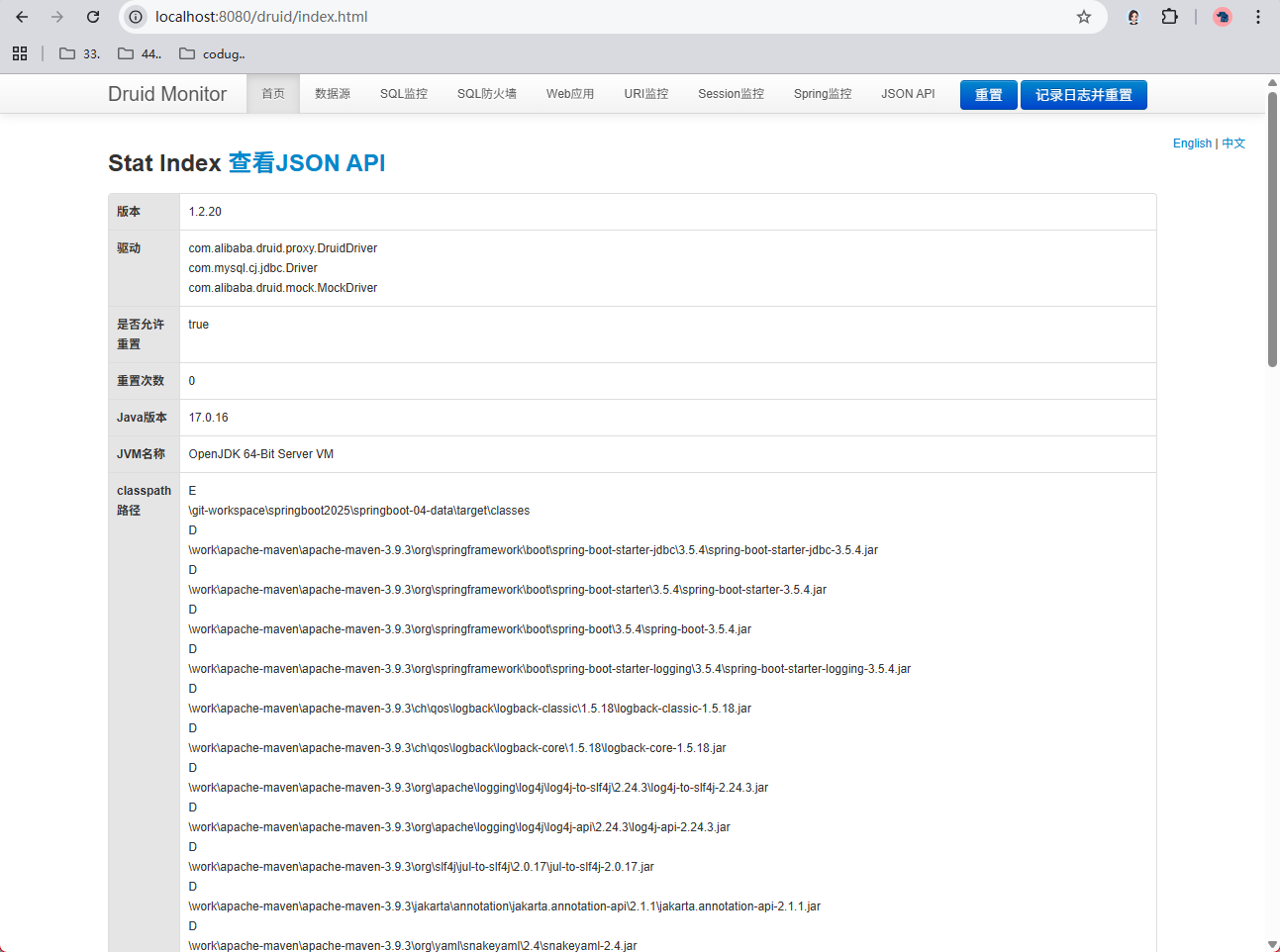
- 启动成功
- 自定义配置数据源
- 看源码:
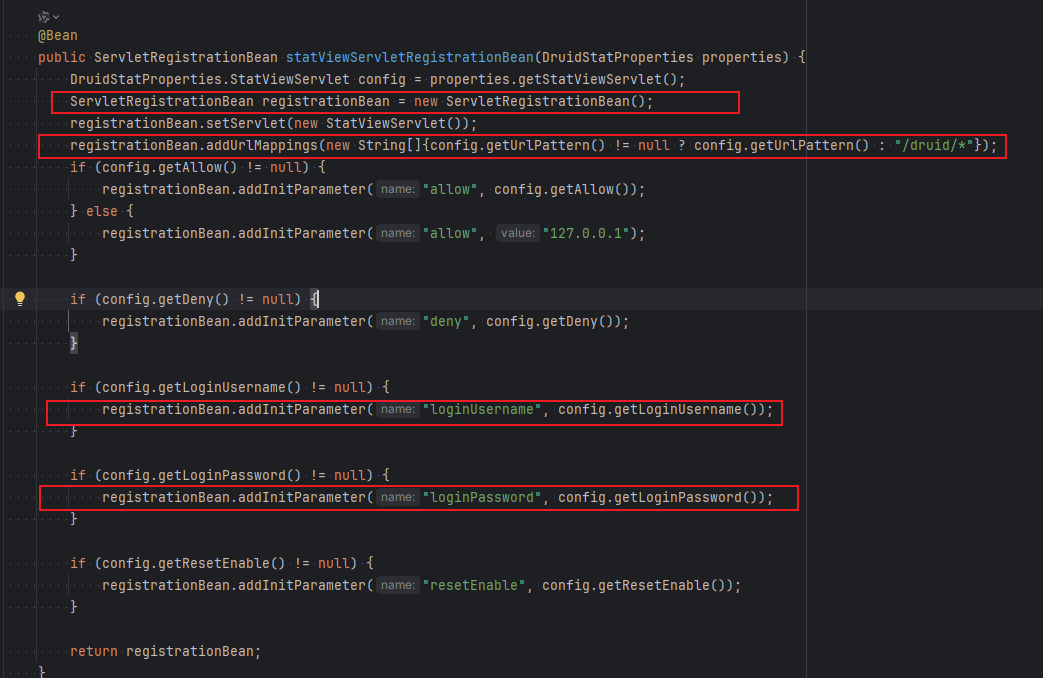
- 仿照写
- 看源码:
    @Bean
    public ServletRegistrationBean statViewServlet() {

        ServletRegistrationBean registrationBean =  new ServletRegistrationBean();
        registrationBean.setServlet(new StatViewServlet());
        registrationBean.addUrlMappings("/druid/*");
        registrationBean.addInitParameter("loginUsername", "admin");
        registrationBean.addInitParameter("loginPassword", "123456");

        return registrationBean;
    }
1. 测试,特地将密码和yaml配置文件的区分开来,测试是否因缓存问题所导致; 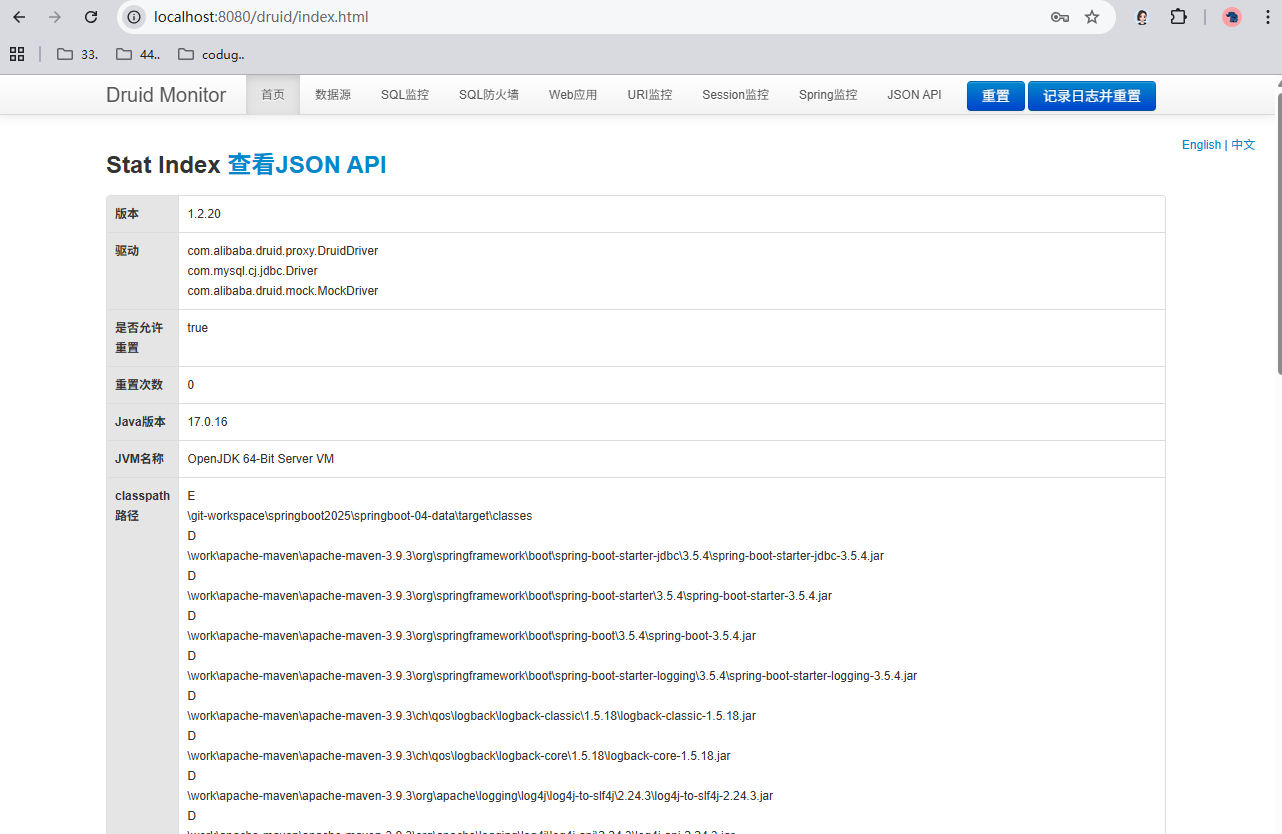
配置 Druid web 监控 filter 过滤器
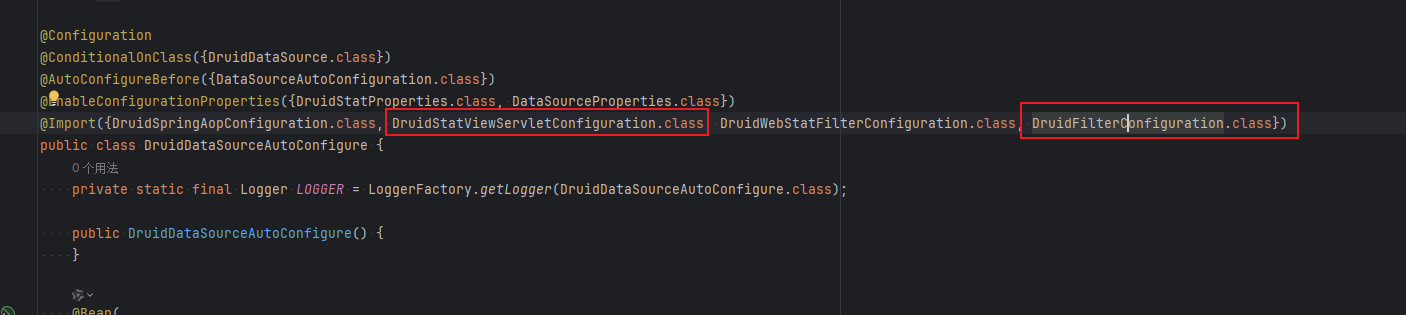
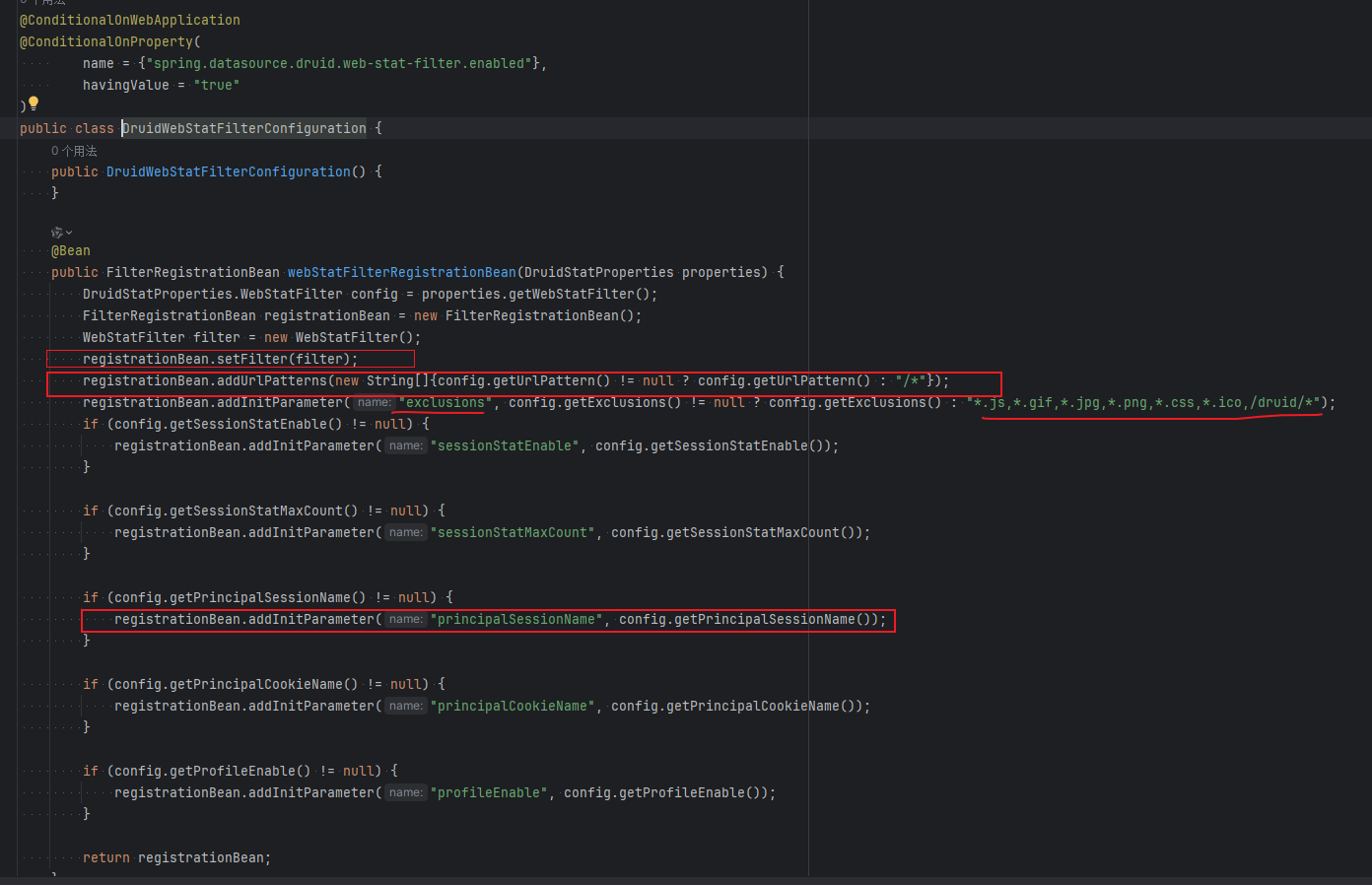
- 同样只适配于 SpringBoot 2.x,一定要确定好启动器
//配置 Druid 监控 之  web 监控的 filter
//WebStatFilter:用于配置Web和Druid数据源之间的管理关联监控统计
@Bean
public FilterRegistrationBean webStatFilter() {
    FilterRegistrationBean bean = new FilterRegistrationBean();
    bean.setFilter(new WebStatFilter());

    //exclusions:设置哪些请求进行过滤排除掉,从而不进行统计
    Map<String, String> initParams = new HashMap<>();
    initParams.put("exclusions", "*.js,*.css,/druid/*,/jdbc/*");
    bean.setInitParameters(initParams);

    //"/*" 表示过滤所有请求
    bean.setUrlPatterns(Arrays.asList("/*"));
    return bean;
}
- yaml配置如下:
      # Web应用监控过滤器配置,用于过滤和统计Web请求信息
      web-stat-filter:
        enabled: true    # 是否启用Web监控过滤器
        url-pattern: /*  # 过滤器拦截的URL路径模式
        exclusions: .js, .gif, .jpg, .png, .css, .ico # 不进行监控统计的资源文件后缀,多个后缀用逗号分隔
        session-stat-enable: true  # 是否启用Session统计功能
Mybatis
官网:简介 – mybatis-spring-boot-autoconfigure
回顾
整合SSM的时候,使用的mybatis-spring
SpringBoot 要使用 mybatis-spring-boot-starter
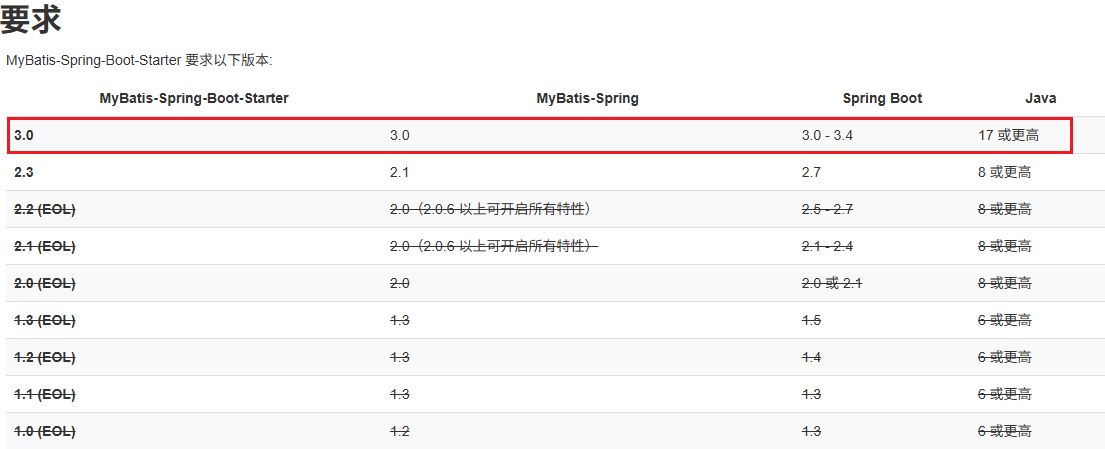
引入依赖:
<dependency>
    <groupId>org.mybatis.spring.boot</groupId>
    <artifactId>mybatis-spring-boot-starter</artifactId>
    <version>3.0.4</version>
</dependency>
项目驱动学习
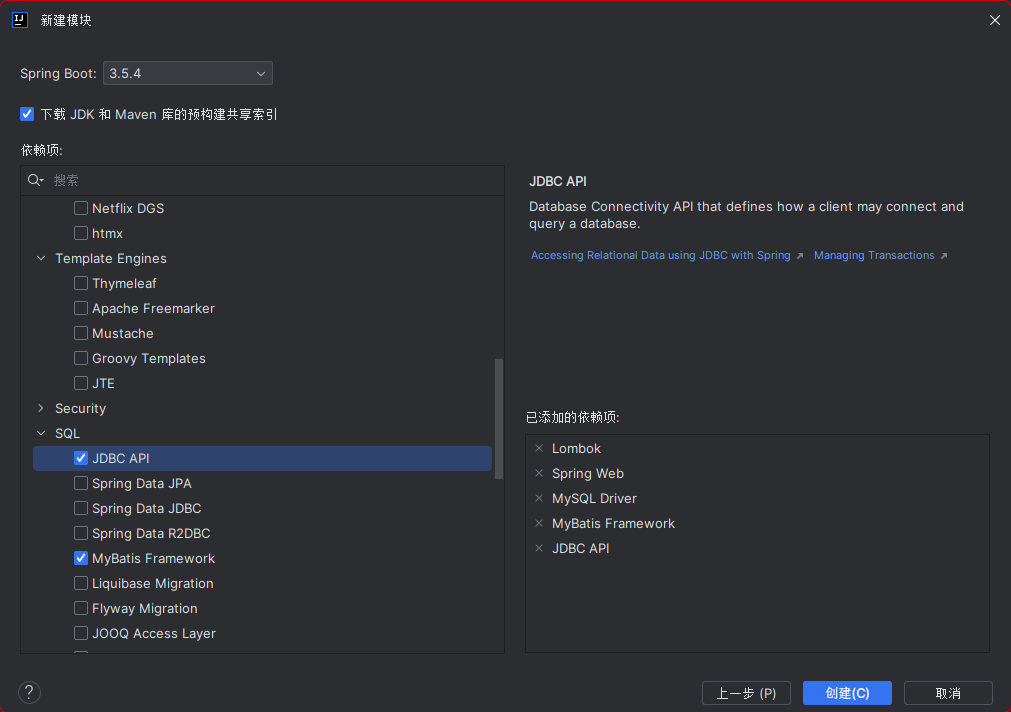
- 新建项目
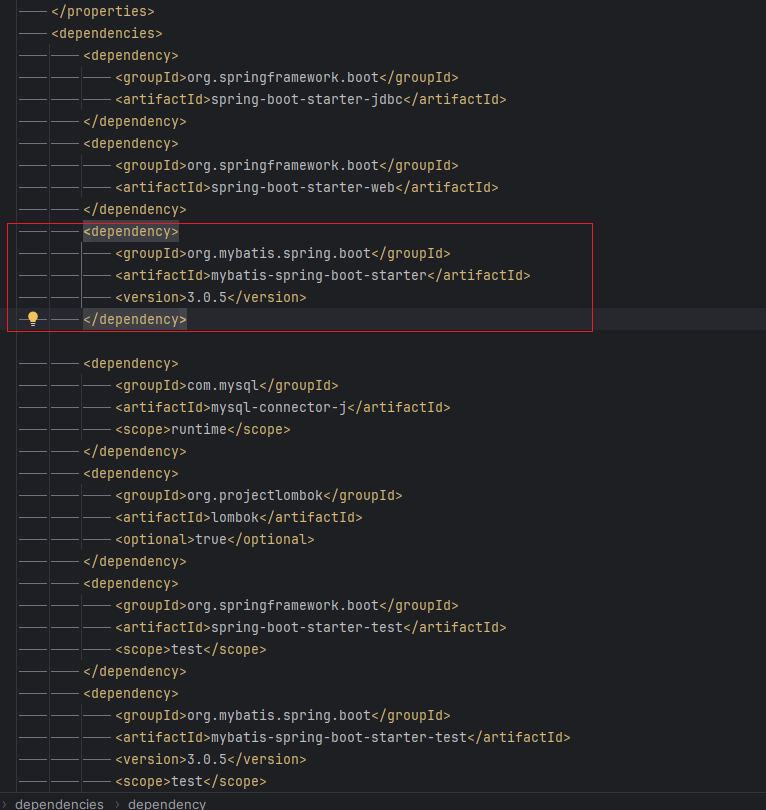
- 项目创建完成,检查pom.xml文件,确定导入依赖
- 配置数据库连接
spring:
  datasource:
    url: jdbc:mysql://localhost:3306/
    username: root
    password: root
    driver-class-name: com.mysql.cj.jdbc.Driver
- 测试数据连接
	@Test
	void contextLoads() throws SQLException {

		// 测试数据库连接
		System.out.println(dataSource.getClass());
		System.out.println(dataSource.getConnection());

	}

Mybatis生成
- 实体类
package com.demo.pojo;

import lombok.AllArgsConstructor;
import lombok.Data;
import lombok.NoArgsConstructor;

@Data
@NoArgsConstructor
@AllArgsConstructor
public class User {

    private Integer id;
    private String name;
    private String pwd;

}
- 持久层接口
package com.demo.mapper;


import com.demo.pojo.User;
import org.apache.ibatis.annotations.Mapper;
import org.springframework.stereotype.Repository;

import java.util.List;

//@Mapper : 表示本类是一个 MyBatis 的 Mapper
@Mapper
@Repository
public interface UserMapper {

    // 获取所有user信息
    List<User> getUserList();

    // 通过id获得user
    User getUserById(Integer id);

    // 添加user
    int addUser(User user);

    // 修改user
    int updateUser(User user);

    // 删除user
    int deleteUser(Integer id);

}
- 根据接口写mybatis的SQL
<?xml version="1.0" encoding="UTF-8" ?>
<!DOCTYPE mapper
        PUBLIC "-//mybatis.org//DTD Mapper 3.0//EN"
        "http://mybatis.org/dtd/mybatis-3-mapper.dtd">
<mapper namespace="com.demo.mapper.UserMapper">

    <insert id="addUser">
        insert into user values(#{id},#{name},#{pwd})
    </insert>

    <update id="updateUser">
        update user set name=#{name},pwd=#{pwd} where id=#{id}
    </update>

    <delete id="deleteUser">
        delete from user where id=#{id}
    </delete>

    <select id="getDUserList" resultType="com.demo.pojo.User">
        select * from user
    </select>


    <select id="getUserById" resultType="com.demo.pojo.User">
        select * from user where id=#{id}
    </select>

</mapper>
- 在配置文件中配置mybatis
# mybatis配置文件
mybatis:
  type-aliases-package: com.demo.pojo
  mapper-locations: classpath:mybatis/mapper/*.xml
  configuration:
    log-impl: org.apache.ibatis.logging.stdout.StdOutImpl
- 控制器
@RestController
public class UserController {

    @Autowired
    UserMapper userMapper;

    @RequestMapping(value = "/getUserList")
    public List<User> getUser() {
        List<User> userList = userMapper.getUserList();

        userList.forEach(
                user -> System.out.println(user)
        );

        return userList;
    }

    @RequestMapping(value = "/getUserList")
    public List<User> getUser() {
        List<User> userList = userMapper.getUserList();

        userList.forEach(
                System.out::println
        );

        return userList;
    }
}
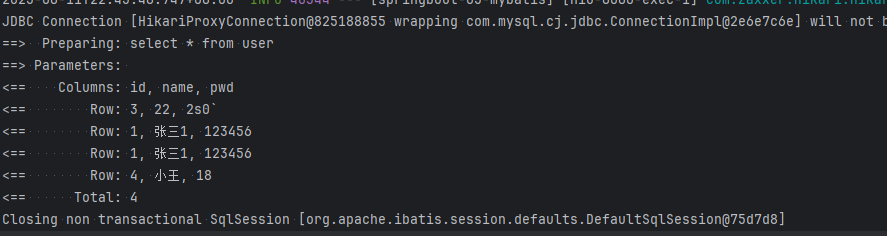
- 测试





 扫一扫
扫一扫


 3368
3368

 被折叠的 条评论
为什么被折叠?
被折叠的 条评论
为什么被折叠?
 到【灌水乐园】发言





