





先看一下ui效果图,当前是vue3,注意一点抖音的和微信有点不同。
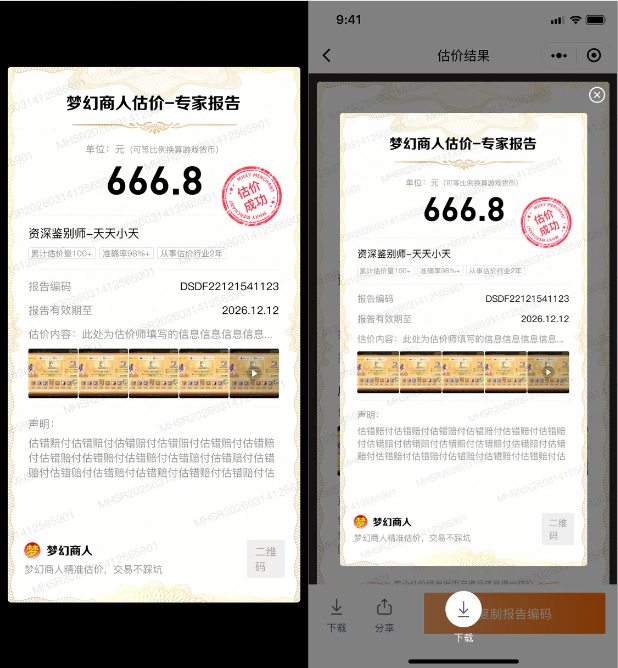
分析一下当前海报中的元素。1.首先有一个水印 2.背景图 3.文字居中 4.文字标签带边框 5.图片列表 6.二维码生成 7.弹窗保存8.下载网络图片资源
1.水印生成
// 绘制水印
export function drawWatermark(ctx, width, height, text = 'SAMPLE', color = '#000', alpha = 0.05) {
	ctx.save();
	// 设置透明度
	ctx.globalAlpha = alpha;
	// 设置字体(建议粗体更清晰)
	ctx.font = ' 12px Arial';
	ctx.fillStyle = color;
	ctx.textAlign = 'center';
	ctx.textBaseline = 'middle';
	// 可选:旋转水印(45度斜向)
	const angle = (-25 * Math.PI) / 180; // 转为弧度(-25度)
	ctx.translate(width / 2, height / 2);
	ctx.rotate(angle);
	// 计算水印间距(根据文字长度动态调整)
	const textWidth = ctx.measureText(text).width;
	const spacingX = textWidth * 1.5; // 水平间距
	const spacingY = 100; // 垂直间距
	// 铺满整个区域
	for (let x = -width; x < width; x += spacingX) {
		for (let y = -height; y < height; y += spacingY) {
			ctx.fillText(text, x, y);
		}
	}
	ctx.restore(); // 恢复状态(重置透明度、旋转等)
}
传入canvas 宽,高,水印文本 宽高指的是水印的区域
drawWatermark(ctx, widths.value, heights.value, assess.value.watermark);
2.背景图
这里的背景图有两种情况一种是小程序的静态资源,一种是网络图片(从后请求的图片路径)。本地的小程序canvas可以直接使用,网络图片需要先下载成为临时路径后再使用。
// 此方法是图片预加载和路径转换
async function preloadMediaImages(list) {
	if (!Array.isArray(list)) {
		console.warn('[preloadMediaImages] 输入不是数组:', list);
		return [];
	}
	const urls = list
		.filter((item) => item?.path && (item.type === 'image' || item.type === 'video'))
		.map((item) => {
			if (item.type === 'image') return item.path;
			const sep = item.path.includes('?') ? '&' : '?';
			return `${item.path}${sep}x-oss-process=video/snapshot,t_0,f_jpg,w_120,h_120,m_fast`;
		});
	if (urls.length === 0) return [];
	return await Promise.all(
		urls.map(
			(url) =>
				new Promise((resolve) => {
					uni.getImageInfo({
						src: url,
						success: (res) => resolve(res.path),
						fail: () => resolve('/static/placeholder.png')
					});
				})
		)
	);
}
此方法可以传出视频路径和图片路径,阿里云通过路径拿到视频第一帧作为图片展示。
	preloadMediaImages([
		{ type: 'image', path: proxy.$IMGURL + 'v17.png' },
		{ type: 'image', path: proxy.$IMGURL + 'v17a.png' }
	]).then((res) => {
		uulist.value = res;
	});
/**
 * 在 Canvas 上绘制带圆角的图片(常用于头像、二维码等)
 * 通过 clip 裁剪出圆角矩形区域,再绘制图片
 * @param {Object} ctx - canvas 上下文对象(由 uni.createCanvasContext 创建)
 * @param {string} img - 图片本地路径(必须是 getImageInfo 返回的 path)
 * @param {number} x - 图片左上角 X 坐标(单位:px,已按比例缩放)
 * @param {number} y - 图片左上角 Y 坐标
 * @param {number} width - 图片绘制宽度
 * @param {number} height - 图片绘制高度
 * @param {number} radius - 圆角半径(建议 ≤ min(width, height)/2)
 * @param {boolean} shadow - 是否添加红色阴影(用于特殊效果,如印章)
 */
export function drawRoundedImage(ctx, img, x, y, width, height, radius, shadow = false) {
	ctx.save()
	ctx.beginPath()
	// 左上角
	ctx.moveTo(x + radius, y)
	// 右上角
	ctx.lineTo(x + width - radius, y)
	ctx.arc(x + width - radius, y + radius, radius, Math.PI * 1.5, Math.PI * 2)
	// 右下角
	ctx.lineTo(x + width, y + height - radius)
	ctx.arc(x + width - radius, y + height - radius, radius, 0, Math.PI * 0.5)
	// 左下角
	ctx.lineTo(x + radius, y + height)
	ctx.arc(x + radius, y + height - radius, radius, Math.PI * 0.5, Math.PI)
	// 左上角闭合
	ctx.lineTo(x, y + radius)
	ctx.arc(x + radius, y + radius, radius, Math.PI, Math.PI * 1.5)
	ctx.closePath()

	if (shadow) {
		ctx.shadowBlur = 20
		ctx.shadowColor = 'red'
	}
	ctx.clip() // 裁剪出圆角区域
	ctx.drawImage(img, x, y, width, height)
	ctx.restore()
}

	// 背景图 uulist.value这个是通过上面方法拿到的临时路径
	drawRoundedImage(ctx, assess.value.type == 1 ? uulist.value[1] : uulist.value[0], 0, 0, widths.value, heights.value, 10);
3.文字居中
居中的文字对应我这里的价格
/**
 * 绘制单行文本(支持自动省略)
 * @param {Object} ctx - canvas 上下文
 * @param {string} font - 字体样式,如 '18px Arial'
 * @param {string} align - 对齐方式 ('left' | 'center' | 'right')
 * @param {string} fillStyle - 文字颜色
 * @param {string} text - 要绘制的文本
 * @param {number} x - 绘制 X 坐标
 * @param {number} y - 绘制 Y 坐标(基线位置)
 * @param {number|null} maxWidth - 最大宽度,超过则省略(可选)
 */
export function drawText(ctx, font, align, fillStyle, text, x, y, maxWidth = null) {
	ctx.font = font;
	ctx.textAlign = align; // ← 直接使用原生对齐!
	ctx.textBaseline = 'alphabetic';
	ctx.fillStyle = fillStyle;

	let finalText = text;
	if (maxWidth != null) {
		finalText = truncateText(ctx, text, maxWidth);
	}

	ctx.fillText(finalText, x, y); // x 就是 align 的参考点
}


	drawText(ctx, 'bold 48px Arial', 'center', '#242424', assess.value.assessPrice, widths.value / 2, 300 / ratio.value);
4.文字标签带边框
累计估价量,准确率,从事估价行业等内容居中带边距带边框有圆角。
/**
 * 绘制多个水平排列的标签(自动测宽 + 间距)
 * @param {Object} ctx - canvas 上下文
 * @param {Array<{text: string}>} items - 标签数据
 * @param {number} startX - 起始 X(左上角)
 * @param {number} startY - 起始 Y(左上角)
 * @param {number} spacing - 标签之间的水平间距(px,已缩放)
 * @param {Object} style - 样式配置
 */
function drawMultipleLabels(ctx, items, startX, startY, spacing, style = {}) {
	const { font = '10px Arial', textColor = '#979797', borderColor = '#d1d1d6', fillColor = '#ffffff', paddingX = 4, paddingY = 2 } = style;

	let currentX = startX;

	items.forEach((item) => {
		// 1. 测量当前标签宽度
		ctx.font = font;
		const textWidth = ctx.measureText(item.text).width;
		const labelWidth = textWidth + paddingX * 2;

		// 2. 绘制当前标签
		drawTextWithBorderBox(ctx, item.text, currentX, startY, font, textColor, borderColor, fillColor, paddingX, paddingY);

		// 3. 更新 X 坐标(加上当前标签宽度 + 间距)
		currentX += labelWidth + spacing;
	});
}
这是使用方法
	const startX = 50 / ratio.value; // 第一个标签的起始x位置
	const startY = 410 / ratio.value; // 第一个标签的起始y位置
	const spacingX = 10; // 标签之间的水平间距
	const texts = [{ text: `累计估价量${user.value.assessCount}+` }, { text: `准确率${user.value.assessRatio}%+` }, { text: `从事估价行业${user.value.assessYear}年` }];
	drawMultipleLabels(ctx, texts, startX, startY, spacingX);
5.图片列表
我这里的展示的内容有图片也有视频,所以采用上面的方法把mp4拿到的第一帧作为图片展示出来。
preloadMediaImages使用此方法。这个就简单了,for循环图片数组就可以了,注意是已经把网络路径下载到本地之后的图片数组。
localPaths.value.forEach((path, i) => {
		if (path) drawRoundedImage(ctx, path, (50 + i * 125) / ratio.value, 670 / ratio.value, 120 / ratio.value, 120 / ratio.value, 4);
	});
6.二维码生成
生成二维码使用uqrcode,同时也需要用到canvas标签。最好在页面进来后就加载二维码,这样等点击弹窗的时候二维码已经生成完毕了。
先引入uqrcode.js,uqrcode.js文件有点大放到最后。
//页面标签
<canvas v-if="isshow" canvas-id="qrcode" style="width: 100px; height: 100px"></canvas>

import uQRCode from '@/utils/uqrcode.js';
//最好在页面刚进来就开始加载二维码
	uQRCode.make({
		canvasId: 'qrcode',
		componentInstance: getCurrentInstance(),
		text: option.code,
		width: 100,
		height: 100,
		size: 100,
		success: (res) => {
			uni.canvasToTempFilePath({
				canvasId: 'qrcode',
				width: 100,
				height: 100,
				destWidth: 100,
				destHeight: 100,
				quality: 1,
				fileType: 'jpg',
				success: (fileRes) => {
					imgEWM.value = fileRes.tempFilePath; // ✅ 这才是真机能用的路径
					isshow.value = false;
				}
			});
		},
		fail: (err) => {
			console.error('二维码绘制失败', err);
		}
	});
7.弹窗展示图片,点击保存
这个很简单,最后生成完毕把页面的弹窗展示出来就好了。
	// 渲染并导出
	ctx.draw(false, () => {
		setTimeout(() => {
			uni.canvasToTempFilePath({
				canvasId: 'posterCanvas',
				destWidth: widths.value * 2,
				destHeight: heights.value * 2,
				quality: 1,
				fileType: 'jpg',
				success: (res) => {
					imgHB.value = res.tempFilePath;
					uni.hideLoading();
					canvasPop.value.open();
					isshowHb.value = false;
				},
				fail: (err) => {
					uni.hideLoading();
					uni.showToast({ title: '绘制失败', icon: 'none' });
					console.error('canvasToTempFilePath fail:', err);
				}
			});
		}, 100);
	});
		<uni-popup ref="canvasPop" type="center">
			<view class="canvasCss">
				<uni-icons @click="canvasPop.close()" class="icons" type="close" color="#fff" size="24"></uni-icons>
				<image show-menu-by-longpress :src="imgHB" mode="" style="border-radius: 10rpx"></image>
				<view class="btns" @click="saveImage">
					<view class="b flex_jc_cent">
						<image src="/static/valuation/xz.png" mode=""></image>
					</view>
					保存
				</view>
			</view>
		</uni-popup>
保存图片方法
function saveImage() {
	uni.saveImageToPhotosAlbum({
		filePath: imgHB.value,
		success: function () {
			uni.showToast({
				icon: 'none',
				position: 'bottom',
				title: '已保存到系统相册'
			});
		},
		fail: function (error) {}
	});
}
8.当前页面代码
以上就是所有用到的方法,接下来把页面全部代码给出来仅供参考。不要直接粘贴复制,先好好看一下。
<template>
	<view>
		<view class="content">
			<image class="bcg" :style="assess.type == 1 ? { filter: 'grayscale(100%)' } : {}" :src="$IMGURL + 'v17.png'" mode=""></image>
			<image class="ads" src="/static/valuation/v20.png" mode=""></image>
			<view class="content_ads">
				<image class="topimg" src="/static/valuation/login1.png" mode=""></image>
				<view class="t1">梦幻商人估价-{{ assess.type == 1 ? '普通报告' : '专家报告' }}</view>
				<image class="img1" :style="assess.type == 1 ? { filter: 'grayscale(100%)' } : {}" src="/static/valuation/v18.png" mode=""></image>
				<view class="ms">
					单位:元(可等比例换算游戏货币)
					<view class="price">{{ assess.assessPrice }}</view>
				</view>
				<view class="hairline" style="margin: 26rpx auto"></view>
				<view class="user">
					<view class="title">资深鉴别师-{{ user.nickname }}</view>
					<view class="flex">
						<view class="its">累计估价量{{ user.assessCount }}+</view>
						<view class="its">准确率{{ user.assessRatio }}%+</view>
						<view class="its">从事估价行业{{ user.assessYear }}年</view>
					</view>
				</view>
				<view class="hairline" style="margin: 26rpx auto 10rpx"></view>
				<view class="ics flex_jc_sb">
					<view class="l">报告编码</view>
					<view class="r">{{ assess.assessCode }}</view>
				</view>
				<view class="ics flex_jc_sb">
					<view class="l">报告有效期至</view>
					<view class="r">{{ pageformatISODate(assess.expEndTime) }}</view>
				</view>
				<view class="hairline" style="margin: 26rpx auto 20rpx"></view>

				<view class="tmList">
					<view class="tit">用户估价信息</view>
					<view class="sub">估价内容:{{ assess.assessContent }}</view>
					<!-- 图片或者视频 -->
					<view class="upload-area">
						<!-- 图片区域 -->
						<view class="preview-img" v-for="(url, idx) in image_video.slice(0, 5)" :key="'img-' + idx" @click="opens(idx)">
							<image v-if="url.type == 'image'" class="uimg" :src="url.path" mode="aspectFill" />
							<view v-else class="preview-video">
								<image class="uimg" :src="url.path + '?x-oss-process=video/snapshot,t_0,f_jpg,w_120,h_120,m_fast'" mode="aspectFill" />
								<view class="ivideo_ads flex_jc_cent">
									<image class="as" src="/static/trad/video.png" mode=""></image>
								</view>
							</view>
							<view class="adstext" v-if="idx == 4">查看更多</view>
						</view>
						<!-- 视频区域 -->
					</view>
				</view>
				<view class="hairline" style="margin: 30rpx auto 20rpx"></view>
				<view class="sm">
					<view class="sm_tit" style="margin-bottom: 10rpx">声明:</view>
					<view class="">
						{{ explain }}
					</view>
				</view>
				<view class="imgflex flex_jc_cent">
					<view class="flex">
						<image class="img" :style="assess.type == 1 ? { filter: 'grayscale(100%)' } : {}" src="/static/valuation/v19.png" mode=""></image>
						专业估价师根据用户提供的信息所评估
						<image class="img i2" :style="assess.type == 1 ? { filter: 'grayscale(100%)' } : {}" src="/static/valuation/v19.png" mode=""></image>
					</view>
				</view>
				<view
					class="watermark-item"
					v-for="(item, index) in watermarkItems"
					:key="index"
					:style="{
						top: `${item.top}px`,
						left: `${item.left}px`,
						transform: `rotate(${-25}deg)`,
						fontSize: `14px`,
						color: '#000',
						opacity: 0.05,
						lineHeight: `20rpx`
					}"
				>
					<view class="">{{ assess.watermark }}</view>
				</view>
			</view>
		</view>
		<view class="" style="height: 220rpx"></view>
		<view class="footer-con flex_jc_sb" v-if="imgEWM">
			<view class="l_btn flex_jc_sb">
				<view class="x" style="margin-right: 68rpx; margin-left: 20rpx" @click="drawPageImg">
					<image src="/static/valuation/xz.png" mode=""></image>
					下载
				</view>
				<view class="x">
					<image src="/static/valuation/fx.png" mode=""></image>
					分享
					<button class="zf_btns" open-type="share">分享</button>
				</view>
			</view>
			<view class="f-btn" @click="$copyToClipboard(assess.assessCode)">复制报告编码</view>
		</view>
		<canvas v-if="isshow" canvas-id="qrcode" style="width: 100px; height: 100px"></canvas>
		<canvas v-if="isshowHb" canvas-id="posterCanvas" :style="{ width: canvasWidth, height: canvasHeight }" style="margin: 20rpx auto"></canvas>
		<uni-popup ref="popup" type="center">
			<view class="preview-container" @click="popup.close()">
				<swiper
					:indicator-dots="false"
					:autoplay="false"
					:interval="3000"
					:duration="500"
					@change="onSwiperChange"
					:current="currentIndex"
					style="width: 100%; height: 100%"
				>
					<swiper-item v-for="(item, index) in image_video" :key="index" class="flex_jc_cent">
						<view class="media-item">
							<image show-menu-by-longpress v-if="item.type == 'image'" class="media-img" :src="item.path" mode="aspectFill" />
							<video
								@click.stop=""
								v-else
								class="media-video"
								:src="item.path"
								:controls="true"
								:show-fullscreen-btn="true"
								:show-play-btn="true"
								:enable-progress-gesture="true"
								controlslist="nodownload"
								playsinline
							/>
						</view>
					</swiper-item>
				</swiper>
				<view class="page-indicator">{{ currentIndex + 1 }}/{{ image_video.length }}</view>
			</view>
		</uni-popup>
		<uni-popup ref="canvasPop" type="center">
			<view class="canvasCss">
				<uni-icons @click="canvasPop.close()" class="icons" type="close" color="#fff" size="24"></uni-icons>
				<image show-menu-by-longpress :src="imgHB" mode="" style="border-radius: 10rpx"></image>
				<view class="btns" @click="saveImage">
					<view class="b flex_jc_cent">
						<image src="/static/valuation/xz.png" mode=""></image>
					</view>
					保存
				</view>
			</view>
		</uni-popup>
	</view>
</template>
<!-- 向您分享了一份官方估价报告 -->
<script setup>
import { ref, reactive, getCurrentInstance } from 'vue';
import { onLoad, onShow, onReachBottom, onPageScroll, onShareAppMessage } from '@dcloudio/uni-app';
import { assessCode } from '@/api/valuation.js';
import { drawRoundedImage, drawTextWithBorderBox, drawRoundedRect, drawText, drawLine, drawWatermark, drawWrappedText } from '@/utils/canvasUtils.js';
import uQRCode from '@/utils/uqrcode.js';
const { proxy } = getCurrentInstance();
const image_video = ref([]);
const explain = ref('');
const user = ref({});
const assess = ref({});
const pageformatISODate = (value) => {
	const date = new Date(value);
	const year = String(date.getFullYear()).padStart(4, '0');
	const month = String(date.getMonth() + 1).padStart(2, '0'); // 月份从0开始
	const day = String(date.getDate()).padStart(2, '0');
	const hours = String(date.getHours()).padStart(2, '0');
	const minutes = String(date.getMinutes()).padStart(2, '0');
	const seconds = String(date.getSeconds()).padStart(2, '0');
	return `${year}-${month}-${day}`;
};
const imgHB = ref('');
const isshowHb = ref(false);
const imgEWM = ref('');
const isshow = ref(true);
const shareCode = ref('');
onLoad(async (option) => {
	shareCode.value = option.code;

	preloadMediaImages([
		{ type: 'image', path: proxy.$IMGURL + 'v17.png' },
		{ type: 'image', path: proxy.$IMGURL + 'v17a.png' }
	]).then((res) => {
		uulist.value = res;
	});

	uQRCode.make({
		canvasId: 'qrcode',
		componentInstance: getCurrentInstance(),
		text: option.code,
		width: 100,
		height: 100,
		size: 100,
		success: (res) => {
			uni.canvasToTempFilePath({
				canvasId: 'qrcode',
				width: 100,
				height: 100,
				destWidth: 100,
				destHeight: 100,
				quality: 1,
				fileType: 'jpg',
				success: (fileRes) => {
					imgEWM.value = fileRes.tempFilePath; // ✅ 这才是真机能用的路径
					isshow.value = false;
				}
			});
		},
		fail: (err) => {
			console.error('二维码绘制失败', err);
		}
	});

	// 1. 获取报告数据
	const res = await assessCode(option.code);
	if (res.code !== 200) return;
	image_video.value = res.data.image_video || [];
	explain.value = res.data.explain;
	user.value = res.data.user;
	assess.value = res.data.assess;
	// 2. 初始化 Canvas 尺寸(必须先完成)
	initCanvasSize();
	// 等待尺寸初始化完成(轮询直到 widths 变化)
	await new Promise((resolve) => {
		const check = () => {
			if (widths.value !== 355) {
				resolve();
			} else {
				setTimeout(check, 50);
			}
		};
		check();
	});
	try {
		const allPaths = await preloadMediaImages(image_video.value);
		const validPaths = Array.isArray(allPaths) ? allPaths : [];
		localPaths.value = validPaths.slice(0, 5);
	} catch (err) {
		localPaths.value = [];
	}
	// 4. 第二步:生成二维码(必须等 canvas 尺寸 ready + 页面存在 qrcode canvas)
});
const watermarkItems = ref([]);
function initWatermarkPositions() {
	const items = [];
	// 计算需要多少行和列水印
	const columns = Math.ceil(710 / 140) + 1;
	const rows = Math.ceil(1300 / 140) + 1;
	// 生成水印位置
	for (let i = 0; i < columns; i++) {
		for (let j = 0; j < rows; j++) {
			items.push({
				left: i * 140 - 140 / 2,
				top: j * 140 - 140 / 2
			});
		}
	}
	watermarkItems.value = items;
}
const currentIndex = ref(0);
// 滑动切换时更新索引
const onSwiperChange = (e) => {
	currentIndex.value = e.detail.current;
};
const popup = ref(null);
const opens = (idx) => {
	currentIndex.value = idx;
	popup.value.open(idx);
};
const localPaths = ref([]);
const canvasWidth = ref('355px');
const canvasHeight = ref('650px');
const widths = ref(355);
const heights = ref(650);
const ratio = ref(2);
function initCanvasSize() {
	uni.getSystemInfo({
		success: (res) => {
			const deviceWidth = res.screenWidth; // 设备真实宽度(如 iPhone 390, 小米 412 等)
			const deviceRatio = 710 / deviceWidth; // 比例:750 / 设备宽
			// 计算实际画布尺寸(按比例缩放)
			const actualWidth = deviceWidth;
			const actualHeight = (1300 / 710) * actualWidth;
			// 更新响应式数据
			widths.value = actualWidth;
			heights.value = actualHeight;
			ratio.value = deviceRatio; // 用于后续坐标换算:设计稿坐标 / ratio = 实际坐标
			canvasWidth.value = actualWidth + 'px';
			canvasHeight.value = actualHeight + 'px';
			initWatermarkPositions();
		},
		fail: (err) => {
			console.error('获取系统信息失败:', err);
		}
	});
}
/**
 * 绘制多个水平排列的标签(自动测宽 + 间距)
 * @param {Object} ctx - canvas 上下文
 * @param {Array<{text: string}>} items - 标签数据
 * @param {number} startX - 起始 X(左上角)
 * @param {number} startY - 起始 Y(左上角)
 * @param {number} spacing - 标签之间的水平间距(px,已缩放)
 * @param {Object} style - 样式配置
 */
function drawMultipleLabels(ctx, items, startX, startY, spacing, style = {}) {
	const { font = '10px Arial', textColor = '#979797', borderColor = '#d1d1d6', fillColor = '#ffffff', paddingX = 4, paddingY = 2 } = style;

	let currentX = startX;

	items.forEach((item) => {
		// 1. 测量当前标签宽度
		ctx.font = font;
		const textWidth = ctx.measureText(item.text).width;
		const labelWidth = textWidth + paddingX * 2;

		// 2. 绘制当前标签
		drawTextWithBorderBox(ctx, item.text, currentX, startY, font, textColor, borderColor, fillColor, paddingX, paddingY);

		// 3. 更新 X 坐标(加上当前标签宽度 + 间距)
		currentX += labelWidth + spacing;
	});
}
// 此方法是图片预加载和路径转换
async function preloadMediaImages(list) {
	if (!Array.isArray(list)) {
		console.warn('[preloadMediaImages] 输入不是数组:', list);
		return [];
	}
	const urls = list
		.filter((item) => item?.path && (item.type === 'image' || item.type === 'video'))
		.map((item) => {
			if (item.type === 'image') return item.path;
			const sep = item.path.includes('?') ? '&' : '?';
			return `${item.path}${sep}x-oss-process=video/snapshot,t_0,f_jpg,w_120,h_120,m_fast`;
		});
	if (urls.length === 0) return [];
	return await Promise.all(
		urls.map(
			(url) =>
				new Promise((resolve) => {
					uni.getImageInfo({
						src: url,
						success: (res) => resolve(res.path),
						fail: () => resolve('/static/placeholder.png')
					});
				})
		)
	);
}

const uulist = ref([]);
const canvasPop = ref(null);
function drawPageImg() {
	uni.showLoading({
		title: '生成中...'
	});
	if (imgHB.value) {
		uni.hideLoading();
		canvasPop.value.open();
		return;
	}
	isshowHb.value = true;
	const ctx = uni.createCanvasContext('posterCanvas', getCurrentInstance());
	// 背景色
	drawRoundedRect(ctx, 0, 0, widths.value, heights.value, 10, '#FFFFFF');
	// 水印
	drawWatermark(ctx, widths.value, heights.value, assess.value.watermark);
	// 背景图
	drawRoundedImage(ctx, assess.value.type == 1 ? uulist.value[1] : uulist.value[0], 0, 0, widths.value, heights.value, 10);

	ctx.drawImage(assess.value.type == 1 ? '/static/valuation/v21a.png' : '/static/valuation/v21.png', 140 / ratio.value, 66 / ratio.value, 426 / ratio.value, 44 / ratio.value);
	ctx.drawImage(assess.value.type == 1 ? '/static/valuation/v18a.png' : '/static/valuation/v18.png', 156 / ratio.value, 134 / ratio.value, 400 / ratio.value, 28 / ratio.value);
	drawText(ctx, '12px Arial, "PingFang SC"', 'left', '#979797', '单位:元', 200 / ratio.value, 200 / ratio.value);
	drawText(ctx, '10px Arial, "PingFang SC"', 'left', '#979797', '(可等比例换算游戏货币)', 300 / ratio.value, 200 / ratio.value);
	drawText(ctx, 'bold 48px Arial', 'center', '#242424', assess.value.assessPrice, widths.value / 2, 300 / ratio.value);
	// drawLine(ctx, 50 / ratio.value, 350 / ratio.value, widths.value - 25, 350 / ratio.value, '#000', 0.5);

	drawLine(ctx, 50 / ratio.value, 340 / ratio.value, widths.value - 25, 340 / ratio.value, '#EEEEEE', 0.5);
	ctx.drawImage('/static/valuation/v20.png', 516 / ratio.value, 220 / ratio.value, 152 / ratio.value, 152 / ratio.value);

	drawText(ctx, '14px Arial, "PingFang SC"', 'left', '#000000', `资深估价师-${user.value.nickname}`, 50 / ratio.value, 390 / ratio.value);

	const startX = 50 / ratio.value; // 第一个标签的起始x位置
	const startY = 410 / ratio.value; // 第一个标签的起始y位置
	const spacingX = 10; // 标签之间的水平间距
	const texts = [{ text: `累计估价量${user.value.assessCount}+` }, { text: `准确率${user.value.assessRatio}%+` }, { text: `从事估价行业${user.value.assessYear}年` }];
	drawMultipleLabels(ctx, texts, startX, startY, spacingX);

	drawLine(ctx, 50 / ratio.value, 470 / ratio.value, widths.value - 25, 470 / ratio.value, '#EEEEEE', 0.5);
	drawText(ctx, '13px Arial, "PingFang SC"', 'left', '#979797', '报告编码', 50 / ratio.value, 510 / ratio.value);
	drawText(ctx, '13px Arial, "PingFang SC"', 'right', '#000000', assess.value.assessCode, 660 / ratio.value, 510 / ratio.value);
	drawText(ctx, '13px Arial, "PingFang SC"', 'left', '#979797', '报告有效期至', 50 / ratio.value, 570 / ratio.value);
	drawText(ctx, '13px Arial, "PingFang SC"', 'right', '#000000', pageformatISODate(assess.value.expEndTime), 660 / ratio.value, 570 / ratio.value);
	drawText(ctx, '13px Arial, "PingFang SC"', 'left', '#979797', '估价内容:', 50 / ratio.value, 640 / ratio.value);
	drawText(ctx, '13px Arial, "PingFang SC"', 'left', '#979797', assess.value.assessContent, 170 / ratio.value, 640 / ratio.value, 500 / ratio.value);
	localPaths.value.forEach((path, i) => {
		if (path) drawRoundedImage(ctx, path, (50 + i * 125) / ratio.value, 670 / ratio.value, 120 / ratio.value, 120 / ratio.value, 4);
	});
	drawLine(ctx, 50 / ratio.value, 815 / ratio.value, widths.value - 25, 815 / ratio.value, '#EEEEEE', 0.5);
	drawText(ctx, '13px Arial, "PingFang SC"', 'left', '#979797', '声明:', 50 / ratio.value, 855 / ratio.value);
	drawWrappedText(ctx, explain.value, 50 / ratio.value, 855 / ratio.value, widths.value - 50, 20, '13px Arial, "PingFang SC"', '#979797');
	ctx.drawImage('/static/valuation/v22.png', 50 / ratio.value, 1140 / ratio.value, 166 / ratio.value, 40 / ratio.value);
	drawText(ctx, '12px Arial, "PingFang SC"', 'left', '#979797', '梦幻商人精准估价,交易不踩坑', 50 / ratio.value, 1230 / ratio.value);
	ctx.drawImage('/static/valuation/pa.png', 556 / ratio.value, 1140 / ratio.value, 100 / ratio.value, 100 / ratio.value);
	// 渲染并导出
	ctx.draw(false, () => {
		setTimeout(() => {
			uni.canvasToTempFilePath({
				canvasId: 'posterCanvas',
				destWidth: widths.value * 2,
				destHeight: heights.value * 2,
				quality: 1,
				fileType: 'jpg',
				success: (res) => {
					imgHB.value = res.tempFilePath;
					uni.hideLoading();
					canvasPop.value.open();
					isshowHb.value = false;
				},
				fail: (err) => {
					uni.hideLoading();
					uni.showToast({ title: '绘制失败', icon: 'none' });
					console.error('canvasToTempFilePath fail:', err);
				}
			});
		}, 100);
	});
}
function saveImage() {
	uni.saveImageToPhotosAlbum({
		filePath: imgHB.value,
		success: function () {
			uni.showToast({
				icon: 'none',
				position: 'bottom',
				title: '已保存到系统相册'
			});
		},
		fail: function (error) {}
	});
}
onShareAppMessage((e) => {
	return {
		title: '向您分享了一份官方估价报告',
		path: `pages/valuation/valuationShare?code=${shareCode.value}`
	};
});
</script>
<style lang="scss">
page {
	background: #272424;
}
.content {
	width: 710rpx;
	height: 1300rpx;
	background: #fff;
	margin: 20rpx auto;
	border-radius: 8rpx;
	position: relative;
	.bcg {
		position: absolute;
		top: 0%;
		width: 710rpx;
		height: 1300rpx;
		border-radius: 8rpx;
	}
	.ads {
		position: absolute;
		top: 314rpx;
		right: 56rpx;
		width: 152rpx;
		height: 152rpx;
	}

	.content_ads {
		position: absolute;
		top: 0%;
		width: 710rpx;
		height: 1300rpx;
		border-radius: 8rpx;
		z-index: 1;
		padding: 0rpx 50rpx;
		box-sizing: border-box;
		overflow: hidden;
		.watermark-item {
			position: absolute;
			white-space: nowrap;
			/* 防止文本换行 */
			user-select: none;
			/* 禁止选中 */
			z-index: 12;
		}
		.topimg {
			width: 230rpx;
			height: 60rpx;
			display: block;
			margin: 92rpx auto 6rpx;
		}
		.t1 {
			font-family: PingFang SC, PingFang SC;
			font-weight: 500;
			font-size: 24rpx;
			color: #979797;
			text-align: center;
		}
		.img1 {
			width: 400rpx;
			height: 28rpx;
			display: block;
			margin: 14rpx auto;
		}
		.ms {
			text-align: center;
			font-family: PingFang SC, PingFang SC;
			font-weight: 500;
			font-size: 24rpx;
			color: #979797;
			margin-top: 10rpx;
			.price {
				font-family: 'DINB';
				font-weight: bold;
				font-size: 96rpx;
				color: #000;
			}
		}
		.user {
			.title {
				font-family: PingFang SC, PingFang SC;
				font-weight: 500;
				font-size: 28rpx;
				color: #000000;
				margin-bottom: 14rpx;
			}
			.its {
				height: 28rpx;
				background: #ffffff;
				border-radius: 4rpx;
				border: 1px solid #d1d1d6;
				padding: 0rpx 8rpx;
				font-family: PingFang SC, PingFang SC;
				font-weight: 500;
				font-size: 20rpx;
				color: #979797;
				line-height: 28rpx;
				margin-right: 8rpx;
			}
		}
		.ics {
			font-family: PingFang SC, PingFang SC;
			font-weight: 500;
			font-size: 26rpx;
			margin-top: 20rpx;
			.l {
				color: #979797;
			}
			.r {
				color: #000000;
			}
		}
	}

	.tmList {
		.tit {
			font-family: PingFang SC, PingFang SC;
			font-weight: 500;
			font-size: 26rpx;
			color: #000000;
		}
		.sub {
			font-family: PingFang SC, PingFang SC;
			font-weight: 500;
			font-size: 26rpx;
			color: #979797;
			margin-top: 8rpx;
		}
		.upload-area {
			display: flex;
			flex-wrap: wrap;
			gap: 1px;
			margin-top: 18rpx;
			.preview-img,
			.preview-video {
				width: 120rpx;
				height: 120rpx;
				border-radius: 4rpx;
				position: relative;
				.uimg,
				.uvideo {
					width: 100%;
					height: 100%;
					border-radius: 4rpx;
				}
				.ivideo_ads {
					width: 120rpx;
					height: 120rpx;
					border-radius: 4rpx;
					position: absolute;
					top: 0%;
					.as {
						width: 40rpx;
						height: 40rpx;
					}
				}
			}
			.adstext {
				width: 120rpx;
				height: 36rpx;
				font-family: PingFang SC, PingFang SC;
				font-weight: 500;
				font-size: 20rpx;
				color: #ffffff;
				text-align: center;
				line-height: 36rpx;
				position: absolute;
				bottom: 0%;
				background: rgba(000, 000, 000, 0.5);
				border-radius: 0rpx 0rpx 4rpx 4rpx;
			}
		}
	}
	.sm {
		font-family: PingFang SC, PingFang SC;
		font-weight: 500;
		font-size: 26rpx;
		color: #979797;
		white-space: pre-wrap;
	}
	.imgflex {
		width: 610rpx;
		position: absolute;
		bottom: 60rpx;
		font-family: PingFang SC, PingFang SC;
		font-weight: 500;
		font-size: 20rpx;
		color: #9da0ae;
		text-align: center;
		.img {
			width: 54rpx;
			height: 8rpx;
			margin: 0rpx 10rpx;
		}
		.i2 {
			transform: scaleX(-1);
		}
	}
}
.footer-con {
	position: fixed;
	width: 100%;
	bottom: 0;
	background-color: #fff;
	padding: 22rpx 30rpx;
	padding-bottom: constant(safe-area-inset-bottom);
	padding-bottom: env(safe-area-inset-bottom);
	z-index: 9;
	box-sizing: border-box;
	border: 1px solid #fff;

	.l_btn {
		.x {
			width: 50rpx;
			position: relative;
			image {
				width: 48rpx;
				height: 48rpx;
			}
			font-family: PingFang SC, PingFang SC;
			font-weight: 500;
			font-size: 24rpx;
			color: #5c5d70;
			.zf_btns {
				position: absolute;
				width: 50rpx;
				height: 50rpx;
				right: 0%;
				top: 0%;
				opacity: 0;
			}
		}
	}
	.f-btn {
		line-height: 100rpx;
		font-size: 32rpx;
		color: #fff;
		height: 100rpx;
		background: linear-gradient(270deg, #ff6f07 0%, #ffa666 100%);
		border-radius: 4rpx;
		text-align: center;
		width: 440rpx;
	}
}
.preview-container {
	position: fixed;
	top: 0;
	left: 0;
	width: 100%;
	height: 100%;
	background-color: #000;
	z-index: 999;
	swiper {
		width: 100%;
		height: 100%;
	}

	swiper-item {
		width: 100%;
		height: 100%;
		display: flex;
		align-items: center;
		justify-content: center;
	}

	.media-item {
		width: 100%;
		height: 100%;
		display: flex;
		align-items: center;
		justify-content: center;
	}

	.media-img {
		max-width: 100%;
		max-height: 100%;
		object-fit: contain;
	}

	.media-video {
		width: 100%;
		height: 80%;
		object-fit: contain;
	}

	.page-indicator {
		position: absolute;
		bottom: 40rpx;
		left: 50%;
		transform: translateX(-50%);
		color: white;
		font-size: 28rpx;
		z-index: 10;
	}
}
.canvasCss {
	width: 750rpx;
	text-align: center;
	.icons {
		position: absolute;
		right: 30rpx;
		top: -50rpx;
	}
	image {
		width: 600rpx;
		height: 1100rpx;
	}
	.btns {
		width: 88rpx;
		font-family: PingFang SC, PingFang SC;
		font-weight: 500;
		font-size: 24rpx;
		color: #ffffff;
		text-align: center;
		margin: 0rpx auto;
		.b {
			width: 88rpx;
			height: 88rpx;
			background: #ffffff;
			border-radius: 60rpx 60rpx 60rpx 60rpx;
			margin: 30rpx auto 10rpx;
			image {
				width: 48rpx;
				height: 48rpx;
			}
		}
	}
}
</style>
9.canvas方法封装
canvasUtils.js
/**
 * 在 Canvas 上绘制带圆角的图片(常用于头像、二维码等)
 * 通过 clip 裁剪出圆角矩形区域,再绘制图片
 * @param {Object} ctx - canvas 上下文对象(由 uni.createCanvasContext 创建)
 * @param {string} img - 图片本地路径(必须是 getImageInfo 返回的 path)
 * @param {number} x - 图片左上角 X 坐标(单位:px,已按比例缩放)
 * @param {number} y - 图片左上角 Y 坐标
 * @param {number} width - 图片绘制宽度
 * @param {number} height - 图片绘制高度
 * @param {number} radius - 圆角半径(建议 ≤ min(width, height)/2)
 * @param {boolean} shadow - 是否添加红色阴影(用于特殊效果,如印章)
 */
export function drawRoundedImage(ctx, img, x, y, width, height, radius, shadow = false) {
	ctx.save()
	ctx.beginPath()
	// 左上角
	ctx.moveTo(x + radius, y)
	// 右上角
	ctx.lineTo(x + width - radius, y)
	ctx.arc(x + width - radius, y + radius, radius, Math.PI * 1.5, Math.PI * 2)
	// 右下角
	ctx.lineTo(x + width, y + height - radius)
	ctx.arc(x + width - radius, y + height - radius, radius, 0, Math.PI * 0.5)
	// 左下角
	ctx.lineTo(x + radius, y + height)
	ctx.arc(x + radius, y + height - radius, radius, Math.PI * 0.5, Math.PI)
	// 左上角闭合
	ctx.lineTo(x, y + radius)
	ctx.arc(x + radius, y + radius, radius, Math.PI, Math.PI * 1.5)
	ctx.closePath()

	if (shadow) {
		ctx.shadowBlur = 20
		ctx.shadowColor = 'red'
	}
	ctx.clip() // 裁剪出圆角区域
	ctx.drawImage(img, x, y, width, height)
	ctx.restore()
}

/**
 * 绘制带圆角的纯色/渐变矩形(常用于背景、卡片容器)
 * @param {Object} ctx - canvas 上下文
 * @param {number} x - 矩形左上角 X
 * @param {number} y - 矩形左上角 Y
 * @param {number} width - 宽度
 * @param {number} height - 高度
 * @param {number} radius - 圆角半径
 * @param {string|CanvasGradient} fillStyle - 填充样式(颜色字符串或渐变对象)
 */
export function drawRoundedRect(ctx, x, y, width, height, radius, fillStyle) {
	ctx.save()
	ctx.beginPath()
	ctx.moveTo(x + radius, y)
	ctx.lineTo(x + width - radius, y)
	ctx.arc(x + width - radius, y + radius, radius, Math.PI * 1.5, Math.PI * 2)
	ctx.lineTo(x + width, y + height - radius)
	ctx.arc(x + width - radius, y + height - radius, radius, 0, Math.PI * 0.5)
	ctx.lineTo(x + radius, y + height)
	ctx.arc(x + radius, y + height - radius, radius, Math.PI * 0.5, Math.PI)
	ctx.lineTo(x, y + radius)
	ctx.arc(x + radius, y + radius, radius, Math.PI, Math.PI * 1.5)
	ctx.closePath()

	ctx.fillStyle = fillStyle
	ctx.fill()
	ctx.restore()
}

/**
 * 对单行文本进行自动省略(超出 maxWidth 显示 ...)
 * @param {Object} ctx - canvas 上下文
 * @param {string} str - 原始文本
 * @param {number} maxWidth - 最大允许宽度(px)
 * @returns {string} 截断后的文本(可能带 …)
 */
export function truncateText(ctx, str, maxWidth) {
	const ellipsis = '…'
	const ellipsisWidth = ctx.measureText(ellipsis).width
	let currentWidth = ctx.measureText(str).width

	if (currentWidth <= maxWidth || maxWidth <= ellipsisWidth) {
		return str
	}

	let len = str.length
	while (currentWidth >= maxWidth - ellipsisWidth && len > 0) {
		len--
		str = str.slice(0, len)
		currentWidth = ctx.measureText(str).width
	}
	return str + ellipsis
}

/**
 * 绘制单行文本(支持自动省略)
 * @param {Object} ctx - canvas 上下文
 * @param {string} font - 字体样式,如 '18px Arial'
 * @param {string} align - 对齐方式 ('left' | 'center' | 'right')
 * @param {string} fillStyle - 文字颜色
 * @param {string} text - 要绘制的文本
 * @param {number} x - 绘制 X 坐标
 * @param {number} y - 绘制 Y 坐标(基线位置)
 * @param {number|null} maxWidth - 最大宽度,超过则省略(可选)
 */
export function drawText(ctx, font, align, fillStyle, text, x, y, maxWidth = null) {
	ctx.font = font;
	ctx.textAlign = align; // ← 直接使用原生对齐!
	ctx.textBaseline = 'alphabetic';
	ctx.fillStyle = fillStyle;

	let finalText = text;
	if (maxWidth != null) {
		finalText = truncateText(ctx, text, maxWidth);
	}

	ctx.fillText(finalText, x, y); // x 就是 align 的参考点
}

/**
 * 绘制多行自动换行文本(适合长介绍、描述)
 * @param {Object} ctx - canvas 上下文
 * @param {string} text - 原始文本(可为空)
 * @param {number} x - 起始 X 坐标
 * @param {number} y - 起始 Y 坐标(第一行顶部位置)
 * @param {number} maxWidth - 每行最大宽度
 * @param {number} lineHeight - 行高(默认 20px)
 * @param {string} font - 字体(默认 '13px Arial, "PingFang SC"')
 * @param {string} color - 文字颜色(默认 '#000000')
 */
export function drawWrappedText(
	ctx,
	text,
	x,
	y,
	maxWidth,
	lineHeight = 20,
	font = '13px Arial, "PingFang SC"',
	color = '#000000'
) {
	const content = (text || '未设置个性签名').replace(/\r\n/g, '\n'); // 兼容 Windows 换行
	const paragraphs = content.split('\n'); // 先按换行符分段
	const lines = [];

	ctx.font = font;

	// 对每个段落单独处理自动换行
	for (const paragraph of paragraphs) {
		if (paragraph === '') {
			lines.push(''); // 保留空行
			continue;
		}

		let line = '';
		const chars = paragraph.split('');

		for (const char of chars) {
			const testLine = line + char;
			const testWidth = ctx.measureText(testLine).width;
			if (testWidth <= maxWidth) {
				line = testLine;
			} else {
				if (line === '') {
					// 单个字符超宽,强制放入
					lines.push(char);
					line = '';
				} else {
					lines.push(line);
					line = char;
				}
			}
		}
		if (line) lines.push(line);
	}

	// 绘制所有行
	ctx.textAlign = 'left';
	ctx.fillStyle = color;

	lines.forEach((lineText, index) => {
		ctx.fillText(lineText, x, y + (index + 1) * lineHeight);
	});
}

// 绘制一条线
export function drawLine(ctx, startX = 50, startY = 50, endX = 250, endY = 50, color = '#EEEEEE', width = 1) {
	if (!ctx) return; // 确保上下文存在
	ctx.beginPath(); // 开始路径
	ctx.moveTo(startX, startY); // 起点
	ctx.lineTo(endX, endY); // 终点
	ctx.strokeStyle = color; // 线条颜色
	ctx.lineWidth = width; // 线条宽度
	ctx.stroke(); // 绘制
	ctx.closePath(); // 关闭路径
}
// 绘制水印
export function drawWatermark(ctx, width, height, text = 'SAMPLE', color = '#000', alpha = 0.05) {
	ctx.save();
	// 下面透明度不行 就换成这样
		ctx.fillStyle = 'rgba(000,000,000,0.05)'; // ← 关键:颜色自带透明度
	// 设置透明度
	ctx.globalAlpha = alpha;
	// 设置字体(建议粗体更清晰)
	ctx.font = ' 12px Arial';
	ctx.fillStyle = color;
	ctx.textAlign = 'center';
	ctx.textBaseline = 'middle';
	// 可选:旋转水印(45度斜向)
	const angle = (-25 * Math.PI) / 180; // 转为弧度(-25度)
	ctx.translate(width / 2, height / 2);
	ctx.rotate(angle);
	// 计算水印间距(根据文字长度动态调整)
	const textWidth = ctx.measureText(text).width;
	const spacingX = textWidth * 1.5; // 水平间距
	const spacingY = 100; // 垂直间距
	// 铺满整个区域
	for (let x = -width; x < width; x += spacingX) {
		for (let y = -height; y < height; y += spacingY) {
			ctx.fillText(text, x, y);
		}
	}
	ctx.restore(); // 恢复状态(重置透明度、旋转等)
}

/**
 * 绘制带边框的文字标签(矩形左上角为 (x, y))
 *
 * @param {Object} ctx
 * @param {string} text - 文字内容
 * @param {number} x - 矩形左上角 X
 * @param {number} y - 矩形左上角 Y
 * @param {string} font - 字体
 * @param {string} textColor - 文字颜色
 * @param {string} borderColor - 边框颜色
 * @param {string} fillColor - 背景色(支持 'transparent')
 * @param {number} paddingX - 水平内边距
 * @param {number} paddingY - 垂直内边距
 * @param {number} borderWidth - 边框宽度
 */
export function drawTextWithBorderBox(
	ctx,
	text,
	x,
	y,
	font = '14px Arial',
	textColor = '#000000',
	borderColor = '#CCCCCC',
	fillColor = '#F5F5F5',
	paddingX = 12,
	paddingY = 6,
	borderWidth = 0.5
) {
	ctx.font = font
	const textWidth = ctx.measureText(text).width
	// 高度估算:使用字体大小近似(更准确可用 lineHeight)
	const fontSize = parseFloat(font) || 14
	const rectHeight = fontSize + paddingY * 2

	const rectWidth = textWidth + paddingX * 2

	// 1. 填充背景
	if (fillColor !== 'transparent') {
		ctx.fillStyle = fillColor
		ctx.fillRect(x, y, rectWidth, rectHeight)
	}

	// 2. 绘制边框
	ctx.strokeStyle = borderColor
	ctx.lineWidth = borderWidth
	ctx.strokeRect(x, y, rectWidth, rectHeight)

	// 3. 绘制文字(左对齐,垂直居中)
	ctx.fillStyle = textColor
	ctx.textAlign = 'left'
	ctx.textBaseline = 'middle'
	const textX = x + paddingX
	const textY = y + rectHeight / 2
	ctx.fillText(text, textX, textY)
}
10.uqrcode.js
let uQRCode = {};

(function() {
	//---------------------------------------------------------------------
	// QRCode for JavaScript
	//
	// Copyright (c) 2009 Kazuhiko Arase
	//
	// URL: http://www.d-project.com/
	//
	// Licensed under the MIT license:
	//   http://www.opensource.org/licenses/mit-license.php
	//
	// The word "QR Code" is registered trademark of
	// DENSO WAVE INCORPORATED
	//   http://www.denso-wave.com/qrcode/faqpatent-e.html
	//
	//---------------------------------------------------------------------

	//---------------------------------------------------------------------
	// QR8bitByte
	//---------------------------------------------------------------------

	function QR8bitByte(data) {
		this.mode = QRMode.MODE_8BIT_BYTE;
		this.data = data;
	}

	QR8bitByte.prototype = {

		getLength: function(buffer) {
			return this.data.length;
		},

		write: function(buffer) {
			for (var i = 0; i < this.data.length; i++) {
				// not JIS ...
				buffer.put(this.data.charCodeAt(i), 8);
			}
		}
	};

	//---------------------------------------------------------------------
	// QRCode
	//---------------------------------------------------------------------

	function QRCode(typeNumber, errorCorrectLevel) {
		this.typeNumber = typeNumber;
		this.errorCorrectLevel = errorCorrectLevel;
		this.modules = null;
		this.moduleCount = 0;
		this.dataCache = null;
		this.dataList = new Array();
	}

	QRCode.prototype = {

		addData: function(data) {
			var newData = new QR8bitByte(data);
			this.dataList.push(newData);
			this.dataCache = null;
		},

		isDark: function(row, col) {
			if (row < 0 || this.moduleCount <= row || col < 0 || this.moduleCount <= col) {
				throw new Error(row + "," + col);
			}
			return this.modules[row][col];
		},

		getModuleCount: function() {
			return this.moduleCount;
		},

		make: function() {
			// Calculate automatically typeNumber if provided is < 1
			if (this.typeNumber < 1) {
				var typeNumber = 1;
				for (typeNumber = 1; typeNumber < 40; typeNumber++) {
					var rsBlocks = QRRSBlock.getRSBlocks(typeNumber, this.errorCorrectLevel);

					var buffer = new QRBitBuffer();
					var totalDataCount = 0;
					for (var i = 0; i < rsBlocks.length; i++) {
						totalDataCount += rsBlocks[i].dataCount;
					}

					for (var i = 0; i < this.dataList.length; i++) {
						var data = this.dataList[i];
						buffer.put(data.mode, 4);
						buffer.put(data.getLength(), QRUtil.getLengthInBits(data.mode, typeNumber));
						data.write(buffer);
					}
					if (buffer.getLengthInBits() <= totalDataCount * 8)
						break;
				}
				this.typeNumber = typeNumber;
			}
			this.makeImpl(false, this.getBestMaskPattern());
		},

		makeImpl: function(test, maskPattern) {

			this.moduleCount = this.typeNumber * 4 + 17;
			this.modules = new Array(this.moduleCount);

			for (var row = 0; row < this.moduleCount; row++) {

				this.modules[row] = new Array(this.moduleCount);

				for (var col = 0; col < this.moduleCount; col++) {
					this.modules[row][col] = null; //(col + row) % 3;
				}
			}

			this.setupPositionProbePattern(0, 0);
			this.setupPositionProbePattern(this.moduleCount - 7, 0);
			this.setupPositionProbePattern(0, this.moduleCount - 7);
			this.setupPositionAdjustPattern();
			this.setupTimingPattern();
			this.setupTypeInfo(test, maskPattern);

			if (this.typeNumber >= 7) {
				this.setupTypeNumber(test);
			}

			if (this.dataCache == null) {
				this.dataCache = QRCode.createData(this.typeNumber, this.errorCorrectLevel, this.dataList);
			}

			this.mapData(this.dataCache, maskPattern);
		},

		setupPositionProbePattern: function(row, col) {

			for (var r = -1; r <= 7; r++) {

				if (row + r <= -1 || this.moduleCount <= row + r) continue;

				for (var c = -1; c <= 7; c++) {

					if (col + c <= -1 || this.moduleCount <= col + c) continue;

					if ((0 <= r && r <= 6 && (c == 0 || c == 6)) ||
						(0 <= c && c <= 6 && (r == 0 || r == 6)) ||
						(2 <= r && r <= 4 && 2 <= c && c <= 4)) {
						this.modules[row + r][col + c] = true;
					} else {
						this.modules[row + r][col + c] = false;
					}
				}
			}
		},

		getBestMaskPattern: function() {

			var minLostPoint = 0;
			var pattern = 0;

			for (var i = 0; i < 8; i++) {

				this.makeImpl(true, i);

				var lostPoint = QRUtil.getLostPoint(this);

				if (i == 0 || minLostPoint > lostPoint) {
					minLostPoint = lostPoint;
					pattern = i;
				}
			}

			return pattern;
		},

		createMovieClip: function(target_mc, instance_name, depth) {

			var qr_mc = target_mc.createEmptyMovieClip(instance_name, depth);
			var cs = 1;

			this.make();

			for (var row = 0; row < this.modules.length; row++) {

				var y = row * cs;

				for (var col = 0; col < this.modules[row].length; col++) {

					var x = col * cs;
					var dark = this.modules[row][col];

					if (dark) {
						qr_mc.beginFill(0, 100);
						qr_mc.moveTo(x, y);
						qr_mc.lineTo(x + cs, y);
						qr_mc.lineTo(x + cs, y + cs);
						qr_mc.lineTo(x, y + cs);
						qr_mc.endFill();
					}
				}
			}

			return qr_mc;
		},

		setupTimingPattern: function() {

			for (var r = 8; r < this.moduleCount - 8; r++) {
				if (this.modules[r][6] != null) {
					continue;
				}
				this.modules[r][6] = (r % 2 == 0);
			}

			for (var c = 8; c < this.moduleCount - 8; c++) {
				if (this.modules[6][c] != null) {
					continue;
				}
				this.modules[6][c] = (c % 2 == 0);
			}
		},

		setupPositionAdjustPattern: function() {

			var pos = QRUtil.getPatternPosition(this.typeNumber);

			for (var i = 0; i < pos.length; i++) {

				for (var j = 0; j < pos.length; j++) {

					var row = pos[i];
					var col = pos[j];

					if (this.modules[row][col] != null) {
						continue;
					}

					for (var r = -2; r <= 2; r++) {

						for (var c = -2; c <= 2; c++) {

							if (r == -2 || r == 2 || c == -2 || c == 2 ||
								(r == 0 && c == 0)) {
								this.modules[row + r][col + c] = true;
							} else {
								this.modules[row + r][col + c] = false;
							}
						}
					}
				}
			}
		},

		setupTypeNumber: function(test) {

			var bits = QRUtil.getBCHTypeNumber(this.typeNumber);

			for (var i = 0; i < 18; i++) {
				var mod = (!test && ((bits >> i) & 1) == 1);
				this.modules[Math.floor(i / 3)][i % 3 + this.moduleCount - 8 - 3] = mod;
			}

			for (var i = 0; i < 18; i++) {
				var mod = (!test && ((bits >> i) & 1) == 1);
				this.modules[i % 3 + this.moduleCount - 8 - 3][Math.floor(i / 3)] = mod;
			}
		},

		setupTypeInfo: function(test, maskPattern) {

			var data = (this.errorCorrectLevel << 3) | maskPattern;
			var bits = QRUtil.getBCHTypeInfo(data);

			// vertical
			for (var i = 0; i < 15; i++) {

				var mod = (!test && ((bits >> i) & 1) == 1);
				if (i < 6) {
					this.modules[i][8] = mod;
				} else if (i < 8) {
					this.modules[i + 1][8] = mod;
				} else {
					this.modules[this.moduleCount - 15 + i][8] = mod;
				}
			}

			// horizontal
			for (var i = 0; i < 15; i++) {

				var mod = (!test && ((bits >> i) & 1) == 1);
				if (i < 8) {
					this.modules[8][this.moduleCount - i - 1] = mod;
				} else if (i < 9) {
					this.modules[8][15 - i - 1 + 1] = mod;
				} else {
					this.modules[8][15 - i - 1] = mod;
				}
			}

			// fixed module
			this.modules[this.moduleCount - 8][8] = (!test);

		},

		mapData: function(data, maskPattern) {

			var inc = -1;
			var row = this.moduleCount - 1;
			var bitIndex = 7;
			var byteIndex = 0;

			for (var col = this.moduleCount - 1; col > 0; col -= 2) {

				if (col == 6) col--;

				while (true) {

					for (var c = 0; c < 2; c++) {

						if (this.modules[row][col - c] == null) {

							var dark = false;

							if (byteIndex < data.length) {
								dark = (((data[byteIndex] >>> bitIndex) & 1) == 1);
							}

							var mask = QRUtil.getMask(maskPattern, row, col - c);

							if (mask) {
								dark = !dark;
							}

							this.modules[row][col - c] = dark;
							bitIndex--;

							if (bitIndex == -1) {
								byteIndex++;
								bitIndex = 7;
							}
						}
					}

					row += inc;

					if (row < 0 || this.moduleCount <= row) {
						row -= inc;
						inc = -inc;
						break;
					}
				}
			}

		}

	};

	QRCode.PAD0 = 0xEC;
	QRCode.PAD1 = 0x11;

	QRCode.createData = function(typeNumber, errorCorrectLevel, dataList) {

		var rsBlocks = QRRSBlock.getRSBlocks(typeNumber, errorCorrectLevel);

		var buffer = new QRBitBuffer();

		for (var i = 0; i < dataList.length; i++) {
			var data = dataList[i];
			buffer.put(data.mode, 4);
			buffer.put(data.getLength(), QRUtil.getLengthInBits(data.mode, typeNumber));
			data.write(buffer);
		}

		// calc num max data.
		var totalDataCount = 0;
		for (var i = 0; i < rsBlocks.length; i++) {
			totalDataCount += rsBlocks[i].dataCount;
		}

		if (buffer.getLengthInBits() > totalDataCount * 8) {
			throw new Error("code length overflow. (" +
				buffer.getLengthInBits() +
				">" +
				totalDataCount * 8 +
				")");
		}

		// end code
		if (buffer.getLengthInBits() + 4 <= totalDataCount * 8) {
			buffer.put(0, 4);
		}

		// padding
		while (buffer.getLengthInBits() % 8 != 0) {
			buffer.putBit(false);
		}

		// padding
		while (true) {

			if (buffer.getLengthInBits() >= totalDataCount * 8) {
				break;
			}
			buffer.put(QRCode.PAD0, 8);

			if (buffer.getLengthInBits() >= totalDataCount * 8) {
				break;
			}
			buffer.put(QRCode.PAD1, 8);
		}

		return QRCode.createBytes(buffer, rsBlocks);
	}

	QRCode.createBytes = function(buffer, rsBlocks) {

		var offset = 0;

		var maxDcCount = 0;
		var maxEcCount = 0;

		var dcdata = new Array(rsBlocks.length);
		var ecdata = new Array(rsBlocks.length);

		for (var r = 0; r < rsBlocks.length; r++) {

			var dcCount = rsBlocks[r].dataCount;
			var ecCount = rsBlocks[r].totalCount - dcCount;

			maxDcCount = Math.max(maxDcCount, dcCount);
			maxEcCount = Math.max(maxEcCount, ecCount);

			dcdata[r] = new Array(dcCount);

			for (var i = 0; i < dcdata[r].length; i++) {
				dcdata[r][i] = 0xff & buffer.buffer[i + offset];
			}
			offset += dcCount;

			var rsPoly = QRUtil.getErrorCorrectPolynomial(ecCount);
			var rawPoly = new QRPolynomial(dcdata[r], rsPoly.getLength() - 1);

			var modPoly = rawPoly.mod(rsPoly);
			ecdata[r] = new Array(rsPoly.getLength() - 1);
			for (var i = 0; i < ecdata[r].length; i++) {
				var modIndex = i + modPoly.getLength() - ecdata[r].length;
				ecdata[r][i] = (modIndex >= 0) ? modPoly.get(modIndex) : 0;
			}

		}

		var totalCodeCount = 0;
		for (var i = 0; i < rsBlocks.length; i++) {
			totalCodeCount += rsBlocks[i].totalCount;
		}

		var data = new Array(totalCodeCount);
		var index = 0;

		for (var i = 0; i < maxDcCount; i++) {
			for (var r = 0; r < rsBlocks.length; r++) {
				if (i < dcdata[r].length) {
					data[index++] = dcdata[r][i];
				}
			}
		}

		for (var i = 0; i < maxEcCount; i++) {
			for (var r = 0; r < rsBlocks.length; r++) {
				if (i < ecdata[r].length) {
					data[index++] = ecdata[r][i];
				}
			}
		}

		return data;

	}

	//---------------------------------------------------------------------
	// QRMode
	//---------------------------------------------------------------------

	var QRMode = {
		MODE_NUMBER: 1 << 0,
		MODE_ALPHA_NUM: 1 << 1,
		MODE_8BIT_BYTE: 1 << 2,
		MODE_KANJI: 1 << 3
	};

	//---------------------------------------------------------------------
	// QRErrorCorrectLevel
	//---------------------------------------------------------------------

	var QRErrorCorrectLevel = {
		L: 1,
		M: 0,
		Q: 3,
		H: 2
	};

	//---------------------------------------------------------------------
	// QRMaskPattern
	//---------------------------------------------------------------------

	var QRMaskPattern = {
		PATTERN000: 0,
		PATTERN001: 1,
		PATTERN010: 2,
		PATTERN011: 3,
		PATTERN100: 4,
		PATTERN101: 5,
		PATTERN110: 6,
		PATTERN111: 7
	};

	//---------------------------------------------------------------------
	// QRUtil
	//---------------------------------------------------------------------

	var QRUtil = {

		PATTERN_POSITION_TABLE: [
			[],
			[6, 18],
			[6, 22],
			[6, 26],
			[6, 30],
			[6, 34],
			[6, 22, 38],
			[6, 24, 42],
			[6, 26, 46],
			[6, 28, 50],
			[6, 30, 54],
			[6, 32, 58],
			[6, 34, 62],
			[6, 26, 46, 66],
			[6, 26, 48, 70],
			[6, 26, 50, 74],
			[6, 30, 54, 78],
			[6, 30, 56, 82],
			[6, 30, 58, 86],
			[6, 34, 62, 90],
			[6, 28, 50, 72, 94],
			[6, 26, 50, 74, 98],
			[6, 30, 54, 78, 102],
			[6, 28, 54, 80, 106],
			[6, 32, 58, 84, 110],
			[6, 30, 58, 86, 114],
			[6, 34, 62, 90, 118],
			[6, 26, 50, 74, 98, 122],
			[6, 30, 54, 78, 102, 126],
			[6, 26, 52, 78, 104, 130],
			[6, 30, 56, 82, 108, 134],
			[6, 34, 60, 86, 112, 138],
			[6, 30, 58, 86, 114, 142],
			[6, 34, 62, 90, 118, 146],
			[6, 30, 54, 78, 102, 126, 150],
			[6, 24, 50, 76, 102, 128, 154],
			[6, 28, 54, 80, 106, 132, 158],
			[6, 32, 58, 84, 110, 136, 162],
			[6, 26, 54, 82, 110, 138, 166],
			[6, 30, 58, 86, 114, 142, 170]
		],

		G15: (1 << 10) | (1 << 8) | (1 << 5) | (1 << 4) | (1 << 2) | (1 << 1) | (1 << 0),
		G18: (1 << 12) | (1 << 11) | (1 << 10) | (1 << 9) | (1 << 8) | (1 << 5) | (1 << 2) | (1 << 0),
		G15_MASK: (1 << 14) | (1 << 12) | (1 << 10) | (1 << 4) | (1 << 1),

		getBCHTypeInfo: function(data) {
			var d = data << 10;
			while (QRUtil.getBCHDigit(d) - QRUtil.getBCHDigit(QRUtil.G15) >= 0) {
				d ^= (QRUtil.G15 << (QRUtil.getBCHDigit(d) - QRUtil.getBCHDigit(QRUtil.G15)));
			}
			return ((data << 10) | d) ^ QRUtil.G15_MASK;
		},

		getBCHTypeNumber: function(data) {
			var d = data << 12;
			while (QRUtil.getBCHDigit(d) - QRUtil.getBCHDigit(QRUtil.G18) >= 0) {
				d ^= (QRUtil.G18 << (QRUtil.getBCHDigit(d) - QRUtil.getBCHDigit(QRUtil.G18)));
			}
			return (data << 12) | d;
		},

		getBCHDigit: function(data) {

			var digit = 0;

			while (data != 0) {
				digit++;
				data >>>= 1;
			}

			return digit;
		},

		getPatternPosition: function(typeNumber) {
			return QRUtil.PATTERN_POSITION_TABLE[typeNumber - 1];
		},

		getMask: function(maskPattern, i, j) {

			switch (maskPattern) {

				case QRMaskPattern.PATTERN000:
					return (i + j) % 2 == 0;
				case QRMaskPattern.PATTERN001:
					return i % 2 == 0;
				case QRMaskPattern.PATTERN010:
					return j % 3 == 0;
				case QRMaskPattern.PATTERN011:
					return (i + j) % 3 == 0;
				case QRMaskPattern.PATTERN100:
					return (Math.floor(i / 2) + Math.floor(j / 3)) % 2 == 0;
				case QRMaskPattern.PATTERN101:
					return (i * j) % 2 + (i * j) % 3 == 0;
				case QRMaskPattern.PATTERN110:
					return ((i * j) % 2 + (i * j) % 3) % 2 == 0;
				case QRMaskPattern.PATTERN111:
					return ((i * j) % 3 + (i + j) % 2) % 2 == 0;

				default:
					throw new Error("bad maskPattern:" + maskPattern);
			}
		},

		getErrorCorrectPolynomial: function(errorCorrectLength) {

			var a = new QRPolynomial([1], 0);

			for (var i = 0; i < errorCorrectLength; i++) {
				a = a.multiply(new QRPolynomial([1, QRMath.gexp(i)], 0));
			}

			return a;
		},

		getLengthInBits: function(mode, type) {

			if (1 <= type && type < 10) {

				// 1 - 9

				switch (mode) {
					case QRMode.MODE_NUMBER:
						return 10;
					case QRMode.MODE_ALPHA_NUM:
						return 9;
					case QRMode.MODE_8BIT_BYTE:
						return 8;
					case QRMode.MODE_KANJI:
						return 8;
					default:
						throw new Error("mode:" + mode);
				}

			} else if (type < 27) {

				// 10 - 26

				switch (mode) {
					case QRMode.MODE_NUMBER:
						return 12;
					case QRMode.MODE_ALPHA_NUM:
						return 11;
					case QRMode.MODE_8BIT_BYTE:
						return 16;
					case QRMode.MODE_KANJI:
						return 10;
					default:
						throw new Error("mode:" + mode);
				}

			} else if (type < 41) {

				// 27 - 40

				switch (mode) {
					case QRMode.MODE_NUMBER:
						return 14;
					case QRMode.MODE_ALPHA_NUM:
						return 13;
					case QRMode.MODE_8BIT_BYTE:
						return 16;
					case QRMode.MODE_KANJI:
						return 12;
					default:
						throw new Error("mode:" + mode);
				}

			} else {
				throw new Error("type:" + type);
			}
		},

		getLostPoint: function(qrCode) {

			var moduleCount = qrCode.getModuleCount();

			var lostPoint = 0;

			// LEVEL1

			for (var row = 0; row < moduleCount; row++) {

				for (var col = 0; col < moduleCount; col++) {

					var sameCount = 0;
					var dark = qrCode.isDark(row, col);

					for (var r = -1; r <= 1; r++) {

						if (row + r < 0 || moduleCount <= row + r) {
							continue;
						}

						for (var c = -1; c <= 1; c++) {

							if (col + c < 0 || moduleCount <= col + c) {
								continue;
							}

							if (r == 0 && c == 0) {
								continue;
							}

							if (dark == qrCode.isDark(row + r, col + c)) {
								sameCount++;
							}
						}
					}

					if (sameCount > 5) {
						lostPoint += (3 + sameCount - 5);
					}
				}
			}

			// LEVEL2

			for (var row = 0; row < moduleCount - 1; row++) {
				for (var col = 0; col < moduleCount - 1; col++) {
					var count = 0;
					if (qrCode.isDark(row, col)) count++;
					if (qrCode.isDark(row + 1, col)) count++;
					if (qrCode.isDark(row, col + 1)) count++;
					if (qrCode.isDark(row + 1, col + 1)) count++;
					if (count == 0 || count == 4) {
						lostPoint += 3;
					}
				}
			}

			// LEVEL3

			for (var row = 0; row < moduleCount; row++) {
				for (var col = 0; col < moduleCount - 6; col++) {
					if (qrCode.isDark(row, col) &&
						!qrCode.isDark(row, col + 1) &&
						qrCode.isDark(row, col + 2) &&
						qrCode.isDark(row, col + 3) &&
						qrCode.isDark(row, col + 4) &&
						!qrCode.isDark(row, col + 5) &&
						qrCode.isDark(row, col + 6)) {
						lostPoint += 40;
					}
				}
			}

			for (var col = 0; col < moduleCount; col++) {
				for (var row = 0; row < moduleCount - 6; row++) {
					if (qrCode.isDark(row, col) &&
						!qrCode.isDark(row + 1, col) &&
						qrCode.isDark(row + 2, col) &&
						qrCode.isDark(row + 3, col) &&
						qrCode.isDark(row + 4, col) &&
						!qrCode.isDark(row + 5, col) &&
						qrCode.isDark(row + 6, col)) {
						lostPoint += 40;
					}
				}
			}

			// LEVEL4

			var darkCount = 0;

			for (var col = 0; col < moduleCount; col++) {
				for (var row = 0; row < moduleCount; row++) {
					if (qrCode.isDark(row, col)) {
						darkCount++;
					}
				}
			}

			var ratio = Math.abs(100 * darkCount / moduleCount / moduleCount - 50) / 5;
			lostPoint += ratio * 10;

			return lostPoint;
		}

	};


	//---------------------------------------------------------------------
	// QRMath
	//---------------------------------------------------------------------

	var QRMath = {

		glog: function(n) {

			if (n < 1) {
				throw new Error("glog(" + n + ")");
			}

			return QRMath.LOG_TABLE[n];
		},

		gexp: function(n) {

			while (n < 0) {
				n += 255;
			}

			while (n >= 256) {
				n -= 255;
			}

			return QRMath.EXP_TABLE[n];
		},

		EXP_TABLE: new Array(256),

		LOG_TABLE: new Array(256)

	};

	for (var i = 0; i < 8; i++) {
		QRMath.EXP_TABLE[i] = 1 << i;
	}
	for (var i = 8; i < 256; i++) {
		QRMath.EXP_TABLE[i] = QRMath.EXP_TABLE[i - 4] ^
			QRMath.EXP_TABLE[i - 5] ^
			QRMath.EXP_TABLE[i - 6] ^
			QRMath.EXP_TABLE[i - 8];
	}
	for (var i = 0; i < 255; i++) {
		QRMath.LOG_TABLE[QRMath.EXP_TABLE[i]] = i;
	}

	//---------------------------------------------------------------------
	// QRPolynomial
	//---------------------------------------------------------------------

	function QRPolynomial(num, shift) {

		if (num.length == undefined) {
			throw new Error(num.length + "/" + shift);
		}

		var offset = 0;

		while (offset < num.length && num[offset] == 0) {
			offset++;
		}

		this.num = new Array(num.length - offset + shift);
		for (var i = 0; i < num.length - offset; i++) {
			this.num[i] = num[i + offset];
		}
	}

	QRPolynomial.prototype = {

		get: function(index) {
			return this.num[index];
		},

		getLength: function() {
			return this.num.length;
		},

		multiply: function(e) {

			var num = new Array(this.getLength() + e.getLength() - 1);

			for (var i = 0; i < this.getLength(); i++) {
				for (var j = 0; j < e.getLength(); j++) {
					num[i + j] ^= QRMath.gexp(QRMath.glog(this.get(i)) + QRMath.glog(e.get(j)));
				}
			}

			return new QRPolynomial(num, 0);
		},

		mod: function(e) {

			if (this.getLength() - e.getLength() < 0) {
				return this;
			}

			var ratio = QRMath.glog(this.get(0)) - QRMath.glog(e.get(0));

			var num = new Array(this.getLength());

			for (var i = 0; i < this.getLength(); i++) {
				num[i] = this.get(i);
			}

			for (var i = 0; i < e.getLength(); i++) {
				num[i] ^= QRMath.gexp(QRMath.glog(e.get(i)) + ratio);
			}

			// recursive call
			return new QRPolynomial(num, 0).mod(e);
		}
	};

	//---------------------------------------------------------------------
	// QRRSBlock
	//---------------------------------------------------------------------

	function QRRSBlock(totalCount, dataCount) {
		this.totalCount = totalCount;
		this.dataCount = dataCount;
	}

	QRRSBlock.RS_BLOCK_TABLE = [

		// L
		// M
		// Q
		// H

		// 1
		[1, 26, 19],
		[1, 26, 16],
		[1, 26, 13],
		[1, 26, 9],

		// 2
		[1, 44, 34],
		[1, 44, 28],
		[1, 44, 22],
		[1, 44, 16],

		// 3
		[1, 70, 55],
		[1, 70, 44],
		[2, 35, 17],
		[2, 35, 13],

		// 4
		[1, 100, 80],
		[2, 50, 32],
		[2, 50, 24],
		[4, 25, 9],

		// 5
		[1, 134, 108],
		[2, 67, 43],
		[2, 33, 15, 2, 34, 16],
		[2, 33, 11, 2, 34, 12],

		// 6
		[2, 86, 68],
		[4, 43, 27],
		[4, 43, 19],
		[4, 43, 15],

		// 7
		[2, 98, 78],
		[4, 49, 31],
		[2, 32, 14, 4, 33, 15],
		[4, 39, 13, 1, 40, 14],

		// 8
		[2, 121, 97],
		[2, 60, 38, 2, 61, 39],
		[4, 40, 18, 2, 41, 19],
		[4, 40, 14, 2, 41, 15],

		// 9
		[2, 146, 116],
		[3, 58, 36, 2, 59, 37],
		[4, 36, 16, 4, 37, 17],
		[4, 36, 12, 4, 37, 13],

		// 10
		[2, 86, 68, 2, 87, 69],
		[4, 69, 43, 1, 70, 44],
		[6, 43, 19, 2, 44, 20],
		[6, 43, 15, 2, 44, 16],

		// 11
		[4, 101, 81],
		[1, 80, 50, 4, 81, 51],
		[4, 50, 22, 4, 51, 23],
		[3, 36, 12, 8, 37, 13],

		// 12
		[2, 116, 92, 2, 117, 93],
		[6, 58, 36, 2, 59, 37],
		[4, 46, 20, 6, 47, 21],
		[7, 42, 14, 4, 43, 15],

		// 13
		[4, 133, 107],
		[8, 59, 37, 1, 60, 38],
		[8, 44, 20, 4, 45, 21],
		[12, 33, 11, 4, 34, 12],

		// 14
		[3, 145, 115, 1, 146, 116],
		[4, 64, 40, 5, 65, 41],
		[11, 36, 16, 5, 37, 17],
		[11, 36, 12, 5, 37, 13],

		// 15
		[5, 109, 87, 1, 110, 88],
		[5, 65, 41, 5, 66, 42],
		[5, 54, 24, 7, 55, 25],
		[11, 36, 12],

		// 16
		[5, 122, 98, 1, 123, 99],
		[7, 73, 45, 3, 74, 46],
		[15, 43, 19, 2, 44, 20],
		[3, 45, 15, 13, 46, 16],

		// 17
		[1, 135, 107, 5, 136, 108],
		[10, 74, 46, 1, 75, 47],
		[1, 50, 22, 15, 51, 23],
		[2, 42, 14, 17, 43, 15],

		// 18
		[5, 150, 120, 1, 151, 121],
		[9, 69, 43, 4, 70, 44],
		[17, 50, 22, 1, 51, 23],
		[2, 42, 14, 19, 43, 15],

		// 19
		[3, 141, 113, 4, 142, 114],
		[3, 70, 44, 11, 71, 45],
		[17, 47, 21, 4, 48, 22],
		[9, 39, 13, 16, 40, 14],

		// 20
		[3, 135, 107, 5, 136, 108],
		[3, 67, 41, 13, 68, 42],
		[15, 54, 24, 5, 55, 25],
		[15, 43, 15, 10, 44, 16],

		// 21
		[4, 144, 116, 4, 145, 117],
		[17, 68, 42],
		[17, 50, 22, 6, 51, 23],
		[19, 46, 16, 6, 47, 17],

		// 22
		[2, 139, 111, 7, 140, 112],
		[17, 74, 46],
		[7, 54, 24, 16, 55, 25],
		[34, 37, 13],

		// 23
		[4, 151, 121, 5, 152, 122],
		[4, 75, 47, 14, 76, 48],
		[11, 54, 24, 14, 55, 25],
		[16, 45, 15, 14, 46, 16],

		// 24
		[6, 147, 117, 4, 148, 118],
		[6, 73, 45, 14, 74, 46],
		[11, 54, 24, 16, 55, 25],
		[30, 46, 16, 2, 47, 17],

		// 25
		[8, 132, 106, 4, 133, 107],
		[8, 75, 47, 13, 76, 48],
		[7, 54, 24, 22, 55, 25],
		[22, 45, 15, 13, 46, 16],

		// 26
		[10, 142, 114, 2, 143, 115],
		[19, 74, 46, 4, 75, 47],
		[28, 50, 22, 6, 51, 23],
		[33, 46, 16, 4, 47, 17],

		// 27
		[8, 152, 122, 4, 153, 123],
		[22, 73, 45, 3, 74, 46],
		[8, 53, 23, 26, 54, 24],
		[12, 45, 15, 28, 46, 16],

		// 28
		[3, 147, 117, 10, 148, 118],
		[3, 73, 45, 23, 74, 46],
		[4, 54, 24, 31, 55, 25],
		[11, 45, 15, 31, 46, 16],

		// 29
		[7, 146, 116, 7, 147, 117],
		[21, 73, 45, 7, 74, 46],
		[1, 53, 23, 37, 54, 24],
		[19, 45, 15, 26, 46, 16],

		// 30
		[5, 145, 115, 10, 146, 116],
		[19, 75, 47, 10, 76, 48],
		[15, 54, 24, 25, 55, 25],
		[23, 45, 15, 25, 46, 16],

		// 31
		[13, 145, 115, 3, 146, 116],
		[2, 74, 46, 29, 75, 47],
		[42, 54, 24, 1, 55, 25],
		[23, 45, 15, 28, 46, 16],

		// 32
		[17, 145, 115],
		[10, 74, 46, 23, 75, 47],
		[10, 54, 24, 35, 55, 25],
		[19, 45, 15, 35, 46, 16],

		// 33
		[17, 145, 115, 1, 146, 116],
		[14, 74, 46, 21, 75, 47],
		[29, 54, 24, 19, 55, 25],
		[11, 45, 15, 46, 46, 16],

		// 34
		[13, 145, 115, 6, 146, 116],
		[14, 74, 46, 23, 75, 47],
		[44, 54, 24, 7, 55, 25],
		[59, 46, 16, 1, 47, 17],

		// 35
		[12, 151, 121, 7, 152, 122],
		[12, 75, 47, 26, 76, 48],
		[39, 54, 24, 14, 55, 25],
		[22, 45, 15, 41, 46, 16],

		// 36
		[6, 151, 121, 14, 152, 122],
		[6, 75, 47, 34, 76, 48],
		[46, 54, 24, 10, 55, 25],
		[2, 45, 15, 64, 46, 16],

		// 37
		[17, 152, 122, 4, 153, 123],
		[29, 74, 46, 14, 75, 47],
		[49, 54, 24, 10, 55, 25],
		[24, 45, 15, 46, 46, 16],

		// 38
		[4, 152, 122, 18, 153, 123],
		[13, 74, 46, 32, 75, 47],
		[48, 54, 24, 14, 55, 25],
		[42, 45, 15, 32, 46, 16],

		// 39
		[20, 147, 117, 4, 148, 118],
		[40, 75, 47, 7, 76, 48],
		[43, 54, 24, 22, 55, 25],
		[10, 45, 15, 67, 46, 16],

		// 40
		[19, 148, 118, 6, 149, 119],
		[18, 75, 47, 31, 76, 48],
		[34, 54, 24, 34, 55, 25],
		[20, 45, 15, 61, 46, 16]
	];

	QRRSBlock.getRSBlocks = function(typeNumber, errorCorrectLevel) {

		var rsBlock = QRRSBlock.getRsBlockTable(typeNumber, errorCorrectLevel);

		if (rsBlock == undefined) {
			throw new Error("bad rs block @ typeNumber:" + typeNumber + "/errorCorrectLevel:" + errorCorrectLevel);
		}

		var length = rsBlock.length / 3;

		var list = new Array();

		for (var i = 0; i < length; i++) {

			var count = rsBlock[i * 3 + 0];
			var totalCount = rsBlock[i * 3 + 1];
			var dataCount = rsBlock[i * 3 + 2];

			for (var j = 0; j < count; j++) {
				list.push(new QRRSBlock(totalCount, dataCount));
			}
		}

		return list;
	}

	QRRSBlock.getRsBlockTable = function(typeNumber, errorCorrectLevel) {

		switch (errorCorrectLevel) {
			case QRErrorCorrectLevel.L:
				return QRRSBlock.RS_BLOCK_TABLE[(typeNumber - 1) * 4 + 0];
			case QRErrorCorrectLevel.M:
				return QRRSBlock.RS_BLOCK_TABLE[(typeNumber - 1) * 4 + 1];
			case QRErrorCorrectLevel.Q:
				return QRRSBlock.RS_BLOCK_TABLE[(typeNumber - 1) * 4 + 2];
			case QRErrorCorrectLevel.H:
				return QRRSBlock.RS_BLOCK_TABLE[(typeNumber - 1) * 4 + 3];
			default:
				return undefined;
		}
	}

	//---------------------------------------------------------------------
	// QRBitBuffer
	//---------------------------------------------------------------------

	function QRBitBuffer() {
		this.buffer = new Array();
		this.length = 0;
	}

	QRBitBuffer.prototype = {

		get: function(index) {
			var bufIndex = Math.floor(index / 8);
			return ((this.buffer[bufIndex] >>> (7 - index % 8)) & 1) == 1;
		},

		put: function(num, length) {
			for (var i = 0; i < length; i++) {
				this.putBit(((num >>> (length - i - 1)) & 1) == 1);
			}
		},

		getLengthInBits: function() {
			return this.length;
		},

		putBit: function(bit) {

			var bufIndex = Math.floor(this.length / 8);
			if (this.buffer.length <= bufIndex) {
				this.buffer.push(0);
			}

			if (bit) {
				this.buffer[bufIndex] |= (0x80 >>> (this.length % 8));
			}

			this.length++;
		}
	};

	//---------------------------------------------------------------------
	// Support Chinese
	//---------------------------------------------------------------------
	function utf16To8(text) {
		var result = '';
		var c;
		for (var i = 0; i < text.length; i++) {
			c = text.charCodeAt(i);
			if (c >= 0x0001 && c <= 0x007F) {
				result += text.charAt(i);
			} else if (c > 0x07FF) {
				result += String.fromCharCode(0xE0 | c >> 12 & 0x0F);
				result += String.fromCharCode(0x80 | c >> 6 & 0x3F);
				result += String.fromCharCode(0x80 | c >> 0 & 0x3F);
			} else {
				result += String.fromCharCode(0xC0 | c >> 6 & 0x1F);
				result += String.fromCharCode(0x80 | c >> 0 & 0x3F);
			}
		}
		return result;
	}

	uQRCode = {

		errorCorrectLevel: QRErrorCorrectLevel,

		defaults: {
			size: 354,
			margin: 0,
			backgroundColor: '#ffffff',
			foregroundColor: '#000000',
			fileType: 'png', // 'jpg', 'png'
			errorCorrectLevel: QRErrorCorrectLevel.H,
			typeNumber: -1
		},

		make: function(options) {
			return new Promise((reslove, reject) => {
				var defaultOptions = {
					canvasId: options.canvasId,
					componentInstance: options.componentInstance,
					text: options.text,
					size: this.defaults.size,
					margin: this.defaults.margin,
					backgroundColor: this.defaults.backgroundColor,
					foregroundColor: this.defaults.foregroundColor,
					fileType: this.defaults.fileType,
					errorCorrectLevel: this.defaults.errorCorrectLevel,
					typeNumber: this.defaults.typeNumber
				};
				if (options) {
					for (var i in options) {
						defaultOptions[i] = options[i];
					}
				}
				options = defaultOptions;
				if (!options.canvasId) {
					console.error('uQRCode: Please set canvasId!');
					return;
				}

				function createCanvas() {
					var qrcode = new QRCode(options.typeNumber, options.errorCorrectLevel);
					qrcode.addData(utf16To8(options.text));
					qrcode.make();

					var ctx = uni.createCanvasContext(options.canvasId, options.componentInstance);
					ctx.setFillStyle(options.backgroundColor);
					ctx.fillRect(0, 0, options.size, options.size);

					var tileW = (options.size - options.margin * 2) / qrcode.getModuleCount();
					var tileH = tileW;

					for (var row = 0; row < qrcode.getModuleCount(); row++) {
						for (var col = 0; col < qrcode.getModuleCount(); col++) {
							var style = qrcode.isDark(row, col) ? options.foregroundColor : options.backgroundColor;
							ctx.setFillStyle(style);
							var x = Math.round(col * tileW) + options.margin;
							var y = Math.round(row * tileH) + options.margin;
							var w = Math.ceil((col + 1) * tileW) - Math.floor(col * tileW);
							var h = Math.ceil((row + 1) * tileW) - Math.floor(row * tileW);
							ctx.fillRect(x, y, w, h);
						}
					}

					setTimeout(function() {
						ctx.draw(false, (function() {
							setTimeout(function() {
								uni.canvasToTempFilePath({
									canvasId: options.canvasId,
									fileType: options.fileType,
									width: options.size,
									height: options.size,
									destWidth: options.size,
									destHeight: options.size,
									success: function(res) {
										let resData; // 将统一为base64格式
										let tempFilePath = res.tempFilePath; // H5为base64,其他为相对路径

										// #ifdef H5
										resData = tempFilePath;
										options.success && options.success(resData);
										reslove(resData);
										// #endif

										// #ifdef APP-PLUS
										const path = plus.io.convertLocalFileSystemURL(tempFilePath) // 绝对路径
										let fileReader = new plus.io.FileReader();
										fileReader.readAsDataURL(path);
										fileReader.onloadend = res => {
											resData = res.target.result;
											options.success && options.success(resData);
											reslove(resData);
										};
										// #endif

										// #ifdef MP-WEIXIN || MP-QQ || MP-TOUTIAO
										uni.getFileSystemManager().readFile({
											filePath: tempFilePath,
											encoding: 'base64',
											success: res => {
												resData = 'data:image/png;base64,' + res.data;
												options.success && options.success(resData);
												reslove(resData);
											}
										})
										// #endif

										// #ifndef H5 || APP-PLUS || MP-WEIXIN || MP-QQ || MP-TOUTIAO
										if (plus) {
											const path = plus.io.convertLocalFileSystemURL(tempFilePath) // 绝对路径
											let fileReader = new plus.io.FileReader();
											fileReader.readAsDataURL(path);
											fileReader.onloadend = res => {
												resData = res.target.result;
												options.success && options.success(resData);
												reslove(resData);
											};
										} else {
											uni.request({
												url: tempFilePath,
												method: 'GET',
												responseType: 'arraybuffer',
												success: res => {
													resData = `data:image/png;base64,${uni.arrayBufferToBase64(res.data)}`; // 把arraybuffer转成base64
													options.success && options.success(resData);
													reslove(resData);
												}
											})
										}
										// #endif
									},
									fail: function(error) {
										options.fail && options.fail(error);
										reject(error);
									},
									complete: function(res) {
										options.complete && options.complete(res);
									}
								}, options.componentInstance);
							}, options.text.length + 100);
						})());
					}, 150);
				}

				createCanvas();
			});
		}
	}

})()

export default uQRCode





 扫一扫
扫一扫


&spm=1001.2101.3001.5002&articleId=160241565&d=1&t=3&u=8161234cce2b4e0a9545477a8e5da7a2)
 9611
9611

 被折叠的 条评论
为什么被折叠?
被折叠的 条评论
为什么被折叠?
 到【灌水乐园】发言





