


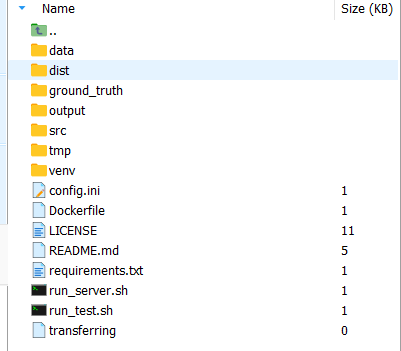
1.目录结构如下:
将vue build的代码放在pyhon项目的根目录下:
2.Dockerfile文件
# 使用 Python 3.12 官方镜像
FROM python:3.12-slim

# 设置工作目录
WORKDIR /app

# 设置环境变量
ENV PYTHONUNBUFFERED=1
ENV PYTHONPATH=/app/src

# 安装系统依赖
RUN apt-get update && apt-get install -y --no-install-recommends \
    && rm -rf /var/lib/apt/lists/*

# 复制依赖文件
COPY requirements.txt .

# 安装 Python 依赖
RUN pip install --no-cache-dir -r requirements.txt -i https://pypi.tuna.tsinghua.edu.cn/simple/

# 复制项目文件
COPY src/ ./src/
COPY config.ini ./

# 复制前端静态文件
COPY dist/ ./static/

# 创建必要的目录
RUN mkdir -p data output tmp ground_truth static

# 设置目录权限
RUN chmod -R 755 /app

# 暴露端口
EXPOSE 8000

# 健康检查
HEALTHCHECK --interval=30s --timeout=10s --start-period=5s --retries=3 \
  CMD python -c "import requests; requests.get('http://localhost:8000/health', timeout=5)"

# 启动命令
CMD ["python", "-m", "uvicorn", "src.app:app", "--host", "0.0.0.0", "--port", "8000"]
3.docker build -t xxxxx . 打包
4.打包成功后运行
docker run -d -p 8000:8000 --name my-app-container my-app
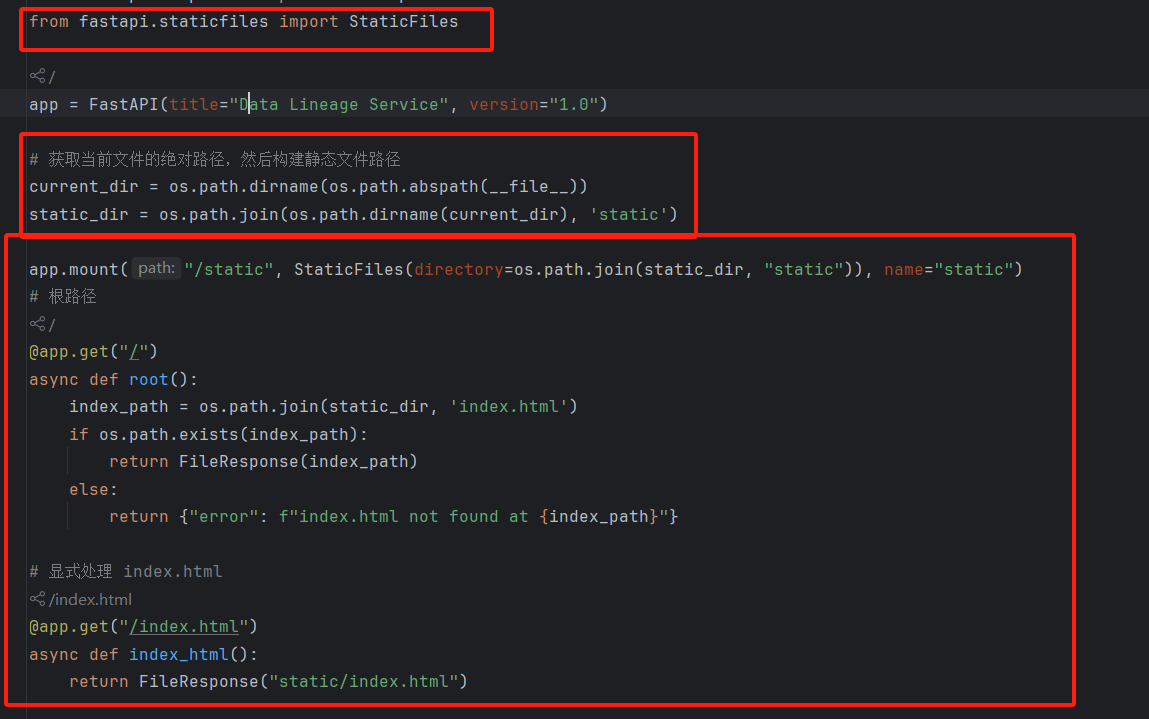
特别重要的一步:需要修改app.py
from fastapi.staticfiles import StaticFiles

app = FastAPI(title="Data Lineage Service", version="1.0")

# 获取当前文件的绝对路径,然后构建静态文件路径
current_dir = os.path.dirname(os.path.abspath(__file__))
static_dir = os.path.join(os.path.dirname(current_dir), 'static')

app.mount("/static", StaticFiles(directory=os.path.join(static_dir, "static")), name="static")
# 根路径
@app.get("/")
async def root():
    index_path = os.path.join(static_dir, 'index.html')
    if os.path.exists(index_path):
        return FileResponse(index_path)
    else:
        return {"error": f"index.html not found at {index_path}"}

# 显式处理 index.html
@app.get("/index.html")
async def index_html():
    return FileResponse("static/index.html")






 扫一扫
扫一扫


 3925
3925

 被折叠的 条评论
为什么被折叠?
被折叠的 条评论
为什么被折叠?
 到【灌水乐园】发言





