



 本文探讨如何使用Java动态代理和ThreadLocal解决数据源及事务管理问题。通过分析难点,如连接对象close方法的改写和多线程下Connection的安全,介绍了一种模拟连接池的方法,并利用ThreadLocal保证每个线程拥有独立的Connection。最后提供了源码下载链接。
一、前言
小demo只是思想的一个简单实现,距离用在生产环境还有一定距离,只是五一劳动节放假宅在家用来锻炼一下思维,不严谨的地方还望见谅。想要看更完整的示例代码,请查看mybatis源码,pooled类的实现。
二、难点分析
JDBC数据源的规范来自java.sql.DataSource接口,里面就一个方法getConnection的两个重载(数据源的思想也已经很普遍了,这里就不再赘述,需要了解的请自行查找),所以数据源的首要任务就是提供数据库连接对象Connection,这个太容易实现了,毫无难点可言,但是获得了连接,使用完之后是需要关闭的,此时连接的关闭不是释放资源,而是将连接对象还回数据库连接池。
难点一:连接对象的关闭不是释放资源,而是将连接对象还回数据库连接池——close方法的改写
上面的描述太过随意浮躁,没有体现难点之所在。java.sql.Connection作为数据库连接的规范接口而存在,他规定了连接对象的两大功能,一是和数据库建立链接,而是为此链接创建执行对象,不同的数据库厂商实现有不同,但是规范都得遵守,无论是mysql还是Oracle,他们提供的数据库驱动包中对java.sql.Connection的实现都要按照规则来,否则程序员们就不乐意了,不好进行开发、不好进行维护啊。那就看一下规范,java.sql.Connection接口中对close方法的描述。
 /**
     * Releases this <code>Connection</code> object's database and JDBC resources
     * immediately instead of waiting for them to be automatically released.
     * <P>
     * Calling the method <code>close</code> on a <code>Connection</code>
     * object that is already closed is a no-op.
     * <P>
     * It is <b>strongly recommended</b> that an application explicitly
     * commits or rolls back an active transaction prior to calling the
     * <code>close</code> method.  If the <code>close</code> method is called
     * and there is an active transaction, the results are implementation-defined.
     * <P>
     *
     * @exception SQLException SQLException if a database access error occurs
     */
void close() throws SQLException;附送更详细的小文链接一枚:点击打开链接
/**
 * In some cases, it is desirable to immediately release a Connection's
 * database and JDBC resources instead of waiting for them to be
 * automatically released (cant think why off the top of my head) <B>Note:</B>
 * A Connection is automatically closed when it is garbage collected.
 * Certain fatal errors also result in a closed connection.
 *
 * @exception SQLException
 *                if a database access error occurs
 */
public void close() throws SQLException {
	synchronized (getConnectionMutex()) {
		if (this.connectionLifecycleInterceptors != null) {
			new IterateBlock<Extension>(this.connectionLifecycleInterceptors.iterator()) {
				void forEach(Extension each) throws SQLException {
					((ConnectionLifecycleInterceptor)each).close();
				}
			}.doForAll();
		}

		realClose(true, true, false, null);
	}
}

/**
 * Closes connection and frees resources.
 *
 * @param calledExplicitly
 *            is this being called from close()
 * @param issueRollback
 *            should a rollback() be issued?
 * @throws SQLException
 *             if an error occurs
 */
public void realClose(boolean calledExplicitly, boolean issueRollback,
		boolean skipLocalTeardown, Throwable reason) throws SQLException {
	SQLException sqlEx = null;

	if (this.isClosed()) {
		return;
	}

	this.forceClosedReason = reason;

	try {
		if (!skipLocalTeardown) {
			if (!getAutoCommit() && issueRollback) {
				try {
					rollback();
				} catch (SQLException ex) {
					sqlEx = ex;
				}
			}

			reportMetrics();

			if (getUseUsageAdvisor()) {
				if (!calledExplicitly) {
					String message = "Connection implicitly closed by Driver. You should call Connection.close() from your code to free resources more efficiently and avoid resource leaks.";

					this.eventSink.consumeEvent(new ProfilerEvent(
							ProfilerEvent.TYPE_WARN, "", //$NON-NLS-1$
							this.getCatalog(), this.getId(), -1, -1, System
									.currentTimeMillis(), 0, Constants.MILLIS_I18N,
									null,
							this.pointOfOrigin, message));
				}

				long connectionLifeTime = System.currentTimeMillis()
						- this.connectionCreationTimeMillis;

				if (connectionLifeTime < 500) {
					String message = "Connection lifetime of < .5 seconds. You might be un-necessarily creating short-lived connections and should investigate connection pooling to be more efficient.";

					this.eventSink.consumeEvent(new ProfilerEvent(
							ProfilerEvent.TYPE_WARN, "", //$NON-NLS-1$
							this.getCatalog(), this.getId(), -1, -1, System
									.currentTimeMillis(), 0, Constants.MILLIS_I18N,
									null,
							this.pointOfOrigin, message));
				}
			}

			try {
				closeAllOpenStatements();
			} catch (SQLException ex) {
				sqlEx = ex;
			}

			if (this.io != null) {
				try {
					this.io.quit();
				} catch (Exception e) {
					;
				}

			}
		} else {
			this.io.forceClose();
		}

		if (this.statementInterceptors != null) {
			for (int i = 0; i < this.statementInterceptors.size(); i++) {
				this.statementInterceptors.get(i).destroy();
			}
		}

		if (this.exceptionInterceptor != null) {
			this.exceptionInterceptor.destroy();
		}
	} finally {
		this.openStatements = null;
		if (this.io != null) {
			this.io.releaseResources();
			this.io = null;
		}
		this.statementInterceptors = null;
		this.exceptionInterceptor = null;
		ProfilerEventHandlerFactory.removeInstance(this);

		synchronized (getConnectionMutex()) {
			if (this.cancelTimer != null) {
				this.cancelTimer.cancel();
			}
		}

		this.isClosed = true;
	}

	if (sqlEx != null) {
		throw sqlEx;
	}
}再来说说事务,JDBC来进行事务开发,API很简单啊,就那么几个固定的方法,顶多需要关注的就是程序的隔离级别和数据库支持的隔离级别的差异,但是这是基于Connection在方法中创建并销毁,如果采用连接池,那么Connection对象怎么在多线程中保持安全?不能我从池中拿了一个Connection,别人也从池中获取到同一个Connection,而且更重要的是,我拿到这个Connection之后,放在哪里?存放的地方应该是我能访问而别人不能访问。
难点二:多线程环境下保证Connection对象的安全——Connection的获取和存放
要想在多线程中进行事务处理,就需要借助于ThreadLocal对象(这货是引子,抛砖引玉的引子,真正存放东西的是每个线程中的ThreadLocalMap,这个是ThreadLocal定义的静态内部类,真正存放线程局部变量的地方,具体请见另一篇转载的博客:《深入理解ThreadLocal》),一个线程一个Connection,线程的生命周期中无论何时拿到的都是同一个Connection(因为本来就是存在Thread的实例属性ThreadLocal.threadLocalMap中),具体详见下面的详解,最后一节附上demo的所有源码。
基本就那么多了,汇总一下整个过程,从自定义的数据源对象中获取连接对象,然后开启事务,执行完成之后,close将连接对象还回池中。
三、实现详解
下面,就来一一破解上述难点。
1. Connection close方法改写
小demo这么来实现,通过DBPoll的getProxConnection方法来进行改写,在DBPool对象初始化的时候,就已经实例化一定的Connection对象,并将这些Connection对象改写了close方法的代理存入一个List,这个List就模拟了连接池的思想。代码节选如下,完成的demo代码以及注释参看第四节。
package cn.wxy.pool;

import java.lang.reflect.InvocationHandler;
import java.lang.reflect.Method;
import java.lang.reflect.Proxy;
import java.sql.Connection;
import java.util.ArrayList;
import cn.wxy.utils.DBUtils;

/**
 * 为了简便实现,实现采用了单例,并没有像mybatis那样做成多环境
 * @author Administrator
 */
public class DBPool {
	/**
	 * threadLocal:线程局部变量,事务控制的起点
	 * pool:用于存放初始化的连接对象
	 * poolSize:初始化的连接数
	 */
	private ThreadLocal<Connection> threadLocal = new ThreadLocal<Connection>();
	private ArrayList<Connection> pool = new ArrayList<Connection>();
	private static int poolSize = 2;
	/**
	 * 默认构造方法
	 */
	private DBPool() {
		init();
	}
	/**
	 * 如果要自定义连接池大小,则应该在获取连接池对象之前调用该方法
	 * @param poolSize
	 */
	public static void initPoolSize(int poolSize){
		DBPool.poolSize = poolSize;
	}
	/**
	 * 静态内部类实现单例
	 * @author Administrator
	 */
	private static class InnerDBPool {
		private static DBPool pool = new DBPool();
	}
	/**
	 * 全局访问接口
	 * @return
	 */
	public static DBPool getPool(){
		return InnerDBPool.pool;
	}
	/**
	 * 初始化方法
	 * 	从DBUtils中获取连接的代理对象,并进行缓存备用
	 */
	public void init(){
		for(int i=0; i<poolSize; i++){
			pool.add(getProxConnection());
		}
	}
	/**
	 * 采用JDK动态代理的方式获取链接对象的单例
	 * 	注意:
	 * 		1. JDK动态代理只能对接口进行代理,因此返回值只能转成接口,而不能转成具体的类;
	 * 		2. 第二参个数是代理的接口数组,可以采用getClass.getIntefaces()和以下实现两种方式
	 * 		但是根据提供的数据库驱动包,getInterfaces()方法可能出现异常,因此为了更好的通用性,建议采用以下实现的方式
	 * @return
	 */
	private Connection getProxConnection(){
		Connection conn = DBUtils.getDbUtils().getRealConnection();
		return (Connection) Proxy.newProxyInstance(conn.getClass().getClassLoader(),
				new Class[]{Connection.class},
				new InvocationHandler() {
					public Object invoke(Object proxy, Method method, Object[] args)
							throws Throwable {
						if("close".equals(method.getName())){
							synchronized (pool) {
								/**
								 * 此处应该从线程局部变量中获取,而不是延用方法中的conn对象
								 * 方法中的conn对象是原始的连接对象,其close方法是关闭资源,而不是还回池中
								 */
								Connection proxyConn = threadLocal.get();
								threadLocal.remove();
								if(pool.contains(proxyConn) || proxyConn == null)
									return null;
								return pool.add(proxyConn);
							}
						}
						return method.invoke(conn, args);
					}
				});
	}
}2. Connection的线程安全
要保证Connection在多线程中的安全,那么从链接池中获取到Connection的时候,就要将此连接对象放入当前线程的线程局部变量中,同一个线程任何时候获取连接,都不应该直接从连接池中获取,而是优先从线程局部变量中获取,否则视为第一次获取Connection对象,从连接池中获取并放入线程局部变量。关于线程局部变量的原理,请参看另一篇博文,部分代码节选如下,完成的demo源码在第四节有下载连接。
package cn.wxy.pool;

import java.lang.reflect.InvocationHandler;
import java.lang.reflect.Method;
import java.lang.reflect.Proxy;
import java.sql.Connection;
import java.util.ArrayList;

import cn.wxy.utils.DBUtils;

/**
 * 为了简便实现,实现采用了单例,并没有像mybatis那样做成多环境
 * @author Administrator
 */
public class DBPool {
	/**
	 * 获取链接对象:任何时候要使用连接对象都应该从此获取,而不应该从DBUtils中获取
	 * 1. 从当前线程局部变来那个中获取链接对象,否则到2
	 * 2. 从线程池中获得连接对象,否则异常
	 * @return
	 */
	public Connection getConnection(){
		Connection conn = threadLocal.get();
		if(conn != null)
			return conn;

		if(pool.size() > 0){
			synchronized (pool) {
				if(pool.size() > 0){
					conn = pool.remove(0);
					threadLocal.set(conn);
					return conn;
				}
			}
		}
		throw new RuntimeException("当前线程池已经用完,请稍候使用!");
	}
}package cn.wxy.utils;
import java.sql.Connection;
import java.sql.SQLException;
import cn.wxy.pool.DBPool;
public class TransactionManager {
private static DBPool pool = DBPool.getPool();
/**
* 开启事务,即关闭自动提交
*/
public static void startTransaction(){
Connection conn = pool.getConnection();
if(conn != null)
try {
conn.setAutoCommit(false);
System.out.println("事务开启········");
} catch (SQLException e) {
e.printStackTrace();
}
}
/**
* 1. 提交事务
* 2. 将连接的事务重置成自动提交,因为连接不关闭,而是还回池中,因此需要还原状态
*/
public static void commitTransaction(){
Connection conn = pool.getConnection();
if(conn != null)
try {
conn.commit();
conn.setAutoCommit(true);
System.out.println("事务提交···");
} catch (SQLException e) {
e.printStackTrace();
}
}
/**
* 1. 事务回滚
* 2. 重置事务状态为自动提交,理由同上
*/
public static void rollbackTransaction(){
Connection conn = pool.getConnection();
if(conn != null)
try {
conn.rollback();
conn.setAutoCommit(true);
} catch (SQLException e) {
e.printStackTrace();
}
}
public static void releaseConnection(){
try {
pool.getConnection().close();
System.out.println("连接还回池中···");
} catch (SQLException e) {
e.printStackTrace();
}
}
}package cn.wxy.utils;
import java.lang.reflect.InvocationHandler;
import java.lang.reflect.Method;
import java.lang.reflect.Proxy;
import java.util.ResourceBundle;
/**
* 对象工厂
* 从中获取需要被代理的对象service
* 从中获取dao对象
* 通过ResourceBundle实现简单的热加载,以牺牲性能为代价
* @author Administrator
*/
public class BeanFactory {
private String defaultConfigFileName = "beanFactory-config";
/**
* 单例工厂
*/
private BeanFactory(){
}
/**
* 静态内部类实现单例工厂
* @author Administrator
*/
private static class InnerBeanFactory {
private static BeanFactory factory = new BeanFactory();
}
/**
* 获取工厂全局接口
* @return
*/
public static BeanFactory getFactory(){
return InnerBeanFactory.factory;
}
/**
* 判断获取bean传入的bean name参数
* @param beanName
* @return
*/
public boolean checkBeanName(String beanName){
if(beanName == null || beanName.trim().length() < 1)
return false;
return true;
}
public <T> T getBean(String beanName){
if(!checkBeanName(beanName))
return null;
if(beanName.endsWith("Service")){
return getServiceBean(beanName);
}
return getOtherBean(beanName);
}
/**
* 如果是返回的是Service,则需要通过JDK动态代理进行事务的添加,然后再返回
* @param beanName
* @return
*/
@SuppressWarnings("unchecked")
private <T> T getServiceBean(String beanName){
try {
T t = (T) Class.forName(ResourceBundle.getBundle(defaultConfigFileName).getString(beanName)).newInstance();
return (T) Proxy.newProxyInstance(t.getClass().getClassLoader(), t.getClass().getInterfaces(), new InvocationHandler() {
public Object invoke(Object proxy, Method method, Object[] args)
throws Throwable {
try {
TransactionManager.startTransaction();
Object retValue = method.invoke(t, args);
TransactionManager.commitTransaction();
return retValue;
} catch (Exception e) {
TransactionManager.rollbackTransaction();
} finally {
TransactionManager.releaseConnection();
}
return null;
}
});
} catch (Exception e) {
throw new RuntimeException(e);
}
}
/**
* 非service的bean直接反射返回,因为不需要添加事务
* @param beanName
* @return
*/
@SuppressWarnings("unchecked")
private <T> T getOtherBean(String beanName){
try {
return (T) Class.forName(ResourceBundle.getBundle(defaultConfigFileName).getString(beanName)).newInstance();
} catch (Exception e) {
throw new RuntimeException(e);
}
}
}package cn.wxy.test;
import java.sql.Connection;
import java.sql.SQLException;
import org.junit.Test;
import cn.wxy.dao.UserDao;
import cn.wxy.domain.User;
import cn.wxy.pool.DBPool;
import cn.wxy.service.UserService;
import cn.wxy.utils.BeanFactory;
import cn.wxy.utils.DBUtils;
public class DBTest {
/**
* 测试连接池
*/
@Test
public void testPool(){
//DBPool.initPoolSize(3);
DBPool pool = DBPool.getPool();
pool.getPoolInfo();
pool.travelPoll();
Connection c1 = pool.getConnection();
Connection c2 = pool.getConnection();
System.out.println(c1 == c2);
pool.getPoolInfo();
pool.travelPoll();
try {
c1.close();
c2.close();
} catch (SQLException e) {
e.printStackTrace();
}
pool.getPoolInfo();
pool.travelPoll();
/**
* 测试结果
* 初始化大小:2, 当前连接池大小:2
com.mysql.jdbc.JDBC4Connection@311d617d
com.mysql.jdbc.JDBC4Connection@7c53a9eb
true
初始化大小:2, 当前连接池大小:1
com.mysql.jdbc.JDBC4Connection@7c53a9eb
初始化大小:2, 当前连接池大小:2
com.mysql.jdbc.JDBC4Connection@7c53a9eb
com.mysql.jdbc.JDBC4Connection@311d617d
*/
}
/**
* 测试bean factory
*/
@Test
public void testFactory(){
BeanFactory factory = BeanFactory.getFactory();
UserDao userDao = factory.getBean("userDao");
UserService userService = factory.getBean("userService");
userDao.insert(null);
userService.addUser(null);
/*执行结果:
impl insert
事务开启········
user service impl
事务提交···
连接还回池中···*/
}
/**
* demo整体测试
*/
@Test
public void test(){
User user1 = new User(null, "插入人1", "123", "male", 23);
User user2 = new User(null, "插入人2", "234", "female", 22);
UserService userService = BeanFactory.getFactory().getBean("userService");
userService.addUser(user1, user2);
}
}事务开启········
事务提交···
连接还回池中···
异常操作,控制台输出以及数据截图检测事务是否控制成功,详情如下。
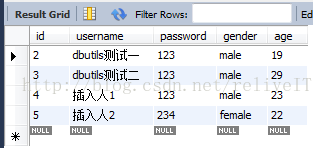
事务开启········
事务回滚了···
连接还回池中···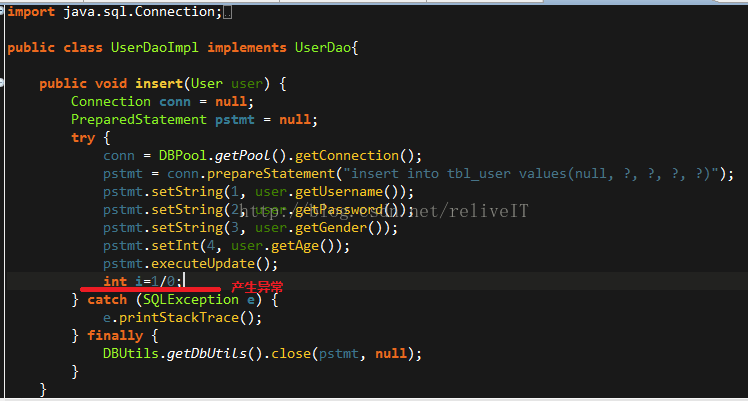
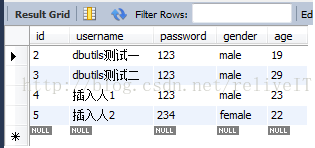
至此,小demo结束,谢谢观赏!
四、源码下载
源码下载:点击打开链接
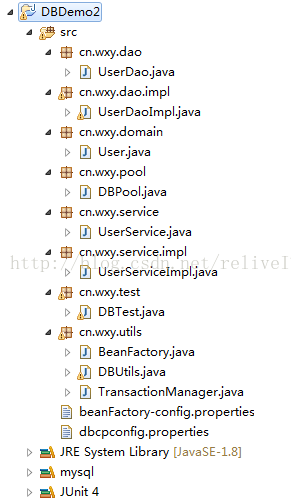
演示demo截图
附注:
本文如有错漏,烦请不吝指正,谢谢!
演示demo代码简陋,还望见谅!





 扫一扫
扫一扫


 984
984

 被折叠的 条评论
为什么被折叠?
被折叠的 条评论
为什么被折叠?
 到【灌水乐园】发言





