



 本文总结了ReactNative开发过程中遇到的典型问题及其解决方案,包括模拟器连接问题、组件属性传递、TextInput边框设置、ListView选中状态设置等。
由于近期在进行React Native开发,遇到了不少坑,在此列出来。
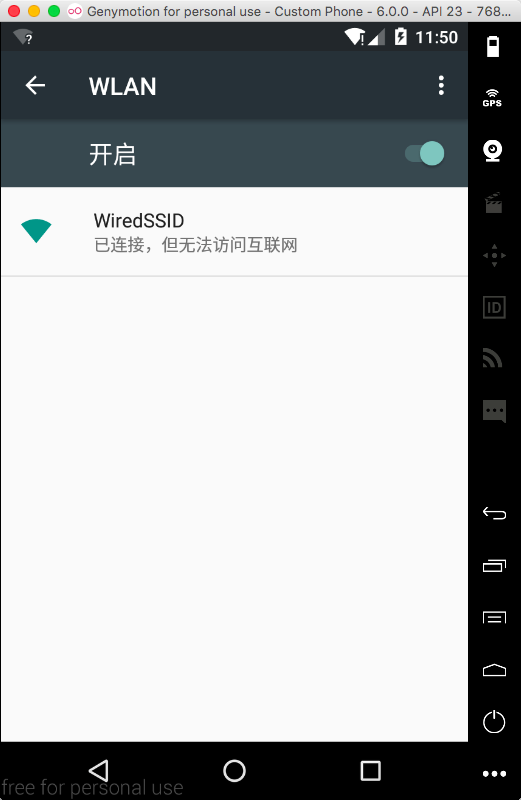
1、使用Android的GenyMotion模拟器时,双击”R”出现”Could not connect to development server”红屏的解决方法.
答:由于模拟器和服务器不在同一个网络下,最有可能的是模拟器没有连接WiFi,将模拟器连接WIFI即可,如下图所示:
2、出现”Could not get BatchedBridge, make sure your bundle is packaged correctly”红屏的解决方法.
答:(1)打开终端,进入ReactNative 初始化的根目录里面。
(2) 运行下面这行命令
curl "http://localhost:8081/index.android.bundle?platform=android" -o "android/app/src/main/assets/index.android.bundle"
Tips:如果没有 assets目录的自己新建一个就可以了!
3、组件封装后属性的传递,例如组件A想要给组件B中的组件C传递一个属性prop,如何实现?
答:第一种:层级传递属性,一级一级传递,如下所示:
/**
 * 这个例子是讲"这是一个标题"这个属性值从A通过B传递到C,以下方法可以实现
  */
class C  extends Component{
    ...
    render(){
        return(
            <View>this.props.title</View>
        );
    }
}

class B extends Component{
    ...
    render(){
        return(
            <C title = {this.props.title}/>
        )
    }
}

class A extends Component{
    ...
    render(){
        return(
            <B title = "这是一个标题"/>
        )
    }
}
第二种:使用上下文Context对象,有兴趣的小伙伴可以自行了解以下,限于笔者水平,在此不做研究。
4、为什么TextInput组件设置边框在Android平台显示无效?
答:将TextInput外围使用一层<View></View>包裹,然后设置该View的边框即可。
5、如何设置ListView中的item的选中状态?
答:笔者由于为初学者,因此并不清楚必须改变dataSource,renderRow方法才会调用,上网查找资料,方知如此,不多说,直接上代码:
class myComponent extends Component{

    //...
    constructor(props) {
        super(props);
        // 初始状态
        this.state = {
            dataSource: new  ListView.DataSource({rowHasChanged: (row1, row2)=>row1 !== row2}),
        };
        this.renderRow = this.renderRow.bind(this);
    }

      //...
      renderRow(rowData, sectionID, rowID, highlightRow){
       <TouchableOpacity style={styles.row} onPress={()=> {
        if (this.lastRowID) {
                    tabs[this.lastRowID].hidden = true;
        } else {
                    tabs[0].hidden = true;
        }
        tabs[rowID].hidden = false;
        var newTabs = JSON.parse(JSON.stringify(tabs));
        this.setState({
           dataSource:
 this.state.dataSource.cloneWithRows(newTabs)
        });
        this.lastRowID = rowID;
      } }>
      //...
   }
}
如此便可通过更改dataSource触发renderRow方法。
6、在ScrollView中切换输入框<TextInouput>,为什么需要点击两次才能实现?
答:这是由于ScrollView也会相应点击事件,解决这个问题,只需要在ScrollView组件中添加两个属性:keyboardShouldPersistTaps={true}
和keyboardDismissMode={'on-drag'}即可。
7、为什么当界面消失时不会触发componentWillUnMount()方法?
答:这是由于拼写错误,在IDE中,有时会提示componentWillUnMount()这个方法,但这个方法拼写是错误的,正确的应该是:componentWillUnmount(),即mount的’m’是小写!
8、怎么在ES6语法中使用定时器以及如何取消定时器?
答:
下面是实现一个倒计时的效果:
代码如下:
const totalCount = 10;
class Register extends Component {
    ...
     // 构造
    constructor(props) {
        super(props);
        // 初始状态
        this.state = {
            count: totalCount
        };
    }

    componentWillUnMount() {
       //界面卸载的时候停止定时器
       this.timer && clearInterval(this.timer);
    }

    count() {
        this.timer = setInterval(()=> {
            this.setState({
                count: this.state.count - 1
            });
            //这里通过条件判断是否停止计时器
            if (this.state.count == 0) {
                clearInterval(this.timer);
            }
        }, 1000);
    }

    render() {
        return(
             ...
             <TouchableOpacity onPress={this.count.bind(this)} disabled={!(this.state.count == totalCount || this.state.count == 0)}>
                            ...
             </TouchableOpacity>
        )
    }
}
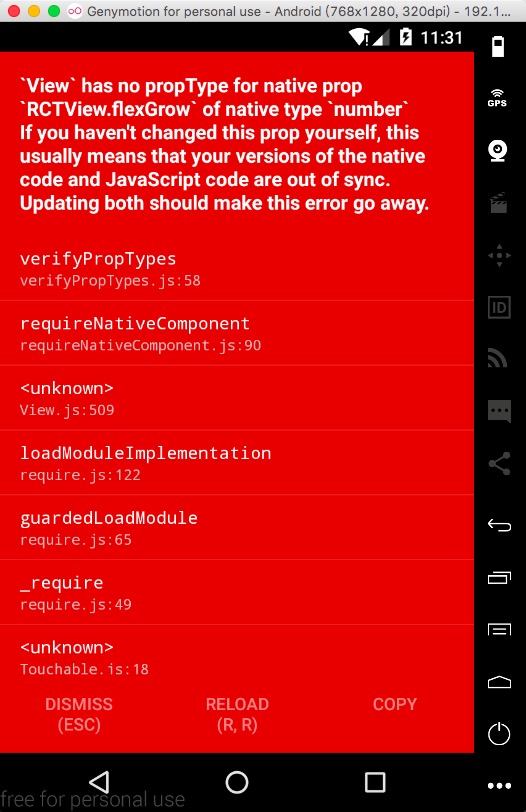
9、出现“‘View’has no propType for native prop ‘RCTView.flexGrow’ of native type…”红屏的解决办法
答:这是因为同时在做两个项目,当退出第一个项目时,npm仍然为第一个项目的,所以启动第二个项目时就会报错。如下图:
。
此时,只需要打开终端,将运行中的npm关闭,输入命令react-native run-ios或react-native run-android 重新启动npm即可。
10、出现“underfined is not an object(evaluating ‘ViewProptypes.style’)”红屏的解决版本
答:首先回答几个问题:
1、是否使用了react-native-scrollable-tab-view第三方库?
2、react-native的版本是否在0.44以下?
3、package-json文件中的react-native-scrollable-tab-view的描述是否类似于"react-native-scrollable-tab-view": "^0.x.x"?
如果是,进行如下操作:
1、将
package-json中的"react-native-scrollable-tab-view": "^0.x.x"修改为
"react-native-scrollable-tab-view": "0.x.x"(去掉了版本号前的^);
2、终端运行npm install.
注:其他第三方库若出现类似问题,解决方法同上。
接下来解释一下,为什么会出现这个问题:首先react-native在0.44版本以后将View.PropTypes.style属性修改成了ViewPropTypes.style,而类似于react-native-scrollable-tab-view这样的第三方库为了适配react-native新版本,也做了如此修改,然而由于我们的package-json文件中第三方库版本描述类似于"^0.6.0",而这个^号表示指定从左面起第一个非零位置的范围。比如:"^0.6.0"表示你下载的版本是区间为[0.6.0,0.7.0)的最新版本。现在答案就很明显了,你只需要将pack-json中将第三方库的版本指定为你最初添加的版本比如我的就是"react-native-scrollable-tab-view": "0.6.0",去掉了这个^号,表示指定了这0.6.0版本。关于版本号的解释,参见https://segmentfault.com/q/1010000006124708/a-1020000006124855。





 扫一扫
扫一扫


 被折叠的 条评论
为什么被折叠?
被折叠的 条评论
为什么被折叠?
 到【灌水乐园】发言





