知识点
string
- 表示空字符串。 此字段为只读。此字段的值为零长度字符串“”。
- string为引用数据类型。会在内存的栈和堆上分配存储空间。因此string.Empty与“”都会在栈上保存一个地址,这个地址占4字节,指向内存堆中的某个长度为0的空间,这个空间保存的是string.Empty的实际值。
- 区别于null,null 只在栈上分配了空间,在堆上没有分配
out
可以在两个上下文中使用 out 关键字:
- 作为 参数修饰符,通过引用而不是值将参数传递给方法。
- 在接口和委托的 泛型类型参数声明中 ,该声明指定类型参数是协变的。
- 当方法需要返回多个值时,关键字 out 特别有用,因为可以使用多个 out 参数。
| 1 2 3 4 5 6 7 8 9 10 11 12 13 14 15 16 | public void Main()
{
double radiusValue = 3.92781;
//Calculate the circumference and area of a circle, returning the results to Main().
CalculateCircumferenceAndArea(radiusValue, out double circumferenceResult, out var areaResult);
System.Console.WriteLine($"Circumference of a circle with a radius of {radiusValue} is {circumferenceResult}.");
System.Console.WriteLine($"Area of a circle with a radius of {radiusValue} is {areaResult}.");
Console.ReadLine();
}
//The calculation worker method.
public static void CalculateCircumferenceAndArea(double radius, out double circumference, out double area)
{
circumference = 2 * Math.PI * radius;
area = Math.PI * (radius * radius);
}
|
Encoding
将字符串从一种编码转换为另一种编码,
编码(Encoding):将 Unicode 字符转换为字节序列的过程。
解码(Decoding):将字节序列转换回 Unicode 字符的过程。
方法
- GetEncoding。返回指定代码页的编码。属于编码过程
| 1 2 3 4 5 6 7 8 9 10 11 12 13 14 15 16 17 18 19 20 21 22 23 24 25 | //返回与指定代码页名称关联的编码。
//Encoding.GetEncoding(String)
using System;
using System.Text;
public class SamplesEncoding {
public static void Main() {
// Get a UTF-32 encoding by codepage.
Encoding e1 = Encoding.GetEncoding( 12000 );
// Get a UTF-32 encoding by name.
Encoding e2 = Encoding.GetEncoding( "utf-32" );
// Check their equality.
Console.WriteLine( "e1 equals e2? {0}", e1.Equals( e2 ) );
}
}
/*
This code produces the following output.
e1 equals e2? True
*/
|
编码表
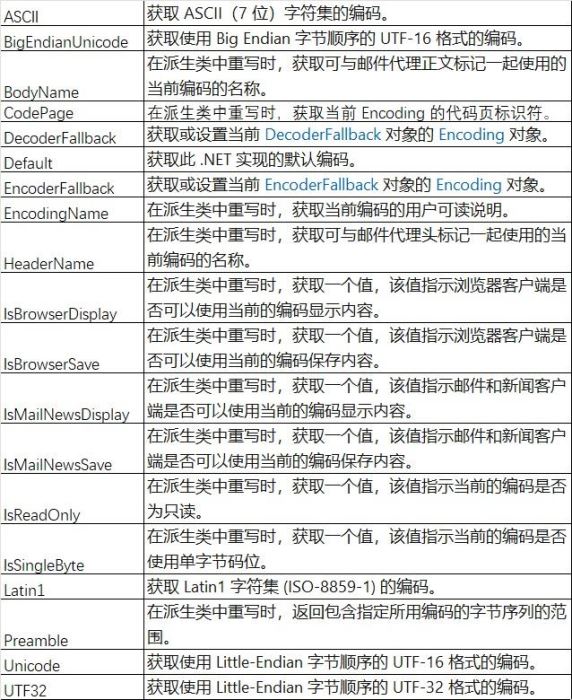
常用编码格式:
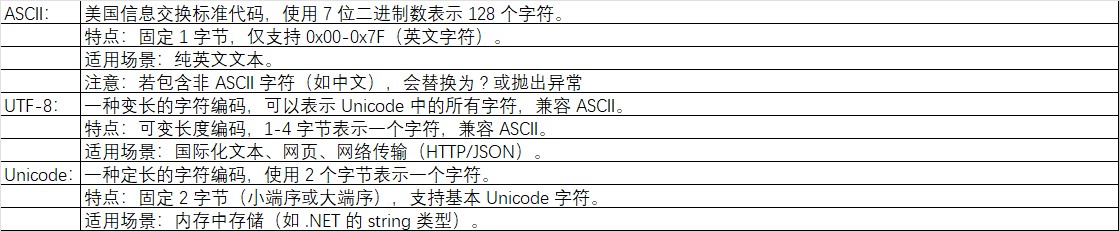
- GetBytes
在派生类中重写时,将一组字符编码为一个字节序列。属于解码过程
| 1 2 | //GetBytes(Char[])
//在派生类中重写时,将指定字符数组中的所有字符编码为一个字节序列。
|
字符串转换为数组
字符串可以理解为在字符数组。所以对手winform控件textbox的text值,也可以作为字符数组,
| 1 2 3 4 5 6 7 8 9 10 11 12 13 14 15 16 | if(textBox1.Text!="")
{
string chars_StrA = "hello";
string chars_StrB=string.Empty;
char[] txtChars01 = new char[10];
char[] txtChars02 = new char[10];
for (int i=0;i<textBox1.Text.Length;i++)
{
txtChars01[i] =textBox1.Text[i];
}
for(int j= 0; j< chars_StrA.Length; j++)
{
txtChars02[j] = chars_StrA[j];
chars_StrB += txtChars02[j];
}
}
|
代码
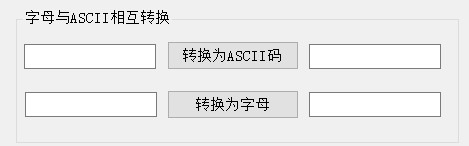
| 1 2 3 4 5 6 7 8 9 10 11 12 13 14 15 16 17 18 19 20 21 22 23 24 25 26 27 28 29 30 31 32 33 34 | private void btn_ToASCII_Click(object sender, EventArgs e)
{
if(txt_char.Text!=string.Empty)
{
if(Encoding.GetEncoding("unicode").GetBytes(new char[] { txt_char.Text[0] })[1]==0)
{
txt_ASCII.Text = Encoding.GetEncoding("unicode").GetBytes(txt_char.Text)[0].ToString();
}
else
{
txt_ASCII.Text = string.Empty;
MessageBox.Show("请输入字母!", "提示!");
}
}
}
private void btn_ToChar_Click(object sender, EventArgs e)
{
if(txt_ASCII2.Text!=string.Empty)
{
int P_int_Num;//定义整型局部变量
if(int.TryParse(txt_ASCII2.Text,out P_int_Num))
{
txt_Char2.Text = ((char)P_int_Num).ToString();
}
else
{
MessageBox.Show("请输入正确ASCII码值", "错误");
}
}
}
|
复制讲解
到此这篇关于C#实现ASCII和字符串相互转换的代码示例的文章就介绍到这了





 扫一扫
扫一扫


 1万+
1万+

 被折叠的 条评论
为什么被折叠?
被折叠的 条评论
为什么被折叠?
 到【灌水乐园】发言





