


 本文介绍如何使用ImageJ进行图像处理,包括通过Maven引入ImageJ库、打开图像文件、获取图像尺寸及位深度等基本操作,并演示了将DICOM格式文件转换为PNG格式的方法。
1.maven引入
<dependency>
            <groupId>ij</groupId>
            <artifactId>ij</artifactId>
            <version>1.0</version>
            <scope>system</scope>
            <systemPath>${project.basedir}/lib/ij.jar</systemPath>
        </dependency>
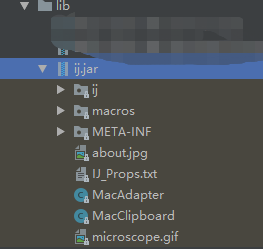
2.下载ImageJ包,分享地址
「ij.jar」,点击链接保存,或者复制本段内容,打开「阿里云盘」APP ,无需下载,极速在线查看享用。
链接:https://www.aliyundrive.com/s/gaRp973sfpN
3.应用
//filePath文件路径
 ImagePlus imagePlus = openImage(filePath);
 ImageProcessor ip = imagePlus.getChannelProcessor();
 int height = ip.getHeight();
 int width = ip.getWidth();
 //通道
 int nChannels = ip.getNChannels();
 //位深度
 int bitDepth = ip.getBitDepth();
 //获取像素
 Object pixels = ip.getPixels();
<







 扫一扫
扫一扫


 913
913

 被折叠的 条评论
为什么被折叠?
被折叠的 条评论
为什么被折叠?
 到【灌水乐园】发言





