



Java学习记录(六):斗地主
1、题目及素材来源
题目来自于BILIBILI黑马程序员官方Java基础教程,具体包括原始代码以及相关素材,相关业务逻辑的实现根据教程的要求自己独立实现。详细功能需求以及相关要求可自行观看其对应教程。
根据教程要求目前只实现了加载牌、洗牌、发牌以及排序功能,没有实现后续抢地主打牌等逻辑。同时存在一个从登录页面进入游戏主页面无法展示发牌动画这个bug,教程是说需要使用多线程,暂未修改(需要通过在项目启动文件处直接启动游戏主页面即可看见动画)。
此项目仅用于交流学习。
2、整体效果
(1)登录页面

(2)游戏主页面
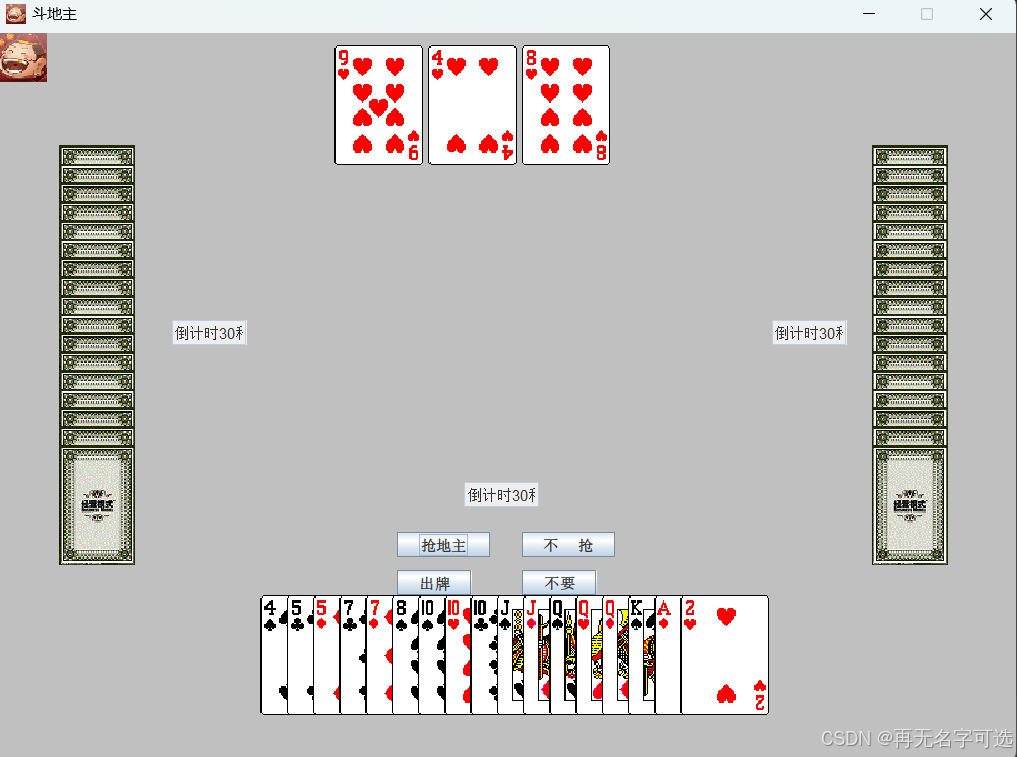
3、各个功能简要介绍
(1)游戏登录
输入账号密码验证码即可登录,账号信息暂未保存至文件,详细可查看具体相关代码。
(2)加载牌、洗牌、发牌、排序
使用列表等相关知识实现牌的加载、洗牌、发牌,以及发牌之后的排序功能。
4、各文件完整代码
(1)项目启动文件
import game.GameJFrame;
import game.LoginJFrame;

public class App {
    public static void main(String[] args) {
        // 程序主入口
        // 创建一个新的游戏对象启动程序
        new LoginJFrame();

        //new GameJFrame();
    }
}
(2)用户信息Java bean类
package domain;

import java.util.Objects;

public class User {
   //自己练习
    private String name;
    private String username;
    private String password;
    private int age;

    public User() {
    }

    public User(String username, String password) {
        this.username = username;
        this.password = password;
    }

    public User(String name, String username, String password, int age) {
        this.name = name;
        this.username = username;
        this.password = password;
        this.age = age;
    }

    public String getName() {
        return name;
    }

    public void setName(String name) {
        this.name = name;
    }

    public String getUsername() {
        return username;
    }

    public void setUsername(String username) {
        this.username = username;
    }

    public String getPassword() {
        return password;
    }

    public void setPassword(String password) {
        this.password = password;
    }

    public int getAge() {
        return age;
    }

    public void setAge(int age) {
        this.age = age;
    }

    @Override
    public boolean equals(Object o) {
        if (this == o) return true;
        if (o == null || getClass() != o.getClass()) return false;
        User user = (User) o;
        return Objects.equals(username, user.username) && Objects.equals(password, user.password);
    }

    @Override
    public int hashCode() {
        return Objects.hash(username, password);
    }

    @Override
    public String toString() {
        return "User{" +
                "name='" + name + '\'' +
                ", username='" + username + '\'' +
                ", password='" + password + '\'' +
                ", age=" + age +
                '}';
    }
}
(3)纸牌Poker Java bean类
package domain;

import javax.swing.*;
import java.awt.*;
import java.awt.event.MouseEvent;
import java.awt.event.MouseListener;
import java.util.HashMap;
import java.util.Objects;

public class Poker extends JLabel implements MouseListener {

    // 当前牌的名字
    private String name;

    // 是正面还是反面
    private boolean front = false;

    // 是否能够点击
    private boolean canClick = false;

    // 是否已经被点击
    private boolean isClicked = false;

    public Poker(String name, boolean front) {
        this.name = name;
        this.front = front;

        if (this.front) {
            // 转换成正面
            this.turnFront();
        } else {
            // 转换成背面
            this.turnBack();
        }
        this.setSize(71, 96);
        this.setVisible(true);
        this.addMouseListener(this);
    }

    public void turnFront(){
        this.front = true;
        this.setIcon(new ImageIcon("image\\poker\\" + this.name + ".png"));
    }

    public void turnBack(){
        this.front = false;
        this.setIcon(new ImageIcon("image\\poker\\rear.png"));
    }

    @Override
    public void mouseClicked(MouseEvent e) {
        if (this.canClick){
            int step = 0;
            if (isClicked) {
                step = 20;
            } else {
                step = -20;
            }

            isClicked = !isClicked;
            Point location = this.getLocation();
            this.setLocation(new Point(location.x, location.y + step));
        }
    }

    @Override
    public void mousePressed(MouseEvent e) {

    }

    @Override
    public void mouseReleased(MouseEvent e) {

    }

    @Override
    public void mouseEntered(MouseEvent e) {

    }

    @Override
    public void mouseExited(MouseEvent e) {

    }

    @Override
    public String getName() {
        return name;
    }

    @Override
    public void setName(String name) {
        this.name = name;
    }

    public boolean isFront() {
        return front;
    }

    public void setFront(boolean front) {
        this.front = front;
    }

    public boolean isCanClick() {
        return canClick;
    }

    public void setCanClick(boolean canClick) {
        this.canClick = canClick;
    }

    public boolean isClicked() {
        return isClicked;
    }

    public void setClicked(boolean clicked) {
        isClicked = clicked;
    }
}
(4)Common类
package game;

import domain.Poker;

import java.awt.*;
import java.util.ArrayList;

public class Common {
	//直接粘贴不需要自己练习
    //移动牌(有移动的动画效果)
    public static void move(Poker poker, Point from, Point to) {
        if (to.x != from.x) {
            double k = (1.0) * (to.y - from.y) / (to.x - from.x);
            double b = to.y - to.x * k;
            int flag = 0;
            if (from.x < to.x)
                flag = 20;
            else {
                flag = -20;
            }
            for (int i = from.x; Math.abs(i - to.x) > 20; i += flag) {
                double y = k * i + b;

                poker.setLocation(i, (int) y);

                try {
                    Thread.sleep(5);
                } catch (InterruptedException e) {
                    e.printStackTrace();
                }
            }
        }
        poker.setLocation(to);

    }

    //重新摆放牌
    //参数一:游戏界面
    //参数二:要重新摆放顺序的集合
    //参数三:标记
    //       0表示左边玩家 1表示中间自己  2表示右边玩家
    public static void rePosition(GameJFrame m,ArrayList<Poker> list, int flag) {
        Point p = new Point();
        if (flag == 0) {
            p.x = 50;
            p.y = (450 / 2) - (list.size() + 1) * 15 / 2;
        }
        if (flag == 1) {
            p.x = (800 / 2) - (list.size() + 1) * 21 / 2;
            p.y = 450;
        }
        if (flag == 2) {
            p.x = 700;
            p.y = (450 / 2) - (list.size() + 1) * 15 / 2;
        }
        int len = list.size();
        for (int i = 0; i < len; i++) {
            Poker poker = list.get(i);
            move(poker, poker.getLocation(), p);
            m.container.setComponentZOrder(poker, 0);
            if (flag == 1)
                p.x += 21;
            else
                p.y += 15;
        }
    }
}
(5)登录页面类
package game;

import domain.User;
import util.CodeUtil;

import javax.swing.*;
import java.awt.*;
import java.awt.event.MouseEvent;
import java.awt.event.MouseListener;
import java.util.ArrayList;

// 登录窗口类,同时使用当前类实现鼠标点击事件
public class LoginJFrame extends JFrame implements MouseListener {
    private static ArrayList<User> users;

    // 类静态构造代码块,用于初始化一些通用的信息,在这里用于初始化用户信息
    static {
        users = new ArrayList<>();
        users.add(new User("admin", "1234"));
        users.add(new User("LiHua","huahua", "qwer", 24));
    }

    // 登录按钮、注册按钮、用户名输入框、密码输入框以及验证码输入框
    // 在此定义是为了便于在整个类中都可以访问
    JButton login = new JButton();
    JButton register = new JButton();
    JTextField username = new JTextField();
    JPasswordField password = new JPasswordField();
    JTextField code = new JTextField();

    //正确的验证码
    // 使用JLabel来显示正确的验证码
    JLabel rightCode = new JLabel();


    public LoginJFrame() {
        //初始化界面
        initJFrame();
        //初始化组件,在这个界面中添加内容
        initView();
        //让当前界面显示出来
        this.setVisible(true);
    }

    //在这个界面中添加内容
    public void initView() {
        //1. 添加用户名文字
        Font usernameFont = new Font(null, Font.BOLD,16);  // 创建一个新的字体样式
        JLabel usernameText = new JLabel("用户名");  // 初始化JLabel对象展示提示性文字
        usernameText.setForeground(Color.white);  // 设置背景颜色
        usernameText.setFont(usernameFont);  // 设置字体格式,包括样式、字体大小
        usernameText.setBounds(140, 55, 55, 22);  // 设置组件在窗口中的位置以及长宽
        this.getContentPane().add(usernameText);  // 将当前组件添加至窗口

        //2.添加用户名输入框
        username.setBounds(223, 46, 200, 30);
        this.getContentPane().add(username);

        //3.添加密码文字
        JLabel passwordText = new JLabel("密码");
        Font passwordFont = new Font(null, Font.BOLD,16);
        passwordText.setForeground(Color.white);
        passwordText.setFont(passwordFont);
        passwordText.setBounds(197, 95, 40, 22);
        this.getContentPane().add(passwordText);

        //4.密码输入框
        password.setBounds(263, 87, 160, 30);
        this.getContentPane().add(password);

        //验证码提示
        JLabel codeText = new JLabel("验证码");
        Font codeFont = new Font(null, Font.BOLD,16);
        codeText.setForeground(Color.white);
        codeText.setFont(codeFont);
        codeText.setBounds(215, 142, 55, 22);
        this.getContentPane().add(codeText);

        //验证码的输入框
        code.setBounds(291, 133, 100, 30);
        this.getContentPane().add(code);

        //获取正确的验证码
        String codeStr = CodeUtil.getCode();
        Font rightCodeFont = new Font(null, Font.BOLD,15);
        //设置颜色
        rightCode.setForeground(Color.RED);
        //设置字体
        rightCode.setFont(rightCodeFont);
        //设置内容
        rightCode.setText(codeStr);
        //绑定鼠标事件
        rightCode.addMouseListener(this);
        //位置和宽高
        rightCode.setBounds(400, 133, 100, 30);
        //添加到界面
        this.getContentPane().add(rightCode);

        //5.添加登录按钮
        login.setBounds(123, 310, 128, 47);
        login.setIcon(new ImageIcon("image\\login\\登录按钮.png"));
        //去除按钮的边框
        login.setBorderPainted(false);
        //去除按钮的背景
        login.setContentAreaFilled(false);
        //给登录按钮绑定鼠标事件
        login.addMouseListener(this);
        this.getContentPane().add(login);

        //6.添加注册按钮
        register.setBounds(256, 310, 128, 47);
        register.setIcon(new ImageIcon("image\\login\\注册按钮.png"));
        //去除按钮的边框
        register.setBorderPainted(false);
        //去除按钮的背景
        register.setContentAreaFilled(false);
        //给注册按钮绑定鼠标事件
        register.addMouseListener(this);
        this.getContentPane().add(register);


        //7.添加背景图片
        JLabel background = new JLabel(new ImageIcon("image\\login\\background.png"));
        background.setBounds(0, 0, 633, 423);
        this.getContentPane().add(background);

    }

    //初始化组件,在这个界面中添加内容
    public void initJFrame() {
        this.setSize(633, 423);  // 设置宽高
        this.setTitle("斗地主游戏 V1.0登录");  // 设置标题
        this.setDefaultCloseOperation(WindowConstants.EXIT_ON_CLOSE);  // 设置关闭模式
        this.setLocationRelativeTo(null);  // 居中
        this.setAlwaysOnTop(false);  // 置顶
        this.setLayout(null);  // 取消内部默认布局
    }

    //点击
    @Override
    public void mouseClicked(MouseEvent e) {
        Object source = e.getSource();

        if (source == login) {
            String username = this.username.getText();
            String password = this.password.getText();
            String code = this.code.getText();
            String rightCodeContent = this.rightCode.getText();
            if (code.isEmpty()){
                String msg = "请输入验证码";
                JOptionPane.showMessageDialog(null, msg, "提示" ,  JOptionPane.ERROR_MESSAGE);
                rightCode.setText(CodeUtil.getCode3());
            }
            else if (username.isEmpty() || password.isEmpty()){
                String msg = "请将用户名和密码输入完整!";
                JOptionPane.showMessageDialog(null, msg, "提示" ,  JOptionPane.ERROR_MESSAGE);
                rightCode.setText(CodeUtil.getCode3());
            } else {
                if (!code.equalsIgnoreCase(rightCodeContent)){
                    String msg = "验证码输入不正确!";
                    JOptionPane.showMessageDialog(null, msg, "提示" ,  JOptionPane.ERROR_MESSAGE);
                    rightCode.setText(CodeUtil.getCode3());
                } else {
                    User currentUser = new User(username, password);
                    boolean flag = false;
                    for (User user : users) {
                        if (currentUser.equals(user)){
                            flag = true;
                            break;
                        }
                    }
                    if (flag){
                        String msg = "登录成功!";
                        //JOptionPane.showMessageDialog(null, msg, "提示" ,  JOptionPane.INFORMATION_MESSAGE);
                        this.setVisible(false);
                        new GameJFrame();
                    } else {
                        String msg = "用户名不存在或密码不正确";
                        JOptionPane.showMessageDialog(null, msg, "提示" ,  JOptionPane.ERROR_MESSAGE);
                        rightCode.setText(CodeUtil.getCode3());
                    }
                }
            }
        } else if (source == register) {
            String msg = "您点击了注册按钮!";
            JOptionPane.showMessageDialog(null, msg, "提示" ,  JOptionPane.INFORMATION_MESSAGE);
        } else if (source == rightCode) {
            String randCode = CodeUtil.getCode3();
            rightCode.setText(randCode);
            System.out.println("刷新验证码: " + randCode);
        }
    }

    //展示弹框
    public void showJDialog(String content) {
        //创建一个弹框对象
        JDialog jDialog = new JDialog();
        //给弹框设置大小
        jDialog.setSize(200, 150);
        //让弹框置顶
        jDialog.setAlwaysOnTop(true);
        //让弹框居中
        jDialog.setLocationRelativeTo(null);
        //弹框不关闭永远无法操作下面的界面
        jDialog.setModal(true);

        //创建Jlabel对象管理文字并添加到弹框当中
        JLabel warning = new JLabel(content);
        warning.setBounds(0, 0, 200, 150);
        jDialog.getContentPane().add(warning);
        //让弹框展示出来
        jDialog.setVisible(true);
    }

    //按下不松
    @Override
    public void mousePressed(MouseEvent e) {
        if (e.getSource() == login) {
            login.setIcon(new ImageIcon("image\\login\\登录按下.png"));
        } else if (e.getSource() == register) {
            register.setIcon(new ImageIcon("image\\login\\注册按下.png"));
        }
    }

    //松开按钮
    @Override
    public void mouseReleased(MouseEvent e) {
        if (e.getSource() == login) {
            login.setIcon(new ImageIcon("image\\login\\登录按钮.png"));
        } else if (e.getSource() == register) {
            register.setIcon(new ImageIcon("image\\login\\注册按钮.png"));
        }
    }

    //鼠标划入
    @Override
    public void mouseEntered(MouseEvent e) {}

    //鼠标划出
    @Override
    public void mouseExited(MouseEvent e) {}
}
(6)游戏主页面类
package game;

import domain.Poker;

import javax.swing.*;
import java.awt.*;
import java.awt.event.ActionEvent;
import java.awt.event.ActionListener;
import java.util.ArrayList;
import java.util.Collections;
import java.util.Comparator;
import java.util.HashMap;

public class GameJFrame extends JFrame implements ActionListener {
    public static Container container = null;

    // 存放是否抢地主按钮,索引0表示抢地主,索引1表示不抢地主
    JButton[] landlord = new JButton[2];

    // 存放是否出牌按钮,索引0表示出牌,索引1表示要不起
    JButton[] publishCard = new JButton[2];

    // 用于显示谁是地主
    JLabel dizhu;

    // 嵌套集合,索引0-2分别表示第1-3位玩家出的牌,Poker为具体的牌
    ArrayList<ArrayList<Poker>> currentList = new ArrayList<>();

    // 嵌套集合,索引0-2分别表示第1-3位玩家手中的牌,Poker为具体的牌
    ArrayList<ArrayList<Poker>> playerList = new ArrayList<>();

    // 三张底牌
    ArrayList<Poker> lordList = new ArrayList<>();

    // 包含所有牌的牌盒,用于发牌
    ArrayList<Poker> pokerList = new ArrayList();

    // 用于记录每一位玩家的出牌剩余时间
    JTextField time[] = new JTextField[3];

    HashMap<String, Integer> valueMap = new HashMap<>();

    public  GameJFrame() {
        // 初始化每一种牌的价值
        valueMap.put("3", 3);
        valueMap.put("4", 4);
        valueMap.put("5", 5);
        valueMap.put("6", 6);
        valueMap.put("7", 7);
        valueMap.put("8", 8);
        valueMap.put("9", 9);
        valueMap.put("10", 10);
        valueMap.put("11", 11);
        valueMap.put("12", 12);
        valueMap.put("13", 13);
        valueMap.put("1", 14);
        valueMap.put("2", 15);
        valueMap.put("5-1", 16);
        valueMap.put("5-2", 17);

        //设置任务栏的图标
        setIconImage(Toolkit.getDefaultToolkit().getImage("image\\poker\\dizhu.png"));
        //设置界面
        initJframe();
        //添加组件
        initView();
        //界面显示出来
        //先展示界面再发牌,因为发牌里面有动画,界面不展示出来,动画无法展示
        this.setVisible(true);

        //初始化牌
        //准备牌,洗牌,发牌,排序
        initCard();
        //打牌之前的准备工作
        //展示抢地主和不抢地主两个按钮并且再创建三个集合用来装三个玩家准备要出的牌
        initGame();
    }

    //初始化牌(准备牌,洗牌,发牌,排序)
    public void initCard() {
		// 准备牌
        for (int i = 1; i <= 5; i++) {
            for (int j = 1; j <= 13; j++) {
                if (i==5 && j>2){
                    break;
                }
                Poker poker = new Poker(i + "-" + j, false);
                poker.setLocation(350, 150);
                this.pokerList.add(poker);
                container.add(poker);
            }
        }

        // 洗牌
        Collections.shuffle(this.pokerList);

        // 发牌
        ArrayList<Poker> player1 = new ArrayList<>();
        ArrayList<Poker> player2 = new ArrayList<>();
        ArrayList<Poker> player3 = new ArrayList<>();
        for (int i = 0; i < pokerList.size(); i++) {
            Poker poker = pokerList.get(i);

            if (i < 3){
                Common.move(poker, poker.getLocation(), new Point(270 + (75 * i), 10));
                poker.turnFront();
                lordList.add(poker);
                continue;
            }

            if (i % 3 == 0) {
                Common.move(poker, poker.getLocation(), new Point(50, 60 + i * 5));
                player1.add(poker);
            } else if (i % 3 == 1) {
                Common.move(poker, poker.getLocation(), new Point(180 + i * 7, 450));
                poker.turnFront();
                player2.add(poker);
            } else {
                Common.move(poker, poker.getLocation(), new Point(700, 60 + i * 5));
                player3.add(poker);
            }

            container.setComponentZOrder(poker, 0);
        }

        playerList.add(player1);
        playerList.add(player2);
        playerList.add(player3);

        // 排序
        for (int i = 0; i < 3; i++) {
            this.order(playerList.get(i));
            Common.rePosition(this, playerList.get(i), i);
        }
    }

    //排序
    public void order(ArrayList<Poker> list) {
        Collections.sort(list, new Comparator<Poker>() {

            @Override
            public int compare(Poker o1, Poker o2) {
                String color1 = o1.getName().substring(0, 1);
                String number1 = o1.getName().substring(2);

                String color2 = o2.getName().substring(0, 1);
                String number2 = o2.getName().substring(2);

                int value1 = color1.equals("5") ? getValue(o1.getName()) : getValue(number1);
                int value2 = color2.equals("5") ? getValue(o2.getName()) : getValue(number2);

                int i = value1 - value2;

                return i == 0 ? Integer.parseInt(color1) - Integer.parseInt(color2) : i;
            }
        });
    }

    //获取每一张牌的价值
    public int getValue(String key) {
        return valueMap.get(key);
    }

    //打牌之前的准备工作
    private void initGame() {
        //创建三个集合用来装三个玩家准备要出的牌
        for (int i = 0; i < 3; i++) {
            ArrayList<Poker> list = new ArrayList<>();
            //添加到大集合中方便管理
            currentList.add(list);
        }

        //展示抢地主和不抢地主两个按钮
        landlord[0].setVisible(true);
        landlord[1].setVisible(true);

        //展示自己前面的倒计时文本
        for (JTextField field : time) {
            field.setText("倒计时30秒");
            field.setVisible(true);
        }

    }

    @Override
    public void actionPerformed(ActionEvent e) {}

    //添加组件
    public void initView() {
        //创建抢地主的按钮
        JButton robBut = new JButton("抢地主");
        //设置位置
        robBut.setBounds(320, 400, 75, 20);
        //添加点击事件
        robBut.addActionListener(this);
        //设置隐藏
        robBut.setVisible(true);
        //添加到数组中统一管理
        landlord[0] = robBut;
        //添加到界面中
        container.add(robBut);

        //创建不抢的按钮
        JButton noBut = new JButton("不     抢");
        //设置位置
        noBut.setBounds(420, 400, 75, 20);
        //添加点击事件
        noBut.addActionListener(this);
        //设置隐藏
        noBut.setVisible(true);
        //添加到数组中统一管理
        landlord[1] = noBut;
        //添加到界面中
        container.add(noBut);

        //创建出牌的按钮
        JButton outCardBut = new JButton("出牌");
        outCardBut.setBounds(320, 430, 60, 20);
        outCardBut.addActionListener(this);
        outCardBut.setVisible(true);
        publishCard[0] = outCardBut;
        container.add(outCardBut);

        //创建不要的按钮
        JButton noCardBut = new JButton("不要");
        noCardBut.setBounds(420, 430, 60, 20);
        noCardBut.addActionListener(this);
        noCardBut.setVisible(true);
        publishCard[1] = noCardBut;
        container.add(noCardBut);

        //创建三个玩家前方的提示文字:倒计时
        //每个玩家一个
        //左边的电脑玩家是0
        //中间的自己是1
        //右边的电脑玩家是2
        for (int i = 0; i < 3; i++) {
            time[i] = new JTextField("倒计时:");
            time[i].setEditable(false);
            time[i].setVisible(false);
            container.add(time[i]);
        }
        time[0].setBounds(140, 230, 60, 20);
        time[1].setBounds(374, 360, 60, 20);
        time[2].setBounds(620, 230, 60, 20);

        //创建地主图标
        dizhu = new JLabel(new ImageIcon("image/poker/dizhu.png"));
        dizhu.setVisible(true);
        dizhu.setSize(40, 40);
        container.add(dizhu);

    }

    //设置界面
    public void initJframe() {
        //设置标题
        this.setTitle("斗地主");
        //设置大小
        this.setSize(830, 620);
        //设置关闭模式
        this.setDefaultCloseOperation(JFrame.EXIT_ON_CLOSE);
        //设置窗口无法进行调节
        this.setResizable(false);
        //界面居中
        this.setLocationRelativeTo(null);
        //获取界面中的隐藏容器,以后直接用无需再次调用方法获取了
        container = this.getContentPane();
        //取消内部默认的居中放置
        container.setLayout(null);
        //设置背景颜色
        container.setBackground(Color.LIGHT_GRAY);
    }
}





 扫一扫
扫一扫


 202
202

 被折叠的 条评论
为什么被折叠?
被折叠的 条评论
为什么被折叠?
 到【灌水乐园】发言





