



 raml2html是一款用JavaScript编写的文档生成器,能够将RAML文件转换为HTML格式,支持RAML 0.8和1.0版本。该工具可通过命令行或作为JavaScript库使用,并允许用户自定义主题和模板。
raml2html是一款从RAML到HTML的文档生成器,JavaScript语言编写。
raml2html默认支持Node.js,支持默认或定制theme。
1. 版本
raml2html 3.x支持RAML 0.8
raml2html 4支持RAML 1.0
2. 安装
npm i -g raml2html
npm i -g raml2html-markdown-theme3. 作为命令行工具使用
raml2html --help
raml2html examples\helloworld.raml > helloworld.html
raml2html --theme raml2html-markdown-theme examples\helloworld.raml > example.html
raml2html --template my-custom-template.nunjucks -i examples\helloworld.raml -o example.html
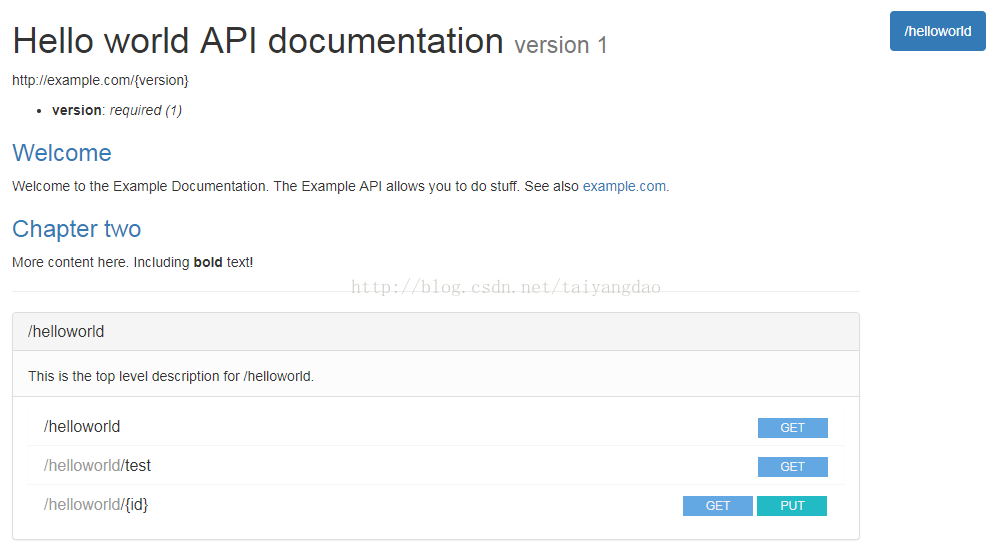
生成的页面如下:
const raml2html = require('raml2html');
const configWithDefaultTheme = raml2html.getConfigForTheme();
const configForDifferentTheme = raml2html.getConfigForTheme('raml2html-markdown-theme');
const configWithCustomTemplate = raml2html.getConfigForTemplate('~/path/to/my-custom-template.nunjucks');
raml2html.render(source, configForDifferentTheme).then(function(result) {
    // Save the result to a file or do something else with the result
    }, function(error) {
        // Output error
    });
参考链接:
https://github.com/raml2html/raml2html





 扫一扫
扫一扫


 340
340

 被折叠的 条评论
为什么被折叠?
被折叠的 条评论
为什么被折叠?
 到【灌水乐园】发言





