



 本文介绍如何配置 CentOS 的阿里YUM源,并提供详细的步骤来安装 GitLab,包括安装依赖项、配置文件及启动服务等。
1、更换阿里yum
// 下载wget
yum install -y wget
// 备份默认的yum
mv /etc/yum.repos.d /etc/yum.repos.d.backup
// 设置新的yum目录
mkdir /etc/yum.repos.d
// 下载阿里yum配置到该目录中
wget -O /etc/yum.repos.d/CentOS-Base.repo http://mirrors.aliyun.com/repo/Centos-7.repo
// 重建缓存
yum clean all
yum makecache
// 升级所有包(改变软件设置和系统设置,系统版本内核都升级,故需要几分钟耐心等待)
yum update -y

// VIM
yum install -y vim
2、安装gitlab
// 安装gitlab的依赖项
yum install -y curl openssh-server openssh-clients postfix cronie policycoreutils-python
// 安装postfix来支持gitlab发送邮件
yum install -y postfix
systemctl start postfix
systemctl enable postfix
// 清华大学镜像: https://mirrors.tuna.tsinghua.edu.cn/gitlab-ce/yum/el7
wget https://mirrors.tuna.tsinghua.edu.cn/gitlab-ce/yum/el7/gitlab-ce-10.5.4-ce.0.el7.x86_64.rpm
// 安装rpm包
rpm -i gitlab-ce-10.5.4-ce.0.el7.x86_64.rpm// 查看gitlab状态
gitlab-ctl status// 修改配置文件gitlab.rb
vim /etc/gitlab/gitlab.rb将external_url变量的地址修改为gitlab所在centos的ip地址
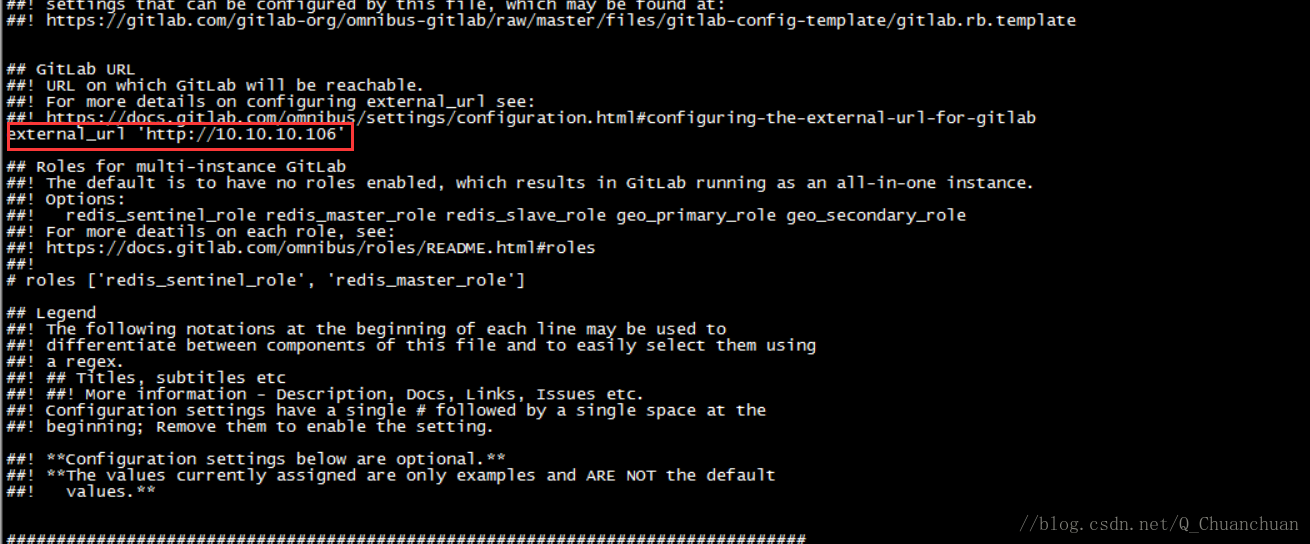
// 重新加载配置文件,并重启gitlab
gitlab-ctl reconfigure
gitlab-ctl restart
参考: https://www.cnblogs.com/straycats/p/7637373.html





 扫一扫
扫一扫


 1万+
1万+

 被折叠的 条评论
为什么被折叠?
被折叠的 条评论
为什么被折叠?
 到【灌水乐园】发言





