


 本文介绍了如何在VSCODE中为特定后缀文件设置全局代码片段,包括创建用户模板、调整输出格式以及在新建文件时自动插入模板的方法。还提到如何在setting.json中配置提示和格式化功能。
[VSCODE]VSCODE 添加全局使用的代码片段
我们希望在指定后缀的文件初始化的时候加入指定的模板,以减少初始化时从零开始,因此用到了用户片段
一、设置指定后缀文件的用户模板
1.1 创建用户模板
文件=》首选项=》用户片段

尝试输入你要创建文件的后缀名
例如,.vue文件输入vue会出现vue.json的提示出现
.md文件输入md 却没有md.json的提示出现,尝试输入m发现出现mardown和markfile的提示,我要创建的时markdown的模板,所以选择markdown
回车后打开如下内容
{
    // Place your snippets for html here. Each snippet is defined under a snippet name and has a prefix, body and
    // description. The prefix is what is used to trigger the snippet and the body will be expanded and inserted. Possible variables are:
    // $1, $2 for tab stops, $0 for the final cursor position, and ${1:label}, ${2:another} for placeholders. Placeholders with the
    // same ids are connected.
    // Example:
    // "Print to console": {
    //  "prefix": "log",
    //  "body": [
    //      "console.log('$1');",
    //      "$2"
    //  ],
    //  "description": "Log output to console"
    // }
}
1.2 默认模板解析
初始化的模板中有个demo,也即我们创建模板要遵循的格式
{
  "Print to console": {
    "prefix": "log",//文件后缀的模板,例如用于**.log文件
    "body": ["console.log('$1');", "$2"],//用于设定具体的模板内容
    "description": "Log output to console"//对于改模板的说明
  }
}
body中用“,”间隔每一行的内容
1.3 vue模板实例
这里创建一个用于.vue文件的模板实例
{
  "Print to console": {
    "prefix": "vue",
    "body": [
      "<template>",
      "</template>",
      "<script>",
      "import { defineComponent, computed, toRefs } from 'vue'",
      "import { useStore } from 'vuex'",
      "export default defineComponent({",
      "name: 'index',",
      "props: {",
      "},",
      "components: {",
      "},",
      "setup(props, option) {",
      "\treturn {",
      "}",
      "}",
      "})",
      "</script>",
      "<style lang=\"less\" scoped>",
      "</style>"
    ],
    "description": ".vue file template"
  }
}
二、调整用户模板输出格式
如果此时新建.vue文件并插入上述模板,那么框架就出来了,但是观察上述模板的输出我们发现输出的内容虽然根据逗号分了行,但是行的开头位置是一致的,也就是说没有缩进
这样并不美观,我们需要手动调整
网上有通过在双引号内添加空格的方式,亲测不可用
最后发现可以通过设置:
| 符号 | 含义 |
|---|---|
| \t | 使用tab缩进 |
| \n | 实现换行 |
| |实现字符转义 |
{
  "Print to console": {
    "prefix": "vue",
    "body": [
      "<template>",
      "</template>",
      "<script>",
      "import { defineComponent, computed, toRefs } from 'vue'",
      "import { useStore } from 'vuex'",
      "export default defineComponent({",
      "\tname: 'index',",
      "\tprops: {",
      "\t},",
      "\tcomponents: {",
      "\t},",
      "\tsetup(props, option) {",
      "\t\treturn {",
      "\t\t}",
      "\t}",
      "})",
      "</script>",
      "<style lang=\"less\" scoped>",
      "</style>"
    ],
    "description": ".vue file template"
  }
}
此时在新建发现输出的是格式化的模板
三、新建指定后缀文件并插入用户模板
3.1 新建文件
ctrl+n 新建文件,文件中直接输入文件名保存即可
3.2 插入模板
鼠标右键命令面板(快捷键CTRL+SHIFT+P),选择要插入模板
3.3 自动识别插入模板类型
根据文件后缀名,输入后缀名自动提示要添加的模板类型
setting.json文件添加
  "editor.snippetSuggestions": "top",
  "editor.formatOnPaste": true
或者设置
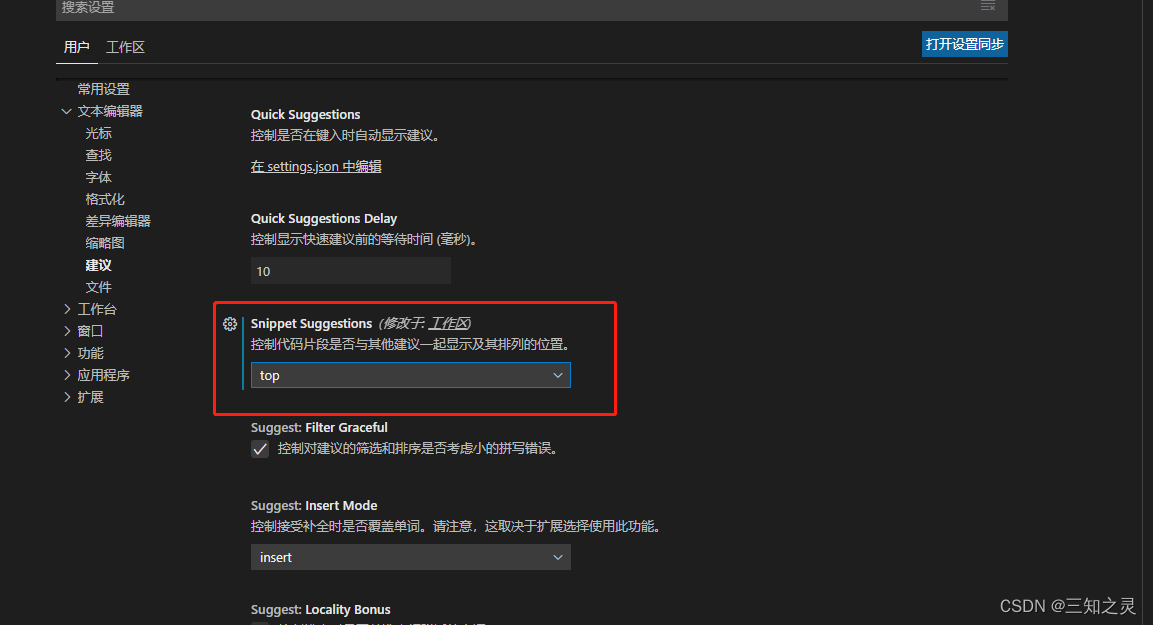
空白文件中输入vue或者html等要插入的模板,文件后缀与输入内容要对应,否则可能没有可选择的提示
目前存在markdown类型文件.md,不论输入md还是markdown都无提示,需要采用3.2方式插入模板





 扫一扫
扫一扫


 1535
1535

 被折叠的 条评论
为什么被折叠?
被折叠的 条评论
为什么被折叠?
 到【灌水乐园】发言





