


1.隐藏/去掉 导航栏返回按钮中的文字
[[UIBarButtonItem appearance] setBackButtonTitlePositionAdjustment:UIOffsetMake(0, -60)
forBarMetrics:UIBarMetricsDefault];
2.设置statusBar颜色为白色

self.navigationController.navigationBar.barStyle = UIBarStyleBlack;
[[UIApplication sharedApplication]setStatusBarStyle:UIStatusBarStyleLightContent];
3.给navigationBar上添加多个按钮
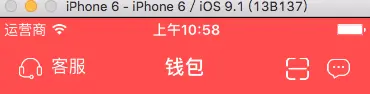
下面贴一个leftItem的例子
-
(void)addLeftItem {
UIView *leftBarView = [[UIView alloc]initWithFrame:CGRectMake(0, 0, 80, 31)];UIButton *phonebutton = [UIButton buttonWithType:UIButtonTypeCustom];
phonebutton.frame=CGRectMake(0, 5, 25, 25);
[phonebutton setImage:[UIImage imageNamed:@"w_qianbao_kefu"] forState:UIControlStateNormal];UILabel *leftLabel = [[UILabel alloc]initWithFrame:CGRectMake(30, 5, 40, 20)];
leftLabel.text = @"客服";
leftLabel.textColor = [UIColor whiteColor];
leftLabel.font = [UIFont systemFontOfSize:15.0f];
leftLabel.backgroundColor = [UIColor clearColor];[leftBarView addSubview:leftLabel];
[leftBarView addSubview:phonebutton];
leftBarView.backgroundColor=[UIColor clearColor];UIBarButtonItem *leftItem = [[UIBarButtonItem alloc]initWithCustomView:leftBarView];
self.navigationItem.leftBarButtonItem = leftItem;
}
原理:在item上添加一个view,然后再在view上添加按钮
4.给导航栏设置一张背景图
[self.navigationController.navigationBar setBackgroundImage:[UIImage imageNamed:@"navigationBar_back"] forBarPosition:UIBarPositionAny
barMetrics:UIBarMetricsDefault];
去掉导航栏下方的线
[self.navigationController.navigationBar setShadowImage:[UIImage new]];
原文链接:http://www.jianshu.com/p/bc8846f80d63
著作权归作者所有,转载请联系作者获得授权,并标注“简书作者”。





 扫一扫
扫一扫


 3789
3789

 被折叠的 条评论
为什么被折叠?
被折叠的 条评论
为什么被折叠?
 到【灌水乐园】发言





