


简介:纯css 不涉及js和canvas等等。
1.上图:
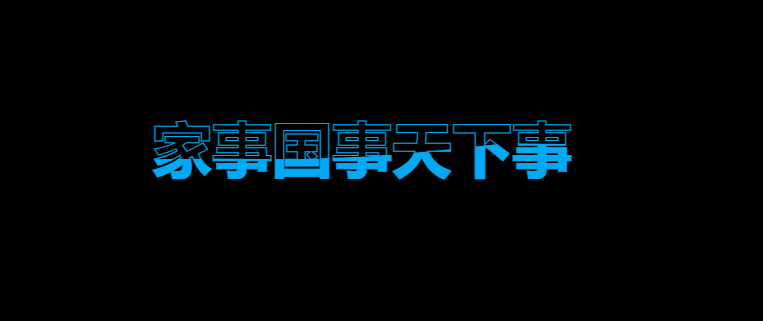
2、代码:拿走能直接用。
<!DOCTYPE html>
<html>
	<head>
		<meta charset="utf-8">
		<title>水波文本动画</title>
		<style>
			* {
				margin: 0;
				padding: 0;
				box-sizing: border-box;
				font-family: "Microsoft YaHei", "SimHei", "Poppins", sans-serif;
			}

			body {
				display: flex;
				background: #000;
				min-height: 100vh;
				align-items: center;
				justify-content: center;
			}

			.content {
				width: 1200px;
			}

			.content h2 {
				color: #fff;
				font-size: 48px;
				position: absolute;
			}

			.content h2:nth-child(1) {
				color: transparent;
				-webkit-text-stroke: 1px #03a9f4;
			}

			.content h2:nth-child(2) {
				color: #03a9f4;
				animation: animate 2s ease-in-out infinite;
			}

			@keyframes animate {
				0%,
				100% {
					clip-path: polygon(
						0% 45%,
						16% 44%,
						33% 50%,
						54% 60%,
						70% 61%,
						84% 59%,
						100% 52%,
						100% 100%,
						0% 100%
					);
				}

				50% {
					clip-path: polygon(
						0% 66%,
						15% 65%,
						34% 66%,
						51% 62%,
						67% 55%,
						84% 45%,
						100% 46%,
						100% 100%,
						0% 100%
					);
				}
			}
		</style>
		<script>
		</script>
	</head>
	<body>
		<section>
			<div class="content">
				<h2>家事国事天下事</h2>
				<h2>家事国事天下事</h2>
			</div>
		</section>
	</body>
</html>
3、思路
这里主要是用到了css 中的clip-path裁剪,把第二个h2(可以是其他的div啊、p啊等等 你随意),的上半部分裁剪掉!然后把二个h2覆盖在第一个上面。所以:这个水波纹动画效果其实就是通过两个h2元素叠加实现的!
*
ps:如果觉得波浪太平静,可以去改动画50%里面的数值。
(以下看不看都行,另外的注释)
-
第一个h2元素 (底层):
- 设置为透明填充: color: transparent;
- 添加蓝色描边: -webkit-text-stroke: 2px #03a9f4;
- 这个元素始终完整显示,作为文字的轮廓
-
第二个h2元素 (上层):
- 设置为蓝色填充: color: #03a9f4;
- 应用水波纹动画: animation: animate 4s ease-in-out infinite;
- 通过 clip-path 属性动态剪裁,使文字的上半部分在不同时间点被"切掉"
动画效果是通过 @keyframes animate 实现的,它定义了两个关键帧:
- 0%和100%:使用一个 clip-path 多边形,切掉文字的上半部分
- 50%:使用另一个不同的 clip-path 多边形,切掉文字的不同部分
4、总结:
当两个元素叠加在一起时,看起来就像是一个文字,但下半部分是完整的蓝色填充,而上半部分随着动画呈现出水波纹般的效果。这种技术创造出了非常流畅的波浪动画效果,而不需要使用任何JavaScript或复杂的图形技术。
这是一个纯CSS实现的创意效果,展示了CSS动画和剪裁路径的强大功能。





 扫一扫
扫一扫


 7470
7470

 被折叠的 条评论
为什么被折叠?
被折叠的 条评论
为什么被折叠?
 到【灌水乐园】发言





