



uni-app之商城分类导航系统
效果:
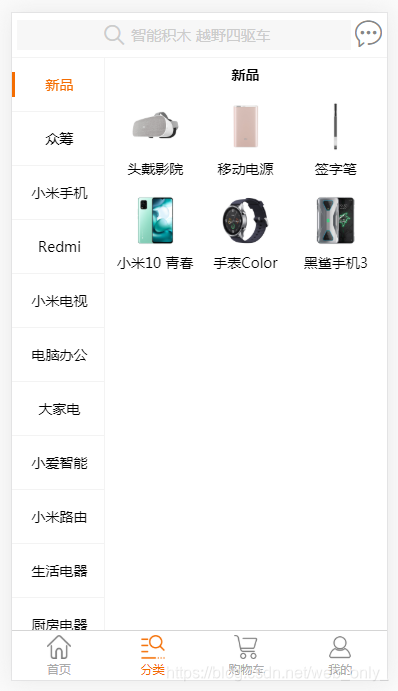
<template>
	<view class="productClass row" :style="productClassStyle">
		<loading :isShow="isLoadingShow"></loading>
		<!-- 左侧一级分类列表 -->
		<scroll-view class="leftClassList col-3 h-100" scroll-y :scroll-top="primaryScrollTop">
			<view class="leftClassItem" v-for="(item,index) in leftClassData" :key="index">
				<view :class="currentIndex===index?'selectClassItem':''" @tap="selectClassTap(index)">{{item.primary_name}}</view>
			</view>
		</scroll-view>

		<!-- 右侧二级分类列表 -->
		<scroll-view class="rightClassList col-9 h-100" scroll-with-animation scroll-y :scroll-top="scrollTop" @scroll="rightScroll">
			<view v-for="(item,index) in rightClassData" :key="index" class="rightClassBox" :style="{'min-height':rightUsableHeight}">
				<view class="row">
					<view class="col-12-percent text-center font-bold">{{item.primaryName}}</view>
						<view v-for="(item1,index1) in item.list" :key="index1" class="rightClassItem h-auto col-4-percent dis-flex align-center">
						<image :src="item1.cover"></image>
						<view>{{item1.secondary_name}}</view>
					</view>
				</view>
			</view>
		</scroll-view>
	</view>
</template>

<script>
	export default {
		data() {
			return {
				isLoadingShow:true,
				leftClassData:[],	//左侧一级分类列表数据
				rightClassData:[],	//右侧二级分类列表数据
				currentIndex:0,
				scrollTop:0,
				leftScrollTop:[],	//左侧每一个分类项目距离顶部的高度
				rightScrollTop:[],	//右侧每一个分类项目距离顶部的高度
				leftClassItemHeight:0,	//左侧一个分类项目的高
				primaryScrollTop:0,	//左侧分类项目距离顶部的距离
				productClassStyle:'',	//设备的可用高度
				rightUsableHeight:''
			}
		},
		methods: {
			//左侧一级分类列表的触碰事件
			selectClassTap(index){
				this.currentIndex = index;
				this.scrollTop = this.rightScrollTop[this.currentIndex]
				// console.log(this.rightScrollTop[this.currentIndex])
			},
			//右侧二级分类列表的滚动事件
			rightScroll(event){
				// console.log(event.detail.scrollTop)
				this.rightScrollTop.forEach((item,index)=>{
					if(item<=event.detail.scrollTop){
						this.currentIndex = index
					}
				})
			}
		},
		onLoad(){
			let temp =  uni.getSystemInfoSync();	//获取系统信息同步接口
			this.productClassStyle = `height:${temp.windowHeight}px`;	//获取可用高度
			this.rightUsableHeight = `${temp.windowHeight}px`;
			console.log(this.productClassStyle)
			console.log(this.rightUsableHeight)


			//返回一个SelectorQuery对象实例。
			//可以在这个实例上使用select等方法选择节点,并使用boundingClientRect等方法选择需要查询的信息。
			let query = uni.createSelectorQuery();

			//获取左侧一级分类列表数据
			uni.request({
				url:'/api/categoryPrimaryQueryAll.jsp',
				method:'get',
				success:res=>{
					console.log(res.data)
					this.leftClassData = res.data
					//$nextTick
					this.$nextTick(()=>{
						//遍历左侧每一个分类项目距离顶部的高度
						query.selectAll('.leftClassItem').boundingClientRect(data=>{
							this.leftScrollTop = data.map(item=>item.top)
						}).exec(()=>{
							console.log(this.leftScrollTop)
							this.leftClassItemHeight = this.leftScrollTop[1] - this.leftScrollTop[0]
							// console.log(this.leftClassItemHeight)
						})
					})
				}
			})
			//获取右侧二级商品分类数据
			uni.request({
				url:'/api/categorySecondaryQueryAll.jsp',
				method:'get',
				success:res=>{
					console.log(res.data)
					this.rightClassData = res.data
					this.$nextTick(()=>{
						//遍历右侧每一个分类项目距离顶部的高度
						query.selectAll('.rightClassBox').boundingClientRect(data=>{
							// console.log(data)
							this.rightScrollTop = data.map((item,index,array)=>{
								return item.top
							})
						}).exec(()=>{
							console.log(this.rightScrollTop)
						});
					})
				}
			})


				//loading动画加载消失
				this.$nextTick(()=>{
					this.isLoadingShow = false
				})
		},
		onReady() {

		},
		watch:{
			//watch:侦听属性。	当currentIndex值发生变化时触发函数
			currentIndex(newValue,oldValue){
				//判断左侧router-view是否需要滚动
				// console.log(newValue,oldValue)
				let query = uni.createSelectorQuery();
				query.select('.leftClassList').fields({
					size:true,	//是否返回节点尺寸(width height)
					scrollOffset:true	//是否返回节点的 scrollLeft scrollTop,节点必须是 scroll-view 或者 viewport
				},res=>{
					// console.log(res.height,res.scrollTop)
					let H = res.height;	//设备的可用高度(设备高度-导航条高度-tab栏高度)
					if(this.leftScrollTop[newValue] + this.leftClassItemHeight > H + res.scrollTop){
						//左侧第n个分类项目距离顶部的高度+左侧一个分类项目的高度 > 设备可用高度+左侧分类项目滚动的距离
						console.log('需要左侧向上滚动')
						this.primaryScrollTop = this.leftScrollTop[newValue] + this.leftClassItemHeight - H;
					}
					if(res.scrollTop > this.leftScrollTop[newValue]){
						//如果左侧分类项目滚动的距离 > 新变化的下标的左侧分类项目距离顶部的距离
						this.primaryScrollTop = this.leftScrollTop[newValue]
					}
				}).exec();
			}
		}
	}
</script>

<style>
	.productClass{
		border-top: 1px solid #f3f3f3;
	}

	.leftClassList{
		border-right: 1px solid #f3f3f3;
		padding: 0;
	}
	.leftClassList .leftClassItem{
		border-bottom: 1px solid #F3F3F3;
		padding: 28upx 0;
		text-align: center;
		font-size: 26upx;
	}
	.leftClassList .leftClassItem view{
		border-left: 3px solid transparent;
	}
	.leftClassList .leftClassItem .selectClassItem{
		color: #f46d01;
		border-left: 3px solid #f46d01;
	}

	.rightClassBox{
		min-height: ;
	}
	.rightClassList .rightClassBox .rightClassItem image{
		width: 119upx;
		height: 119upx;
	}
</style>





 扫一扫
扫一扫


 690
690

 被折叠的 条评论
为什么被折叠?
被折叠的 条评论
为什么被折叠?
 到【灌水乐园】发言





