


 本文探讨了在Ubuntu环境下,如何使用CLion进行图像调试。由于Windows下的Visual Studio有Image Watch,但在Ubuntu中CLion的Image Watch插件需付费,作者转向研究了Open Image Debugger的安装与配置,但未成功。随后,作者找到了CLion的OpenCV Image Viewer免费插件,并详细介绍了如何安装和使用这一插件来实现图像调试。
在windows下有vistual studio,针对opencv有image watch,在ubuntu下用Clion插件Image Watch要收费,遂研究OpenImageDebugger与CLion问题及在Clion中调试方法
1.Open Image Debugger
Open Image Debugger is a tool for visualizing in-memory buffers during debug sessions, compatible with both GDB and LLDB. It works out of the box with instances of the OpenCV Mat class and Eigen matrices, but can also be customized to work with any arbitrary data structure.
说明及安装步骤见Git官网:OpenImageDebugger
安装时注意:其中PREFIX=/path/to/installation/folder表示gdb-imagewatch的安装路径,如果不设置这个参数,则使用默认的安装路径:/usr/local.
Qt中设置启动时载入.gdbinit:
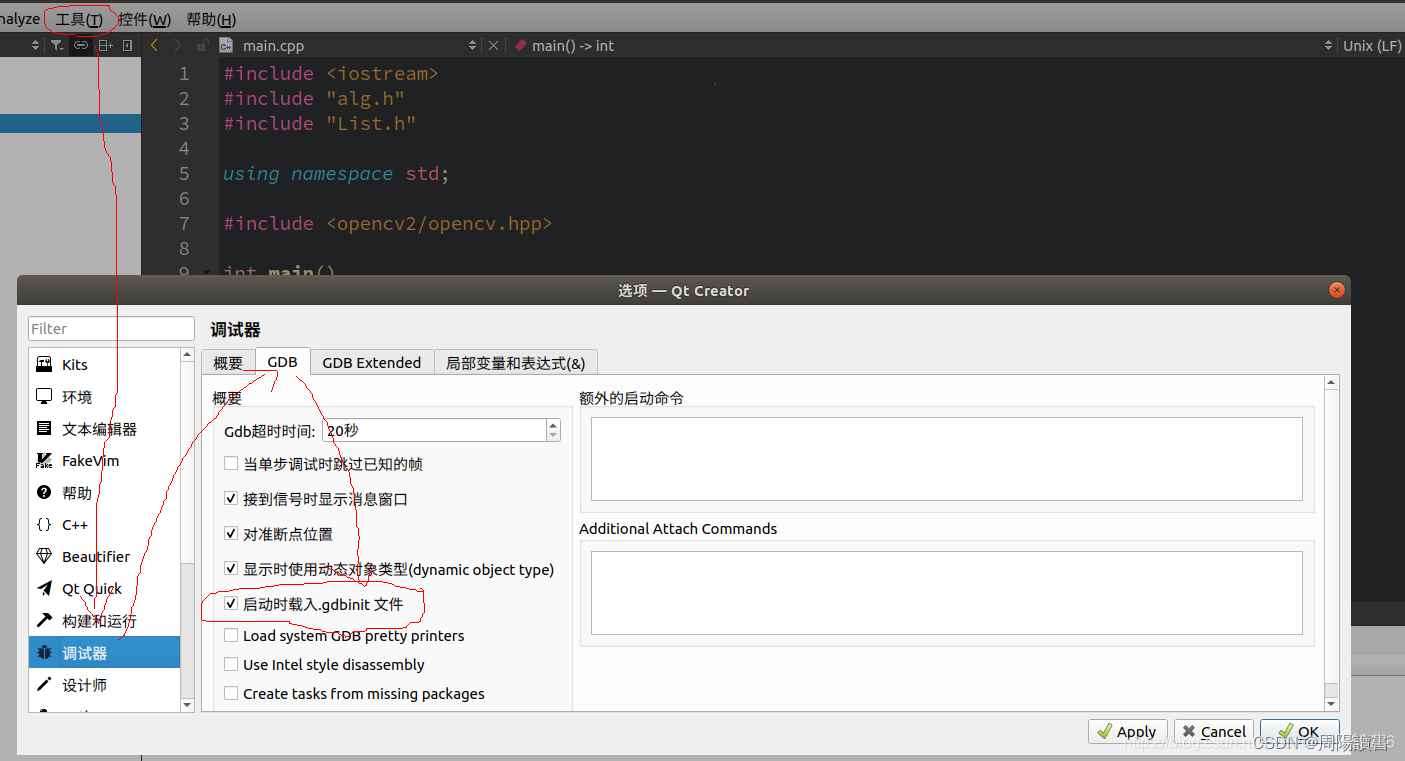
但是在CLion中没有这个设置:
参见官网:Custom .gdbinit/.lldbi







 扫一扫
扫一扫


 2万+
2万+

 被折叠的 条评论
为什么被折叠?
被折叠的 条评论
为什么被折叠?
 到【灌水乐园】发言





