


 本文介绍了版本控制系统的重要性,详细讲解了Git的基本概念和使用方法,包括初始化仓库、检查状态、跟踪文件、暂存更改、提交文件以及查看提交日志。适合初学者快速掌握Git的基本操作。
git使用简介
什么是版本控制系统 (What are version control systems)
Imagine a software code base with thousands of files, and multiple developers contributing code to it. It can be really difficult to manage such a large and complex repository of code without proper tools. A version control system helps track and manage changes to these files, and enables versioning of source code. There are a number of version control systems like GIT, Mercurial, Apache Subversion (SVM), ClearCase, etc. In this article, we will be taking a look at one of the most popular choices — GIT, and how it is used by developers.
想象一下一个软件代码库,其中包含成千上万个文件,并且有多个开发人员为其提供代码。 如果没有适当的工具,要管理如此庞大和复杂的代码存储库确实很困难。 版本控制系统有助于跟踪和管理对这些文件的更改,并支持对源代码进行版本控制。 有许多版本控制系统,例如GIT , Mercurial, Apache Subversion(SVM), ClearCase等。在本文中,我们将介绍最流行的选择之一-GIT,以及开发人员如何使用它。 。
为什么需要版本控制系统 (Why are version control systems required)
Before we dive into the workings of GIT and the technical details, first let’s take a look at what would happen if we did not use a version control system, and if we simply used a cloud storage provider like google drive or dropbox to store and share all of our code.
在深入研究GIT的工作原理和技术细节之前,首先让我们看一下如果不使用版本控制系统,以及仅使用诸如Google Drive或Dropbox之类的云存储提供商进行存储和共享会发生什么情况。我们所有的代码。
With no system in place to track changes to files, it would be impossible to maintain a history of who changed which part of which file, making it difficult for developers to collaborate on a single project. It would also be tedious to manage different versions of our code base — we could possibly create separate copies of different versions of the entire code and store them in folders, but we will not be able to find differences between various versions and unable to figure out what features went into each version, etc.
没有可用的系统来跟踪文件的更改,就不可能维护谁更改了文件的哪个部分的历史记录,这使开发人员难以在单个项目上进行协作。 管理我们代码库的不同版本也很麻烦-我们可能会创建整个代码的不同版本的单独副本并将它们存储在文件夹中,但是我们将无法找到不同版本之间的差异并且无法弄清楚每个版本都有哪些功能,等等。
Also, there would be no way to recover specific revisions of each file. For example, if some changes went in 10 days ago, and we realize that there is a bug in that code, we would want to track down the exact changes that were made so as to either revert the change until we can figure out a solution or to fix the issue right away. And we would also want to know who made the change since that person would have a better understanding of how the code works, and the same person could help us fix the issue.
另外,将无法恢复每个文件的特定修订版。 例如,如果在10天前进行了一些更改,并且我们意识到该代码中存在错误,则我们希望跟踪所做的确切更改,以便还原更改直到找到解决方案为止或立即解决该问题。 而且我们还想知道是谁进行了更改,因为那个人将对代码的工作方式有更好的了解,而那个人可以帮助我们解决问题。
Another point of consideration is that if multiple people are working on the same few files at the same time, then there are bound to be tons of problems when trying to merge (merge conflicts) those files together to make the whole piece of code work together. All these issues would lead to chaos and make it near impossible for developers to collaborate with each other. Version control systems solve almost all of these problems, and help developers manage their code base while still maintaining their sanity.
另一个需要考虑的问题是,如果多个人同时处理同一个文件,那么在试图将这些文件合并(合并冲突)以使整个代码段协同工作时,肯定会有很多问题。 。 所有这些问题将导致混乱,并使开发人员几乎无法相互协作。 版本控制系统几乎解决了所有这些问题,并帮助开发人员管理其代码库,同时仍保持理智。
To summarize, version control systems are useful for things like
总而言之,版本控制系统对于诸如
- Recovering specific revisions of each file 恢复每个文件的特定修订版
- Maintaining a history of who made what change to each file and when 维护谁对每个文件以及何时进行了哪些更改的历史记录
- Manage versions of a product and gracefully manage product features 管理产品版本并正常管理产品功能
- Provide a reliable backup of the codebase 提供代码库的可靠备份
- Reverting back in case of issues or bugs 如果出现问题或错误,请还原
- Collaboration between multiple developers and teams 多个开发人员和团队之间的协作
什么是GIT (What is GIT)
Git was created in 2005 by Linus Torvalds for development of the Linux kernel. It is a free and open source version control software application used to manage and track changes to a set of files. Usually, it is accessed through the terminal, although there are graphical applications available to manage your repositories. ex: sublime merge or github desktop
Git由Linus Torvalds于2005年创建,用于Linux内核的开发。 它是一个免费和 开源的 版本控制 软件应用程序,用于管理和跟踪对一组文件的更改。 通常,尽管可以使用图形应用程序来管理存储库,但可以通过终端访问它。 例如: 崇高合并或github桌面
What is a terminal: An application on your computer which allows text based access to the operating system (command line on windows). You can install applications, and interact with applications through the terminal. Usually the git application is used from the terminal.
什么是 终端 :计算机上的应用程序,允许基于文本的访问操作系统(Windows上的命令行 )。 您可以安装应用程序,并通过终端与应用程序进行交互。 通常,从终端使用git应用程序。
安装和初始化GIT (Installing and Initializing GIT)
正在安装 (Installing)
Installing git is straightforward — just follow the steps on the downloads page https://git-scm.com/downloads. Although most macs and linux installations come with git pre-installed, you might have to install it on a windows machine. You can use either the windows command line or git bash to access git based on your configuration. You can create a git repository out of any folder with your code. In fact git is also used for version controlling documentation and other metadata. In this guide, I am going to use MacOS for the demo, but the git commands work the same in Windows.
安装git很简单-只需按照下载页面https://git-scm.com/downloads上的步骤进行即可。 尽管大多数Mac和Linux安装都预装有git,但您可能必须将其安装在Windows计算机上。 您可以根据配置使用Windows命令行或git bash访问git。 您可以使用代码在任何文件夹之外创建git存储库。 实际上,git也用于版本控制文档和其他元数据。 在本指南中,我将使用MacOS进行演示,但是git命令在Windows中的工作原理相同。
初始化中 (Initializing)
The command git init is used to initialize an empty git repository in a particular folder. What happens on running this command? — git creates a hidden folder called .git in the directory where you ran the command. This folder is where git stores all the metadata regarding your files, and the changes made to those files, along with other configuration data.
git init命令用于初始化特定文件夹中的空git存储库。 运行此命令会发生什么? — git在运行命令的目录中创建一个名为.git的隐藏文件夹。 这个文件夹是git存储有关文件的所有元数据,对这些文件所做的更改以及其他配置数据的位置。
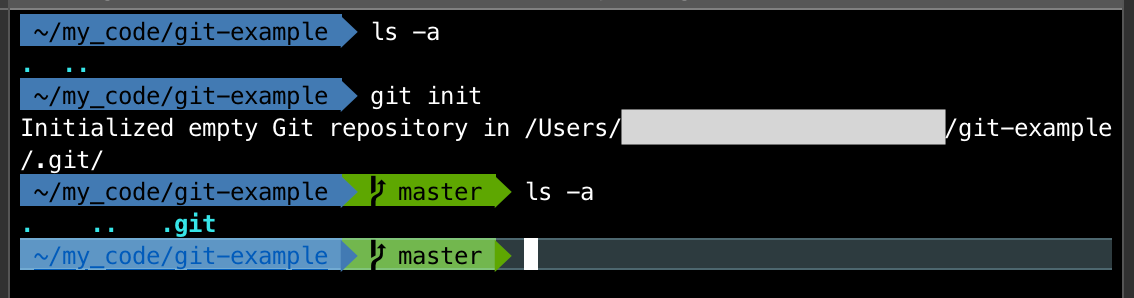
As you can see in the image above, running git init initialized an empty git repository and created a hidden folder named .git — we don’t need to do anything with this hidden folder, but this is used by git internally to manage data for your repository (you can view hidden files and folders using ls -a command on linux based systems).
如上图所示,运行git init初始化一个空的git信息库并创建一个名为.git的隐藏文件夹-我们无需对此隐藏文件夹进行任何操作,但是git内部会使用它来管理数据您的存储库(您可以在基于linux的系统上使用ls -a命令查看隐藏的文件和文件夹)。
So if you wanted to remove the git repository from this folder, you can simply delete the .git folder. This will not affect the current state of other files in your folder, but it will remove all the changes that git was tracking.
因此,如果要从此文件夹中删除git存储库,则只需删除.git文件夹。 这不会影响文件夹中其他文件的当前状态,但是会删除git跟踪的所有更改。
使用GIT (Using GIT)
检查状态 (Checking status)
Once we have initialized git in a folder, we can check the status of our repository using the command git status
在文件夹中初始化git之后,我们可以使用git status命令检查存储库的git status
Check the status of your repository using the command:
git status使用以下命令检查存储库的状态:
git status
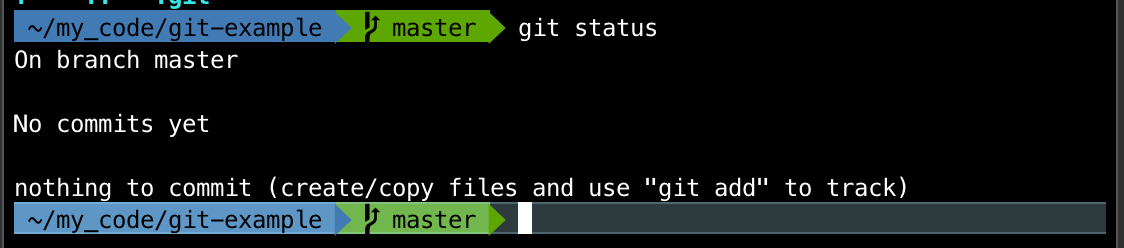
Here, we can see that running git status in our empty git repository tells us four things
在这里,我们可以看到在空git存储库中运行git status可以告诉我们四件事
On
masterbranch — We will take a look at what branches are in a later article, but for now keep in mind that git creates a default branch calledmasterwhen you initialize a repository.在
master分支上 —我们将在以后的文章中了解什么是分支,但是现在请记住git在初始化存储库时会创建一个称为master的默认分支。There are no commits yet — This means that we have not committed any changes to the repository yet.
尚无提交 -这意味着我们尚未对存储库进行任何更改。
Nothing to commit — There are no changes to any files in this folder that can be committed.
没有要提交的内容 -此文件夹中可以提交的文件没有任何更改。
Create/Copy files and use git add to track — We can add files to this folder and run the command
git addto track those files. Lets take a look at this command next.创建/复制文件并使用git add进行跟踪 -我们可以将文件添加到此文件夹中,然后运行
git add命令来跟踪这些文件。 接下来让我们看一下该命令。
追踪 (Tracking)
As we saw in the previous part, git told us that we can add files to our folder and use the command git add to track those files. Lets take a look at how this command works.
正如我们在上一部分中所看到的,git告诉我们可以将文件添加到文件夹中,并使用git add命令来跟踪这些文件。 让我们看一下此命令的工作方式。
Let’s say we are developing a simple website and we created a new index file called index.html with this basic html template.
假设我们正在开发一个简单的网站,并使用此基本html模板创建了一个名为index.html的新索引文件 。
<!doctype html>
<html lang="en">
<head>
  <meta charset="utf-8">
  <title>Learning Git</title>
</head>
<body>
  <div>Hello World!</div>
</body>
</html>
After saving this file to the git-example folder, let us check the status.
将文件保存到git-example文件夹后,让我们检查状态。
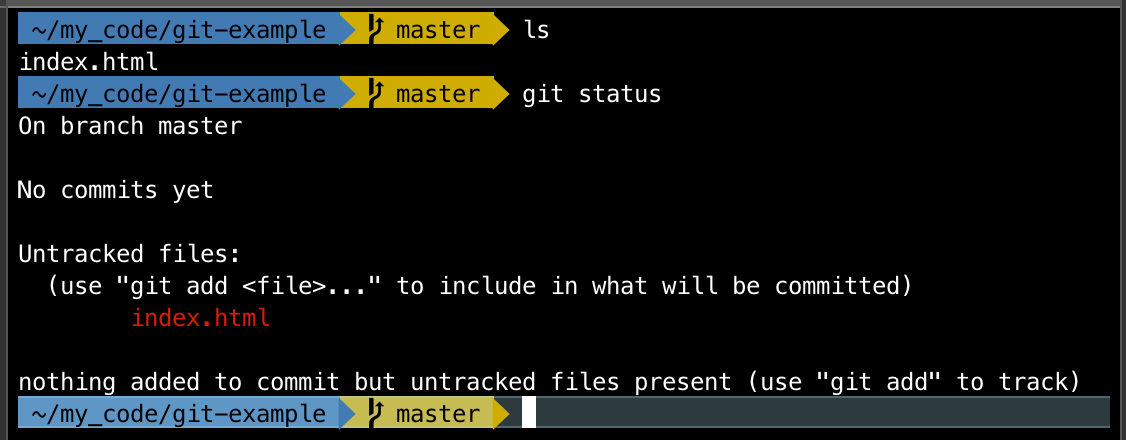
We can see that git is now saying there is a new untracked file called index.html It still says nothing is added to commit, but we can add untracked files using git add When we create and save a new file, git does not proactively do anything about it, unless we specifically tell it to. Let us add this file to git and explore what that means. The documentation says — This command updates the index using the current content found in the working tree, to prepare the content staged for the next commit.
我们可以看到git现在说有一个名为index.html未跟踪新文件index.html它仍然说未添加任何内容来提交,但是我们可以使用git add添加未跟踪的文件在创建并保存新文件时,git不会主动执行关于它的任何事情,除非我们明确告知。 让我们将此文件添加到git中,并探讨其含义。 文档说- This command updates the index using the current content found in the working tree, to prepare the content staged for the next commit.
So the command git add tells git to track your file, if it is not being tracked and also update the index (git’s index — not to be confused with our index.html file) with the changes in that file. So essentially it stages the file for commit.
因此,命令git add告诉git跟踪您的文件(如果没有被跟踪),并使用该文件中的更改来更新索引(git的索引-不要与我们的index.html文件混淆)。 因此,从本质上讲,它暂存文件以进行提交。
Adding content from an individual file:
git add <filename>从单个文件添加内容:
git add <filename>Adding all unstaged content in the current folder:
git add .在当前文件夹中添加所有未暂存的内容:
git add .
Let us run the command and check out what happens
让我们运行命令并查看会发生什么
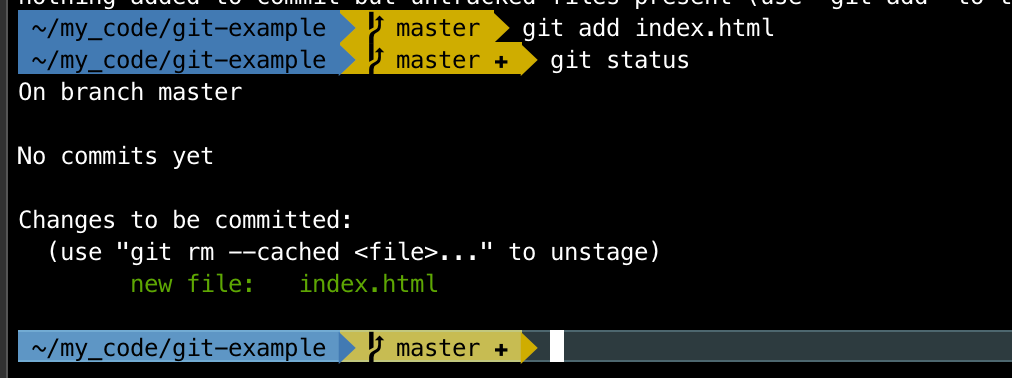
As expected, git says that there is a new file called index.html and it is showing up as Changes to be committed. We will take a look at staging and committing in the next sections.
正如预期的那样,git表示有一个名为index.html的新文件,它显示为要提交的更改。 我们将在下一部分中介绍暂存和提交。
分期 (Staging)
Git has a staging area — an intermediate place where we can edit and review our changes before committing them. When we run the command git add we move our changes into the staging area.
Git有一个暂存区 –一个中间位置,我们可以在提交之前编辑和查看更改。 当我们运行命令git add我们将更改移到暂存区域。

When we commit changes, all changes that are staged will be committed to the repository. We can either stage all changes, or selectively stage changes for commit, as we saw in the earlier section using git add .
当我们提交更改时,所有暂存的更改都将提交到存储库。 如上一节中使用git add ,我们可以git add所有更改,也可以有选择地git add更改以提交。
For our example website, let us add another file and stage it — I created a new file called about.html and saved it in our website folder. Let us check the git status before staging this new file.
对于我们的示例网站,让我们添加另一个文件并将其about.html -我创建了一个名为about.html的新文件,并将其保存在我们的网站文件夹中。 在暂存此新文件之前,让我们检查git状态。
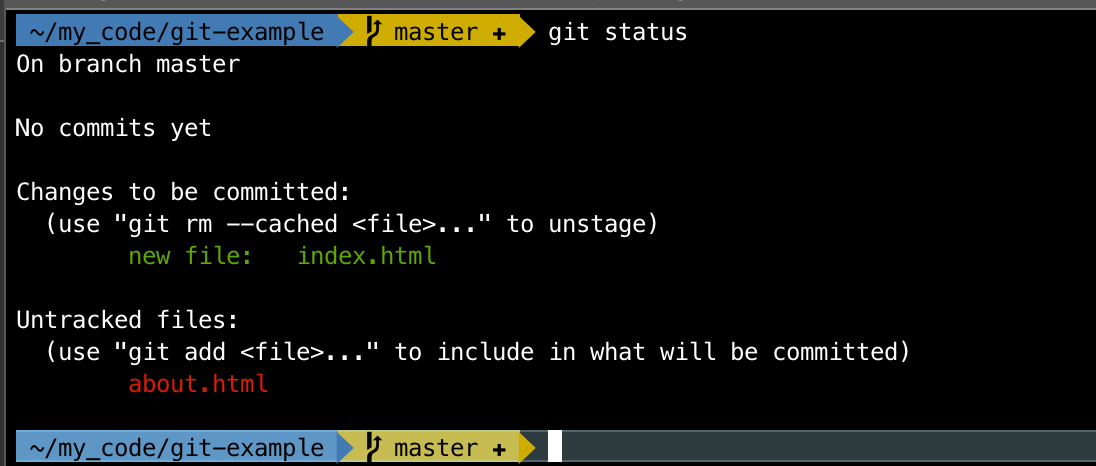
Git says that there is a new file called about.html which is untracked. We can use git add to track this file, and move it to our staging area. But before we do that, its a good idea to take a look at where each file is in the git process — our index.html file is in the staging area (since we added it earlier using git add) And the new file about.html is in the working directory, since we have not told git to do anything to it.
Git说,有一个名为about.html的新文件没有被跟踪。 我们可以使用git add来跟踪该文件,并将其移到暂存区。 但是在执行此操作之前,最好先查看每个文件在git进程中的位置-我们的index.html文件在登台区域中(因为我们之前使用git add对其进行了git add )以及新文件about.html在工作目录中,因为我们没有告诉git对它做任何事情。
Let us add this file to the staging area using git add .
让我们使用git add .将此文件添加到暂存区域git add .
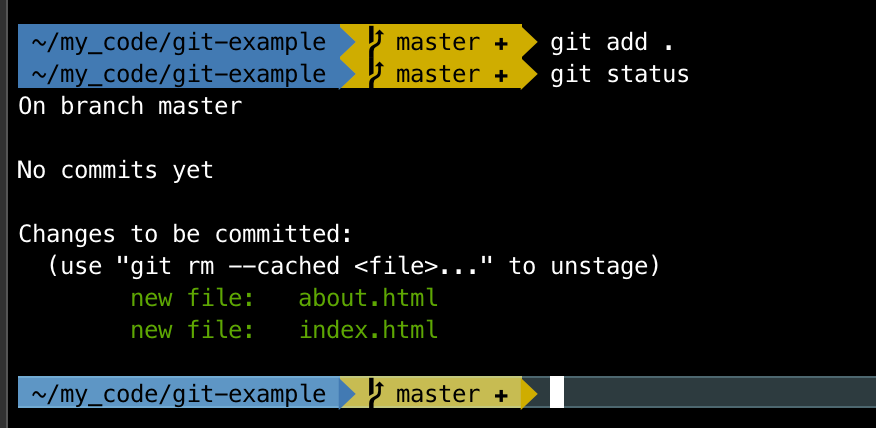
Now we can see that git says there are 2 new files that are ready to be committed. Great! Let us take a look at how to commit these files in the next section.
现在我们可以看到git表示有两个准备提交的新文件。 大! 让我们在下一部分中看看如何提交这些文件。
提交中 (Committing)
We can add files to our repository using the command git commit. This command commits the staged files to the git repository. This command accepts a message we can use to attach to our commit using the -m option.
我们可以使用命令git commit将文件添加到存储库中。 此命令将暂存的文件提交到git存储库。 该命令接受一条消息,我们可以使用-m选项将其附加到提交中。
Let us commit our 2 files using the command git commit -m "first commit"
让我们使用命令git commit -m "first commit"来提交2个文件。
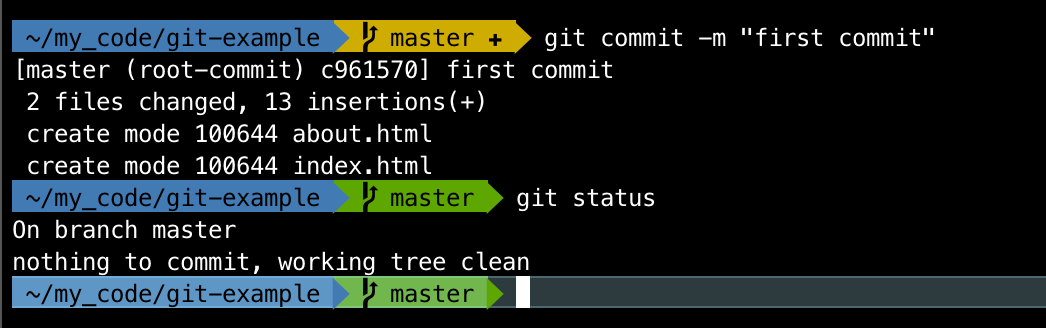
After committing our changes, we can see that git says there is nothing to commit and working tree is clean — meaning that there are no other changes in our directory that can be added and committed at this time.
提交更改后,我们可以看到git表示没有要提交的内容,并且工作树是干净的-这意味着此时目录中没有其他更改可以添加和提交。
Commit staged changes using
git commit -m "<message>"使用
git commit -m "<message>"提交阶段性更改
Awesome! We made our fist commit. But how do we take a look at our commit logs? What commits went in before and who made them?
太棒了! 我们做出了拳头承诺。 但是,我们如何看待提交日志? 之前提交过哪些提交内容,是谁创建的?
检查日志 (Checking the log)
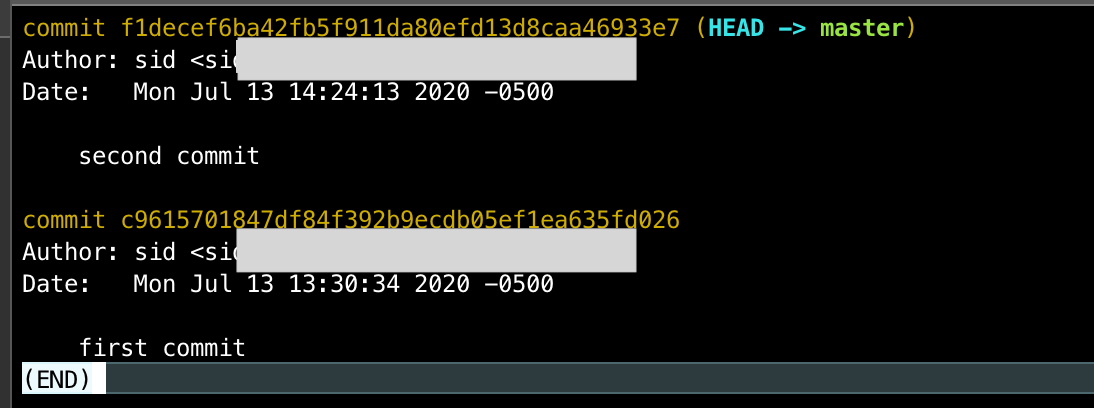
We can check the history of previous commits using the command git log
我们可以使用命令git log检查以前的提交历史
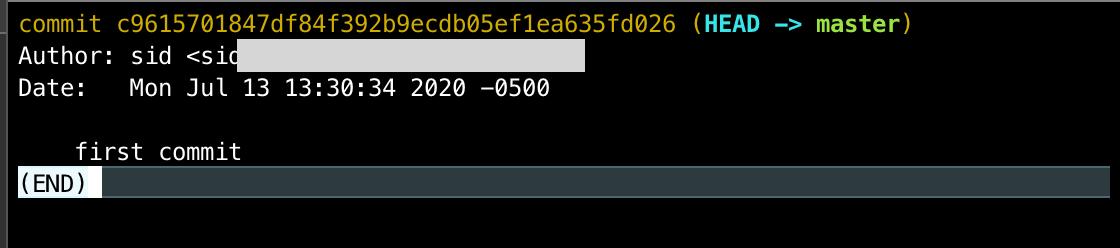
This command shows us the commit history, when they were made and who made them.
该命令向我们显示提交历史,创建时间和创建者。
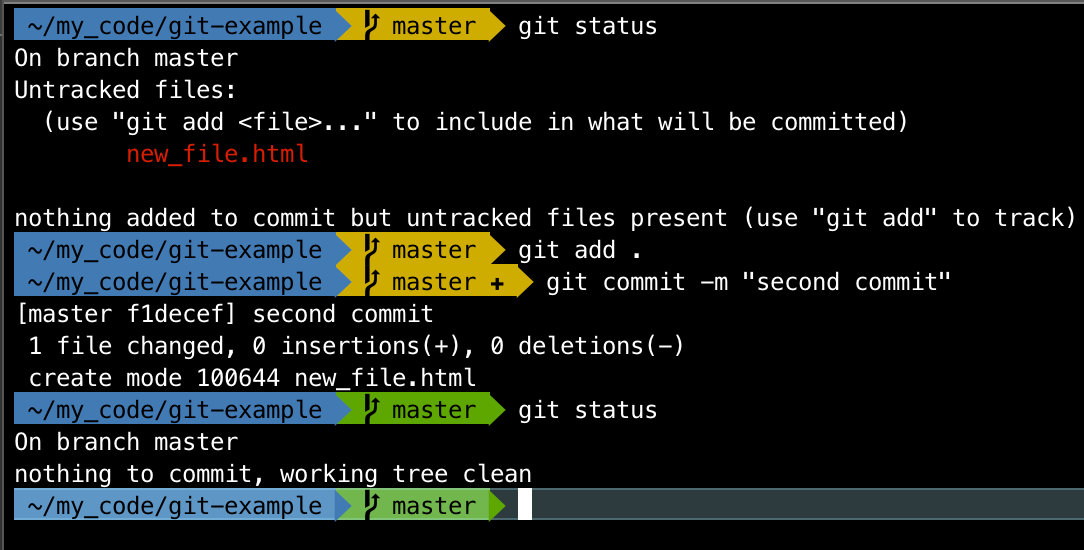
Let us add another file, and commit it and check the logs
让我们添加另一个文件,然后提交并检查日志
View the logs with command
git log使用命令
git log查看git log
The logs show us the commits —who made them and when. This is specially useful when working in teams and multiple developers are contributing code to the same repository.
日志向我们显示了提交的内容-谁以及何时进行的。 当团队工作并且多个开发人员将代码贡献到同一存储库时,此功能特别有用。
Awesome! We have successfully created a git repository, added files to it, committed those changes to our repository and checked the logs.
太棒了! 我们已经成功创建了一个git存储库,向其中添加了文件,并将这些更改提交给我们的存储库并检查了日志。
Now that we have some code committed to a git repository, we can now host it online and collaborate with other developers.
既然我们已经将一些代码提交给了git存储库,我们现在就可以在线托管它并与其他开发人员进行协作。
什么是GitHub (What is GitHub)
Github is a platform for hosting and reviewing code and project management. It provides an online space for hosting git repositories. There are other companies that provide similar functionality as well like BitBucket and GitLab.
Github是一个用于托管和审查代码以及项目管理的平台。 它提供了一个在线空间来托管git存储库。 其他公司也提供类似的功能,例如BitBucket和GitLab 。
We will take an in-depth look at how to work with github and collaborate with others in an upcoming article.
在下一篇文章中,我们将深入研究如何使用github并与他人合作。
摘要 (Summary)
In this article, we took a look at what are version control systems and how they are crucial to the software development workflow, what is git and how git is used. We looked at the basic commands like git init ,git status,git add,git commit and git log.
在本文中,我们研究了什么是版本控制系统以及它们对软件开发工作流程如何至关重要,什么是git以及如何使用git。 我们研究了基本命令,例如git init , git status , git add , git commit和git log 。
Hopefully this article provides a useful introduction to git and the development workflow, and makes you comfortable using git to manage your code. Feel free to post any questions in the comments below and I will try to answer them to the best of my knowledge. We will be exploring advanced git techniques and how to use Github in upcoming articles, so stay tuned!
希望本文对git和开发工作流程提供有用的介绍,并使您轻松使用git管理代码。 请随时在下面的评论中发布任何问题,我将尽我所能回答。 我们将在以后的文章中探索先进的git技术以及如何使用Github,敬请期待!
翻译自: https://medium.com/swlh/introduction-to-git-d5e17392bdd1
git使用简介








 扫一扫
扫一扫


 1489
1489

 被折叠的 条评论
为什么被折叠?
被折叠的 条评论
为什么被折叠?
 到【灌水乐园】发言





