


 本文介绍如何使用UIKit组件创建一个简单的图片查看器。通过UIImageView显示图片,UISlider控制图片透明度,UIButton切换图片。代码中详细展示了如何初始化图片数组,以及按钮和滑块的事件处理。
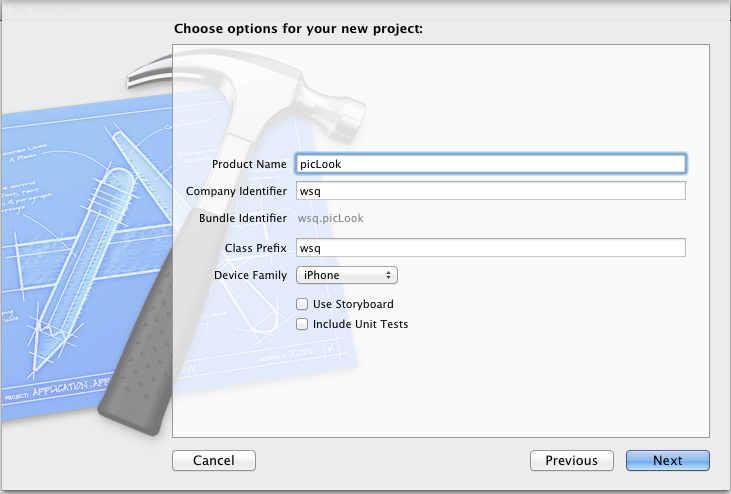
新建一个single view 工程:
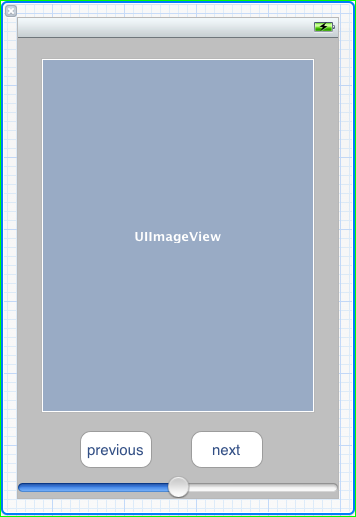
关闭ARC , 在.xib视图文件上拖放一个UIImageView 两个UIButton ,一个UISlider ,布局如图。
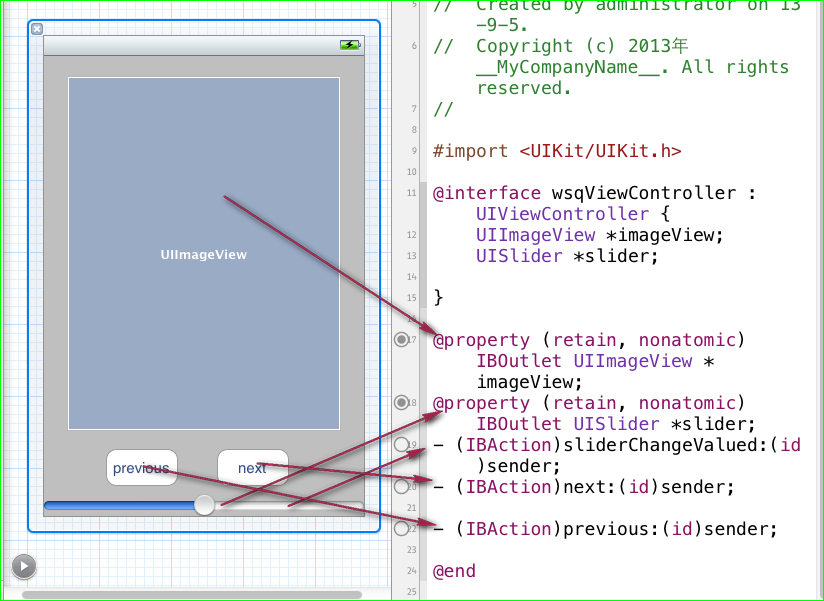
并为他们连线,
UIImageView 和 UISlider 分别定义插座变量,两个 UIButton 分别 连接两个Action next和previous ,在为 UISlider 连接一个Action 事件。
再在.h 文件中声明两个实例变量。 NSInteger index ; NSMutableArray* arrayPic ; 一个用来记录当前图片的index,一个用来做图片的容器,
用UISlider 来控制图片的透明度 (alpha 属性)。在slider 的界面构建起动作中添加代码,让图片的透明度等于 slider的value。
- (IBAction)sliderChangeValued:(id)sender {

    self.imageView.alpha = slider.value;
}
在两个UIButton 的界面构建起动作中添加代码,循环遍历arrayPic中的图片:
- (IBAction)next:(id)sender {
    if(index == [arrayPic count]){
        index = 0;
    }
    self.imageView.image = [UIImage imageWithContentsOfFile:[arrayPic objectAtIndex:index]];
    index++;
}

- (IBAction)previous:(id)sender {
    if(index == -1){
        index = ([arrayPic count] -1);
    }
   self.imageView.image = [UIImage imageWithContentsOfFile:[arrayPic objectAtIndex:index]];
    index--;
}
至此:简单的图片查看器已经完成,
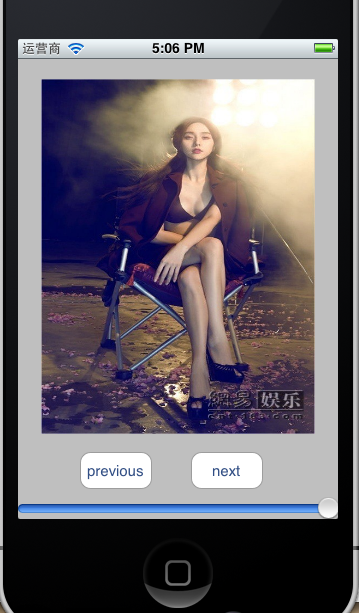
整个控制器类中的代码:
//
//  wsqViewController.h
//  picLook
//
//  Created by administrator on 13-9-5.
//  Copyright (c) 2013年 __MyCompanyName__. All rights reserved.
//

#import <UIKit/UIKit.h>

@interface wsqViewController : UIViewController {
    UIImageView *imageView;
    UISlider *slider;
    NSInteger index ;
    NSMutableArray* arrayPic ;


}

@property (retain, nonatomic) IBOutlet UIImageView *imageView;
@property (retain, nonatomic) IBOutlet UISlider *slider;
- (IBAction)sliderChangeValued:(id)sender;
- (IBAction)next:(id)sender;

- (IBAction)previous:(id)sender;

@end
//
//  wsqViewController.m
//  picLook
//
//  Created by administrator on 13-9-5.
//  Copyright (c) 2013年 __MyCompanyName__. All rights reserved.
//

#import "wsqViewController.h"

@implementation wsqViewController
@synthesize imageView;
@synthesize slider;

- (void)didReceiveMemoryWarning
{
    [super didReceiveMemoryWarning];
    // Release any cached data, images, etc that aren't in use.
}

#pragma mark - View lifecycle

- (void)viewDidLoad
{
    [super viewDidLoad];
    //获取mainbudle下所有 jpg格式的图片,
      arrayPic = [[NSMutableArray alloc ] initWithArray: [[NSBundle mainBundle] pathsForResourcesOfType:@"jpg" inDirectory:nil]];
    index = 0;
    NSLog(@"%@",arrayPic);

}

- (void)viewDidUnload
{
    [self setImageView:nil];
    [self setSlider:nil];
    [super viewDidUnload];
    // Release any retained subviews of the main view.
    // e.g. self.myOutlet = nil;
}

- (void)viewWillAppear:(BOOL)animated
{
    [super viewWillAppear:animated];
}

- (void)viewDidAppear:(BOOL)animated
{
    [super viewDidAppear:animated];
}

- (void)viewWillDisappear:(BOOL)animated
{
    [super viewWillDisappear:animated];
}

- (void)viewDidDisappear:(BOOL)animated
{
    [super viewDidDisappear:animated];
}

- (BOOL)shouldAutorotateToInterfaceOrientation:(UIInterfaceOrientation)interfaceOrientation
{
    // Return YES for supported orientations
    return (interfaceOrientation != UIInterfaceOrientationPortraitUpsideDown);
}

- (void)dealloc {
    [arrayPic release];
    [imageView release];
    [slider release];
    [super dealloc];
}
- (IBAction)sliderChangeValued:(id)sender {

    self.imageView.alpha = slider.value;
}

- (IBAction)next:(id)sender {
    if(index == [arrayPic count]){
        index = 0;
    }
    self.imageView.image = [UIImage imageWithContentsOfFile:[arrayPic objectAtIndex:index]];
    index++;
}

- (IBAction)previous:(id)sender {
    if(index == -1){
        index = ([arrayPic count] -1);
    }
   self.imageView.image = [UIImage imageWithContentsOfFile:[arrayPic objectAtIndex:index]];
    index--;
}
@end





 扫一扫
扫一扫


 697
697

 被折叠的 条评论
为什么被折叠?
被折叠的 条评论
为什么被折叠?
 到【灌水乐园】发言





