


 本文介绍了一种基于SQL Server的无限级分类系统的设计与实现,包括表结构设计、查询、添加、顺序调整、删除和修改等操作的具体实现方法。
最近在做个CMS系统,要做无限级分类。开始在网上找,希望能有现成的拿来就用,结果没搜到满意的,要吗操作复杂,要吗结构复杂,于是想自己倒腾一个,结果还算满意。
1、表结构:
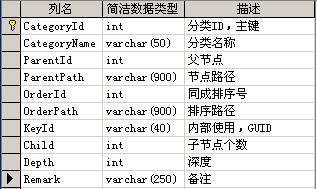
2、查询所有分类(树型)

 Code
Code1
 Select * from Category Order By OrderPath
3、查询某个分类(这里假设该节点ID为 10)下属分类
Code1
a、直接下属:Select * From Category Where ParentId=10 2
3
b、本身及所有子节点:Select * From Category Where ParentPath Like '10%' Order By OrderPath 4
5
c、所有下属子节点(不含本身):Select * From Category Where ParentPath Like '10,%' Order By OrderPath 6
4:添加分类(存储过程实现):
Code1
create proc Proc_InsertCategory(2
@CategoryName varchar(50),3
@ParentId int,4
@Remark varchar(250)5
) as6
begin7
declare @KeyId varchar(40)8
declare @OrderId int9
declare @CategoryId int 10
declare @Path varchar(900)11
declare @OrderPath varchar(900)12
select @KeyId=NewId()13
if @ParentId > 014
Select @OrderId=IsNull(Max(OrderId),0) + 1 From Category Where ParentId=@ParentId15
else16
Select @OrderId=IsNull(Max(OrderId),0) + 1 From Category Where ParentId=CategoryId 17
18
Insert Into Category(ChannelId,KeyId,CategoryName,ParentId,OrderId,Child,Remark)19
Values(@ChannelId,@KeyId,@CategoryName,@ParentId,@OrderId,0,@Remark)20
Select @CategoryId=CategoryId From Category Where KeyId=@KeyId21
if @ParentId > 022
begin23
select @Path=ParentPath,@OrderPath=OrderPath From Category Where CategoryId=@ParentId24
Update Category Set ParentPath=@Path + ',' + Cast(@CategoryId As Varchar(10)),OrderPath=@OrderPath + ',' + Cast(@OrderId As Varchar(10)) Where CategoryId=@CategoryId 25
Update Category Set Child=Child + 1 Where CategoryId=@ParentId26
end27
else28
Update Category Set ParentId=@CategoryId,Path=Cast(@CategoryId As Varchar(10)),OrderPath=Cast(@OrderId As Varchar(10)) Where CategoryId=@CategoryId29
Select @CategoryId30
end 31
32
5、顺序调整:
--辅助过程
Code1
create Proc Proc_ResetCategoryOrder(2
@CategoryId int,3
@OrderId int4
) as5
begin6
Update Category7
Set OrderId=@OrderId,OrderPath=(Select OrderPath From Category Where CategoryId=(Select ParentId From Category Where CategoryId=@CategoryId)) + ',' + cast(@OrderId As varchar(10))8
Where CategoryId=@CategoryId 9
10
Update Category11
Set OrderPath=(Select OrderPath From Category Where CategoryId=@CategoryId) + ',' + cast(OrderId As varchar(10))12
Where ParentPath like (Select ParentPath From Category Where CategoryId=@CategoryId) + ',%'13
end 14
--修改分类序号
Code1
create Proc Proc_ChangeCategoryOrder(2
@CategoryId int,3
@NewOrderId int4
) as5
begin6
exec Proc_ResetCategoryOrder @CategoryId,@NewOrderId7
declare @OldOrderId int8
declare @ParentId int9
declare @cid int10
declare @oid int11
Select @OldOrderId=OrderId,@ParentId=ParentId From Category Where CategoryId=@CategoryId12
if @OldOrderId=@NewOrderId13
return14
declare @Relation_Category cursor 15
16
if @ParentId = @CategoryId17
begin18
if @OldOrderId>@NewOrderId19
set @Relation_Category = cursor for select CategoryId,OrderId+1 From Category Where CategoryId=ParentId And OrderId<@OldOrderId And OrderId>@NewOrderId20
else21
set @Relation_Category = cursor for select CategoryId,OrderId-1 From Category Where CategoryId=ParentId And OrderId>@OldOrderId And OrderId<@NewOrderId22
end23
else24
begin25
if @OldOrderId>@NewOrderId26
set @Relation_Category = cursor for select CategoryId,OrderId+1 From Category Where CategoryId=@ParentId And OrderId<@OldOrderId And OrderId>@NewOrderId27
else28
set @Relation_Category = cursor for select CategoryId,OrderId-1 From Category Where CategoryId=@ParentId And OrderId>@OldOrderId And OrderId<@NewOrderId29
end30
open @Relation_Category31
fetch next from @Relation_Category into @cid,@oid32
while @@fetch_status=033
begin34
exec Proc_ResetCategoryOrder @cid,@oid 35
fetch next from @Relation_Category into @cid,@oid36
end37
close @Relation_Category38
DEALLOCATE @Relation_Category39
end 40
6、删除分类:
Code1
Delete From Category Where ParentPath Like (Select ParentPath From Category Where CategoryId=@CategoryId) + '%'
7、修改:
就只是修改名称和备注,直接更新就可以了
开始的时候觉得好像很难,做出来了才发现,很简单的嘛





 扫一扫
扫一扫


 722
722

 被折叠的 条评论
为什么被折叠?
被折叠的 条评论
为什么被折叠?
 到【灌水乐园】发言





