


 本文介绍了如何在Android应用中自定义标题栏样式,包括设置自定义布局、修改背景颜色和高度,以及应用主题样式。通过修改代码顺序、定义布局文件、设置样式和应用主题,实现了对标题栏的全面定制。提供了源码下载链接供读者参考。
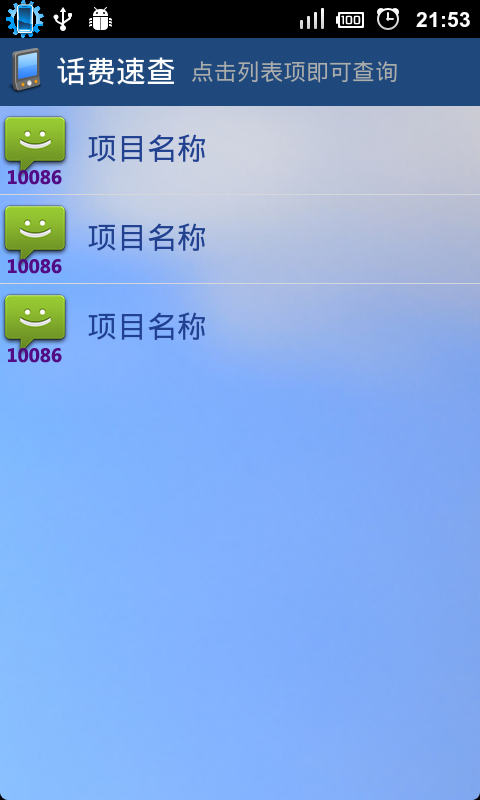
在开发上个应用 话费速查 的时候,需要修改标题栏的样式,但是android自身的标题栏是不支持修改样式的,因此需要通过下面的方式让android支持自定义标题栏:
super.onCreate(savedInstanceState);
requestWindowFeature(Window.FEATURE_CUSTOM_TITLE);
setContentView(R.layout.main);
getWindow().setFeatureInt(Window.FEATURE_CUSTOM_TITLE, R.layout.title);
注意上面的代码顺序不要改变,否则不会有效果。
上面的R.layout.title就是自定义标题栏的布局文件:
android:layout_width="fill_parent"
android:layout_height="wrap_content"
android:orientation="horizontal"
android:layout_gravity="center_vertical">
android:src="@drawable/phone"
android:contentDescription="@string/desc"
android:gravity="center_vertical"
android:layout_width="wrap_content"
android:layout_height="fill_parent"/>
android:layout_width="wrap_content"
android:layout_height="fill_parent"
android:layout_marginLeft="5dip"
android:gravity="center_vertical"
android:textColor="#FFFFFF"
android:textSize="20sp"/>
android:layout_width="wrap_content"
android:layout_height="fill_parent"
android:layout_marginLeft="10dip"
android:gravity="center_vertical"
android:textColor="#ABACAC"
android:textSize="15sp"/>
但是仅仅这样,还是不够的。标题栏的背景颜色和高度还是不能改变,还需要给它定义样式:
#1F497D
45dp
@style/CustomWindowTitleBackground
上面样式文件中的背景颜色 和 标题大小都是可以自己修改的。
最后,将该样式应用到Main Activity(即启动Activity):
android:name=".BillQueryActivity"
android:label="@string/app_name"
android:theme="@style/title">
好了,现在可以看看效果了:
源码下载地址:点击这里
大小: 225.4 KB
下载次数: 269
2
顶
0
踩
分享到:


2012-04-11 21:53
浏览 11707
评论
2 楼
mvpstevenlin
2012-04-20
写得很好啊!!!
1 楼
aswang
2012-04-12
奇怪,iteye上传的附件都不显示了,怎么回事?





 扫一扫
扫一扫


 483
483

 被折叠的 条评论
为什么被折叠?
被折叠的 条评论
为什么被折叠?
 到【灌水乐园】发言





