


 本文展示了如何使用JavaScript实现表格的简单排序功能,通过遍历表格数据,比较单元格内容并重新排列行,实现升序或降序排序。示例代码详细解释了排序过程,并给出了实际运行效果。
本文实例讲述了JS实现简单表格排序操作。分享给大家供大家参考,具体如下:
sort table*{
margin:0px;
padding:0px;
}
body{
background:#ccc;
}
table{
width:350px;
margin:0 auto;
background-color:#eee;
}
table th{
cursor:hand;
padding:5px 0;
background-color:#999;
}
table td{
background-color:#fff;
font-size:16px;
font-weight:normal;
text-align:center;
line-height:30px;
}
function sortCells(type){
var tbs=document.getElementsByTagName("table")[0];
var arr=[];
var arr2=[];
for(var i=1;i
var text=tbs.rows[i].cells[type].innerText;
arr.push(text);
arr2[text]=i;
}
if(type==0){
arr.sort(function(a,b){return a-b});
}else{
arr.sort();
}
var temp="";
for(var j=1;j
temp=tbs.rows[j].cells[0].innerText;
tbs.rows[j].cells[0].innerText=tbs.rows[arr2[arr[j-1]]].cells[0].innerText;
tbs.rows[arr2[arr[j-1]]].cells[0].innerText=temp;
temp=tbs.rows[j].cells[1].innerText;
tbs.rows[j].cells[1].innerText=tbs.rows[arr2[arr[j-1]]].cells[1].innerText;
tbs.rows[arr2[arr[j-1]]].cells[1].innerText=temp;
temp=tbs.rows[j].cells[2].innerText;
tbs.rows[j].cells[2].innerText=tbs.rows[arr2[arr[j-1]]].cells[2].innerText;
tbs.rows[arr2[arr[j-1]]].cells[2].innerText=temp;
// console.log(arr2);
for(var i=1;i
var text=tbs.rows[i].cells[type].innerText;
arr2[text]=i;
}
}
}
| 序号 | 姓名 | 日期 |
|---|---|---|
| 2 | BB | 2015-09-12 |
| 3 | CC | 2015-07-12 |
| 1 | AA | 2015-09-11 |
| 4 | DD | 2015-06-12 |
运行效果:
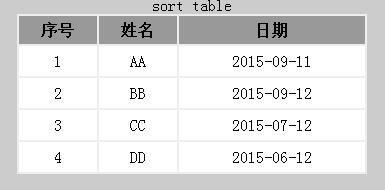
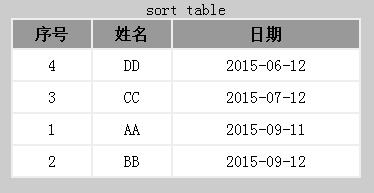
希望本文所述对大家JavaScript程序设计有所帮助。





 扫一扫
扫一扫


 755
755

 被折叠的 条评论
为什么被折叠?
被折叠的 条评论
为什么被折叠?
 到【灌水乐园】发言





