


前言
文的文字及图片来源于网络,仅供学习、交流使用,不具有任何商业用途,版权归原作者所有,如有问题请及时联系我们以作处理。
作者: 王翔
PS:如有需要Python学习资料的小伙伴可以加点击下方链接自行获取
http://note.youdao.com/noteshare?id=3054cce4add8a909e784ad934f956cef
九型人格
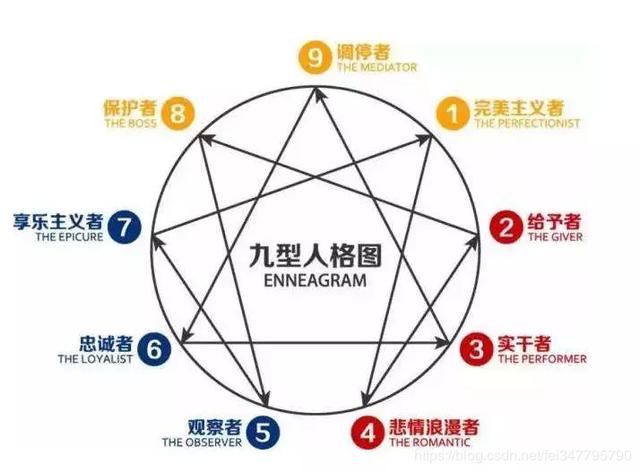
今天,我们就用Python开发一套九型人格性格分析工具。用以让更多的人,了解自己的性格分类!
既然是九型人格分析,首先我们需要拿到它的测试题。翻了很久,知道了百度文库的测试原题:
https://wenku.baidu.com/view/19455024dd36a32d72758105.html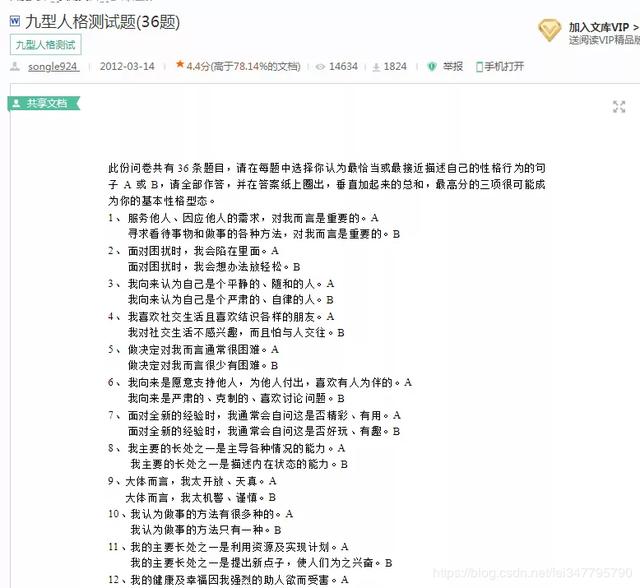
测试题总共36道,通过各场景下的行为表现,最终分析出你最接近的人格分类。现在题有了,如何做出测试题呢?我选择使用Python的tkinter模块,将测试题开发为一个可执行的exe工具,说干就干!
基础准备
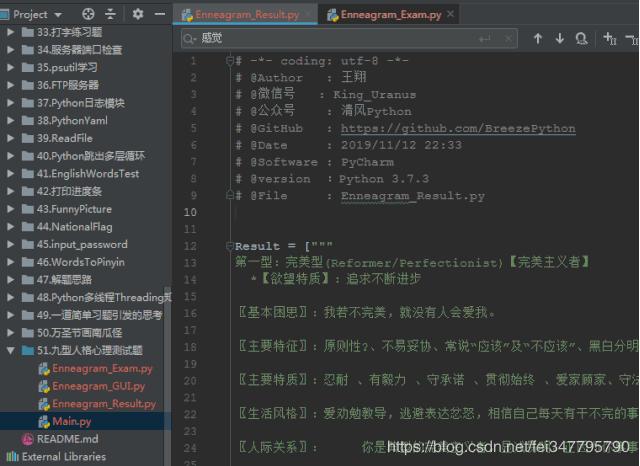
为了能将代码打包成单独的可执行文件,我们需要先准备测试题与对应的答案,然后提前存储在代码中。我们需要进行相关拆分,这种苦力活就交给拥有雷锋精神的我来完成吧:
界面开发
界面无需太过复杂,提供说明、题目、选项作答、题目切换与操作按钮即可。当然,交卷后,需要显示用户的测试结果,那么开始吧!
30 minutes later…完成!
Main.py
from Enneagram_GUI import * from tkinter import * def center_window(root, width, height): screenwidth = root.winfo_screenwidth() screenheight = root.winfo_screenheight() size = '%dx%d+%d+%d' % (width, height, (screenwidth - width) / 2, (screenheight - height) / 2) root.geometry(size)roo = Tk()center_window(root, 750, 700)root.resizable(width=False, height=False)root.title('九型人格测试 | 公众号: 清风Python')ExamPage(root)root.mainloop()Enneagram_GUI.py
# coding:utf-8 from tkinter import * import Enneagram_Exam import Enneagram_Result import tkinter.messagebox # 自测说明 Standard = '此份问卷共有36道测试题目,请在每题中选择你认为最恰当或者最接近描述自己的性格行为的句子,' '请全部作答,最高分的项目很可能成为你的基本性格型态。' # 人格类型矩阵 Style_Dict = [ {3: 2, 6: 2, 10: 2, 15: 2, 19: 1, 22: 2, 28: 2, 32: 2}, {1: 1, 6: 1, 12: 1, 17: 2, 20: 1, 23: 1, 29: 1, 33: 1}, {4: 1, 7: 1, 10: 1, 14: 2, 23: 2, 26: 2, 30: 1, 34: 1}, {2: 1, 8: 2, 12: 2, 16: 1, 21: 2, 24: 1, 28: 1, 34: 2}, {1: 2, 4: 2, 13: 1, 16: 2, 19: 2, 25: 1, 31: 1, 36: 1}, {5: 1, 9: 2, 14: 1, 18: 1, 21: 1, 25: 2, 29: 2, 32: 1}, {2: 2, 7: 2, 11: 2, 18: 2, 22: 1, 27: 2, 33: 2, 36: 2}, {3: 1, 9: 1, 13: 2, 17: 1, 24: 2, 27: 1, 20: 2, 35: 2} ] class ExamPage: def __init__(self, master=None): self.root = master # 用户结果集 self.user_result = {} self.status = 1 self.All_Exam = Enneagram_Exam self.normal_choice = IntVar() self.start_exam() # 上一题方法 def before(self): if self.normal_choice.get() != 0: self.user_result[self.status] = self.normal_choice.get() if self.status > 1: self.status -= 1 self.body.grid_forget() self.main_exam() else: tkinter.messagebox.showwarning("提示:", message="请先选择答案!") # 下一题方法 def after(self): if self.normal_choice.get() != 0: self.user_result[self.status] = self.normal_choice.get() if self.status < len(Enneagram_Exam.Exam): self.status += 1 self.body.grid_forget() self.main_exam() else: tkinter.messagebox.showwarning("提示:", message="请先选择答案!") # 获取当前题目 def exam_files(self, num): return list(map(lambda x: x.split('.'), self.All_Exam.Exam[num - 1].strip().split(''))) # 交卷 def hand_paper(self): self.user_result[self.status] = self.normal_choice.get() if len(self.user_result) != 36: tkinter.messagebox.showwarning("提示:", message="您还有未完成的测试题!") else: self.exam_result = LabelFrame(self.root, text="测试结果", padx=10, pady=10, fg="red", font=("黑体", '11')) self.exam_result.grid(padx=10, pady=5, sticky=NSEW) sc = Scrollbar(self.exam_result) sc.grid(row=0, column=1, sticky=NS) result_info = Text(self.exam_result, font=("黑体", '11'), width=85, yscrollcommand=sc.set) result_info.grid(row=0, column=0, sticky=NSEW) sc.config(command=result_info.yview) all_num = [] for style in Style_Dict: calc_num = list( point for point in self.user_result if point in style and self.user_result[point] == style[point]) if calc_num == None: all_num.append(0) else: all_num.append(len(calc_num)) user_type = all_num.index(max(all_num)) for line in Enneagram_Result.Result[user_type]: result_info.insert(END, line) # 启动测试所需控制按钮 def start_exam(self): self.title = LabelFrame(self.root, text="自测说明", padx=10, pady=10, fg="red", font=("黑体", '11')) self.title.grid(padx=10, pady=5) note = Label(self.title, text=Standard, justify=LEFT, font=("黑体", '11')) note.grid() self.show = LabelFrame(self.root, text="选项", padx=10, pady=10, fg="red", font=("黑体", '11')) self.show.grid(padx=10, pady=5, sticky=EW) go_back = Button(self.show, text="上一题", width=8, command=lambda: self.before()) go_back.grid(row=4, column=0, padx=5, pady=10) to_forword = Button(self.show, text="下一题", width=8, command=lambda: self.after()) to_forword.grid(row=4, column=1, padx=5, pady=10, sticky=E) hand_in = Button(self.show, text="交卷", width=8, command=lambda: self.hand_paper()) hand_in.grid(row=4, column=2, padx=5, pady=10, sticky=E) exit_sys = Button(self.show, text="退出", width=8, command=lambda: sys.exit()) exit_sys.grid(row=4, column=3, padx=5, pady=10, sticky=E) self.main_exam() # 测试题主界面 def main_exam(self): self.normal_choice.set(0) self.body = LabelFrame(self.root, text="测试题 第%s题,剩余%s题" % (self.status, (len(Enneagram_Exam.Exam) - self.status)), padx=10, pady=10, fg="red", font=("黑体", '11')) self.body.grid(padx=10, pady=5, sticky=EW) for option, choice in self.exam_files(self.status): authority_choice = Radiobutton(self.body, text=choice, variable=self.normal_choice, value=option) authority_choice.grid(row=option, sticky=W) Label(self.body, text=" 第%s道题,用户选择的结果是:" % self.status, fg="red", font=("黑体", '11')).grid(row=3, column=0, sticky=W) Label(self.body, textvariable=self.normal_choice).grid(row=3, column=0, sticky=E)剩余的练习题与答案代码,就不在这里赘述了。
对于一位程序员的审美,大家要求别太高,重点来关注下功能实现吧!当然在此之前我们需要先将代码打包为exe工具,大小8MB。
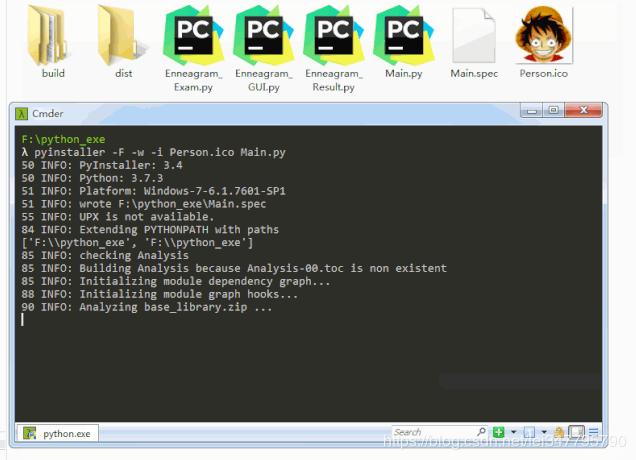
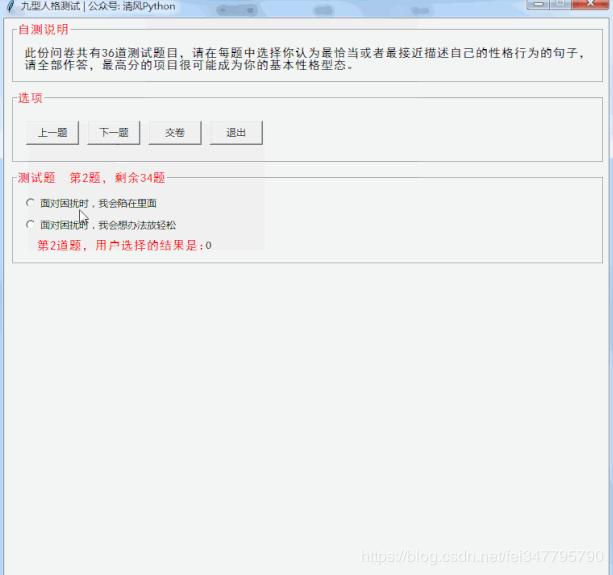
功能OK了,现在不要打扰我,我要做题了!
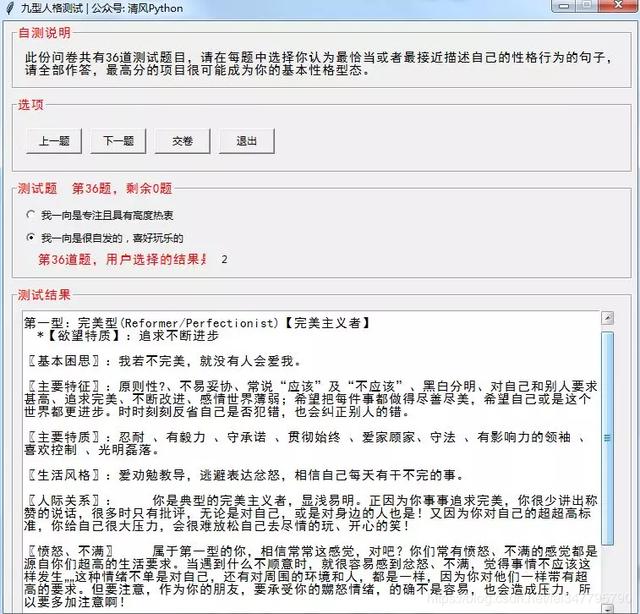
.





 扫一扫
扫一扫


 746
746

 被折叠的 条评论
为什么被折叠?
被折叠的 条评论
为什么被折叠?
 到【灌水乐园】发言





