


为了方便在Word中快速使用MathType,会在工具栏加载MathType,这样在Word中就会导致冲突,使得复制粘贴功能无法使用。以下教程将以Word 2016为例,给出安装MathType7导致Word无法复制粘贴的解决方法。【[MathType-win-zh-7.4.8.0破解安装参考另一篇](https://download.csdn.net/download/weixin_43763284/92409611)】
具体操作步骤如下:
- 在MathType公式编辑器的安装目录下找到
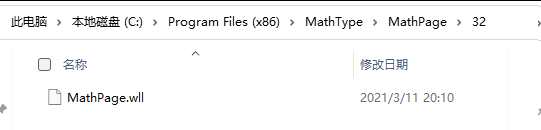
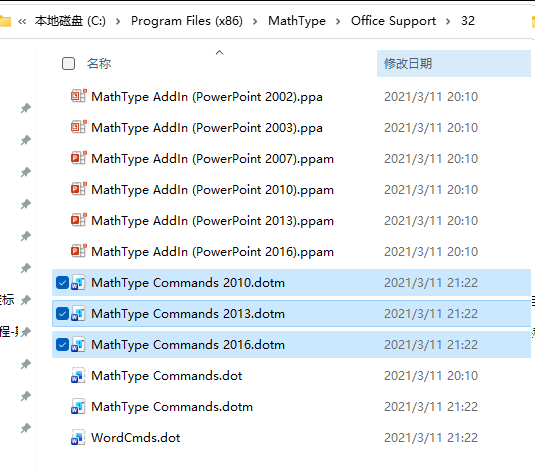
MathPage.wll(在MathPage文件夹中)和MathType Commands 6 For Word.dotm(在 Office Support文件夹中)两个文件。
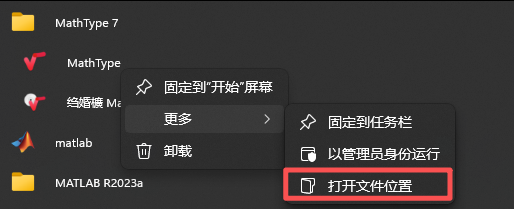
(1)已知MathType安装路径;
(2)路径未知,可通过下图找到安装路径。
MathPage.wll文件所在文件夹:
MathType Commands 6 For Word.dotm文件所在路径,根据word版本选择相应版本。
-
在确保Word关闭的情况下,复制
MathType Commands 6 For Word.dotm到Word安装路径下【路径确认方式参考上面】:C:\Program Files\Microsoft Office\root\Office16\STARTUP中。
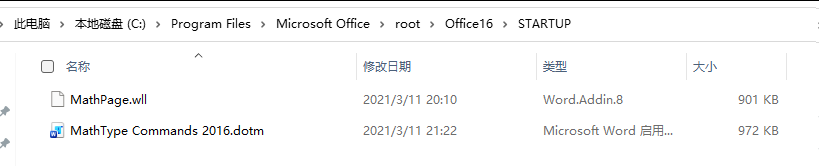
复制MathType Commands 6 For Word.dotm文件到Office安装目录下
注意:Office安装目录不是固定的,用户可以根据自己的安装目录找到STARTUP文件夹中。 -
将
MathPage.wll复制到C:\Users\12248\AppData\Roaming\Microsoft\Word\STARTUP中。
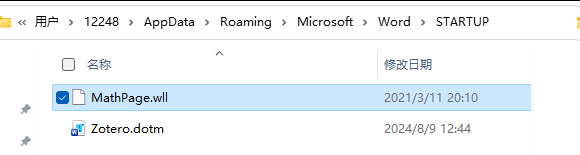
操作完成,打开word复制粘贴功能恢复正常,同时MathType也正常加载到Word 2016中!





 扫一扫
扫一扫


 1万+
1万+

 被折叠的 条评论
为什么被折叠?
被折叠的 条评论
为什么被折叠?
 到【灌水乐园】发言





