



 本文介绍了一种使用Delphi实现自定义TListView标题栏背景颜色和字体颜色的方法。通过替换默认窗口过程并处理WM_PAINT和WMNotify消息,可以实现对标题栏样式的完全控制。
搜遍全网,基本都找不到Delphi自绘TListview标题背景颜色的代码,研究了很久自已实现了这个功能。现将代码发出来以供有需要的童鞋日后参考:
实现的思路基本就是:
1 获取TListview的句柄 ListView_GetHeader();
2 用自己的窗口过程替换默认的窗口过程 setwindowlong
3 在窗口过程里处理WM_PAINT,WMNotify消息(重绘标题字体、背景颜色、边框样式)
完整实现代码如下:
unit Unit1;

interface

uses
  Windows, Messages, SysUtils, Variants, Classes, Graphics, Controls, Forms,
  Dialogs, ComCtrls, CommCtrl, StdCtrls;

type
  TSetHeaderItemFontColorEvent = procedure(Sender: TCustomListView; ItemIndex: Integer; var FontColor: TColor) of object;

  TListView = class(ComCtrls.TListView)
  private
    FHeaderHandle: HWND;
    FOnSetHeaderItemFontColor: TSetHeaderItemFontColorEvent;
    procedure WMNotify(var AMessage: TWMNotify); message WM_NOTIFY;
  protected
    procedure CreateWnd; override;
  published
    property OnSetHeaderItemFontColor: TSetHeaderItemFontColorEvent read FOnSetHeaderItemFontColor write FOnSetHeaderItemFontColor;
  end;

type
  TForm1 = class(TForm)
    ListView1: TListView;
    procedure FormCreate(Sender: TObject);
  private
    procedure SetHeaderItemFontColor(Sender: TCustomListView; ItemIndex: Integer; var FontColor: TColor);
  public
    { Public declarations }
  end;

var
  Form1: TForm1;

implementation

{$R *.dfm}

{ TListView }

procedure TListView.CreateWnd;
begin
  inherited;
  FHeaderHandle := ListView_GetHeader(Handle);
end;

procedure TListView.WMNotify(var AMessage: TWMNotify);
var
  NMCustomDraw: TNMCustomDraw;
  i: Integer;
  r: TRect;

  H, W, X, Y: Integer;
const
  DT_ALIGN: array[TAlignment] of integer = (DT_LEFT, DT_RIGHT, DT_CENTER);
  BackColor = clBlue;    //Hander背景颜色
  FontColor = clWhite;   //Hander字体颜色

begin
  if (AMessage.NMHdr.hwndFrom = FHeaderHandle) and (AMessage.NMHdr.code = NM_CUSTOMDRAW) then
  begin
    NMCustomDraw := PNMCustomDraw(TMessage(AMessage).LParam)^;
    case NMCustomDraw.dwDrawStage of
      CDDS_PREPAINT:
        AMessage.Result := CDRF_NOTIFYITEMDRAW;
      CDDS_ITEMPREPAINT:
        begin
          i := NMCustomDraw.dwItemSpec;
          r := NMCustomDraw.rc;

          Canvas.Brush.Color := BackColor;
          FillRect(NMCustomDraw.hdc, r, Canvas.Brush.Handle);
          SetBkColor(NMCustomDraw.hdc, BackColor);
          DrawEdge(NMCustomDraw.hdc, r, BDR_RAISEDOUTER, BF_LEFT);  //中粗
          //DrawEdge(NMCustomDraw.hdc, r, BDR_SUNKENOUTER, BF_LEFT);  //细的
          //DrawEdge(NMCustomDraw.hdc, r, BDR_SUNKENINNER, BF_LEFT); //最细
          Inc(r.Left, 1);
          Dec(r.Right, 1);
          if self.Column[i].Alignment = taLeftJustify then
            Inc(r.Left, 1)
          else
            Dec(r.Right, 1);

          SetTextColor(NMCustomDraw.hdc,FontColor);

          DrawText(NMCustomDraw.hdc,
                   PChar(self.Column[i].Caption),
                   length(self.Column[i].Caption),
                   r,
                   DT_SINGLELINE or DT_ALIGN[self.Column[i].Alignment] or DT_VCENTER or DT_END_ELLIPSIS);


          AMessage.Result := CDRF_SKIPDEFAULT;
        end;
    else
      AMessage.Result := CDRF_DODEFAULT;
    end;
  end
  else
    inherited;
end;


{ TForm1 }

procedure TForm1.FormCreate(Sender: TObject);
var
 i,j:integer;
 item:TListItem;
begin
 with ListView1 do
 begin
  ViewStyle := vsReport;
  GridLines:=True;

  for i:=0 to 6 do
  begin
     Columns.Add.Caption:='Column'+IntToStr(i);
     Columns[i].Width:=70;
     Column[I].Alignment := taCenter;
     item:=Items.Add;
     item.Caption:='Item'+IntToStr(i);
     for j:=1 to 6 do item.SubItems.Add('SubItem'+IntToStr(j)+IntToStr(i))
  end
 end;

  ListView1.OnSetHeaderItemFontColor := SetHeaderItemFontColor;
end;

procedure TForm1.SetHeaderItemFontColor(Sender: TCustomListView;
  ItemIndex: Integer; var FontColor: TColor);
begin
  case ItemIndex of
    0: FontColor := clRed;
    1: FontColor := clGreen;
    2: FontColor := clBlue;
    3: FontColor := clFuchsia;
    4: FontColor := clBlack;
    5: FontColor := clLime;
  end;
end;

end.
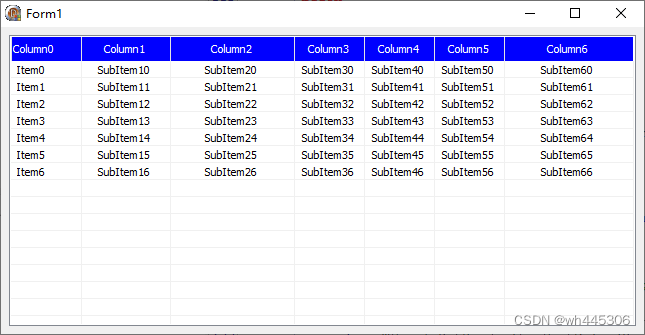
运行效果截图:
全网原创首发,转载请注明出处!谢谢!






 扫一扫
扫一扫


 被折叠的 条评论
为什么被折叠?
被折叠的 条评论
为什么被折叠?
 到【灌水乐园】发言





