

笔者曾写过一篇文章,简述了如何在Linux桌面环境下制作并安装新世纪五笔输入法的码表的过程。这篇文章可以看作之前文章的一个补充。在那篇文章中,笔者提供的制作方法,完全忽略了单字和词组的频率(所有词组的频率均为1024),这导致了使用新世纪五笔输入法时,有时需要翻很多页,才能找到期望输入的(常用)词组。
截止目前,笔者未找到生成五笔码表频率的统计方法,于是想到直接替换现有码表的方法,即下图中的WubiHaifeng86和WuBi-JiDian-86对应的码表:
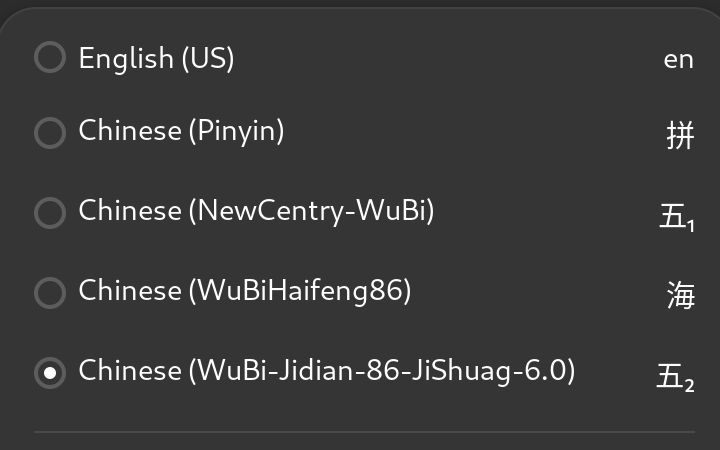
替换后,这两个输入法实际上使用的是新世纪五笔输入法。笔者提供已制作好的两个码表,下载解压后可以执行./install.sh脚本一键安装:
~/ibus-新世纪五笔码表-202511$ ./install.sh
[sudo] password for user:
copied 'wubi-jidian86.db' -> '/usr/share/ibus-table/tables/wubi-jidian86.db'
removed 'wubi-jidian86.db'
copied 'wubi-haifeng86.db' -> '/usr/share/ibus-table/tables/wubi-haifeng86.db'
removed 'wubi-haifeng86.db'
安装完成,请执行命令reboot或重新登录以生效
该资原可在笔者的资源下载区获得到。
笔者编写了一个简单的Lua脚本,用于实现码表的转换;用到的新世纪五笔码表为:王码大一统码表-[标准, GB18030]-v1-lite,想重新制作码表的伙伴,可以自行下载。下载后,把wmwb06jm.txt/wmwb06qm.txt两个文件合并成一个文件:
yejq@ubuntu:~/Downloads/王码大一统码表-[标准, GB18030]-v1-lite/05-已解码码表$ ls -lh
total 9.2M
-rw-rw-r-- 1 yejq yejq 975K 10月 31 21:57 combined-wmwb06.txt
-rw-rw-r-- 1 yejq yejq  50K 11月  4  2012 wmwb06jm.txt
-rw-rw-r-- 1 yejq yejq 2.7M 11月  4  2012 wmwb06qm.txtw
注意,这两个文件的头部都有三个字节的ucs-bom,合并后请保留一个即可。之后下载ibus-table-Chinese仓库:
git clone --depth 1 https://github.com/mike-fabian/ibus-table-chinese.git
之后,执行以下命令转换码表:
cd $HOME
lua5.4 wubi-2008.lua \
    "./Downloads/王码大一统码表-[标准, GB18030]-v1-lite/05-已解码码表/combined-wmwb06.txt" \
	./ibus-table-chinese/tables/wubi-haifeng/wubi-haifeng86.UTF-8 > \
	./ibus-table-chinese/tables/wubi-haifeng/wubi-haifeng86.txt
cd ./ibus-table-chineses/tables/wubi-haifeng
cat wubi-haifeng86.head wubi-haifeng86.txt wubi-haifeng86.tail > wubi-haifeng86-2008.txt

cd $HOME
lua5.4 wubi-2008.lua \
    "./Downloads/王码大一统码表-[标准, GB18030]-v1-lite/05-已解码码表/combined-wmwb06.txt" \
    ./ibus-table-chinese/tables/wubi-jidian/wubi-jidian86.txt > \
    ./ibus-table-chinese/tables/wubi-jidian/wubi-jidian86-2008.txt
最终生成的两个码表文件为wubi-haifeng86-2008.txt/wubi-jidian86-2008.txt,这两个码表保留了原始码表词组的频率,虽然比原先的码表词组少,但完全足够使用。感兴趣的可以比较这两个码表分别与wubi-haifeng86.UTF-8/wubi-jidian86.txt的不同之处(建议使用beyound-compare,其他工具比较会比较慢)。接下来,就是调用ibus-table-createdb命令生成码表数据库了:
ibus-table-createdb -n wubi-jidian86.db  -s wubi-jidian86-2008.txt
ibus-table-createdb -n wubi-haifeng86.db -s wubi-haifeng86-2008.txt
sudo mv -v -f wubi-jidian86.db wubi-haifeng86.db /usr/share/ibus-table/tables/
sudo chown root:root /usr/share/ibus-table/tables/wubi-*.db
rm -rf $HOME/.local/share/ibus-table/tables/*
笔者编写的wubi-2008.lua脚本全部内容如下:
#!/usr/bin/lua5.4

local g_wubi2008 = arg[1]
local g_existold = arg[2]

local gfmt = string.format

local function check_files()
	if type(g_wubi2008) ~= "string" then
		io.stderr:write("Wubi 2008 file not specified.\n")
		io.stderr:flush()
		return false
	end

	if type(g_existold) ~= "string" then
		io.stderr:write("Existing Wubi file not specified.\n")
		io.stderr:flush()
		return false
	end

	return true
end

local function transform_table(wubilist)
	local wubi = io.open(g_existold, "rb")
	if not wubi then
		io.stderr:write(gfmt("Error, failed to open file: %s\n", g_existold))
		io.stderr:flush()
		return false
	end

	local existing = {}
	local numok, numdrop = 0, 0
	while true do
		local nextl = wubi:read("l")
		if not nextl then break end
		local wcode, word, freq = string.match(nextl, "^(%a+)\t([^%s]+)\t(%d+)$")
		if wcode and word and freq then
			local winfo = wubilist[word]
			if winfo then
				local wlen = string.len(wcode)
				local code = winfo[wlen]
				if not code then
					local itab = { 2, 3, 4 }
					if wlen == 2 then itab = { 3, 1, 4 } end
					if wlen == 3 then itab = { 2, 4, 1 } end
					if wlen == 4 then itab = { 3, 2, 1 } end
					for _, idx in ipairs(itab) do
						code = winfo[idx]
						if code then
							wlen = idx
							break
						end
					end
				end

				if code then
					local extkey = gfmt("%s\t%s", code, word)
					if not existing[extkey] then
						winfo[wlen] = nil
						numok = numok + 1
						existing[extkey] = true
						io.stdout:write(gfmt("%s\t%s\t%s\n", code, word, freq))
					else
						numdrop = numdrop + 1
					end
				else
					numdrop = numdrop + 1
				end
			else
				numdrop = numdrop + 1
			end
		else
			if #nextl > 0 then io.stdout:write(nextl) end
			io.stdout:write("\n")
		end
	end

	wubi:close(); wubi = nil
	io.stderr:write(gfmt("Number of words processed: %d, skipped: %d\n",
		numok, numdrop))
	io.stderr:flush()
end

local function load_wubi_2008()
	local wubi = io.open(g_wubi2008, "rb")
	if not wubi then
		io.stderr:write(gfmt("Error, failed to open file: %s\n", g_wubi2008))
		io.stderr:flush()
		return false
	end

	wubi:read(3) -- skip first 3 bytes, which indicates the file is encoded in UTF-8

	local wtab, wnum = {}, 0
	while true do
		local nextl = wubi:read("l")
		if not nextl then break end
		local wcode, word = string.match(nextl, "^(%a+),%s+([^%s]+)")
		if wcode and word then
			local winfo, isnew = wtab[word], false
			if type(winfo) ~= "table" then
				wnum = wnum + 1
				winfo, isnew = {}, true
			end

			local wlen = string.len(wcode)
			winfo[wlen] = wcode
			if isnew then wtab[word] = winfo end
		end
	end

	io.stdout:flush()
	wubi:close(); wubi = nil

	io.stderr:write(gfmt("Number of words processed: %d\n", wnum))
	io.stderr:flush()
	return wtab
end

if not check_files() then
	os.exit(1)
end
local wlist = load_wubi_2008()
if not wlist then
	os.exit(2)
end
transform_table(wlist)
该脚本写得很粗糙,感兴趣的伙伴可以自己生成新世纪五笔的码表。


 扫一扫
扫一扫


 549
549

 被折叠的 条评论
为什么被折叠?
被折叠的 条评论
为什么被折叠?
 到【灌水乐园】发言





