ARP has no way to verify that a reply is honest. A host asks “who has 192.168.10.1?” and believes whatever answer comes back first, so an attacker on the same VLAN can answer with its own MAC, plant itself as the gateway in every victim’s ARP cache, and quietly read or alter their traffic. That attack is ARP spoofing, and dynamic ARP inspection is how a Cisco switch stops it.
Dynamic ARP inspection, or DAI, intercepts every ARP packet on an untrusted port and checks the sender’s IP and MAC against the DHCP snooping binding table. If the pair matches a real lease, the ARP is forwarded. If it does not, the switch drops it and logs the violation. Because it leans on that table, DAI only works once DHCP snooping is already in place.
This guide enables DAI on a switch that already runs DHCP snooping, trusts the uplink, then watches a legitimate DHCP client pass while a statically addressed host with no binding is blocked.
Tested June 2026 on Cisco IOS 15.2, with a static host on an untrusted port to trigger a real denial.
How dynamic ARP inspection works
DAI sorts ports into trusted and untrusted, the same split DHCP snooping uses. ARP on a trusted port is forwarded without a second look, so uplinks toward the rest of the network and the link to the DHCP server are trusted. ARP on an untrusted port is held up and validated: the switch reads the sender IP and sender MAC out of the ARP packet and looks for a binding that matches that pair on that VLAN.
A device that leased its address through DHCP has a binding, so its ARP sails through. A device with no binding does not, and that is the important case. An attacker spoofing the gateway’s IP has no lease for it, so the forged ARP is dropped before it can poison a single cache. The same logic also blocks a host that simply uses a static address, which is why legitimate static devices like servers and printers need an explicit exception, covered at the end.
The lab topology
The lab reuses the DHCP snooping setup with one addition. SW1 runs snooping and DAI on VLAN 1, with Gi0/1 to the DHCP server trusted. A DHCP client sits on the untrusted Gi0/2, and a statically addressed host with no lease sits on the untrusted Gi0/3 to play the part of the spoofer.
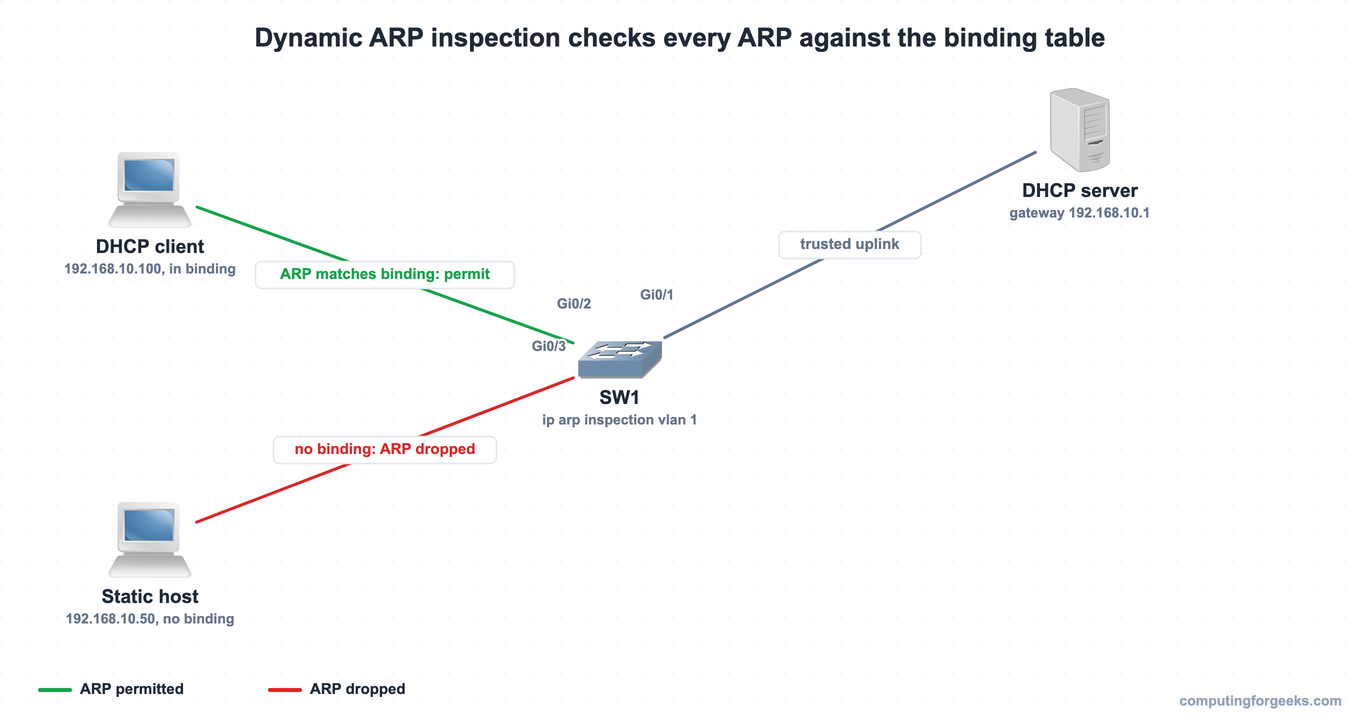
The same four nodes built in GNS3, where the configuration below was applied and tested on real Cisco IOS:
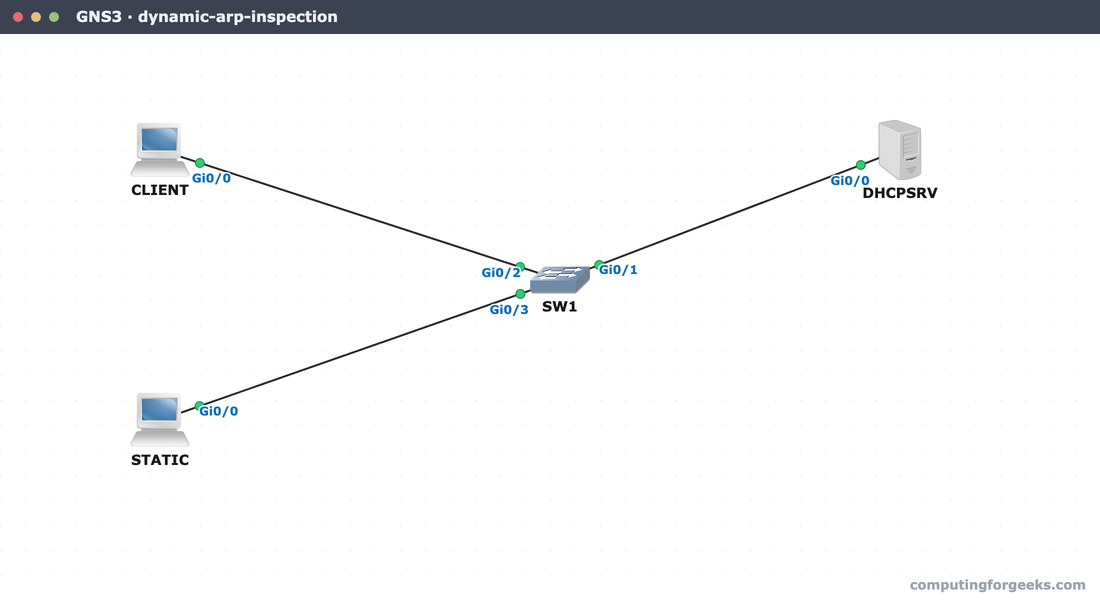
Snooping is already running from the previous guide, so only DAI needs adding.
Configure dynamic ARP inspection
DAI has one hard prerequisite: DHCP snooping must already be enabled on the same VLAN, because DAI reads the bindings snooping creates. With that in place, turn inspection on for the VLAN:
ip arp inspection vlan 1As with snooping, every port is untrusted the moment you enable it, including the uplink toward the rest of the network. Trust the link to the DHCP server and any uplink that carries legitimate ARP, leaving user ports untrusted:
interface GigabitEthernet0/1
 ip arp inspection trust
 exit
That is the whole change: snooping already running from before, DAI armed on the VLAN, and the uplink trusted. Confirm it took.
Verify DAI is on
Check that inspection is active on the VLAN before trusting it to defend anything:
show ip arp inspection vlan 1The configuration and operation both read active for VLAN 1, and DHCP logging is set to deny so dropped ARPs are logged:
 Vlan     Configuration    Operation   ACL Match          Static ACL
 ----     -------------    ---------   ---------          ----------
    1     Enabled          Active

 Vlan     ACL Logging      DHCP Logging      Probe Logging
 ----     -----------      ------------      -------------
    1     Deny             Deny              Off
With inspection confirmed active on the VLAN, put it to the test with two hosts that differ in exactly one way: one has a DHCP lease, the other does not.
Permitted versus denied
The DHCP client leased its address, so a binding exists for it. When it pings the gateway, its ARP matches that binding and the switch lets it through. The ping succeeds cleanly:

The static host is a different story. It never asked for a lease, so the binding table has nothing for its address. The instant it sends an ARP to reach the same gateway, DAI finds no matching binding and drops the request, and the ping fails completely:

Two hosts on the same switch, the same VLAN, the same gateway, and only the one with a real lease can resolve it. A spoofer claiming the gateway’s address would meet exactly the same wall the static host just did.
Read the inspection counters
The statistics command turns that behavior into numbers, which is what you watch on a live network to know DAI is doing its job:
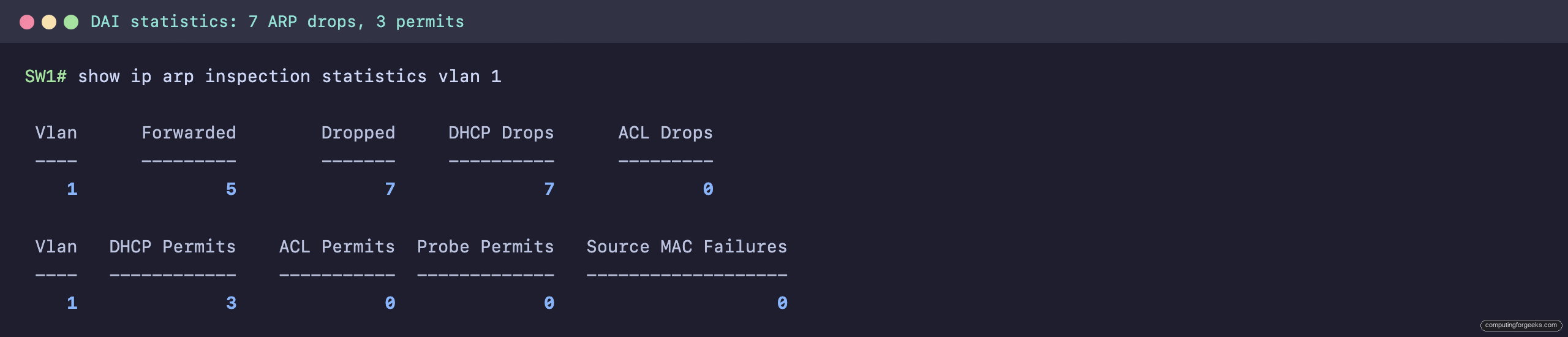
The forwarded and DHCP-permit counts cover the legitimate ARP that passed, validated against the client’s binding. The seven drops, all counted as DHCP drops, are the static host’s ARP attempts, refused because no binding backs them. On a real network a climbing drop counter on a user VLAN is your early warning that something is forging ARP.
Practice dynamic ARP inspection
Run the questions to lock in what DAI validates, why it needs DHCP snooping, which ports to trust, and how static hosts are handled, then use the flashcards for quick recall.
Flip through the deck until the binding-table check, the trust rule, and the ARP ACL exception are automatic, or grab the Anki pack to review them anywhere:
Letting legitimate static hosts through
The static host in the lab was blocked because DAI had nothing to validate it against, and a real network is full of devices that never use DHCP: servers, printers, and management interfaces with fixed addresses. For those, write an ARP ACL that states the IP and MAC pair you trust, then point DAI at it. Create the list first:
arp access-list STATIC-HOSTS
 permit ip host 192.168.10.50 mac host 0050.7966.6850
 exit
Then tell DAI to apply that ACL on the VLAN, so the listed pair is permitted alongside the DHCP-learned bindings:
ip arp inspection filter STATIC-HOSTS vlan 1DAI checks the ACL first and falls back to the DHCP bindings for any address the ACL does not list, so with that filter in place the server keeps working while every unlisted, unleased ARP is still dropped. DAI rounds out the access-layer defenses that start with port security and DHCP snooping and sit beside access control lists on every VLAN. The CCNA 200-301 study roadmap shows where each of these fits.