Bandwidth is finite, and when a link fills up, something has to wait. Quality of Service decides what waits and what goes first. On an uncongested link it does nothing at all; the moment a link saturates, QoS is what keeps a voice call clear while a file download backs off. Quality of Service (QoS) is the set of tools a network uses to classify traffic, mark it, and then treat each class differently when a link is congested, so latency-sensitive traffic like voice and video is protected from bulk data.
This guide explains the QoS concepts the CCNA 200-301 exam expects you to describe: classification and marking with DSCP and CoS, queuing and congestion management, the difference between policing and shaping, and where the trust boundary sits. These are describe-level topics, so the goal is to understand what each mechanism does and why, not to memorize a configuration. Everything here follows the QoS model on current Cisco IOS, checked against Cisco’s documentation in June 2026.
What Quality of Service actually does
QoS manages four things a network can degrade: bandwidth (how much a class gets), delay or latency (how long a packet takes), jitter (the variation in that delay), and loss (dropped packets). Different traffic cares about different ones. A voice call tolerates almost no jitter or loss but needs very little bandwidth; a backup job wants bandwidth and does not care about delay. QoS lets you give each what it needs from a shared link.
The single most important thing to understand: QoS does not create bandwidth. It only decides how a congested link’s existing bandwidth is divided, and which packets get dropped or delayed when there is not enough to go around. The end-to-end picture is a pipeline. Traffic is identified and marked near its source, and every device downstream honors that marking when its own links congest:
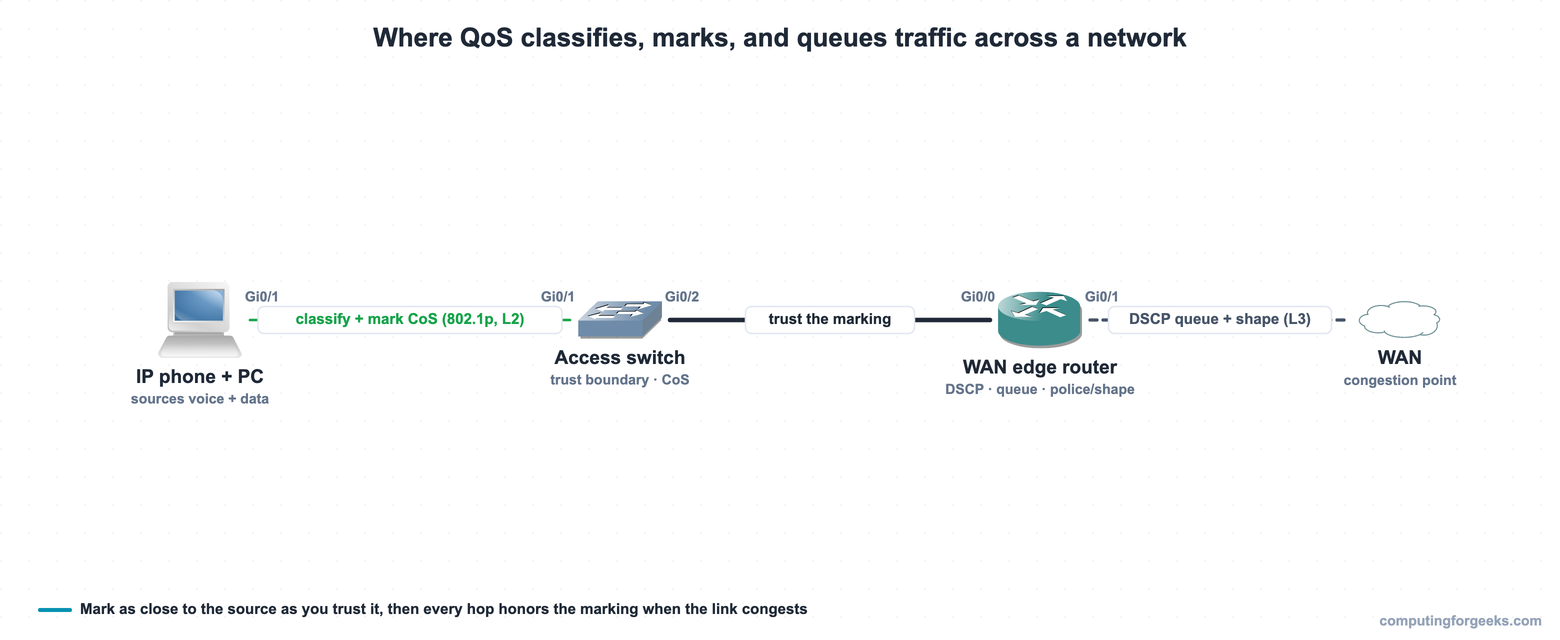
Each stage of that pipeline is a QoS mechanism in its own right. They run in order: identify and label the traffic, then decide how to queue and drop it under load, then enforce rates at the edges. Start with how traffic gets labeled in the first place.
Classification and marking
Classification is identifying what a packet is, voice, video, web, backup, by inspecting it against access lists, protocols, ports, or incoming markings. Marking is then writing a value into the packet or frame header so later devices do not have to re-inspect it; they just read the mark. The two happen together at the edge, and there are two places a marking can live.
CoS (Class of Service) is a Layer 2 marking: three bits in the 802.1Q VLAN tag (the 802.1p field), giving values 0 to 7. Because it lives in the VLAN tag, CoS exists only on trunk links and is lost the moment a frame leaves a trunk or hits a router. DSCP (Differentiated Services Code Point) is a Layer 3 marking: six bits in the IP header’s DS field, giving values 0 to 63. Because it rides in the IP header, DSCP survives across routers end to end, which is why it is the marking that matters for traffic crossing a network.
DSCP values are grouped into standard per-hop behaviors (PHBs) so every vendor agrees on what a number means. The ones worth knowing:
| Traffic | PHB name | DSCP value | CoS |
|---|---|---|---|
| Voice (RTP) | EF (Expedited Forwarding) | 46 | 5 |
| Interactive video | AF41 | 34 | 4 |
| Call signaling | CS3 | 24 | 3 |
| Mission-critical data | AF31 | 26 | 3 |
| Network control | CS6 | 48 | 6 |
| Best effort (default) | DF (CS0) | 0 | 0 |
| Scavenger (bulk) | CS1 | 8 | 1 |
The pattern is worth seeing. Class Selector values (CS0 through CS7) are multiples of 8 and are backward-compatible with the old IP Precedence field. Assured Forwarding values (AFxy) carry a class and a drop priority. Expedited Forwarding (EF, 46) is the one reserved for voice, because it gets the strict-priority treatment described next. The voice marking pair, DSCP EF and CoS 5, is the one to commit to memory. One value to watch: Cisco’s QoS baseline marks call signaling CS3 (24), which is what Cisco gear uses, while RFC 4594 instead recommends CS5 (40), so do not be thrown if a non-Cisco reference lists a different number.
Queuing and congestion management
When an interface has more traffic than it can send, the excess waits in queues, and queuing is how the device decides which queue to drain first. This is where the marking finally pays off: a scheduler reads the DSCP value and services the high-priority queue ahead of the rest. The common approach on Cisco gear is a low-latency queue (LLQ) that gives voice a strict-priority queue serviced before anything else, combined with class-based weighted fair queuing (CBWFQ) that guarantees each other class a share of the remaining bandwidth.
Congestion management also covers how packets get dropped when a queue fills. The naive behavior is tail drop: once the queue is full, every new packet is discarded, which tends to make many TCP senders slow down and speed up in lockstep and waste the link. Weighted Random Early Detection (WRED) avoids that by dropping a few packets early and selectively as a queue starts to fill, signaling senders to back off gradually before the queue overflows.
Policing versus shaping
Policing and shaping both enforce a traffic rate, but they handle the excess in opposite ways, and confusing the two is a common and costly mistake.
| Aspect | Policing | Shaping |
|---|---|---|
| Excess traffic | Dropped or re-marked immediately | Buffered and sent later |
| Adds delay? | No, no buffering | Yes, it queues the excess |
| Traffic shape | Bursty (hard cutoff) | Smoothed to the rate |
| Typical direction | Inbound or outbound | Outbound only |
Policing enforces a rate by dropping (or lowering the marking of) anything above it the instant it arrives. It adds no delay because it never buffers, but it is harsh on bursty TCP traffic, which gets dropped and has to retransmit. Shaping enforces the same rate by buffering the excess and releasing it smoothly over time, which adds delay and jitter but causes far fewer drops. The classic use of shaping is a branch office whose router shapes outbound traffic to the rate the provider actually delivers, so the provider does not have to police (and drop) the overflow.
The trust boundary
A device only acts on a marking it trusts, and the trust boundary is the line where the network starts believing (or sets) markings itself. The rule is to mark as close to the source as possible, but only trust sources you control. A Cisco IP phone can be trusted to mark its own voice as EF, so the trust boundary is extended to the phone. A user PC plugged into the same switch should not be trusted, because anyone can set a DSCP value on a PC and claim priority; its traffic is re-marked at the access switch port. Everything inside the boundary trusts the markings and just queues on them; everything outside is classified and marked fresh on the way in. Voice deployments lean on the voice VLAN to separate phone traffic from the PC behind it precisely so the switch can trust one and not the other.
Practice QoS concepts
Run the quiz, then the flashcards, and read the explanation on anything you miss. The DSCP and CoS values, the policing versus shaping difference, and what a trust boundary is are the three areas questions cluster around.
Drill the marking values and the QoS mechanisms until they are automatic:
Common QoS misconceptions
A few ideas trip people up, and clearing them up is usually enough to answer most QoS questions. QoS does not add bandwidth; on a link that never congests it changes nothing, and its whole job is dividing a full link fairly. Marking a packet does nothing on its own either; some downstream device must have a queuing policy that actually acts on that mark, or the value is just a number riding along. CoS and DSCP are not interchangeable: CoS is a Layer 2 tag that dies at the first router or access port, while DSCP is carried in the IP header and survives end to end, so anything crossing the network is marked with DSCP. And policing is not a gentler shaping: policing drops the excess, shaping delays it, and choosing the wrong one either adds latency you did not want or drops traffic you meant to keep. With those straight, pair this with how a network is architected end to end, and the CCNA 200-301 study roadmap maps the rest of the IP Services domain.