You already run Kubernetes, or you are about to, and you keep hearing that Red Hat OpenShift is “Kubernetes plus a lot of stuff.” The honest question is which stuff, and whether it earns the licence cost. This guide answers that by walking the real OpenShift 4 new features that ship in the box, from automated installs on immutable RHEL CoreOS to built-in AI model serving, OpenShift Virtualization for running VMs next to pods, and an opinionated security and CI/CD stack.
OpenShift is still on the 4.x line (there is no OpenShift 5), and Red Hat ships a new minor roughly every four months. So “OpenShift 4” today is a very different product from the 2019 launch. Below covers what the platform adds on top of upstream Kubernetes, the capabilities that landed in the most recent releases, where it runs, and which CFG install guide to follow once you want hands on a cluster.
Current as of June 2026, written against the OpenShift 4.21 and 4.20 release notes (Kubernetes 1.34 and 1.33).
What is Red Hat OpenShift 4?
Red Hat OpenShift 4 is an enterprise Kubernetes platform that bundles a certified Kubernetes distribution with an opinionated operating system, installer, developer tooling, security model, and Red Hat support into one product. It is CNCF-certified conformant Kubernetes at the core, so anything you know about pods, deployments, and services still applies. The current release tracks Kubernetes 1.34 and the CRI-O container runtime, and the whole control plane runs on Red Hat Enterprise Linux CoreOS, an immutable, container-optimized OS that the cluster manages and updates for you.
The Administrator perspective in the web console pulls the cluster version, health, and feature highlights into a single Overview:
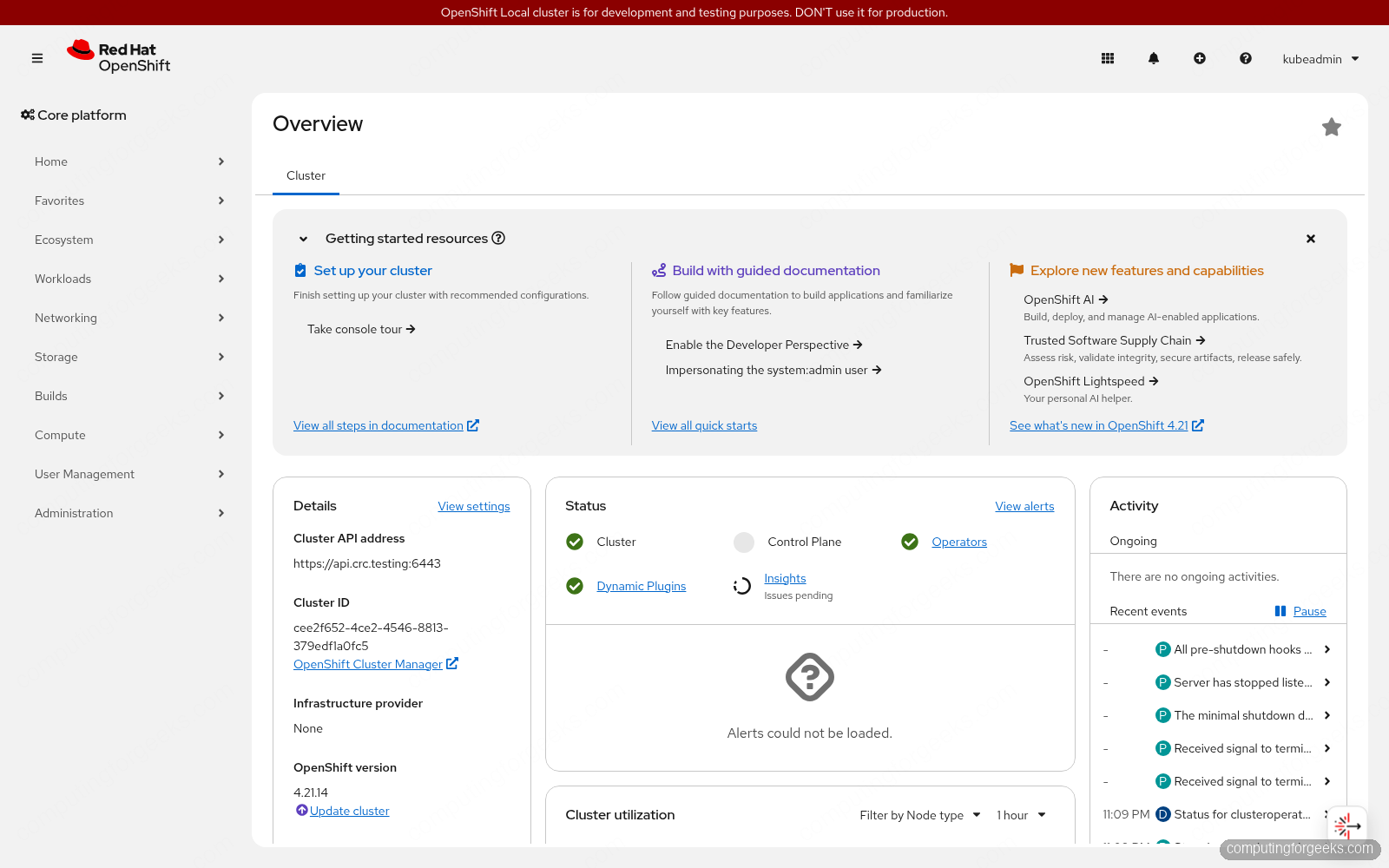
The practical difference from a hand-rolled cluster is that OpenShift treats the platform itself as something to automate. Installation, upgrades, and day-2 operations run through Operators and over-the-air updates instead of a pile of YAML you maintain by hand. To check what a running cluster is on, the version and the operator status are one command away:
oc version
oc get clusterversion
oc get clusteroperators
If you want the full breakdown of reading cluster and operator state, see the guide on how to check the cluster version and operator status.
OpenShift 4 vs vanilla Kubernetes: what you get for free
The fastest way to see the value is to line up what you would normally bolt on to a plain Kubernetes cluster against what OpenShift ships preassembled and supported:
| Capability | Vanilla Kubernetes | Red Hat OpenShift 4 |
|---|---|---|
| Install and upgrade | DIY (kubeadm, kops, managed control plane) | Full-stack installer plus over-the-air cluster updates |
| Node OS | Bring your own and patch it | RHEL CoreOS, immutable and cluster-managed |
| Web console | Optional dashboard add-on | Built-in Administrator and Developer consoles |
| Operators | Install OLM yourself | OperatorHub and Operator Lifecycle Manager built in |
| Image registry | Run an external one | Integrated container registry |
| Ingress | Pick and install a controller | Routes plus integrated ingress on OVN-Kubernetes |
| CI/CD | Add-on of your choice | OpenShift Pipelines (Tekton) and GitOps (Argo CD) |
| Monitoring and logging | Assemble it | Built-in Prometheus stack, Loki logging, Tempo tracing |
| Security | Configure RBAC and admission yourself | RBAC plus Security Context Constraints and default hardening |
| Support | Community | Red Hat enterprise support with a defined lifecycle |
None of this stops you from using upstream tooling. The point is that the integration and the support contract are Red Hat’s problem, not yours.
Built-in AI and model serving
This is where most of the recent OpenShift 4 new features have landed. OpenShift AI turns the cluster into a platform for training and serving models, with model serving built on KServe and vLLM so you can stand up an OpenAI-compatible inference endpoint without wiring it together yourself. A genuinely useful operational change is that you can now mount model weights directly from a container registry as a read-only volume. Data scientists push a new model version to the registry, and the serving pods pick it up without anyone rebuilding the container image.
On the assistant side, OpenShift Lightspeed is a generative-AI helper embedded in the console that answers cluster questions, explains errors, and walks you through tasks in plain language. There is also a Kubernetes Model Context Protocol (MCP) server, shipped as a developer preview, that bridges AI assistants like VS Code, Cursor, and Copilot to a live cluster so you can query and act on it in natural language. If your reason for adopting OpenShift is AI infrastructure, this is the pillar to evaluate first.
OpenShift Virtualization: run VMs next to containers
OpenShift Virtualization, built on the KubeVirt project, lets you run full virtual machines as Kubernetes objects on the same cluster as your containers, managed with the same console, RBAC, and networking. Since the Broadcom acquisition of VMware pushed teams to look elsewhere, this has become one of the biggest reasons organizations adopt OpenShift. The Migration Toolkit for Virtualization imports existing vSphere VMs, and the virtualization story has matured fast: a dedicated virtualization-admin console view with folder navigation and bulk operations, cross-cluster live migration with zero downtime, CPU load-aware rebalancing that moves VMs off hot nodes automatically, incremental backups via change block tracking, Arm support, and Lightspeed assistance built into the virtualization UI.
The pitch is consolidation: instead of running a separate hypervisor estate and a separate Kubernetes estate, you manage VMs and containers in one place with one operational model.
Operators, OperatorHub, and full-stack automation
OpenShift’s automation story runs on Operators. OperatorHub is an in-console catalog of certified, community, and Red Hat Operators, and the Operator Lifecycle Manager installs, configures, and upgrades them for you. The platform itself is built the same way: the cluster is self-managing, with components reconciled by Operators and the entire stack updated as a unit through over-the-air updates. That is what “full-stack automation” actually means in practice, the installer provisions and scales the cluster using Kubernetes itself, and updates flow as signed releases you apply with one click or one command.
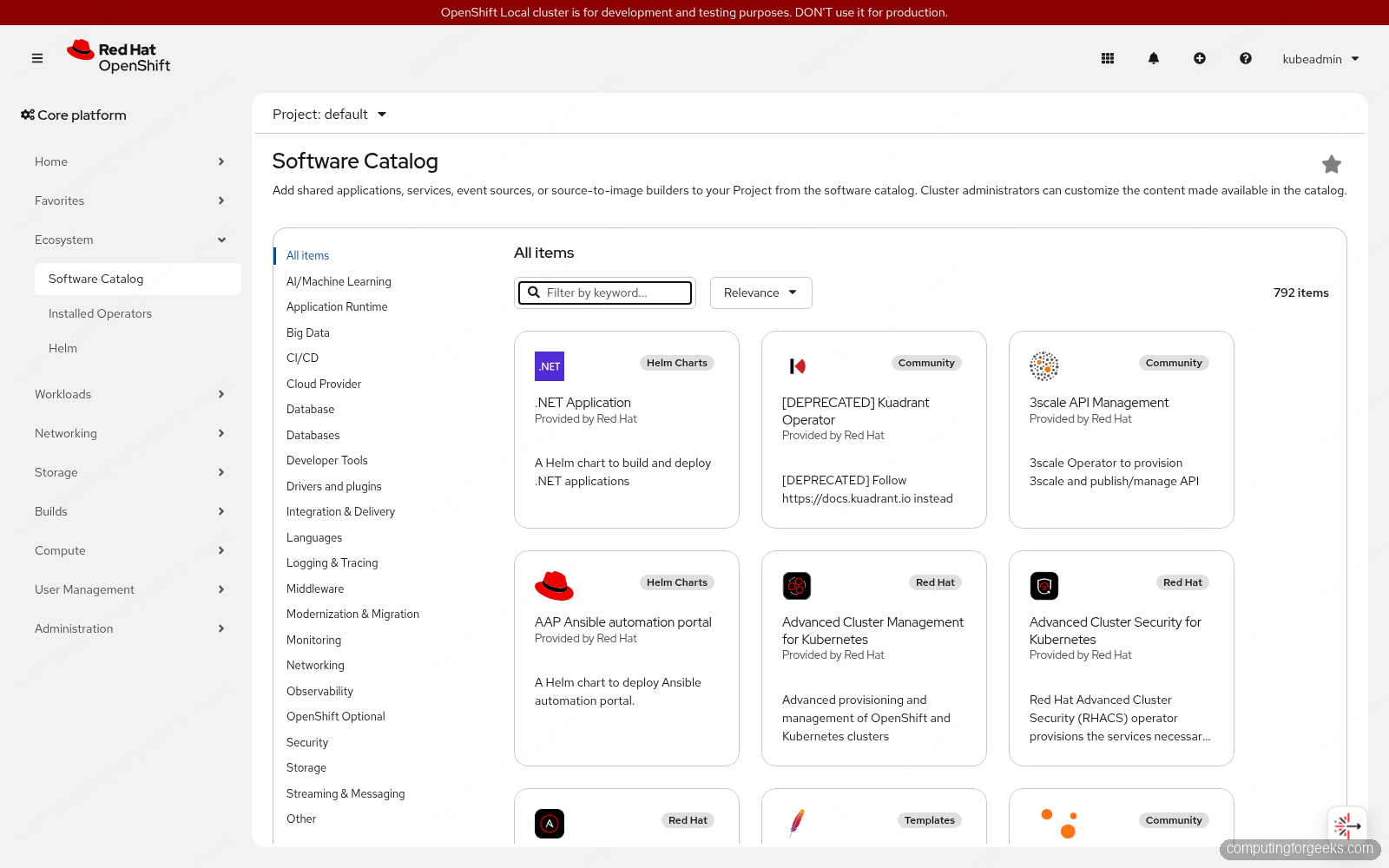
The in-console Software Catalog (OperatorHub) lists hundreds of certified, Red Hat, and community Operators:
When you do need to move between minor versions, the process is deliberate. The walkthrough on how to perform OpenShift cluster upgrades covers the channels and the order of operations.
Developer experience: Dev Spaces, Pipelines, GitOps, and Service Mesh
OpenShift ships a developer platform, not just a runtime. The Developer console perspective gives a topology view of your apps, and Source-to-Image builds container images straight from source with no Dockerfile. The supporting products carry Red Hat names now, which trips people up when they read older guides:
- OpenShift Dev Spaces (formerly CodeReady Workspaces): browser-based, container-native dev environments defined by a devfile, so nobody installs an IDE or runs containers on a laptop.
- OpenShift Pipelines (based on Tekton): cloud-native, Kubernetes-native CI with pipelines-as-code triggered from Git events.
- OpenShift GitOps (based on Argo CD): declarative delivery that reconciles cluster state to whatever your Git repo says.
- OpenShift Service Mesh (based on Istio): mTLS, traffic shaping, and tracing for microservices, with Kiali for visualization. See how to set up the Istio-based Service Mesh.
Security and compliance baked in
OpenShift is stricter than stock Kubernetes by default, which is a feature, not friction. Security Context Constraints sit on top of RBAC and stop containers running as root or grabbing host privileges unless you explicitly allow it. Red Hat Advanced Cluster Security adds runtime threat detection, vulnerability management, and policy enforcement across clusters. Recent releases pushed this further with a Zero Trust Workload Identity Manager that issues cryptographically verifiable workload identities on SPIFFE/SPIRE, a generally available External Secrets Operator for pulling secrets from external vaults, post-quantum-ready TLS key exchange, and default NetworkPolicy isolation so platform Operators only talk to what they need. Supply-chain tooling like Trusted Artifact Signer rounds it out by signing and verifying your build artifacts.
Networking, storage, and observability
The default CNI is OVN-Kubernetes, which handles pod networking, network policy, egress control, and, in recent releases, native BGP routing for advertising cluster networks to your physical fabric. External traffic reaches apps through Routes and the integrated ingress controller, and wildcard TLS is straightforward once you wire in certificates, as covered in the guide on Let’s Encrypt wildcard certificates on OpenShift routes.
For storage, OpenShift Data Foundation provides software-defined block, file, and object storage on Ceph, the LVM Storage Operator covers single-node and edge cases, and the CSI layer means most third-party storage plugs in cleanly. Observability is not an afterthought either: a built-in Prometheus and Alertmanager stack handles metrics, Loki handles logs, and Tempo handles distributed tracing, all surfaced in the console.
Where OpenShift 4 runs: hybrid cloud, managed, and edge
OpenShift’s whole reason for existing is one consistent platform everywhere. You can self-manage it on AWS, Microsoft Azure, Google Cloud, IBM Cloud, Oracle Cloud, OpenStack, VMware vSphere, and bare metal. If you would rather not run the control plane, the managed services do it for you: Red Hat OpenShift Service on AWS (ROSA), Azure Red Hat OpenShift (ARO), and OpenShift Dedicated. For multi-cluster fleets, Red Hat Advanced Cluster Management gives you one pane of glass, and the install guide for Advanced Cluster Management on OpenShift shows the setup.
At the small end, Single Node OpenShift collapses the whole thing onto one machine, and MicroShift strips OpenShift down for edge and IoT hardware. The guide on running MicroShift on RHEL and Fedora is the place to start for constrained devices.
OpenShift 4 new features in the latest releases
For readers tracking specific releases, here are the headline items from the two most recent versions. OpenShift 4.20 (Kubernetes 1.33) introduced:
- Mounting AI model weights from a container registry as volumes, and a developer preview of the Kubernetes MCP server.
- Zero Trust Workload Identity Manager (SPIFFE/SPIRE) and a generally available External Secrets Operator.
- Native BGP routing in OVN-Kubernetes and post-quantum X25519MLKEM768 key exchange.
- Virtualization CPU load-aware rebalancing, live migration to a specific node, and Arm support, plus a full-screen YAML editor and UI-driven control plane machine set management in the console.
OpenShift 4.21 (Kubernetes 1.34, CRI-O 1.34) followed with Lightspeed integrated directly into the virtualization UI, cross-cluster live migration, multi-architecture-aware autoscaling, Volume Attributes Classes reaching general availability, and tighter default network isolation for cluster Operators. The full detail lives in the official OpenShift 4.21 release notes.
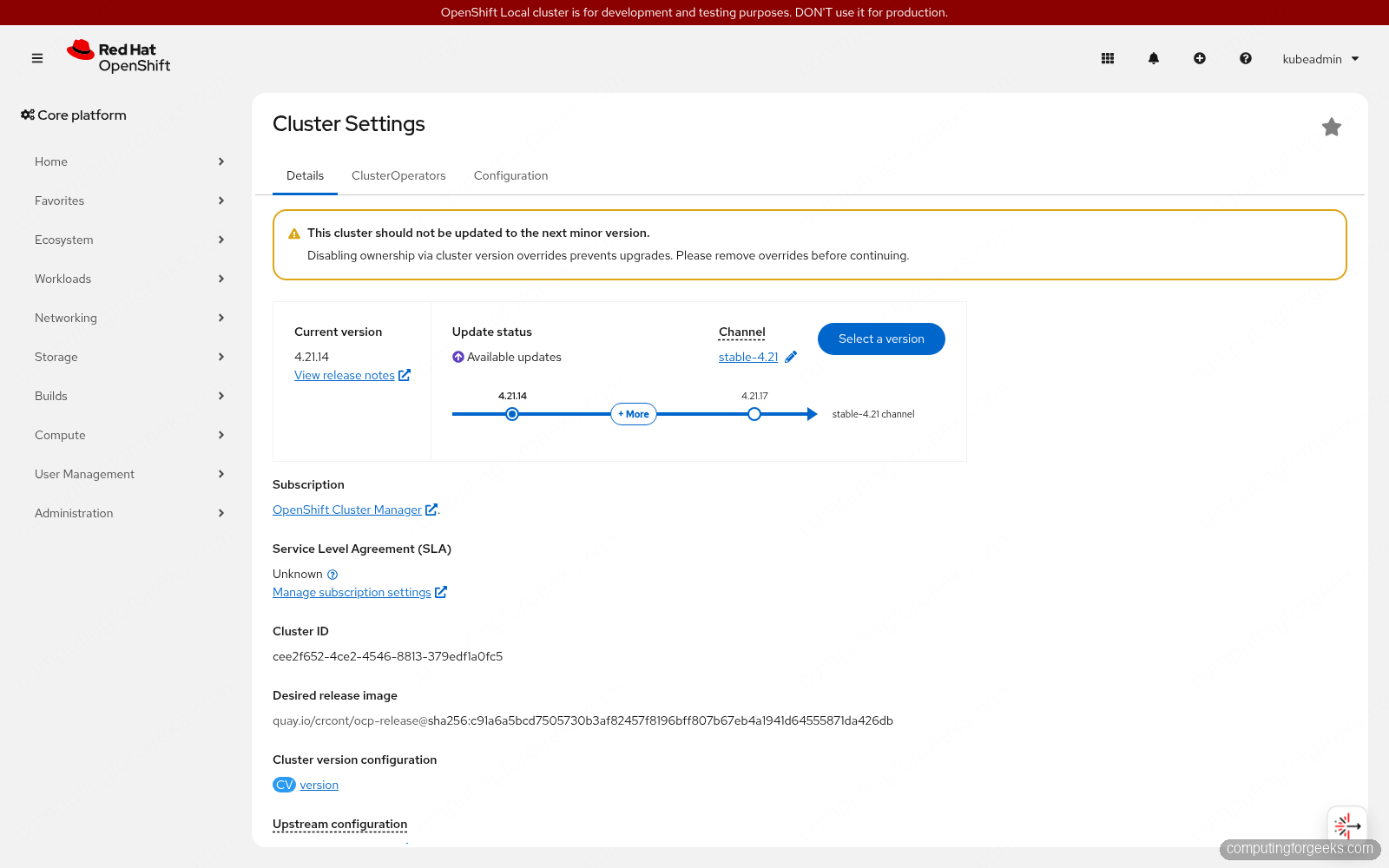
Cluster Settings shows the running version and the update channel, with the available releases laid out on the update graph:
Try it on your own cluster
Reading about the features only gets you so far. The cheapest way to feel the difference is a local cluster on your own machine using CodeReady Containers (CRC), which gives you the full console and most Operators on a laptop. From there, the open-source OKD build runs well on OpenStack or directly on KVM and libvirt when you want a multi-node cluster to test upgrades, Operators, and the virtualization stack against. Pick the smallest environment that lets you exercise the feature you actually care about, then scale up once it earns its place.