
I've seen Breaking Bad so many times, like honestly at least 4 times. If you haven't seen it, be careful, it can make you stay in front of the TV for several days. In a nutshell, the show is about a high school teacher that gets diagnosed with cancer and decides to cook meth. Walter (the main character) goes through all kinds of crazy stuff, the first time you see it, you think that guy is so smart!! When you get to see it as many times as me you notice that he is not only smart but lucky.
There's another character Hector Salamanca, he seems to have had a severe stroke so he has to communicate with nothing but a bell.

By now you should have remembered him, if not, you can imagine how frustrating must be to not be able to communicate. Although, Mr. Hector is family guy and his nephews are always there for him.

Since a few weeks ago, I've been working with accessibility and it has totally shifted the way I do things. So when I saw Breaking Bad the last time, I was really interested in finding out a way you could properly communicate with Mr. Hector. Yeah, I was thinking on accessibility while watching Breaking Bad, that happens when you see a show that many times.
There's one scene that Walter is about to get caught by Hector's nephew Tuco, but he wasn't able to properly understand what Mr. Hector was trying to say. At the moment I was thinking like, just if they both knew morse, right?.
Later on, Mr. Hector gets reunited with his other nephews Leonel y Marcos. And something incredible happened, they used a Ouija board to communicate with him. At that time I felt like, WOW, that's much better than morse, I even felt dumb for not thinking it.

When I thought about using a Ouija board was smart, Hector was sent to a nursing home where he had the proper equipment in order to communicate. And the most obvious thing happened, I was reinventing the wheel. There already was something called alphabet board specially designed for scenarios like Mr. Hector. If I felt dumb before you can imagine.

So let's face it, the rule of thumb is if we are looking to solve a problem the first thing you should do is to search for how others are dealing with it now and that will probably get you into the right direction. To feel better I decided to do an angular application with a digital alphabet board.
Letter board also may refer to aid tool, used by people with disabilities, to communicate with others, by pointing letters on board with written on it letters (whole alphabet), numbers and other essential signs, even whole frequently used words. Wikipedia.
I started thinking that if I was gonna learn about accessibility, probably doing an accessibility tool is the best way to go. And an alphabet board seemed like a fun idea, listing the alphabet, going through all the letters, reacting to some way of input to build phrases as the user interacts with it. I decided to use the click as the interaction for this example but it can be changed to anything else.
In real life, there's someone holding the board while the patient makes some kind of signal when reaches certain letter. So the digital version has to automatically go through the letters and selecting when receiving clicks.
Now that you have an idea of how to deal with this. Let's go back to accessibility concepts in order to understand how to properly tackle the situation.
Accessibility in the sense considered here refers to the design of products, devices, services, or environments so as to be usable by people with disabilities. Wikipedia.
You may be thinking, by adding some kind of outline to the currently active letter while going through the alphabet the user will be aware. What if the user has also come kind of visual impairment? That leads us to the first principle in WCAG, Perceivable.
Users must be able to perceive the information being presented (it can't be invisible to all of their senses). WCAG
In order to say that the alphabet tool is actually accessible, even users with visual impairment have to be able to use it. There has to be some mechanism to let the user know the currently active letter by sound.
Although it may look like this is the only principle you are applying but actually if you create an alphabet board that can be easily in any input in HTML, even users like Mr. Hector would be able to do things that they wouldn't even imagine before. This falls into the second principle in WCAG, Operable.
Users must be able to operate the interface (the interface cannot require interaction that a user cannot perform). WCAG
Helping users like Mr. Hector to use web applications is taking this principle to the next level. It can literally change lives.
Now instead of teaching morse to all patients and nurses, let's build an easy to use alphabet board for people that cant speak.
The alphabet should be stored as a list of letters, the user interface has to show all the letters in the alphabet separated by space. It has to have a time interval while the letter is active, when the user interacts the currently active letter is stored as part of the word.
In order for it to work, there has to be some kind of store keeping track of the state of the letters that have been added to the word.
Let's get to it. First step is to build the array of letters, the standard used for electronic communication encoding is named ASCII, in which the upper case letter A is represented by the integer 65 since it's ordered we can assume that 66 is upper cased B and so on until we reach the length of the alphabet (26).
One of the possible ways to generate an array containing the integers from 65 to 90 in typescript is:
const charCodes = Array.from(Array(26), (_, index) => 65 + index);You may be wondering, now what? the user has to do the math to see the current letter? Short answer, no. Long answer we can use a custom pure pipe to map the charCodes to their respective letter. That pipe can look like this:
@Pipe({
  name: 'char'
})
export class CharPipe implements PipeTransform {
  transform(keyCode: number) {
    return String.fromCharCode(keyCode);
  }
}
Which can be used this way:
<span>{{ charCode | char }}</span>Next step will be to display them in the UI for the user, that can be done like this:
<span *ngFor="let charCode of charCodes">
  {{ charCode | char }}
</span>
What about the active letter? How will the user be visually notified of the currently active letter? That's easy, we create a modifier class in css for that. It can be something like this:
.active {
  outline: 2px solid red;
}
The Alphabet board now is pretty useless, we need it to move if we want to allow users to use it by themselves.
RxJs to the rescue!
For the board to move, is required to have an interval running that will loop through the items in the letters array. We want it to go back to the start once it reaches the end of the list. Also, the .active class depends on the currently active letter so you are gonna need some Angular magic too.
index$ = timer(0, 2000).pipe(map(tick => tick % (this.letters.length + 1)));<span
*ngFor="let charCode of charCodes; let i = index"
[ngClass]="{active: (index$ | async) === i}">
{{ charCode | char }}
</span>We are close, the board is there and it already moves automatically. Now is the time to listen to interactions and save the currently selected letter as well as the word stored so far.
select = new Subject();
word$ = this.select.pipe(
withLatestFrom(this.index$, (_, index) => String.fromCharCode(index)),
scan((state: string, letter: string) => state + letter, '')
);
handleClick = () => {
this.select.next();
}<div (click)="handleClick()">
<span
  *ngFor="let charCode of charCodes; let i = index"
  [ngClass]="{active: (index$ | async) === i}">
  {{ charCode | char }}
</span>
<span>{{ word$ | async }}</span>
</div>You just did it! you are able to write words with it. And even Mr. Hector can use it.
What if I told you, that's not true.
Although there's a visual way to know the active letter, what about blind users? Remember we are talking about inclusion here. You'll need to have a way to automatically notify screen reader users which of the letters is currently active as well as to read out the word written so far.
Thankfully ARIA exists and it has a property that does exactly what we need. I'm not gonna talk about ARIA specifically in this article but you'll need it to get your alphabet board to the next level. To achieve this you can use aria-live property.
<div (click)="handleClick()">
  <span aria-live="assertive">{{ index$ | async | char }} is active.</span>

  <span
    *ngFor="let charCode of charCodes; let i = index"
    [ngClass]="{active: (index$ | async) === i}">
    {{ charCode | char }}
  </span>

  <span aria-live="assertive">{{ word$ | async }}</span>
</div>
And now if you turn on a screen reader you'll see how it notifies the active letter as well as the word written so far.
In case you don't want to go with the trouble you can access my version of the alphabet board which looks like this:
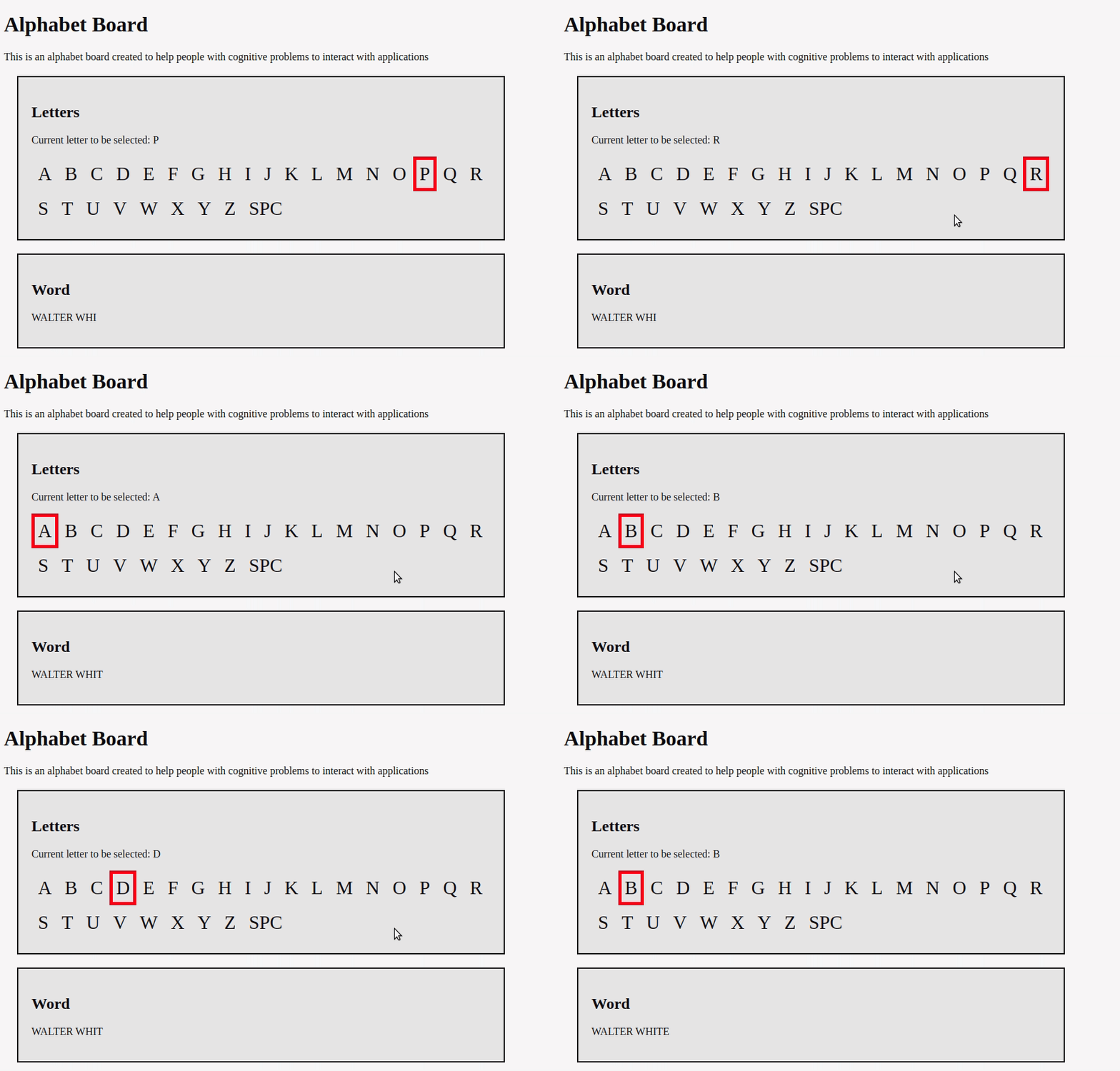
To wrap this up I have to say that I personally had a lot of fun doing the Alphabet Board and I really hope you do too. Many think that accessibility is a matter of following rules and compliances, but there is more to it. Is a way of designing what we build.
NOTE: This article is not related to compliances and rules. The intention is to give you a broader view in the accessibility aspect. If you are interested in being WCAG compliant, I'll release a new article about that soon.
Icons made by Nikita Golubev from Flaticon
