Repository navigation
Using "Most recent" feature
Since v. 2.0.0.0, it is possible to set not only certain release (i.e. 8), but also to specify meta-versions, such as Most recent and Most recent LTS.
There are two types of installations in Update Watcher:
- Auto-discovered installations. They are discovered via Windows registry and are considered volatile. It is not possible to change API parameters for them, they use auto-discovered ones.
- Manually added installations. Since they are non-volatile (persistent), it is possible to set API parameters for them.
Thus, "Most recent" feature can be used only with Manually added installations - such as JAVA_HOME instance or custom directories.
In order to use "Most recent" feature, most likely scenario will be like:
- Make sure JAVA_HOME environment variable is set to the necessary release
- Add JAVA_HOME instance to the list of installations
- Set API/Major version to desired value
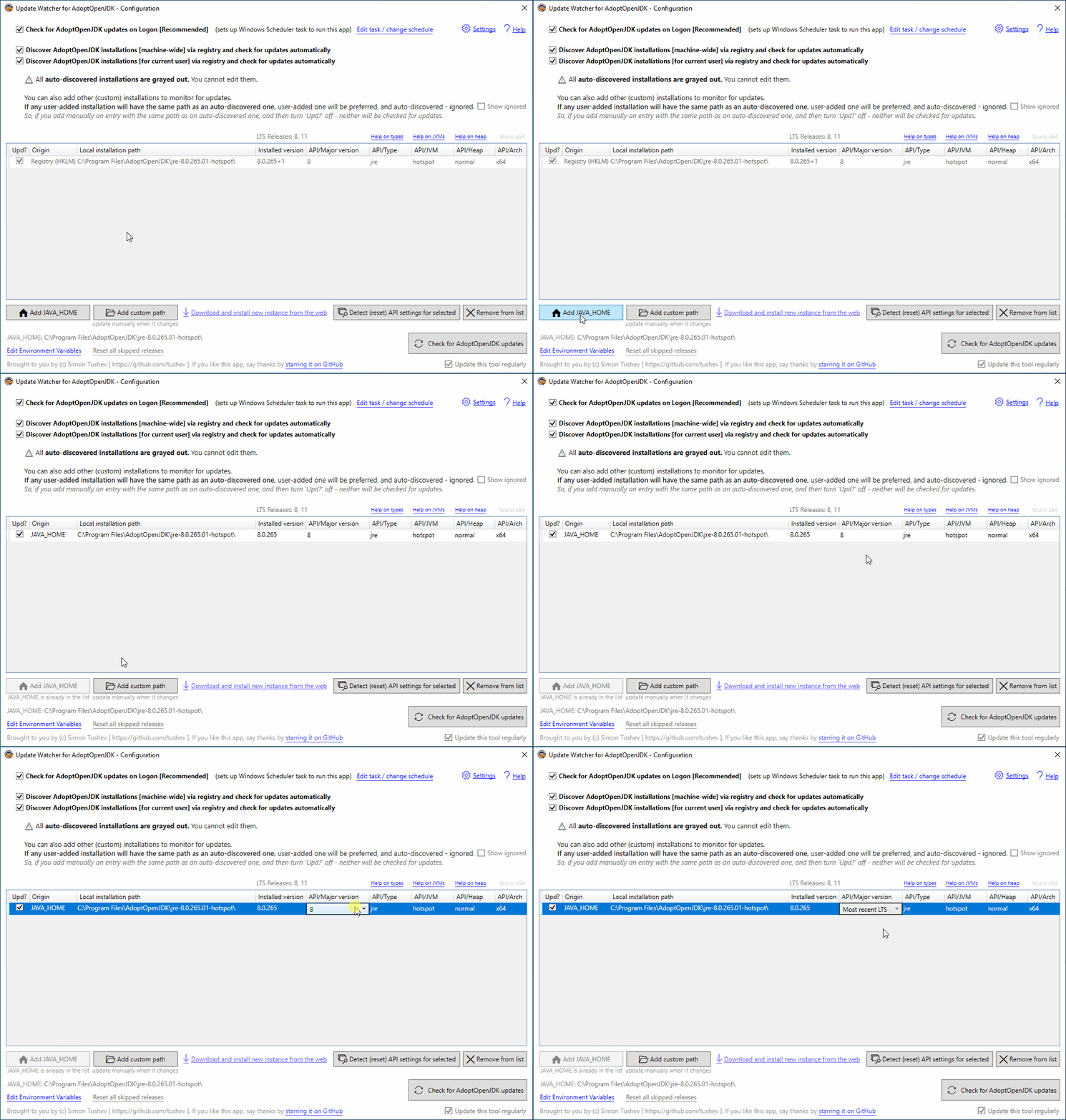
Note how JAVA_HOME instance overrides auto-discovered one (this happens because manually added entry has the same path as auto-discovered entry)
