
制空権。これが世界を動かしている

追尾する計算は、驚くほど簡単だ
空を飛ぶ飛行機を追いかける。
カメラでロックオンする。
逃げるターゲットとのズレを測り続ける。
そして少しずつ修正していく。
その様子を見ると、多くの人はこう思う。
「すごい計算をしているに違いない」
だが実際には、その本質は驚くほどシンプルだ。
本当にやっていること
追尾AIの基本は、実はこれだけである。
誤差 = ターゲット位置 - 自分の位置
つまり、
「どっち方向に、どれだけズレているか」
それを毎フレーム測っているだけだ。
例えば:
ターゲット x = 500
自分 x = 450
なら、
誤差 = +50
右へ50ズレている。
なら右へ動けばいい。
これだけだ。
しかし、これが世界を動かしている
驚くべきことに、この単純な構造は、
ドローン
ミサイル
自動運転
カメラ追尾
ロボットアーム
AI制御
工場機械
あらゆる場所に現れる。
つまり追尾とは、
誤差を減らし続ける運動
なのである。
未来を見ると、急に賢くなる
さらに少しだけ未来を予測すると、一気に「知能っぽさ」が出る。
例えば:
未来位置 = 現在位置 + 速度
を使う。
つまり、
「今ここにいる」ではなく、
「次にどこへ行くか」
を追う。
これだけで追尾は劇的に滑らかになる。
子供向けウェブアプリを作って気づいたこと
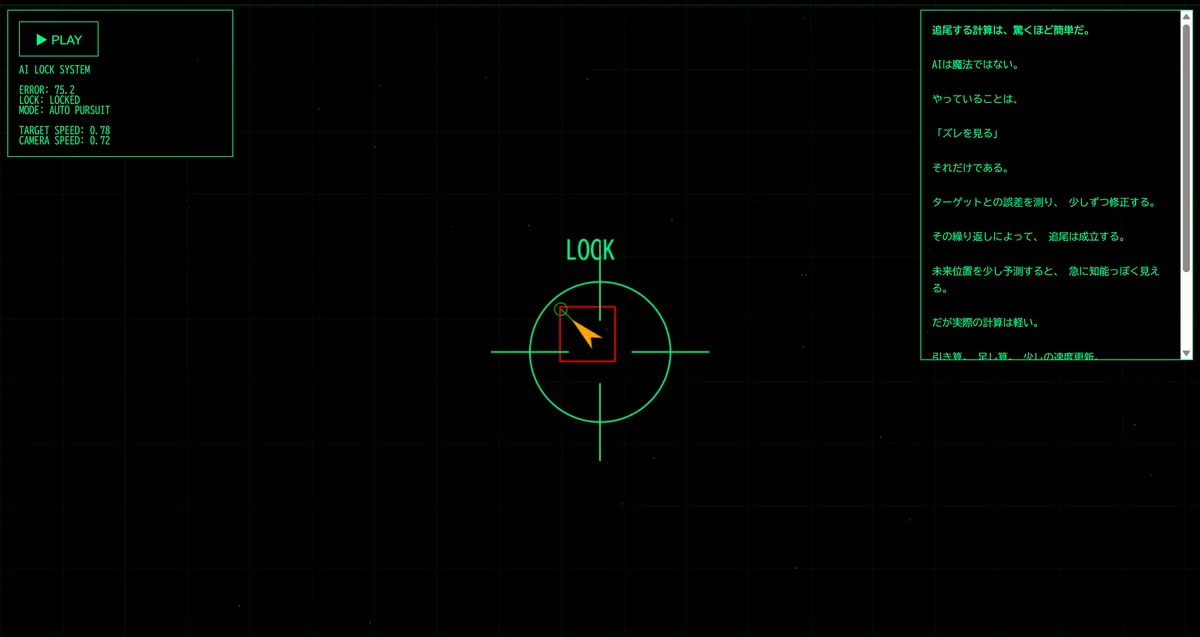
画面には、
ゆっくり逃げる飛行機
ロックオンカーソル
誤差線
カメラ視点
スキャンHUD
が映る。
プレイヤーは何もしない。
ただ眺める。
しかし、見ているうちに分かってくる。
AIは魔法ではない。
巨大な意思があるわけでもない。
ただ、
ズレを見て
少し修正する
これを永遠に繰り返している。
それだけなのだ。
実はこれは「生物」に近い
考えてみると、人間も似ている。
歩くとき。
手を伸ばすとき。
ボールを取るとき。
全部、
目標との差
を修正している。
つまり知能とは、ある意味、
誤差修正システム
なのかもしれない。
そして計算は軽い
ここが面白い。
派手な見た目に反して、実際の計算量は非常に小さい。
毎フレームやっていることは:
引き算
足し算
少しの速度更新
それだけ。
ESP32でも十分動く。
つまり、
知能っぽさ ≠ 巨大計算
なのである。
見える化すると、突然理解できる
数式だけでは分からない。
だが、
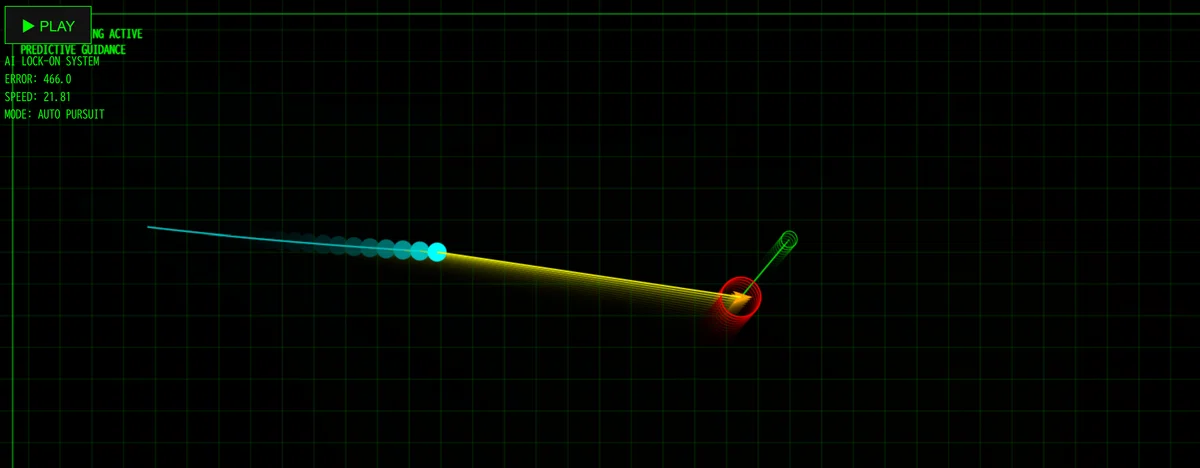
誤差線
ロックオン円
未来予測点
滑らかな追尾
を画面で見ると、一気に直感へ変わる。
「ああ、こうやって追いかけているのか」
と理解できる。
これは非常に大きい。
追尾とは「世界への反応」
追尾AIは、世界を見ている。
そして、
ズレた
↓
修正する
↓
またズレる
↓
また修正する
を繰り返す。
この循環こそが、制御の核心だ。
たぶん、知能の原型もここにある
もしかすると。
知能の最初の形は、
難しい推論ではなく、
誤差を減らしたい
という運動だったのかもしれない。
追尾アニメーションをぼんやり眺めていると、そんな気がしてくるのである。
<!DOCTYPE html>
<html lang="ja">
<head>
<meta charset="UTF-8">
<title>追尾AI - LOCK ON DEMO</title>

<style>
html, body{
    margin:0;
    overflow:hidden;
    background:black;
    font-family:monospace;
    color:#00ff88;
}

canvas{
    display:block;
}

#ui{
    position:absolute;
    top:15px;
    left:15px;
    z-index:10;

    background:rgba(0,0,0,0.45);
    border:1px solid #00ff88;

    padding:14px;
    width:260px;
}

button{
    background:black;
    color:#00ff88;
    border:1px solid #00ff88;

    padding:10px 20px;
    cursor:pointer;

    font-size:16px;
    margin-bottom:10px;
}

#essay{
    position:absolute;
    right:15px;
    top:15px;

    width:320px;
    height:420px;

    overflow:auto;

    background:rgba(0,0,0,0.45);
    border:1px solid #00ff88;

    padding:14px;

    line-height:1.7;
    font-size:13px;
}
</style>
</head>
<body>

<div id="ui">

<button onclick="resetWorld()">▶ PLAY</button>

<div>
AI LOCK SYSTEM<br><br>

ERROR:
<span id="err">0</span><br>

LOCK:
<span id="lock">SEARCHING</span><br>

MODE:
AUTO PURSUIT<br><br>

TARGET SPEED:
<span id="ts">0</span><br>

CAMERA SPEED:
<span id="cs">0</span>
</div>

</div>

<div id="essay">

<b>追尾する計算は、驚くほど簡単だ。</b><br><br>

AIは魔法ではない。<br><br>

やっていることは、<br><br>

「ズレを見る」<br><br>

それだけである。<br><br>

ターゲットとの誤差を測り、
少しずつ修正する。<br><br>

その繰り返しによって、
追尾は成立する。<br><br>

未来位置を少し予測すると、
急に知能っぽく見える。<br><br>

だが実際の計算は軽い。<br><br>

引き算。
足し算。
少しの速度更新。<br><br>

それだけで、
「追いかける知能」が生まれる。<br><br>

このアニメーションは、
その最小構造を視覚化したものだ。

</div>

<canvas id="cv"></canvas>

<script>
const canvas = document.getElementById("cv");
const ctx = canvas.getContext("2d");

canvas.width = window.innerWidth;
canvas.height = window.innerHeight;

const errText = document.getElementById("err");
const lockText = document.getElementById("lock");
const tsText = document.getElementById("ts");
const csText = document.getElementById("cs");

function rand(min,max){
    return Math.random()*(max-min)+min;
}

let stars = [];

for(let i=0;i<200;i++){

    stars.push({

        x:Math.random()*2000-1000,
        y:Math.random()*2000-1000,
        s:Math.random()*2
    });
}

let target;
let cam;

function resetWorld(){

    target = {

        x: rand(-300,300),
        y: rand(-200,200),

        vx: rand(-0.7,0.7),
        vy: rand(-0.5,0.5),

        timer:0
    };

    cam = {

        x:0,
        y:0,

        vx:0,
        vy:0
    };
}

function updateTarget(){

    target.timer++;

    // ゆっくり方向変化
    if(target.timer > 240){

        target.vx += rand(-0.4,0.4);
        target.vy += rand(-0.4,0.4);

        const sp = Math.hypot(target.vx,target.vy);

        const max = 1.5;

        if(sp > max){

            target.vx *= max/sp;
            target.vy *= max/sp;
        }

        target.timer = 0;
    }

    target.x += target.vx;
    target.y += target.vy;
}

function updateCamera(){

    // 少し未来を見る
    const futureX = target.x + target.vx*60;
    const futureY = target.y + target.vy*60;

    const dx = futureX - cam.x;
    const dy = futureY - cam.y;

    // 超ゆっくり誘導
    cam.vx += dx * 0.00018;
    cam.vy += dy * 0.00018;

    // 慣性
    cam.vx *= 0.985;
    cam.vy *= 0.985;

    cam.x += cam.vx;
    cam.y += cam.vy;

    const err = Math.hypot(dx,dy);

    errText.textContent = err.toFixed(1);

    if(err < 90){

        lockText.textContent = "LOCKED";
        lockText.style.color = "#00ff88";

    }else{

        lockText.textContent = "TRACKING";
        lockText.style.color = "yellow";
    }

    tsText.textContent =
        Math.hypot(target.vx,target.vy).toFixed(2);

    csText.textContent =
        Math.hypot(cam.vx,cam.vy).toFixed(2);
}

function drawBackground(){

    ctx.fillStyle = "black";
    ctx.fillRect(0,0,canvas.width,canvas.height);

    const cx = canvas.width/2;
    const cy = canvas.height/2;

    for(let s of stars){

        const px = cx + s.x - cam.x*0.2;
        const py = cy + s.y - cam.y*0.2;

        ctx.fillStyle = "rgba(255,255,255,0.25)";
        ctx.fillRect(px,py,s.s,s.s);
    }
}

function drawGrid(){

    ctx.strokeStyle = "rgba(0,255,100,0.06)";
    ctx.lineWidth = 1;

    const cx = canvas.width/2;
    const cy = canvas.height/2;

    for(let x=-2000;x<2000;x+=80){

        ctx.beginPath();

        ctx.moveTo(
            cx + x - cam.x,
            0
        );

        ctx.lineTo(
            cx + x - cam.x,
            canvas.height
        );

        ctx.stroke();
    }

    for(let y=-2000;y<2000;y+=80){

        ctx.beginPath();

        ctx.moveTo(
            0,
            cy + y - cam.y
        );

        ctx.lineTo(
            canvas.width,
            cy + y - cam.y
        );

        ctx.stroke();
    }
}

function drawTarget(){

    const cx = canvas.width/2;
    const cy = canvas.height/2;

    const x = cx + target.x - cam.x;
    const y = cy + target.y - cam.y;

    // 未来位置
    const fx = cx + (target.x + target.vx*60) - cam.x;
    const fy = cy + (target.y + target.vy*60) - cam.y;

    // 予測線
    ctx.strokeStyle = "lime";

    ctx.beginPath();
    ctx.moveTo(x,y);
    ctx.lineTo(fx,fy);
    ctx.stroke();

    ctx.beginPath();
    ctx.arc(fx,fy,8,0,Math.PI*2);
    ctx.stroke();

    // ロック枠
    ctx.strokeStyle = "red";
    ctx.lineWidth = 2;

    ctx.strokeRect(x-35,y-35,70,70);

    // 飛行機
    ctx.save();

    ctx.translate(x,y);

    const ang = Math.atan2(target.vy,target.vx);

    ctx.rotate(ang);

    ctx.fillStyle = "orange";

    ctx.beginPath();

    ctx.moveTo(28,0);
    ctx.lineTo(-18,-10);
    ctx.lineTo(-6,0);
    ctx.lineTo(-18,10);

    ctx.closePath();
    ctx.fill();

    ctx.restore();
}

function drawHUD(){

    const cx = canvas.width/2;
    const cy = canvas.height/2;

    ctx.strokeStyle = "#00ff88";
    ctx.lineWidth = 2;

    // 中央ロック円
    ctx.beginPath();
    ctx.arc(cx,cy,90,0,Math.PI*2);
    ctx.stroke();

    // クロスヘア
    ctx.beginPath();

    ctx.moveTo(cx-140,cy);
    ctx.lineTo(cx-40,cy);

    ctx.moveTo(cx+40,cy);
    ctx.lineTo(cx+140,cy);

    ctx.moveTo(cx,cy-140);
    ctx.lineTo(cx,cy-40);

    ctx.moveTo(cx,cy+40);
    ctx.lineTo(cx,cy+140);

    ctx.stroke();

    // スキャン線
    const sy =
        (Math.sin(Date.now()*0.001)+1)*0.5
        * canvas.height;

    ctx.strokeStyle = "rgba(0,255,100,0.15)";

    ctx.beginPath();
    ctx.moveTo(0,sy);
    ctx.lineTo(canvas.width,sy);
    ctx.stroke();

    // LOCK表示
    const tx = cx + target.x - cam.x;
    const ty = cy + target.y - cam.y;

    const d = Math.hypot(tx-cx,ty-cy);

    if(d < 90){

        ctx.fillStyle = "#00ff88";
        ctx.font = "32px monospace";

        ctx.fillText("LOCK",cx-45,cy-120);
    }
}

function draw(){

    drawBackground();
    drawGrid();
    drawTarget();
    drawHUD();
}

function update(){

    updateTarget();
    updateCamera();
}

function loop(){

    update();
    draw();

    requestAnimationFrame(loop);
}

resetWorld();
loop();

window.addEventListener("resize",()=>{

    canvas.width = window.innerWidth;
    canvas.height = window.innerHeight;
});
</script>

</body>
</html>