
ComfyUI上でLM studioが使える「LM Studio Nodes for ComfyUI」

以前ComfyUI上でLLMを使い、ZIT用のプロンプトを拡張できるカスタムノードを紹介しました。
これと似たような機能でComfyUI上でLM Studioが使える「LM Studio Nodes for ComfyUI」というものがあります。
某掲示板で話題になってたので使ってみました。
LM Studio Nodes for ComfyUIとは?

LM Studio Nodes for ComfyUIは、LM Studioの機能をComfyUI上で直接利用するためのカスタムノードです。
以前紹介したComfyui-Z-Image-UtilitiesはLLMの接続方法が複数あり、ZIT用のプロンプト拡張が目的でした。
LM Studio Nodes for ComfyUIはLM studioをメインに使用し、プロンプトを自由にカスタマイズできるので、ZIT以外のモデルも使えると思います。
https://github.com/mattjohnpowell/comfyui-lmstudio-image-to-text-node
ComfyUIのインストール
ComfyUIのインストールがまだの方はこちらを参考にしてみてください
ComfyUI ポータブル版:https://note.com/aiaicreate/n/n0bb6c5b8bfa2
ComfyUI デスクトップ版:https://note.com/aiaicreate/n/n753c76432496
Stability Matrix:https://note.com/aiaicreate/n/nadcfc6dc8605
ComfyUI Manager:https://note.com/aiaicreate/n/ne73ba273c412
LM Studioのインストール
LM Studioのインストールがまだの方はこちらを参考にしてみてください。
LM Studio Nodes for ComfyUIの使い方
インストール
Manager入れてる方は検索からインストールできます。

手動の場合は以下のパスでクローンしてください。
git clone https://github.com/mattjohnpowell/comfyui-lmstudio-image-to-text-node.git一応サンプルworkflowも同梱されてますが、workflowのノードが古いので置き換える必要があります。
ComfyUI\custom_nodes\comfyui-lmstudio-image-to-text-node\workflow.pngただworkflow自体がSD3用になっていたので今回は公式のZIT用workflowに入れて使ってみました。
・LM Studio (Image to Text)用
・LM Studio (Text Gen)用
LM Studioの準備
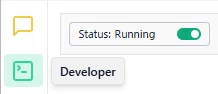
起動してDeveloperからstatusをRunningにしておいてください。
LM Studio (Image to Text)の使い方
LM Studio (Image to Text)はVLMモデル(画像解析可能なモデル)を使うノードです。
セットした画像を参照し、何らかの指示を与えてそれを生成プロンプトとして使ったりできます。
まずLoad Imageで画像をセット。

LM Studio側で使いたいモデルの名前をmodel_keyに入力してください。
My modelsからモデルにカーソル合わせればコピーできます。
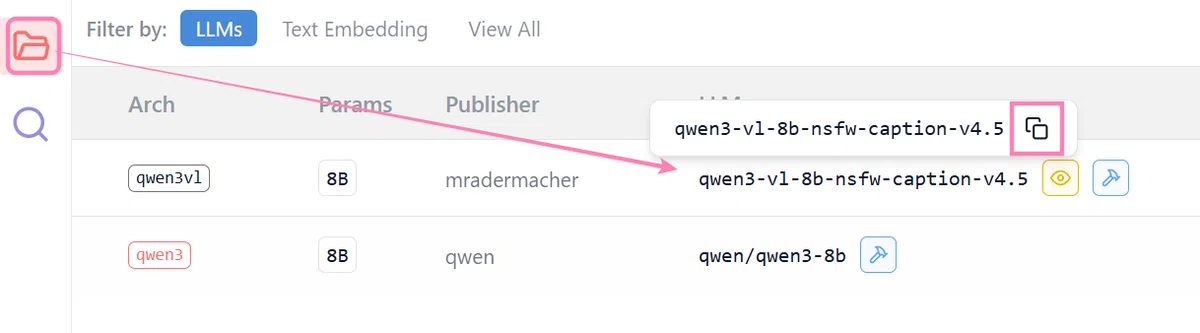
ノード側で名前の指定すれば切り替えられるなので、LM studio側で操作する必要はありません。
以下LM Studio (Image to Text)のパラメータです。
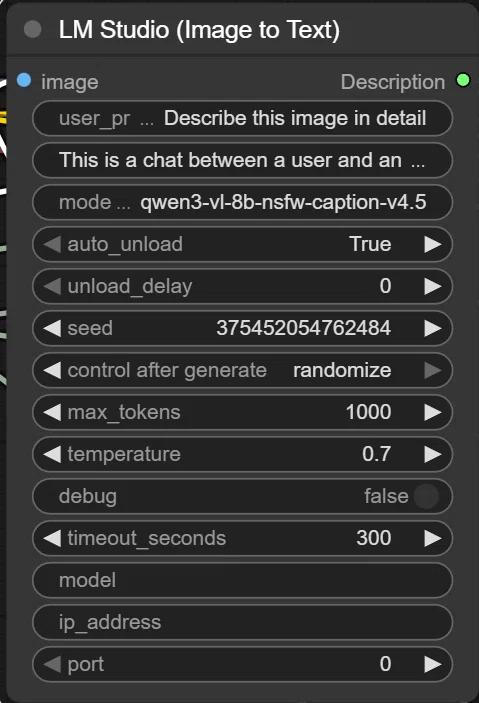
user_prompt:画像について具体的に何を聞きたいかを入力
system_prompt:AIにどのような役割で振る舞ってほしいかを指示
model_key:LM Studio側でロードしているモデルの名前(ID)を指定
auto_unload:生成が終わった後に、メモリからモデルを自動で解放するかどうか
unload_delay:auto_unload がONの場合、生成終了から何秒後に解放するかを指定
seed:生成結果の乱数シード値
control after generate:実行後にシード値をどうするか
max_tokens:AIが生成する文章の最大長さ(トークン数)
temperature:文章の創造性(ランダム度)。高いと独創的に、低いと論理的・安定的
debug:コンソール画面に詳細な通信ログやエラーを表示するかどうか
timeout_seconds:応答が返ってこない場合、何秒で諦めてエラーにするか
model:model_keyの旧仕様パラメータ。指定不要
ip_address:旧仕様パラメータ。指定不要
port: 旧仕様パラメータ。指定不要
これで実行すると指定したVLMモデルが画像を解析して出力してくれます。
・出力
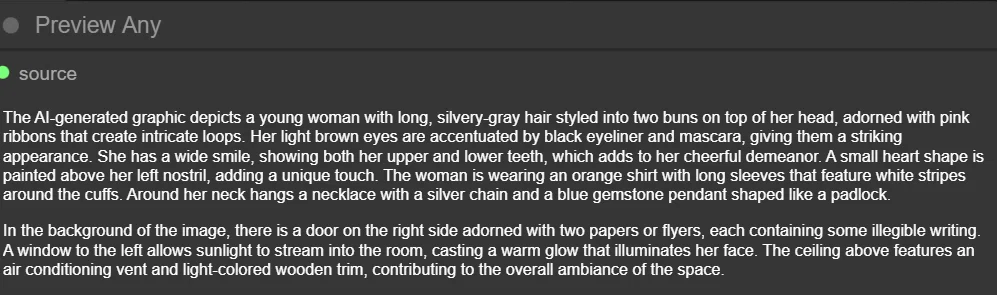
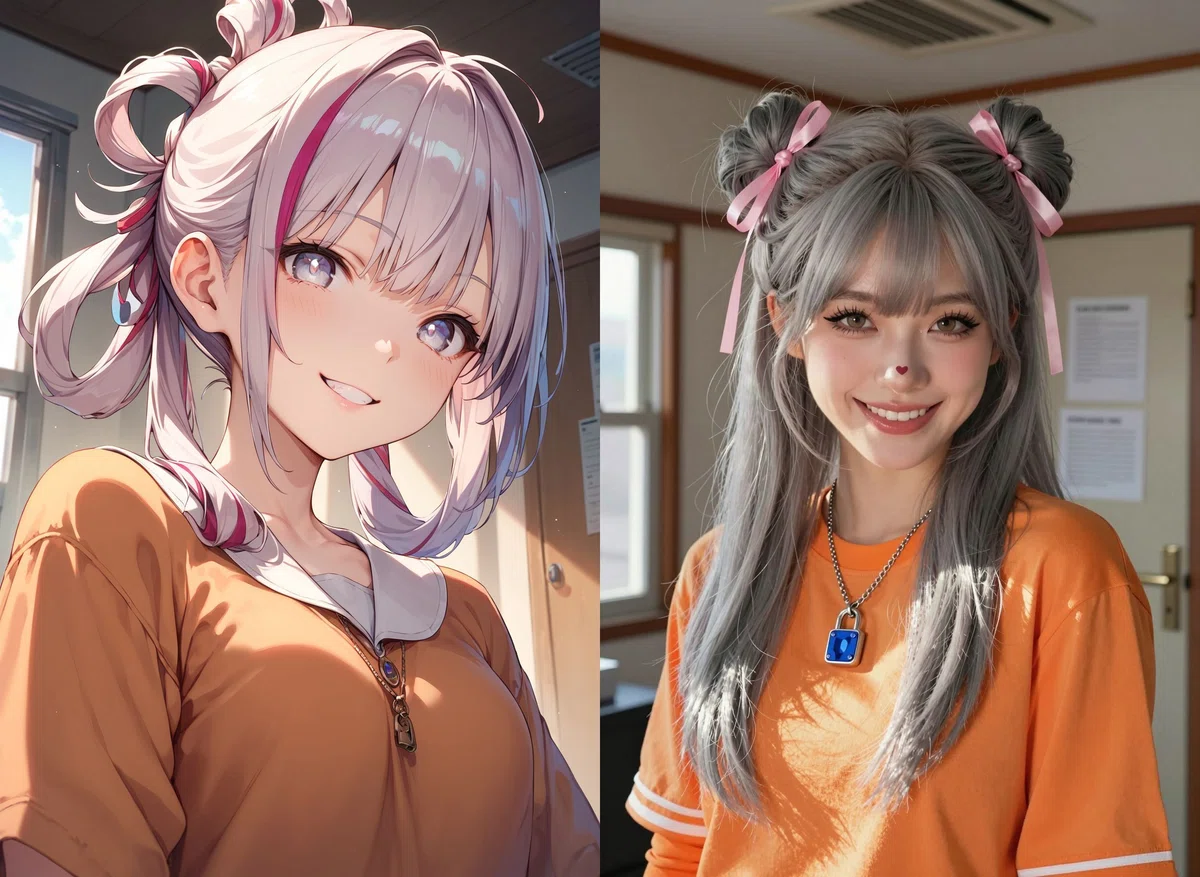
The AI-generated graphic depicts a young woman with long, silvery-gray hair styled into two buns on top of her head, adorned with pink ribbons that create intricate loops. Her light brown eyes are accentuated by black eyeliner and mascara, giving them a striking appearance. She has a wide smile, showing both her upper and lower teeth, which adds to her cheerful demeanor. A small heart shape is painted above her left nostril, adding a unique touch. The woman is wearing an orange shirt with long sleeves that feature white stripes around the cuffs. Around her neck hangs a necklace with a silver chain and a blue gemstone pendant shaped like a padlock.
In the background of the image, there is a door on the right side adorned with two papers or flyers, each containing some illegible writing. A window to the left allows sunlight to stream into the room, casting a warm glow that illuminates her face. The ceiling above features an air conditioning vent and light-colored wooden trim, contributing to the overall ambiance of the space.
pony画像をVLM(qwen3-vl-8b-nsfw-caption-v4.5)で解析→ZITで生成したらこんな感じになりました。
LM Studio (Text Gen)の使い方
LM Studio (Text Gen)はLLMモデルに何らかの指示を与えてその結果を出力できるものです。
パラメータはImage to Textと同じなので、デフォルトのままで良ければuser_prompt、system_prompt、model_key辺りいじればすぐ使えます。
user_promptだけ変えてそれをプロンプトとして生成してみました。

・user Prompt
Please think of a background or situation that suits a cyberpunk-style woman and output a prompt for image generation.
サイバーパンク風の女性に合う背景やシチュエーションを考えて画像生成用のプロンプトを出力してください
・出力

In the neon-lit cityscape, a futuristic woman stands on a rain-soaked street corner. Her sleek black trench coat with reflective accents catches the vibrant glow from towering skyscrapers adorned with holographic advertisements. She wears dark sunglasses that hide her eyes but add to her mysterious allure. In one hand, she holds a glowing smartphone emitting blue light, while the other rests casually by her side. The urban environment around her is filled with advanced technology; flying cars zip through the air, and robotic street vendors offer futuristic snacks. Despite the rain, there's an electric energy in the air as this cyberpunk figure navigates the bustling digital metropolis.
結果:

LM Studio (Unified)の使い方

LM Studio (Unified)は上記二つのどちらのノードとしても使えるものです。
AI調べだと画像+VLMやLLMだけでも使えるというだけで、内部の処理は同じとのこと。
なのでこれは好みだと思います。
自分でworkflow組むときに使いやすい方を使ってください。
まとめ
スレだとMD記法で細かく指示してる方もいたので、モデルや用途に合わせて自由にカスタマイズできるのがメリットだと思います。
最近はローカルLLM・VLMも進化してるので、プロンプトだけじゃなくキャプション作成とか幅広く使えそう。
今パッとは浮かばないのですが、使い方次第でいろいろ捗りそうな気もします。
なんか良い使い方見つけたら別途紹介します。よかったら使ってみてください。
以上LM Studio Nodes for ComfyUIの使い方を紹介しました。
当サークルではこのようなAIに関するさまざまな情報を発信しています。
メンバーシップに加入して頂くと一部の有料記事は読み放題です。
AI技術の向上、マネタイズ方法などに興味がある方は、ぜひご検討ください。
もしこの記事が少しでも役に立った場合は、いいねやフォローして頂けると励みになります。
最後まで読んでいただき、ありがとうございました。
いいなと思ったら応援しよう!
 よろしければサポートお願いします! いただいたサポートはクリエイターとしての活動費に使わせていただきます!