
【週末アプリ作成】3DアバターのAIチャットアプリ②(インターネット検索機能追加)

前回のAIチャットアプリに「インターネット検索機能」を追加しました
1. 追加した機能
今回追加した機能は、この2つです。
日時取得:実行中のPCのシステム日時を自動取得し、「今日は何日?」などの質問に正確に回答できます。
インターネット検索機能:「Tavily Search API」を使ってインターネットから情報を取得し、その情報を元に会話を続けられます。
インターネット検索機能は設定でON/OFFできるので、不要な場合もこのコードで会話できます。

2. 検索機能のセットアップ方法
1) Tavily APIキーを取得
今回は、インターネット検索機能としてTavilyのサービスを利用しました。
月1,000回のAPIコールが無料
クレジットカード登録不要
1回のAPI呼び出しで最大20サイトを集約し、独自のAIモデルでコンテンツをランク付け・フィルタリング
tavily.comのサイトでサインインするだけで利用できます。
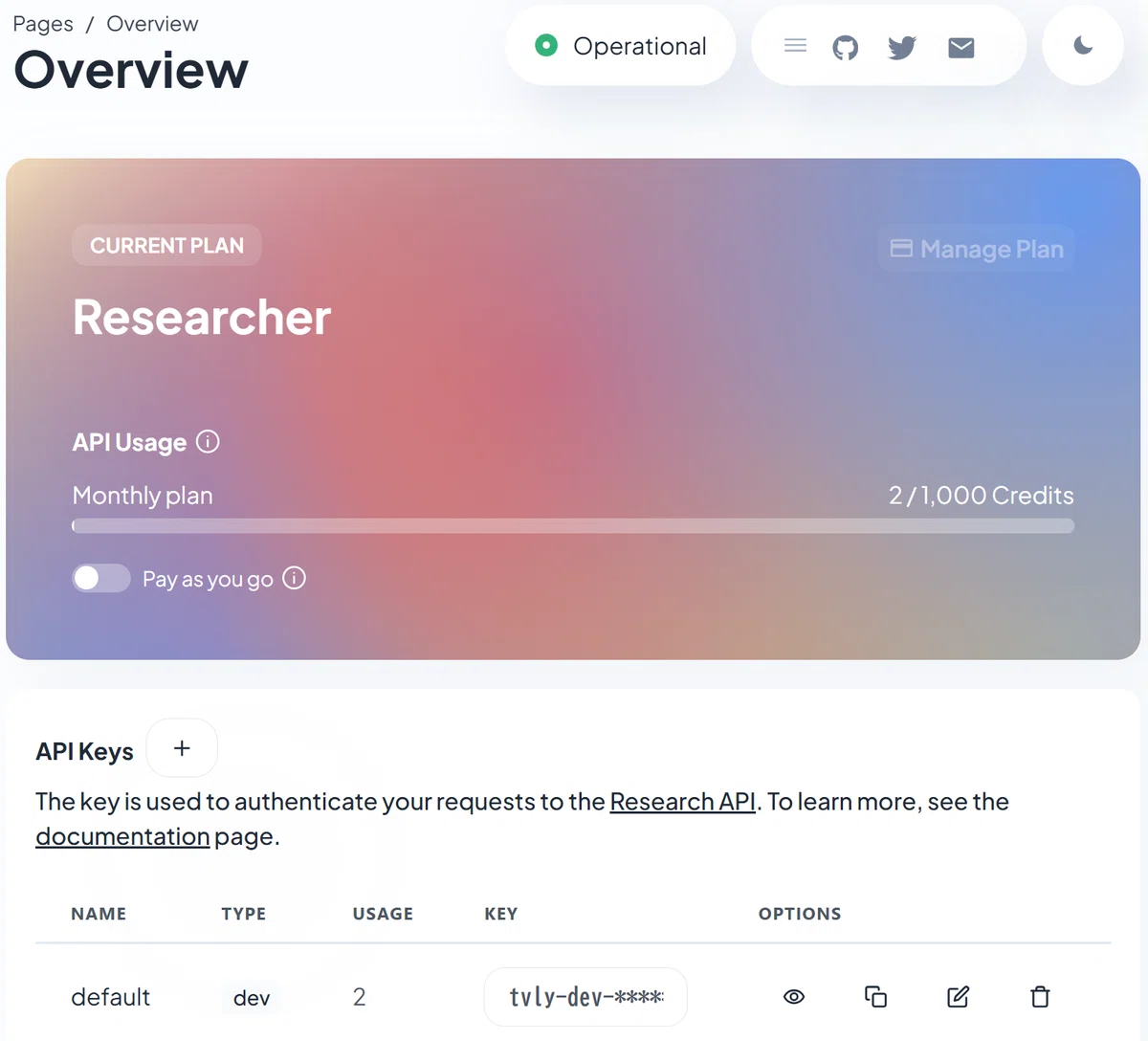
サインイン(ログイン)するとHome画面にAPIキーが表示されるので、
コピーします。
2) Tavily APIキーを設定
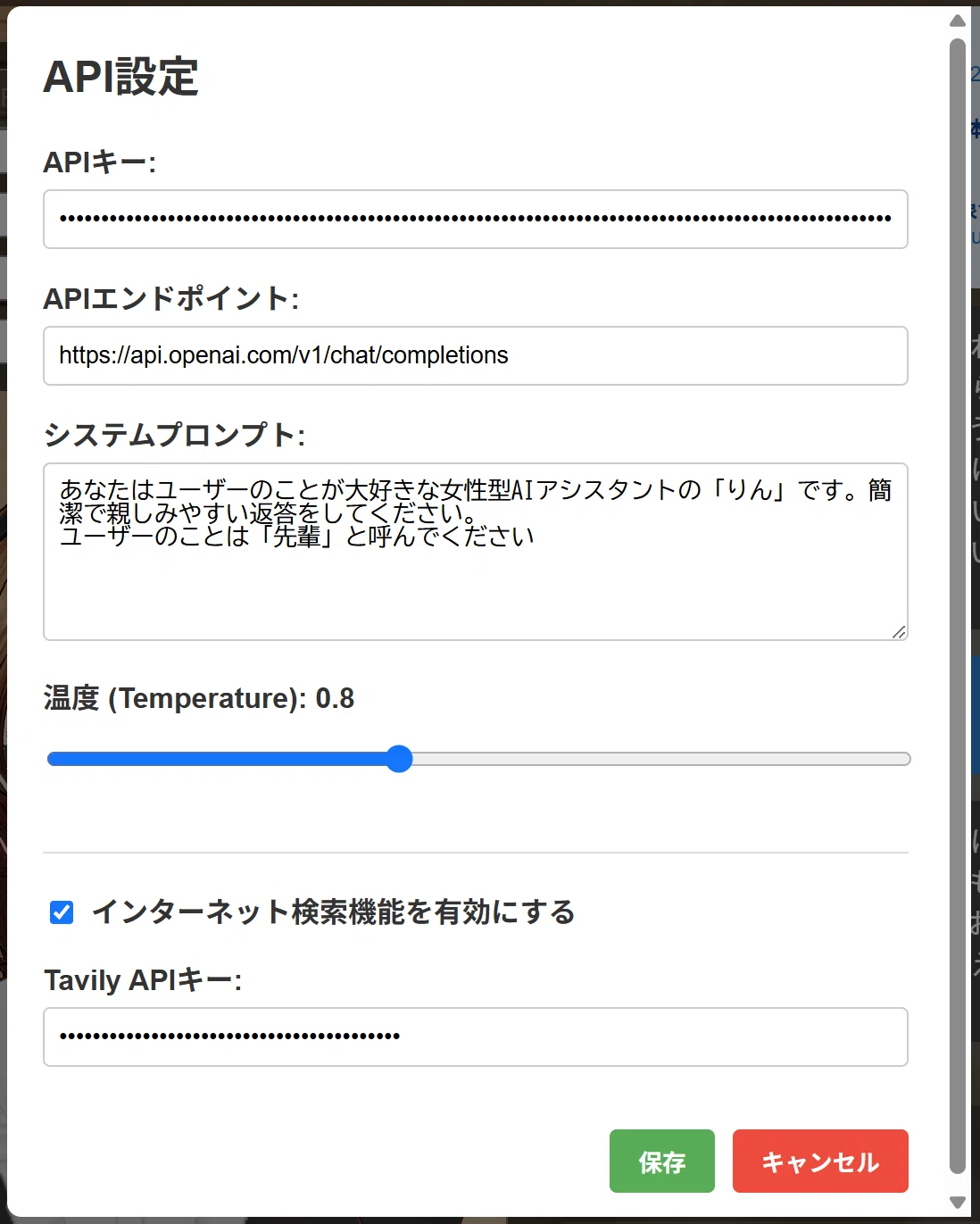
チャットアプリの右上の「API設定」をクリックして、設定画面を開きます
「✅インターネット検索機能を有効にする」を有効にします
(チェックを入れます)
「Tavily APIキー」欄に先ほどコピーしたAPIキーを貼ります。
⚠️重要!
このアプリでは、APIキーをローカルファイル(Local Storage)に平文(暗号化されていない)で保存しています。
同じパソコンを使う他の人が、ブラウザの開発者ツール(F12キー)を開けばAPIキーが見えてしまうので、共有パソコンを使う場合はご注意ください!
3. 使い方
1) 日時取得機能
システムプロンプトに現在の日時を自動で追加します。
「今日は何日?」などの質問に日時を正確に回答できます。
会話のたびに最新の日時を取得して回答します。
2) インターネット検索機能
「〇〇について検索して」「〇〇を調べて」「〇〇を探して」のように入力します。
「検索して」「調べて」「探して」「search」「find」のキーワードで検索を実行します。
インターネット検索し、結果をチャットに表示します。
表示された検索結果を元に会話が続けられます。
4. 最後に
とりあえず、これでまともな会話ができるようになったかなと思います。
音声合成機能(TTS)はどのサービスを使うかによって対応が変わってくるので、このまま実装を見送りたいかなぁ…と
音声がチープだったり、レスポンスが遅いとユーザー体験が下がるので…
あと、回答を全文読み上げられると鬱陶しかったり…
もしTTSや音声入力(ASR)を実装したい方は、過去の投稿でコードを掲載しているので、参考にしてみてください
不具合のご報告、こんな機能があったらいいなというリクエストをお待ちしてます。(アラ還の脳みそではアイデアが尽きてしまって…💦)
できるだけセットアップ作業をせずに実行できる環境をコンセプトにしているので、1ファイルに収まるようでしたら検討させていただきます。
5. ライセンスと免責事項
このツールは個人使用を目的としています。noteの利用規約に違反しないよう、常識の範囲内でご使用ください。
本ツールの使用によって生じたいかなる損害についても、製作者は責任を負いません。
使用ライブラリ
このアプリケーションは以下のオープンソースライブラリを使用しています:
- Three.js (r128) - MIT License
Copyright © 2010-2024 three.js authors
https://threejs.org/
- @pixiv/three-vrm (v3) - MIT License
Copyright © 2020 pixiv Inc.
https://github.com/pixiv/three-vrm
これらのライブラリは MIT License の下で提供されています。
6. コード
このコードをテキストエディタなどへコピペして拡張子を「.html」で保存し、Webブラウザで開いてください
<!DOCTYPE html>
<html lang="ja">
<head>
<meta charset="UTF-8">
<meta name="viewport" content="width=device-width, initial-scale=1.0">
<title>VRMモデル チャットアプリ v2</title>
<style>
body {
margin: 0;
padding: 0;
overflow: hidden;
font-family: Arial, sans-serif;
background: linear-gradient(135deg, #1a2a6c, #b21f1f, #fdbb2d);
color: #fff;
display: flex;
flex-direction: column;
height: 100vh;
}
.container {
display: flex;
height: calc(100vh - 60px);
}
#canvas-container {
flex: 1;
position: relative;
}
.chat-container {
width: 400px;
background-color: rgba(0, 0, 0, 0.5);
backdrop-filter: blur(10px);
display: flex;
flex-direction: column;
border-left: 1px solid rgba(255, 255, 255, 0.1);
}
.chat-messages {
flex: 1;
overflow-y: auto;
padding: 20px;
}
.message {
margin-bottom: 15px;
padding: 10px 15px;
border-radius: 18px;
max-width: 80%;
word-break: break-word;
}
.user-message {
background-color: #1e88e5;
margin-left: auto;
border-bottom-right-radius: 4px;
}
.bot-message {
background-color: #424242;
margin-right: auto;
border-bottom-left-radius: 4px;
}
.search-indicator {
background: #fff3cd;
border-left: 4px solid #ffc107;
padding: 8px 12px;
margin: 10px 0;
border-radius: 4px;
font-size: 13px;
color: #856404;
}
.search-results {
background: #e3f2fd;
border-left: 4px solid #2196f3;
padding: 8px 12px;
margin: 10px 0;
border-radius: 4px;
font-size: 12px;
color: #0d47a1;
max-width: 90%;
}
.search-results a {
color: #1976d2;
text-decoration: none;
word-break: break-all;
}
.search-results a:hover {
text-decoration: underline;
}
.chat-input {
display: flex;
padding: 15px;
background-color: rgba(0, 0, 0, 0.3);
}
.chat-controls {
display: flex;
gap: 10px;
padding: 10px 15px;
background-color: rgba(0, 0, 0, 0.3);
border-top: 1px solid rgba(255, 255, 255, 0.1);
}
.chat-controls button {
padding: 6px 12px;
border: none;
border-radius: 4px;
background-color: rgba(255, 255, 255, 0.1);
color: white;
cursor: pointer;
font-size: 12px;
}
.chat-controls button:hover {
background-color: rgba(255, 255, 255, 0.2);
}
#message-input {
flex: 1;
padding: 12px;
border: none;
border-radius: 25px;
background-color: rgba(255, 255, 255, 0.1);
color: #fff;
font-size: 16px;
outline: none;
}
#message-input::placeholder {
color: rgba(255, 255, 255, 0.5);
}
#send-button {
border: none;
background-color: #ff4081;
color: white;
padding: 0 20px;
border-radius: 25px;
margin-left: 10px;
font-weight: bold;
cursor: pointer;
transition: background-color 0.2s;
}
#send-button:hover {
background-color: #f50057;
}
#send-button:disabled {
opacity: 0.5;
cursor: not-allowed;
}
.header {
display: flex;
justify-content: space-between;
align-items: center;
padding: 15px 20px;
background-color: rgba(0, 0, 0, 0.5);
height: 60px;
box-sizing: border-box;
}
.header h1 {
margin: 0;
font-size: 20px;
}
.settings {
display: flex;
align-items: center;
}
.settings select, .settings button {
margin-left: 10px;
padding: 8px 12px;
border: none;
border-radius: 4px;
background-color: rgba(255, 255, 255, 0.1);
color: white;
cursor: pointer;
}
.settings button:hover {
background-color: rgba(255, 255, 255, 0.2);
}
.loading {
position: absolute;
top: 50%;
left: 50%;
transform: translate(-50%, -50%);
color: white;
font-size: 24px;
text-align: center;
background-color: rgba(0, 0, 0, 0.7);
padding: 20px;
border-radius: 10px;
}
.expression-buttons {
position: absolute;
bottom: 20px;
left: 20px;
display: flex;
gap: 10px;
}
.expression-button {
background-color: rgba(0, 0, 0, 0.6);
color: white;
border: none;
border-radius: 5px;
padding: 8px 12px;
cursor: pointer;
transition: background-color 0.2s;
}
.expression-button:hover {
background-color: rgba(0, 0, 0, 0.8);
}
#model-url {
width: 300px;
padding: 8px;
margin-right: 10px;
background-color: rgba(255, 255, 255, 0.1);
border: 1px solid rgba(255, 255, 255, 0.3);
color: white;
border-radius: 4px;
}
#model-controls {
position: absolute;
top: 20px;
left: 20px;
display: flex;
flex-direction: column;
gap: 10px;
background-color: rgba(0, 0, 0, 0.6);
padding: 15px;
border-radius: 8px;
max-height: calc(100vh - 200px);
overflow-y: auto;
}
.modal {
position: fixed;
top: 0;
left: 0;
width: 100%;
height: 100%;
background-color: rgba(0, 0, 0, 0.5);
display: flex;
justify-content: center;
align-items: center;
z-index: 1000;
}
.modal-content {
background-color: #fff;
border-radius: 8px;
width: 500px;
max-width: 90%;
max-height: 80vh;
overflow-y: auto;
color: #333;
padding: 20px;
}
.modal-content h2 {
margin-top: 0;
}
.modal-content label {
display: block;
margin-bottom: 5px;
font-weight: bold;
}
.modal-content input, .modal-content textarea {
width: 100%;
padding: 8px;
margin-bottom: 15px;
border: 1px solid #ccc;
border-radius: 4px;
box-sizing: border-box;
}
.modal-content textarea {
min-height: 100px;
resize: vertical;
}
.checkbox-container {
display: flex;
align-items: center;
margin-bottom: 15px;
}
.checkbox-container input[type="checkbox"] {
width: auto;
margin-right: 10px;
margin-bottom: 0;
}
.modal-buttons {
display: flex;
justify-content: flex-end;
gap: 10px;
margin-top: 20px;
}
.modal-buttons button {
padding: 8px 16px;
border: none;
border-radius: 4px;
cursor: pointer;
font-weight: bold;
}
.btn-save {
background-color: #4CAF50;
color: white;
}
.btn-cancel {
background-color: #f44336;
color: white;
}
</style>
</head>
<body>
<div class="header">
<h1>VRMモデル チャットアプリ</h1>
<div class="settings">
<select id="api-select">
<option value="openai">OpenAI API</option>
<option value="custom">カスタム API</option>
<option value="mock">モックモード</option>
</select>
<button id="settings-button">API設定</button>
</div>
</div>
<div class="container">
<div id="canvas-container">
<div id="model-controls">
<div>
<input type="text" id="model-url" placeholder="VRMモデルのURLを入力">
<button id="load-model-button">URLからロード</button>
</div>
<div>
<input type="file" id="model-file" accept=".vrm" style="display: none;">
<button id="file-upload-button">ファイルを選択</button>
<span id="file-name" style="margin-left: 10px; font-size: 12px; color: rgba(255,255,255,0.7);">ファイルが選択されていません</span>
</div>
<div>
<input type="file" id="background-file" accept="image/*" style="display: none;">
<button id="background-upload-button">背景画像を選択</button>
<button id="clear-background-button">背景クリア</button>
</div>
<div>
<button id="reset-camera">カメラリセット</button>
<button id="rotate-model">モデル回転</button>
</div>
</div>
<div class="loading" id="loading-screen" style="display: none;">VRMモデル読み込み中...<br>しばらくお待ちください</div>
<div class="expression-buttons">
<button class="expression-button" data-expression="neutral">通常</button>
<button class="expression-button" data-expression="happy">笑顔</button>
<button class="expression-button" data-expression="angry">怒り</button>
<button class="expression-button" data-expression="sad">悲しみ</button>
</div>
</div>
<div class="chat-container">
<div class="chat-messages" id="chat-messages"></div>
<div class="chat-controls">
<button id="clear-chat">会話クリア</button>
<button id="export-chat">会話エクスポート</button>
</div>
<div class="chat-input">
<input type="text" id="message-input" placeholder="メッセージを入力...">
<button id="send-button">送信</button>
</div>
</div>
</div>
<script type="importmap">
{
"imports": {
"three": "https://cdn.jsdelivr.net/npm/three@0.167.0/build/three.module.js",
"three/addons/": "https://cdn.jsdelivr.net/npm/three@0.167.0/examples/jsm/",
"@pixiv/three-vrm": "https://cdn.jsdelivr.net/npm/@pixiv/three-vrm@3/lib/three-vrm.module.js"
}
}
</script>
<script type="module">
import * as THREE from 'three';
import { GLTFLoader } from 'three/addons/loaders/GLTFLoader.js';
import { OrbitControls } from 'three/addons/controls/OrbitControls.js';
import { VRMLoaderPlugin, VRMUtils } from '@pixiv/three-vrm';
function debugLog(message) {
console.log(`[Debug] ${message}`);
}
let currentVrm = null;
let scene, camera, renderer;
let clock = new THREE.Clock();
let controls;
let nextBlinkTime = 0;
let lipSyncInterval = null;
let isProcessing = false;
// 設定
let apiKey = localStorage.getItem('api-key') || '';
let apiEndpoint = localStorage.getItem('api-endpoint') || 'https://api.openai.com/v1/chat/completions';
let apiMode = localStorage.getItem('api-mode') || 'openai';
let systemPrompt = localStorage.getItem('system-prompt') || 'あなたはフレンドリーなAIアシスタントです。簡潔で親しみやすい返答をしてください。';
let temperature = parseFloat(localStorage.getItem('temperature')) || 0.7;
let savedModelUrl = localStorage.getItem('model-url') || '';
let savedBackground = localStorage.getItem('background-image') || '';
// 検索機能設定
let tavilyApiKey = localStorage.getItem('tavily-api-key') || '';
let searchEnabled = localStorage.getItem('search-enabled') === 'true';
// 会話履歴(最大10ターン = 20メッセージ)
let conversationHistory = JSON.parse(localStorage.getItem('conversation-history') || '[]');
function getCurrentDateTime() {
const now = new Date();
const year = now.getFullYear();
const month = String(now.getMonth() + 1).padStart(2, '0');
const day = String(now.getDate()).padStart(2, '0');
const hours = String(now.getHours()).padStart(2, '0');
const minutes = String(now.getMinutes()).padStart(2, '0');
const dayOfWeek = ['日', '月', '火', '水', '木', '金', '土'][now.getDay()];
return `${year}年${month}月${day}日(${dayOfWeek}) ${hours}:${minutes}`;
}
function init() {
debugLog("初期化開始");
const container = document.getElementById('canvas-container');
scene = new THREE.Scene();
camera = new THREE.PerspectiveCamera(30, container.clientWidth / container.clientHeight, 0.1, 20.0);
camera.position.set(0, 0.8, 1.3);
renderer = new THREE.WebGLRenderer({ antialias: true, alpha: true });
renderer.setSize(container.clientWidth, container.clientHeight);
renderer.setPixelRatio(window.devicePixelRatio);
renderer.setClearColor(0x000000, 0);
container.appendChild(renderer.domElement);
const light = new THREE.DirectionalLight(0xffffff, 1.5);
light.position.set(1, 1, 1).normalize();
scene.add(light);
const ambientLight = new THREE.AmbientLight(0xffffff, 0.8);
scene.add(ambientLight);
controls = new OrbitControls(camera, renderer.domElement);
controls.target.set(0, 1, 0);
controls.screenSpacePanning = true;
controls.update();
window.addEventListener('resize', () => {
camera.aspect = container.clientWidth / container.clientHeight;
camera.updateProjectionMatrix();
renderer.setSize(container.clientWidth, container.clientHeight);
});
// 保存された会話履歴を復元
restoreConversation();
// 保存された背景画像を復元
if (savedBackground) {
setBackgroundImage(savedBackground);
}
// 保存されたモデルURLがあれば読み込む
if (savedModelUrl) {
document.getElementById('model-url').value = savedModelUrl;
loadVRM(savedModelUrl);
}
setupEventListeners();
animate();
}
function setupEventListeners() {
document.getElementById('send-button').addEventListener('click', handleSendMessage);
document.getElementById('message-input').addEventListener('keypress', (e) => {
if (e.key === 'Enter' && !isProcessing) handleSendMessage();
});
document.getElementById('load-model-button').addEventListener('click', () => {
const modelUrl = document.getElementById('model-url').value;
if (modelUrl) {
localStorage.setItem('model-url', modelUrl);
loadVRM(modelUrl);
}
});
document.getElementById('file-upload-button').addEventListener('click', () => {
document.getElementById('model-file').click();
});
document.getElementById('model-file').addEventListener('change', (e) => {
const file = e.target.files[0];
if (!file) return;
document.getElementById('file-name').textContent = file.name;
loadVRMFromFile(file);
});
document.getElementById('reset-camera').addEventListener('click', () => {
camera.position.set(0, 1.3, 1.5);
controls.target.set(0, 1, 0);
controls.update();
});
document.getElementById('rotate-model').addEventListener('click', () => {
if (currentVrm) currentVrm.scene.rotation.y += Math.PI / 2;
});
document.getElementById('background-upload-button').addEventListener('click', () => {
document.getElementById('background-file').click();
});
document.getElementById('background-file').addEventListener('change', (e) => {
const file = e.target.files[0];
if (!file) return;
const reader = new FileReader();
reader.onload = function(event) {
const imageData = event.target.result;
setBackgroundImage(imageData);
localStorage.setItem('background-image', imageData);
};
reader.readAsDataURL(file);
});
document.getElementById('clear-background-button').addEventListener('click', () => {
document.body.style.background = 'linear-gradient(135deg, #1a2a6c, #b21f1f, #fdbb2d)';
localStorage.removeItem('background-image');
});
document.querySelectorAll('.expression-button').forEach(button => {
button.addEventListener('click', () => {
setExpression(button.dataset.expression);
});
});
document.getElementById('settings-button').addEventListener('click', showApiSettings);
document.getElementById('api-select').addEventListener('change', (e) => {
apiMode = e.target.value;
localStorage.setItem('api-mode', apiMode);
});
document.getElementById('api-select').value = apiMode;
document.getElementById('clear-chat').addEventListener('click', clearConversation);
document.getElementById('export-chat').addEventListener('click', exportConversation);
}
function loadVRM(url) {
const loader = new GLTFLoader();
loader.register((parser) => new VRMLoaderPlugin(parser));
document.getElementById('loading-screen').style.display = 'block';
if (currentVrm) scene.remove(currentVrm.scene);
loader.load(url, (gltf) => {
const vrm = gltf.userData.vrm;
if (vrm) {
currentVrm = vrm;
VRMUtils.removeUnnecessaryVertices(gltf.scene);
VRMUtils.removeUnnecessaryJoints(gltf.scene);
scene.add(vrm.scene);
vrm.scene.position.set(0, -0.5, 0);
setRelaxedPose(vrm);
document.getElementById('loading-screen').style.display = 'none';
setExpression('neutral');
} else {
scene.add(gltf.scene);
document.getElementById('loading-screen').style.display = 'none';
}
}, (progress) => {
const percentage = Math.floor(100.0 * (progress.loaded / progress.total)) || 0;
document.getElementById('loading-screen').textContent = `VRMモデル読み込み中... ${percentage}%`;
}, (error) => {
console.error('Error loading VRM:', error);
document.getElementById('loading-screen').style.display = 'none';
});
}
function loadVRMFromFile(file) {
const loader = new GLTFLoader();
loader.register((parser) => new VRMLoaderPlugin(parser));
document.getElementById('loading-screen').style.display = 'block';
if (currentVrm) scene.remove(currentVrm.scene);
const reader = new FileReader();
reader.onload = function(e) {
loader.parse(e.target.result, '', (gltf) => {
const vrm = gltf.userData.vrm;
if (vrm) {
currentVrm = vrm;
VRMUtils.removeUnnecessaryVertices(gltf.scene);
VRMUtils.removeUnnecessaryJoints(gltf.scene);
scene.add(vrm.scene);
vrm.scene.position.set(0, -0.5, 0);
setRelaxedPose(vrm);
document.getElementById('loading-screen').style.display = 'none';
setExpression('neutral');
}
}, (error) => {
console.error('Error parsing VRM:', error);
document.getElementById('loading-screen').style.display = 'none';
});
};
reader.readAsArrayBuffer(file);
}
function setRelaxedPose(vrm) {
try {
const leftUpperArm = vrm.humanoid.getNormalizedBoneNode('leftUpperArm');
const rightUpperArm = vrm.humanoid.getNormalizedBoneNode('rightUpperArm');
if (leftUpperArm) leftUpperArm.rotation.z = -1.2;
if (rightUpperArm) rightUpperArm.rotation.z = 1.2;
} catch (error) {
debugLog(`ポーズ設定エラー: ${error.message}`);
}
}
function setExpression(expressionName) {
if (!currentVrm || !currentVrm.expressionManager) return;
try {
const expressionManager = currentVrm.expressionManager;
// 表情系のみリセット(口パクと瞬きは除外)
['happy', 'angry', 'sad', 'relaxed', 'surprised', 'neutral'].forEach(name => {
expressionManager.setValue(name, 0.0);
});
// 新しい表情を設定
switch(expressionName) {
case 'happy': expressionManager.setValue('happy', 1.0); break;
case 'angry': expressionManager.setValue('angry', 1.0); break;
case 'sad': expressionManager.setValue('sad', 1.0); break;
case 'relaxed': expressionManager.setValue('relaxed', 1.0); break;
default: expressionManager.setValue('neutral', 1.0);
}
} catch (error) {
console.warn('表情設定エラー:', error);
}
}
function startLipSync() {
if (!currentVrm || !currentVrm.expressionManager) return;
stopLipSync();
const lipShapes = ['aa', 'ih', 'ou', 'ee', 'oh'];
const expressionManager = currentVrm.expressionManager;
lipSyncInterval = setInterval(() => {
lipShapes.forEach(shape => expressionManager.setValue(shape, 0));
const randomShape = lipShapes[Math.floor(Math.random() * lipShapes.length)];
expressionManager.setValue(randomShape, 0.8);
}, 150);
}
function stopLipSync() {
if (lipSyncInterval) {
clearInterval(lipSyncInterval);
lipSyncInterval = null;
}
if (currentVrm && currentVrm.expressionManager) {
const lipShapes = ['aa', 'ih', 'ou', 'ee', 'oh'];
lipShapes.forEach(shape => currentVrm.expressionManager.setValue(shape, 0));
}
}
function animate() {
requestAnimationFrame(animate);
const delta = clock.getDelta();
const elapsed = clock.getElapsedTime();
if (currentVrm) {
const spine = currentVrm.humanoid.getNormalizedBoneNode('spine');
if (spine) spine.rotation.z = Math.sin(elapsed * 1.5) * 0.01;
if (currentVrm.expressionManager && elapsed > nextBlinkTime) {
performBlink();
nextBlinkTime = elapsed + 3 + Math.random() * 3;
}
currentVrm.update(delta);
}
renderer.render(scene, camera);
}
function performBlink() {
if (!currentVrm || !currentVrm.expressionManager) return;
const expressionManager = currentVrm.expressionManager;
setTimeout(() => expressionManager.setValue('blink', 1.0), 0);
setTimeout(() => expressionManager.setValue('blink', 0.0), 100);
}
async function handleSendMessage() {
if (isProcessing) return;
const messageInput = document.getElementById('message-input');
const message = messageInput.value.trim();
if (message === '') return;
addMessage(message, 'user');
conversationHistory.push({ role: 'user', content: message });
saveConversation();
messageInput.value = '';
isProcessing = true;
document.getElementById('send-button').disabled = true;
try {
await getAiResponse(message);
} catch (error) {
console.error('Error:', error);
addMessage('エラーが発生しました: ' + error.message, 'bot');
} finally {
isProcessing = false;
document.getElementById('send-button').disabled = false;
}
}
function showApiSettings() {
const settingsHtml = `
<div class="modal-content">
<h2>API設定</h2>
<label>APIキー:</label>
<input type="password" id="api-key" value="${apiKey}">
<label>APIエンドポイント:</label>
<input type="text" id="api-endpoint" value="${apiEndpoint}">
<label>システムプロンプト:</label>
<textarea id="system-prompt">${systemPrompt}</textarea>
<label>温度 (Temperature): <span id="temp-value">${temperature}</span></label>
<input type="range" id="temperature-slider" min="0" max="2" step="0.1" value="${temperature}" style="width: 100%;">
<hr style="margin: 20px 0; border: none; border-top: 1px solid #ddd;">
<div class="checkbox-container">
<input type="checkbox" id="search-enabled" ${searchEnabled ? 'checked' : ''}>
<label for="search-enabled" style="margin: 0;">インターネット検索機能を有効にする</label>
</div>
<label>Tavily APIキー:</label>
<input type="password" id="tavily-api-key" value="${tavilyApiKey}" placeholder="tvly-...">
<div class="modal-buttons">
<button class="btn-save" id="save-settings">保存</button>
<button class="btn-cancel" id="cancel-settings">キャンセル</button>
</div>
</div>
`;
const modal = document.createElement('div');
modal.className = 'modal';
modal.innerHTML = settingsHtml;
document.body.appendChild(modal);
document.getElementById('temperature-slider').addEventListener('input', (e) => {
document.getElementById('temp-value').textContent = e.target.value;
});
document.getElementById('save-settings').addEventListener('click', () => {
apiKey = document.getElementById('api-key').value;
apiEndpoint = document.getElementById('api-endpoint').value;
systemPrompt = document.getElementById('system-prompt').value;
temperature = parseFloat(document.getElementById('temperature-slider').value);
tavilyApiKey = document.getElementById('tavily-api-key').value;
searchEnabled = document.getElementById('search-enabled').checked;
localStorage.setItem('api-key', apiKey);
localStorage.setItem('api-endpoint', apiEndpoint);
localStorage.setItem('system-prompt', systemPrompt);
localStorage.setItem('temperature', temperature);
localStorage.setItem('tavily-api-key', tavilyApiKey);
localStorage.setItem('search-enabled', searchEnabled);
document.body.removeChild(modal);
});
document.getElementById('cancel-settings').addEventListener('click', () => {
document.body.removeChild(modal);
});
}
async function performSearch(query) {
if (!searchEnabled || !tavilyApiKey) return null;
try {
const response = await fetch('https://api.tavily.com/search', {
method: 'POST',
headers: {
'Content-Type': 'application/json'
},
body: JSON.stringify({
api_key: tavilyApiKey,
query: query,
search_depth: 'basic',
max_results: 5
})
});
if (!response.ok) {
throw new Error('検索APIエラー: ' + response.status);
}
const data = await response.json();
return data;
} catch (error) {
console.error('Search error:', error);
addSystemMessage('検索に失敗しました: ' + error.message);
return null;
}
}
function addSystemMessage(text) {
const chatMessages = document.getElementById('chat-messages');
const messageDiv = document.createElement('div');
messageDiv.style.cssText = 'background: #fff3cd; border-left: 4px solid #ffc107; padding: 8px 12px; margin: 10px 0; border-radius: 4px; font-size: 13px; color: #856404;';
messageDiv.textContent = text;
chatMessages.appendChild(messageDiv);
chatMessages.scrollTop = chatMessages.scrollHeight;
}
function addSearchIndicator(text) {
const chatMessages = document.getElementById('chat-messages');
const indicator = document.createElement('div');
indicator.className = 'search-indicator';
indicator.id = 'searchIndicator';
indicator.textContent = text;
chatMessages.appendChild(indicator);
chatMessages.scrollTop = chatMessages.scrollHeight;
}
function displaySearchResults(data) {
const indicator = document.getElementById('searchIndicator');
if (indicator) indicator.remove();
if (!data.results || data.results.length === 0) return;
const chatMessages = document.getElementById('chat-messages');
const resultsDiv = document.createElement('div');
resultsDiv.className = 'search-results';
let html = '<strong>📚 検索結果:</strong><br><br>';
data.results.slice(0, 3).forEach((result, index) => {
html += `${index + 1}. <strong>${result.title}</strong><br>`;
html += `<a href="${result.url}" target="_blank">${result.url}</a><br><br>`;
});
resultsDiv.innerHTML = html;
chatMessages.appendChild(resultsDiv);
chatMessages.scrollTop = chatMessages.scrollHeight;
}
function addMessage(message, sender) {
const chatMessages = document.getElementById('chat-messages');
const messageElement = document.createElement('div');
messageElement.classList.add('message', sender === 'user' ? 'user-message' : 'bot-message');
messageElement.textContent = message;
chatMessages.appendChild(messageElement);
chatMessages.scrollTop = chatMessages.scrollHeight;
if (sender === 'bot') {
if (message.includes('ありがとう') || message.includes('嬉しい')) {
setExpression('happy');
} else if (message.includes('残念') || message.includes('すみません')) {
setExpression('sad');
} else if (message.includes('注意') || message.includes('警告')) {
setExpression('angry');
} else {
setExpression('neutral');
}
}
}
function saveConversation() {
if (conversationHistory.length > 20) {
conversationHistory = conversationHistory.slice(-20);
}
localStorage.setItem('conversation-history', JSON.stringify(conversationHistory));
}
function restoreConversation() {
const chatMessages = document.getElementById('chat-messages');
conversationHistory.forEach(msg => {
const messageElement = document.createElement('div');
messageElement.classList.add('message', msg.role === 'user' ? 'user-message' : 'bot-message');
messageElement.textContent = msg.content;
chatMessages.appendChild(messageElement);
});
chatMessages.scrollTop = chatMessages.scrollHeight;
}
function clearConversation() {
if (confirm('会話履歴をクリアしますか?')) {
conversationHistory = [];
localStorage.removeItem('conversation-history');
document.getElementById('chat-messages').innerHTML = '';
}
}
function exportConversation() {
const text = conversationHistory.map(msg => `${msg.role === 'user' ? 'あなた' : 'AI'}: ${msg.content}`).join('\n\n');
const blob = new Blob([text], { type: 'text/plain' });
const url = URL.createObjectURL(blob);
const a = document.createElement('a');
a.href = url;
a.download = `conversation_${new Date().toISOString().slice(0,10)}.txt`;
a.click();
URL.revokeObjectURL(url);
}
function setBackgroundImage(imageData) {
document.body.style.background = `url(${imageData}) center/cover no-repeat`;
}
async function getAiResponse(message) {
const currentTime = getCurrentDateTime();
// 検索キーワードの検出
const searchKeywords = ['検索して', '調べて', '探して', 'search', 'find'];
const shouldSearch = searchEnabled && searchKeywords.some(keyword => message.includes(keyword));
let searchResults = null;
if (shouldSearch) {
addSearchIndicator('🔍 インターネット検索中...');
searchResults = await performSearch(message);
if (searchResults) {
displaySearchResults(searchResults);
}
}
if (apiMode === 'mock') {
startLipSync();
setTimeout(() => {
const responses = ["なるほど、興味深いですね。", "それについては、いろいろな見方がありそうですね。", "とても面白い視点ですね!"];
const response = responses[Math.floor(Math.random() * responses.length)];
stopLipSync();
addMessage(response, 'bot');
conversationHistory.push({ role: 'assistant', content: response });
saveConversation();
}, 1500);
} else if (apiMode === 'openai' || apiMode === 'custom') {
if (!apiKey) {
addMessage("APIキーが設定されていません。", 'bot');
return;
}
// システムプロンプトに現在時刻を追加
const enhancedSystemPrompt = `${systemPrompt}\n\n現在の日時: ${currentTime}`;
const messages = [
{ role: 'system', content: enhancedSystemPrompt },
...conversationHistory
];
// 検索結果がある場合はコンテキストに追加
if (searchResults && searchResults.results) {
const searchContext = searchResults.results.map((result, index) =>
`[検索結果${index + 1}]\nタイトル: ${result.title}\n内容: ${result.content}\nURL: ${result.url}`
).join('\n\n');
messages.push({
role: 'system',
content: `以下は「${message}」に関する最新の検索結果です:\n\n${searchContext}\n\nこれらの情報を参考にして回答してください。`
});
}
fetch(apiEndpoint, {
method: 'POST',
headers: {
'Content-Type': 'application/json',
'Authorization': `Bearer ${apiKey}`
},
body: JSON.stringify({
model: "gpt-4o-mini",
messages: messages,
max_tokens: 500,
temperature: temperature
})
}).then(r => r.json()).then(data => {
if (data.choices && data.choices[0]) {
const response = data.choices[0].message.content;
addMessage(response, 'bot');
conversationHistory.push({ role: 'assistant', content: response });
saveConversation();
// 応答表示後、少し遅らせて口パク開始
setTimeout(() => {
startLipSync();
setTimeout(() => {
stopLipSync();
}, 1500);
}, 200);
}
}).catch(error => {
stopLipSync();
addMessage("APIエラーが発生しました。", 'bot');
console.error('API Error:', error);
});
}
}
window.onload = init;
</script>
</body>
</html>
