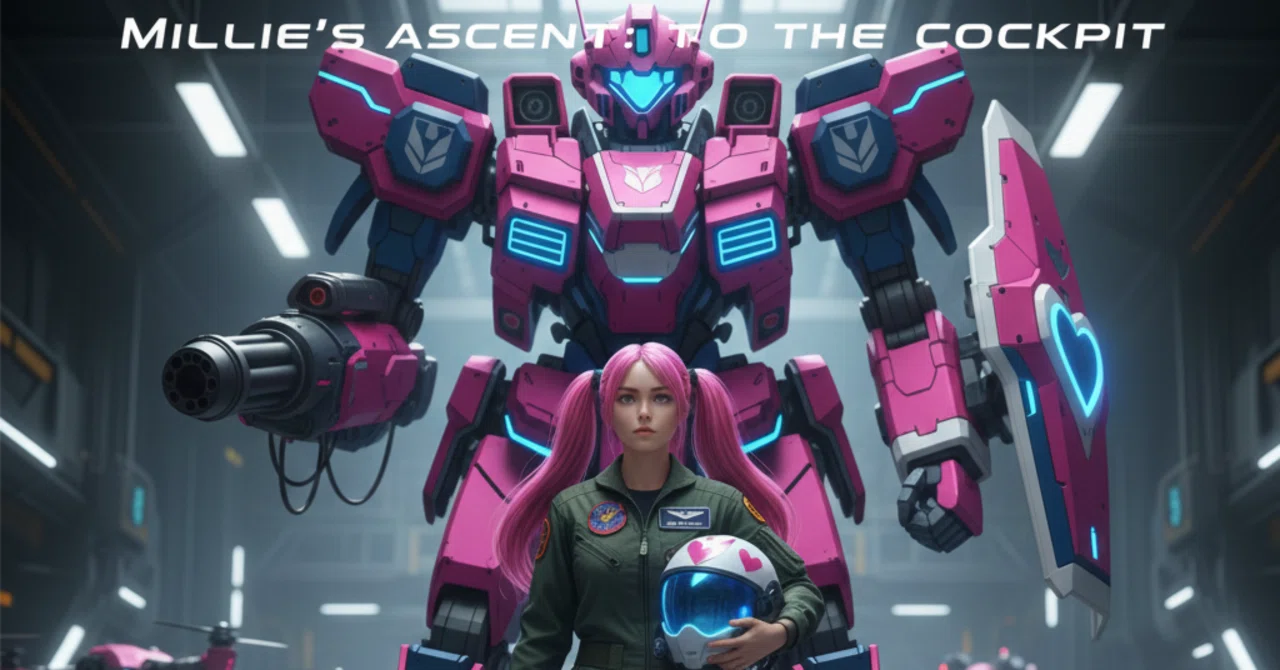
MECHA BUlLDER レギュレーション1.0版

ロボットバトル物です。
バトリングネタですね。
ゲームが作れますシリーズ、内容を注文したらこうなったバージョン。(笑)
本当にGemini3は優秀、トラブル無く…も無いけどそこそこ頑張る。
クロードさん頼らなくても完成をするのは2.5と大違い、本当に凄いです。
ほぼ初期バランスはAIが決めてるのでバランス感覚はAI側のもの演出はイロイロ追加しましたけど
なのでこの後、可動させてストーリーモードとか作るかどうか、たぶん、これはこのレギュレーションで可動させて、別にストーリーモード版を作るとかかな?
ともかくはしばらくはこのバランスで動きを見ます。
(いや、見てる余裕ないんだけど…。)
一応、他の人と対戦可能らしいです。
そちらはまだ未テスト
自分の機体同士での動作まで確認してます。
レギュレーション変更で同じレギュレーションのバージョンとしか戦えないかもです。
ご了承下さい。
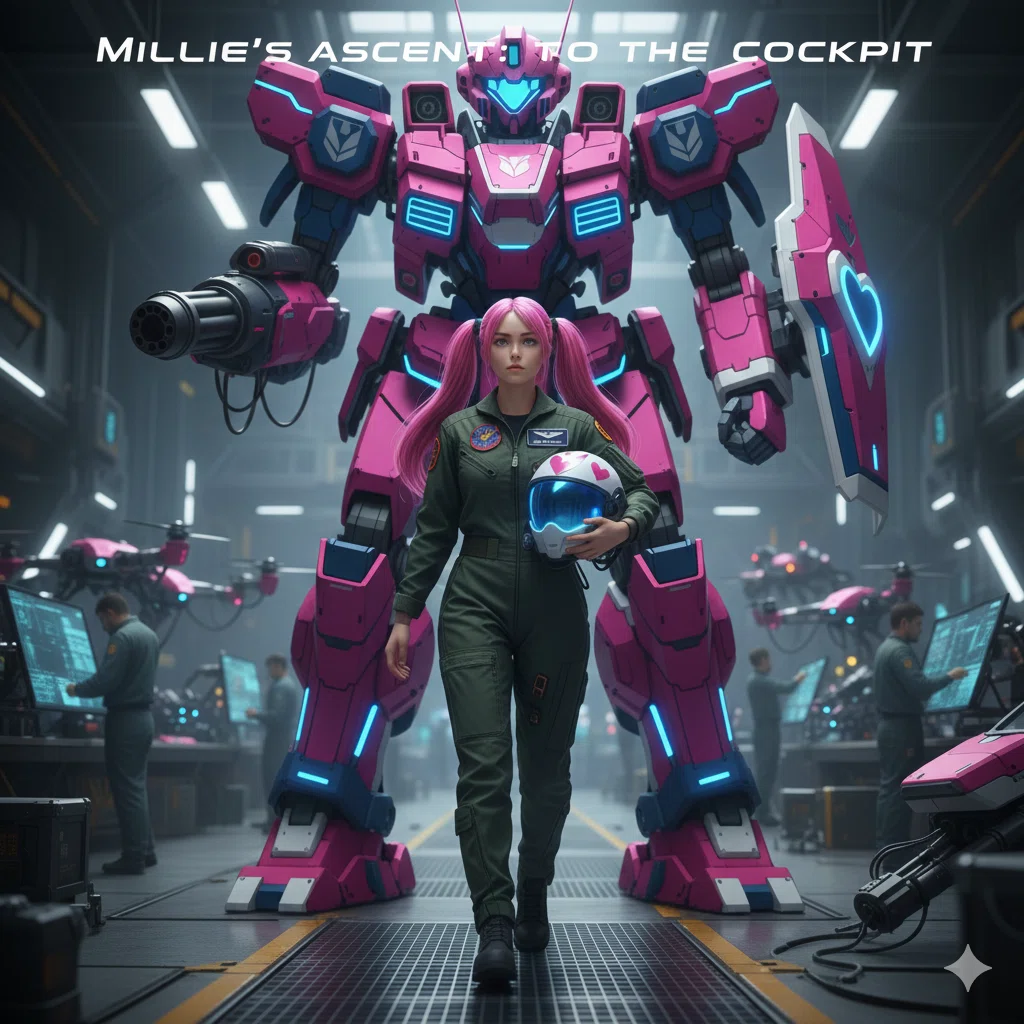
MECHA BUILDER ユーザーマニュアル
このアプリは、独自のロボット(メカ)を構築し、他のユーザーが作成したロボットと対戦させるためのシミュレーションツールです。
1. アプリのモード画面上部のボタンで3つのモードを切り替えます。
アイコンモード名概要
⚙️ロボット構築 (BUILD)パーツ、名前、セリフを設定し、ロボットを保存します。
⚔️対戦相手選択 (SELECT_OPPONENT)自分のロボットと、対戦相手を選択します。
⚡️バトルシミュレーション (BATTLE)選択した2体のロボットを対戦させ、戦闘ログを確認します。
2. ⚙️ ロボット構築 (BUILD)ロボットの設計を行うモードです。
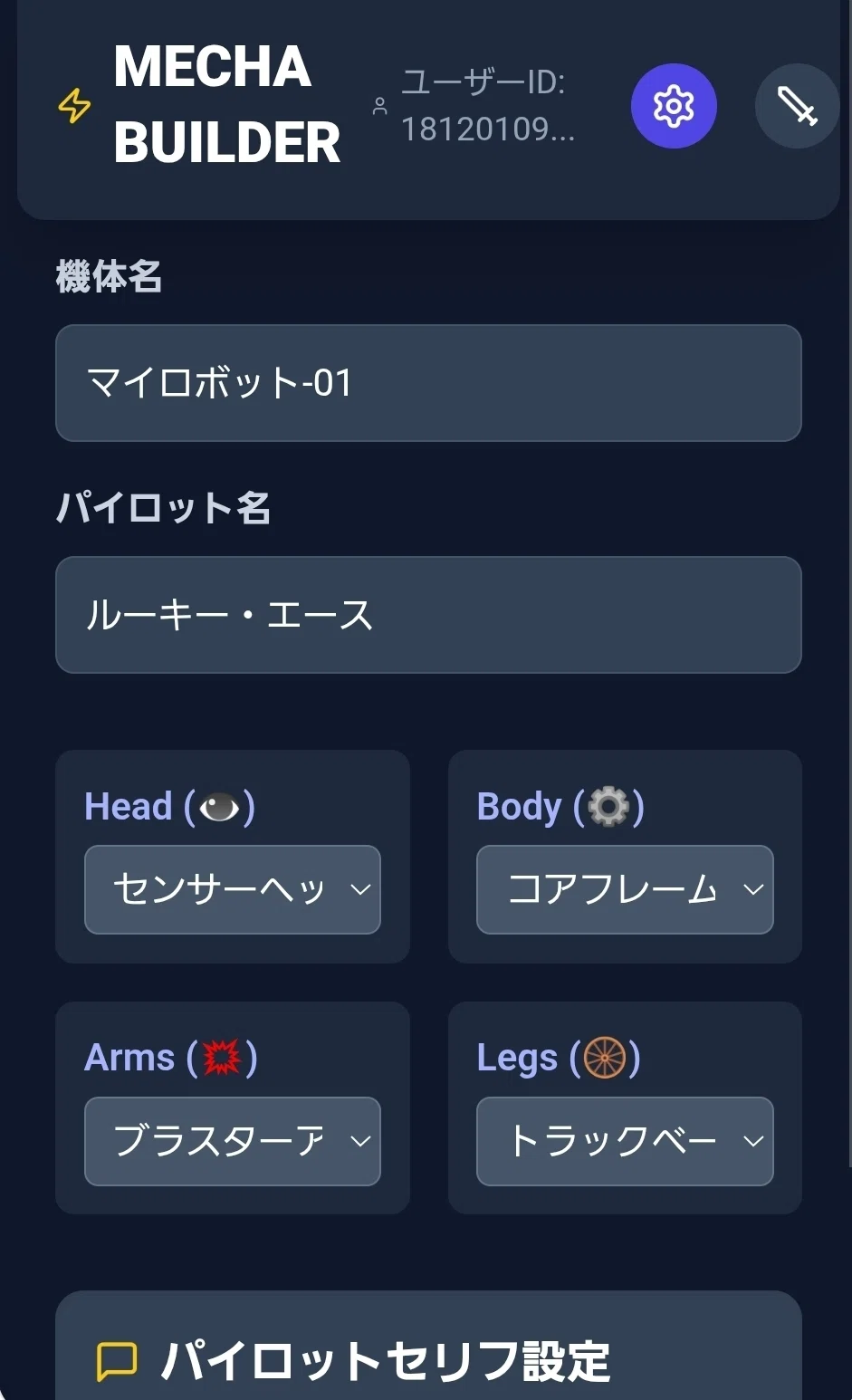
2.1. 機体情報の設定機体名 / パイロット名: ロボットとパイロットの名前を入力します。
パーツ選択: HEAD, BODY, ARMS, LEGS の各パーツを選択します。パーツを選ぶと、下部の「総合ステータス」がリアルタイムで変化します。重要: SPD (スピード)が高いほど、戦闘中の行動順や手数に影響します。
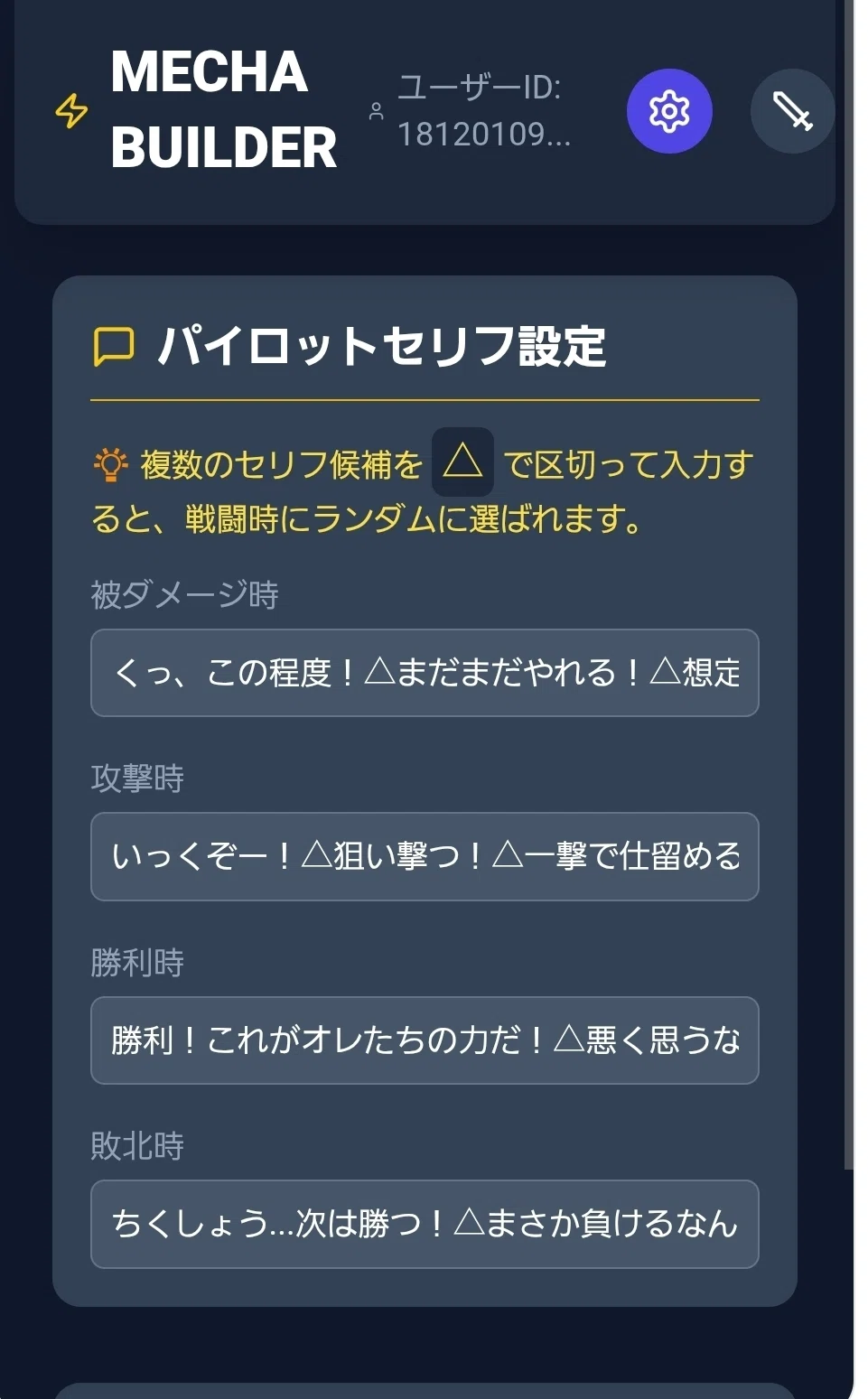
2.2. パイロットセリフ設定戦闘中にパイロットが発言するセリフを設定します。
💡 複数のセリフ候補を △ で区切って入力することで、戦闘時にランダムに選ばれます。(例: いっくぞー!△やらせるか!△避けろ!)
2.3. ロボットの保存パーツ選択とセリフ設定が完了したら、「ロボットを保存」ボタンを押して、データをクラウド(Firestore)に登録します。保存されたロボットは、あなたの登録ロボットリストに表示され、対戦相手として他のユーザーにも公開されます。
3. ⚔️ 対戦相手選択 (SELECT_OPPONENT)バトルを開始するための準備モードです。
自分のロボットの選択: 上部のリストから、対戦に使用するあなたのロボットをクリックして選択します。
対戦相手のリスト更新: 右上の「更新」ボタンを押して、他のユーザーが登録した最新のロボットリストを取得します。
対戦相手の選択: リストから対戦させたい相手のロボットをクリックして選択します。
バトル開始: 自分のロボットと対戦相手の両方が選択された状態で、「バトル開始!」ボタンを押すと、BATTLEモードに移行します。
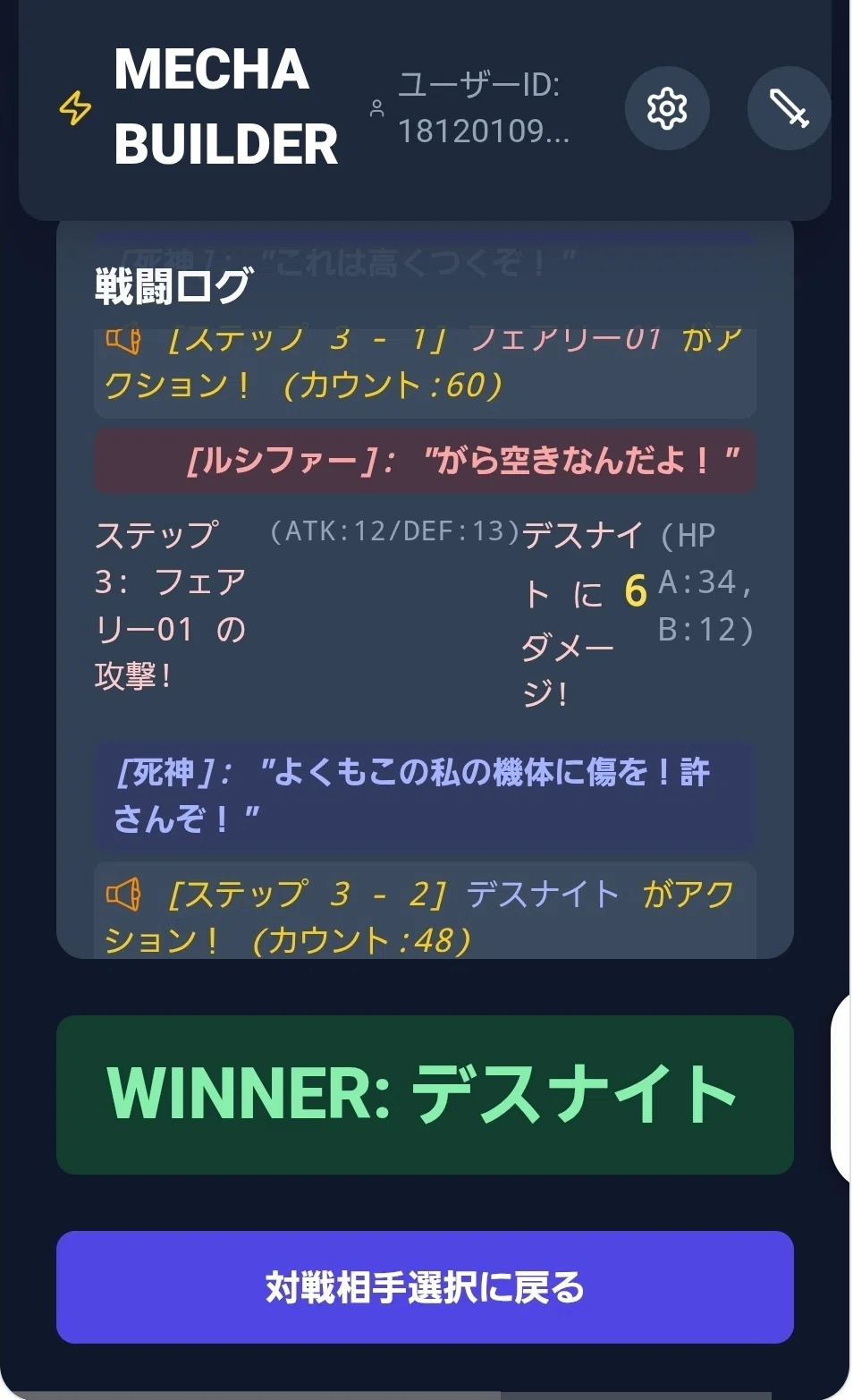
4. ⚡️ バトルシミュレーション (BATTLE)戦闘が自動でシミュレーションされ、結果がリアルタイムで表示されます。
戦闘ロジック:各ロボットのSPD値に応じて、行動(アクション)に必要なカウントが貯まります。カウントが一定値(30)に達すると、攻撃権が発生します。
攻撃時には、ATKとDEFに基づいたダメージが計算され、乱数要素が含まれるため、同じ組み合わせでも結果が変わることがあります。
戦闘ログ:戦闘の進行状況(攻撃、ダメージ、パイロットのセリフ)が時系列で表示されます。
結果:どちらかのHPがゼロになるか、ステップ数が最大値(50)に達すると戦闘終了です。勝者が表示されます。
5. 重要な注意事項データ保存: ロボットデータはクラウド(Firestore)に保存されるため、ブラウザを閉じてもデータが失われることはありません。公開データ: 作成・保存されたロボットは、あなたのユーザーIDとともに全ユーザーに公開され、対戦相手として選択可能になります。
尚、制作者はバランス調整の為にレギュレーションを任意で変更することがあります。(データがレギュレーション変更で初期化、再設定が必要になる場合があり得ます)
これを含む使用したことによる責任は一切負えません、自己責任でお楽しみください。
転売等、御自身で制作者を名乗る等はお止めください。
Gemini 、Canvasモードでの起動を想定しています。(テスト環境)
Canvasモードで張り付けてください。
あとは機体を作って、バトリング開始
機体は追加修正が出来ないので作ったら登録したらそこで完成形となります。
台詞等も後修正は出来ないので心残りの無いように(対戦データとなるので途中で変わるとトラブルになるから?多分仕様なだけかもですが)
import React, { useState, useEffect, useMemo } from 'react';
// 🚨 修正: URL参照ではなく、モジュール名によるインポートに変更
import { initializeApp } from 'firebase/app';
import { getAuth, signInAnonymously, signInWithCustomToken, onAuthStateChanged } from 'firebase/auth';
import { getFirestore, doc, setDoc, addDoc, deleteDoc, onSnapshot, collection, query, where, getDocs } from 'firebase/firestore';
import { Settings, Sword, User, Loader2, Save, Trash2, Zap, Heart, Shield, MessageSquare, Mic, FastForward } from 'lucide-react';
// --- FirebaseとTailwind CSSを使ったロボットアセンブリ&バトルアリーナ ---
// --- 1. ゲーム設定とパーツデータ ---
const ROBOT_PARTS = {
head: [
{ name: 'センサーヘッド', stats: { hp: 10, atk: 5, spd: 8 }, icon: '👁️', color: 'bg-yellow-500' },
{ name: '重装バイザー', stats: { hp: 20, atk: 2, spd: 3 }, icon: '🛡️', color: 'bg-gray-400' },
{ name: 'キャノンヘルメット', stats: { hp: 5, atk: 18, spd: 5 }, icon: '💣', color: 'bg-red-600' },
],
body: [
{ name: 'コアフレーム', stats: { hp: 30, def: 5, spd: 10 }, icon: '⚙️', color: 'bg-blue-500' },
{ name: 'ヘビーシャーシ', stats: { hp: 40, def: 8, spd: 2 }, icon: '🏋️', color: 'bg-slate-700' },
{ name: 'スピードシェル', stats: { hp: 10, def: 2, spd: 15 }, icon: '💨', color: 'bg-green-500' },
],
arms: [
{ name: 'ブラスターアーム', stats: { atk: 18, spd: 5 }, icon: '💥', color: 'bg-red-500' },
{ name: 'シールドフィスト', stats: { atk: 5, spd: 8 }, icon: '⚔️', color: 'bg-gray-500' },
{ name: 'グリップクロー', stats: { atk: 10, spd: 12 }, icon: '🦾', color: 'bg-orange-500' },
],
legs: [
{ name: 'トラックベース', stats: { def: 10, spd: 1 }, icon: '🛞', color: 'bg-yellow-700' },
{ name: 'ジェットブースター', stats: { def: 5, spd: 15 }, icon: '🚀', color: 'bg-cyan-500' },
{ name: '標準脚', stats: { def: 2, spd: 8 }, icon: '👟', color: 'bg-gray-300' },
]
};
const DEFAULT_BATTLE_MESSAGES = {
onHit: "くっ、この程度!△まだまだやれる!△想定内だ。",
onAttack: "いっくぞー!△狙い撃つ!△一撃で仕留める!",
onWin: "勝利!これがオレたちの力だ!△悪く思うなよ!△戦いの続きはまた今度だ!",
onLose: "ちくしょう...次は勝つ!△まさか負けるなんて...△データが足りなかったか。",
};
const MESSAGE_LABELS = {
onHit: "被ダメージ時",
onAttack: "攻撃時",
onWin: "勝利時",
onLose: "敗北時",
};
const MESSAGE_DELIMITER = '△';
const ACTION_THRESHOLD = 30; // 攻撃に必要なカウント
// 共通して使用するFirebase/Firestoreの変数
let dbInstance = null;
let authInstance = null;
// --- 2. 乱数ステータス計算ヘルパー ---
const calculateRandomStat = (baseStat) => {
if (baseStat <= 0) return 0;
// 半分を確定値
const fixedPart = Math.floor(baseStat / 2);
// 残りの半分を乱数で決定 (0からrandomMaxまでの乱数)
const randomMax = baseStat - fixedPart;
const randomPart = Math.floor(Math.random() * (randomMax + 1));
return fixedPart + randomPart;
};
// --- 3. データ正規化ヘルパー (強化): 全てのネストされた構造を保証し、レンダリングエラーを防ぐ ---
const normalizeRobotData = (data) => {
// 1. Stats safety (totalStatsが存在し、hp/atk/def/spdが0以上であることを保証)
const safeStats = data.totalStats || {};
const normalizedStats = {
hp: safeStats.hp || 0,
atk: safeStats.atk || 0,
def: safeStats.def || 0,
spd: safeStats.spd || 0,
};
// 2. Messages safety (battleMessagesが存在することを保証)
const safeMessages = data.battleMessages || DEFAULT_BATTLE_MESSAGES;
// 3. Parts safety (partsオブジェクトとその子供が全てオブジェクトであることを保証)
const rawParts = data.parts || {};
const normalizedParts = {
// head, body, arms, legs が null/undefined の場合、空のオブジェクト {} を割り当てる
head: rawParts.head || {},
body: rawParts.body || {},
arms: rawParts.arms || {},
legs: rawParts.legs || {},
};
return {
...data,
totalStats: normalizedStats,
battleMessages: safeMessages,
parts: normalizedParts,
pilotName: data.pilotName || '名無しのパイロット',
};
};
const App = () => {
// --- 状態管理 ---
const [mode, setMode] = useState('BUILD');
const [userId, setUserId] = useState(null);
const [loading, setLoading] = useState(true);
const [error, setError] = useState(null);
// ロボット構築用
const [robotName, setRobotName] = useState('マイロボット-01');
const [pilotName, setPilotName] = useState('ルーキー・エース');
const [selectedParts, setSelectedParts] = useState({
head: ROBOT_PARTS.head[0],
body: ROBOT_PARTS.body[0],
arms: ROBOT_PARTS.arms[0],
legs: ROBOT_PARTS.legs[0],
});
const [customMessages, setCustomMessages] = useState(DEFAULT_BATTLE_MESSAGES);
// 対戦用データ
const [myRobots, setMyRobots] = useState([]);
const [opponentRobots, setOpponentRobots] = useState([]);
const [selectedMyRobot, setSelectedMyRobot] = useState(null);
const [selectedOpponent, setSelectedOpponent] = useState(null);
// バトルシミュレーション結果
const [battleLog, setBattleLog] = useState([]);
const [battleResult, setBattleResult] = useState(null);
const [battleResultId, setBattleResultId] = useState(null);
const [isSimulating, setIsSimulating] = useState(false);
const [isAuthReady, setIsAuthReady] = useState(false); // 認証準備完了フラグ
const appId = typeof __app_id !== 'undefined' ? __app_id : 'default-robot-app';
const collectionPath = `artifacts/${appId}/public/data/robots`;
// --- 4. Firebase初期化と認証 ---
useEffect(() => {
let app;
let authUnsubscribe;
try {
// 🚨 防御的強化: Firebase Configの安全なパース
let firebaseConfig = {};
const configString = typeof __firebase_config !== 'undefined' ? __firebase_config : null;
if (configString) {
try {
firebaseConfig = JSON.parse(configString);
} catch (e) {
console.error("Firebase Config JSON Parse Error:", e);
setError("Firebase設定ファイルの解析に失敗しました。");
setLoading(false);
return;
}
}
// Firebase初期化
app = initializeApp(firebaseConfig);
dbInstance = getFirestore(app);
authInstance = getAuth(app);
authUnsubscribe = onAuthStateChanged(authInstance, async (user) => {
if (user) {
setUserId(user.uid);
} else {
try {
if (typeof __initial_auth_token !== 'undefined' && __initial_auth_token) {
await signInWithCustomToken(authInstance, __initial_auth_token);
} else {
await signInAnonymously(authInstance);
}
} catch (e) {
// 認証に失敗してもアプリは動かすためにエラーはセットしない(匿名認証がブロックされた場合など)
console.warn("Firebase Auth Failed (falling back to unauth state):", e);
}
}
// 認証状態の確認が完了
setIsAuthReady(true);
setLoading(false);
});
} catch (e) {
console.error("Firebase Initialization Error:", e);
setError(`Firebaseの初期化に失敗しました。エラー: ${e.message}`);
setLoading(false);
}
return () => {
if (authUnsubscribe) authUnsubscribe();
};
}, []);
// --- 5. ロボットデータのロード(Firestore) ---
useEffect(() => {
// 🚨 厳格なチェック: DBインスタンスと認証が完了するまで処理をスキップ
if (!isAuthReady || !dbInstance || !userId) return;
const loadMyRobots = () => {
try {
const q = query(collection(dbInstance, collectionPath), where("userId", "==", userId));
const unsubscribe = onSnapshot(q, (snapshot) => {
// 強化された正規化処理を実行
const bots = snapshot.docs.map(doc => normalizeRobotData({ id: doc.id, ...doc.data() }));
setMyRobots(bots);
// 現在選択中のロボットのデータ更新
if (selectedMyRobot) {
const updatedBot = bots.find(b => b.id === selectedMyRobot.id);
if (updatedBot) setSelectedMyRobot(updatedBot);
}
}, (err) => {
console.error("My Robot Snapshot Error:", err);
setError(`Firestoreデータ取得エラー: ${err.message}`);
});
return unsubscribe;
} catch (e) {
console.error("My Robot Load Error:", e);
// このエラーは認証後でDBインスタンスがあるはずなので、より深刻なエラー
setError(`自分のロボットの読み込みに失敗しました。エラー: ${e.message}`);
}
};
return loadMyRobots();
}, [isAuthReady, userId]);
const loadAllPublicRobots = async () => {
if (!isAuthReady || !dbInstance) return;
setLoading(true);
try {
const q = query(collection(dbInstance, collectionPath));
const snapshot = await getDocs(q);
// 強化された正規化処理を実行
const bots = snapshot.docs.map(doc => normalizeRobotData({ id: doc.id, ...doc.data() }));
setOpponentRobots(bots);
setSelectedOpponent(null);
setLoading(false);
} catch (e) {
console.error("All Public Robot Load Error:", e);
setError(`公開ロボットの読み込みに失敗しました。エラー: ${e.message}`);
setLoading(false);
}
};
// --- 6. ステータス計算 (SPDを追加) ---
const calculateStats = useMemo(() => {
const stats = { hp: 0, atk: 0, def: 0, spd: 0 };
Object.values(selectedParts).forEach(part => {
// 安全性のために part.stats が存在することをチェック
const partStats = part.stats || {};
stats.hp += partStats.hp || 0;
stats.atk += partStats.atk || 0;
stats.def += partStats.def || 0;
stats.spd += partStats.spd || 0;
});
return stats;
}, [selectedParts]);
// --- 7. ロボット保存(Firestoreへの書き込み) ---
const handleSaveRobot = async () => {
if (!dbInstance || !userId || !isAuthReady) {
setError("Firebase接続またはユーザーIDが取得できていません。認証の完了を待ってください。");
return;
}
if (!robotName.trim() || !pilotName.trim()) {
setError("ロボット名とパイロット名を入力してください。");
return;
}
setLoading(true);
setError(null);
// 保存時に最新のパーツデータ構造をFirestoreに送る
const newRobot = {
userId: userId,
name: robotName,
pilotName: pilotName,
parts: {
head: selectedParts.head,
body: selectedParts.body,
arms: selectedParts.arms,
legs: selectedParts.legs,
},
totalStats: calculateStats,
battleMessages: customMessages,
createdAt: Date.now(),
};
try {
const existingBot = myRobots.find(b => b.name === robotName);
if (existingBot) {
await setDoc(doc(dbInstance, collectionPath, existingBot.id), newRobot);
} else {
await addDoc(collection(dbInstance, collectionPath), newRobot);
}
setLoading(false);
} catch (e) {
console.error("Save Robot Error:", e);
setError(`ロボットの保存に失敗しました。エラー: ${e.message}`);
setLoading(false);
}
};
// --- 8. ロボットの削除 ---
const handleDeleteRobot = async (botId) => {
if (!dbInstance || !isAuthReady) return;
try {
await deleteDoc(doc(dbInstance, collectionPath, botId));
if (selectedMyRobot && selectedMyRobot.id === botId) {
setSelectedMyRobot(null);
}
if (selectedOpponent && selectedOpponent.id === botId) {
setSelectedOpponent(null);
}
} catch (e) {
console.error("Delete Robot Error:", e);
setError(`ロボットの削除に失敗しました。エラー: ${e.message}`);
}
};
// --- 9. 機体の特徴を評価するヘルパー関数 (ナレーション用) ---
const generateRobotDescription = (bot) => {
const stats = bot.totalStats;
const { hp, atk, def, spd } = stats;
let features = [];
let assessment = "";
// 評価ロジック (暫定的な基準値: HP=50, ATK=20, DEF=15, SPD=30)
const isHighHP = hp >= 50;
const isHighATK = atk >= 20;
const isHighDEF = def >= 15;
const isHighSPD = spd >= 35;
const isLowSPD = spd <= 20;
if (isHighSPD && isHighATK) {
assessment = "電光石火のヒット&アウェイ型";
} else if (isHighHP && isHighDEF && isLowSPD) {
assessment = "難攻不落の要塞型(機動力難あり)";
} else if (isHighATK) {
assessment = "攻撃力に特化した高火力アタッカー";
} else if (isHighSPD) {
assessment = "スピード重視の高速戦闘機";
} else if (isHighDEF) {
assessment = "防御力に特化した重装甲型";
} else {
assessment = "標準的な性能を持つバランス型";
}
features.push(`【特徴評価】${assessment}`);
const partDetails = [];
// partsのネストされた構造が保証されているため、安全にアクセス可能
if (bot.parts?.body?.name === 'スピードシェル' || bot.parts?.legs?.name === 'ジェットブースター') partDetails.push("高速移動を可能にするブースター装備");
if (bot.parts?.head?.name === '重装バイザー' && bot.parts?.legs?.name === 'トラックベース') partDetails.push("徹底的な防御と引き換えに機動力を犠牲");
if (partDetails.length > 0) {
features.push(`【パーツ】${partDetails.join('、')}`);
}
return features.join(" / ");
};
// --- 10. バトルシミュレーションロジック (乱数ダメージとタイムスライシングを導入) ---
const simulateBattle = (botA, botB) => {
const log = [];
// totalStatsは正規化で存在が保証されているため安全にアクセス可能
const getStat = (bot, stat) => bot.totalStats?.[stat] || 0;
const getMessage = (bot, type) => {
const messageString = bot.battleMessages[type] || DEFAULT_BATTLE_MESSAGES[type];
const messages = messageString.split(MESSAGE_DELIMITER)
.map(m => m.trim())
.filter(m => m.length > 0);
if (messages.length === 0) {
return DEFAULT_BATTLE_MESSAGES[type].split(MESSAGE_DELIMITER)[0].trim() || "(メッセージなし)";
}
const randomIndex = Math.floor(Math.random() * messages.length);
return messages[randomIndex];
};
const getPilotName = (bot) => bot.pilotName || '名無しのパイロット';
let hpA = getStat(botA, 'hp') || 10;
let hpB = getStat(botB, 'hp') || 10;
const spdA = getStat(botA, 'spd');
const spdB = getStat(botB, 'spd');
let step = 1;
const MAX_STEPS = 50;
let countA = 0;
let countB = 0;
const performAttack = (attacker, defender, hpDefender, isA, currentStep) => {
const atkerName = attacker.name;
const defrName = defender.name;
const atkerPilot = getPilotName(attacker);
const defrPilot = getPilotName(defender);
const calculatedAtk = calculateRandomStat(getStat(attacker, 'atk'));
const calculatedDef = calculateRandomStat(getStat(defender, 'def'));
const rawDamage = calculatedAtk - Math.floor(calculatedDef / 2);
const damage = Math.max(1, rawDamage);
log.push({ type: 'message', name: atkerPilot, text: getMessage(attacker, 'onAttack'), isA: isA });
const prevHp = hpDefender;
const newHp = Math.max(0, hpDefender - damage);
log.push({
step: currentStep,
attacker: atkerName,
defender: defrName,
damage: damage,
atk: calculatedAtk,
def: calculatedDef,
hpA: isA ? hpA : newHp,
hpB: isA ? newHp : hpB,
isA: isA
});
if (damage > 0 && newHp < prevHp) {
log.push({ type: 'message', name: defrPilot, text: getMessage(defender, 'onHit'), isA: !isA });
}
return newHp;
};
// --- ナレーション (戦闘前) ---
log.push({ message: `--- バトルアナウンス ---` });
log.push({
type: 'narration',
text: `青コーナー!機体名 <span class="font-extrabold text-indigo-300">${botA.name}</span>、パイロットは <span class="font-extrabold text-indigo-300">${getPilotName(botA)}</span>!`
});
log.push({
type: 'narration',
text: `機体特徴: ${generateRobotDescription(botA)} (HP:${getStat(botA, 'hp')} / ATK:${getStat(botA, 'atk')} / DEF:${getStat(botA, 'def')} / <span class="text-green-400">SPD:${spdA}</span>)`
});
log.push({
type: 'narration',
text: `赤コーナー!機体名 <span class="font-extrabold text-red-300">${botB.name}</span>、パイロットは <span class="font-extrabold text-red-300">${getPilotName(botB)}</span>!`
});
log.push({
type: 'narration',
text: `機体特徴: ${generateRobotDescription(botB)} (HP:${getStat(botB, 'hp')} / ATK:${getStat(botB, 'atk')} / DEF:${getStat(botB, 'def')} / <span class="text-green-400">SPD:${spdB}</span>)`
});
log.push({ message: `--- 戦闘開始! (30カウントでアクション) ---` });
// --- メインバトルループ ---
while (hpA > 0 && hpB > 0 && step <= MAX_STEPS) {
countA += spdA;
countB += spdB;
let attacksInStep = 0;
while ((countA >= ACTION_THRESHOLD || countB >= ACTION_THRESHOLD) && attacksInStep < 5) {
attacksInStep++;
const canA = countA >= ACTION_THRESHOLD;
const canB = countB >= ACTION_THRESHOLD;
let attacker = null;
let isAAttacking = false;
if (!canA && !canB) break;
// 優先順位決定ロジック
if (canA && canB) {
if (countA > countB) {
attacker = botA; isAAttacking = true;
} else if (countB > countA) {
attacker = botB; isAAttacking = false;
} else {
if (spdA > spdB) {
attacker = botA; isAAttacking = true;
} else if (spdB > spdA) {
attacker = botB; isAAttacking = false;
} else {
attacker = Math.random() < 0.5 ? botA : botB;
isAAttacking = attacker === botA;
}
}
} else if (canA) {
attacker = botA; isAAttacking = true;
} else if (canB) {
attacker = botB; isAAttacking = false;
}
// 攻撃の実行とカウントのリセット
if (isAAttacking) {
log.push({ type: 'narration', text: `[ステップ ${step} - ${attacksInStep}] <span class="text-indigo-300">${attacker.name}</span> がアクション! (カウント:${Math.floor(countA)})` });
hpB = performAttack(botA, botB, hpB, true, step);
countA -= ACTION_THRESHOLD;
} else {
log.push({ type: 'narration', text: `[ステップ ${step} - ${attacksInStep}] <span class="text-red-300">${attacker.name}</span> がアクション! (カウント:${Math.floor(countB)})` });
hpA = performAttack(botB, botA, hpA, false, step);
countB -= ACTION_THRESHOLD;
}
if (hpA <= 0 || hpB <= 0) {
log.push({
type: 'narration',
text: `一撃必殺! 勝負あり!`
});
break;
}
}
if (hpA <= 0 || hpB <= 0) break;
step++;
}
// 勝利判定
let winnerName = '引き分け';
let winnerId = null;
if (hpA > 0 && hpB <= 0) {
winnerName = botA.name;
winnerId = botA.id;
log.push({ type: 'message', name: getPilotName(botA), text: getMessage(botA, 'onWin'), isA: true });
log.push({ type: 'message', name: getPilotName(botB), text: getMessage(botB, 'onLose'), isA: false });
} else if (hpB > 0 && hpA <= 0) {
winnerName = botB.name;
winnerId = botB.id;
log.push({ type: 'message', name: getPilotName(botB), text: getMessage(botB, 'onWin'), isA: false });
log.push({ type: 'message', name: getPilotName(botA), text: getMessage(botA, 'onLose'), isA: true });
} else if (step > MAX_STEPS) {
log.push({ message: `--- 時間切れ (${MAX_STEPS}ステップ到達) ---` });
if (hpA > hpB) {
winnerName = botA.name;
winnerId = botA.id;
log.push({ type: 'message', name: getPilotName(botA), text: getMessage(botA, 'onWin'), isA: true });
} else if (hpB > hpA) {
winnerName = botB.name;
winnerId = botB.id;
log.push({ type: 'message', name: getPilotName(botB), text: getMessage(botB, 'onWin'), isA: false });
} else {
winnerName = '時間切れ/引き分け (HP同値)';
winnerId = null;
}
}
log.push({ message: `--- 決着! 勝者: ${winnerName} (残HP A:${hpA}, B:${hpB}) ---` });
return { log, winnerName, winnerId };
};
const startBattle = () => {
if (!selectedMyRobot || !selectedOpponent) return;
setIsSimulating(true);
setBattleLog([]);
setBattleResult(null);
setBattleResultId(null);
const result = simulateBattle(selectedMyRobot, selectedOpponent);
let logIndex = 0;
const interval = setInterval(() => {
if (logIndex < result.log.length) {
setBattleLog(prev => [...prev, result.log[logIndex]]);
logIndex++;
} else {
clearInterval(interval);
setBattleResult(result.winnerName);
setBattleResultId(result.winnerId);
setIsSimulating(false);
}
}, 100);
};
// --- 共通UIコンポーネント (App内に定義し直しました) ---
const StatDisplay = ({ Icon, label, value, color }) => (
<div className="text-center">
<Icon size={24} className={`mx-auto ${color}`} />
<p className="text-xs text-slate-400">{label}</p>
<p className="text-lg font-extrabold text-white">{value}</p>
</div>
);
// --- UI部品: ロボット表示コンポーネント (変更なし) ---
const RobotCard = ({ robot, isSelected = false, onClick, type = 'my' }) => {
// totalStatsは正規化により存在が保証されている
const stats = robot.totalStats;
const pilotNameDisplay = robot.pilotName || '名無しのパイロット';
const StatIcon = ({ Icon, value, color }) => (
<span className={`flex items-center text-xs ${color} font-bold`}>
<Icon size={12} className="mr-1"/> {value}
</span>
);
const RobotVisual = () => (
<div className="flex flex-col items-center justify-center p-2">
{/* robot.parts.head は正規化により {} のいずれかが保証されている */}
<div className={`text-xl ${robot.parts?.head?.color || 'text-white'}`}>{robot.parts?.head?.icon || '❓'}</div>
<div className={`text-3xl ${robot.parts?.arms?.color || 'text-white'} flex items-center`}>
{robot.parts?.arms?.icon || '❓'}
<span className={`text-xl mx-2 ${robot.parts?.body?.color || 'text-white'}`}>{robot.parts?.body?.icon || '❓'}</span>
{robot.parts?.arms?.icon || '❓'}
</div>
<div className={`text-xl ${robot.parts?.legs?.color || 'text-white'}`}>{robot.parts?.legs?.icon || '❓'}</div>
</div>
);
return (
<div
className={`p-4 rounded-xl shadow-lg transition duration-200 cursor-pointer
${isSelected ? 'bg-indigo-700 ring-4 ring-indigo-400 scale-[1.02]' : 'bg-slate-700 hover:bg-slate-600'}
${onClick ? 'hover:scale-[1.02]' : ''}`}
onClick={onClick}
>
<h3 className="text-lg font-extrabold mb-1 truncate" title={robot.name}>{robot.name}</h3>
<p className="text-sm font-semibold text-yellow-300 mb-2 truncate">
<User size={12} className="inline mr-1"/> {pilotNameDisplay}
</p>
<p className={`text-xs mb-2 ${robot.userId === userId ? 'text-indigo-300' : 'text-red-300'}`}>
{robot.userId === userId ? '作成者: あなた' : `作成者: ${robot.userId?.slice(0, 8)}...`}
</p>
<RobotVisual />
<div className="flex justify-between items-center mt-3 border-t border-slate-600 pt-2">
<StatIcon Icon={Heart} value={stats.hp} color="text-red-400"/>
<StatIcon Icon={Zap} value={stats.atk} color="text-yellow-400"/>
<StatIcon Icon={Shield} value={stats.def} color="text-cyan-400"/>
<StatIcon Icon={FastForward} value={stats.spd} color="text-green-400"/>
</div>
{type === 'my' && robot.userId === userId && (
<div className="mt-3 border-t border-slate-600 pt-3 text-right">
<button
onClick={(e) => { e.stopPropagation(); handleDeleteRobot(robot.id); }}
className="text-red-400 hover:text-red-300 transition text-sm flex items-center ml-auto"
>
<Trash2 size={14} className="mr-1" /> 削除
</button>
</div>
)}
</div>
);
};
// --- UI: 各モードのレンダリング関数 (変更なし) ---
const renderBuildMode = () => (
<div className="p-4 md:p-8 space-y-8 max-w-xl mx-auto">
<h2 className="text-3xl font-extrabold text-indigo-400 flex items-center gap-2">
<Settings size={28} /> ロボット構築アリーナ
</h2>
<p className="text-slate-400">パーツを選び、ステータス(特に**SPD**)を確認して、ロボットとパイロットを登録しましょう。</p>
{/* ロボット名 & パイロット名 */}
<div className="grid grid-cols-1 md:grid-cols-2 gap-4">
<div className="space-y-2">
<label className="block text-slate-300 font-bold">機体名</label>
<input
type="text"
value={robotName}
onChange={(e) => setRobotName(e.target.value)}
placeholder="ロボット名を入力"
className="w-full p-3 bg-slate-700 border border-slate-600 rounded-lg text-white focus:ring-indigo-500 focus:border-indigo-500"
/>
</div>
{/* パイロット名入力 */}
<div className="space-y-2">
<label className="block text-slate-300 font-bold">パイロット名</label>
<input
type="text"
value={pilotName}
onChange={(e) => setPilotName(e.target.value)}
placeholder="パイロット名を入力"
className="w-full p-3 bg-slate-700 border border-slate-600 rounded-lg text-white focus:ring-yellow-500 focus:border-yellow-500"
/>
</div>
</div>
{/* パーツ選択 */}
<div className="grid grid-cols-2 gap-4">
{Object.keys(ROBOT_PARTS).map(partKey => (
<div key={partKey} className="space-y-1 p-3 bg-slate-800 rounded-lg">
<label className="block text-indigo-300 font-semibold capitalize">{partKey} ({selectedParts[partKey].icon})</label>
<select
value={selectedParts[partKey].name}
onChange={(e) => {
const newPart = ROBOT_PARTS[partKey].find(p => p.name === e.target.value);
setSelectedParts(prev => ({ ...prev, [partKey]: newPart }));
}}
className="w-full p-2 bg-slate-600 border border-slate-500 rounded-md text-white"
>
{ROBOT_PARTS[partKey].map(part => (
<option key={part.name} value={part.name}>
{part.name} (HP:{part.stats.hp || 0}, ATK:{part.stats.atk || 0}, DEF:{part.stats.def || 0}, SPD:{part.stats.spd || 0})
</option>
))}
</select>
</div>
))}
</div>
{/* カスタムメッセージ設定 */}
<div className="bg-slate-700 p-4 rounded-xl shadow-inner space-y-3">
<h3 className="text-xl font-bold text-white border-b border-yellow-500 pb-2 flex items-center gap-2">
<MessageSquare size={20} className="text-yellow-400"/> パイロットセリフ設定
</h3>
<p className="text-sm text-yellow-300">💡 複数のセリフ候補を <span className="font-extrabold text-lg bg-slate-800 p-1 rounded-md">△</span> で区切って入力すると、戦闘時にランダムに選ばれます。</p>
<div className="grid grid-cols-1 md:grid-cols-2 gap-4">
{Object.keys(DEFAULT_BATTLE_MESSAGES).map(key => (
<div key={key} className="space-y-1">
<label className="block text-sm text-slate-400 font-medium">{MESSAGE_LABELS[key]}</label>
<input
type="text"
value={customMessages[key]}
onChange={(e) => setCustomMessages(prev => ({ ...prev, [key]: e.target.value }))}
placeholder={DEFAULT_BATTLE_MESSAGES[key]}
maxLength={100}
className="w-full p-2 bg-slate-600 border border-slate-500 rounded-md text-white text-sm"
/>
</div>
))}
</div>
</div>
{/* ステータスと保存ボタン */}
<div className="bg-slate-700 p-4 rounded-xl shadow-inner space-y-3">
<h3 className="text-xl font-bold text-white border-b border-indigo-500 pb-2">総合ステータス</h3>
<div className="flex justify-between">
<StatDisplay Icon={Heart} label="HP" value={calculateStats.hp} color="text-red-400"/>
<StatDisplay Icon={Zap} label="ATK" value={calculateStats.atk} color="text-yellow-400"/>
<StatDisplay Icon={Shield} label="DEF" value={calculateStats.def} color="text-cyan-400"/>
<StatDisplay Icon={FastForward} label="SPD" value={calculateStats.spd} color="text-green-400"/>
</div>
<button
onClick={handleSaveRobot}
disabled={loading || !userId}
className="w-full p-3 bg-indigo-600 hover:bg-indigo-700 rounded-lg font-bold flex items-center justify-center gap-2 transition disabled:bg-indigo-900/50 mt-4"
>
{loading ? <Loader2 size={20} className="animate-spin" /> : <Save size={20} />}
ロボットを保存
</button>
</div>
{/* 自分のロボットリスト */}
<h3 className="text-2xl font-bold text-slate-300 mt-6 border-b border-slate-600 pb-2">あなたの登録ロボット ({myRobots.length})</h3>
<div className="grid grid-cols-1 md:grid-cols-2 gap-4">
{myRobots.map(robot => (
<RobotCard
key={robot.id}
robot={robot}
type="my"
onClick={() => {
setRobotName(robot.name);
setPilotName(robot.pilotName || '名無しのパイロット');
// 既存のデータを元に、ROBOT_PARTSから対応するパーツを見つける
setSelectedParts({
// parts.headなどが空オブジェクトであっても、nameアクセスは安全になる
head: ROBOT_PARTS.head.find(p => p.name === (robot.parts?.head?.name || ROBOT_PARTS.head[0].name)) || ROBOT_PARTS.head[0],
body: ROBOT_PARTS.body.find(p => p.name === (robot.parts?.body?.name || ROBOT_PARTS.body[0].name)) || ROBOT_PARTS.body[0],
arms: ROBOT_PARTS.arms.find(p => p.name === (robot.parts?.arms?.name || ROBOT_PARTS.arms[0].name)) || ROBOT_PARTS.arms[0],
legs: ROBOT_PARTS.legs.find(p => p.name === (robot.parts?.legs?.name || ROBOT_PARTS.legs[0].name)) || ROBOT_PARTS.legs[0],
});
setCustomMessages(robot.battleMessages || DEFAULT_BATTLE_MESSAGES);
}}
/>
))}
</div>
</div>
);
const renderOpponentSelectMode = () => {
const availableOpponents = opponentRobots.filter(bot =>
!selectedMyRobot || bot.id !== selectedMyRobot.id
);
return (
<div className="p-4 md:p-8 space-y-6 max-w-3xl mx-auto">
<h2 className="text-3xl font-extrabold text-red-400 flex items-center gap-2">
<Sword size={28} /> 対戦相手選択
</h2>
<p className="text-slate-400">対戦相手をデータベースから選択し、あなたのロボットと勝負させましょう!</p>
{/* 自分のロボット選択 */}
<div className="border-2 border-indigo-500 rounded-xl p-4 bg-slate-800">
<h3 className="text-xl font-bold text-indigo-300 mb-3">対戦に使用するあなたのロボット</h3>
<div className="grid grid-cols-2 md:grid-cols-3 gap-4">
{myRobots.length > 0 ? myRobots.map(robot => (
<RobotCard
key={robot.id}
robot={robot}
type="my"
isSelected={selectedMyRobot && selectedMyRobot.id === robot.id}
onClick={() => {
setSelectedMyRobot(robot);
setSelectedOpponent(null);
}}
/>
)) : (
<p className="col-span-3 text-slate-500">構築モードでロボットを作成・保存してください。</p>
)}
</div>
</div>
{/* 相手ロボットリスト */}
<div className="border-2 border-red-500 rounded-xl p-4 bg-slate-800">
<h3 className="text-xl font-bold text-red-300 mb-3 flex justify-between items-center">
対戦相手リスト ({availableOpponents.length})
<button onClick={loadAllPublicRobots} disabled={loading} className="text-sm px-3 py-1 bg-red-600/50 hover:bg-red-600 rounded-full transition flex items-center gap-1">
{loading ? <Loader2 size={16} className="animate-spin" /> : '更新'}
</button>
</h3>
{!selectedMyRobot && <p className="text-yellow-400 mb-3">先に上部の「対戦に使用するあなたのロボット」を選択してください。</p>}
{availableOpponents.length === 0 ? (
<p className="text-slate-500">対戦相手がいません。(自分のロボットが1体のみの場合は、構築モードで2体目を作成してください)</p>
) : (
<div className="grid grid-cols-2 md:grid-cols-3 gap-4">
{availableOpponents.map(robot => (
<RobotCard
key={robot.id}
robot={robot}
type="opponent"
isSelected={selectedOpponent && selectedOpponent.id === robot.id}
onClick={() => setSelectedOpponent(robot)}
/>
))}
</div>
)}
</div>
{/* バトル開始ボタン */}
<button
onClick={() => { setMode('BATTLE'); startBattle(); }}
disabled={!selectedMyRobot || !selectedOpponent || selectedMyRobot.id === selectedOpponent.id}
className="w-full p-4 text-xl font-extrabold bg-green-600 hover:bg-green-700 rounded-lg flex items-center justify-center gap-2 transition disabled:bg-green-900/50"
>
<Sword size={24}/> バトル開始!
</button>
</div>
);
};
const renderBattleMode = () => {
if (!selectedMyRobot || !selectedOpponent) {
// 対戦相手が選択されていない場合は選択画面に戻る
setMode('SELECT_OPPONENT');
return (
<div className="p-10 text-center text-red-400 mt-10">
<h2 className="text-2xl font-bold">⚠️ 対戦エラー</h2>
<p className="mt-2">対戦に必要なロボットデータが見つかりませんでした。対戦相手選択画面に戻ります。</p>
</div>
);
}
const isMyRobotWinner = !isSimulating && selectedMyRobot.id && battleResultId === selectedMyRobot.id;
const isOpponentWinner = !isSimulating && selectedOpponent.id && battleResultId === selectedOpponent.id;
return (
<div className="p-4 md:p-8 space-y-6 max-w-4xl mx-auto">
<h2 className="text-3xl font-extrabold text-green-400 flex items-center gap-2">
<Zap size={28} /> バトルシミュレーション
</h2>
<p className="text-slate-400">ダメージに乱数要素が加わりました。同じ組み合わせでも結果が変わる可能性があります!</p>
{/* ロボット対戦表示 */}
<div className="flex justify-around items-start p-4 bg-slate-800 rounded-xl shadow-2xl">
<div className={`p-4 rounded-lg transition duration-500
${isMyRobotWinner ? 'ring-4 ring-indigo-400' : ''}`}>
<RobotVisualDisplay robot={selectedMyRobot} />
<p className="text-xl font-bold text-center text-indigo-300 mt-2">{selectedMyRobot.name}</p>
<p className="text-sm font-semibold text-center text-yellow-300">({selectedMyRobot.pilotName || '名無しのパイロット'})</p>
</div>
<div className="text-4xl font-black text-red-500 p-4">VS</div>
<div className={`p-4 rounded-lg transition duration-500
${isOpponentWinner ? 'ring-4 ring-red-400' : ''}`}>
<RobotVisualDisplay robot={selectedOpponent} />
<p className="text-xl font-bold text-center text-red-300 mt-2">{selectedOpponent.name}</p>
<p className="text-sm font-semibold text-center text-yellow-300">({selectedOpponent.pilotName || '名無しのパイロット'})</p>
</div>
</div>
{/* バトルログ */}
<div className="bg-slate-700 h-80 overflow-y-auto p-4 rounded-xl font-mono text-sm space-y-1 shadow-inner">
<h3 className="text-lg font-bold text-white sticky top-0 bg-slate-700/90 py-1">戦闘ログ</h3>
{battleLog.map((entry, index) => {
if (!entry || typeof entry !== 'object') {
return null;
}
// ナレーションのレンダリング
if (entry.type === 'narration') {
return (
<p key={index}
className="text-yellow-400 font-medium italic bg-slate-600/50 p-1 rounded-md mb-1"
dangerouslySetInnerHTML={{ __html: `📢 ${entry.text}` }}
/>
);
}
// カスタムメッセージのレンダリング
if (entry.type === 'message') {
const speakerColor = entry.isA ? 'text-indigo-300' : 'text-red-300';
const textAlignment = entry.isA ? 'text-left' : 'text-right';
const bgColor = entry.isA ? 'bg-indigo-900/30' : 'bg-red-900/30';
const nameDisplay = entry.isA ? `[${entry.name}]` : `[${entry.name}]`;
return (
<p key={index} className={`font-bold italic ${speakerColor} ${textAlignment} px-2 py-1 rounded-md ${bgColor} animate-pulse-once`}>
{nameDisplay}: "{entry.text}"
</p>
);
}
if (entry.message) {
// システムメッセージの表示
return <p key={index} className="text-green-400 font-bold border-t border-slate-600 pt-1">{entry.message}</p>;
}
// ターンログの場合
if (entry.damage === undefined || entry.atk === undefined || entry.def === undefined) {
return null;
}
const isMyAttack = entry.isA;
const textColor = isMyAttack ? 'text-indigo-200' : 'text-red-200';
return (
<div key={index} className={`flex justify-between ${textColor} border-b border-slate-700/50 py-1`}>
<span>ステップ {entry.step}: {entry.attacker} の攻撃! </span>
<span className="text-xs text-slate-400"> (ATK:{entry.atk}/DEF:{entry.def})</span>
<span>{entry.defender} に <span className="text-lg font-extrabold text-yellow-300">{entry.damage}</span> ダメージ!</span>
<span className="text-slate-400"> (HP A:{entry.hpA}, B:{entry.hpB})</span>
</div>
);
})}
{isSimulating && <Loader2 size={24} className="animate-spin text-green-400 mt-4 mx-auto" />}
</div>
{/* 結果表示 */}
{battleResult && (
<div className="text-center p-4 bg-green-800/50 rounded-lg">
<p className="text-3xl font-extrabold text-green-300">
{battleResult === '時間切れ/引き分け' ? battleResult : `WINNER: ${battleResult}`}
</p>
</div>
)}
{/* 戻るボタン */}
<button
onClick={() => { setMode('SELECT_OPPONENT'); setBattleResult(null); setBattleResultId(null); setBattleLog([]); loadAllPublicRobots(); }}
className="w-full p-3 bg-indigo-600 hover:bg-indigo-700 rounded-lg font-bold transition"
>
対戦相手選択に戻る
</button>
</div>
);
};
const RobotVisualDisplay = ({ robot }) => (
<div className="flex flex-col items-center justify-center p-4">
<div className={`text-4xl ${robot.parts?.head?.color || 'text-white'}`}>{robot.parts?.head?.icon || '❓'}</div>
<div className={`text-5xl ${robot.parts?.arms?.color || 'text-white'} flex items-center`}>
{robot.parts?.arms?.icon || '❓'}
<span className={`text-3xl mx-3 ${robot.parts?.body?.color || 'text-white'}`}>{robot.parts?.body?.icon || '❓'}</span>
{robot.parts?.arms?.icon || '❓'}
</div>
<div className={`text-4xl ${robot.parts?.legs?.color || 'text-white'}`}>{robot.parts?.legs?.icon || '❓'}</div>
<p className="text-sm text-slate-500 mt-2">
{robot.userId === userId ? 'あなた' : `ID: ${robot.userId?.slice(0, 8)}...`}
</p>
</div>
);
// --- メインレンダリング (変更なし) ---
if (loading && !isAuthReady) {
return (
<div className="flex flex-col items-center justify-center h-screen bg-slate-900 text-white">
<Loader2 size={48} className="animate-spin text-indigo-400" />
<p className="mt-4 text-xl">システム起動中(認証待機)...</p>
</div>
);
}
if (error) {
return (
<div className="flex flex-col items-center justify-center h-screen bg-slate-900 text-red-400 p-8">
<h1 className="text-2xl font-bold">致命的なエラーが発生しました</h1>
<p className="mt-4 text-center text-lg">{error}</p>
<p className="mt-8 text-sm text-slate-400 border-t border-slate-600 pt-4">
上記のメッセージが、起動時にブラウザの**コンソール**に表示されるエラー内容と一致しない場合、<br/>
お手数ですが、コンソールに表示された**赤いエラーメッセージ**をそのままコピー&ペーストでお知らせください。<br/>
それが問題解決の鍵になります。
</p>
</div>
);
}
return (
<div className="min-h-screen bg-slate-900 text-white font-sans p-2">
<header className="flex justify-between items-center p-4 bg-slate-800 shadow-xl rounded-b-xl sticky top-0 z-10">
<h1 className="text-2xl font-black text-white flex items-center gap-2">
<Zap size={28} className="text-yellow-400"/> MECHA BUILDER
</h1>
<div className="flex items-center gap-4">
<p className="text-sm text-slate-400 flex items-center">
<User size={16} className="mr-1"/> ユーザーID: {userId ? userId.slice(0, 8) + '...' : '未認証'}
</p>
<button
onClick={() => setMode('BUILD')}
className={`p-2 rounded-full transition ${mode === 'BUILD' ? 'bg-indigo-600' : 'bg-slate-700 hover:bg-slate-600'}`}
title="ロボット構築"
>
<Settings size={20} />
</button>
<button
onClick={() => { setMode('SELECT_OPPONENT'); loadAllPublicRobots(); }}
disabled={myRobots.length === 0}
className={`p-2 rounded-full transition ${mode === 'SELECT_OPPONENT' ? 'bg-red-600' : 'bg-slate-700 hover:bg-slate-600'} disabled:opacity-50`}
title="対戦相手選択"
>
<Sword size={20} />
</button>
</div>
</header>
<main>
{mode === 'BUILD' && renderBuildMode()}
{mode === 'SELECT_OPPONENT' && renderOpponentSelectMode()}
{mode === 'BATTLE' && renderBattleMode()}
</main>
</div>
);
};
export default App;
