
Web Audio APIでシンセサイザーを作ってみる。

シンセサイザーとは、「synthesize (合成する)」に由来し、音を合成・生成する楽器のことです。
キーボードと似ていて、キーボードは数ある音色から選んで弾くのに対して、
シンセサイザーは、音をゼロから作ることができるのが大きな違いです。鍵盤を備えているものが多いですが、鍵盤がない(音源モジュール)もあります。
今回は、どこへでも持ち運べ、いつでも簡単に楽しめるようにスマホでもパソコンでも動かせるWebアプリにしていければと思います。
(と言っても、スマホでも表示できるようにシンプルな機能のものをイメージしています。)
今回も役割分担として、Geminiがプログラミングを、私はプロデュースを担当することとします。
プログラミングをGeminiに任せることによって、誰でも簡単にアプリを作成することができますので、ぜひお試しください。
今回は、ブラウザの機能の1つであるWeb Audio APIを使いながら、シンセサイザーを作ることによって、Web Audio APIの機能を知ることが個人的な目標です。
では、早速、Geminiと会話していきます。

Web Audio APIを使ってシンセサイザーを作りたいです。
htmlとJSを使って作成して下さい。

Geminiの回答
Web Audio APIを使ってシンセサイザーを作るのは、プログラミングと音響工学の両方を学べる素晴らしいプロジェクトですね!
まずは、**「鍵盤をクリックすると音が鳴る」**というシンプルで拡張性の高い基本コードを作成しました。
※ここでコードが表示される。(長くなるので省略。)
※さらにどんな機能を追加するか聞いてくる。
選択肢を表示してくれるので、参考にして指示を出していく。
Geminiが表示した選択肢を参考に、指示をしていきます。
Osc(音声の入力)は2つにして、合成できるようにして。
それぞれのOscは基本的な4つの波形をサポートして。
ADSRエンベロープをサポートした。
ローパスフィルターは、2つのOscの合成後にかけられるようにして。
スマホで使うことも考え、Pointerに対応して。
波形を見られるようにして。
そういうやりとりを何回かしてできたのが、
次のアプリです。
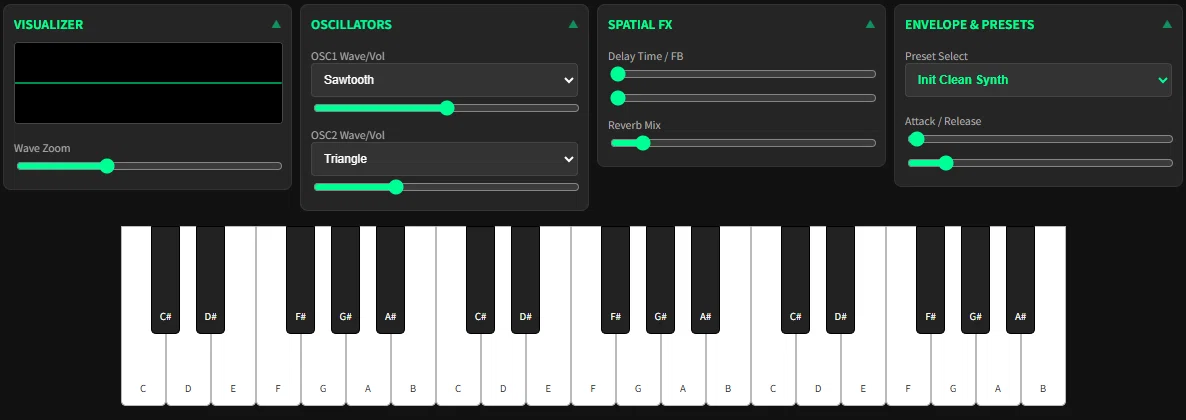
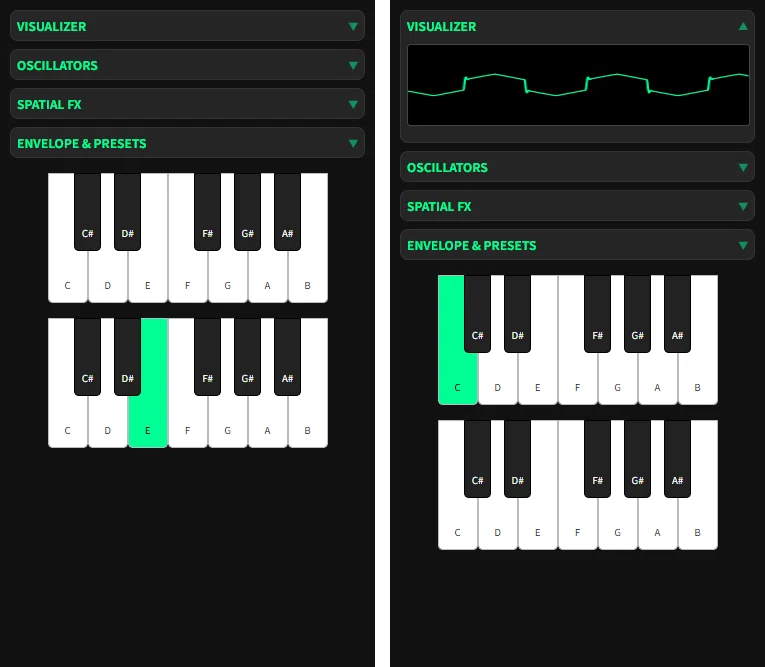
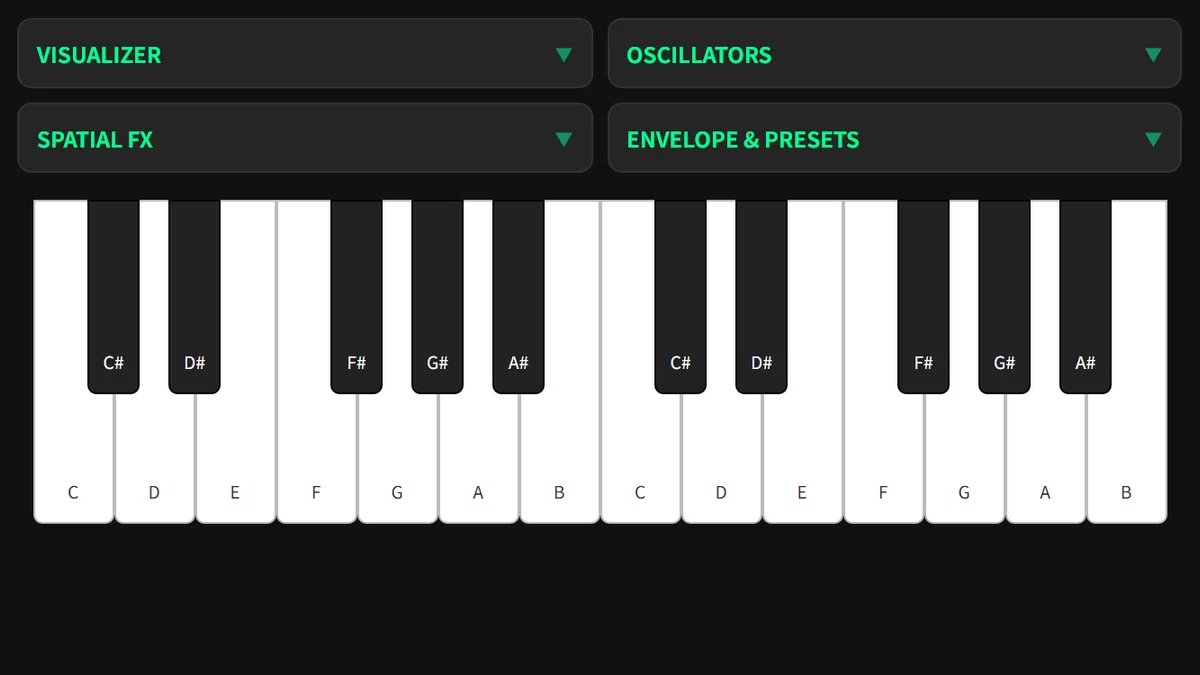
今回は、端末のサイズに合わせて表示を変えたので、
どうしてもやり取りが多くなってしまいました。
全部で12回くらいのやり取り。
やりとりを全部載せると長くなるので省略しますが、
基本の流れとしては、
① こちらから指示をする。
② Geminiがコードを作成。追加機能の例を提示。
③ さらに指示をする。
まだ、
さまざまな端末の画面サイズに合わせるなら、
微調整が必要なところもありますが、
今回はここまでにして、
とりあえず完成としたいと思います。
今回、作成したシンセサイザーの機能は、
Visualizer 音の波形を見る
OSC 波形2つの合成が可能
FX リバーブ・デュレイ
ENVELOPE ADSRの調整
PRESET プリセット設定
今回のコード(html+Javascript)
パソコンならテキストエディタに貼り付けて、synth.htmlのように、
名前の最後(拡張子)に.htmlをつけて保存。
ダブルクリックで、ブラウザが開きます。
<!DOCTYPE html>
<html lang="ja">
<head>
    <meta charset="UTF-8">
    <meta name="viewport" content="width=device-width, initial-scale=1.0, maximum-scale=1.0, user-scalable=no">
    <title>Integrated Synth Pro</title>
    <style>
        :root {
            --bg-color: #121212; --panel-color: #252525; --accent-color: #00ff95;
            --white-key-w: 45px; --white-key-h: 180px;
        }
        body { background-color: var(--bg-color); color: white; font-family: sans-serif; margin: 0; display: flex; flex-direction: column; align-items: center; touch-action: manipulation; }
        .container { width: 100%; max-width: 1200px; padding: 10px; box-sizing: border-box; }

        .dashboard { display: grid; gap: 8px; grid-template-columns: repeat(auto-fit, minmax(240px, 1fr)); margin-bottom: 15px; }
        .module { background: var(--panel-color); padding: 10px; border-radius: 8px; border: 1px solid #333; height: fit-content; }
        .module h3 { font-size: 0.75rem; margin: 0; color: var(--accent-color); text-transform: uppercase; cursor: pointer; display: flex; justify-content: space-between; align-items: center; }
        .module h3::after { content: '▼'; font-size: 0.6rem; opacity: 0.5; }
        .module.expanded h3::after { content: '▲'; }

        .module-content { display: none; padding-top: 10px; }
        .module.expanded .module-content { display: block; }

        canvas { width: 100%; height: 80px; background: #000; border-radius: 4px; border: 1px solid #444; margin-bottom: 5px; }

        label { display: block; font-size: 0.65rem; color: #aaa; margin-top: 6px; }
        input[type="range"] { width: 100%; accent-color: var(--accent-color); cursor: pointer; }
        select { width: 100%; padding: 8px; background: #333; color: white; border: 1px solid #444; font-size: 0.75rem; border-radius: 4px; }

        @media (max-width: 550px) {
            :root { --white-key-w: 40px; --white-key-h: 130px; }
            .dashboard { grid-template-columns: 1fr; }
            .module { padding: 6px; }
            #waveZoomContainer { display: none; }
        }

        /* 鍵盤レイアウト */
        .keyboard-container { display: flex; flex-wrap: wrap; justify-content: center; width: 100%; }
        .octave { position: relative; height: var(--white-key-h); width: calc(var(--white-key-w) * 7); flex-shrink: 0; margin-bottom: 15px; }
        .key { position: absolute; box-sizing: border-box; cursor: pointer; touch-action: none; display: flex; align-items: flex-end; justify-content: center; padding-bottom: 10px; font-size: 0.6rem; user-select: none; border-radius: 0 0 5px 5px; }
        .key.white { width: var(--white-key-w); height: var(--white-key-h); background: white; color: #333; border: 1px solid #bbb; z-index: 1; }
        .key.black {
            width: calc(var(--white-key-w) * 0.66); height: calc(var(--white-key-h) * 0.6);
            background: #222; color: white; z-index: 2; border: 1px solid #000;
            margin-left: calc(var(--white-key-w) * -0.33);
        }
        .key.playing { background: var(--accent-color) !important; color: black; }
    </style>
</head>
<body>

<div class="container">
    <div class="dashboard">
        <div class="module" id="visModule">
            <h3 onclick="toggleModule(this)">Visualizer</h3>
            <div class="module-content">
                <canvas id="visualizer"></canvas>
                <div id="waveZoomContainer">
                    <label>Wave Zoom</label>
                    <input type="range" id="waveZoom" min="0.01" max="1.5" step="0.01" value="0.5">
                </div>
            </div>
        </div>

        <div class="module" id="oscModule">
            <h3 onclick="toggleModule(this)">Oscillators</h3>
            <div class="module-content">
                <label>OSC1 Wave/Vol</label>
                <select id="type1"><option value="sawtooth" selected>Sawtooth</option><option value="sine">Sine</option><option value="square">Square</option><option value="triangle">Triangle</option></select>
                <input type="range" id="vol1" min="0" max="1" step="0.01" value="0.5">
                <label>OSC2 Wave/Vol</label>
                <select id="type2"><option value="triangle" selected>Triangle</option><option value="sine">Sine</option><option value="square">Square</option><option value="sawtooth">Sawtooth</option></select>
                <input type="range" id="vol2" min="0" max="1" step="0.01" value="0.3">
            </div>
        </div>

        <div class="module" id="fxModule">
            <h3 onclick="toggleModule(this)">Spatial FX</h3>
            <div class="module-content">
                <label>Delay Time / FB</label>
                <input type="range" id="delayTime" min="0" max="1" step="0.01" value="0.0">
                <input type="range" id="delayFeedback" min="0" max="0.8" step="0.01" value="0.0">
                <label>Reverb Mix</label>
                <input type="range" id="reverbMix" min="0" max="1" step="0.01" value="0.1">
            </div>
        </div>

        <div class="module" id="envModule">
            <h3 onclick="toggleModule(this)">Envelope & Presets</h3>
            <div class="module-content">
                <label>Preset Select</label>
                <select id="presetSelect" style="margin-bottom: 10px; color: var(--accent-color); font-weight: bold;">
                    <option value="init">Init Clean Synth</option>
                    <option value="piano">Acoustic Piano</option>
                    <option value="guitar">Classic E-Guitar</option>
                    <option value="flute">Boutique Flute</option>
                    <option value="fatBase">Analog Bass</option>
                </select>
                <label>Attack / Release</label>
                <input type="range" id="attack" min="0.01" max="1.5" step="0.01" value="0.02">
                <input type="range" id="release" min="0.1" max="2.5" step="0.01" value="0.4">
            </div>
        </div>
    </div>

    <div class="keyboard-container" id="keyboard"></div>
</div>

<script>
    const audioCtx = new (window.AudioContext || window.webkitAudioContext)();
    const analyser = audioCtx.createAnalyser(); analyser.fftSize = 2048;
    const canvas = document.getElementById('visualizer');
    const canvasCtx = canvas.getContext('2d');

    // モジュール制御
    function toggleModule(header) { header.parentElement.classList.toggle('expanded'); }

    // PC版なら初期ですべて展開
    if (window.innerWidth > 550) {
        document.querySelectorAll('.module').forEach(m => m.classList.add('expanded'));
    }

    // エフェクト設定
    const delayNode = audioCtx.createDelay(1.0);
    const delayFeedback = audioCtx.createGain();
    const delayMix = audioCtx.createGain();
    delayNode.connect(delayFeedback); delayFeedback.connect(delayNode); delayNode.connect(delayMix);

    const reverbNode = audioCtx.createConvolver();
    const reverbMix = audioCtx.createGain();
    (function() {
        const len = audioCtx.sampleRate * 2.5; const buf = audioCtx.createBuffer(2, len, audioCtx.sampleRate);
        for (let i = 0; i < 2; i++) { const d = buf.getChannelData(i); for (let j = 0; j < len; j++) d[j] = (Math.random() * 2 - 1) * Math.pow(1 - j / len, 1.8); }
        reverbNode.buffer = buf;
    })();

    const masterOut = audioCtx.createGain();
    delayMix.connect(masterOut); reverbMix.connect(masterOut);
    masterOut.connect(analyser).connect(audioCtx.destination);

    // プリセットデータ
    const presets = {
        init: { t1: 'sawtooth', v1: 0.5, t2: 'triangle', v2: 0.3, d: 0.0, f: 0.0, r: 0.1, a: 0.02, rel: 0.4 },
        piano: { t1: 'sine', v1: 0.6, t2: 'triangle', v2: 0.2, d: 0.0, f: 0.0, r: 0.4, a: 0.01, rel: 1.5 },
        guitar: { t1: 'sawtooth', v1: 0.4, t2: 'sine', v2: 0.4, d: 0.3, f: 0.4, r: 0.2, a: 0.01, rel: 0.8 },
        flute: { t1: 'sine', v1: 0.7, t2: 'triangle', v2: 0.2, d: 0.2, f: 0.2, r: 0.3, a: 0.2, rel: 0.5 },
        fatBase: { t1: 'square', v1: 0.6, t2: 'sawtooth', v2: 0.3, d: 0.0, f: 0.0, r: 0.0, a: 0.01, rel: 0.2 }
    };

    document.getElementById('presetSelect').addEventListener('change', e => {
        const p = presets[e.target.value];
        document.getElementById('type1').value = p.t1; document.getElementById('vol1').value = p.v1;
        document.getElementById('type2').value = p.t2; document.getElementById('vol2').value = p.v2;
        document.getElementById('delayTime').value = p.d; document.getElementById('delayFeedback').value = p.f;
        document.getElementById('reverbMix').value = p.r; document.getElementById('attack').value = p.a;
        document.getElementById('release').value = p.rel;
    });

    let activeVoices = new Map();

    function playNote(freq, keyElement) {
        if (audioCtx.state === 'suspended') audioCtx.resume();
        if (activeVoices.has(keyElement)) return;
        const now = audioCtx.currentTime;
        const o1 = audioCtx.createOscillator(); const o2 = audioCtx.createOscillator();
        const o1g = audioCtx.createGain(); const o2g = audioCtx.createGain();
        const mg = audioCtx.createGain(); const flt = audioCtx.createBiquadFilter();

        o1.type = document.getElementById('type1').value; o1.frequency.setValueAtTime(freq, now);
        o2.type = document.getElementById('type2').value; o2.frequency.setValueAtTime(freq, now);
        o1g.gain.value = document.getElementById('vol1').value;
        o2g.gain.value = document.getElementById('vol2').value;

        flt.type = 'lowpass'; flt.frequency.value = 4000;
        const atk = parseFloat(document.getElementById('attack').value);
        mg.gain.setValueAtTime(0, now); mg.gain.linearRampToValueAtTime(0.3, now + atk);

        delayNode.delayTime.value = document.getElementById('delayTime').value;
        delayFeedback.gain.value = document.getElementById('delayFeedback').value;
        reverbMix.gain.value = document.getElementById('reverbMix').value;

        o1.connect(o1g).connect(flt); o2.connect(o2g).connect(flt);
        flt.connect(mg); mg.connect(masterOut); mg.connect(delayNode); mg.connect(reverbNode).connect(reverbMix);

        o1.start(); o2.start();
        keyElement.classList.add('playing');
        activeVoices.set(keyElement, { o1, o2, mg });
    }

    function stopNote(keyElement) {
        const v = activeVoices.get(keyElement); if (!v) return;
        const now = audioCtx.currentTime; const rel = parseFloat(document.getElementById('release').value);
        v.mg.gain.cancelScheduledValues(now); v.mg.gain.exponentialRampToValueAtTime(0.001, now + rel);
        v.o1.stop(now + rel); v.o2.stop(now + rel);
        keyElement.classList.remove('playing'); activeVoices.delete(keyElement);
    }

    // 鍵盤配置データ
    const octT = [
        {n:"C",t:"white",x:0},{n:"C#",t:"black",x:1},
        {n:"D",t:"white",x:1},{n:"D#",t:"black",x:2},
        {n:"E",t:"white",x:2},
        {n:"F",t:"white",x:3},{n:"F#",t:"black",x:4},
        {n:"G",t:"white",x:4},{n:"G#",t:"black",x:5},
        {n:"A",t:"white",x:5},{n:"A#",t:"black",x:6},
        {n:"B",t:"white",x:6}
    ];

    function renderKeyboard(num) {
        const kb = document.getElementById('keyboard'); kb.innerHTML = '';
        for (let oct = 0; oct < num; oct++) {
            const div = document.createElement('div'); div.className = 'octave';
            const baseFreq = 130.81 * Math.pow(2, oct);
            octT.forEach((note, i) => {
                const k = document.createElement('div');
                const f = baseFreq * Math.pow(2, i/12);
                k.className = `key ${note.t}`;
                k.style.left = `calc(var(--white-key-w) * ${note.x})`;
                k.innerHTML = `<span>${note.n}</span>`;
                k.addEventListener('pointerdown', e => { e.preventDefault(); playNote(f, k); });
                k.addEventListener('pointerup', () => stopNote(k));
                k.addEventListener('pointerleave', () => stopNote(k));
                div.appendChild(k);
            });
            kb.appendChild(div);
        }
    }
    window.addEventListener('resize', () => renderKeyboard(window.innerWidth > 1000 ? 3 : 2));
    renderKeyboard(window.innerWidth > 1000 ? 3 : 2);

    // PCキーボード演奏機能
    const pcKeyMap = {'a':0,'w':1,'s':2,'e':3,'d':4,'f':5,'t':6,'g':7,'y':8,'h':9,'u':10,'j':11,'k':12};
    const pressedKeys = new Set();
    window.addEventListener('keydown', e => {
        const key = e.key.toLowerCase();
        if (pcKeyMap[key] !== undefined && !pressedKeys.has(key)) {
            pressedKeys.add(key);
            const allKeys = document.querySelectorAll('.key');
            if (allKeys[pcKeyMap[key]]) playNote(130.81 * Math.pow(2, pcKeyMap[key]/12), allKeys[pcKeyMap[key]]);
        }
    });
    window.addEventListener('keyup', e => {
        const key = e.key.toLowerCase();
        if (pcKeyMap[key] !== undefined) {
            pressedKeys.delete(key);
            const allKeys = document.querySelectorAll('.key');
            if (allKeys[pcKeyMap[key]]) stopNote(allKeys[pcKeyMap[key]]);
        }
    });

    function draw() {
        requestAnimationFrame(draw);
        const data = new Uint8Array(analyser.frequencyBinCount); analyser.getByteTimeDomainData(data);
        canvasCtx.fillStyle = '#000'; canvasCtx.fillRect(0, 0, canvas.width, canvas.height);
        canvasCtx.lineWidth = 2; canvasCtx.strokeStyle = '#00ff95'; canvasCtx.beginPath();
        const zoom = window.innerWidth <= 550 ? 0.5 : parseFloat(document.getElementById('waveZoom').value);
        const sliceWidth = canvas.width / data.length; let x = 0;
        for (let i = 0; i < data.length; i++) {
            const v = (((data[i]-128) * zoom) + 128) / 128.0 * canvas.height/2;
            if (i === 0) canvasCtx.moveTo(x, v); else canvasCtx.lineTo(x, v);
            x += sliceWidth;
        }
        canvasCtx.stroke();
    }
    draw();
</script>
</body>
</html>