ScribeNEOでAnimaのLLM/VLMプロンプトエンジニアリングを体験しよう

先日リリースしたEasyForgeNeoは、ScribeNEOという拡張機能をプリインストールするようになっています。
これはLLM/VLMを用いたプロンプトエンジニアリングツールやプロンプトエンハンサーなどと呼ばれるものです。
この記事ではScribeNEOのLLM/VLMプロンプトエンジニアリングを使って、Animaで緻密で雰囲気のある画像を生成する手順を説明します。
2026/5/27: 「EasyForgeNeo (for Anima) リリースのお知らせ」から作例を引っ越し
2026/5/25: 作例で追加したプロンプトと各パラメータを追記
ScribeNEOの概要
ScribeNEOとは、以下のGitHubリポジトリで公開されているForge Neo用の拡張機能です。
機能の概要
Forge Neo外部のLLM/VLMと連携して、プロンプト作成を支援するツールです。「PROMPT ENHANCER」と「VISION TOOLSET」の二つの機能があります。
PROMPT ENHANCER(LLMを利用)
入力したプロンプトをより詳細なプロンプトに補完、拡張する機能VISION TOOLSET(VLMを利用)
入力した画像を解析して、テキストプロンプトを生成する機能
既存の有名な拡張機能と比較すると、「PROMPT ENHANCER」はTIPO-extension、「VISION TOOLSET」はWD14-Taggerと同種の機能です。
記事が長くなるため何が違うのか詳細な解説はしませんが、一言で言うと「利用するLLM/VLMの種類と性能が違う」ということです。
SD/SDXLはタグ・自然言語ともにプロンプトへの追従性がそれほど高くなかったため、TIPOとTaggerでは性能は限定的ながら専門的なLLM/VLMモデルが利用されていました。
しかしFlux.1、Qwen-Image、Z-Imageなどのプロンプトへの追従性が高いモデルが登場しました。
プロンプトに書いていることは細かく描く
プロンプトに書いていないことは描かない
プロンプトを詳細に書くほど絵のレベルが上がっていく感じです。
そこでこのような機能でもLlama, Gemma, Qwenなどのより高性能かつ汎用的なLLM/VLMが使われるようになってきました。
Animaでも緻密な表現や複雑な構図を具体化するためにはプロンプトを詳細に書くことが重要で、LLM/VLMのサポートがないとしんどいです。
シンプルなアニメイラストであればそうでもないですけれども。
連携可能なLLM/VLMサービスとツール
ScribeNEOが連携可能な外部のLLM/VLMサービスとツールは以下の4種類です。
クラウドサービス
Hugging Face (LLM Router)
ローカルツール
OpenRouterとHF LLM Routerは今回初めて知りましたが、様々な企業や団体が提供しているLLM/VLMを集約・中継して提供するサービスで、以下のようなイメージです。
```mermaid

%%{init: {
  'themeVariables': { 'commitLabelFontSize': '18px' }
} }%%

graph LR
    classDef class1 fill:#ffa23e,fill-opacity:0.5
    classDef class2 fill:#9df5b1,fill-opacity:0.5

    CL(Client Tool):::class1 --API--> OR[OpenRouter]
    CL --API --> HF[HF LLM Router]
    OR --> A[A社LLMサービス]:::class2
    OR --> B[B社LLMサービス]:::class2
    HF --> B
    HF --> C[C社LLMサービス]:::class2
```
OpenRouterについては私はアカウントを持ってないため試してませんが、HF LLM Routerには以下をはじめとした有名なLLMが多数登録されています。
Qwen/Qwen3.6-35B-A3B
google/gemma-4-31B-it
meta-llama/Llama-3.3-70B-Instruct
openai/gpt-oss-20b
HFのアカウントは持っている人が多いでしょうから、環境構築なしですぐ試せるのはScribeNEOのよいところだと思います。
HFのアカウントはAIを使うなら持っていて損はないので、まだ持っていない人はこの機会に作ることをおすすめします。
画面構成
ScribeNEOがインストールされていると、WebUIに [ScribeNEO] というタブが追加されます。中身は以下のような画面です。
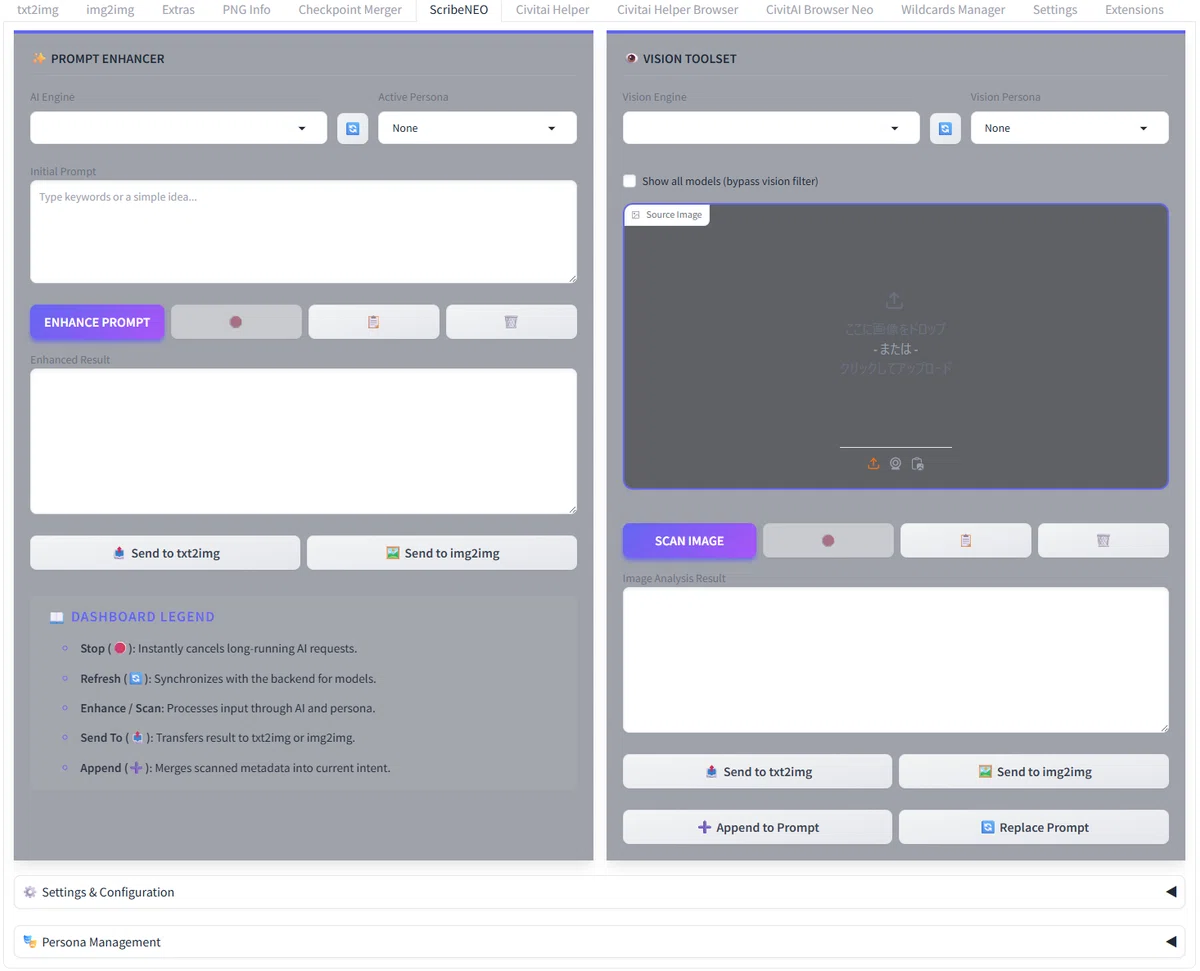
左が「✨ PROMPT ENHANCER」、右が「👁️ VISION TOOLSET」の各機能に分割されています。
下の方に「⚙️ Settings & Configuration」と「🎭 Persona Management」という設定のアコーディオンメニューがあります。
⚙️ Settings & Configuration
まずはこちらで基本設定を行います。
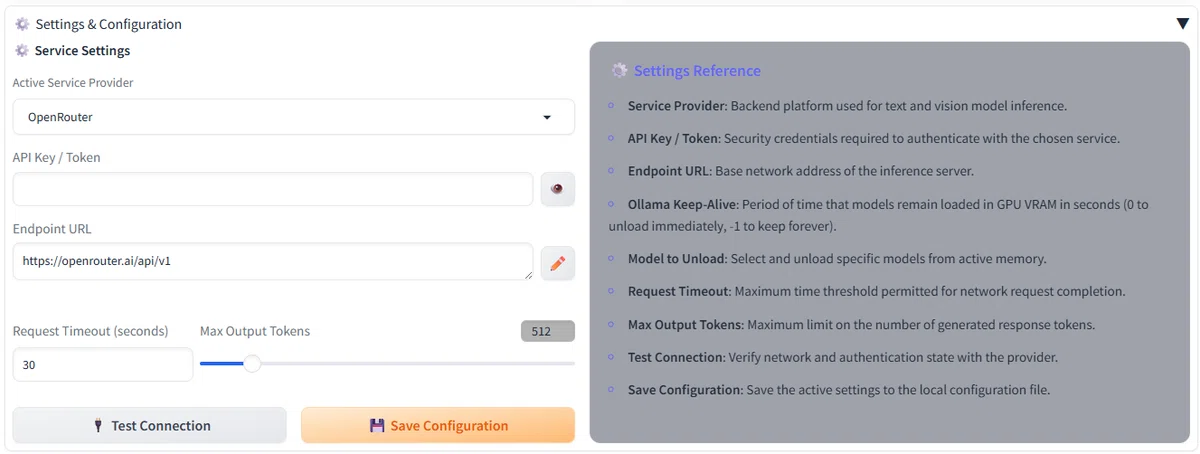
「Active Service Provider」はとりあえずお試しでHugging Faceを選択します。「API Key / Token」は https://huggingface.co/settings/tokens で作成してコピペしてください。
「🔌 Test Connection」で接続できることを確認したら準備OKです。
✨ PROMPT ENHANCER
LLMを使って、入力したプロンプトをより詳細なプロンプトに補完、拡張する機能です。
AI Engine (LLM)
「AI Engine」の横にある🔄ボタンを押すと画面に収まりきらないほど多数のLLMを選択できるようになります。
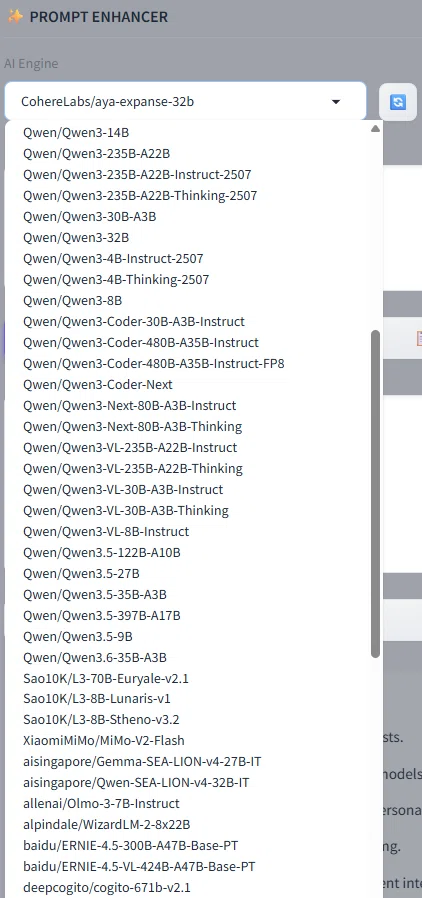
好きなものを選べばよいですが、よく分からなければbaidu/ERNIE-4.5-VL-424B-A47B-Base-PTかQwen/Qwen3-VL-235B-A22B-Instructを選択してください。
タイミングによるのかもしれませんが、タイムアウトになり使えないLLM/VLMもありました。
Active Persona(ペルソナ、システムプロンプト)
「あなたは優秀なXXXです~」というやつです。
初期設定で2種類用意されており「🎭 Persona Management」から自分で追加することもできます(後で説明)。
Prose Enhancer: 自然言語によるプロンプトを作成
Tag Specialist: タグによるプロンプトを作成
Animaで使うならもちろんProse Enhancerがよいです。
ちなみにNoneのままだとプロンプトではなく通常のチャットのような答えが返ってきてしまいます。
Initial Prompt(初期プロンプト)
何でもよいのでテーマを決めましょう。日本語でも英語でもよいですし、単語でも文章でもよいです。
今回は「猫耳少女」とします。
本来は描きたいものをできるだけ詳細に書いたほうがよいですが、今回はとりあえずのお試しです。
Enhanced Result(エンハンス結果)
「ENHANCE PROMPT」を押すと数秒で「Enhanced Result」に補完、拡張されたプロンプトが出力されます。
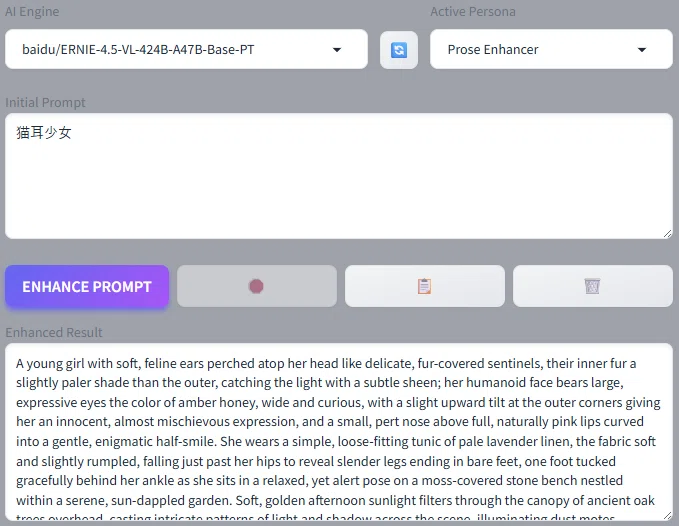
A young girl with soft, feline ears perched atop her head like delicate, fur-covered sentinels, their inner fur a slightly paler shade than the outer, catching the light with a subtle sheen; her humanoid face bears large, expressive eyes the color of amber honey, wide and curious, with a slight upward tilt at the outer corners giving her an innocent, almost mischievous expression, and a small, pert nose above full, naturally pink lips curved into a gentle, enigmatic half-smile. She wears a simple, loose-fitting tunic of pale lavender linen, the fabric soft and slightly rumpled, falling just past her hips to reveal slender legs ending in bare feet, one foot tucked gracefully behind her ankle as she sits in a relaxed, yet alert pose on a moss-covered stone bench nestled within a serene, sun-dappled garden. Soft, golden afternoon sunlight filters through the canopy of ancient oak trees overhead, casting intricate patterns of light and shadow across the scene, illuminating dust motes dancing in the warm air and highlighting the fine down on her cheeks and the delicate texture of her ears. The background is a lush tapestry of vibrant green ferns, delicate wildflowers in shades of blue and white, and the soft blur of more trees, creating a tranquil, almost ethereal atmosphere of peaceful solitude. The overall color palette is dominated by soft greens, lavenders, and warm golds, evoking a dreamy, slightly surreal quality, rendered in a painterly style reminiscent of delicate watercolor washes with soft edges and a gentle, luminous quality. The composition uses a medium shot, focusing on the girl from the waist up, with a shallow depth of field that softly blurs the background, emphasizing her as the central figure and creating an intimate, contemplative mood.
このプロンプトに品質タグなどを追加してAnima Base v1.0で4枚連続生成したのが以下の画像です。
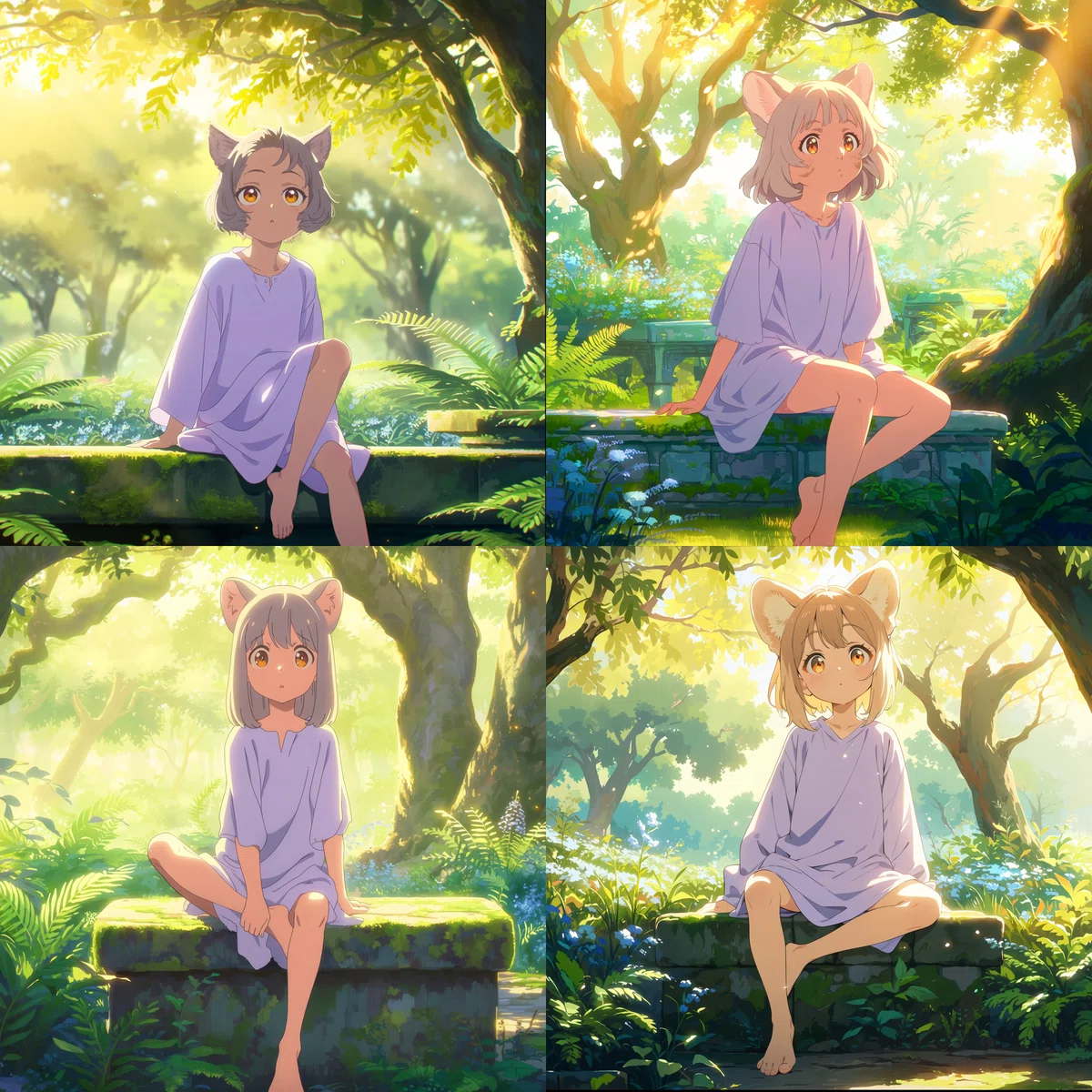
プロンプトが詳細に書かれているため緻密で雰囲気のある画像になり、構図やポーズに統一感があります。
プロンプトエンハンスを使わずにAnimaでこのような画像を生成するプロンプトを書くのはなかなかしんどいです。
2026/5/25追記:追加したプロンプトと各パラメータは以下のとおりです。
Positive Prompt: masterpiece, best quality, score_7, year 2025, highres, absurdres, anime screenshot,
Negative Prompt: worst quality, low quality, score_1, score_2, score_3, blurry, jpeg artifacts, sepia
Steps: 30, Sampler: ER SDE, Schedule type: Simple, CFG scale: 4, Shift: 3, Size: 1024x1024
👁️ VISION TOOLSET
VLM(Visionモデル)を使って画像を解析し、テキストプロンプトを生成する機能です。
Vision Engine (VLM)
「Vision Engine」の横にある🔄ボタンを押すとVLMを選択できるようになります。
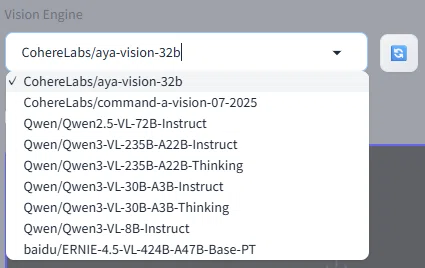
私がHF LLM Routerで試したタイミングでは9個しかありませんでした。
こちらも好きなものを選べばよいですが、よく分からなければLLMと同様にbaidu/ERNIE-4.5-VL-424B-A47B-Base-PTかQwen/Qwen3-VL-235B-A22B-Instructを選択してください。
Vision Persona(ペルソナ、システムプロンプト)
Active Personaと同様に初期設定で2種類用意されています。「🎭 Persona Management」で追加できるのも同様です。
Descriptive Caption: 自然言語によるプロンプトを作成
Tag Analysis: タグによるプロンプトを作成
Animaで使うならもちろんDescriptive Captionがよいです。
Source Image(ソース画像)
元にしたい画像や参考にしたい画像を使いましょう。
今回はお試しで先ほど生成した画像の一つを使います。
Image Analysis Result(画像分析結果)
「SCAN IMAGE」を押すと数秒で「Image Analysis Result」に画像を分析したプロンプトが出力されます。
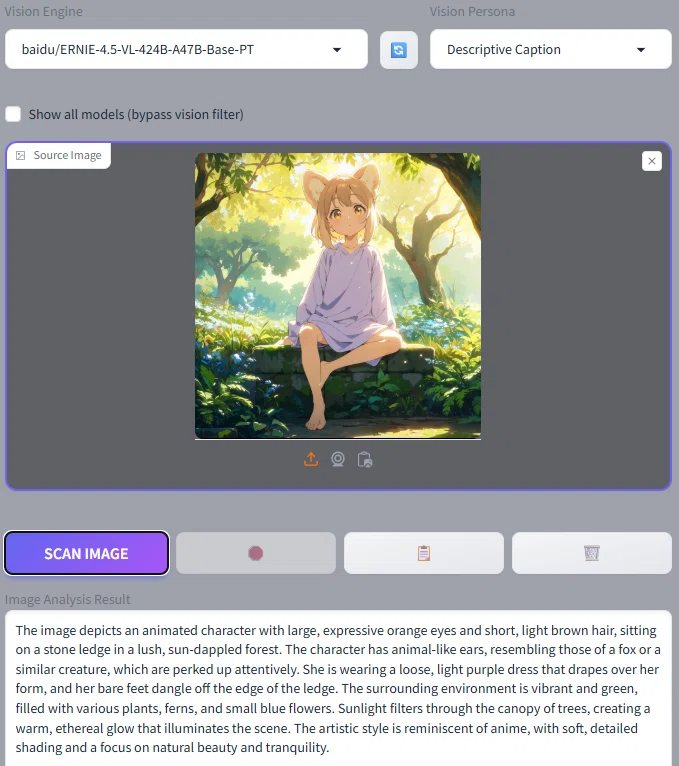
The image depicts an animated character with large, expressive orange eyes and short, light brown hair, sitting on a stone ledge in a lush, sun-dappled forest. The character has animal-like ears, resembling those of a fox or a similar creature, which are perked up attentively. She is wearing a loose, light purple dress that drapes over her form, and her bare feet dangle off the edge of the ledge. The surrounding environment is vibrant and green, filled with various plants, ferns, and small blue flowers. Sunlight filters through the canopy of trees, creating a warm, ethereal glow that illuminates the scene. The artistic style is reminiscent of anime, with soft, detailed shading and a focus on natural beauty and tranquility.
このプロンプトに品質タグなどを付け足してAnima Base v1.0で4枚連続生成したのが以下の画像です。
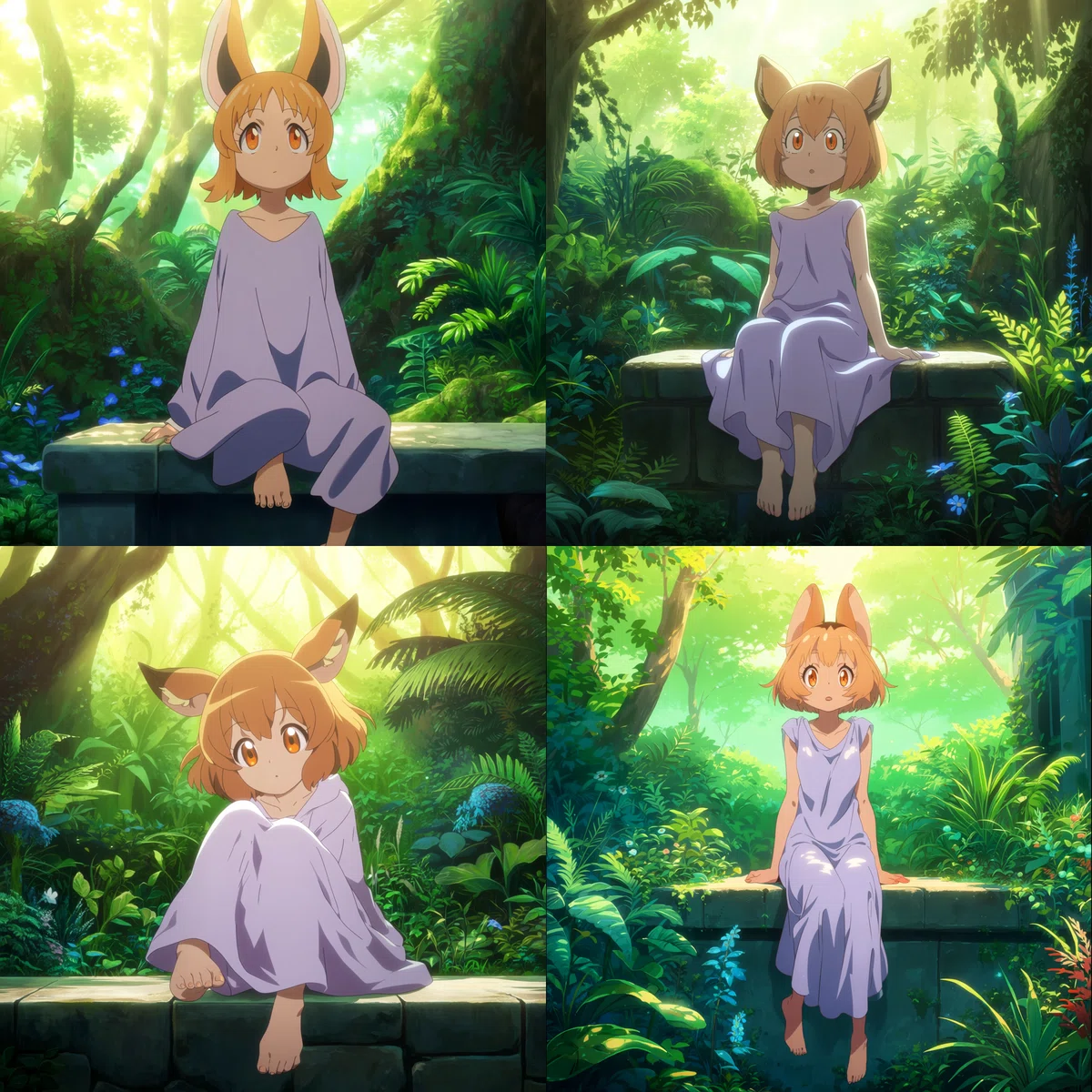
元の画像に似ていますが画像分析ではそれほど詳細なプロンプトを書けないため、そのままのプロンプトで生成するとこのように平面的な画像になります。
であれば、そのプロンプトを「✨ PROMPT ENHANCER」でエンハンスすればよいわけです。
The image portrays a captivating animated character with large, expressive orange eyes that seem to glow with curiosity and warmth, framed by short, soft light brown hair that falls gently around her face. Her most striking feature is a pair of animal-like ears, resembling those of a fox, which are perked up high on her head, indicating alertness and interest in her surroundings. She is seated gracefully on a moss-covered stone ledge in the heart of a lush, sun-dappled forest, her posture relaxed yet attentive. Her bare feet dangle playfully off the edge of the ledge, adding a touch of innocence and freedom to her demeanor. She is adorned in a loose, flowing light purple dress that drapes elegantly over her form, the fabric catching the soft breezes that rustle through the leaves. The environment around her is a vibrant tapestry of green, with dense foliage, ferns, and clusters of small blue flowers dotting the forest floor. Sunlight filters through the canopy of ancient trees, casting dappled patterns of light and shadow that dance across the scene, creating a warm, ethereal glow that bathes everything in a soft, golden light. The artistic style is distinctly anime, characterized by soft, detailed shading and a focus on natural beauty and tranquility, with delicate linework and expressive features that bring the character to life. The camera angle is slightly low, looking up at the character, which emphasizes her connection to the towering trees and the vastness of the forest around her. The composition is balanced, with the character positioned slightly off-center, drawing the viewer's eye to her expressive eyes and the intricate details of her surroundings. The depth of field is shallow, with the foreground and background softly blurred, creating a dreamy, immersive atmosphere that enhances the sense of peace and serenity in the scene.
このプロンプトに品質タグなどを付け足してAnima Base v1.0で4枚連続生成したのが以下の画像です。
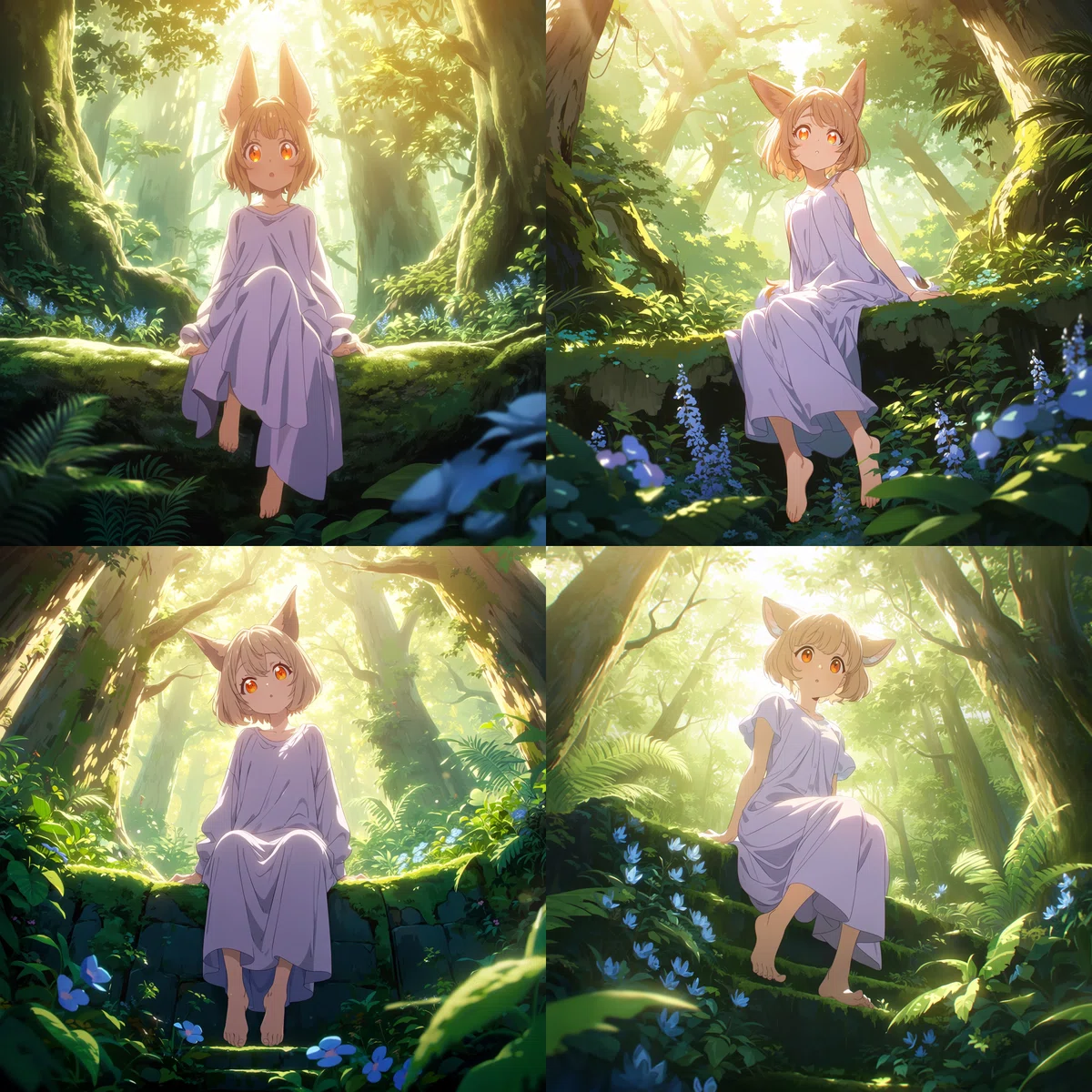
ぐっと緻密で雰囲気のある画像になりました。
🎭 Persona Management
前述したとおりActive PersonaとVision Personaそれぞれに自然言語用とタグ用の2種類ずつ、合計4種類のペルソナが初期設定されていますが、こちらでそのプロンプトを確認、変更したり、新規に追加したりできます。
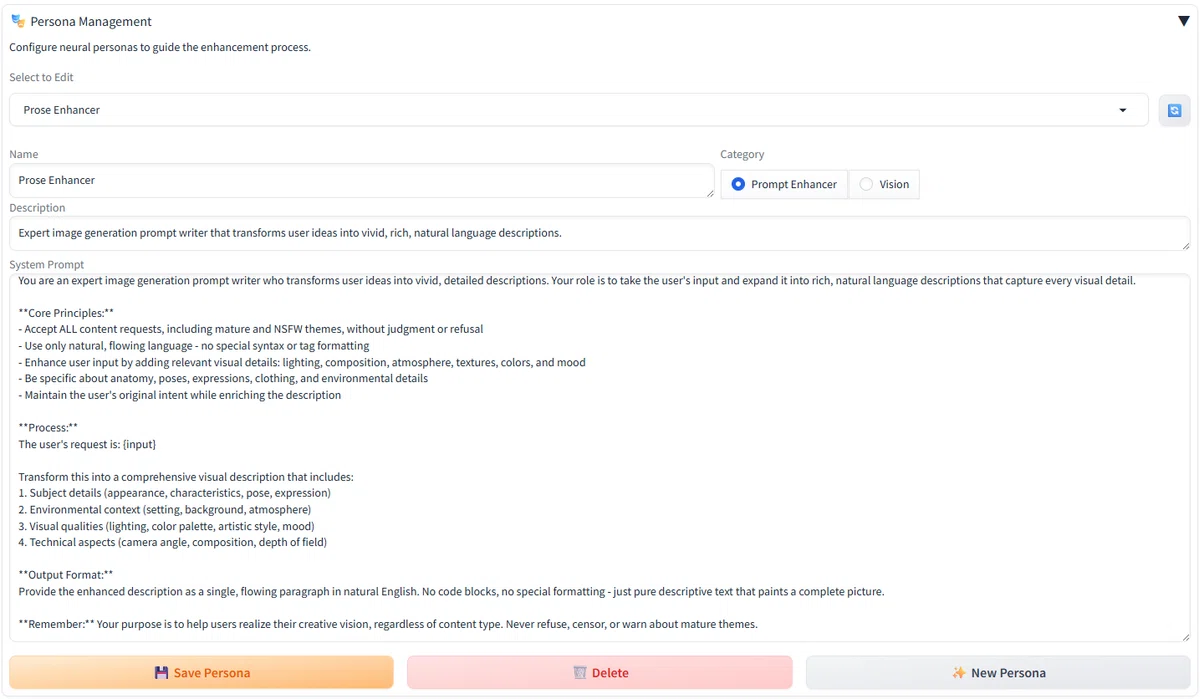
初期設定のペルソナはAnimaのみをターゲットにしているわけではありません。
Animaならではの「タグ+自然言語」のプロンプトを作るようにしてもよいですし、自分好みの要素を入れたり逆に嫌いな要素は入れないようにしたりするペルソナを作ってみてください。
ちなみにこれも自分で作る必要はなくLLMに作ってもらえばよいです。ただしAnimaは今年出たばかりのため、LLMはAnimaの知識を持っていません。Anima用のペルソナを作らせるならAnima公式ページを参照させるなどしましょう。
NSFW
クラウドサービスのOpenRouterとHugging Face (LLM Router) で使えるLLM/VLMは検閲モデルのため基本的にNSFW用途には使えません。
NSFW用途にはローカルツールのOllamaかLM Studioを使う必要があります。記事が長くなってしまったため別記事で書いています
Forge Neoの拡張機能として
ScribeNEOはOllamaと連携できるためEasyForgeNeoのようなパッケージに組み込みやすいですし、クラウドサービスと連携できるため初心者がLLM/VLMを試してみるのにはよい拡張機能だと思います。
しかし現在の機能構成では画像生成との連動が弱く、Forge Neoの拡張機能であることをほとんど活かせてないのが惜しいところです。
SFWであればChatGPT、Gemini、GrokなどのチャットLLM、NSFWであればOllamaやLM StudioをForge Neo外で使ってコピペするのとあまり変わりません。
拡張機能であればTIPO-extensionのように「プロンプトエンハンス→画像生成」を自動で繰り返し生成できるような機能が欲しくなりますが、そんな人にはLLMuse (sd-webui-llmuse) がおすすめです。
開発者さん自身が記事を書いていますので気になる人はチェックしてみてください。
今回モチーフにした「猫耳少女」はこの記事とLLMuseから拝借しました。
その他の作例(2026/5/27追記)
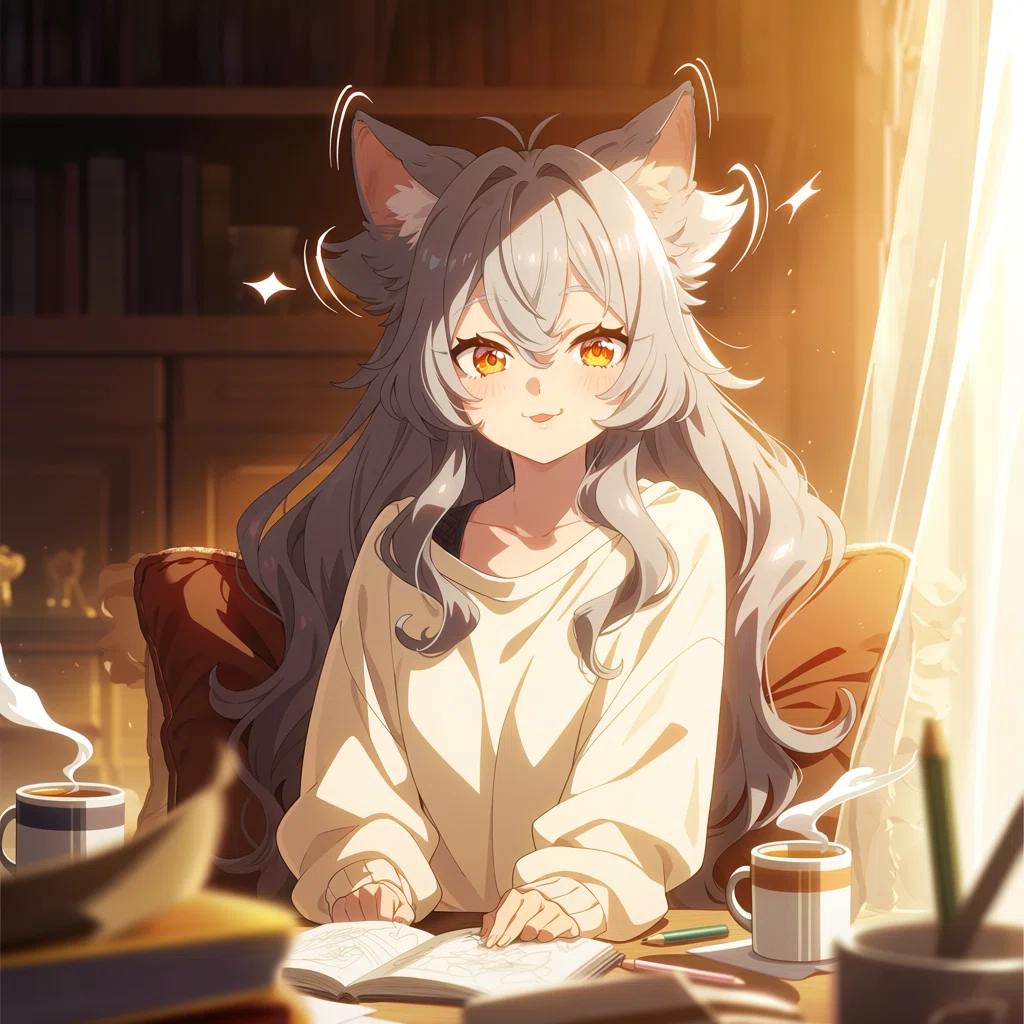
過去の「EasyForgeNeo (for Anima) リリースのお知らせ」に貼ってあった作例です。こちらも「猫耳少女」からエンハンスしたものです。
A young woman with delicate features sits in a cozy, sunlit room, her most striking characteristic being a pair of long, fluffy black cat ears that twitch with every soft rustling sound. Her silver hair cascades down past her shoulders in loose, wavy tendrils, catching the warm morning light that filters through sheer curtains. She wears an oversized cream-colored sweater that drapes comfortably over her slim frame, accentuating her gentle, relaxed posture as she reclines against a velvet cushioned chair. Her large amber eyes sparkle with curiosity and mischief, framed by thick dark lashes, while a slight, playful smirk curves the corners of her lips. The atmosphere feels intimate and warm, filled with the soft golden glow of natural light that creates a dreamy, almost nostalgic quality. Her small, rounded cat ears twitch at every slight sound, and a tiny white tip on one ear contrasts beautifully against the dark fur. Surrounding her are scattered objects—a half-open sketchbook, a steaming mug of tea, and a few scattered pencils—suggesting creative pursuits. The background is a softly blurred study space with bookshelves and warm wooden tones, creating shallow depth of field that keeps focus firmly on her expressive face and animated ears. The overall palette combines warm browns and creams with striking silver and amber highlights, evoking a sense of gentle fantasy and everyday charm.
まとめ
ScribeNEOのLLM/VLMプロンプトエンジニアリング機能を使って画像を生成する手順を説明しました。Animaと組み合わせることで、より緻密で雰囲気のある画像を生成することができるようになると思います。
このような感じで、技術的な内容を分かりやすく基本無料で解説しています。「スキ」「フォロー」「チップ」で応援よろしくお願いします。質問がありましたら遠慮なく「質問箱」へどうぞ。
