
Qt6.9.1 チュートリアル Qt Documentation コンパイラの追加と削除

皆さんこんにちは!今回は、Qtのリファレンスドキュメントを読んでいきます。日々の積み重ねが大切です。ドキュメントは何度も読み込むものです。Qtの聖書です。()でくくっている部分は、基本的に私個人の意見です。
リファレンスから、さらにわからない単語が出てきます。調べまくりましょう・・・。その時はわからなくても、一度脳みそに通過させておくことは重要です。
Add compilers
You can develop Qt applications on several 32-bit and 64-bit platforms. Usually, you can build Qt applications on each platform with GCC, a vendor-supplied compiler, or a third party compiler. In Qt Creator, a kit specifies the compiler and other necessary tools for building an application for and running it on a particular platform.
Qtアプリケーションは32bitと64bitのプラットフォームで開発できます。普通、GCC、ベンダ提供のコンパイラ、もしくは第3パーティのコンパイラを使って各プラットフォーム上でQtアプリケーションをビルドできます。Qtクリエーターでは、キットkitが特有のプラットフォーム上でアプリケーションをビルドし、実行するためのコンパイラと、その他の必要なツールを特定します。
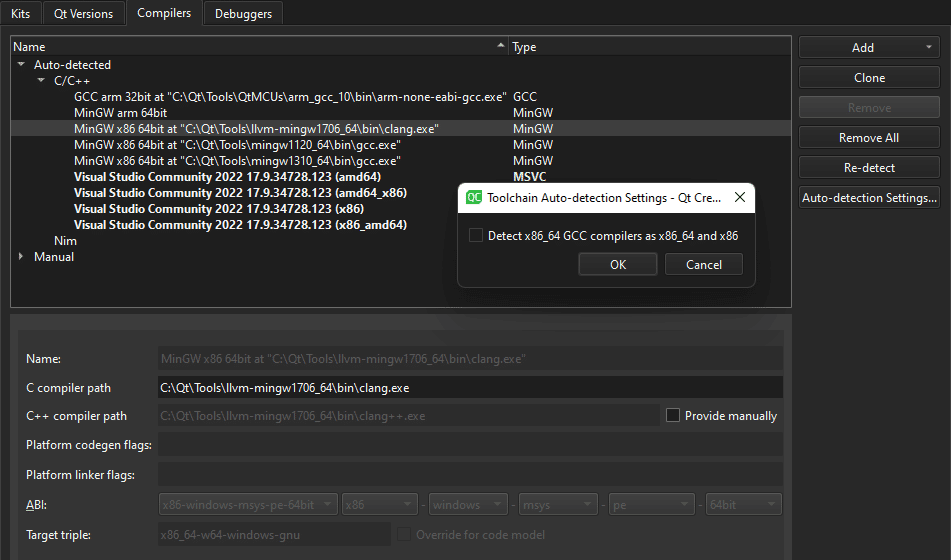
Qt Creator automatically detects the compilers that your system or Qt Online Installer registers and lists them in Preferences > Kits > Compilers.
Qtクリエーターは自動的にあなたのシステムやQtオンラインインストーラーがPreferences>Kits>Compilers内で登録され、リスト化しているコンパイラ検知します。
Note: On macOS, the ccache C/C++ compiler cache is detected automatically only if you installed it using Homebrew or MacPorts. When using MacPorts, you also need to create symlinks, as instructed in How to enable ccache in the MacPorts wiki.
ノート:マックOS上では、ccache C/C++コンパイラキャッシュはあなたがHomebrewか、MacPortsを使ってインストールしたときだけ自動的に検知します。MacPortsを使っているときは、MacPortsウィキ内のHow to enable ccache内で指示されているように、あなたはsymlinksも作る必要があります。
Re-detect compilers
When Qt Creator finds an x86_64 GCC compiler, it sets up an instance for the native x86_64 target. If you plan to create also 32-bit x86 binaries without using a dedicated cross-compiler, select Auto-detection Settings > Detect x86_64 GCC compilers as x86_64 and x86. Then select Re-detect to refresh the list of automatically detected compilers.
Qtクリエーターはx86_64GCコンパイラを探すとき、ネイティブのx86_64ターゲットのためのインスタンスをセットアップします。もしあなたが32-bit x86バイナリを、専用のクロスコンパイラを使うことなく作る計画であるならば、Auto-detection Settings > Detect x86_64 GCC compilers as x86_64 and x86.を選択してください。それから、自動的に検知したコンパイラのリストを再読み込みするべく、Re-detectを選択してください。
To remove manually added compilers, select Remove or Remove All.
もし追加したコンパイラを手動で削除するならば、RemoveかRemove Allを選択してください。
Add C or C++ compilers
To add a C or C++ compiler:
CあるいはC++コンパイラを加えるためには、
Select Preferences > Kits > Compilers.
Select Add to add a new compiler or Clone to add another version of the selected compiler.
Select a compiler in the list.
Set preferences according to the selected compiler.
Preferences > Kits > Compilers を選択
新しいコンパイラを選ぶには、Addを選択し、選択したコンパイラのもう一つのバージョンを加えるためにはCloneを選択します。
リスト内のコンパイラを選択します。
選択したコンパイラに従って、プリファレンスを設定します。
(プリファレンスというのは、「自分好みの設定」と言った意味です。)
Supported compilers
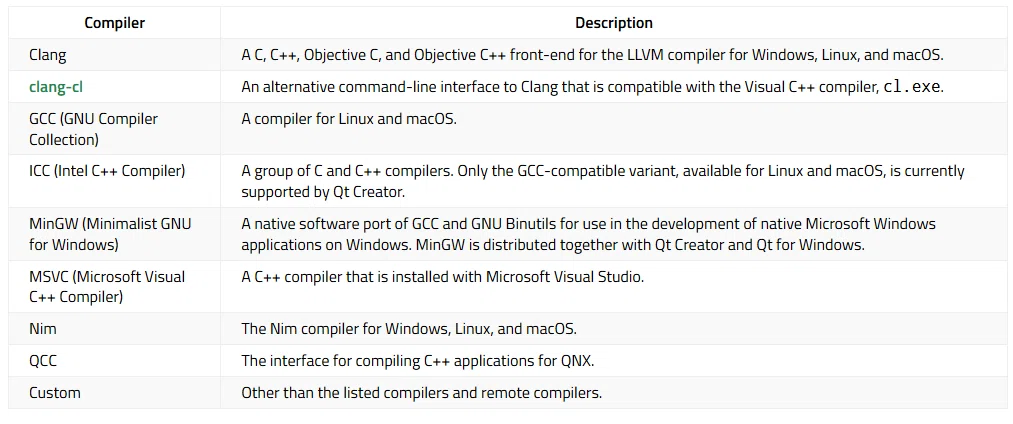
You can add the following compilers to build applications by using other compilers or by using other versions of the automatically detected compilers.
あなたは他のコンパイラを使うことによって、あるいは、自動的に検知されたコンパイラの他のバージョンを使うことによって、アプリケーションをビルドするために次のコンパイラを加えることができます。
CompilerDescriptionClangA C, C++, Objective C, and Objective C++ front-end for the LLVM compiler for Windows, Linux, and macOS.clang-clAn alternative command-line interface to Clang that is compatible with the Visual C++ compiler, cl.exe.GCC (GNU Compiler Collection)A compiler for Linux and macOS.ICC (Intel C++ Compiler)A group of C and C++ compilers. Only the GCC-compatible variant, available for Linux and macOS, is currently supported by Qt Creator.MinGW (Minimalist GNU for Windows)A native software port of GCC and GNU Binutils for use in the development of native Microsoft Windows applications on Windows. MinGW is distributed together with Qt Creator and Qt for Windows.MSVC (Microsoft Visual C++ Compiler)A C++ compiler that is installed with Microsoft Visual Studio.NimThe Nim compiler for Windows, Linux, and macOS.QCCThe interface for compiling C++ applications for QNX.CustomOther than the listed compilers and remote compilers.
(↑はテーブル表記が崩れたものです。)
Clang
A C, C++, Objective C, and Objective C++ front-end for the LLVM compiler for Windows, Linux, and macOS.
Windows, Linux, macOSに対して、LLVMコンパイラ、C, C++, Objective C, そして、Objective C++ フロントエンド
(LLVMコンパイラインフラストラクチャプロジェクトは、C、C++、Objective-C、Objective-C++などの言語をサポートするモジュール式で再利用可能なコンパイラおよびツールチェーン技術の集合体です。これらの言語のフロントエンドとして、LLVMはClangを提供しています。)
clang-cl
An alternative command-line interface to Clang that is compatible with the Visual C++ compiler, cl.exe.
ビジュアルC++コンパイラ、cl.exeで互換性があるClangの代わりのコマンドラインインターフェース
GCC (GNU Compiler Collection)
A compiler for Linux and macOS.
リナックスとマックOSのためのコンパイラ
ICC (Intel C++ Compiler)
A group of C and C++ compilers. Only the GCC-compatible variant, available for Linux and macOS, is currently supported by Qt Creator.
C, C++コンパイラグループ。現在、Qt Creator では、Linux および macOS で利用可能な GCC 互換バリアントのみ(ページ最後で説明)がサポートされています。
MinGW (Minimalist GNU for Windows)
A native software port of GCC and GNU Binutils for use in the development of native Microsoft Windows applications on Windows. MinGW is distributed together with Qt Creator and Qt for Windows.
Windows上のネイティブマイクロソフトWindowsアプリケーションの開発で、GCCとGNU Binutilsのネイティブソフトウェアポート。MinGWはQtクリエーターと、Qt for Windowsで共にディストリビュートされます。
(Windows使用者は、MSVCの他、MinGWもコンパイラとして使えますね。)
MSVC (Microsoft Visual C++ Compiler)
A C++ compiler that is installed with Microsoft Visual Studio.
マイクロソフトビジュアルスタジオでインストールされるC++コンパイラ。
(マイクロソフト純正と言われますね。私はWindowsでコンパイルするのには、これが気に入っています。)
Nim
The Nim compiler for Windows, Linux, and macOS.
Windows, Linux, macOSのためのNimコンパイラ。
(これは知らなかった。)
QCC
The interface for compiling C++ applications for QNX.
QNXのためのC++アプリケーションをコンパイルするためのインターフェース
(QNXって何だろう?)
Custom
Other than the listed compilers and remote compilers.
リスト化されたコンパイラとリモートコンパイラ他
The emscripten compiler is toolchain for compiling to WebAssembly.
emscripten コンパイラは、WebAssembly にコンパイルするためのツールチェーンです。
Bare-metal compilers
In addition, the Qt Creator Bare Metal Device plugin supports the following compilers.
加えて、Qtクリエーターメタルデバイスプラグインは、次のコンパイラをサポートしています。
CompilerDescriptionIAREWA group of C and C++ bare-metal compilers from the various IAR Embedded Workbench development environments. Currently supported architectures are 8051, AVR, ARM, STM8, and MSP430.KEILA group of C and C++ bare-metal compilers from the various KEIL development environments. Currently supported architectures are 8051 and ARM.SDCCAn optimizing C bare-metal compiler for various architectures. Currently supported architectures are 8051 and STM8.
(↑こちらも、テーブルで表記できないため、崩れています。)

IAREW
A group of C and C++ bare-metal compilers from the various IAR Embedded Workbench development environments. Currently supported architectures are 8051, AVR, ARM, STM8, and MSP430.
各種IAR Embedded Workbench開発環境向けのCおよびC++ベアメタルコンパイラのグループです。現在サポートされているアーキテクチャは、8051、AVR、ARM、STM8、MSP430です。
KEIL
A group of C and C++ bare-metal compilers from the various KEIL development environments. Currently supported architectures are 8051 and ARM.
いろいろなKEIL開発環境からCとC++のベアメタルコンパイラグループ。現在サポートされているアーキテクチャは8051とARMです。
SDCC
An optimizing C bare-metal compiler for various architectures. Currently supported architectures are 8051 and STM8.
いろいろなアーキテクチャのための先鋭化したCベアメタルコンパイラ。現在サポートされているアーキテクチャは8051とSTM8です。
Troubleshoot MinGW compilation errors
If error messages displayed in Compile Output contain paths where slashes are missing (for example, C:QtSDK), check your PATH variable. At the command line, enter the following commands:
MinGWコンパイルエラーのトラブルシューティング
もしスラッシュが無くなっているパスを含むコンパイルアウトプット内でエラーメッセージが表示されたら、PATH変数をチェックしてください。(例えば、C:QtSDKのように。)コマンドラインでは、次のコマンドを入力してください。
where sh.exe
where make.exe
where mingw32-make.exe
If these commands show paths, they have been added to the global PATH variable during the installation of a toolchain based on Cygwin or MinGW, even though this is against Windows conventions.
もしこれらのコマンドがパスを示すのであれば、それらはCygwinやMinGWを基本としたツールチェインのインストール中にグローバルPATH変数が加えられたのです。例えこれがWindowsの慣習であるとしても・・・。
To keep working with the third-party toolchain, create a new shell link that adds the required paths (as Visual Studio and Qt do). The shell link must point to cmd.exe:
サードパーティのツールチェインで作業を続けるには、 (as Visual Studio and Qt do ビジュアルスタジオとQtがするように) 強制されたパスを加える新しいシェルリンクを作ってください。シェルリンクはcmd.exeを指していなければなりません。
C:\Windows\System32\cmd.exe /K C:\path_to\myenv.batwhere the /K parameter carries out the command specified in the bat file.
/Kパラメーターはbatファイルで指定されたコマンドを実行する箇所です。
Create the myenv.bat file at path_to, which should be in a convenient location. In the file, specify the paths to the toolchains. For example,
都合のいい場所にあるべき、myenv.batファイルをpath_toに作ってください。そのファイル内に、ツールチェインへのパスを指定します。例えば、
set PATH=C:\path1;C:\path2;%PATH%where path1 and path2 are paths to the toolchains.
path1とpath2は、ツールチェインへのパスです。
Finally, remove the paths from the global PATH, reboot the computer, and run the where commands again to verify that the global PATH is now clean.
最後に、グローバルPATHからパスを削除します。コンピュータをリブートし、グローバルパスが綺麗に除去されているかを検証するために、再びwhereコマンドを実行します。
You can use the shell link to run the tools in the third-party toolchains.
サードパーティツールチェイン内のツールを実行するためにシェルリンクを使うことができます。
See also Compilers, Add Nim compilers, Add custom compilers, Developing for Bare Metal Devices, and Supported Platforms.
(以下は、チャットGPTに投げて聞いたことです。)
バリアントについて
「バリアント(variant)」とは、Qt Creator や CMake、ビルドシステムにおいて「ある設定項目(variant setting)」の中から1つずつ選ばれたオプションの組み合わせを指します。より具体的には:
バリアントのイメージ例
以下のような複数の設定項目(variant settings)があります:
ビルドタイプ(例:Debug/Release)
OpenGL の使用有無(例:Use OpenGL/Use Software Renderer)
UT(単体テスト)を含むか否か など
それぞれの設定項に対し「選択肢」(choices)があり、その中から1つずつ選ぶことになります。そしてその全組み合わせが「バリアント」です。たとえば:
「Debug & OpenGL」
「Release & Software Renderer」
「Debug & Software Renderer & withTests」などaqtinstall.readthedocs.io+2qt.io+2github.com+2
Qt Creator における「GCC 互換バリアント」の意味
Qt Creator のコンパイラ設定で「GCC 互換バリアントのみがサポートされている」という表現は、「Intel C++ Compiler(ICC)などの中でも、GCC と互換性のあるフロントエンド構成のみ認識する」という意味です。
つまり:
Windows/macOS では、ICC の C/C++ に対応した複数の使い方のうち…
GCC とほぼ同じオプション体系や ABI を持つモードのみを Qt Creator が扱える
MSVC モードやその他のICC 独自モードはサポート対象外
この文脈では「バリアント」は、「ICC の GCC 互換モード」「ICC の MSVC 互換モード」といった複数のモードの中で、「GCC 互換」という一つの組み合わせを指す用語になっています。
この記事が気に入ったらチップで応援してみませんか?
