
ComfyUIでQwen3-TTSの推論を試す

少し今更ですが、Qwen3-TTSを試していきます。
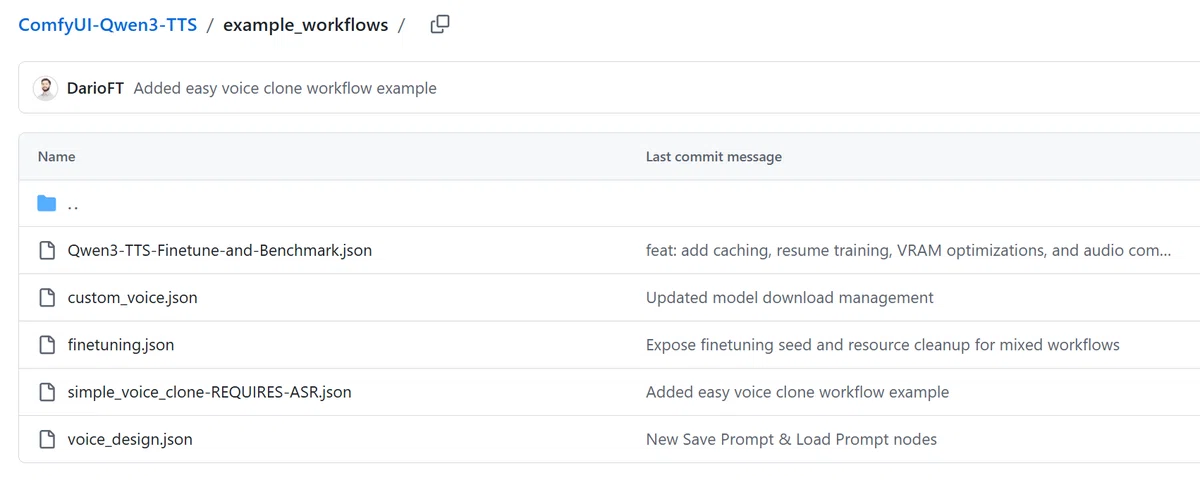
現在、ワークフローが5つありますが、今回は推論系のワークフローを試していきます。
・Qwen3-TTS-Finetune-and-Benchmark.json:運用を想定したファインチューニング用ワークフロー(学習)
・custom_voice.json:speakerを指定して、text2speech(推論)
・finetuning.json:ファインチューニング用ワークフロー(学習)
・simple_voice_clone-REQUIRES-ASR.json:参照音声をspeakerとして、text2speech(推論)
・voice_design.json:プロンプトで設計したspeakerで、text2speech(推論)
環境
OS:Windows 11
GPU:GeForce RTX 4090
CPU:i9-13900KF
memory:128G
構築手順
以下のコマンドでカスタムノードをインストールして、ComfyUIを最新化・再起動してください。
cd ComfyUI\custom_nodes
git clone https://github.com/DarioFT/ComfyUI-Qwen3-TTS.git
cd ../..
python_embeded\python.exe -m pip install -r ComfyUI\custom_nodes\ComfyUI-Qwen3-TTS\requirements.txt以下は、simple_voice_clone-REQUIRES-ASR.jsonでのみ使用。
cd ComfyUI\custom_nodes
git clone https://github.com/DarioFT/ComfyUI-Qwen3-ASR.git
cd ../..
python_embeded\python.exe -m pip install -r ComfyUI\custom_nodes\ComfyUI-Qwen3-ASR\requirements.txt
conflict起きてますが、気にせず進めてみます。
Installing collected packages: sox, aiofiles, accelerate, qwen-tts
  Attempting uninstall: aiofiles
    Found existing installation: aiofiles 24.1.0
    Uninstalling aiofiles-24.1.0:
      Successfully uninstalled aiofiles-24.1.0
  Attempting uninstall: accelerate
    Found existing installation: accelerate 1.11.0
    Uninstalling accelerate-1.11.0:
      Successfully uninstalled accelerate-1.11.0
   ━━━━━━━━━━━━━━━━━━━━╺━━━━━━━━━━━━━━━━━━━ 2/4 [accelerate]  WARNING: The scripts accelerate-config.exe, accelerate-estimate-memory.exe, accelerate-launch.exe, accelerate-merge-weights.exe and accelerate.exe are installed in 'C:\XXXXX\comfy-ui\ComfyUI_windows_portable\python_embeded\Scripts' which is not on PATH.
  Consider adding this directory to PATH or, if you prefer to suppress this warning, use --no-warn-script-location.
   ━━━━━━━━━━━━━━━━━━━━━━━━━━━━━━╺━━━━━━━━━ 3/4 [qwen-tts]  WARNING: The script qwen-tts-demo.exe is installed in 'C:\XXXXX\comfy-ui\ComfyUI_windows_portable\python_embeded\Scripts' which is not on PATH.
  Consider adding this directory to PATH or, if you prefer to suppress this warning, use --no-warn-script-location.
ERROR: pip's dependency resolver does not currently take into account all the packages that are installed. This behaviour is the source of the following dependency conflicts.
matrix-nio 0.25.2 requires aiofiles~=24.1, but you have aiofiles 23.2.1 which is incompatible.custom_voice.json:speakerを指定して、text2speech(推論)
ワークフローは以下です。
言語やspeakerを指定できます。
あと、instructの部分で感情とかも指定できます。
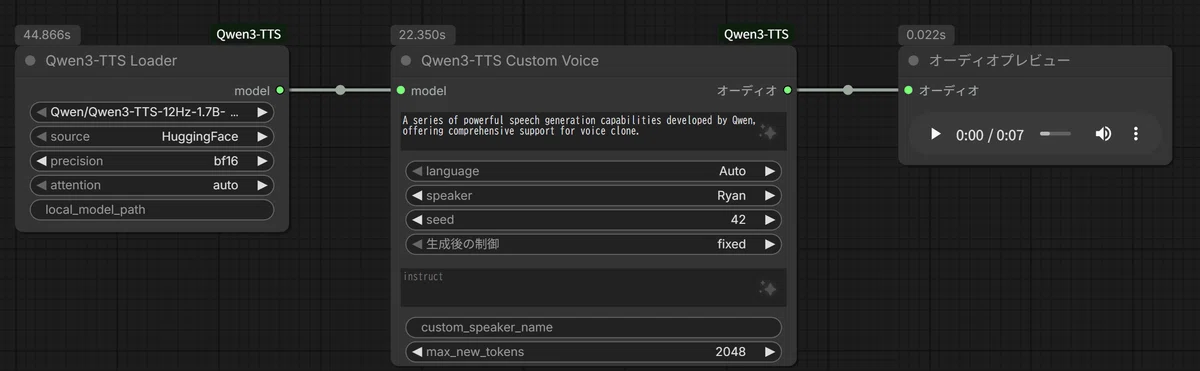
生成結果はこんな感じです。
VRAM23.5GB、生成時間はモデルのダウンロード込みで67秒でした。
simple_voice_clone-REQUIRES-ASR.json:参照音声をspeakerとして、text2speech(推論)
ワークフローは以下です。
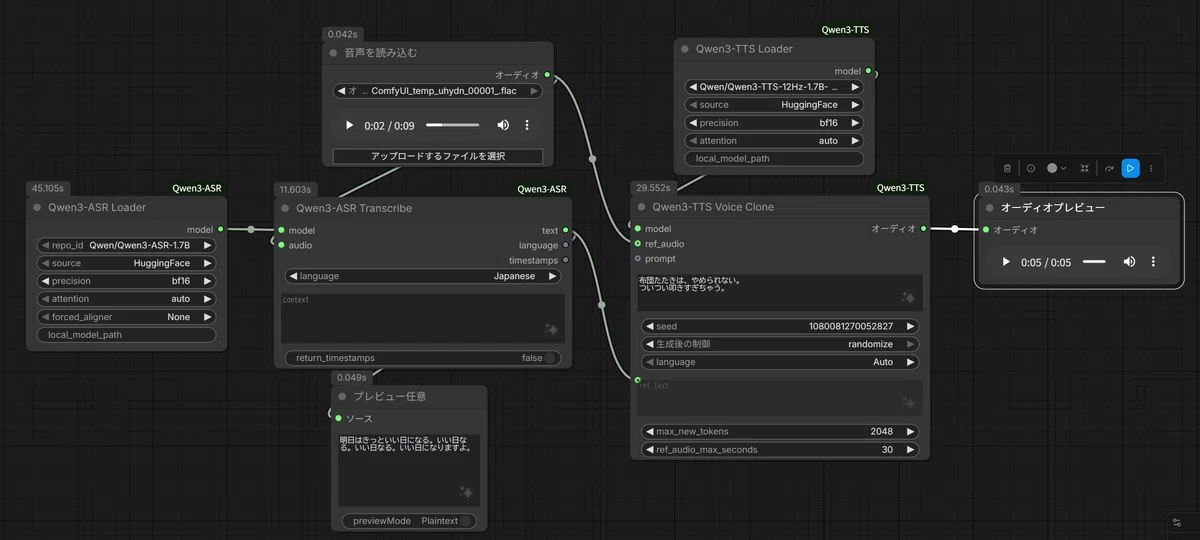
以下の音声のspeakerの声で、text2speachをします。
ちなみにこの音声はbarkというtext2speachモデルで生成しています。
(後ほど補足で紹介します。)
生成結果は以下です。
VRAMは23.5GBで、生成時間は86.4秒でした。
voice_design.json:プロンプトで設計したspeakerで、text2speech(推論)
ワークフローは以下です。
左側のワークフローで、speakerのプロンプトを設計して、そのプロンプトを右側のワークフローで使うことで、設計したspeakerでtext2speechする仕組みみたいです。
画像だと、右側のワークフローが非活性になっていますが、上部のノードで切り替えができます。
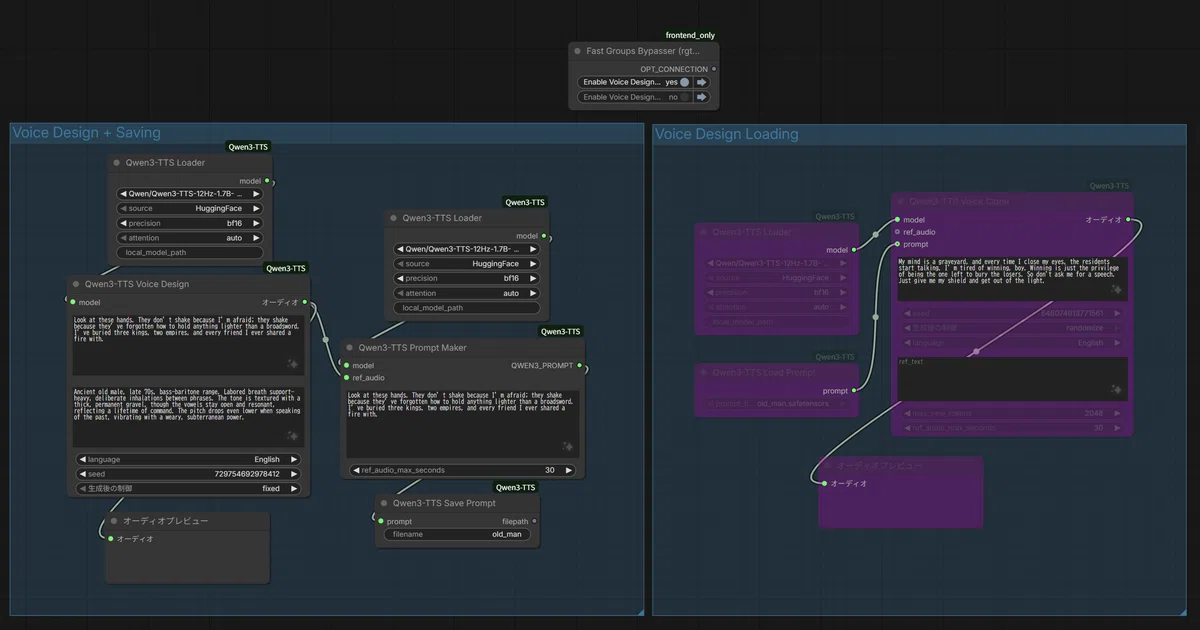
以下の設定で生成してみます。
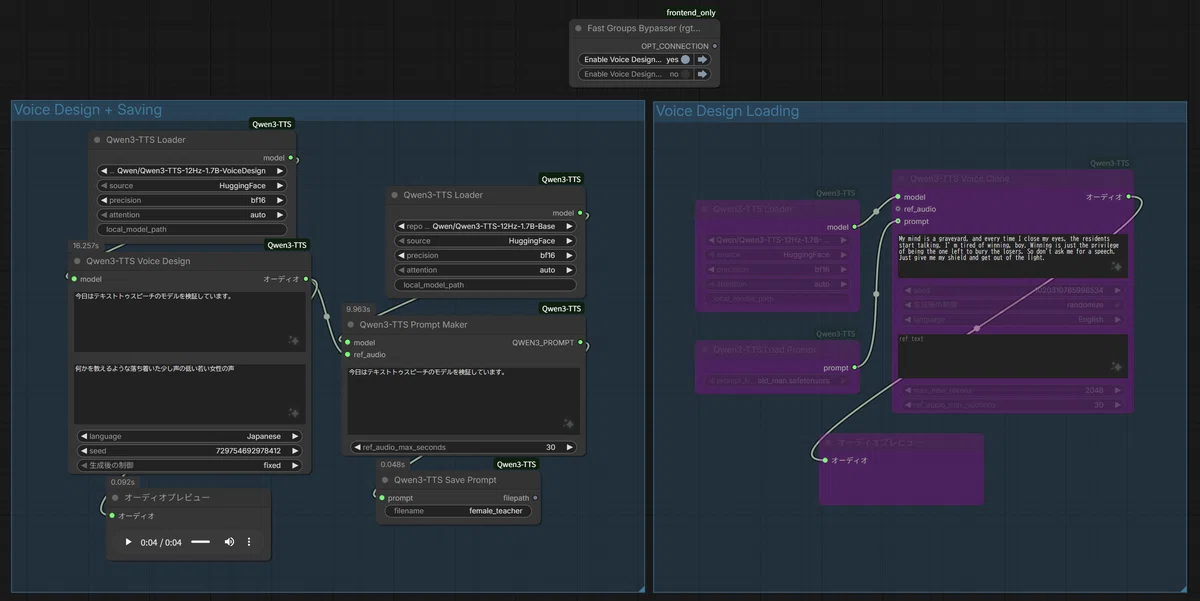
VRAMは23.5GBで、生成時間はモデルのダウンロード・読み込み時間を合わせて、188秒でした。(2回目以降は25秒ぐらいです。)
また、speaker用のプロンプトが以下に出力されています。
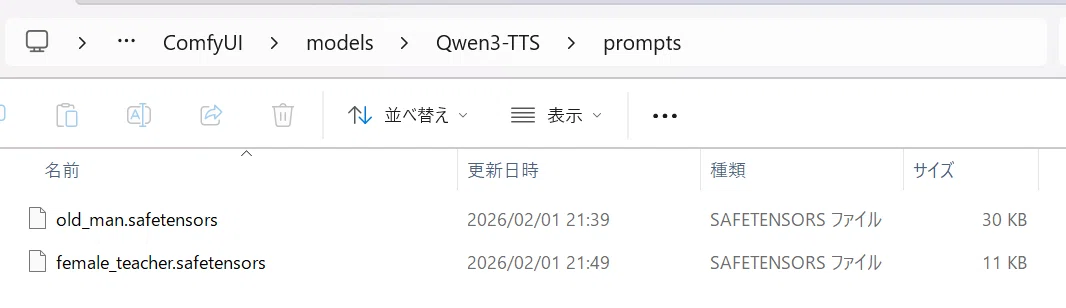
次に、このプロンプトを使ってspeakerを再現してtext2speachをします。
以下の設定で生成します。
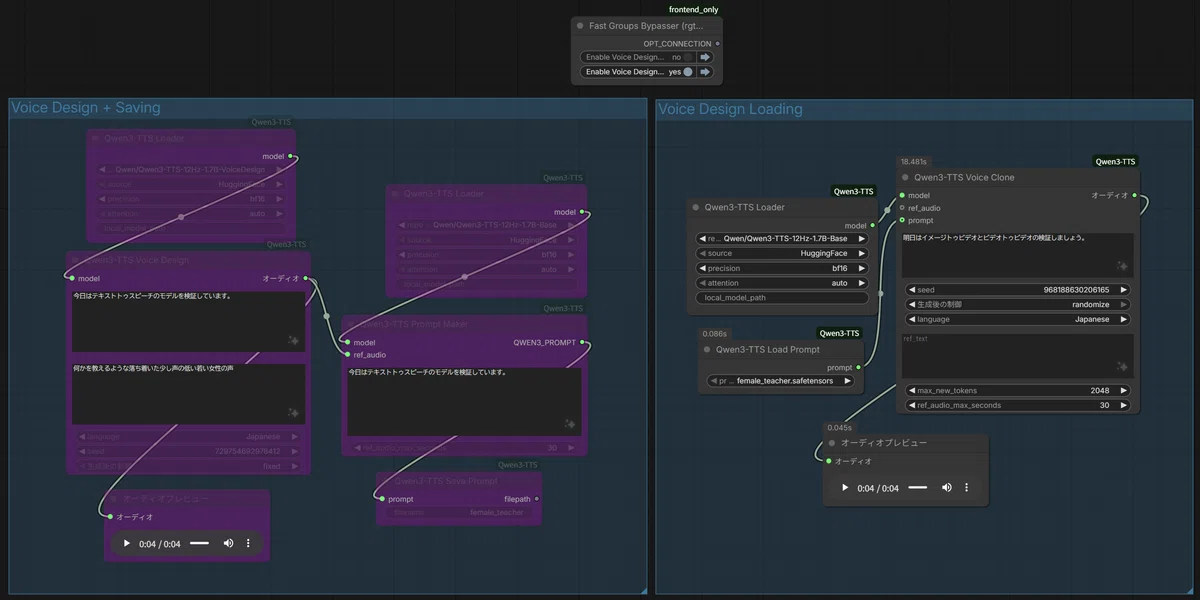
生成結果は以下です。
VRAMは23.5GBで、生成時間は18秒でした。
補足(bark)
以下のカスタムノードをインストールすることで、オープンソースのtext2speachができます。
cd ComfyUI\custom_nodes
git clone https://github.com/gitmylo/ComfyUI-audio-nodes.git
cd ../..
python_embeded\python.exe -m pip install -r ComfyUI\custom_nodes\ComfyUI-audio-nodes\requirements.txt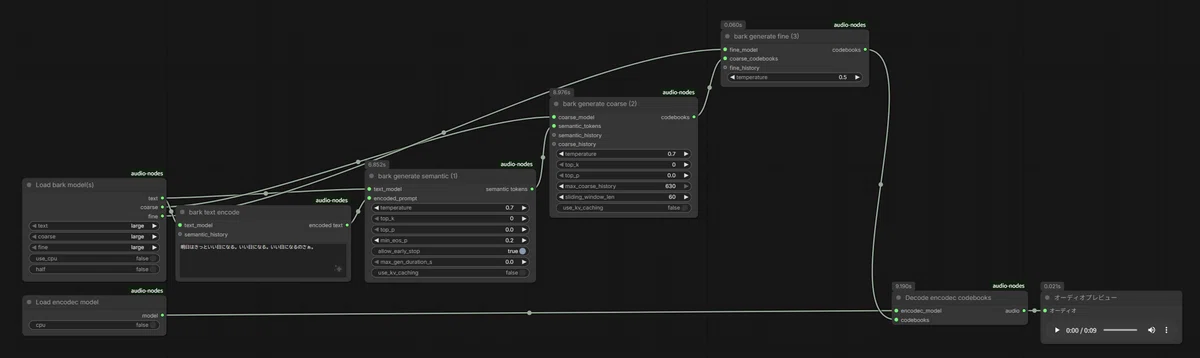
VRAMは、瞬間的に23.5GBぐらいまでいきますが、エンコードをCPUで実施すれば、12GBで済むはず。
生成時間は、モデルのダウンロード込みで80秒。
補足(.flac → .mp3)
ComfyUIの機能でダウンロードすると、「.flac」という拡張子でダウンロードされるので、flac_to_mp3.batというバッチファイルで「.mp3」に変換しています。このbatファイルにドラッグ$ドロップで、変換されます。
@echo off
setlocal EnableExtensions EnableDelayedExpansion

if "%~1"=="" (
  echo FLACをこのbatにドラッグ&ドロップしてください。
  pause
  exit /b 1
)

:loop
if "%~1"=="" goto :end

set "in=%~1"
set "dir=%~dp1"
set "name=%~n1"
set "out=%dir%%name%.mp3"

echo.
echo [INPUT]  "%in%"
echo [OUTPUT] "%out%"
ffmpeg -hide_banner -i "%in%" -codec:a libmp3lame -b:a 320k -y "%out%"

if not exist "%out%" (
  echo [ERROR] MP3ファイルが作成されませんでした。
)

shift
goto :loop

:end
echo.
echo 完了しました。
pause
感想
想像以上に性能が高いですね。
もっと使い物にならないと思ってました。
Vidu Q3とかを見てて思いますが、声はかなり慎重に扱う必要がありますね。
悪用に注意するというよりは、意図せず許可されていない声を使ってしまいそうだと感じました。
画像や動画、テキストは創作物や作成物って感じですが、声は生体情報なので、画像や動画、テキストよりも丁重に扱う必要がある気がします。
