
【Cisco ACI】VersionUp後に一部のSpine/LeafにSSHできなくなった??

はじめに
検証環境のCisco ACI環境を 4.2(5n)-->5.2(8i) へバージョンアップが完了した後、一部のSpine/LeafスイッチへSSHでログインできなくなってしまいました。
本記事ではこの事象をまとめようと思います。
あらかじめ記載しておきますが、本記事では事象について記載はしているものの詳細な原因は不明になります。そのため、類似の事象に遭遇し、詳細な調査が必要な場合は参考程度に留め、環境に従い対応していただけますと幸いです。
検証環境について
■ACIのバージョンについて
・Current ACI Version: 4.2(5n)
・Target ACI Version:5.2(8i)
■その他
・ログイン時の認証は RADIUS を使用
事象について
Current ACI Version から Target ACI Version にバージョンアップ後、302(Leaf302)のみSSHでログインできなくなりました。
RADIUSサーバから対象の302(Leaf302)に対して疎通性はありました。
APIC上でRADIUS認証を無効化しLocal認証に切替えると、APIC含め302(Leaf302)へのログインも問題なく可能になるが、再度APIC上でRADIUS認証を有効化すると302(Leaf302)へのみSSHができなくなる。
show switch、show fnvreadコマンドで見ても問題なくAPIC上で認識されておりサービス通信にも問題なし。APICからのFabricコマンドからは対象のSwitchへコマンドを打てました。
確認したこと
1.VersionやLast Reset Reasonを確認
バージョンアップに伴い事象が発生したため、302(Leaf302)のみバージョンアップに問題があったのかと思い、Fabricコマンドなどでshow versionを確認しました。
しかし、Target ACI Versionにもなっており、Last Reset Reasonについても問題ないように思います。。
■APIC上でSSHできなくなったSwitchの状態を確認
show switch
show fnvread
APIC1# show switch
 ID    Pod   Address          In-Band IPv4     In-Band IPv6               OOB IPv4         OOB IPv6                   Version             Flags  Serial Number     Name
 ----  ----  ---------------  ---------------  -------------------------  ---------------  -------------------------  ------------------  -----  ----------------  ------------------
 101   1     100.64.100.1     0.0.0.0          ::                         10.100.71.1      ::                         n9000-15.2(8i)      asiv   AAAAAAAAAAA       Spine1
 102   1     100.64.100.3     0.0.0.0          ::                         10.100.71.2      ::                         n9000-15.2(8i)      asiv   BBBBBBBBBBB       Spine2
 201   1     100.64.100.6     0.0.0.0          ::                         10.100.71 3      ::                         n9000-15.2(8i)      aliv   CCCCCCCCCCC       Leaf201
 202   1     100.64.80.96     0.0.0.0          ::                         10.100.71.4      ::                         n9000-15.2(8i)      aliv   DDDDDDDDDDD       Leaf202
 301   1     100.64.80.98     0.0.0.0          ::                         10.100.71.5      ::                         n9000-15.2(8i)      aliv   EEEEEEEEEEE       Leaf301
 302   1     100.64.100.4     0.0.0.0          ::                         10.100.71.6      ::                         n9000-15.2(8i)      aliv   FFFFFFFFFFF       Leaf302
 401   1     100.64.80.97     0.0.0.0          ::                         10.100.71.7      ::                         n9000-15.2(8i)      aliv   GGGGGGGGGGG       Leaf401
 402   1     100.64.80.64     0.0.0.0          ::                         10.100.71.8      ::                         n9000-15.2(8i)      aliv   HHHHHHHHHHH       Leaf402
 501   1     100.64.100.0     0.0.0.0          ::                         10.100.71.9      ::                         n9000-15.2(8i)      aliv   IIIIIIIIIII       Leaf501
 502   1     100.64.100.2     0.0.0.0          ::                         10.100.71.10     ::                         n9000-15.2(8i)      aliv   JJJJJJJJJJJ       Leaf502

Flags - a:Active | l/s:Leaf/Spine | v:Valid Certificate | i:In-Service

APIC1#
APIC1#
APIC1# acidiag fnvread
      ID   Pod ID                 Name    Serial Number         IP Address    Role        State   LastUpdMsgId
--------------------------------------------------------------------------------------------------------------
     101        1          Spine1           AAAAAAAAAAA    100.64.100.1/32   spine        active   0
     102        1          Spine2           BBBBBBBBBBB    100.64.100.3/32   spine        active   0
     201        1          Leaf201          CCCCCCCCCCC    100.64.100.6/32    leaf        active   0
     202        1          Leaf202          DDDDDDDDDDD    100.64.80.96/32    leaf        active   0
     301        1          Leaf301          EEEEEEEEEEE    100.64.80.98/32    leaf        active   0
     302        1          Leaf302          FFFFFFFFFFF    100.64.100.4/32    leaf        active   0
     401        1          Leaf401          GGGGGGGGGGG    100.64.80.97/32    leaf        active   0
     402        1          Leaf402          HHHHHHHHHHH    100.64.80.64/32    leaf        active   0
     501        1          Leaf501          IIIIIIIIIII    100.64.100.0/32    leaf        active   0
     502        1          Leaf502          JJJJJJJJJJJ    100.64.100.2/32    leaf        active   0

Total 10 nodes

APIC1#
■問題ないSwitch 301 (Leaf301)
Leaf301# show version
Cisco Nexus Operating System (NX-OS) Software
TAC support: http://www.cisco.com/tac
Documents: http://www.cisco.com/en/US/products/ps9372/tsd_products_support_series_home.html
Copyright (c) 2002-2014, Cisco Systems, Inc. All rights reserved.
The copyrights to certain works contained in this software are
owned by other third parties and used and distributed under
license. Certain components of this software are licensed under
the GNU General Public License (GPL) version 2.0 or the GNU
Lesser General Public License (LGPL) Version 2.1. A copy of each
such license is available at
http://www.opensource.org/licenses/gpl-2.0.php and
http://www.opensource.org/licenses/lgpl-2.1.php

Software
  BIOS:      version 05.47
  kickstart: version 15.2(8i) [build 15.2(8i)]
  system:    version 15.2(8i) [build 15.2(8i)]
  PE:        version 5.2(8i)
  BIOS compile time:       04/28/2022
  kickstart image file is: /bootflash/aci-n9000-dk9.15.2.8i.bin
  kickstart compile time:  02/29/2024 09:57:53 [02/29/2024 09:57:53]
  system image file is:    /bootflash/auto-s
  system compile time:     02/29/2024 09:57:53 [02/29/2024 09:57:53]


Hardware
  cisco N9K-C93108TC-FX ("supervisor")
   Intel(R) Xeon(R) CPU D-1526 @ 1.80GHz with 24437760 kB of memory.
  Processor Board ID EEEEEEEEEEE

  Device name: Leaf301
  bootflash:    125029376 kB

Kernel uptime is 01 day(s), 01 hour(s), 12 minute(s), 02 second(s)

Last reset at 525000 usecs after Fri Feb 28 20:47:10 2025 JST
  Reason: reset-by-installer
  System version: 14.2(5n)
  Service: Upgrade

plugin
  Core Plugin, Ethernet Plugin
Leaf301#
■問題のSwitch 302 (Leaf302)
APIC1# fabric 302 show version
----------------------------------------------------------------
 Node 302 (Leaf302)
----------------------------------------------------------------
Cisco Nexus Operating System (NX-OS) Software
TAC support: http://www.cisco.com/tac
Documents: http://www.cisco.com/en/US/products/ps9372/tsd_products_support_series_home.html
Copyright (c) 2002-2014, Cisco Systems, Inc. All rights reserved.
The copyrights to certain works contained in this software are
owned by other third parties and used and distributed under
license. Certain components of this software are licensed under
the GNU General Public License (GPL) version 2.0 or the GNU
Lesser General Public License (LGPL) Version 2.1. A copy of each
such license is available at
http://www.opensource.org/licenses/gpl-2.0.php and
http://www.opensource.org/licenses/lgpl-2.1.php

Software
  BIOS:      version 05.47
  kickstart: version 15.2(8i) [build 15.2(8i)]
  system:    version 15.2(8i) [build 15.2(8i)]
  PE:        version 5.2(8i)
  BIOS compile time:       04/28/2022
  kickstart image file is: /bootflash/aci-n9000-dk9.15.2.8i.bin
  kickstart compile time:  02/29/2024 09:57:53 [02/29/2024 09:57:53]
  system image file is:    /bootflash/auto-s
  system compile time:     02/29/2024 09:57:53 [02/29/2024 09:57:53]


Hardware
  cisco N9K-C93108TC-FX ("supervisor")
   Intel(R) Xeon(R) CPU D-1526 @ 1.80GHz with 24437760 kB of memory.
  Processor Board ID FFFFFFFFFFF

  Device name: Leaf302
  bootflash:    125029376 kB

Kernel uptime is 01 day(s), 01 hour(s), 35 minute(s), 09 second(s)

Last reset at 762000 usecs after Fri Feb 28 21:46:21 2025 JST
  Reason: reset-by-installer
  System version: 14.2(5n)
  Service: Upgrade

plugin
  Core Plugin, Ethernet Plugin

APIC1#
302 (Leaf302)に対してはSSHアクセスができないため、Fabricコマンドにて取得しました。ConsoleでもRADIUS認証が効いてしまいログインできませんでした。
2.ログイン失敗時について確認
302 (Leaf302)に対してTeraTermでSSHアクセスを試みると最終的に以下のログインに失敗した旨のメッセージが返ってきました。
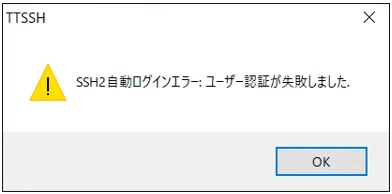
調べてみましたが、正直ユーザー名、パスワード、ポート番号など何かしらが間違っている場合などに返ってくるようで詳細がわかりませんでした。
また、APICや他SwitchからのSSHコマンドでのログインも失敗するため、正直TeraTermの問題とも思えません。
■APICからSSH確認
APIC1#
APIC1# ssh admin@10.100.71.5        <--問題ないSwitch 301 (Leaf301)に対してのSSHログイン確認

(admin@10.100.71.5) Password:       <--問題ないSwitch 301 (Leaf301)に対してパスワード入力
Last login: Sat Mar  1 22:01:23 2025 from 10.100.70.55
Cisco Nexus Operating System (NX-OS) Software
TAC support: http://www.cisco.com/tac
Copyright (c) 2002-2024, Cisco Systems, Inc. All rights reserved.
The copyrights to certain works contained in this software are
owned by other third parties and used and distributed under
license. Certain components of this software are licensed under
the GNU General Public License (GPL) version 2.0 or the GNU
Lesser General Public License (LGPL) Version 2.1. A copy of each
such license is available at
http://www.opensource.org/licenses/gpl-2.0.php and
http://www.opensource.org/licenses/lgpl-2.1.php
Leaf301#
Leaf301#
Leaf301# exit
logout
Connection to 10.100.71.5 closed.   <--301 (Leaf301)からログアウト
APIC1#
APIC1#
APIC1#
APIC1# ssh admin@10.100.71.6        <--問題のSwitch 302 (Leaf302)に対してのSSHログイン試行

(admin@10.100.71.6) Password:
(admin@10.100.71.6) Password:
(admin@10.100.71.6) Password:
APIC1#      <--3回目も失敗するためCtrl+Cで終了しました
APIC1#
ちなみにですが、バージョンアップ前と後で認証含め設定変更は一切行っておりません。RADIUSサーバ側も同様で、ログイン時にユーザー名、パスワードが間違っているといったこともありえません。(自動化してます。)
3.APIC上でRSAキーを再発行
RMA時の事象ですが、Cisco CommunityにてRSAキーを再発行する旨の記載があったため、もしかしてということで試してみました。
・Unable to SSH a leaf from Apic after replacement of the leaf switch with same Node ID from the fabric
■手順概要
※詳細は上記Cisco Communityにて記載があります。
・Step 1: Look for Leaf hostname and IP address
・Step 2 (Optional): Verify if there is any existing entry for your leaf
apic1# cat /home/admin/.ssh/known_hosts
・Step 3: Remove RSA host keys from the APIC for your leaf
apic1# ssh-keygen -R <leaf-hostname>
apic1# ssh-keygen -R <leaf-IP>
・Step 4(Optional): Verify if the entry is removed for your leaf
apic1# cat /home/admin/.ssh/known_hosts
・Step 5: Try to SSH your Leaf from APIC and it should add fresh RSA key to the list of known hosts
■APICにて確認
Step2. のコマンドでKnown_hostsファイルの中身を確認したところ、SSHアクセスできない302 (Leaf302)のRSAキーはIPアドレスでもホスト名でも登録がありました。
APIC1# cat /home/admin/.ssh/known_hosts
 <omit>
Leaf302 ssh-rsa AAAA< omit> juvZ02x
10.100.71.6 ssh-rsa AAAA <omit> juvZ02x
 <omit>
APIC1#
Known_hostsファイルに登録されていたためStep3. に従い以下コマンドで削除します。
■コマンド
ssh-keygen -R 10.100.71.6
ssh-keygen -R Leaf302
APIC1# ssh-keygen -R 10.100.71.6
# Host 10.100.71.6 found: line 13
/home/admin/.ssh/known_hosts updated.
Original contents retained as /home/admin/.ssh/known_hosts.old
APIC1#
APIC1# ssh-keygen -R Leaf302
# Host Leaf302 found: line 12
/home/admin/.ssh/known_hosts updated.
Original contents retained as /home/admin/.ssh/known_hosts.old
APIC1#
再度Known_hostsファイルを確認したところ問題なく削除されてました。
APIC1# cat /home/admin/.ssh/known_hosts
 <omit>
APIC1#
■APICから302 (Leaf302)へSSHアクセス確認
APIC1# ssh admin@Leaf302        <--問題のSwitch 302 (Leaf302)に対してのSSHログイン試行
Warning: Permanently added 'Leaf302' (RSA) to the list of known hosts.

(admin@Leaf302) Password:
(admin@Leaf302) Password:
(admin@Leaf302) Password:
APIC1#      <--3回目も失敗するためCtrl+Cで終了しました
APIC1#
APIC1# ssh admin@10.100.71.6        <--問題のSwitch 302 (Leaf302)に対してのSSHログイン試行
Warning: Permanently added '10.100.71.6' (RSA) to the list of known hosts.

(admin@10.100.71.6) Password:
(admin@10.100.71.6) Password:
(admin@10.100.71.6) Password:
APIC1#      <--3回目も失敗するためCtrl+Cで終了しました
APIC1#
しかし、結局RSAキーの問題でもなかったようでIPアドレスでもホスト名でもログインできませんでした。。。
4.302 (Leaf302)の再起動
今回の事象ではAPICにてRADIUS認証を無効化すれば 302 (Leaf302) へSSHログイン可能なことは確認できているため、一旦RADIUS認証を無効化の上 302 (Leaf302) にSSHアクセスをし、reloadコマンドで再起動をかけました。
再起動後、APIC上のFabric Discoveryにて 302 (Leaf302) がActiveとなったことを確認し、SSHアクセス可能かを確認します。
結果、RADIUS認証を有効化した状態でも 302 (Leaf302) にSSHアクセスできました。
※自PCからもAPIC上でホスト名指定でもSSHできました。
■302 (Leaf302)再起動後、APICからSSH確認
APIC1# ssh admin@10.100.71.6
Warning: Permanently added '10.100.71.6' (RSA) to the list of known hosts.

(admin@10.100.71.6) Password:
Last login: Sun Mar  2 10:19:13 2025 from 100.64.0.1
Cisco Nexus Operating System (NX-OS) Software
TAC support: http://www.cisco.com/tac
Copyright (c) 2002-2024, Cisco Systems, Inc. All rights reserved.
The copyrights to certain works contained in this software are
owned by other third parties and used and distributed under
license. Certain components of this software are licensed under
the GNU General Public License (GPL) version 2.0 or the GNU
Lesser General Public License (LGPL) Version 2.1. A copy of each
such license is available at
http://www.opensource.org/licenses/gpl-2.0.php and
http://www.opensource.org/licenses/lgpl-2.1.php
Leaf302# exit
logout
Connection to 10.100.71.6 closed.
APIC1#
結果
結果として詳細な原因は不明となりますが、対象のSwitchを再起動をすることで事象を改善できました。
ちなみに、RADIUSサーバ側で認証が機能しているかも確認はしましたが、APICなどSSHアクセスが成功している機器への認証時と、今回事象が発生した302 (Leaf302)へのSSHアクセス時で特段違いは無く、302 (Leaf302)へのSSH時もなぜかLogin Successfulとなっておりました。。
もうわからん。(´;ω;`)ウゥゥ
さいごに
この事象はメーカーTAC等へ確認を行っていません。
そのため、類似の事象が発生したとしても本記事の手順で解消するかはわかりかねます。
