
無料配布】Excelで図面作成!455・910モジュール自動作図マクロ(色分け対応版)

はじめに(これかなり使えます)
現場でよくある
「ちょっとした図面を描くだけなのにCAD起動…面倒」
「910ピッチを手で引くのダルい」
「仮設・天井割をサッと確認したい」
このマクロで全部解決します。
選択 → 実行 → 完成(10秒)
しかも今回は
色分け対応(ゾーニング可能)
455・910モジュール完全対応
範囲内自動作図
グループ化まで自動
完全に“Excel簡易CAD化”です
できること
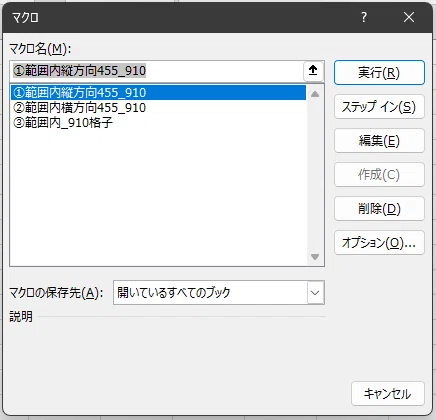
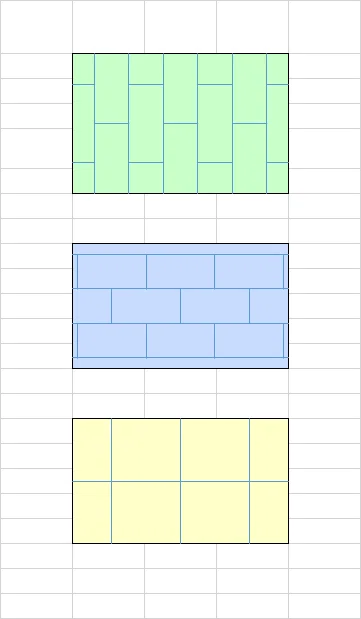
① 範囲内縦方向455_910
縦ライン(455ピッチ)
横ライン(910ピッチ)
中心配置
一番実務で使うメイン機能
② 範囲内横方向455_910
横ライン主体(455)
縦ライン補助(910)
天井割・内装割付に強い
③ 範囲内_910格子
シンプルな910グリッド
とりあえず下書き最強
+ 色分け機能
薄赤・青・緑・黄・グレー
ゾーニング・用途分けに便利
マクロの組み込み方(3分)
① VBAエディタ起動
Alt + F11
② 標準モジュール追加
挿入 → 標準モジュール
③ 下記コードを丸ごと貼り付け
Sub ①範囲内縦方向455_910()

    Dim ws As Worksheet
    Set ws = ActiveSheet

    '=========================
    ' 範囲チェック
    '=========================
    If TypeName(Selection) <> "Range" Then
        MsgBox "セル範囲を選択してください"
        Exit Sub
    End If
    Dim rng As Range
    Set rng = Selection
    Call FillRangeLightColor(rng)

    '=========================
    ' 縮尺入力(デフォルト50)
    '=========================
    Dim scaleInput As Variant
    Dim scaleVal As Double
    scaleInput = Application.InputBox("縮尺を入力してください(例:50 → 1/50)", "縮尺指定", 50, Type:=1)
    If scaleInput = False Then Exit Sub
    If IsNumeric(scaleInput) Then
        scaleVal = CDbl(scaleInput)
        If scaleVal <= 0 Then scaleVal = 50
    Else
        scaleVal = 50
    End If

    '=========================
    ' mm → pt
    '=========================
    Dim mmToPt As Double
    mmToPt = 2.83465

    Dim lineLength As Double
    Dim pitch As Double
    Dim horizPitch As Double
    Dim halfWidth As Double
    Dim offsetXBase As Double, offsetYBase As Double

    lineLength = (455 / scaleVal) * mmToPt
    pitch = (910 / scaleVal) * mmToPt
    horizPitch = (455 / scaleVal) * mmToPt
    halfWidth = (227.5 / scaleVal) * mmToPt
    offsetXBase = (455 / scaleVal) * mmToPt
    offsetYBase = (455 / scaleVal) * mmToPt

    '=========================
    ' 範囲座標
    '=========================
    Dim leftLimit As Double, rightLimit As Double
    Dim topLimit As Double, bottomLimit As Double
    Dim centerX As Double, centerY As Double

    leftLimit = rng.Left
    rightLimit = rng.Left + rng.width
    topLimit = rng.Top
    bottomLimit = rng.Top + rng.height
    centerX = rng.Left + rng.width / 2
    centerY = rng.Top + rng.height / 2

    '=========================
    ' 作図したShape名を記録用
    '=========================
    Dim shNames() As String
    Dim shCount As Long
    shCount = 0

    '=========================
    ' ① 縦線展開(中心 ±227.5, 左右455mm間隔)
    '=========================
    Dim offsetX As Double
    Dim vertXLeft As Double, vertXRight As Double
    offsetX = 0
    Do
        vertXLeft = centerX - halfWidth - offsetX
        vertXRight = centerX + halfWidth + offsetX

        ' 左側
        If vertXLeft >= leftLimit Then
            shCount = shCount + 1
            ReDim Preserve shNames(1 To shCount)
            shNames(shCount) = ws.Shapes.AddLine(vertXLeft, topLimit, vertXLeft, bottomLimit).Name
        End If
        ' 右側
        If vertXRight <= rightLimit Then
            shCount = shCount + 1
            ReDim Preserve shNames(1 To shCount)
            shNames(shCount) = ws.Shapes.AddLine(vertXRight, topLimit, vertXRight, bottomLimit).Name
        End If

        ' 終了条件
        If vertXLeft < leftLimit And vertXRight > rightLimit Then Exit Do

        offsetX = offsetX + horizPitch
    Loop

    '=========================
    ' ② 横線(中心基準)
    '=========================
    Call DrawHorizontalLines_Group(ws, centerX, centerY, lineLength, pitch, leftLimit, rightLimit, topLimit, bottomLimit, shNames, shCount)

    '=========================
    ' ③ 横線(オフセット中心基準)
    '=========================
    Call DrawHorizontalLines_Group(ws, centerX + offsetXBase, centerY - offsetYBase, lineLength, pitch, _
                                  leftLimit, rightLimit, topLimit, bottomLimit, shNames, shCount)

    '=========================
    ' グループ化
    '=========================
    If shCount > 0 Then
        ws.Shapes.Range(shNames).Group
    End If

    MsgBox "縦線・横線(中心・オフセット)を選択範囲内に一発作図し、グループ化しました"

End Sub

'-------------------------
' 横線作図共通サブルーチン(グループ化対応)
'-------------------------
Private Sub DrawHorizontalLines_Group(ws As Worksheet, centerX As Double, centerY As Double, lineLength As Double, _
                                     pitch As Double, _
                                     leftLimit As Double, rightLimit As Double, topLimit As Double, bottomLimit As Double, _
                                     ByRef shNames() As String, ByRef shCount As Long)

    Dim offsetX As Double, offsetY As Double
    Dim currentX As Double, currentY As Double
    Dim startX As Double, endX As Double
    Dim shp As Shape

    ' 右方向展開
    offsetX = 0
    Do
        currentX = centerX + offsetX
        startX = currentX - lineLength / 2
        endX = currentX + lineLength / 2
        If startX > rightLimit Then Exit Do
        If startX < leftLimit Then startX = leftLimit
        If endX > rightLimit Then endX = rightLimit

        ' 上下展開
        offsetY = 0
        Do
            currentY = centerY - offsetY
            If currentY >= topLimit Then
                shCount = shCount + 1
                ReDim Preserve shNames(1 To shCount)
                shNames(shCount) = ws.Shapes.AddLine(startX, currentY, endX, currentY).Name
            End If
            If offsetY <> 0 Then
                currentY = centerY + offsetY
                If currentY <= bottomLimit Then
                    shCount = shCount + 1
                    ReDim Preserve shNames(1 To shCount)
                    shNames(shCount) = ws.Shapes.AddLine(startX, currentY, endX, currentY).Name
                End If
            End If
            offsetY = offsetY + pitch
            If centerY - offsetY < topLimit And centerY + offsetY > bottomLimit Then Exit Do
        Loop

        offsetX = IIf(offsetX = 0, pitch, offsetX + pitch)
    Loop

    ' 左方向展開
    offsetX = pitch
    Do
        currentX = centerX - offsetX
        startX = currentX - lineLength / 2
        endX = currentX + lineLength / 2
        If endX < leftLimit Then Exit Do
        If startX < leftLimit Then startX = leftLimit
        If endX > rightLimit Then endX = rightLimit

        ' 上下展開
        offsetY = 0
        Do
            currentY = centerY - offsetY
            If currentY >= topLimit Then
                shCount = shCount + 1
                ReDim Preserve shNames(1 To shCount)
                shNames(shCount) = ws.Shapes.AddLine(startX, currentY, endX, currentY).Name
            End If
            If offsetY <> 0 Then
                currentY = centerY + offsetY
                If currentY <= bottomLimit Then
                    shCount = shCount + 1
                    ReDim Preserve shNames(1 To shCount)
                    shNames(shCount) = ws.Shapes.AddLine(startX, currentY, endX, currentY).Name
                End If
            End If
            offsetY = offsetY + pitch
            If centerY - offsetY < topLimit And centerY + offsetY > bottomLimit Then Exit Do
        Loop

        offsetX = offsetX + pitch
    Loop
End Sub


Sub ②範囲内横方向455_910()

    Dim ws As Worksheet
    Set ws = ActiveSheet

    '=========================
    ' 選択範囲チェック
    '=========================
    If TypeName(Selection) <> "Range" Then
        MsgBox "セル範囲を選択してください"
        Exit Sub
    End If
    Dim rng As Range
    Set rng = Selection
    Call FillRangeLightColor(rng)

    '=========================
    ' 縮尺入力(安全版)
    '=========================
    Dim scaleInput As Variant
    Dim scaleVal As Double  ' 予約語回避

    scaleInput = Application.InputBox("縮尺を入力してください(例:50 → 1/50)", "縮尺指定", 50, Type:=1)
    If scaleInput = False Then Exit Sub
    If IsNumeric(scaleInput) Then
        scaleVal = CDbl(scaleInput)
        If scaleVal <= 0 Then scaleVal = 50
    Else
        scaleVal = 50
    End If

    '=========================
    ' 共通パラメータ
    '=========================
    Dim mmToPt As Double
    mmToPt = 2.83465

    Dim leftLimit As Double, rightLimit As Double
    Dim topLimit As Double, bottomLimit As Double
    leftLimit = rng.Left
    rightLimit = rng.Left + rng.width
    topLimit = rng.Top
    bottomLimit = rng.Top + rng.height

    Dim centerX As Double, centerY As Double
    centerX = (leftLimit + rightLimit) / 2
    centerY = (topLimit + bottomLimit) / 2

    '=========================
    ' 作図したShape名を記録用
    '=========================
    Dim shNames() As String
    Dim shCount As Long
    shCount = 0

    '=========================
    ' 横線作図(中心±227.5mm・455mm間隔)
    '=========================
    Dim pitchH As Double, centerOffsetH As Double
    pitchH = (455 / scaleVal) * mmToPt
    centerOffsetH = (227.5 / scaleVal) * mmToPt

    Dim baseOffsetsH(1) As Double
    baseOffsetsH(0) = centerOffsetH
    baseOffsetsH(1) = -centerOffsetH

    Dim startX As Double, endX As Double, currentY As Double, i As Long
    startX = leftLimit
    endX = rightLimit

    For i = 0 To 1
        ' 上方向
        currentY = centerY + baseOffsetsH(i)
        Do While currentY <= bottomLimit
            shCount = shCount + 1
            ReDim Preserve shNames(1 To shCount)
            shNames(shCount) = ws.Shapes.AddLine(startX, currentY, endX, currentY).Name
            currentY = currentY + pitchH
        Loop
        ' 下方向
        currentY = centerY + baseOffsetsH(i) - pitchH
        Do While currentY >= topLimit
            shCount = shCount + 1
            ReDim Preserve shNames(1 To shCount)
            shNames(shCount) = ws.Shapes.AddLine(startX, currentY, endX, currentY).Name
            currentY = currentY - pitchH
        Loop
    Next i

    '=========================
    ' 縦線作図(中心基準)
    '=========================
    Call DrawVerticalLines_Group(ws, leftLimit, rightLimit, topLimit, bottomLimit, centerX, centerY, scaleVal, shNames, shCount)

    '=========================
    ' 縦線作図(基準点変更)
    ' 基準点左455mm・上455mm
    '=========================
    Dim baseXOffset As Double, baseYOffset As Double
    baseXOffset = -(455 / scaleVal) * mmToPt
    baseYOffset = -(455 / scaleVal) * mmToPt
    Call DrawVerticalLines_Group(ws, leftLimit, rightLimit, topLimit, bottomLimit, centerX + baseXOffset, centerY + baseYOffset, scaleVal, shNames, shCount)

    '=========================
    ' グループ化
    '=========================
    If shCount > 0 Then
        ws.Shapes.Range(shNames).Group
    End If

    MsgBox "横線+縦線(中心基準・基準点変更)を一発作図し、グループ化しました"

End Sub

'=========================
' 縦線描画サブルーチン(グループ化対応)
'=========================
Private Sub DrawVerticalLines_Group(ws As Worksheet, leftLimit As Double, rightLimit As Double, topLimit As Double, bottomLimit As Double, centerX As Double, centerY As Double, scaleVal As Double, ByRef shNames() As String, ByRef shCount As Long)

    Dim mmToPt As Double
    mmToPt = 2.83465

    Dim lineLength As Double, halfLength As Double, pitchV As Double
    lineLength = (455 / scaleVal) * mmToPt
    halfLength = lineLength / 2
    pitchV = (910 / scaleVal) * mmToPt

    Dim baseOffsetsV(2) As Double
    baseOffsetsV(0) = 0
    baseOffsetsV(1) = pitchV
    baseOffsetsV(2) = -pitchV

    Dim vertOffsets() As Double
    ReDim vertOffsets(0)
    vertOffsets(0) = 0

    ' 上方向
    Dim offsetY As Double
    offsetY = pitchV
    Do While centerY - offsetY - halfLength >= topLimit
        ReDim Preserve vertOffsets(UBound(vertOffsets) + 1)
        vertOffsets(UBound(vertOffsets)) = -offsetY
        offsetY = offsetY + pitchV
    Loop

    ' 下方向
    offsetY = pitchV
    Do While centerY + offsetY + halfLength <= bottomLimit
        ReDim Preserve vertOffsets(UBound(vertOffsets) + 1)
        vertOffsets(UBound(vertOffsets)) = offsetY
        offsetY = offsetY + pitchV
    Loop

    Dim offsetX As Double, currentX As Double, currentY As Double, i As Long, j As Long

    ' 中心+右展開
    offsetX = 0
    Do
        For i = 0 To 2
            currentX = centerX + baseOffsetsV(i) + offsetX
            If currentX > rightLimit Then Exit Do
            For j = LBound(vertOffsets) To UBound(vertOffsets)
                currentY = centerY + vertOffsets(j)
                shCount = shCount + 1
                ReDim Preserve shNames(1 To shCount)
                shNames(shCount) = ws.Shapes.AddLine(currentX, currentY - halfLength, currentX, currentY + halfLength).Name
            Next j
        Next i
        offsetX = offsetX + pitchV
    Loop

    ' 中心+左展開
    offsetX = pitchV
    Do
        For i = 0 To 2
            currentX = centerX + baseOffsetsV(i) - offsetX
            If currentX < leftLimit Then Exit Do
            For j = LBound(vertOffsets) To UBound(vertOffsets)
                currentY = centerY + vertOffsets(j)
                shCount = shCount + 1
                ReDim Preserve shNames(1 To shCount)
                shNames(shCount) = ws.Shapes.AddLine(currentX, currentY - halfLength, currentX, currentY + halfLength).Name
            Next j
        Next i
        offsetX = offsetX + pitchV
    Loop

End Sub

Sub ③範囲内_910格子()

    Dim ws As Worksheet
    Set ws = ActiveSheet

    '=========================
    ' セル範囲選択チェック
    '=========================
    If TypeName(Selection) <> "Range" Then
        MsgBox "セル範囲を選択してください", vbExclamation
        Exit Sub
    End If
    Dim rng As Range
    Set rng = Selection
    Call FillRangeLightColor(rng)

    '=========================
    ' 縮尺入力(デフォルト50)
    '=========================
    Dim scaleInput As Variant
    Dim scaleVal As Double
    scaleInput = Application.InputBox("縮尺を入力してください(例:50 → 1/50)", "縮尺指定", 50, Type:=1)
    If scaleInput = False Then Exit Sub
    If IsNumeric(scaleInput) Then
        scaleVal = CDbl(scaleInput)
        If scaleVal <= 0 Then scaleVal = 50
    Else
        scaleVal = 50
    End If

    '=========================
    ' mm → pt
    '=========================
    Dim mmToPt As Double
    mmToPt = 2.83465

    ' 天井材ハッチ間隔
    Dim pitch As Double
    pitch = (910 / scaleVal) * mmToPt   ' 910mm → pt換算

    ' 範囲座標
    Dim leftLimit As Double, rightLimit As Double
    Dim topLimit As Double, bottomLimit As Double
    leftLimit = rng.Left
    rightLimit = rng.Left + rng.width
    topLimit = rng.Top
    bottomLimit = rng.Top + rng.height

    ' 範囲中心
    Dim centerX As Double, centerY As Double
    centerX = (leftLimit + rightLimit) / 2
    centerY = (topLimit + bottomLimit) / 2

    '=========================
    ' 作図したShape名記録
    '=========================
    Dim shNames() As String
    Dim shCount As Long
    shCount = 0

    Dim offset As Double
    Dim xPos As Double, yPos As Double

    '=========================
    ' 横線作図(中心基準で上下展開)
    '=========================
    offset = 0
    Do
        ' 上方向
        yPos = centerY - offset
        If yPos >= topLimit Then
            shCount = shCount + 1
            ReDim Preserve shNames(1 To shCount)
            shNames(shCount) = ws.Shapes.AddLine(leftLimit, yPos, rightLimit, yPos).Name
        End If
        ' 下方向
        If offset <> 0 Then
            yPos = centerY + offset
            If yPos <= bottomLimit Then
                shCount = shCount + 1
                ReDim Preserve shNames(1 To shCount)
                shNames(shCount) = ws.Shapes.AddLine(leftLimit, yPos, rightLimit, yPos).Name
            End If
        End If
        offset = offset + pitch
        If centerY - offset < topLimit And centerY + offset > bottomLimit Then Exit Do
    Loop

    '=========================
    ' 縦線作図(中心基準で左右展開)
    '=========================
    offset = 0
    Do
        ' 左方向
        xPos = centerX - offset
        If xPos >= leftLimit Then
            shCount = shCount + 1
            ReDim Preserve shNames(1 To shCount)
            shNames(shCount) = ws.Shapes.AddLine(xPos, topLimit, xPos, bottomLimit).Name
        End If
        ' 右方向
        If offset <> 0 Then
            xPos = centerX + offset
            If xPos <= rightLimit Then
                shCount = shCount + 1
                ReDim Preserve shNames(1 To shCount)
                shNames(shCount) = ws.Shapes.AddLine(xPos, topLimit, xPos, bottomLimit).Name
            End If
        End If
        offset = offset + pitch
        If centerX - offset < leftLimit And centerX + offset > rightLimit Then Exit Do
    Loop

    '=========================
    ' 作図線をグループ化
    '=========================
    If shCount > 0 Then
        ws.Shapes.Range(shNames).Group
    End If

    MsgBox "選択範囲内に910mm間隔の天井材ハッチを作図(中心対称)し、グループ化しました"

End Sub


Sub FillRangeLightColor(rng As Range)

    Dim colorNo As Integer

    colorNo = Application.InputBox( _
        "塗りつぶし色を選択" & vbCrLf & _
        "1:薄赤  2:薄青  3:薄緑  4:薄黄  5:薄グレー", _
        "色選択", 1, Type:=1)

    If colorNo < 1 Or colorNo > 5 Then Exit Sub

    Select Case colorNo
        Case 1: rng.Interior.Color = RGB(255, 200, 200) '薄赤
        Case 2: rng.Interior.Color = RGB(200, 220, 255) '薄青
        Case 3: rng.Interior.Color = RGB(200, 255, 200) '薄緑
        Case 4: rng.Interior.Color = RGB(255, 255, 200) '薄黄
        Case 5: rng.Interior.Color = RGB(230, 230, 230) '薄グレー
    End Select

End Sub
保存すればすぐ使えます
.xlsm形式で保存、重要
マクロの実行方法
1エクセルでセルを選択
2.Alt + F8 → マクロ一覧表示 →選択 実行
使い方(実務フロー)
① セル範囲を選択
② マクロ実行
③ 色を選択(1〜5)
④ 縮尺入力(例:50)
完成(自動作図+グループ化)
実務での使い道(リアル)
これ普通に現場で使えます
天井材割付(LGS・ボード)
仮設計画(足場・区画)
墨出し補助ライン
設備配置検討
平面ラフ図
「Excelでここまでできるのか」ってなるやつ
このマクロの強み
正直ここが本質
CAD → 正確だけど重い
Excel → 軽いけど図面弱い
このマクロはその中間
=“雑図面を爆速で作るツール”
使用イメージ
手作業 → 5〜10分
マクロ → 10秒
毎日使うとかなり差が出ます
カスタマイズするとさらに強い
線色変更
線太さ変更
点線化
文字追加
記号配置
自分専用ツール化できます
注意点
図形が多いと重くなる
Excelの倍率で見え方が変わる
正確図面はCAD推奨
あくまで「検討・補助用途」が最適
免責事項
本マクロは無償提供のため、以下について責任を負いません。
データ消失・破損
業務上の損害
図面精度の不具合
環境依存による動作差
必ずバックアップを取ってからご利用ください。
まとめ
Excelで図面が“秒で作れる”
現場・検討用途ではかなり強い
無料でこのレベルはコスパ良い
今後の展開(ちょい宣伝)
このシリーズ今後
マクロ選択メニュー化
記号・文字帳連携
工程表との統合
完全「Excel CAD化」
継続してアップしていきます
