
コピペするだけ!簡単「黄金比画像トリミング」

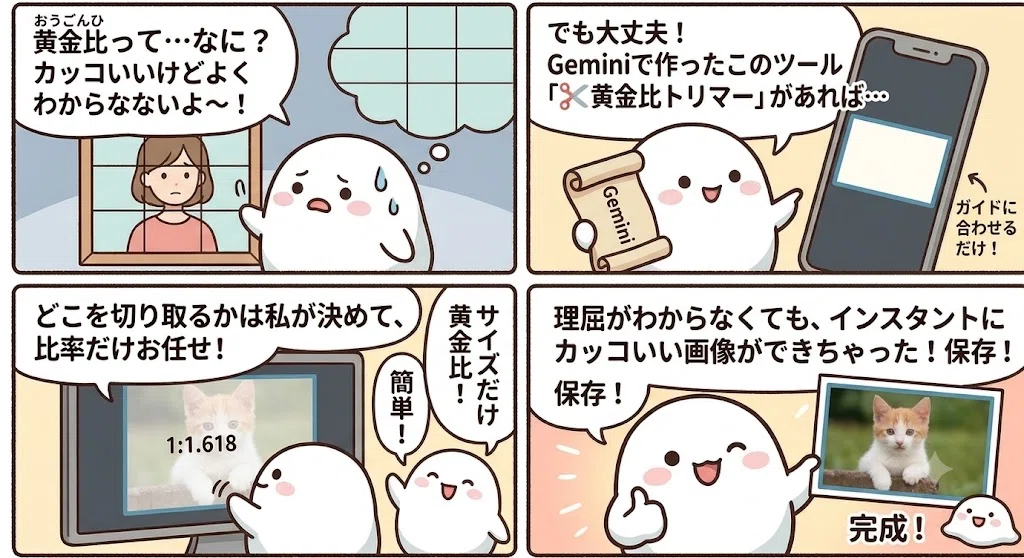
黄金比って、語れるとなんだかカッコいいんだけどよくわかってません!
画像を黄金比で切り出すガイドがあったら、なんとかなるものでしょうか?
読ませて頂いた記事をマガジンに追加させて頂いております。
伺った際にはマガジンへの登録をさせて頂いていきますが、それはやめてほしいなどありましたら、DM / コメントで一言頂けましたら幸いです😊
ブックマークに置いとくだけ!
コピペするだけの簡単小道具!
Geminiで簡単!ツール作成!
一発作成プロンプトも紹介!
構図、バランスの取り方はとりあえず一旦置いておく。
切り出した画像自体が、まずは黄金比を意識したサイズ感であるかどうか。
黄金比が何ものか理解していない私でも、黄金比的な画像が作れるのだろうか。
どこを切り取るかは自分で決める。
サイズの比率だけ、黄金比にお任せ。
Geminiさんに頑張ってもらう。
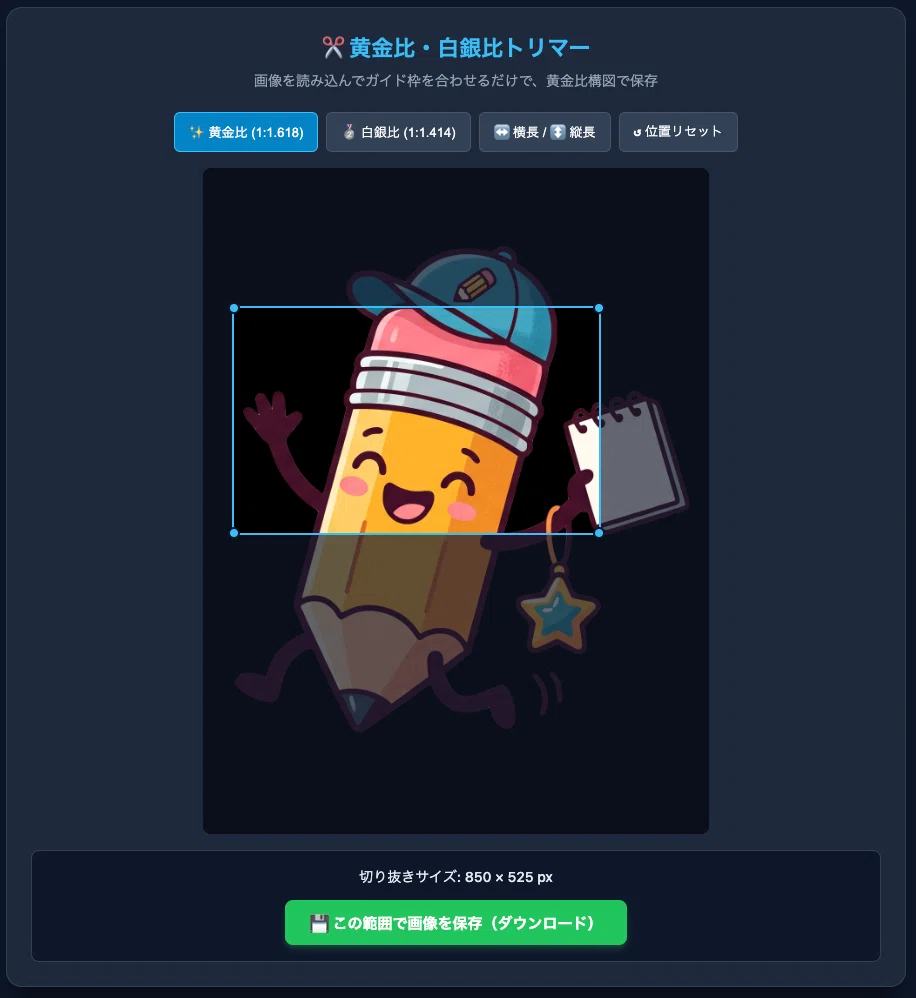
位置とサイズを合わせる!
あとは保存ボタンを押すだけ!
理屈がわからなくてもインスタント!
サイズだけは黄金比!
🛠️ 使い方(スマホ版)
1. 適当なページをブックマークする
まずは、今見ているこのページなど、何でもいいので一度ブックマークに登録します。
2. 「編集」を開く
ブックマークバーにある今作ったブックマークを長押しして、「編集」を選択します。
3. 内容を書き換える
表示された設定画面で、以下の2箇所を変更して保存します。
名前: (自分が分かりやすい名前)
URL: もともと入っているURLをすべて消して、コードを貼り付ける。
ブックマークを押すだけ簡単!
📋これを貼ります!
javascript:(function(){try{var w=window.open('about:blank','_blank');if(!w){alert('ポップアップを許可してください。');return;}var d=w.document;var playTone=function(f,dure){try{var AudioCtx=w.AudioContext||w.webkitAudioContext;if(!AudioCtx)return;var ctx=new AudioCtx();var osc=ctx.createOscillator();var gain=ctx.createGain();osc.type='sine';osc.frequency.setValueAtTime(f,ctx.currentTime);gain.gain.setValueAtTime(0.1,ctx.currentTime);gain.gain.exponentialRampToValueAtTime(0.0001,ctx.currentTime+dure);osc.connect(gain);gain.connect(ctx.destination);osc.start();osc.stop(ctx.currentTime+dure);}catch(e){}};d.open();d.close();var meta=d.createElement('meta');meta.name='viewport';meta.content='width=device-width, initial-scale=1.0';d.head.appendChild(meta);d.title='✂️ 黄金比・白銀比トリマー';var style=d.createElement('style');style.textContent='* { box-sizing: border-box; margin: 0; padding: 0; user-select: none; -webkit-user-select: none; } body { background-color: #0f172a; color: #f8fafc; font-family: system-ui, -apple-system, sans-serif; display: flex; justify-content: center; align-items: center; min-height: 100vh; padding: 20px; } .card { background-color: #1e293b; border: 1px solid #334155; border-radius: 16px; padding: 24px; width: 100%; max-width: 900px; box-shadow: 0 20px 25px -5px rgba(0,0,0,0.5); text-align: center; } .title { color: #38bdf8; font-size: 22px; font-weight: bold; margin-bottom: 6px; } .subtitle { color: #94a3b8; font-size: 14px; margin-bottom: 20px; } .drop-zone { border: 2px dashed #475569; border-radius: 12px; padding: 30px 20px; background-color: #0f172a; cursor: pointer; transition: border-color 0.2s, background-color 0.2s; margin-bottom: 20px; } .drop-zone.hover { border-color: #38bdf8; background-color: #1e293b; } .drop-zone p { color: #94a3b8; margin-bottom: 12px; font-size: 14px; } .file-btn { background-color: #38bdf8; color: #0f172a; padding: 8px 16px; border-radius: 6px; font-size: 14px; font-weight: bold; cursor: pointer; border: none; display: inline-block; } .file-btn:hover { background-color: #7dd3fc; } .btn-group { display: flex; flex-wrap: wrap; gap: 8px; justify-content: center; margin-bottom: 16px; } .btn { background-color: #334155; color: #f8fafc; border: 1px solid #475569; padding: 8px 14px; border-radius: 6px; font-size: 13px; font-weight: 500; cursor: pointer; transition: background-color 0.2s; } .btn:hover { background-color: #475569; } .btn.active { background-color: #0284c7; border-color: #38bdf8; color: #ffffff; } .preview-container { position: relative; display: inline-block; max-width: 100%; margin: 0 auto 16px auto; overflow: hidden; background: #000; border-radius: 8px; line-height: 0; } .preview-img { max-width: 100%; max-height: 60vh; display: block; object-fit: contain; pointer-events: none; } .crop-box { position: absolute; border: 2px solid #38bdf8; box-shadow: 0 0 0 9999px rgba(15, 23, 42, 0.65); cursor: move; box-sizing: border-box; } .handle { position: absolute; width: 12px; height: 12px; background-color: #38bdf8; border: 2px solid #0f172a; border-radius: 50%; } .handle-tl { top: -6px; left: -6px; cursor: nwse-resize; } .handle-tr { top: -6px; right: -6px; cursor: nesw-resize; } .handle-bl { bottom: -6px; left: -6px; cursor: nesw-resize; } .handle-br { bottom: -6px; right: -6px; cursor: nwse-resize; } .action-panel { background-color: #0f172a; border-radius: 8px; padding: 16px; border: 1px solid #334155; display: flex; flex-direction: column; align-items: center; gap: 12px; } .size-info { color: #e2e8f0; font-size: 14px; font-weight: 500; } .save-btn { background-color: #22c55e; color: #ffffff; border: none; padding: 10px 24px; border-radius: 8px; font-size: 15px; font-weight: bold; cursor: pointer; box-shadow: 0 4px 6px -1px rgba(34,197,94,0.3); transition: background-color 0.2s; } .save-btn:hover { background-color: #16a34a; }';d.head.appendChild(style);var card=d.createElement('div');card.className='card';d.body.appendChild(card);var title=d.createElement('div');title.className='title';title.textContent='✂️ 黄金比・白銀比トリマー';card.appendChild(title);var subtitle=d.createElement('div');subtitle.className='subtitle';subtitle.textContent='画像を読み込んでガイド枠を合わせるだけで、黄金比構図で保存';card.appendChild(subtitle);var dropZone=d.createElement('div');dropZone.className='drop-zone';var dropText=d.createElement('p');dropText.textContent='ここに画像をドラッグ&ドロップ';dropZone.appendChild(dropText);var fileBtn=d.createElement('label');fileBtn.className='file-btn';fileBtn.textContent='ファイルを選択';var fileInput=d.createElement('input');fileInput.type='file';fileInput.accept='image/*';fileInput.style.display='none';fileBtn.appendChild(fileInput);dropZone.appendChild(fileBtn);card.appendChild(dropZone);var workArea=d.createElement('div');workArea.style.display='none';card.appendChild(workArea);var btnGroup=d.createElement('div');btnGroup.className='btn-group';var btnGolden=d.createElement('button');btnGolden.className='btn active';btnGolden.textContent='✨ 黄金比 (1:1.618)';var btnSilver=d.createElement('button');btnSilver.className='btn';btnSilver.textContent='🥈 白銀比 (1:1.414)';var btnOrient=d.createElement('button');btnOrient.className='btn';btnOrient.textContent='↔️ 横長 / ↕️ 縦長';var btnReset=d.createElement('button');btnReset.className='btn';btnReset.textContent='↺ 位置リセット';btnGroup.appendChild(btnGolden);btnGroup.appendChild(btnSilver);btnGroup.appendChild(btnOrient);btnGroup.appendChild(btnReset);workArea.appendChild(btnGroup);var previewContainer=d.createElement('div');previewContainer.className='preview-container';var previewImg=d.createElement('img');previewImg.className='preview-img';previewContainer.appendChild(previewImg);var cropBox=d.createElement('div');cropBox.className='crop-box';var hTL=d.createElement('div');hTL.className='handle handle-tl';var hTR=d.createElement('div');hTR.className='handle handle-tr';var hBL=d.createElement('div');hBL.className='handle handle-bl';var hBR=d.createElement('div');hBR.className='handle handle-br';cropBox.appendChild(hTL);cropBox.appendChild(hTR);cropBox.appendChild(hBL);cropBox.appendChild(hBR);previewContainer.appendChild(cropBox);workArea.appendChild(previewContainer);var actionPanel=d.createElement('div');actionPanel.className='action-panel';var sizeInfo=d.createElement('div');sizeInfo.className='size-info';sizeInfo.textContent='切り抜きサイズ: - × - px';var saveBtn=d.createElement('button');saveBtn.className='save-btn';saveBtn.textContent='💾 この範囲で画像を保存(ダウンロード)';actionPanel.appendChild(sizeInfo);actionPanel.appendChild(saveBtn);workArea.appendChild(actionPanel);var loadedImg=new w.Image();var isGolden=true;var isLandscape=true;var box={x:0,y:0,w:0,h:0};var getRatio=function(){var r=isGolden?1.618:1.4142;return isLandscape?r:(1/r);};var updateUI=function(){cropBox.style.left=box.x+'px';cropBox.style.top=box.y+'px';cropBox.style.width=box.w+'px';cropBox.style.height=box.h+'px';var scale=loadedImg.naturalWidth/previewImg.clientWidth;var cropW=Math.round(box.w*scale);var cropH=Math.round(box.h*scale);sizeInfo.textContent='切り抜きサイズ: '+cropW+' × '+cropH+' px';};var initBox=function(){var pW=previewImg.clientWidth;var pH=previewImg.clientHeight;if(!pW||!pH)return;var ratio=getRatio();var maxW=pW;var maxH=pH;var wVal=maxW;var hVal=wVal/ratio;if(hVal>maxH){hVal=maxH;wVal=hVal*ratio;}box.w=wVal*0.8;box.h=hVal*0.8;box.x=(pW-box.w)/2;box.y=(pH-box.h)/2;updateUI();};var handleFile=function(file){if(!file||!file.type.match(/^image\//))return;var reader=new FileReader();reader.onload=function(e){loadedImg.onload=function(){previewImg.src=e.target.result;dropZone.style.display='none';workArea.style.display='block';w.setTimeout(initBox,50);playTone(880,0.1);};loadedImg.src=e.target.result;};reader.readAsDataURL(file);};dropZone.addEventListener('dragover',function(e){e.preventDefault();dropZone.className='drop-zone hover';});dropZone.addEventListener('dragleave',function(e){e.preventDefault();dropZone.className='drop-zone';});dropZone.addEventListener('drop',function(e){e.preventDefault();dropZone.className='drop-zone';if(e.dataTransfer.files&&e.dataTransfer.files[0]){handleFile(e.dataTransfer.files[0]);}});fileInput.addEventListener('change',function(e){if(e.target.files&&e.target.files[0]){handleFile(e.target.files[0]);}});btnGolden.addEventListener('click',function(){isGolden=true;btnGolden.className='btn active';btnSilver.className='btn';initBox();playTone(600,0.05);});btnSilver.addEventListener('click',function(){isGolden=false;btnSilver.className='btn active';btnGolden.className='btn';initBox();playTone(600,0.05);});btnOrient.addEventListener('click',function(){isLandscape=!isLandscape;initBox();playTone(600,0.05);});btnReset.addEventListener('click',function(){initBox();playTone(500,0.05);});var dragging=false;var resizing=false;var currentHandle=null;var startX=0;var startY=0;var startBox={x:0,y:0,w:0,h:0};var startDrag=function(e,type,handle){dragging=(type==='move');resizing=(type==='resize');currentHandle=handle||null;var pt=e.touches?e.touches[0]:e;startX=pt.clientX;startY=pt.clientY;startBox={x:box.x,y:box.y,w:box.w,h:box.h};e.preventDefault();};cropBox.addEventListener('mousedown',function(e){if(e.target.classList.contains('handle'))return;startDrag(e,'move');});cropBox.addEventListener('touchstart',function(e){if(e.target.classList.contains('handle'))return;startDrag(e,'move');});var attachHandleEvent=function(el,handleName){el.addEventListener('mousedown',function(e){startDrag(e,'resize',handleName);e.stopPropagation();});el.addEventListener('touchstart',function(e){startDrag(e,'resize',handleName);e.stopPropagation();});};attachHandleEvent(hTL,'tl');attachHandleEvent(hTR,'tr');attachHandleEvent(hBL,'bl');attachHandleEvent(hBR,'br');d.addEventListener('mousemove',function(e){if(!dragging&&!resizing)return;var pt=e.touches?e.touches[0]:e;var dx=pt.clientX-startX;var dy=pt.clientY-startY;var pW=previewImg.clientWidth;var pH=previewImg.clientHeight;if(dragging){var nx=startBox.x+dx;var ny=startBox.y+dy;box.x=Math.max(0,Math.min(pW-box.w,nx));box.y=Math.max(0,Math.min(pH-box.h,ny));updateUI();}else if(resizing){var ratio=getRatio();var nw=startBox.w;var nh=startBox.h;var nx=startBox.x;var ny=startBox.y;if(currentHandle==='br'){nw=Math.max(30,startBox.w+dx);nh=nw/ratio;if(nx+nw>pW){nw=pW-nx;nh=nw/ratio;}if(ny+nh>pH){nh=pH-ny;nw=nh*ratio;}}else if(currentHandle==='bl'){nw=Math.max(30,startBox.w-dx);nh=nw/ratio;if(startBox.x+(startBox.w-nw)<0){nw=startBox.x+startBox.w;nh=nw/ratio;}if(ny+nh>pH){nh=pH-ny;nw=nh*ratio;}nx=startBox.x+(startBox.w-nw);}else if(currentHandle==='tr'){nw=Math.max(30,startBox.w+dx);nh=nw/ratio;if(nx+nw>pW){nw=pW-nx;nh=nw/ratio;}if(startBox.y+(startBox.h-nh)<0){nh=startBox.y+startBox.h;nw=nh*ratio;}ny=startBox.y+(startBox.h-nh);}else if(currentHandle==='tl'){nw=Math.max(30,startBox.w-dx);nh=nw/ratio;if(startBox.x+(startBox.w-nw)<0){nw=startBox.x+startBox.w;nh=nw/ratio;}if(startBox.y+(startBox.h-nh)<0){nh=startBox.y+startBox.h;nw=nh*ratio;}nx=startBox.x+(startBox.w-nw);ny=startBox.y+(startBox.h-nh);}box.x=nx;box.y=ny;box.w=nw;box.h=nh;updateUI();}});d.addEventListener('mouseup',function(){dragging=false;resizing=false;});d.addEventListener('touchend',function(){dragging=false;resizing=false;});w.addEventListener('resize',function(){if(workArea.style.display!=='none'){initBox();}});saveBtn.addEventListener('click',function(){var scale=loadedImg.naturalWidth/previewImg.clientWidth;var sx=box.x*scale;var sy=box.y*scale;var sw=box.w*scale;var sh=box.h*scale;var canvas=d.createElement('canvas');canvas.width=sw;canvas.height=sh;var ctx=canvas.getContext('2d');ctx.drawImage(loadedImg,sx,sy,sw,sh,0,0,sw,sh);var a=d.createElement('a');a.download='crop_'+Date.now()+'.png';a.href=canvas.toDataURL('image/png');a.click();playTone(1200,0.15);});}catch(e){alert('Error: '+e.message);}})();void(0);一発作成プロンプト!
手元の画像ファイル(ドラッグ&ドロップまたはファイル選択)を読み込み、黄金比(1:1.618)や白銀比(1:1.414)のガイド枠を重ね合わせて直感的に構図を調整し、その範囲をそのまま画像ファイル(PNG)として切り抜き保存(ダウンロード)できるツール「✂️ 黄金比・白銀比トリマー」を、新規タブ(別タブ)で起動するブックマークレットを作成してください。

一時保存や外部通信、サーバーへの画像送信は完全に禁止とし、完全なES5/ES6互換構文・HTML5 File API・Canvas(HTML5 Canvas `toDataURL` / `toBlob`)を用いたブラウザ内完結の完全オフライン構成にしてください。

【新規タブ生成・エラー回避の絶対ルール(最重要)】
1. `document.write()`、`innerHTML`、`outerHTML` 等の文字列によるHTML構築は禁止し、DOM要素(`document.createElement`)のみを用いて全UIを構築してください。
2. JavaScriptコード内にテンプレートリテラル(バックティック ` )や改行を含めず、【通常のシングルクォート(')文字列結合】のみを使用し、単一の圧縮コードとして出力してください。
3. ドラッグ操作等のグローバルイベント(mousemove, mouseup, touchmove, touchend等)は、`w.addEventListener` ではなく、必ず **`d.addEventListener()` または `w.document.addEventListener()`(別タブのdocument)に対して登録** してください。

【ドラッグ操作・可動範囲の厳格な計算ルール(移動制限バグの絶対回避)】
1. **ガイド枠移動(Move)の自由度(必須)**:
   - 枠移動時は、ドラッグされた座標 `nx`, `ny` を `Math.max(0, Math.min(imageWidth - box.w, nx))` の形式でのみ制限し、**画像の端から端(0 〜 画像右下端)まで自由に滑らかに移動できるようにすること**。
   - 描画・更新用のUI関数(`updateBoxUI` 等)の中で `box.x` や `box.y` を勝手に再計算・上書きしてドラッグ動作を干渉・制限することは【絶対禁止】とします。
2. **四隅ハンドルによるリサイズ(Resize)**:
   - 四隅(TL, TR, BL, BR)のハンドル操作時、指定比率(黄金比 1:1.618 / 白銀比 1:1.414)を保ったまま拡大縮小を行うこと。
   - 枠サイズの上限は「画像全体(100%)」まで拡大可能とし、小さな上限で制限しないこと。

【ツールコンセプト & 機能仕様】
1. **ガイド枠の操作機能**:
   - [✨ 黄金比(1:1.618)][🥈 白銀比(1:1.414)][↔️ 横長 / ↕️ 縦長][↺ 位置リセット]の切替ボタンを設置。
   - 意味のない「適合度%」などの難解な評価数字は一切非表示とし、純粋な切り抜きプレビューサイズ(例: 「切り抜きサイズ: 1200 × 741 px」)のみをシンプル表示。
2. **トリミング&画像保存機能**:
   - [💾 この範囲で画像を保存(ダウンロード)]ボタンを配置。
   - HTML5 Canvas を用いてガイド枠内の領域のみをクロップし、`a.download` を介してローカルへPNGダウンロード保存させること。

【新タブ内のUIレイアウトおよび機能】
・ 全体背景: #0f172a(ダークモード)
・ 画面中央カード: #1e293b (角丸16px, 枠線 #334155, 幅最大900px)
・ タイトル: ✂️ 黄金比・白銀比トリマー (#38bdf8 / 22px / bold)
・ サブタイトル: 「画像を読み込んでガイド枠を合わせるだけで、黄金比構図で保存」(#94a3b8 / 14px)
・ 画像読み込みエリア: 点線枠のドロップゾーン + ファイル選択ボタン。
・ 【キャンバス・操作エリア】:
  ・ 画像プレビュー領域 + 比率ガイド枠(四隅ハンドルでリサイズ、枠ドラッグで移動)
  ・ ガイド制御ボタン[✨ 黄金比][🥈 白銀比][↔️ 横長 / ↕️ 縦長][↺ 位置リセット]
・ 【アクションパネル】:
  ・ 切り抜きサイズ表示(例: 「切り抜きサイズ: 1000 × 618 px」)
  ・ メインボタン[💾 この範囲で画像を保存(ダウンロード)](目立つ緑色ボタン)
・ 効果音機能: 操作時や保存時に Web Audio API でピピッと高音ビープ音を鳴らす。

【出力形式(絶対厳守)】
- 解説テキストや前置き文は一切出力しないでください。
- 全体を `javascript:(function(){ ... })();void(0);` のラッパー構造で記述し、単一コードブロックのみを出力してください。
この記事について!
今更ながら、Gemini 3分クッキング記事について注意点など|へろん
PR記事を書かせて頂いています!
何でもどうぞ!答えられるものは全て答えます!
設置はお済みですか?図らずも人の庭でnote質問箱を試す!|へろん
メンバーシップ始めました!
まだ手探りですが、ご要望/無茶振り/質問、可能な限りお受けします!
参加させて頂いています!是非チェックしてみてください😆
有料ツールに挑戦中!
OBS Studio用リモコン | OBS画面を前面に出さずに操作できます!
小道具すべて、こちらに置きました!
☕ お時間あればこちらも是非!
https://note.com/nifty_sheep7386/m/m0753a978f181
いいなと思ったら応援しよう!
 いつも応援ありがとうございます!
快適な制作を進めるためのおやつ活動費に使わせて頂きます!
いつも応援ありがとうございます!
快適な制作を進めるためのおやつ活動費に使わせて頂きます!