
GPT Index のインデックスの種類

「GPT Index」のインデックスの種類をまとめました。
前回
1. GPT Index のインデックスの種類
1-1. GPT Index のインデックスの種類
「GPT Index」のインデックスの種類は、次のとおりです。
・ベクトルストアインデックス : GPTSimpleVectorIndex、GPTFaissIndex、GPTWeaviateIndex
・リストインデックス : GPTListIndex
・ツリーインデックス : GPTTreeIndex
・キーワードテーブルインデックス : GPTKeywordTableIndex
1-2. クエリパラメータ
インデックス共通のクエリパラメータは、次のとおりです。
◎ クエリパラメータ
・mode : モード
・response_mode : レスポンスモード
・required_keywords : ノードに存在する必要があるキーワードリスト (GPTTreeIndex以外)・exclude_keywords : ノードに存在しない必要があるキーワードリスト (GPTTreeIndex以外)
・llm_predictor : LLMプロバイダ
・prompt_helper : プロンプトヘルパー
・text_qa_template : QAプロンプト
・refine_template : Refineプロンプト
・include_summary : 応答にインデックスの要約テキストを使用するかどうか
レスポンスモードの設定項目は、次の3つです。
・default : ノードごとに別々のLLM呼び出し。精度向上
・compact : プロンプトの最大サイズに収まるだけ多くのノードをまとめてLLM呼び出し。コスト削減
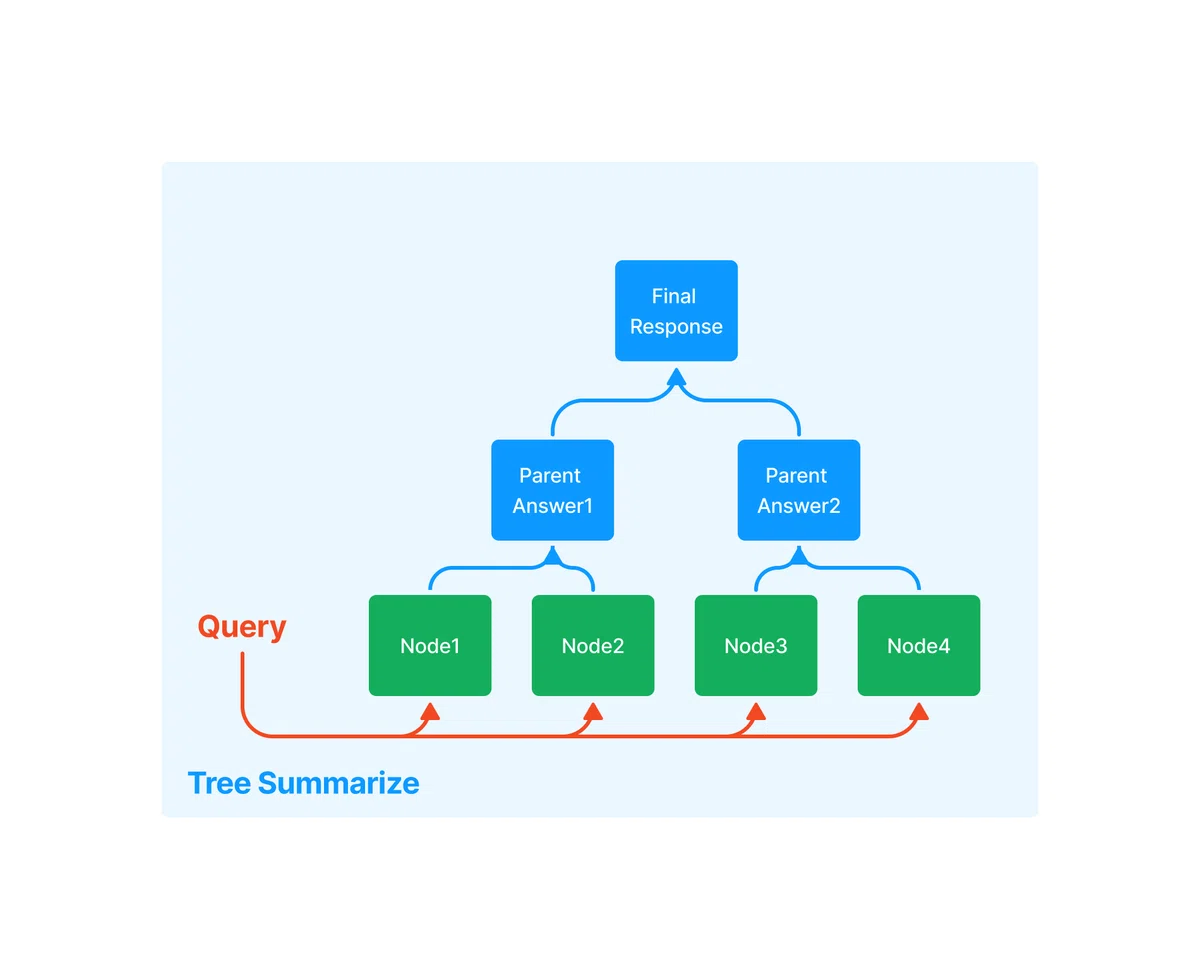
・tree_summarize : 再帰的にツリーを構築し、ルートノードを応答として返す。要約向け (GPTTreeIndex以外)
2. ベクトルストアインデックス
2-1. ベクトルストアインデックス
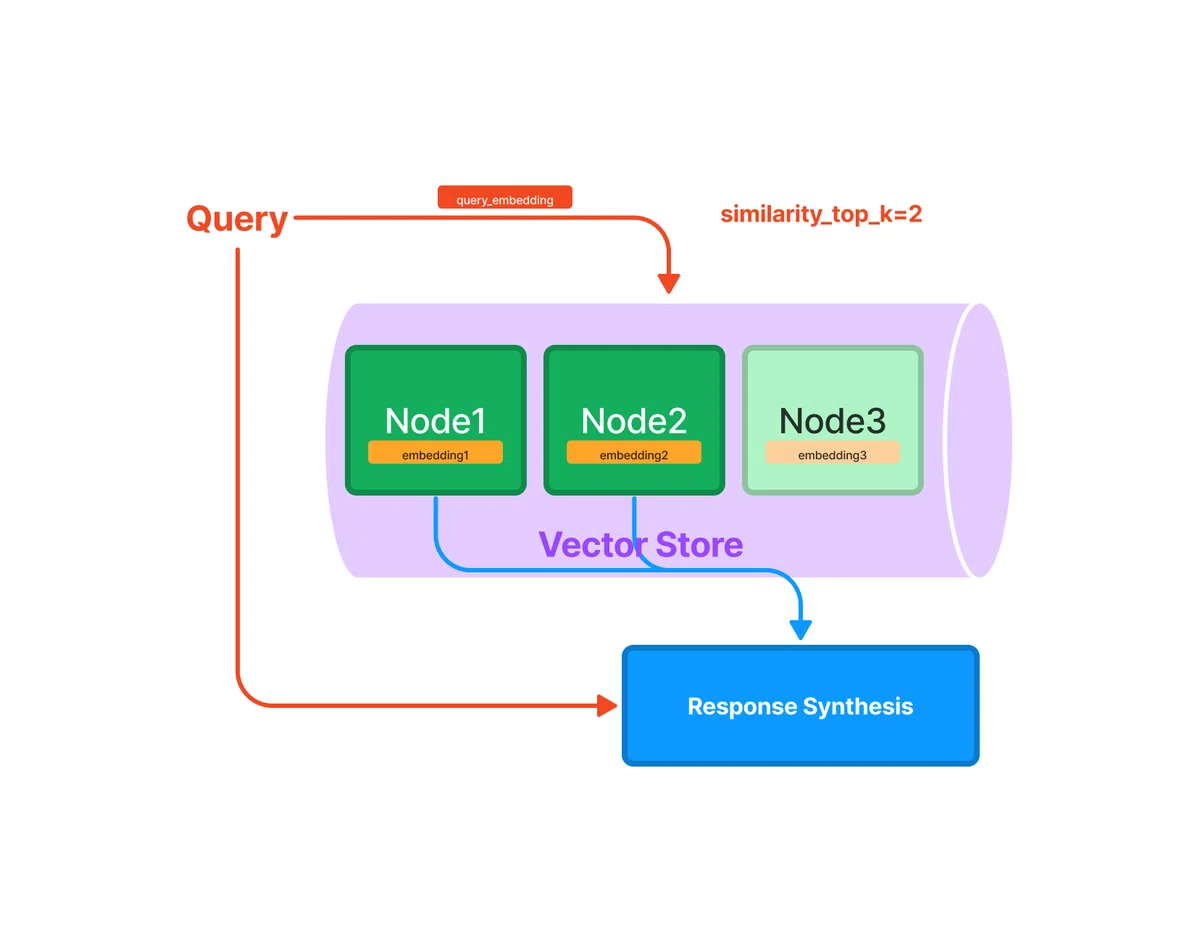
「ベクトルストアインデックス」は、各ノードと対応する埋め込みをベクトルストアに格納するインデックスです。埋め込みのコサイン類似度で、利用するノードを選択します。辞書 と Pinecone と Weaviate の3種類のベクトルストアがあります。
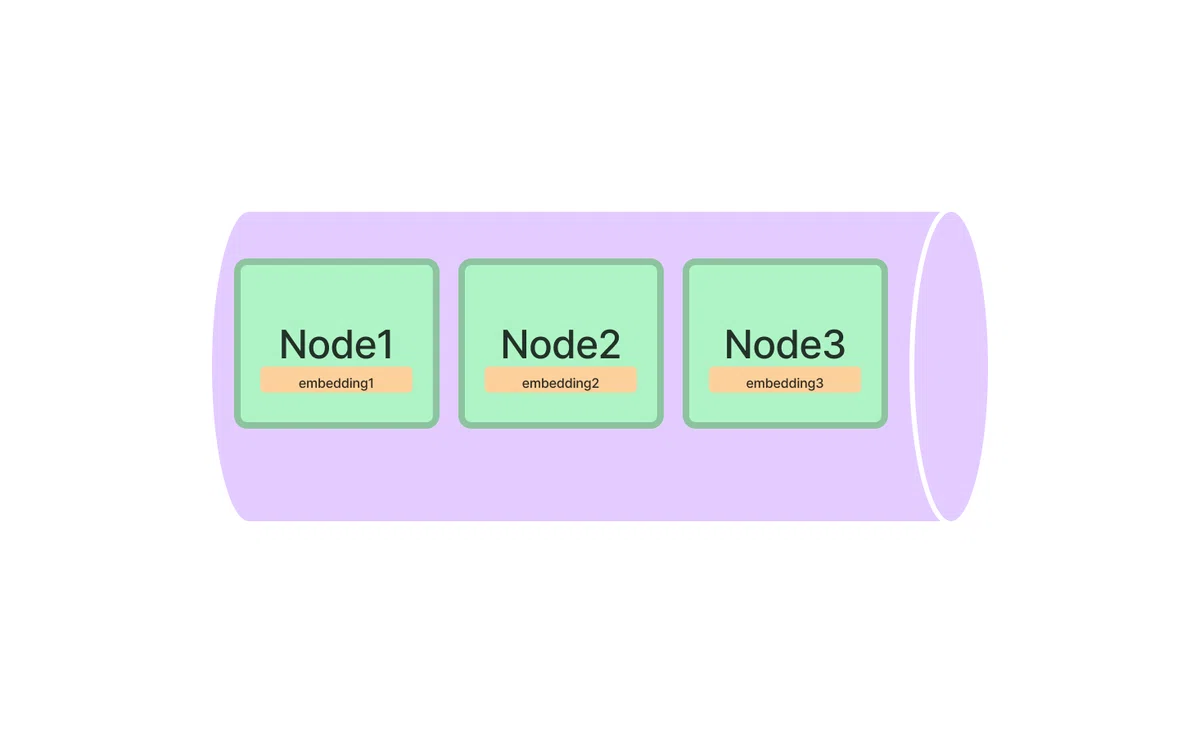
2-2. 埋め込みの類似性上位k個のノードの応答を合成
埋め込みの類似性上位k個のノードの応答を合成します。
2-3. クエリパラメータ
◎ GPTSimpleVectorIndexのクエリパラメータ
・embed_model : 埋め込みモデル
・similarity_top_k : 上位k個
◎ GPTFaissIndexのクエリパラメータ
・faiss_index : Faiss Indexオブジェクト
・embed_model : 埋め込みモデル
・similarity_top_k : 上位k個
3. リストインデックス
3-1. リストインデックス
「リストインデックス」は、ノードを順次チェーンとして格納するインデックスです。default と embeddings の2つのモードがあります。
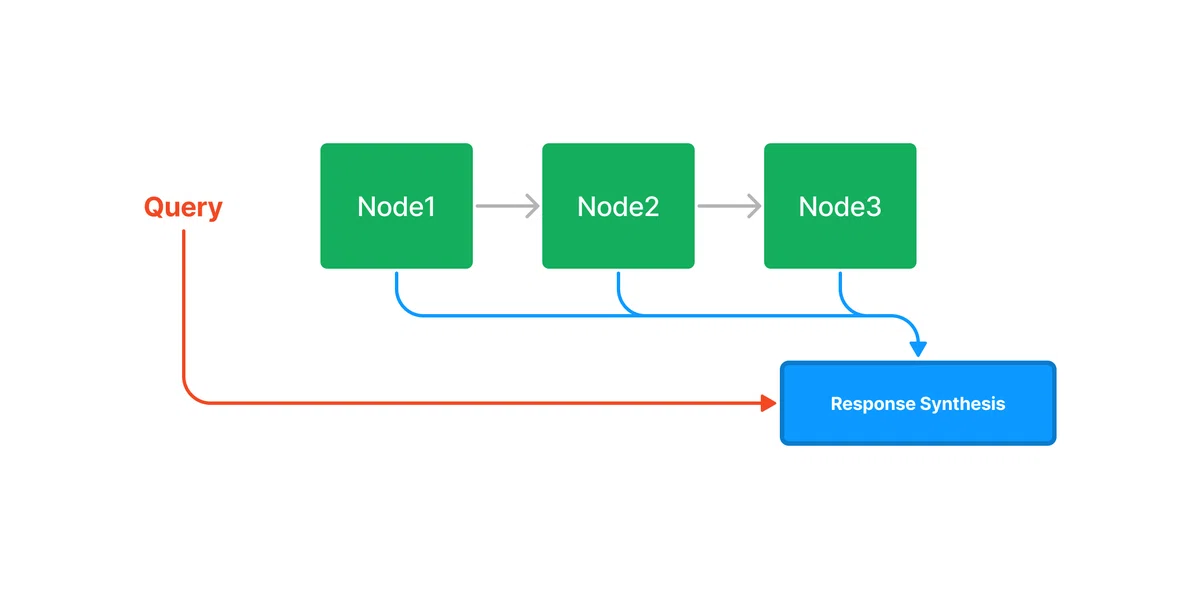
・default : すべてのノードの応答を合成
・embeddings : 埋め込みの類似性上位k個のノードの応答を合成
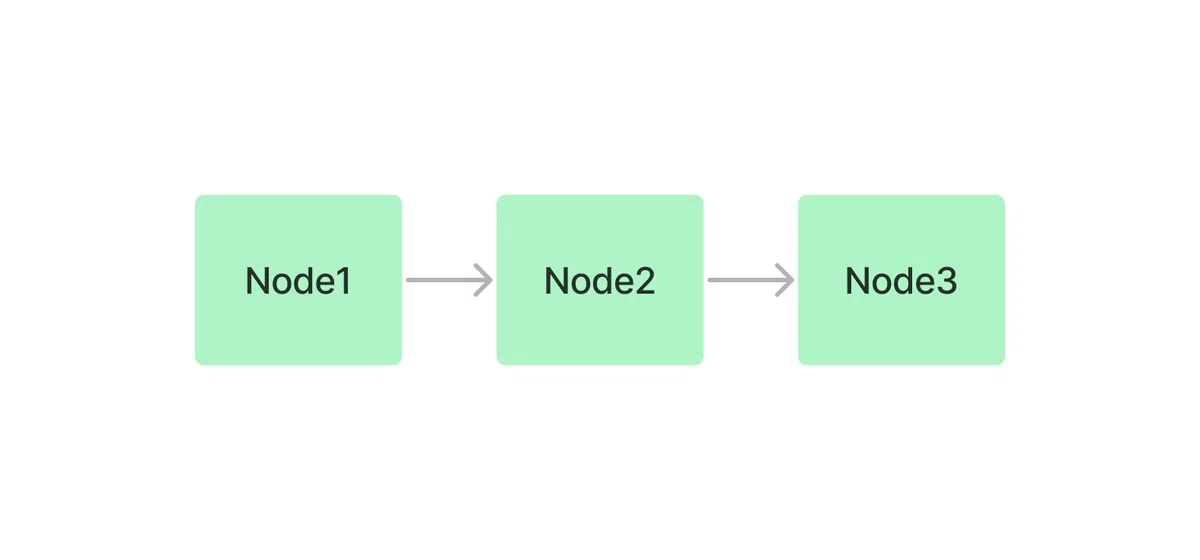
3-2. リスト内の全ノードの応答を合成
クエリパラメータなし時は、リスト内の全ノードの応答を合成します。
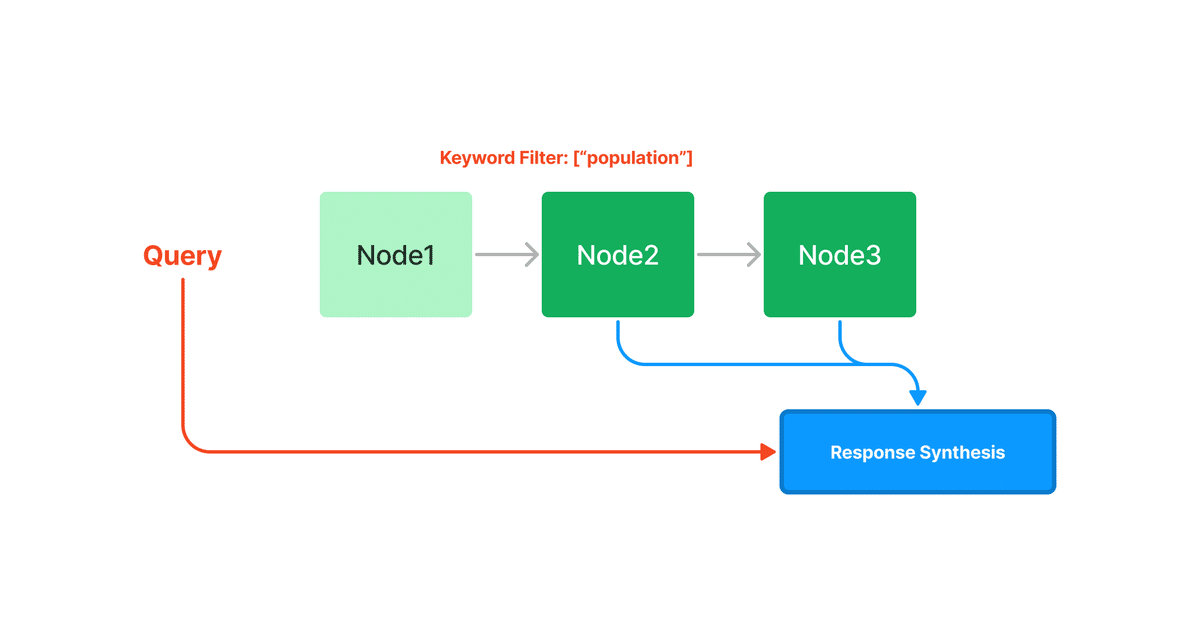
3-3. 条件に合致したノードの応答を合成
mode="embeddings"の時は埋め込みの類似性上位k個、フィルタリング時はフィルタリングで残ったノードの応答を合成します。
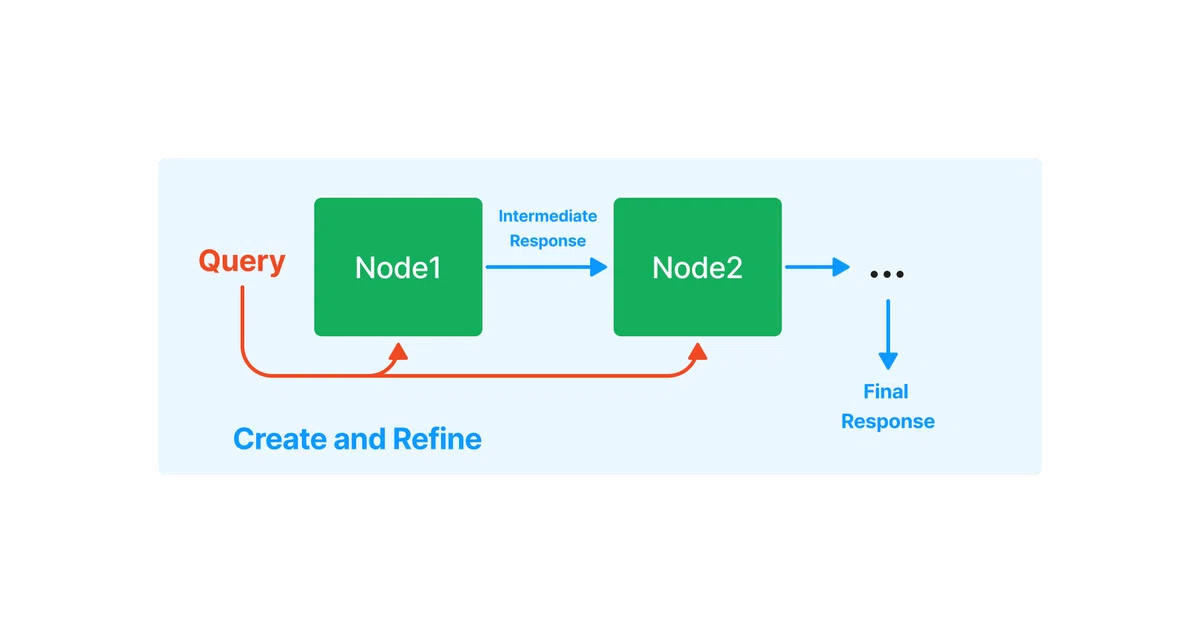
3-4. 応答の生成とリファイン
応答の生成とリファインは、制度の高い応答を生成する反復的な手法です。 まず、最初のノードのコンテキストとクエリを「QAプロンプト」に渡して、最初の応答を生成します。 次に、この応答と2 番目のノードのコンテキストとクエリを「Refineプロンプト」に渡し、リファインされた応答を生成します。
デフォルトのQAプロンプトとRefineプロンプトは、次のとおりです。
・QAプロンプト
DEFAULT_TEXT_QA_PROMPT_TMPL = (
    "Context information is below. \n"
    "---------------------\n"
    "{context_str}"
    "\n---------------------\n"
    "Given the context information and not prior knowledge, "
    "answer the question: {query_str}\n"
・Refineプロンプト
DEFAULT_REFINE_PROMPT_TMPL = (
    "The original question is as follows: {query_str}\n"
    "We have provided an existing answer: {existing_answer}\n"
    "We have the opportunity to refine the existing answer"
    "(only if needed) with some more context below.\n"
    "------------\n"
    "{context_msg}\n"
    "------------\n"
    "Given the new context, refine the original answer to better "
    "answer the question. "
    "If the context isn't useful, return the original answer."
4. ツリーインデックス
4-1. ツリーインデックス
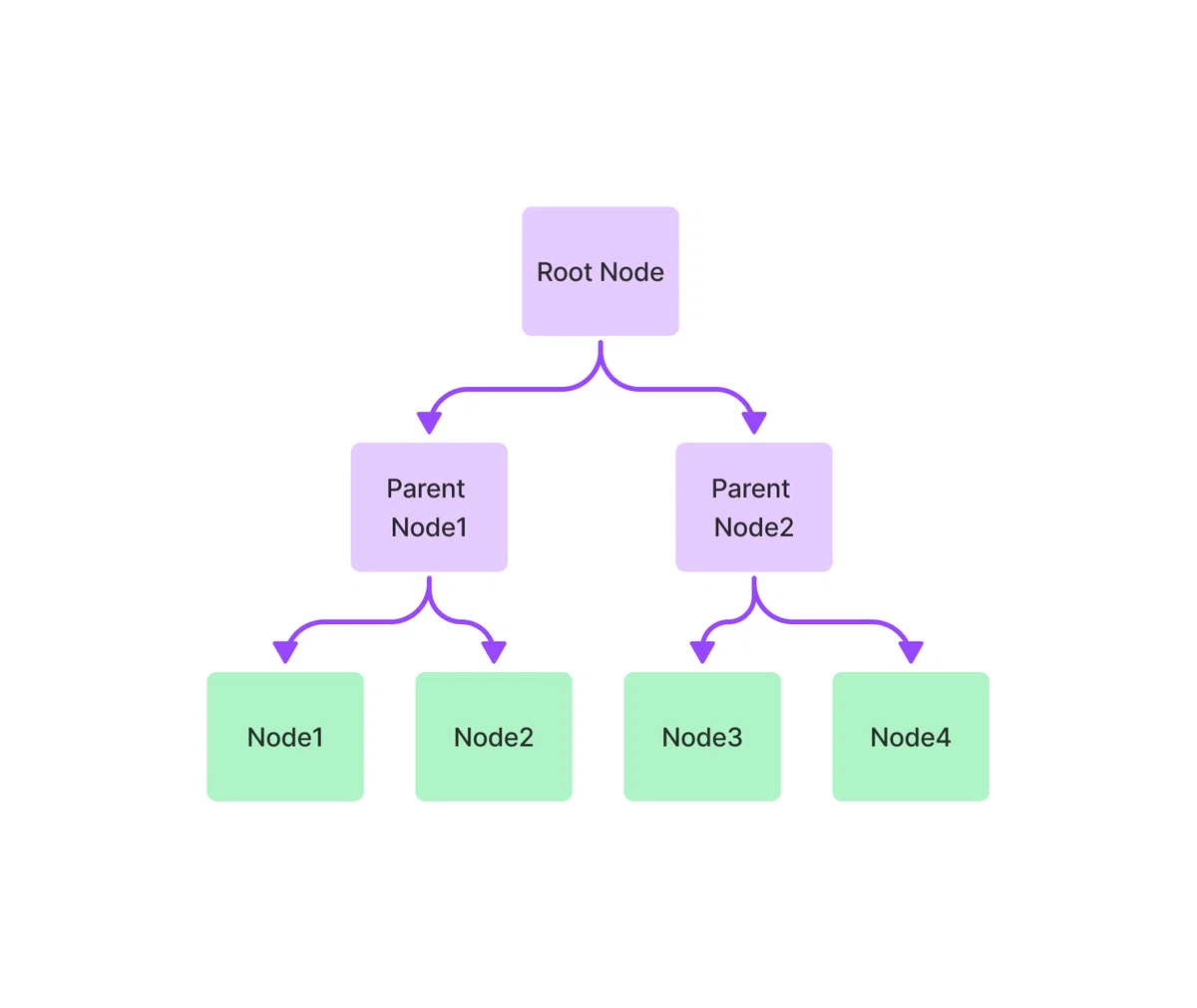
「ツリーインデックス」は、一連のノード (ツリーのリーフノード) で階層ツリーを構築するインデックスです。ツリーのトラバースで、利用するノードを選択します。default と embeddings と retrieve の3つのモードがあります。
・default : クエリに最もよく回答するリーフノードを検索
・embeddings : 埋め込みの類似性でのトラバース
・retrive : ルートノードから回答を直接取得
・summarize : 要約
4-2. ツリーをトラバースして取得したノードの応答を合成
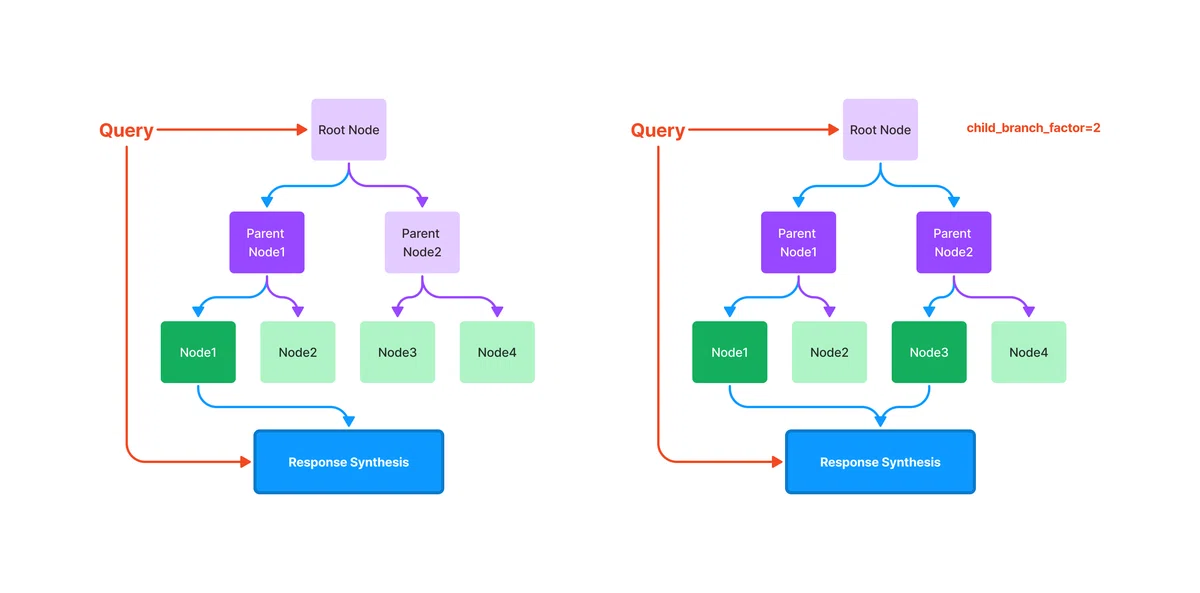
「ツリーインデックス」のクエリは、ルートノードからリーフノードまでトラバースします。child_branch_factor=1 (デフォルト) では、クエリは親ノードから1つの子ノードを選択します。child_branch_factor=2 では、クエリは親ごとに2つの子ノードを選択します。
4-3. ツリーの要約
ツリーの要約では、一連の候補ノードに対してツリーインデックスを構築し、クエリでシードされた要約プロンプトを使用します。ツリーはボトムアップ方式で構築され、最終的にルート ノードが応答を返します。
4-4. クエリパラメータ
◎ defaultのクエリパラメータ
・query_template : ツリー選択クエリプロンプト (単一)
・query_template_multiple : ツリー選択クエリプロンプト (複数)
・child_branch_factor : 各レベルで考慮する子ノードの数。
◎ embeddingsのクエリパラメータ
・query_template : ツリー選択クエリプロンプト (単一)
・query_template_multiple : ツリー選択クエリプロンプト (複数)
・child_branch_factor : 各レベルで考慮する子ノードの数。
・embed_model : 埋め込みモデル
デフォルトのツリー選択プロンプトと要約プロンプトは、次のとおりです。
◎ ツリー選択クエリプロンプト (単一)
DEFAULT_QUERY_PROMPT_TMPL = (
    "Some choices are given below. It is provided in a numbered list "
    "(1 to {num_chunks}),"
    "where each item in the list corresponds to a summary.\n"
    "---------------------\n"
    "{context_list}"
    "\n---------------------\n"
    "Using only the choices above and not prior knowledge, return "
    "the choice that is most relevant to the question: '{query_str}'\n"
    "Provide choice in the following format: 'ANSWER: <number>' and explain why "
    "this summary was selected in relation to the question.\n"
)
◎ ツリー選択クエリプロンプト (複数)
DEFAULT_QUERY_PROMPT_MULTIPLE_TMPL = (
    "Some choices are given below. It is provided in a numbered "
    "list (1 to {num_chunks}), "
    "where each item in the list corresponds to a summary.\n"
    "---------------------\n"
    "{context_list}"
    "\n---------------------\n"
    "Using only the choices above and not prior knowledge, return the top choices "
    "(no more than {branching_factor}, ranked by most relevant to least) that "
    "are most relevant to the question: '{query_str}'\n"
    "Provide choices in the following format: 'ANSWER: <numbers>' and explain why "
    "these summaries were selected in relation to the question.\n"
)
◎ 要約プロンプト
DEFAULT_SUMMARY_PROMPT_TMPL = (
    "Write a summary of the following. Try to use only the "
    "information provided. "
    "Try to include as many key details as possible.\n"
    "\n"
    "\n"
    "{context_str}\n"
    "\n"
    "\n"
    'SUMMARY:"""\n'
)
5. キーワードテーブルインデックス
5-1. キーワードテーブルインデックス
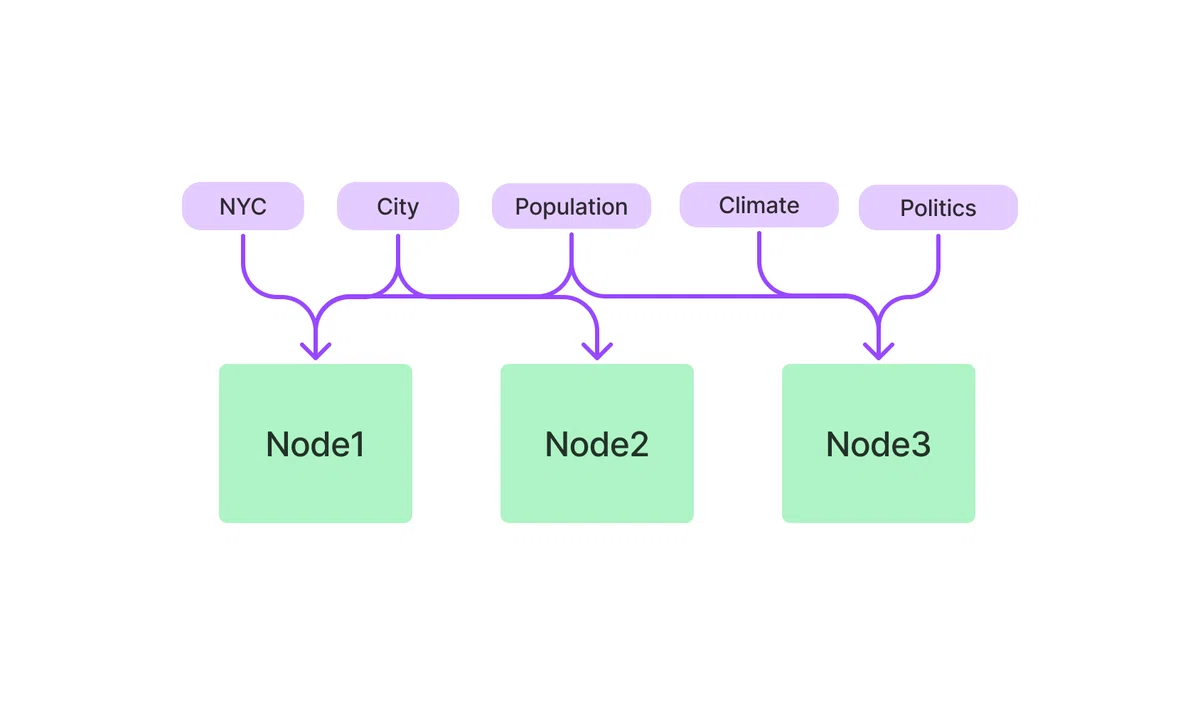
「キーワードテーブルインデックス」は、各ノードからキーワードを抽出し、各キーワードから対応するノードへのリンクを構築するインデックスです。キーワードで、利用するノードを選択します。default と rake と simple の3つのモードがあります。
・default : GPTでキーワード抽出
・rake : RAKEでキーワード抽出
・simple : 正規表現でキーワード抽出
5-2. キーワードで取得したノードの応答を合成
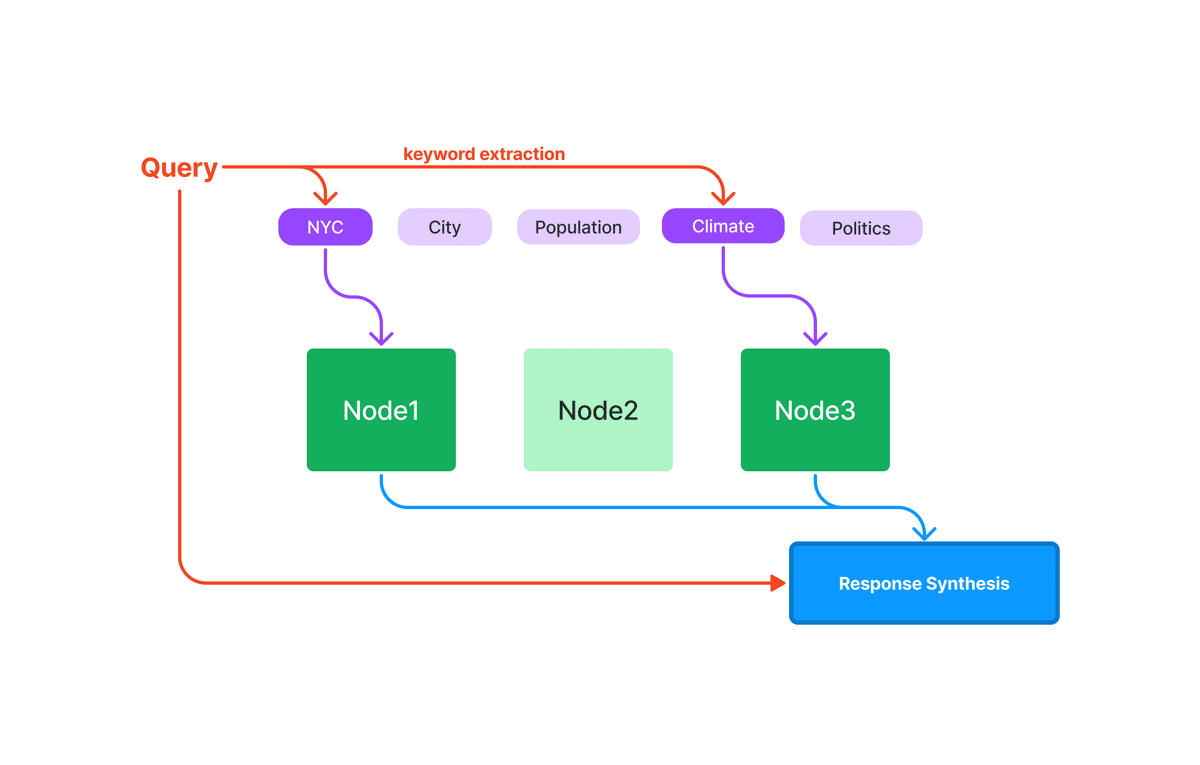
クエリ時に、クエリから関連するキーワードを抽出し、それらを事前に抽出されたノードキーワードと照合して、対応するノードを取得します。
6. インデックスの階層構造の構築
6-1. インデックスの階層構造の構築
「GPT Index」は、他のインデックス上にインデックスを構築できます。これにより、ドキュメントツリー全体をより効果的にインデックス化できます。
インデックスの階層構造の構築手順は、次のとおりです。
(1) doc1、doc2、doc3 の3つのドキュメントの準備。
doc1 = SimpleDirectoryReader('data1').load_data()
doc2 = SimpleDirectoryReader('data2').load_data()
doc3 = SimpleDirectoryReader('data3').load_data()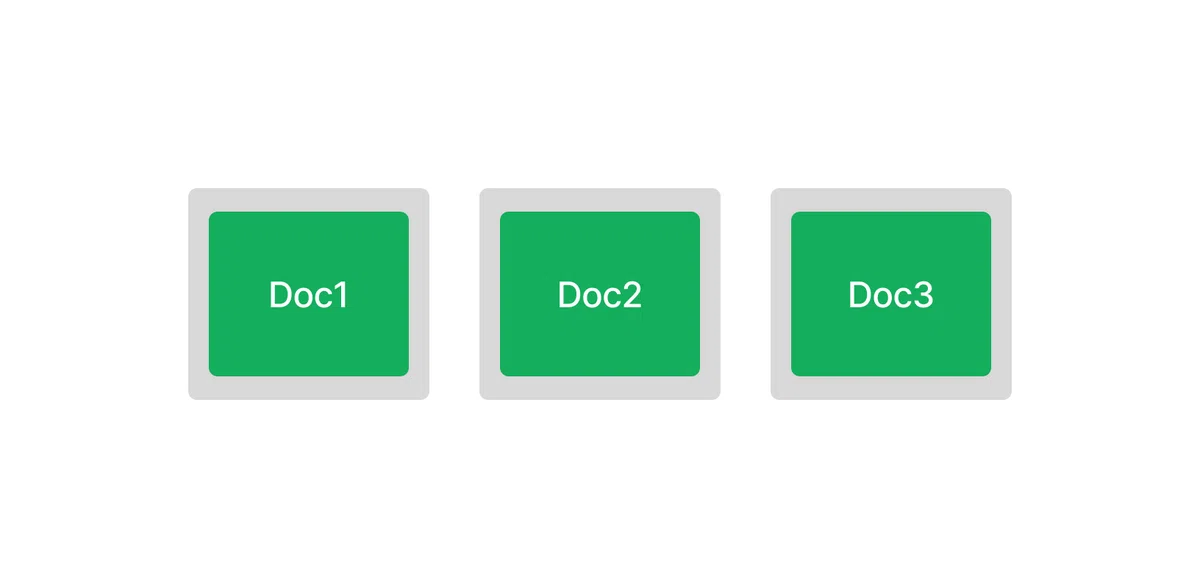
(2) 各ドキュメントのツリーインデックスの準備。
index1 = GPTTreeIndex(doc1)
index2 = GPTTreeIndex(doc2)
index3 = GPTTreeIndex(doc3)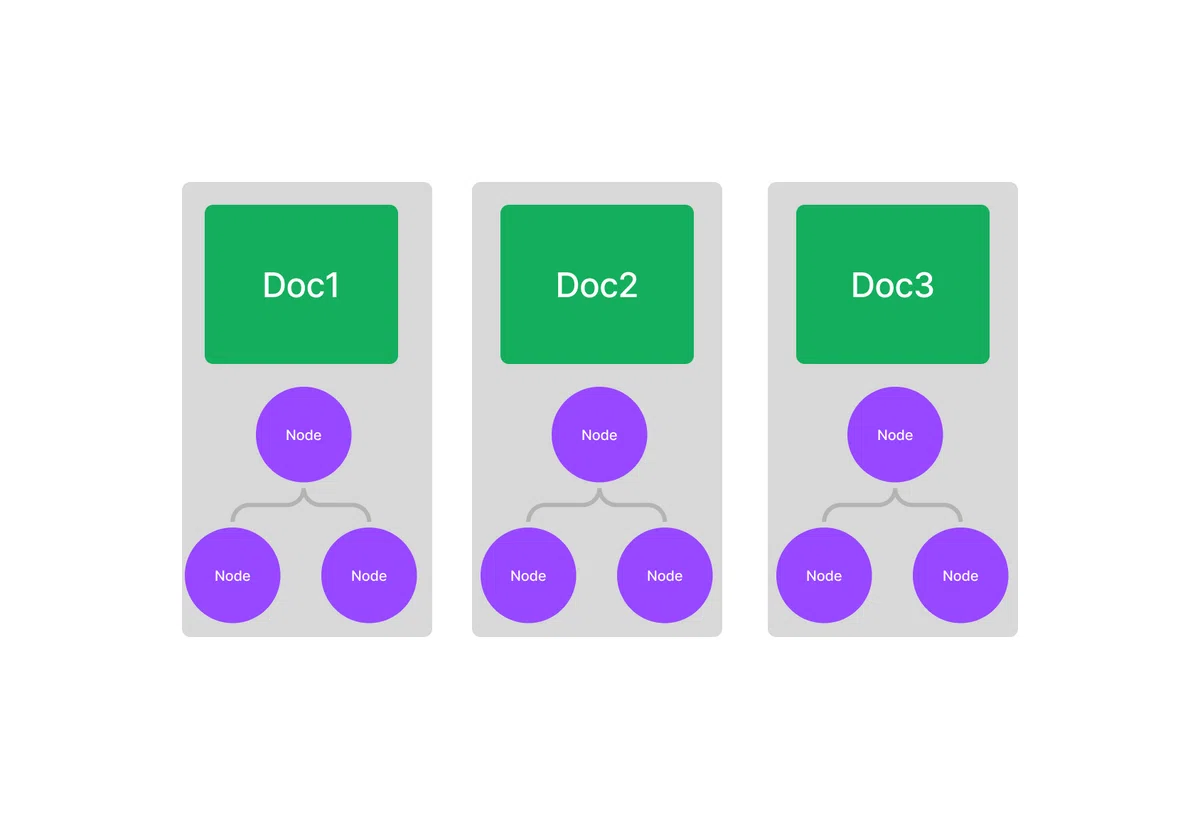
(3) 各ツリーインデックスの要約テキストの設定。
サブインデックスに要約テキストを指定することで、クエリ時の絞り込みが可能になります。
index1.set_text("<summary1>")
index2.set_text("<summary2>")
index3.set_text("<summary3>")
要約テキストは「GPT Index」で生成することもできます。要約生成は、ベクトルストアインデックスとリストインデックスでは response_mode="tree_summarize"、ツリーインデックスでは mode="summarize" を指定します。
index1.set_text(
    index1.query(
        "What is a summary of this document?",
        mode="summarize"
    )
)
(4) 3つのツリー インデックスでリスト インデックスを作成。
list_index = GPTListIndex([index1, index2, index3])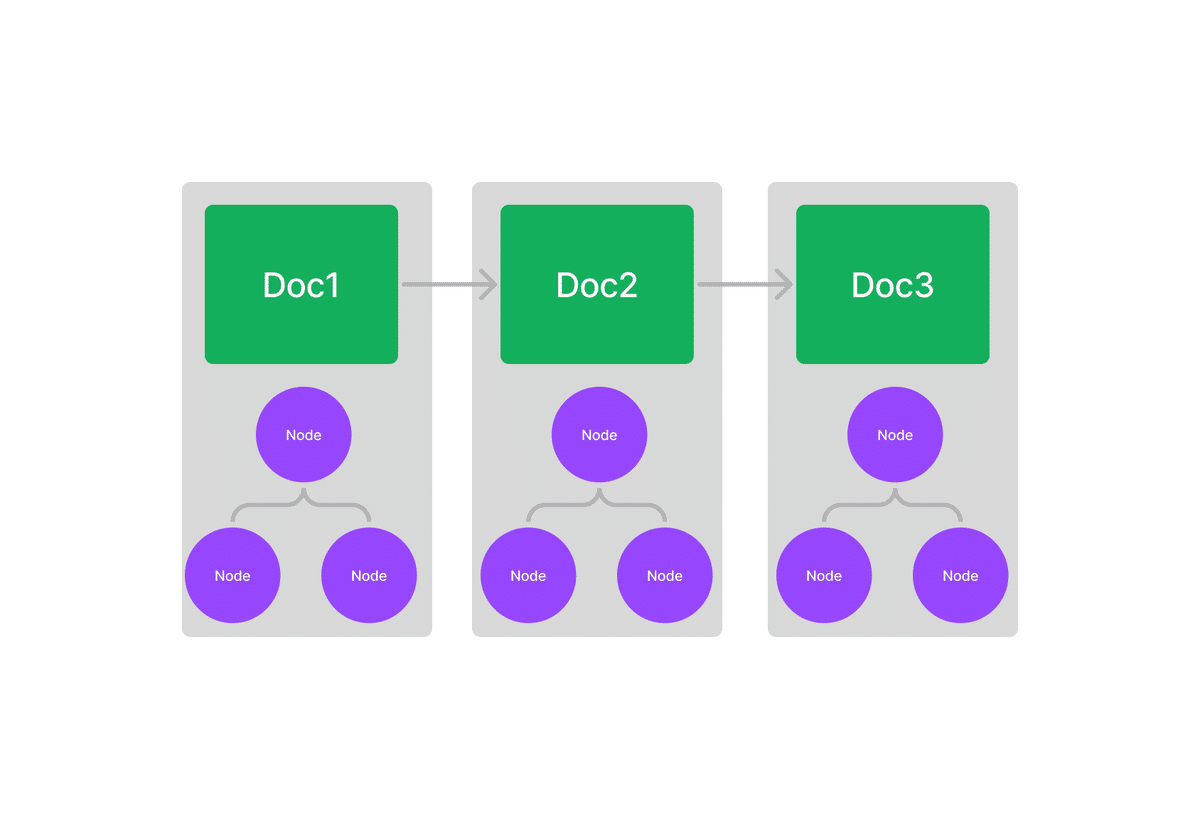
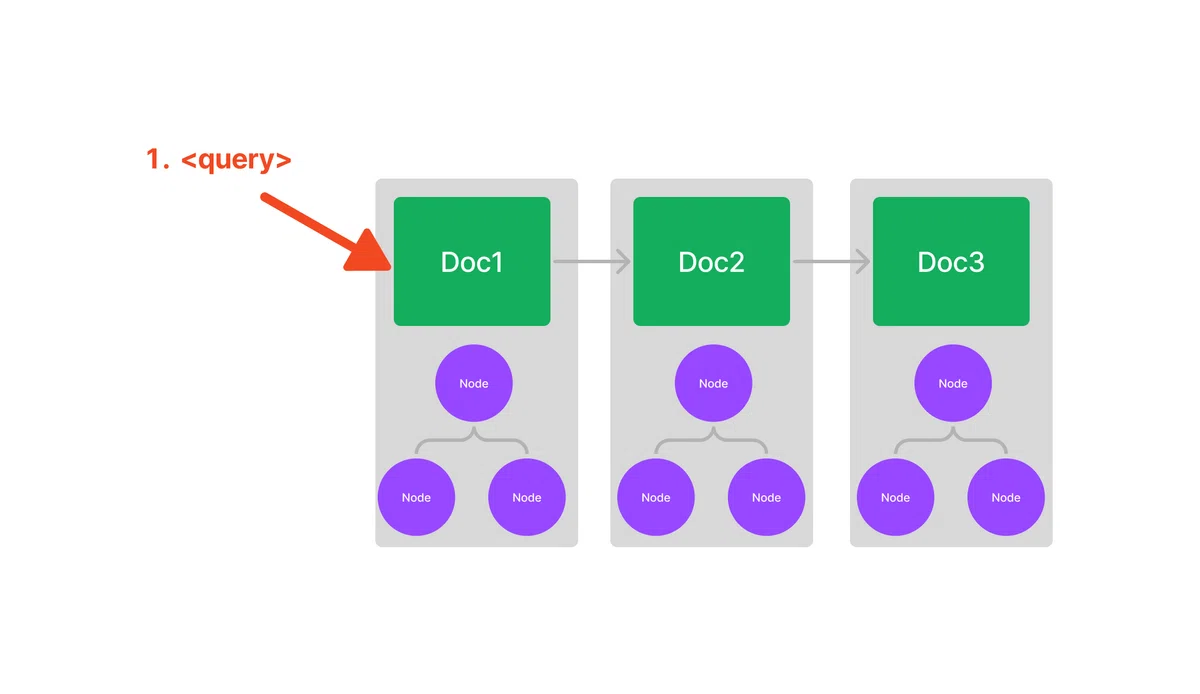
(5) 最上位インデックスでクエリ実行。
再帰 (mode="recursive") と クエリ設定 (query_configs) を指定して、クエリを実行します。
query_configs = [
    {
        "index_struct_type": "tree",
        "query_mode": "default",
        "query_kwargs": {
            "child_branch_factor": 2
        }
    },
    {
        "index_struct_type": "keyword_table",
        "query_mode": "simple",
        "query_kwargs": {}
    },
    ...
]

response = list_index.query(
    "Where did the author grow up?",
    mode="recursive",
    query_configs=query_configs
)
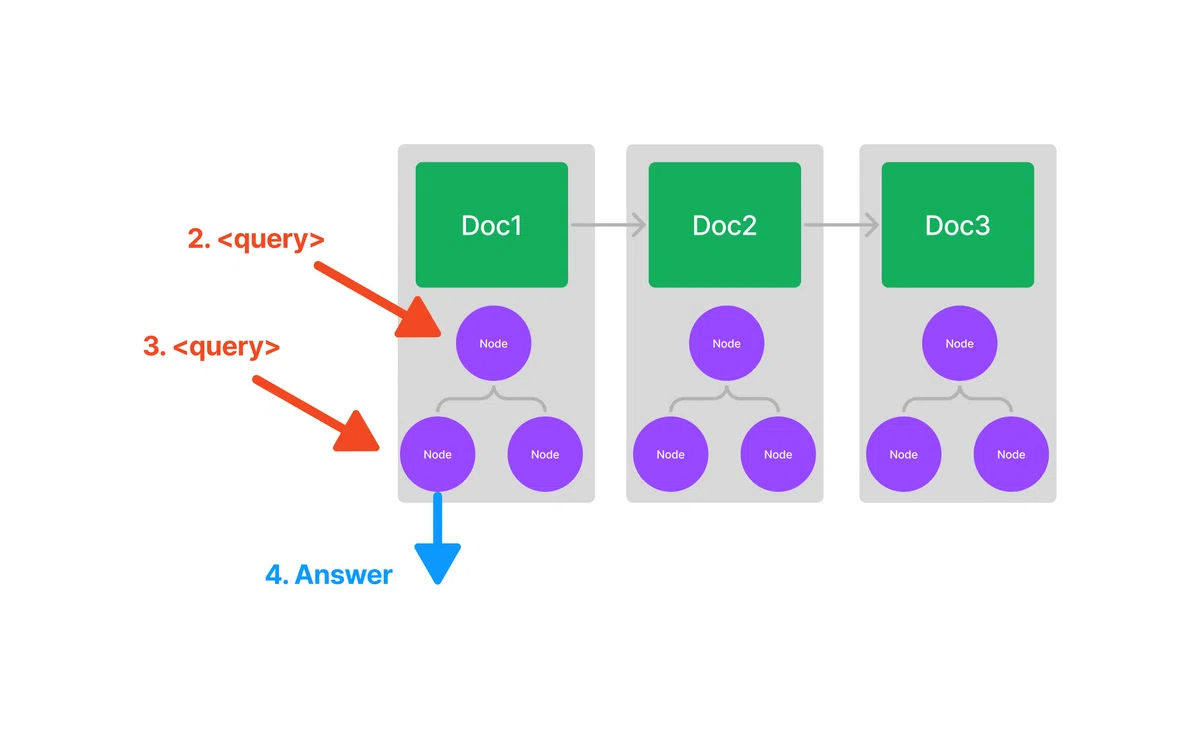
ノード内では、テキストを取得する代わりに、格納されたツリーインデックスを再帰的にクエリして、回答を取得します。
公式のノートブックはこちら。
6-2 クエリ設定パラメータ
クエリ設定パラメータは、次のとおりです。
・index_struct_type : インデックス構造体の型
・query_mode : クエリモード
・query_kwargs : クエリ引数の辞書
インデックス構造体の型は、次のとおりです。
・tree : GPTTreeIndex
・list : GPTListIndex
・keyword_table : GPTKeywordTableIndex
・dict : GPTFaissIndex
・simple_dict : SimpleVectorStoreIndex
・weaviate : GPTWeaviateIndex
・SQL : GPTSQLStructStoreIndex
クエリモードは、次のとおりです。
・default : デフォルト
・retrieve : 取得
・embedding : 埋め込み
・summarize : 要約
・simple : 正規表現によるキーワード抽出
・rake : RAKEによるキーワード抽出
・recursive : 再帰
