Pyxel初心者向けチートシート

Pyxelを改めて勉強しました。自分用に頻繁に使う命令をまとめました。
まず読むべき一次情報
Pyxel公式APIリファレンス
https://kitao.github.io/pyxel/web/api-reference/
分からなくなったらまずここを見る。
画面
画面を作る
pyxel.init(160, 120)
160×120サイズのゲーム画面を作る。
背景を塗る
pyxel.cls(0)
画面全体を指定色で塗る。
例
pyxel.cls(0)  # 黒
pyxel.cls(1)  # 濃い青
pyxel.cls(7)  # 白
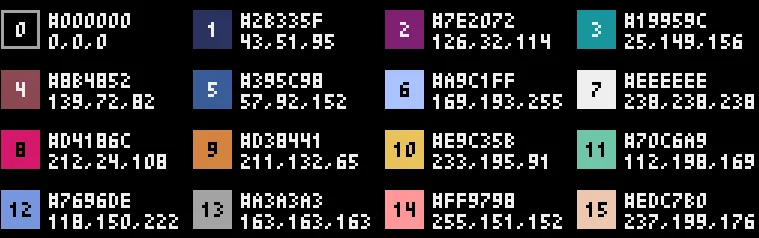
↑困ったら、ここを見よう!
図形
四角
pyxel.rect(x, y, width, height, color)
四角の枠
pyxel.rectb(x, y, width, height, color)
円
pyxel.circ(x, y, radius, color)
円の枠
pyxel.circb(x, y, radius, color)
線
pyxel.line(x1, y1, x2, y2, color)
1ドット描画
pyxel.pset(x, y, color)
文字
文字表示
pyxel.text(x, y, "HELLO", color)
例
pyxel.text(10, 10, "GAME START", 7)
変数を表示
score = 100

pyxel.text(
    10,
    20,
    str(score),
    7
)
キー入力
押している間
pyxel.btn(pyxel.KEY_LEFT)
キーを押している間ずっと True
押した瞬間
pyxel.btnp(pyxel.KEY_SPACE)
押した瞬間だけ True
BGM・効果音
Pyxelの音は
Sound
↓
Music
↓
playm()
という流れで作る。
Sound作成
pyxel.sounds[0].set(
    notes="C4",
    tones="P",
    volumes="4",
    effects="N",
    speed=20
)
notes
音階を指定する。
使用可能オクターブ
0〜4
例
C0~B4
例えば
notes="C4 E4 G4"
は
ド ミ ソ
を鳴らす。
注意
notes="C5"
はエラーになる。
Pyxelの公式仕様では音符指定は
CDEFGAB
+
01234
となっているため。つまりオクターブ4まで。
tones
音色
tones="T"
Triangle
柔らかい音
tones="S"
Square
ファミコン風
tones="P"
Pulse
力強い音
tones="N"
Noise
ノイズ
雨や爆発などに使う
volumes
音量
volumes="0"
無音
volumes="7"
最大音量
effects
音の変化
effects="N"
None
変化なし
effects="S"
Slide
音程が滑らかに変化する
effects="V"
Vibrato
音が揺れる
effects="F"
FadeOut
徐々に小さくなる
effects="H"
Half FadeOut
短めのフェードアウト
effects="Q"
Quarter FadeOut
さらに短いフェードアウト
speed
音の長さ
speed=10
速い
speed=30
普通
speed=60
ゆっくり
公式仕様
1 が最速
数字が大きいほど遅い
120で1音=1秒
Music
複数のSoundをまとめる。
pyxel.musics[0].set(
    [0],
    [1],
    [2],
    [3]
)
意味
チャンネル0 → sound0
チャンネル1 → sound1
チャンネル2 → sound2
チャンネル3 → sound3
play()
効果音再生
pyxel.play(
    0,
    0
)
意味
チャンネル0で
sound0を再生
playm()
BGM再生
pyxel.playm(
    0,
    loop=True
)
意味
music0を再生
繰り返し再生
重要
pyxel.playm(0)
の 0 は
チャンネル番号
ではない。
music番号
である。
そのため
pyxel.musics[0].set(
    [0],
    [1],
    [2],
    [3]
)
なら
sound0~sound3 が同時に再生される。
for文
基本
for i in range(5):
結果
0
1
2
3
4
よく使う例
for x in range(0, 160, 4):
意味
0
4
8
12
16
...
156
4ずつ増やしながら繰り返す。
草やドット背景を描く時によく使う。
初心者が最初に覚える命令
pyxel.init()
pyxel.run()

pyxel.cls()

pyxel.rect()
pyxel.rectb()

pyxel.circ()
pyxel.circb()

pyxel.line()
pyxel.pset()

pyxel.text()

pyxel.btn()
pyxel.btnp()

pyxel.play()
pyxel.playm()

pyxel.sounds[]
pyxel.musics[]

range()

if
for
global
まずはこのあたりを理解すると、Pyxel製ゲームの大半のサンプルコードが読めるようになる。
