
[MINISFORUM] MS-S1 MAX 導入設定 Dify を Docker Compose + Traefik で構築・移行する

すでに mac で動作している dify を MS-S1 MAX の Debian13 Linux へ移行しました。実態は Ansible で実装していますが、一般のユーザ向けに Docker などの設定手順に書き起こしています。
何よりもClaude Code 様々です。
実装内容ですが。Dify を Docker Compose でセルフホスティングし、Traefik リバースプロキシと Let's Encrypt で HTTPS 化しています。
既存 mac インスタンスからの移行方法、よくあるトラブルと解決策も紹介してもらいました。v1.9.1で実施していますが、根本的な移行方式は大きく変わらないでしょう。注意するべきは、移行元も移行先も同じ version にしておいた方が良い、と言うことです。
構成概要
Dify v1.9.1 - LLM アプリケーション構築プラットフォーム
Traefik - リバースプロキシ + Let's Encrypt 自動証明書
PostgreSQL 15 - メインデータベース
Redis 7 - キャッシュ・キュー
Weaviate 1.19 - ベクトルデータベース(ナレッジベース用)
サービス構成(10コンテナ)
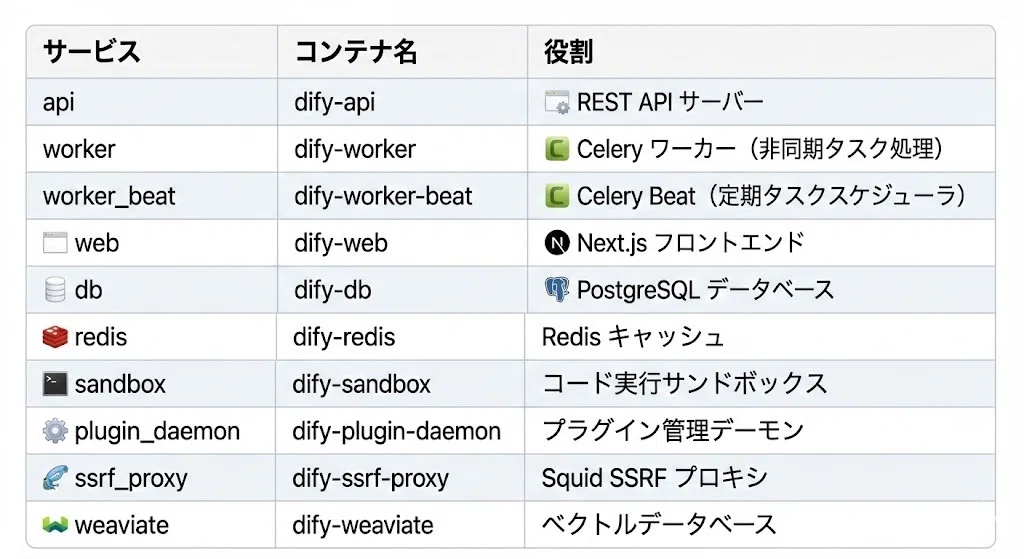
前提条件
Docker CE インストール済み
Traefik リバースプロキシ稼働中
`traefik` Docker ネットワーク作成済み
パブリック DNS に Web/API 両方のホスト名を登録済み
# Traefik ネットワークの確認
docker network ls | grep traefik

# なければ作成
docker network create traefik
ディレクトリ構造
mkdir -p /opt/dify/ssrf_proxy
cd /opt/dify
/opt/dify/
├── docker-compose.yml
├── .env
└── ssrf_proxy/
├── squid.conf.template
└── docker-entrypoint.sh設定ファイル
1. シークレットの生成
# 各種シークレットを生成
SECRET_KEY=$(openssl rand -hex 32)
DB_PASSWORD=$(openssl rand -base64 24 | tr -d '=+/')
REDIS_PASSWORD=$(openssl rand -base64 24 | tr -d '=+/')
WEAVIATE_API_KEY=$(openssl rand -hex 32)
PLUGIN_DAEMON_KEY=$(openssl rand -hex 32)
INNER_API_KEY=$(openssl rand -hex 32)
SANDBOX_API_KEY=$(openssl rand -hex 16)

# 確認(メモしておく)
cat << EOF
SECRET_KEY=$SECRET_KEY
DB_PASSWORD=$DB_PASSWORD
REDIS_PASSWORD=$REDIS_PASSWORD
WEAVIATE_API_KEY=$WEAVIATE_API_KEY
PLUGIN_DAEMON_KEY=$PLUGIN_DAEMON_KEY
INNER_API_KEY=$INNER_API_KEY
SANDBOX_API_KEY=$SANDBOX_API_KEY
EOF
移行元で設定しているものがあれば、同じものを使います。特に SECRET_KEY。安全を見て、移行するのであれば全て同じ設定にすることが得策です。
2. .env ファイル
FQDN のドメインは example.com にしていますので、適宜、個々の環境にあわせて変更してください。
cat > /opt/dify/.env << 'EOF'
# =============================================================================
# Dify AI Platform Environment Configuration
# =============================================================================

# Common Settings
LOG_LEVEL=INFO
SECRET_KEY=<生成したSECRET_KEY>
TZ=Asia/Tokyo

# =============================================================================
# Server URLs - 自分のドメインに変更
# =============================================================================
CONSOLE_API_URL=https://api.dify.example.com
CONSOLE_WEB_URL=https://dify.example.com
SERVICE_API_URL=https://api.dify.example.com
APP_API_URL=https://api.dify.example.com
APP_WEB_URL=https://dify.example.com
FILES_URL=https://api.dify.example.com/files
MIGRATION_ENABLED=true

# =============================================================================
# Database Configuration
# =============================================================================
DB_USERNAME=postgres
DB_PASSWORD=<生成したDB_PASSWORD>
DB_HOST=db
DB_PORT=5432
DB_DATABASE=dify
DB_PLUGIN_DATABASE=dify_plugin

# =============================================================================
# Redis Configuration
# =============================================================================
REDIS_HOST=redis
REDIS_PORT=6379
REDIS_PASSWORD=<生成したREDIS_PASSWORD>
REDIS_USE_SSL=false
REDIS_DB=0
CELERY_BROKER_URL=redis://:<生成したREDIS_PASSWORD>@redis:6379/1

# =============================================================================
# Storage Configuration
# =============================================================================
STORAGE_TYPE=opendal
OPENDAL_SCHEME=fs
OPENDAL_FS_ROOT=storage

# =============================================================================
# Vector Store Configuration
# =============================================================================
VECTOR_STORE=weaviate
WEAVIATE_ENDPOINT=http://weaviate:8080
WEAVIATE_API_KEY=<生成したWEAVIATE_API_KEY>

# =============================================================================
# SSRF Proxy Configuration
# =============================================================================
SSRF_PROXY_HTTP_URL=http://ssrf_proxy:3128
SSRF_PROXY_HTTPS_URL=http://ssrf_proxy:3128

# =============================================================================
# Sandbox Configuration
# =============================================================================
CODE_EXECUTION_ENDPOINT=http://sandbox:8194
CODE_EXECUTION_API_KEY=<生成したSANDBOX_API_KEY>
CODE_MAX_NUMBER=9223372036854775807
CODE_MIN_NUMBER=-9223372036854775808
CODE_MAX_DEPTH=5
CODE_MAX_PRECISION=20
CODE_MAX_STRING_LENGTH=80000
CODE_MAX_OBJECT_ARRAY_LENGTH=30
CODE_MAX_STRING_ARRAY_LENGTH=30
TEMPLATE_TRANSFORM_MAX_LENGTH=80000

# =============================================================================
# Plugin Configuration
# =============================================================================
PLUGIN_DAEMON_URL=http://plugin_daemon:5002
PLUGIN_DAEMON_KEY=<生成したPLUGIN_DAEMON_KEY>
PLUGIN_DIFY_INNER_API_KEY=<生成したINNER_API_KEY>
INNER_API_KEY=<生成したINNER_API_KEY>
PLUGIN_ENCRYPTER_KEY=<生成したPLUGIN_DAEMON_KEY>

# =============================================================================
# Worker Configuration
# =============================================================================
SERVER_WORKER_AMOUNT=2
CELERY_WORKER_AMOUNT=4
GUNICORN_TIMEOUT=360

# =============================================================================
# File Upload Limits
# =============================================================================
UPLOAD_FILE_SIZE_LIMIT=15
UPLOAD_FILE_BATCH_LIMIT=5

# =============================================================================
# Workflow Settings
# =============================================================================
WORKFLOW_MAX_EXECUTION_STEPS=500
WORKFLOW_MAX_EXECUTION_TIME=1200

# =============================================================================
# Telemetry (Disabled)
# =============================================================================
SENTRY_DSN=
NEXT_TELEMETRY_DISABLED=1
EOF
3. docker-compose.yml
# Dify AI Platform with Traefik Integration
# Based on Dify v1.9.1

services:
  # API service
  api:
    image: langgenius/dify-api:1.9.1
    container_name: dify-api
    restart: unless-stopped
    env_file:
      - .env
    environment:
      MODE: api
    depends_on:
      db:
        condition: service_healthy
      redis:
        condition: service_healthy
    volumes:
      - dify_storage:/app/api/storage
    networks:
      - ssrf_proxy_network
      - dify-internal
      - traefik
    labels:
      - "traefik.enable=true"
      - "traefik.http.routers.dify-api.rule=Host(`api.dify.example.com`)"
      - "traefik.http.routers.dify-api.entrypoints=websecure"
      - "traefik.http.routers.dify-api.tls.certresolver=letsencrypt"
      - "traefik.http.services.dify-api.loadbalancer.server.port=5001"
      - "traefik.docker.network=traefik"

  # Worker service - Celery worker for processing the queue
  worker:
    image: langgenius/dify-api:1.9.1
    container_name: dify-worker
    restart: unless-stopped
    env_file:
      - .env
    environment:
      MODE: worker
    depends_on:
      db:
        condition: service_healthy
      redis:
        condition: service_healthy
    volumes:
      - dify_storage:/app/api/storage
    networks:
      - ssrf_proxy_network
      - dify-internal

  # Worker beat service - Celery beat for scheduling periodic tasks
  worker_beat:
    image: langgenius/dify-api:1.9.1
    container_name: dify-worker-beat
    restart: unless-stopped
    env_file:
      - .env
    environment:
      MODE: beat
    depends_on:
      db:
        condition: service_healthy
      redis:
        condition: service_healthy
    networks:
      - ssrf_proxy_network
      - dify-internal

  # Frontend web application
  web:
    image: langgenius/dify-web:1.9.1
    container_name: dify-web
    restart: unless-stopped
    environment:
      HOSTNAME: "0.0.0.0"
      CONSOLE_API_URL: "https://api.dify.example.com"
      APP_API_URL: "https://api.dify.example.com"
      NEXT_TELEMETRY_DISABLED: "1"
      TEXT_GENERATION_TIMEOUT_MS: "60000"
      PM2_INSTANCES: "2"
    networks:
      - dify-internal
      - traefik
    labels:
      - "traefik.enable=true"
      - "traefik.http.routers.dify-web.rule=Host(`dify.example.com`)"
      - "traefik.http.routers.dify-web.entrypoints=websecure"
      - "traefik.http.routers.dify-web.tls.certresolver=letsencrypt"
      - "traefik.http.services.dify-web.loadbalancer.server.port=3000"
      - "traefik.docker.network=traefik"

  # PostgreSQL database
  db:
    image: postgres:15-alpine
    container_name: dify-db
    restart: unless-stopped
    environment:
      POSTGRES_USER: "postgres"
      POSTGRES_PASSWORD: "<DB_PASSWORD>"
      POSTGRES_DB: "dify"
      PGDATA: /var/lib/postgresql/data/pgdata
    command: >
      postgres -c 'max_connections=100'
               -c 'shared_buffers=128MB'
               -c 'work_mem=4MB'
               -c 'maintenance_work_mem=64MB'
               -c 'effective_cache_size=4096MB'
    volumes:
      - dify_db_data:/var/lib/postgresql/data
    networks:
      - dify-internal
    healthcheck:
      test: ["CMD", "pg_isready", "-h", "db", "-U", "postgres", "-d", "dify"]
      interval: 10s
      timeout: 5s
      retries: 5

  # Redis cache
  redis:
    image: redis:7-alpine
    container_name: dify-redis
    restart: unless-stopped
    environment:
      REDISCLI_AUTH: "<REDIS_PASSWORD>"
    volumes:
      - dify_redis_data:/data
    command: redis-server --requirepass <REDIS_PASSWORD>
    networks:
      - dify-internal
    healthcheck:
      test: ["CMD-SHELL", "redis-cli -a <REDIS_PASSWORD> ping | grep -q PONG"]
      interval: 10s
      timeout: 5s
      retries: 5

  # DifySandbox - Code execution environment
  sandbox:
    image: langgenius/dify-sandbox:0.2.10
    container_name: dify-sandbox
    restart: unless-stopped
    environment:
      API_KEY: "<SANDBOX_API_KEY>"
      GIN_MODE: release
      WORKER_TIMEOUT: "15"
      ENABLE_NETWORK: "true"
      HTTP_PROXY: "http://ssrf_proxy:3128"
      HTTPS_PROXY: "http://ssrf_proxy:3128"
      SANDBOX_PORT: "8194"
    volumes:
      - dify_sandbox_dependencies:/dependencies
      - dify_sandbox_conf:/conf
    networks:
      - ssrf_proxy_network
    healthcheck:
      test: ["CMD", "curl", "-f", "http://localhost:8194/health"]
      interval: 30s
      timeout: 10s
      retries: 3

  # Plugin daemon
  plugin_daemon:
    image: langgenius/dify-plugin-daemon:0.0.7-local
    container_name: dify-plugin-daemon
    restart: unless-stopped
    env_file:
      - .env
    environment:
      DB_DATABASE: "dify_plugin"
      SERVER_PORT: "5002"
      SERVER_KEY: "<PLUGIN_DAEMON_KEY>"
      DIFY_INNER_API_URL: "http://api:5001"
      DIFY_INNER_API_KEY: "<INNER_API_KEY>"
      PLUGIN_REMOTE_INSTALLING_HOST: "0.0.0.0"
      PLUGIN_REMOTE_INSTALLING_PORT: "5003"
      PLUGIN_WORKING_PATH: /app/storage/cwd
      FORCE_VERIFYING_SIGNATURE: "true"
      PYTHON_ENV_INIT_TIMEOUT: "120"
      PLUGIN_MAX_EXECUTION_TIMEOUT: "600"
      PLUGIN_STORAGE_TYPE: local
      PLUGIN_STORAGE_LOCAL_ROOT: /app/storage
    ports:
      - "5003:5003"
    volumes:
      - dify_plugin:/app/storage
    networks:
      - dify-internal
    depends_on:
      db:
        condition: service_healthy

  # SSRF Proxy server
  ssrf_proxy:
    image: ubuntu/squid:latest
    container_name: dify-ssrf-proxy
    restart: unless-stopped
    volumes:
      - ./ssrf_proxy/squid.conf.template:/etc/squid/squid.conf.template
      - ./ssrf_proxy/docker-entrypoint.sh:/docker-entrypoint-mount.sh
    entrypoint:
      [
        "sh",
        "-c",
        "cp /docker-entrypoint-mount.sh /docker-entrypoint.sh && sed -i 's/\\r$$//' /docker-entrypoint.sh && chmod +x /docker-entrypoint.sh && /docker-entrypoint.sh",
      ]
    environment:
      HTTP_PORT: "3128"
      COREDUMP_DIR: /var/spool/squid
      REVERSE_PROXY_PORT: "8194"
      SANDBOX_HOST: sandbox
      SANDBOX_PORT: "8194"
    networks:
      - ssrf_proxy_network
      - dify-internal

  # Weaviate vector database
  weaviate:
    image: semitechnologies/weaviate:1.19.0
    container_name: dify-weaviate
    restart: unless-stopped
    environment:
      PERSISTENCE_DATA_PATH: /var/lib/weaviate
      QUERY_DEFAULTS_LIMIT: "25"
      AUTHENTICATION_ANONYMOUS_ACCESS_ENABLED: "false"
      AUTHENTICATION_APIKEY_ENABLED: "true"
      AUTHENTICATION_APIKEY_ALLOWED_KEYS: "<WEAVIATE_API_KEY>"
      AUTHENTICATION_APIKEY_USERS: "dify@localhost"
      AUTHORIZATION_ADMINLIST_ENABLED: "true"
      AUTHORIZATION_ADMINLIST_USERS: "dify@localhost"
      DEFAULT_VECTORIZER_MODULE: none
      CLUSTER_HOSTNAME: node1
    volumes:
      - dify_weaviate_data:/var/lib/weaviate
    networks:
      - dify-internal

volumes:
  dify_db_data:
  dify_redis_data:
  dify_storage:
  dify_sandbox_dependencies:
  dify_sandbox_conf:
  dify_plugin:
  dify_weaviate_data:

networks:
  traefik:
    external: true
  dify-internal:
    driver: bridge
  ssrf_proxy_network:
    driver: bridge
    internal: true
4. SSRF Proxy 設定
ssrf_proxy/squid.conf.template
cat > /opt/dify/ssrf_proxy/squid.conf.template << 'EOF'
acl localnet src 0.0.0.1-0.255.255.255	# RFC 1122 "this" network (LAN)
acl localnet src 10.0.0.0/8		# RFC 1918 local private network (LAN)
acl localnet src 100.64.0.0/10		# RFC 6598 shared address space (CGN)
acl localnet src 169.254.0.0/16 	# RFC 3927 link-local (directly plugged) machines
acl localnet src 172.16.0.0/12		# RFC 1918 local private network (LAN)
acl localnet src 192.168.0.0/16		# RFC 1918 local private network (LAN)
acl localnet src fc00::/7       	# RFC 4193 local private network range
acl localnet src fe80::/10      	# RFC 4291 link-local (directly plugged) machines
acl SSL_ports port 443
acl Safe_ports port 80		# http
acl Safe_ports port 21		# ftp
acl Safe_ports port 443		# https
acl Safe_ports port 70		# gopher
acl Safe_ports port 210		# wais
acl Safe_ports port 1025-65535	# unregistered ports
acl Safe_ports port 280		# http-mgmt
acl Safe_ports port 488		# gss-http
acl Safe_ports port 591		# filemaker
acl Safe_ports port 777		# multiling http
acl CONNECT method CONNECT
acl allowed_domains dstdomain .marketplace.dify.ai
http_access allow allowed_domains
http_access deny !Safe_ports
http_access deny CONNECT !SSL_ports
http_access allow localhost manager
http_access deny manager
http_access allow localhost
include /etc/squid/conf.d/*.conf
http_access deny all

################################## Proxy Server ################################
http_port ${HTTP_PORT}
coredump_dir ${COREDUMP_DIR}
refresh_pattern ^ftp:		1440	20%	10080
refresh_pattern ^gopher:	1440	0%	1440
refresh_pattern -i (/cgi-bin/|\?) 0	0%	0
refresh_pattern \/(Packages|Sources)(|\.bz2|\.gz|\.xz)$ 0 0% 0 refresh-ims
refresh_pattern \/Release(|\.gpg)$ 0 0% 0 refresh-ims
refresh_pattern \/InRelease$ 0 0% 0 refresh-ims
refresh_pattern \/(Translation-.*)(|\.bz2|\.gz|\.xz)$ 0 0% 0 refresh-ims
refresh_pattern .		0	20%	4320

################################## Reverse Proxy To Sandbox ################################
http_port ${REVERSE_PROXY_PORT} accel vhost
cache_peer ${SANDBOX_HOST} parent ${SANDBOX_PORT} 0 no-query originserver
acl src_all src all
http_access allow src_all

# Unless the option's size is increased, an error will occur when uploading more than two files.
client_request_buffer_max_size 100 MB
EOF
ssrf_proxy/docker-entrypoint.sh
cat > /opt/dify/ssrf_proxy/docker-entrypoint.sh << 'EOF'
#!/bin/bash

echo "[ENTRYPOINT] re-create snakeoil self-signed certificate removed in the build process"
if [ ! -f /etc/ssl/private/ssl-cert-snakeoil.key ]; then
    /usr/sbin/make-ssl-cert generate-default-snakeoil --force-overwrite > /dev/null 2>&1
fi

tail -F /var/log/squid/access.log 2>/dev/null &
tail -F /var/log/squid/error.log 2>/dev/null &
tail -F /var/log/squid/store.log 2>/dev/null &
tail -F /var/log/squid/cache.log 2>/dev/null &

# Replace environment variables in the template and output to the squid.conf
echo "[ENTRYPOINT] replacing environment variables in the template"
awk '{
    while(match($0, /\${[A-Za-z_][A-Za-z_0-9]*}/)) {
        var = substr($0, RSTART+2, RLENGTH-3)
        val = ENVIRON[var]
        $0 = substr($0, 1, RSTART-1) val substr($0, RSTART+RLENGTH)
    }
    print
}' /etc/squid/squid.conf.template > /etc/squid/squid.conf

/usr/sbin/squid -Nz
echo "[ENTRYPOINT] starting squid"
/usr/sbin/squid -f /etc/squid/squid.conf -NYC 1
EOF

chmod +x /opt/dify/ssrf_proxy/docker-entrypoint.sh
DNS 設定
重要: Let's Encrypt 証明書取得には、パブリック DNS への登録が必須です。
dify.example.com      A  <サーバーの外部IP>
api.dify.example.com  A  <サーバーの外部IP>
内部 DNS(Pi-hole, Unbound 等)だけでは Let's Encrypt の HTTP-01 チャレンジが失敗します。
起動
cd /opt/dify

# 起動
docker compose up -d

# ログ確認
docker compose logs -f

# 全コンテナの状態確認
docker ps --format 'table {{.Names}}\t{{.Status}}' | grep dify
正常起動時は 10 コンテナすべてが `Up` 状態になります。
既存インスタンスからの移行
移行対象ボリューム
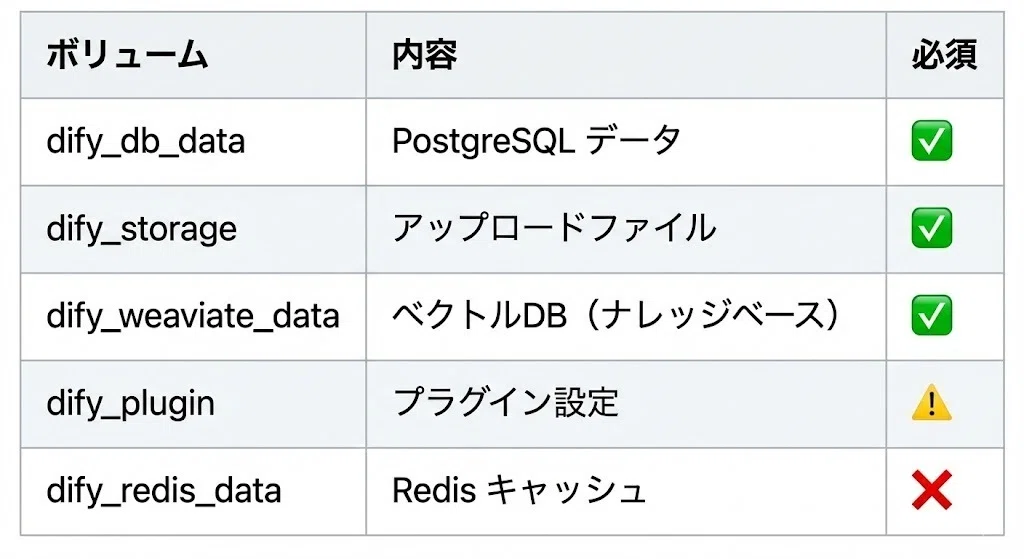
移行手順
# 1. 元の Dify を停止
cd /path/to/old/dify
docker compose down

# 2. ボリュームデータをバックアップ
docker run --rm -v dify_db_data:/data -v $(pwd):/backup alpine \
  tar czf /backup/dify_db_data.tar.gz -C /data .

docker run --rm -v dify_storage:/data -v $(pwd):/backup alpine \
  tar czf /backup/dify_storage.tar.gz -C /data .

docker run --rm -v dify_weaviate_data:/data -v $(pwd):/backup alpine \
  tar czf /backup/dify_weaviate_data.tar.gz -C /data .

# 3. 新環境でボリュームを作成してリストア
# ※ ボリューム名が変わる場合は docker compose up で自動作成される名前を確認
docker volume create dify_dify_db_data
docker run --rm -v dify_dify_db_data:/data -v $(pwd):/backup alpine \
  tar xzf /backup/dify_db_data.tar.gz -C /data

docker volume create dify_dify_storage
docker run --rm -v dify_dify_storage:/data -v $(pwd):/backup alpine \
  tar xzf /backup/dify_storage.tar.gz -C /data

docker volume create dify_dify_weaviate_data
docker run --rm -v dify_dify_weaviate_data:/data -v $(pwd):/backup alpine \
  tar xzf /backup/dify_weaviate_data.tar.gz -C /data

# 4. 新環境を起動
cd /opt/dify
docker compose up -d
プラグインキャッシュのクリア(移行後の必須作業)
移行後、プラグインが以下のエラーで起動しない場合があります:
ModuleNotFoundError: No module named 'gevent._gevent_c_hub_local'これは、プラグインの Python 仮想環境(`.venv`)に含まれる アーキテクチャ固有のバイナリ(gevent 等の C 拡張)が原因です。
解決方法:
# プラグインキャッシュを完全クリア
docker stop dify-plugin-daemon
docker run --rm -v dify_dify_plugin:/data alpine \
  sh -c 'rm -rf /data/cwd/* /data/plugin_packages/*'
docker start dify-plugin-daemon

# ログを確認(プラグインが再コンパイルされる)
docker logs -f dify-plugin-daemon
クリア後、プラグインは Dify Marketplace から自動的に再ダウンロード・再コンパイルされます。
ホスト上の Ollama に接続する
Dify から同一ホスト上の Ollama に接続する場合、Docker コンテナからホストにアクセスする必要があります。
Base URL の設定
Dify の設定画面で Ollama の Base URL を以下のように設定:
http://172.17.0.1:11434`172.17.0.1` は Docker ブリッジネットワークのゲートウェイ IP(= ホスト)です。
ファイアウォール設定
UFW を使用している場合、Docker ネットワークからのアクセスを許可する必要があります:
# Docker ネットワーク (172.16.0.0/12) から Ollama ポートへのアクセスを許可
sudo ufw allow from 172.16.0.0/12 to any port 11434 comment 'Ollama from Docker'

# 確認
sudo ufw status | grep 11434
トラブルシューティング
Let's Encrypt 証明書エラー
Unable to obtain ACME certificate: DNS problem: NXDOMAIN looking up A for api.dify.example.com→ パブリック DNS にホスト名が登録されていません。DNS プロバイダーで A レコードを追加してください。
502 Bad Gateway
Traefik returns 502 for web UI→ Web コンテナの `HOSTNAME: "0.0.0.0"` が設定されているか確認。また、Traefik ネットワークに接続されているか確認:
docker network inspect traefik | grep difyプラグインタイムアウト
PluginDaemonInternalServerError: killed by timeout→ プラグインの初回起動時に発生することがあります。数分待つか、上記のプラグインキャッシュクリアを実行してください。
ヘルスチェック
# API ヘルスチェック
docker exec dify-api curl -s http://localhost:5001/health
# 期待: {"pid": 90, "status": "ok", "version": "1.9.1"}

# PostgreSQL 接続確認
docker exec dify-db pg_isready -h localhost -U postgres -d dify

# Redis 接続確認
docker exec dify-redis redis-cli -a <REDIS_PASSWORD> ping

# Weaviate 接続確認
docker exec dify-weaviate wget -qO- http://localhost:8080/v1/.well-known/ready
コンテナ再起動
cd /opt/dify
docker compose restart
ネットワーク構成図
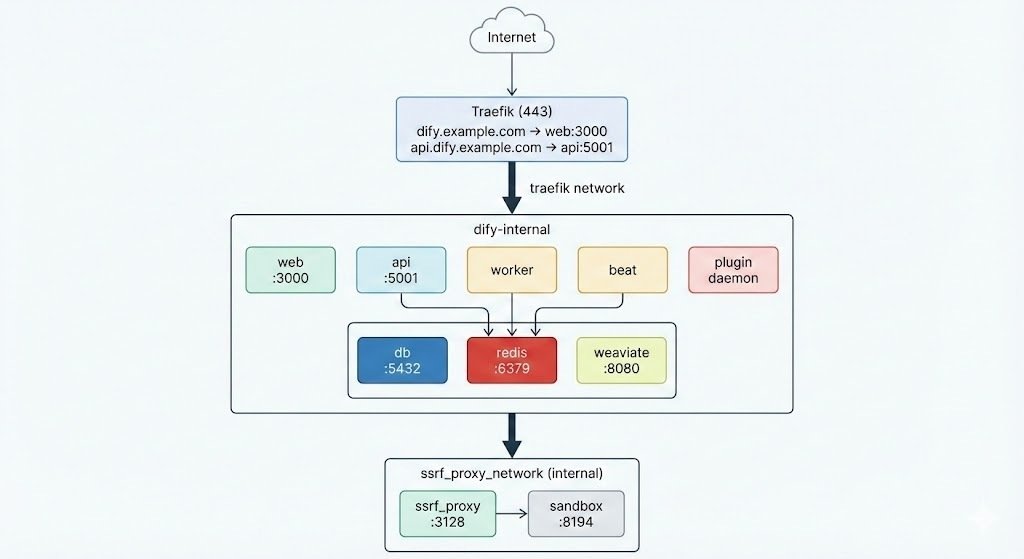
参考リンク
いいなと思ったら応援しよう!
 あなたの支えが、私の心の糧になります。
note の収益はガジェットのレビューや、自費出版に使わせていただきます。
あなたの支えが、私の心の糧になります。
note の収益はガジェットのレビューや、自費出版に使わせていただきます。