
【note】スキ制限が厳しくなったら、note民は数え始める

note のスキ制限がどんな感じでかかるのか気になって、
手動でポチポチ数を測れるカウンタを ChatGPT くんに作ってもらいました。
きっかけは ↓ の記事になります。
できることは、とてもシンプル。
✨ カウントできる項目
記事へのスキ
コメント
コメントへのスキ
この3つを それぞれ別カウンタで管理します。
⏱ ストップウォッチも別々
各項目ごとに 専用のストップウォッチ付き
最初の「+1」を押した瞬間に自動でスタート
どれだけの時間で、どれくらい操作したかが見える化できます
🔘 操作は全部手動
note で操作したら、こちらのボタンも押すだけ
押し間違えたとき用に
「−1」ボタンあり
個別リセットあり
全部まとめて初期化できる 全リセット も付けています
💾 ブラウザ版なので保存されます
ブラウザを閉じても
カウント数・計測時間はそのままインストール不要、HTML1枚で完結(ローカルで使える)
🤔 何のためのツール?
スキを増やすためのものではなくて、
何分くらいで制限っぽい挙動が出るのか
記事スキ/コメント/コメントスキで違いがあるのか
を 安全に・人力で・記録するための検証用ツールです。
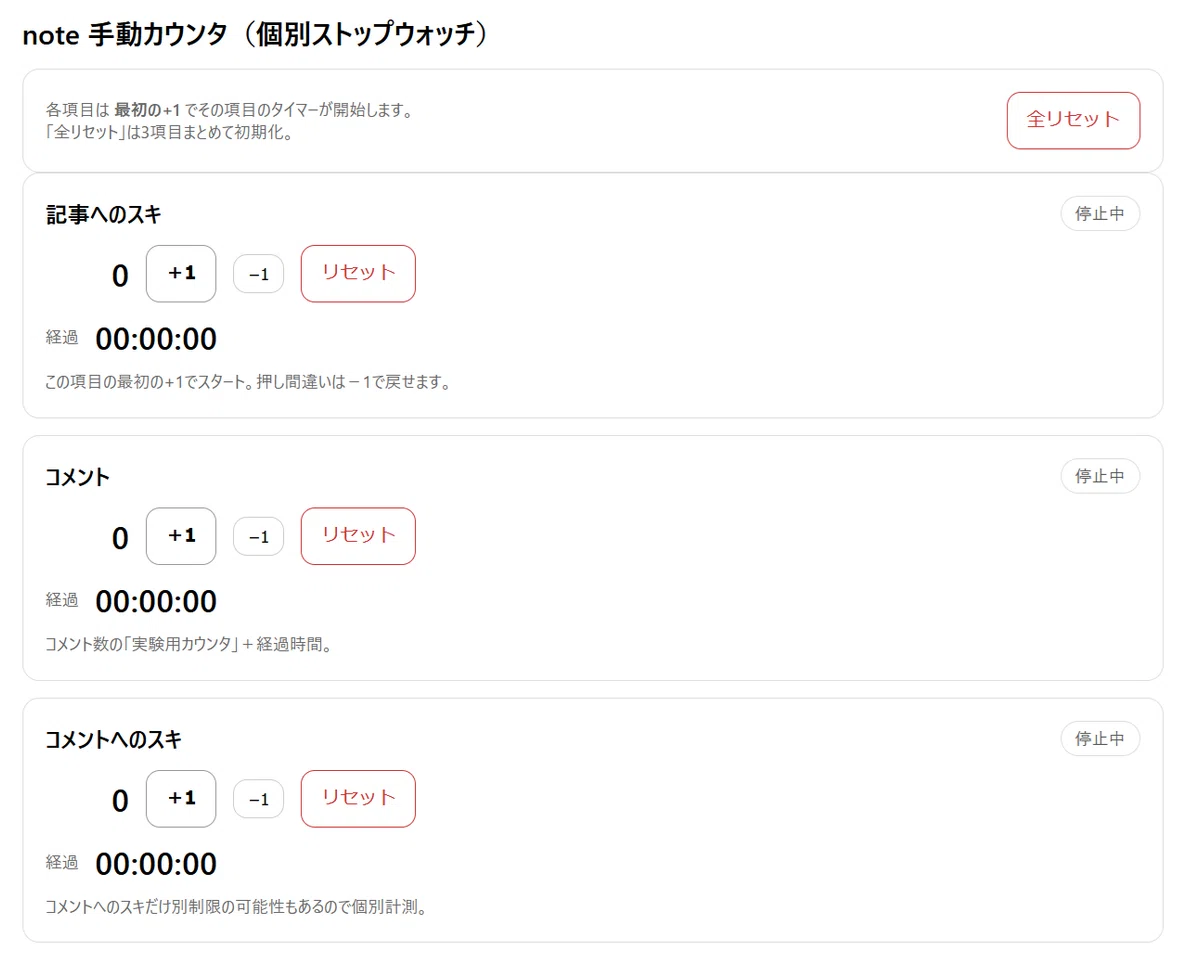
note 手動スキカウンタ・ブラウザ版(HTML 1枚で完結・保存もOK)
下のコードをメモ帳等に貼り付けて、 like_counter_multi_timer.html などのファイル名を付けて保存 → 開くだけで動きます(Chrome/Edge推奨)。
※カウント&タイマーは localStorage に保存されるので、閉じても残ります。
<!doctype html>
<html lang="ja">
<head>
  <meta charset="utf-8" />
  <meta name="viewport" content="width=device-width,initial-scale=1" />
  <title>note 手動カウンタ(個別ストップウォッチ)</title>
  <style>
    body { font-family: system-ui, -apple-system, "Segoe UI", sans-serif; margin: 24px; }
    .wrap { max-width: 820px; margin: 0 auto; }
    h1 { font-size: 20px; margin: 0 0 12px; }
    .grid { display: grid; grid-template-columns: 1fr; gap: 12px; }
    .card { border: 1px solid #ddd; border-radius: 12px; padding: 16px; }
    .toprow { display:flex; justify-content:space-between; align-items:center; gap:12px; flex-wrap:wrap; }
    .title { font-size: 16px; font-weight: 700; }
    .pill { display:inline-block; padding: 4px 10px; border:1px solid #ddd; border-radius: 999px; font-size: 12px; color:#555;}
    .row { display:flex; align-items:center; gap: 12px; flex-wrap: wrap; margin-top: 10px; }
    .count { font-size: 22px; font-weight: 800; min-width: 60px; text-align: right; }
    .timer { font-size: 22px; font-weight: 800; letter-spacing: 0.5px; }
    button { padding: 10px 14px; border: 1px solid #ccc; border-radius: 10px; cursor: pointer; background: #fff; }
    button.primary { border-color: #999; font-weight: 600; }
    button.danger { border-color: #c33; color: #c33; }
    button.small { padding: 6px 10px; border-radius: 10px; font-size: 12px; }
    .note { font-size: 12px; color: #666; line-height: 1.6; margin-top: 8px;}
    .muted { color:#666; font-size: 12px; }
  </style>
</head>
<body>
  <div class="wrap">
    <h1>note 手動カウンタ(個別ストップウォッチ)</h1>

    <div class="card">
      <div class="toprow">
        <div class="muted">
          各項目は <b>最初の+1</b> でその項目のタイマーが開始します。<br/>
          「全リセット」は3項目まとめて初期化。
        </div>
        <button id="resetAll" class="danger">全リセット</button>
      </div>
    </div>

    <div class="grid">
      <!-- Article Like -->
      <div class="card" data-key="like_article">
        <div class="toprow">
          <div class="title">記事へのスキ</div>
          <span class="pill" id="pill_like_article">停止中</span>
        </div>
        <div class="row">
          <div class="count" id="count_like_article">0</div>
          <button class="primary" id="inc_like_article">+1</button>
          <button class="small" id="dec_like_article">−1</button>
          <button class="danger" id="reset_like_article">リセット</button>
        </div>
        <div class="row">
          <div class="muted">経過</div>
          <div class="timer" id="timer_like_article">00:00:00</div>
        </div>
        <div class="note">この項目の最初の+1でスタート。押し間違いは−1で戻せます。</div>
      </div>

      <!-- Comment -->
      <div class="card" data-key="comment">
        <div class="toprow">
          <div class="title">コメント</div>
          <span class="pill" id="pill_comment">停止中</span>
        </div>
        <div class="row">
          <div class="count" id="count_comment">0</div>
          <button class="primary" id="inc_comment">+1</button>
          <button class="small" id="dec_comment">−1</button>
          <button class="danger" id="reset_comment">リセット</button>
        </div>
        <div class="row">
          <div class="muted">経過</div>
          <div class="timer" id="timer_comment">00:00:00</div>
        </div>
        <div class="note">コメント数の「実験用カウンタ」+経過時間。</div>
      </div>

      <!-- Like for Comment -->
      <div class="card" data-key="like_comment">
        <div class="toprow">
          <div class="title">コメントへのスキ</div>
          <span class="pill" id="pill_like_comment">停止中</span>
        </div>
        <div class="row">
          <div class="count" id="count_like_comment">0</div>
          <button class="primary" id="inc_like_comment">+1</button>
          <button class="small" id="dec_like_comment">−1</button>
          <button class="danger" id="reset_like_comment">リセット</button>
        </div>
        <div class="row">
          <div class="muted">経過</div>
          <div class="timer" id="timer_like_comment">00:00:00</div>
        </div>
        <div class="note">コメントへのスキだけ別制限の可能性もあるので個別計測。</div>
      </div>
    </div>
  </div>

<script>
  const KEY = "note_manual_counter_multi_timer_v1";

  const defaultItem = () => ({
    count: 0,
    running: false,
    startAtMs: null, // Date.now() when started
    elapsedMs: 0     // accumulated (we only stop on reset in this version)
  });

  const state = {
    like_article: defaultItem(),
    comment: defaultItem(),
    like_comment: defaultItem()
  };

  function load() {
    try {
      const raw = localStorage.getItem(KEY);
      if (!raw) return;
      const obj = JSON.parse(raw);
      if (!obj) return;
      for (const k of Object.keys(state)) {
        if (obj[k]) state[k] = Object.assign(defaultItem(), obj[k]);
      }
    } catch (e) {}
  }

  function save() {
    localStorage.setItem(KEY, JSON.stringify(state));
  }

  function pad2(n){ return String(n).padStart(2,"0"); }
  function fmt(ms){
    const total = Math.floor(ms / 1000);
    const h = Math.floor(total / 3600);
    const m = Math.floor((total % 3600) / 60);
    const s = total % 60;
    return `${pad2(h)}:${pad2(m)}:${pad2(s)}`;
  }

  function elapsedOf(item){
    if (!item.running || !item.startAtMs) return item.elapsedMs || 0;
    return (item.elapsedMs || 0) + (Date.now() - item.startAtMs);
  }

  function renderOne(key){
    const item = state[key];
    document.getElementById(`count_${key}`).textContent = item.count;
    document.getElementById(`timer_${key}`).textContent = fmt(elapsedOf(item));
    document.getElementById(`pill_${key}`).textContent = item.running ? "計測中" : "停止中";
  }

  function renderAll(){
    renderOne("like_article");
    renderOne("comment");
    renderOne("like_comment");
  }

  function ensureStarted(key){
    const item = state[key];
    if (item.running) return;
    item.running = true;
    item.startAtMs = Date.now();
  }

  function inc(key){
    ensureStarted(key);
    state[key].count += 1;
    save();
    renderOne(key);
  }

  function dec(key){
    // タイマーは「開始したらそのまま」でOK(要望があれば「0に戻ったら停止」も可能)
    state[key].count = Math.max(0, state[key].count - 1);
    save();
    renderOne(key);
  }

  function reset(key){
    state[key] = defaultItem();
    save();
    renderOne(key);
  }

  function resetAll(){
    state.like_article = defaultItem();
    state.comment = defaultItem();
    state.like_comment = defaultItem();
    save();
    renderAll();
  }

  // wiring
  document.getElementById("inc_like_article").addEventListener("click", () => inc("like_article"));
  document.getElementById("dec_like_article").addEventListener("click", () => dec("like_article"));
  document.getElementById("reset_like_article").addEventListener("click", () => reset("like_article"));

  document.getElementById("inc_comment").addEventListener("click", () => inc("comment"));
  document.getElementById("dec_comment").addEventListener("click", () => dec("comment"));
  document.getElementById("reset_comment").addEventListener("click", () => reset("comment"));

  document.getElementById("inc_like_comment").addEventListener("click", () => inc("like_comment"));
  document.getElementById("dec_like_comment").addEventListener("click", () => dec("like_comment"));
  document.getElementById("reset_like_comment").addEventListener("click", () => reset("like_comment"));

  document.getElementById("resetAll").addEventListener("click", resetAll);

  // tick for display
  setInterval(() => {
    // running items only update visually
    renderAll();
  }, 250);

  load();
  renderAll();
</script>
</body>
</html>
📝 まとめ
note の操作を「何回・何分やったか」を
ただ静かに可視化するだけの、とても地味なカウンタです。
同じように「気になってた」という方の参考になればうれしいです🌿
これを改良する前に note の仕様が元に戻るといいな(*'▽'*)


#検証中 #noteあるある #手動スキカウンタ
── 💬 ノーティストさんを笑わせたい #制限もアピール希望
スキは気持ち。
でも制限は、だいたい無言。
