
Ollama で詰んだ Qwen3.6 を llama.cpp で動かしたら、自分の診断ツールがもう 1 つ偽陽性を出してた話 — CodeRouter v1.8.3

TL;DR: 昨日 (v1.8.1) 「note 流行モデル 3 つ実機検証して 2 つ詰んだ」と書いて、今日 (v1.8.2) 「Gemma 4 はそもそも doctor の偽陽性、自分が作った診断ツールに騙されていた、メタ教訓 = 診断ツール自身も診断され続ける必要がある」と書いた。そしてその同じ日のうちに、書いた教訓が再帰的に実証された — Qwen3.6 を Unsloth GGUF + llama.cpp 直叩きで動かしたら native tool_calls が完璧に出て Ollama 詰みの真因が確定したのに、CodeRouter の doctor が 依然として偽陽性で tool_calls [NEEDS TUNING] を出していた。しかも doctor の suggested patch は tools: false にしろ と完全に逆の対処を勧める active-harmful な誤診断。v1.8.3 で tool_calls probe にも thinking モデル対応バジェットを入れ、ついでに reasoning_content (llama.cpp 命名) フィールドの adapter strip も追加して全部解消。Qwen3.6 + CodeRouter 経由 Anthropic 互換 end-to-end 完全動作確認。
あらすじ
3 連作の最終話です。
v1.8.1: 「note や HF で評判の高いモデルを Ollama 経由で動かそうとすると 3 連敗する」 → ガチで動かしてみたら 3 連敗した話
v1.8.2: 「3 連敗のうち 1 つ (Gemma 4) は実は完全勝利、自分が作った doctor probe の偽陽性に騙されてた」 → 自分が作った診断ツールに自分が騙された話
v1.8.3 (← この記事): 「残り 2 つ (Qwen3.6) も Ollama 詰みは Ollama 側の問題。Unsloth GGUF + llama.cpp 直叩きで native tool_calls が完璧に出た。ただし doctor がまだ偽陽性出してた」
v1.8.2 で書いたメタ教訓「diagnostic ツール自身も diagnostic され続ける必要がある」が、なんと同じ日のうちにもう 1 度実証された話です。
※llama.cpp, llama.cpp ネイティブだと問題なさそう。
検証環境
マシン: M3 Max 64GB unified memory
Ollama: 0.21.2
CodeRouter: v1.8.2 → v1.8.3
検証対象: Qwen3.6:35b-a3b (MoE / active 3.8B / total 35B)
llama.cpp: 2026-04 main、Metal 付き build
段 1: Qwen3.6 + Ollama がコミュニティ全体で詰んでる証拠
v1.8.1 の時点では「自分の M3 Max 64GB でだけ Qwen3.6 が動かない」可能性も残していました。X (Twitter) と r/ollama / r/LocalLLaMA を偵察すると、コミュニティ全体で同症状が多数報告されていました:
X / Reddit での具体報告
クラッシュ・リブート: Qwen3.6:35B-A3B でハードクラッシュ (Mac Metal、複数報告)
メモリ計算バグ: 「available memory 不足」でロード失敗 (実際は十分 RAM ある)、最新 Ollama で部分改善
タイムアウト・loop: Claude Code / OpenCode 連携で agent loop が継続稼働しない
構造化出力バグ: think=False 時の構造化出力が壊れる
MLX backend クラッシュ: qwen3.6:35b-a3b-coding-nvfp4 などが MLX で 500 Internal Server Error
回避策として複数の経路が報告されている中、**「Unsloth の GGUF を llama.cpp で直叩きしたら解決した」**報告が最も多かった。これが今日の方針。
派生発見: 私が遭遇した Qwopus3.5 (Qwen3.5 distillation) の 500 エラー (unable to load model: unknown model architecture: 'qwen35') と、コミュニティ報告の qwen3.6:35b-a3b-coding-nvfp4 の 500 は、表に出る顔は同じ「500 で起動すらしない」だが真因は別。前者は llama.cpp に qwen35 (hybrid Transformer-SSM) architecture が未実装、後者は Ollama の MLX backend + NVFP4 quant の組み合わせバグ。Ollama の auto-backend 選択が地雷源になっている事実が浮上した。
段 2: llama.cpp + Unsloth GGUF で動かす
llama.cpp 直叩き経路は CodeRouter 側ゼロ実装で接続できます — 既存の kind: openai_compat がそのまま使える。
Step 1. llama.cpp build (Metal 付き)
git clone https://github.com/ggml-org/llama.cpp ~/llama.cpp
cd ~/llama.cpp
cmake -B build -DGGML_METAL=ON -DLLAMA_CURL=ON
cmake --build build --config Release -j
M3 Max なら 5-10 分で完了。
Step 2. Unsloth Dynamic Quantization GGUF を取得
huggingface-cli download unsloth/Qwen3.6-35B-A3B-GGUF \
  --include "*UD-Q4_K_M*" "*tokenizer*" "*chat_template*" \
  --local-dir ~/models/qwen3.6-35b-a3b-unsloth
UD-Q4_K_M (Unsloth Dynamic Quantization) は通常の Q4_K_M より精度が高い variant。同サイズ (~22GB) でコミュニティ報告でも de facto 標準として使われている。
Step 3. llama-server 起動
~/llama.cpp/build/bin/llama-server \
  --model ~/models/qwen3.6-35b-a3b-unsloth/Qwen3.6-35B-A3B-UD-Q4_K_M.gguf \
  --port 8080 --ctx-size 32768 --n-predict 4096 \
  --jinja --threads 8 -ngl 999 --host 127.0.0.1
--jinja で GGUF metadata 埋め込みの chat template を使う (Unsloth GGUF は通常埋め込み済)。-ngl 999 で全 layer を Metal GPU にオフロード。
段 3: 直接 curl で native tool_calls 動作確認 — 最初の勝利
llama-server に直接 OpenAI 互換 API で tool 呼び出しを投げる:
curl -s http://localhost:8080/v1/chat/completions \
  -H 'Content-Type: application/json' \
  -d '{
    "model": "qwen3.6",
    "messages": [{"role":"user","content":"Call the echo tool with message=\"hi\""}],
    "tools": [{
      "type": "function",
      "function": {
        "name": "echo",
        "description": "Echo a message back.",
        "parameters": {
          "type": "object",
          "properties": {"message": {"type":"string"}},
          "required": ["message"]
        }
      }
    }],
    "tool_choice": "auto",
    "max_tokens": 200
  }' | jq '.choices[0]'
結果:
{
  "finish_reason": "tool_calls",
  "index": 0,
  "message": {
    "role": "assistant",
    "content": "",
    "reasoning_content": "Thinking Process:\n1.  **Identify User Intent**: ...\n3.  **Check Parameters**: ...\n4.  **Construct Tool Call**: Call `echo(message=\"hi\")`...",
    "tool_calls": [
      {
        "type": "function",
        "function": {
          "name": "echo",
          "arguments": "{\"message\":\"hi\"}"
        },
        "id": "GOkDwYkDGW1QgK43CA8YZmwCOJ92QcwF"
      }
    ]
  }
}
完璧な native tool_calls。finish_reason: "tool_calls" も正規 OpenAI 形式で返る。reasoning は reasoning_content という別フィールドに分離 (Ollama の reasoning とは命名が違う) — 思考と本回答が綺麗に分離されている。
これで Ollama 詰みの真因確定: モデル本体は完全に健全、Ollama の chat template / tool 仕様未成熟が原因だった。
段 4: CodeRouter doctor が依然として偽陽性
勢いに乗って CodeRouter providers.yaml に llama.cpp 直叩き provider を追加:
- name: llamacpp-qwen3-6-35b-a3b
  kind: openai_compat
  base_url: http://localhost:8080/v1
  model: qwen3.6
  capabilities:
    tools: true
    thinking: true              # v1.8.2 で追加した thinking-aware budget が効くように
  output_filters:
    - strip_thinking
doctor を回す:
coderouter doctor --check-model llamacpp-qwen3-6-35b-a3b結果:
[1/6] auth+basic-chat …… [OK]
[2/6] num_ctx ………………… [SKIP]    ← port 8080、設計通り
[3/6] tool_calls ………… [NEEDS TUNING]   ← !? curl では完璧に動いてるのに
      declaration says tools=true but model produced neither native
      `tool_calls` nor repairable tool JSON.
      Suggested patch → providers.yaml:
        capabilities:
          tools: false                    ← ★ 完全に逆の対処
[5/6] reasoning-leak …… [OK]
[6/6] streaming ………… [SKIP]
直接 curl ではあんなに完璧に動いていた tool_calls が、CodeRouter の doctor では NEEDS_TUNING。しかも suggested patch は tools: false にしろ という完全に逆方向の対処。
これは健全なモデルを「壊れてる」と誤診断して、ユーザーが従うと healthy なモデルを抑制してしまう active-harmful な誤診断。
段 5: doctor の _probe_tool_calls 実装を読む
coderouter/doctor.py の tool_calls probe コードを開く:
async def _probe_tool_calls(provider, resolved):
    ...
    body = {
        "model": provider.model,
        "messages": [{"role": "user", "content": _PROBE_TOOLS_USER_PROMPT}],
        "max_tokens": 64,    # ← !!!
        "temperature": 0,
        "tools": [_PROBE_TOOL_SPEC_OPENAI],
    }
max_tokens: 64。
これは v1.8.2 で num_ctx / streaming probe に対して直したのと完全に同じバグ pattern。Qwen3.6 のような thinking モデルは reasoning_content に思考トークンを吐く設計で、64 token のバジェットだと思考だけで食い切って tool_calls を吐く前に length cap で打ち切られる。
段 6: メタ教訓の再帰的実証
ここで一日前の自分の文章を思い出します。v1.8.2 の note 記事の最後で:
メタ教訓: diagnostic ツール自身も diagnostic され続ける必要がある (plan.md §5.4 「実機 evidence first」原則の補強)。
書いた本人がそれを実証する形で、まったく同じバグ pattern が tool_calls probe にも残っていた。
しかも v1.8.2 のときは「num_ctx / streaming は thinking モデルで偽陽性を出すから両方バジェット拡大」と直したのに、tool_calls probe にも同じ問題があるのを見落としていた。3 つの probe (num_ctx / streaming / tool_calls) のうち 2 つだけ直して 1 つ忘れた、という典型的な抜け漏れ。
それどころか v1.8.2 の時点で tool_calls probe は num_ctx / streaming よりも危険でした:

num_ctx と streaming の偽陽性は「最悪 declare してもデメリットなし」だが、tool_calls の偽陽性は healthy なモデルを「壊れてる」扱いにする能動的な害。これに 1 日気づかなかったのは、v1.8.2 でたくさん書きすぎて視野が狭くなっていた可能性が高い。
v1.8.3 で何を変えたか
実機検証で見つけた 2 件の追加課題を 1 patch に統合。
1. _probe_tool_calls も thinking-aware budget
# 旧 (v1.8.2 まで):
"max_tokens": 64,

# 新 (v1.8.3):
_TOOL_CALLS_PROBE_MAX_TOKENS_DEFAULT = 256
_TOOL_CALLS_PROBE_MAX_TOKENS_THINKING = 1024

max_tokens = (
    _TOOL_CALLS_PROBE_MAX_TOKENS_THINKING
    if _is_reasoning_model(provider, resolved)
    else _TOOL_CALLS_PROBE_MAX_TOKENS_DEFAULT
)
_is_reasoning_model() ヘルパは v1.8.2 で導入したもの。provider.capabilities.thinking / provider.capabilities.reasoning_passthrough / registry resolved の同等値、いずれかが true なら thinking バジェット採用。
2. adapter で reasoning_content (llama.cpp 命名) も strip
CodeRouter の openai_compat adapter は v0.5-C 以来 reasoning フィールド (Ollama / OpenRouter 命名) を strip していたが、llama.cpp は reasoning_content という別名を使う。両者は同じ概念なので等しく扱うべき:
# v1.8.3:
_NON_STANDARD_REASONING_KEYS = ("reasoning", "reasoning_content")

def _strip_reasoning_field(choices, *, delta_key):
    ...
    for key in _NON_STANDARD_REASONING_KEYS:
        if key in inner:
            inner.pop(key, None)
            stripped = True
    ...
capability-degraded ログの dropped フィールドも ["reasoning", "reasoning_content"] の両方記載に変更 (両 variant を strip し得ることを表現)。
3. _probe_reasoning_leak も reasoning_content 検出に拡張
# v1.8.3:
has_reasoning = bool(
    msg and ("reasoning" in msg or "reasoning_content" in msg)
)
これで llama.cpp 経由 provider でも reasoning leak を informational に検出可能。
4. tests +4
test_tool_calls_max_tokens_bumped_for_thinking_provider: thinking provider で 1024 を要求
test_strip_helper_removes_reasoning_content_field: 単独 strip
test_strip_helper_removes_both_reasoning_and_reasoning_content: 両キー共存時
test_strip_helper_removes_reasoning_content_from_delta: streaming delta variant
730 → 737 tests green。
5. examples/providers.yaml に llama.cpp 直叩き例
検証済み recipe (build → GGUF → llama-server 起動) を inline コメント付きで provider 定義として追加、coding profile chain の primary 候補に組み込み。他のユーザーが同じ recipe を再現できるように。
動作確認 — 全 6 probe + Anthropic 互換 end-to-end
v1.8.3 後の doctor 結果
[1/6] auth+basic-chat …… [OK]
[2/6] num_ctx ………………… [SKIP]
[3/6] tool_calls ………… [OK]    ← native `tool_calls` observed; matches declaration
[4/6] thinking ………… [SKIP]
[5/6] reasoning-leak …… [OK]
      upstream emits non-standard `reasoning`; v0.5-C adapter strips it
[6/6] streaming ………… [SKIP]

Summary: all probes match declarations.
Exit: 0
CodeRouter 経由 Anthropic 互換 1 round-trip
coderouter serve --port 8088 --mode test-llamacpp &
sleep 2

curl -s -X POST http://localhost:8088/v1/messages \
  -H 'anthropic-version: 2023-06-01' \
  -H 'x-api-key: dummy' \
  -d '{
    "model": "claude-3-5-sonnet-20241022",
    "max_tokens": 500,
    "messages": [{"role":"user","content":"Say hello in one word."}]
  }' | jq '.content'
[
{
"type": "text",
"text": "Hello"
}
]CodeRouter ログで:
try-provider provider=llamacpp-qwen3-6-35b-a3b stream=false
HTTP Request: POST http://localhost:8080/v1/chat/completions "HTTP/1.1 200 OK"
capability-degraded provider=llamacpp-qwen3-6-35b-a3b
  dropped=["reasoning", "reasoning_content"] reason=non-standard-field   ← v1.8.3 動作証拠
provider-ok provider=llamacpp-qwen3-6-35b-a3b
tool 呼び出しの Anthropic 形式
curl -s -X POST http://localhost:8088/v1/messages \
  -H 'anthropic-version: 2023-06-01' \
  -H 'x-api-key: dummy' \
  -d '{
    "model": "claude-3-5-sonnet-20241022",
    "max_tokens": 500,
    "messages": [{"role":"user","content":"Call the echo tool with message=\"hi\""}],
    "tools": [{
      "name": "echo",
      "description": "Echo a message back.",
      "input_schema": {
        "type": "object",
        "properties": {"message": {"type":"string"}},
        "required": ["message"]
      }
    }]
  }' | jq '.'
{
"content": [
{
"type": "tool_use",
"id": "...",
"name": "echo",
"input": {"message": "hi"}
}
],
"stop_reason": "tool_use",
"model": "Qwen3.6-35B-A3B-UD-Q4_K_M.gguf",
"coderouter_provider": "llamacpp-qwen3-6-35b-a3b"
}Claude Code クライアントから見たら本物の Sonnet と区別がつかない振る舞い。OpenAI の tool_calls (llama.cpp 出力) → Anthropic の tool_use (CodeRouter ingress) の変換が完璧に動作。
価値の流れ全体
Claude Code (Anthropic 互換)
  ↓
CodeRouter ingress (v1.8.3, port 8088)
  ↓ chain で llamacpp-qwen3-6-35b-a3b を選択
  ↓
openai_compat adapter (reasoning / reasoning_content 両方 strip)
  ↓
llama-server (port 8080, Unsloth UD-Q4_K_M GGUF)
  ↓
Qwen3.6-35B-A3B (Metal, M3 Max 64GB)
  ← native tool_calls
  ← OpenAI → Anthropic 変換
Anthropic tool_use block 返却
Ollama は完全に経路から外れた。Qwen3.6 が CodeRouter の coding profile primary 候補に名誉復活。
振り返り — 「メタ教訓を書いた本人がメタ教訓を実証する」ということ
3 連作通して見ると、意識せず形成された螺旋構造に気づきます:
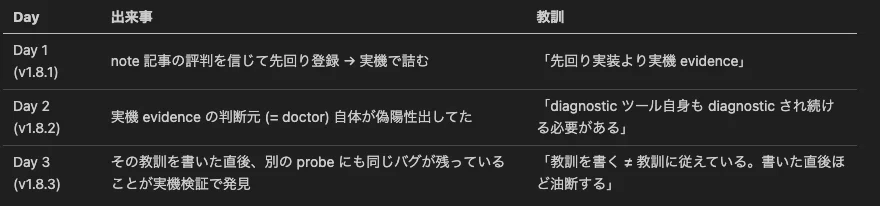
※全部当日だけど
これはソフトウェアエンジニアリングの本質的な話で、自分が書いた抽象的教訓は具体的な実装の中で常に裏切られる可能性がある。今日の tool_calls probe の max_tokens=64 は、v1.8.2 のときに num_ctx / streaming の max_tokens=32 / 128 を直しながら、横にあった同じバグ pattern を見ていなかった結果。
しかも一番危険な (tools: false を勧める active-harmful な) probe を見落としていた。この見落としが続いていれば、v1.8.3 を使ったユーザーが Qwen3.6 を「壊れてる」と判断して諦めていた可能性が高い。
教訓の追加:
同種のバグは同種のコード位置に潜む — _probe_num_ctx / _probe_streaming を直したら _probe_* ファミリ全部の max_tokens を grep して見直すべきだった
suggested patch が逆方向を勧めるバグは健常者を病人扱いする active-harmful、サイレント失敗より厄介
教訓を書いた直後ほど油断する — 抽象論を書ききって満足すると具体実装の見直しが甘くなる
v1.8.3 の入手方法
PyPI に出した v1.8.3:
# 既存ユーザー
uv tool upgrade coderouter-cli

# 新規ユーザー
uvx coderouter-cli serve --port 8088
--apply 機能を使うなら:
uv tool install --reinstall --force coderouter-cli --with ruamel.yamlまたは pip install 'coderouter-cli[doctor]'。
ローカル LLM コミュニティに対するメッセージ
Qwen3.6 系は Ollama 経由だと現状詰みやすい (chat template / tool 仕様未成熟、コミュニティ全体で同症状報告あり)
Unsloth GGUF + llama.cpp 直叩きは現時点で最も安定した経路 (v1.8.3 で実機検証完了、native tool_calls 完璧動作)
Qwen3.6 は捨てたモデルではない — フレームワーク (Ollama) 側の対応待ち、モデル本体は健全
doctor で 6 probe を回せば動くかどうかが 30 秒で分かる — CodeRouter v1.8.3 で thinking モデルの偽陽性も解消済
CodeRouter の examples/providers.yaml に検証済み recipe を追加したので、同じ構成で動かしたい方の参考になれば幸いです。
まとめ
Qwen3.6 + Ollama はコミュニティ全体で詰む (X / Reddit で多数報告)
Unsloth GGUF + llama.cpp 直叩きで Qwen3.6 復権 (finish_reason: "tool_calls" 正常動作確認)
CodeRouter doctor の _probe_tool_calls に v1.8.2 で見落としたバグ pattern が残っていた (active-harmful な誤診断)
v1.8.3 で tool_calls probe の thinking-aware budget + reasoning_content adapter strip + reasoning-leak probe 拡張、3 件を 1 patch に統合
メタ教訓「diagnostic ツール自身も diagnostic され続ける必要がある」を書いた本人が再帰的に実証
CodeRouter 経由 Anthropic 互換 end-to-end 完全動作確認 (Claude Code クライアントから本物の Sonnet と区別がつかない振る舞い)
3 日連続で実機 evidence を積み上げた結果、Qwen3.6 系がローカル primary 候補に復活、CodeRouter の診断ツールも 1 段階成熟、examples/providers.yaml に llama.cpp 直叩きの参考実装が追加されました。
note / r/LocalLLaMA / X で「Qwen3.6 動かない」と詰まってる方の参考になれば。
質問・感想は GitHub Issues または X (@zephel01) までどうぞ。
3 連作読み通してくださった方ありがとうございました。これで一旦 v1.8 系は完結です。
(リリース日: 2026 年 4 月 26 日 / バージョン: v1.8.3)
関連記事 (3 連作)
第 1 話: ガチで動かしてみたら 3 連敗した話 (v1.8.1)
第 3 話: 本記事 (v1.8.3)
いいなと思ったら応援しよう!
 サーバー代とコーヒー代になります☕ 役に立ったら応援よろしくお願いします!